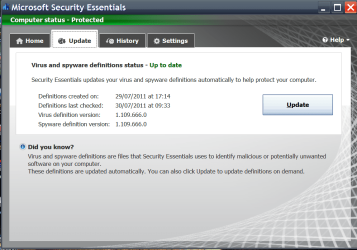
MSE optional update - just ranting. It's not a problem.

t-4-2

Banned
Local time
6:48 PM
Messages
997
This is getting ridiculous !!!

From July 12th to today 29th, I had installed a total of 33 optional updates entirely about MSE. ( I use manual update method )

I am think of going back to Avast free edition !!! This MSE optional Update is B.S.
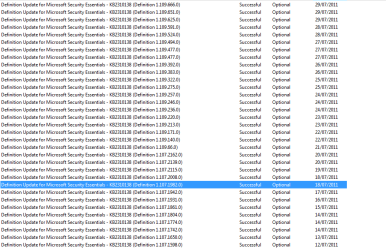
Image 3.png
 

My Computer My Computer

At a glance

Windows 7 Home Premium 64-bit, SP1Intel Pentium P6200, Cores 2, 2.13 GHz4 GBIntel HD
Computer Manufacturer/Model Number
Acer Aspire 7741Z
OS
Windows 7 Home Premium 64-bit, SP1
CPU
Intel Pentium P6200, Cores 2, 2.13 GHz
Memory
4 GB
Graphics Card(s)
Intel HD
Sound Card
unknown
Monitor(s) Displays
17.3 inches
Screen Resolution
1600 x 900
Hard Drives
640 GB, 5400 PRM
They average 2-3 a day so you may have even missed some.

I have mine set to run a quick scan everyday with "Check for ther latest virus and spyware definitions before running a scheduled scan" selected. So it updates automatically every day, but only once a day when the scan runs. So I suppose I'm missing at least one update each day but they are cumulative and for me it works fine.

I could probably get at least one additional update by adjusting the time I run the quick scan but I know that the way MSE auto updates is a bit odd. When I first was using it I let it install it's own updates without running a scan and it was kind of strange how it did it so I went with to quick scan everyday option. Works for me.
 

My Computer My Computer

At a glance

Win 7 Home Premium x64Intel Core i3-540 3.07 GHz4 GB (2 X 2) Dual-Channel PC-10600 DDR3 @ 665...Integrated Intel H57
Computer Manufacturer/Model Number
HP p6608f
OS
Win 7 Home Premium x64
CPU
Intel Core i3-540 3.07 GHz
Motherboard
MS-7613 (Iona-GL8E)
Memory
4 GB (2 X 2) Dual-Channel PC-10600 DDR3 @ 665MHz (9-9-9-24)
Graphics Card(s)
Integrated Intel H57
Sound Card
Integrated Realtek ALC888S Audio
Monitor(s) Displays
17" SDM-HS73 (a vestige from my old computer)
Screen Resolution
1280 X 1024
Hard Drives
750GB SATA 7200 RPM
PSU
250W
Keyboard
HP USB keyboard
Mouse
HP USB optical mouse
Internet Speed
15Mbps/1Mbps
Avast does the same. I know because I have it and like Avast.

I just let Avast auto update.

Windows Update is set to let me know when they are available to download. I'll never let it auto run again.
 

My Computer My Computer

At a glance

Windows7 Pro 64bit SP-1; Windows XP Pro 32bitIntel Core i7-870 Lynnfield 2.93GHz LGA 1156 ...8GB@1400MHz Crucial Ballistix DDR3-1600 4x2GBASUS ENGTX460 DirectCU/2DI/1GD5 1GB 256-bit G...
Computer Manufacturer/Model Number
Hopalong/ Godzilla
OS
Windows7 Pro 64bit SP-1; Windows XP Pro 32bit
CPU
Intel Core i7-870 Lynnfield 2.93GHz LGA 1156 95W Quad-Core
Motherboard
ASUS P7P55D-E PRO
Memory
8GB@1400MHz Crucial Ballistix DDR3-1600 4x2GB
Graphics Card(s)
ASUS ENGTX460 DirectCU/2DI/1GD5 1GB 256-bit GDDR5
Sound Card
VIA Onboard
Monitor(s) Displays
Asus VS248H-P 24"; Samsung SyncMaster 941BW 19"ws
Screen Resolution
1920x1080; 1440x900
Hard Drives
Samsung 830 120GB SSD
Intel 320 120GB SSD
Western Digital Caviar Black WD7501AALS 750GB 7200 RPM SATA 3.0Gb/s
Western Digital Caviar Black WD6401AALS 640GB 7200 RPM SATA 3.0Gb/s
PSU
COOLER MASTER Silent Pro RS850-AMBAJ3-US 850W Modular
Case
COOLER MASTER HAF 932 RC-932-KKN5-GP Black
Cooling
Scythe "Mugen-2 Rev.B" (2 ScytheKaze-Jyuni PWM fans)
Keyboard
Logitech K-320
Mouse
Kensington
Antivirus
Avast Inernet Suite
Browser
IE 9 ; Chrome
Avast does the same. I know because I have it and like Avast.

I just let Avast auto update.

Windows Update is set to let me know when they are available to download. I'll never let it auto run again.

I know Avast auto-updates everyday, almost.
I had it for 3 years + before switching to MSE.

The difference is I do not want Windows Update in Auto. So, I am suffering everyday installing the damn MSE updates.
 

My Computer My Computer

At a glance

Windows 7 Home Premium 64-bit, SP1Intel Pentium P6200, Cores 2, 2.13 GHz4 GBIntel HD
Computer Manufacturer/Model Number
Acer Aspire 7741Z
OS
Windows 7 Home Premium 64-bit, SP1
CPU
Intel Pentium P6200, Cores 2, 2.13 GHz
Memory
4 GB
Graphics Card(s)
Intel HD
Sound Card
unknown
Monitor(s) Displays
17.3 inches
Screen Resolution
1600 x 900
Hard Drives
640 GB, 5400 PRM
Hi there
Can't see what the problem is --- just open MSE from the icon at the bottom right of the screen and choose UPDATE

Also you can decide how MSE does the updates in the settings tab. You don't need to do this via the MS update facility.

Couldn't be easier !!.

Cheers
jimbo
 

Attachments

  • mse1.png
    mse1.png
    80.7 KB · Views: 17

My Computer My Computer

At a glance

Linux CENTOS 7 / various Windows OS'es and se...Intel i7 Intel i58GB, 16GBOn Motherboard
Computer type
PC/Desktop
Computer Manufacturer/Model Number
Custom built, several laptops HP/ASUS
OS
Linux CENTOS 7 / various Windows OS'es and servers
CPU
Intel i7 Intel i5
Memory
8GB, 16GB
Graphics Card(s)
On Motherboard
Sound Card
Realtek HD audio
Monitor(s) Displays
Apple Cinema display, Samsung LCD
Screen Resolution
1920 X 1080
Hard Drives
4 X 1TB SATA
Mouse
Toshiba wireless laser
Internet Speed
> 20MB up
Jimbo,

the problem should be pretty easy to figure out:

1. There is no (easy) automated way to get the most recent signature version for Microsoft Security Essentials;
2. There is no way in Windows Update to set Microsoft Security Essentials updates as higher than "optional", which is a status they outweigh;
3. One may set Microsoft Security Essentials to do a daily security check and update to the latest signature version, but that would require for all computers to run permanently as there doesn't seem to be a catch-up functionality on missed scheduled security checks.

Please don't continue to follow through on a notion that there is no problem when there is.
 

My Computer My Computer

At a glance

Undisclosed
OS
Undisclosed
Jimbo,

the problem should be pretty easy to figure out:

1. There is no (easy) automated way to get the most recent signature version for Microsoft Security Essentials;
2. There is no way in Windows Update to set Microsoft Security Essentials updates as higher than "optional", which is a status they outweigh;
3. One may set Microsoft Security Essentials to do a daily security check and update to the latest signature version, but that would require for all computers to run permanently as there doesn't seem to be a catch-up functionality on missed scheduled security checks.

Please don't continue to follow through on a notion that there is no problem when there is.

That's because there is not a problem at all :)

MSE does its own updating - you can switch Windows Updates to 'Never download' and MSE will still update normally.

The only reason that MSE Updates appear in WU is so that you have the option to download and install them that way. MSE uses its own downloader task to do its won automatic updates.
 

My Computer My Computer

At a glance

Win 7 x64 Home Premium (and x86 VirtualBox VM...i3 370M/i7 6500U8GB - finally :)/8GBit's an i3, dude!/dual Intel&nVidia
Computer type
Laptop
Computer Manufacturer/Model Number
Asus K52F or Lenovo B51-80
OS
Win 7 x64 Home Premium (and x86 VirtualBox VM)/Win10
CPU
i3 370M/i7 6500U
Motherboard
Asus/Lenovo
Memory
8GB - finally :)/8GB
Graphics Card(s)
it's an i3, dude!/dual Intel&nVidia
Sound Card
onboard
Monitor(s) Displays
15.6" built-in
Screen Resolution
1366x768/1920x1080
Hard Drives
750GB Seagate internal
Sundry external drives attached to other computers on the local network
1TB SSD on the Lenovo
PSU
n/a
Internet Speed
as much as I can get - usually on a dongle/phone, so <1MB/s
Antivirus
MSE/Defender
Browser
IE11/12/Edge/Chrome/FF(if I must)
This is getting ridiculous !!!

From July 12th to today 29th, I had installed a total of 33 optional updates entirely about MSE. ( I use manual update method )

I am think of going back to Avast free edition !!! This MSE optional Update is B.S.

View attachment 167585
Why is it a problem surely you want your anti virus program to have the most up to date defs loaded. MSE does its downloads in the background and doesn't interfere with you working so just let it carry on and work as it's supposed to.;)
 

My Computer My Computer

At a glance

Windows 10 64bit/Windows 10 64bit/Windows 10 ...Intel Pentium J3710 @ 60GHz/Intel B820,1.7GHz...8.00GB DDR3 @ 1599MHz/8GB 2 x 4GB DDR3/8.00GB...Intel HD Graphics/Intel/512MB ATI AMD Radeon ...
Computer type
PC/Desktop
Computer Manufacturer/Model Number
Acer Aspire XC-704 x64 bit/ Asus K55A Notebook PC/HP Envy x360 Convertible 15-bq0xx
OS
Windows 10 64bit/Windows 10 64bit/Windows 10 64bit
CPU
Intel Pentium J3710 @ 60GHz/Intel B820,1.7GHz/AMD A9 Radeon
Motherboard
Acer Aspire XC-704 (SOCKET 0)/Asus/HP 8312 (Socket FP4)
Memory
8.00GB DDR3 @ 1599MHz/8GB 2 x 4GB DDR3/8.00GB Dual-Channel
Graphics Card(s)
Intel HD Graphics/Intel/512MB ATI AMD Radeon R5 Graphics (HP
Sound Card
Realtek High Definition Audio/Onboard/AMD High Definition Au
Monitor(s) Displays
Acer LCD K222HQL /Asus 15.6/Generic PnP Monitor (1920x1080@6
Screen Resolution
1920x1080@59Hz/1366 x 768/1920x1080@60Hz
Hard Drives
1863GBWesternn Digital WDC/Asus/119GB SanDisk SD8SN8U-128G-1006 (SSD)
931GB Hitachi HGST HTS721010A9E630 (SATA)
Keyboard
Microsoft Natural Ergonomic Keyboard 4000 (UK)/Inbuilt/Inbui
Mouse
Microsoft Optical Wheel Mouse/Same plus Touchpad/Same + Pad
Internet Speed
Infinity 2 up to 76 Mbps
Antivirus
MSE/MSE/MSE and all 3 have MalwareBytes Premium
Browser
Edge, Firefox/Edge, Firefox/Edge, Firefox, Chrome
Other Info
Seagate Expansion 500GB External Desktop Drive
Seagate Expansion Portable Drives 500GB and 1TB
Epson XP-332 Wireless Printer
Back
Top