
Solved 1/2 the ram showing up in system info

drmax

New member
Member
VIP
Local time
12:19 PM
Messages
314
Mobo asus f1a75, cpu amd a8-3850, ram g-skill 2 x 4 gig ...2 sticks each, total 8 gig. Brand new build, freshly installed W7HP. Went into system display to ck the amount of ram showing, and shows total 4. Sticks inserted in blue slots, as suggested by manual of asus mobo. Why is it not showing 8 G?
 
Last edited:

My Computer My Computer

At a glance

W7 premium 64amd a8-38508G g-skillasus gt-520 silent
OS
W7 premium 64
CPU
amd a8-3850
Motherboard
asus f1-a75v pro
Memory
8G g-skill
Graphics Card(s)
asus gt-520 silent
Monitor(s) Displays
LED viewsonic 24"
Hard Drives
seagate sata 120
wd 2T green
PSU
cool master 600W silent pro (80+bronze)
Before we go any further, how much RAM is shown in the BIOS POST ?
 

My Computer My Computer

At a glance

Windows 8.1 Pro RTM x64Intel Core-i5-3570K 4-core @ 3.4GHz (Ivy Brid...4 x 4GB DDR3-1600 Corsair Vengeance CMZ8GX3M2...MSI GeForce GTX770 Gaming OC 2GB
Computer type
PC/Desktop
Computer Manufacturer/Model Number
Dwarf Dwf/11/2012 r09/2013
OS
Windows 8.1 Pro RTM x64
CPU
Intel Core-i5-3570K 4-core @ 3.4GHz (Ivy Bridge) (OC 4.4GHz)
Motherboard
ASRock Z77 Extreme4-M
Memory
4 x 4GB DDR3-1600 Corsair Vengeance CMZ8GX3M2A1600C9B (16GB)
Graphics Card(s)
MSI GeForce GTX770 Gaming OC 2GB
Sound Card
Realtek High Definition on board solution (ALC 898)
Monitor(s) Displays
ViewSonic VA1912w Widescreen (VGA)
Screen Resolution
1440x900
Hard Drives
OCZ Agility 3 SSD 120GB SATA III x2 (RAID 0)
Samsung HD501LJ 500GB SATA II x2
Hitachi HDS721010CLA332 1TB SATA II
Iomega 1.5TB Ext USB 2.0
WD 2.0TB Ext USB 3.0
PSU
XFX Pro Series 850W Semi-Modular
Case
Gigabyte IF233
Cooling
1 x 120mm Front Inlet 1 x 120mm Rear Exhaust
Keyboard
Microsoft Comfort Curve Keyboard 3000 (USB)
Mouse
Microsoft Comfort Mouse 3000 for Business (USB)
Internet Speed
NetGear DG834Gv3 ADSL Modem/Router (Ethernet) ~4.0 Mb/s (O2)
Antivirus
Avast! 8.0.1497
Browser
IE 11
Other Info
Optical Drive: HL-DT-ST BD-RE BH10LS30 SATA Bluray
Lexmark S305 Printer/Scanner/Copier (USB)
WEI Score: 8.1/8.1/8.5/8.5/8.25
Asus Eee PC 1011PX Netbook (Windows 7 x86 Starter)
Before we go any further, how much RAM is shown in the BIOS POST ?
it'll be a bit b-f i can ck. keyboard being used for another pc.
 

My Computer My Computer

At a glance

W7 premium 64amd a8-38508G g-skillasus gt-520 silent
OS
W7 premium 64
CPU
amd a8-3850
Motherboard
asus f1-a75v pro
Memory
8G g-skill
Graphics Card(s)
asus gt-520 silent
Monitor(s) Displays
LED viewsonic 24"
Hard Drives
seagate sata 120
wd 2T green
PSU
cool master 600W silent pro (80+bronze)
No problem. We'll wait for you. The reason I'm asking this is if the memory is not being detected by the BIOS, it's not going to be by the OS.
 

My Computer My Computer

At a glance

Windows 8.1 Pro RTM x64Intel Core-i5-3570K 4-core @ 3.4GHz (Ivy Brid...4 x 4GB DDR3-1600 Corsair Vengeance CMZ8GX3M2...MSI GeForce GTX770 Gaming OC 2GB
Computer type
PC/Desktop
Computer Manufacturer/Model Number
Dwarf Dwf/11/2012 r09/2013
OS
Windows 8.1 Pro RTM x64
CPU
Intel Core-i5-3570K 4-core @ 3.4GHz (Ivy Bridge) (OC 4.4GHz)
Motherboard
ASRock Z77 Extreme4-M
Memory
4 x 4GB DDR3-1600 Corsair Vengeance CMZ8GX3M2A1600C9B (16GB)
Graphics Card(s)
MSI GeForce GTX770 Gaming OC 2GB
Sound Card
Realtek High Definition on board solution (ALC 898)
Monitor(s) Displays
ViewSonic VA1912w Widescreen (VGA)
Screen Resolution
1440x900
Hard Drives
OCZ Agility 3 SSD 120GB SATA III x2 (RAID 0)
Samsung HD501LJ 500GB SATA II x2
Hitachi HDS721010CLA332 1TB SATA II
Iomega 1.5TB Ext USB 2.0
WD 2.0TB Ext USB 3.0
PSU
XFX Pro Series 850W Semi-Modular
Case
Gigabyte IF233
Cooling
1 x 120mm Front Inlet 1 x 120mm Rear Exhaust
Keyboard
Microsoft Comfort Curve Keyboard 3000 (USB)
Mouse
Microsoft Comfort Mouse 3000 for Business (USB)
Internet Speed
NetGear DG834Gv3 ADSL Modem/Router (Ethernet) ~4.0 Mb/s (O2)
Antivirus
Avast! 8.0.1497
Browser
IE 11
Other Info
Optical Drive: HL-DT-ST BD-RE BH10LS30 SATA Bluray
Lexmark S305 Printer/Scanner/Copier (USB)
WEI Score: 8.1/8.1/8.5/8.5/8.25
Asus Eee PC 1011PX Netbook (Windows 7 x86 Starter)
Before we go any further, how much RAM is shown in the BIOS POST ?
it'll be a bit b-f i can ck. keyboard being used for another pc.
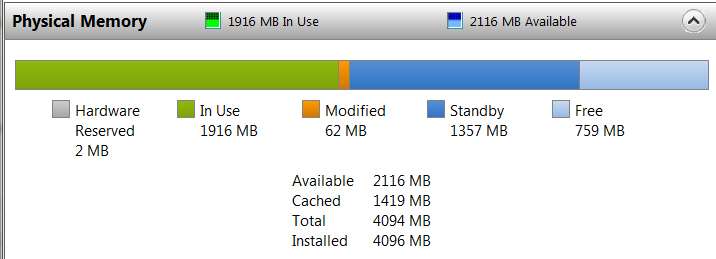
Also, when you do come back can you please post a screenshot of the lower part of the Resource Monitor -> Memory display?

Start -> Run -> TASKMGR -> Performance tab -> push RESOURCE MONITOR button at the bottom. This will open a second window for Resource Monitor.

Then push the Memory tab on the second Resource Monitor window, and at the bottom of the screen will appear the "Physical Memory" layout. That's what would be very helpful to see. If you need to move the horizontal separator between the upper "Processes" list and the lower "Physical Memory" graphic so that we can see the whole thing, please do.

It will look something like this:

memorymap.jpg


Also, If you can download and install CPU-Z (download links on right side of that page), and post the screenshots of the following tabs: CPU, Mainboard, Memory, Graphics, and SPD (all that are populated, one screenshot for each of your slot#'s) that would also be extremely useful for us to help you explain what's going on.
 

My Computer My Computer

At a glance

Windows 7 Pro x64 (1), Win7 Pro X64 (2)i5-3350p 3.1Ghz/6MB-cache (1); E8400 3.0Ghz/6...8GB PC3-12800 DDR3 (1); 4GB PC3-10600 DDR3 (2)ATI HD7750 (1), (see TV cards); ATI R7 250 (2)
Computer type
PC/Desktop
Computer Manufacturer/Model Number
Home-built, two systems (1) and (2)
OS
Windows 7 Pro x64 (1), Win7 Pro X64 (2)
CPU
i5-3350p 3.1Ghz/6MB-cache (1); E8400 3.0Ghz/6MB-cache (2)
Motherboard
ASUS P8Z77-V Pro (1); ASUS P5Q3 (2)
Memory
8GB PC3-12800 DDR3 (1); 4GB PC3-10600 DDR3 (2)
Graphics Card(s)
ATI HD7750 (1), (see TV cards); ATI R7 250 (2)
Sound Card
Realtek ALC892 HD Audio (1); Realtek ALC1200 HD Audio (2)
Monitor(s) Displays
Eizo HD2441W LCD, Eizo S2433W (1); Eizo 24" S2433W (2)
Screen Resolution
1920x1200, 1920x1200 (1); 1920x1200 (2)
Hard Drives
(1) 1TB SATA-II (7200RPM), 2x2TB SATA-III (7200RPM), 250GB SATA-III (10000RPM) for OS; 2x2TB external USB 3.0

(2) 320GB SATA-II (7200RPM), 750GB SATA-II (7200RPM), 150GB SATA-II (10000RPM) for OS; 2TB external USB 3.0
PSU
Nesteq ECS-6001 600W (1); Nesteq ECS-5001 500W (2)
Case
Acousti-Case 360 (1) and (2)
Cooling
Noctua NH-U12P SE2 for CPU, 2x120mm case fans (1) and (2)
Keyboard
IBM PS/2 (1) and (2)
Mouse
Logitech MX Revolution wireless (1); Microsoft wired (2)
Internet Speed
100mbps down / 10mbps up
Antivirus
Microsoft Security Essentials; Malwarebyte Anti-Malware Pro
Browser
Firefox
Other Info
Ceton InfiniTV 4-tuner cablecard-enabled TV card as well as Hauppauge HVR-2250 OTA/ATSC 2-tuner TV card in (1), running under Win7 WMC

My Computer My Computer

At a glance

W7 premium 64amd a8-38508G g-skillasus gt-520 silent
OS
W7 premium 64
CPU
amd a8-3850
Motherboard
asus f1-a75v pro
Memory
8G g-skill
Graphics Card(s)
asus gt-520 silent
Monitor(s) Displays
LED viewsonic 24"
Hard Drives
seagate sata 120
wd 2T green
PSU
cool master 600W silent pro (80+bronze)

My Computer My Computer

At a glance

Win 7 Ultimate x64FX-8350 @ 4.6 GHz so farADATA XPG V1 Series Black 8GB DDR3 1600Sapphire R9 270x Dual-X
Computer type
PC/Desktop
Computer Manufacturer/Model Number
Me
OS
Win 7 Ultimate x64
CPU
FX-8350 @ 4.6 GHz so far
Motherboard
Asus M5A97 EVO
Memory
ADATA XPG V1 Series Black 8GB DDR3 1600
Graphics Card(s)
Sapphire R9 270x Dual-X
Sound Card
Xonar DGX w/ Corsair Vengence 1300
Monitor(s) Displays
Acer S232HL Abid
Screen Resolution
1920x1080
Hard Drives
120 GB OCZ Vertex 3
500 GB Seagate 7200.12
PSU
Antec Earthwatts 650W Green
Case
Antec Three Hundred
Cooling
Cooler Master 212 EVO
Keyboard
Logitech G510
Mouse
Logitech G500s
Internet Speed
35000/3000
Before we go any further, how much RAM is shown in the BIOS POST ?
it'll be a bit b-f i can ck. keyboard being used for another pc.
Also, when you do come back can you please post a screenshot of the lower part of the Resource Monitor -> Memory display?

Start -> Run -> TASKMGR -> Performance tab -> push RESOURCE MONITOR button at the bottom. This will open a second window for Resource Monitor.

Then push the Memory tab on the second Resource Monitor window, and at the bottom of the screen will appear the "Physical Memory" layout. That's what would be very helpful to see. If you need to move the horizontal separator between the upper "Processes" list and the lower "Physical Memory" graphic so that we can see the whole thing, please do.

It will look something like this:

memorymap.jpg


Also, If you can download and install CPU-Z (download links on right side of that page), and post the screenshots of the following tabs: CPU, Mainboard, Memory, Graphics, and SPD (all that are populated, one screenshot for each of your slot#'s) that would also be extremely useful for us to help you explain what's going on.
say, this pc isn't even hooked up to the internet at the moment. i can only relay what info you're after. sorry
 

My Computer My Computer

At a glance

W7 premium 64amd a8-38508G g-skillasus gt-520 silent
OS
W7 premium 64
CPU
amd a8-3850
Motherboard
asus f1-a75v pro
Memory
8G g-skill
Graphics Card(s)
asus gt-520 silent
Monitor(s) Displays
LED viewsonic 24"
Hard Drives
seagate sata 120
wd 2T green
PSU
cool master 600W silent pro (80+bronze)
pull up the monitor under performance tab...4096 installed, 3333 available, 485 cached, 4072 total
 

My Computer My Computer

At a glance

W7 premium 64amd a8-38508G g-skillasus gt-520 silent
OS
W7 premium 64
CPU
amd a8-3850
Motherboard
asus f1-a75v pro
Memory
8G g-skill
Graphics Card(s)
asus gt-520 silent
Monitor(s) Displays
LED viewsonic 24"
Hard Drives
seagate sata 120
wd 2T green
PSU
cool master 600W silent pro (80+bronze)
Let me clarify this. You say that you have 4 x 2GB sticks of RAM installed, making 8GB, but the BIOS is only detecting ½ that amount, i.e. 4GB. Correct? What is the full part number of the RAM modules?
 

My Computer My Computer

At a glance

Windows 8.1 Pro RTM x64Intel Core-i5-3570K 4-core @ 3.4GHz (Ivy Brid...4 x 4GB DDR3-1600 Corsair Vengeance CMZ8GX3M2...MSI GeForce GTX770 Gaming OC 2GB
Computer type
PC/Desktop
Computer Manufacturer/Model Number
Dwarf Dwf/11/2012 r09/2013
OS
Windows 8.1 Pro RTM x64
CPU
Intel Core-i5-3570K 4-core @ 3.4GHz (Ivy Bridge) (OC 4.4GHz)
Motherboard
ASRock Z77 Extreme4-M
Memory
4 x 4GB DDR3-1600 Corsair Vengeance CMZ8GX3M2A1600C9B (16GB)
Graphics Card(s)
MSI GeForce GTX770 Gaming OC 2GB
Sound Card
Realtek High Definition on board solution (ALC 898)
Monitor(s) Displays
ViewSonic VA1912w Widescreen (VGA)
Screen Resolution
1440x900
Hard Drives
OCZ Agility 3 SSD 120GB SATA III x2 (RAID 0)
Samsung HD501LJ 500GB SATA II x2
Hitachi HDS721010CLA332 1TB SATA II
Iomega 1.5TB Ext USB 2.0
WD 2.0TB Ext USB 3.0
PSU
XFX Pro Series 850W Semi-Modular
Case
Gigabyte IF233
Cooling
1 x 120mm Front Inlet 1 x 120mm Rear Exhaust
Keyboard
Microsoft Comfort Curve Keyboard 3000 (USB)
Mouse
Microsoft Comfort Mouse 3000 for Business (USB)
Internet Speed
NetGear DG834Gv3 ADSL Modem/Router (Ethernet) ~4.0 Mb/s (O2)
Antivirus
Avast! 8.0.1497
Browser
IE 11
Other Info
Optical Drive: HL-DT-ST BD-RE BH10LS30 SATA Bluray
Lexmark S305 Printer/Scanner/Copier (USB)
WEI Score: 8.1/8.1/8.5/8.5/8.25
Asus Eee PC 1011PX Netbook (Windows 7 x86 Starter)
say, this pc isn't even hooked up to the internet at the moment. i can only relay what info you're after. sorry
Fair enough.

And yet you have access to the internet from some other machine, to post here. Can you download CPU-Z using this machine, and then install it on the other machine, and run it as suggested?

If you only show 4GB out of the 8GB, the SPD tab from CPU-Z will show you each of the slots you have memory sticks installed in, and will show whether there is or is not any memory in that slot. This would be very revealing for diagnosis.

I know you have physically installed a 4GB stick in each of two slots, but we need to see what the hardware thinks is actually present in each slot, and that's exactly what the SPD tab shows from CPU-Z.

I wonder if the two sticks need to be installed in slots #1 and #3, rather than #1 and #2?
 

My Computer My Computer

At a glance

Windows 7 Pro x64 (1), Win7 Pro X64 (2)i5-3350p 3.1Ghz/6MB-cache (1); E8400 3.0Ghz/6...8GB PC3-12800 DDR3 (1); 4GB PC3-10600 DDR3 (2)ATI HD7750 (1), (see TV cards); ATI R7 250 (2)
Computer type
PC/Desktop
Computer Manufacturer/Model Number
Home-built, two systems (1) and (2)
OS
Windows 7 Pro x64 (1), Win7 Pro X64 (2)
CPU
i5-3350p 3.1Ghz/6MB-cache (1); E8400 3.0Ghz/6MB-cache (2)
Motherboard
ASUS P8Z77-V Pro (1); ASUS P5Q3 (2)
Memory
8GB PC3-12800 DDR3 (1); 4GB PC3-10600 DDR3 (2)
Graphics Card(s)
ATI HD7750 (1), (see TV cards); ATI R7 250 (2)
Sound Card
Realtek ALC892 HD Audio (1); Realtek ALC1200 HD Audio (2)
Monitor(s) Displays
Eizo HD2441W LCD, Eizo S2433W (1); Eizo 24" S2433W (2)
Screen Resolution
1920x1200, 1920x1200 (1); 1920x1200 (2)
Hard Drives
(1) 1TB SATA-II (7200RPM), 2x2TB SATA-III (7200RPM), 250GB SATA-III (10000RPM) for OS; 2x2TB external USB 3.0

(2) 320GB SATA-II (7200RPM), 750GB SATA-II (7200RPM), 150GB SATA-II (10000RPM) for OS; 2TB external USB 3.0
PSU
Nesteq ECS-6001 600W (1); Nesteq ECS-5001 500W (2)
Case
Acousti-Case 360 (1) and (2)
Cooling
Noctua NH-U12P SE2 for CPU, 2x120mm case fans (1) and (2)
Keyboard
IBM PS/2 (1) and (2)
Mouse
Logitech MX Revolution wireless (1); Microsoft wired (2)
Internet Speed
100mbps down / 10mbps up
Antivirus
Microsoft Security Essentials; Malwarebyte Anti-Malware Pro
Browser
Firefox
Other Info
Ceton InfiniTV 4-tuner cablecard-enabled TV card as well as Hauppauge HVR-2250 OTA/ATSC 2-tuner TV card in (1), running under Win7 WMC
Let me clarify this. You say that you have 4 x 2GB sticks of RAM installed, making 8GB, but the BIOS is only detecting ½ that amount, i.e. 4GB. Correct? What is the full part number of the RAM modules?
no...2 x 4GB
0n the package...
F3-12800CL9D-8GBXL
DDR3-1600 PC3-12800
4096 x 2
CL9-9-924 1.5v
 

My Computer My Computer

At a glance

W7 premium 64amd a8-38508G g-skillasus gt-520 silent
OS
W7 premium 64
CPU
amd a8-3850
Motherboard
asus f1-a75v pro
Memory
8G g-skill
Graphics Card(s)
asus gt-520 silent
Monitor(s) Displays
LED viewsonic 24"
Hard Drives
seagate sata 120
wd 2T green
PSU
cool master 600W silent pro (80+bronze)
say, this pc isn't even hooked up to the internet at the moment. i can only relay what info you're after. sorry
Fair enough.

And yet you have access to the internet from some other machine, to post here. Can you download CPU-Z using this machine, and then install it on the other machine, and run it as suggested?

If you only show 4GB out of the 8GB, the SPD tab from CPU-Z will show you each of the slots you have memory sticks installed in, and will show whether there is or is not any memory in that slot. This would be very revealing for diagnosis.

I know you have physically installed a 4GB stick in each of two slots, but we need to see what the hardware thinks is actually present in each slot, and that's exactly what the SPD tab shows from CPU-Z.

I wonder if the two sticks need to be installed in slots #1 and #3, rather than #1 and #2?
I edited my 1st post as is confusing and I am sorry. 2 sticks...totaling 8 gig. i'll download program, xfer it to new pc. hold on
 

My Computer My Computer

At a glance

W7 premium 64amd a8-38508G g-skillasus gt-520 silent
OS
W7 premium 64
CPU
amd a8-3850
Motherboard
asus f1-a75v pro
Memory
8G g-skill
Graphics Card(s)
asus gt-520 silent
Monitor(s) Displays
LED viewsonic 24"
Hard Drives
seagate sata 120
wd 2T green
PSU
cool master 600W silent pro (80+bronze)
Thanks for the clarification. What do you get when you have a single stick installed? Try both sticks individually. It could be that one is bad.
 

My Computer My Computer

At a glance

Windows 8.1 Pro RTM x64Intel Core-i5-3570K 4-core @ 3.4GHz (Ivy Brid...4 x 4GB DDR3-1600 Corsair Vengeance CMZ8GX3M2...MSI GeForce GTX770 Gaming OC 2GB
Computer type
PC/Desktop
Computer Manufacturer/Model Number
Dwarf Dwf/11/2012 r09/2013
OS
Windows 8.1 Pro RTM x64
CPU
Intel Core-i5-3570K 4-core @ 3.4GHz (Ivy Bridge) (OC 4.4GHz)
Motherboard
ASRock Z77 Extreme4-M
Memory
4 x 4GB DDR3-1600 Corsair Vengeance CMZ8GX3M2A1600C9B (16GB)
Graphics Card(s)
MSI GeForce GTX770 Gaming OC 2GB
Sound Card
Realtek High Definition on board solution (ALC 898)
Monitor(s) Displays
ViewSonic VA1912w Widescreen (VGA)
Screen Resolution
1440x900
Hard Drives
OCZ Agility 3 SSD 120GB SATA III x2 (RAID 0)
Samsung HD501LJ 500GB SATA II x2
Hitachi HDS721010CLA332 1TB SATA II
Iomega 1.5TB Ext USB 2.0
WD 2.0TB Ext USB 3.0
PSU
XFX Pro Series 850W Semi-Modular
Case
Gigabyte IF233
Cooling
1 x 120mm Front Inlet 1 x 120mm Rear Exhaust
Keyboard
Microsoft Comfort Curve Keyboard 3000 (USB)
Mouse
Microsoft Comfort Mouse 3000 for Business (USB)
Internet Speed
NetGear DG834Gv3 ADSL Modem/Router (Ethernet) ~4.0 Mb/s (O2)
Antivirus
Avast! 8.0.1497
Browser
IE 11
Other Info
Optical Drive: HL-DT-ST BD-RE BH10LS30 SATA Bluray
Lexmark S305 Printer/Scanner/Copier (USB)
WEI Score: 8.1/8.1/8.5/8.5/8.25
Asus Eee PC 1011PX Netbook (Windows 7 x86 Starter)
additional info

the book reads...
"you may install varying memory sized in Cahnnel A and B. The system maps the total size of the lower-sized channel for the dual-channel configuration. ANy excess memory from the higher-sized channel in then mapped for single-channel operation."
also...
"We recommend that you install the momory modules from the blue slots for better overclocking capability"

Blue slots are listed as Dimm A1 Dimm B1, and black slots as Dimm A2 dimm B2

Currently installed into blue A1 & B1
 

My Computer My Computer

At a glance

W7 premium 64amd a8-38508G g-skillasus gt-520 silent
OS
W7 premium 64
CPU
amd a8-3850
Motherboard
asus f1-a75v pro
Memory
8G g-skill
Graphics Card(s)
asus gt-520 silent
Monitor(s) Displays
LED viewsonic 24"
Hard Drives
seagate sata 120
wd 2T green
PSU
cool master 600W silent pro (80+bronze)
Thanks for the clarification. What do you get when you have a single stick installed? Try both sticks individually. It could be that one is bad.
i think i'll try this 1st. thx for jogging my brain
 

My Computer My Computer

At a glance

W7 premium 64amd a8-38508G g-skillasus gt-520 silent
OS
W7 premium 64
CPU
amd a8-3850
Motherboard
asus f1-a75v pro
Memory
8G g-skill
Graphics Card(s)
asus gt-520 silent
Monitor(s) Displays
LED viewsonic 24"
Hard Drives
seagate sata 120
wd 2T green
PSU
cool master 600W silent pro (80+bronze)
Alternatively, it could be that one of the slots on the motherboard is faulty. When checking the RAM, I forgot to say to try each stick in each slot.
 

My Computer My Computer

At a glance

Windows 8.1 Pro RTM x64Intel Core-i5-3570K 4-core @ 3.4GHz (Ivy Brid...4 x 4GB DDR3-1600 Corsair Vengeance CMZ8GX3M2...MSI GeForce GTX770 Gaming OC 2GB
Computer type
PC/Desktop
Computer Manufacturer/Model Number
Dwarf Dwf/11/2012 r09/2013
OS
Windows 8.1 Pro RTM x64
CPU
Intel Core-i5-3570K 4-core @ 3.4GHz (Ivy Bridge) (OC 4.4GHz)
Motherboard
ASRock Z77 Extreme4-M
Memory
4 x 4GB DDR3-1600 Corsair Vengeance CMZ8GX3M2A1600C9B (16GB)
Graphics Card(s)
MSI GeForce GTX770 Gaming OC 2GB
Sound Card
Realtek High Definition on board solution (ALC 898)
Monitor(s) Displays
ViewSonic VA1912w Widescreen (VGA)
Screen Resolution
1440x900
Hard Drives
OCZ Agility 3 SSD 120GB SATA III x2 (RAID 0)
Samsung HD501LJ 500GB SATA II x2
Hitachi HDS721010CLA332 1TB SATA II
Iomega 1.5TB Ext USB 2.0
WD 2.0TB Ext USB 3.0
PSU
XFX Pro Series 850W Semi-Modular
Case
Gigabyte IF233
Cooling
1 x 120mm Front Inlet 1 x 120mm Rear Exhaust
Keyboard
Microsoft Comfort Curve Keyboard 3000 (USB)
Mouse
Microsoft Comfort Mouse 3000 for Business (USB)
Internet Speed
NetGear DG834Gv3 ADSL Modem/Router (Ethernet) ~4.0 Mb/s (O2)
Antivirus
Avast! 8.0.1497
Browser
IE 11
Other Info
Optical Drive: HL-DT-ST BD-RE BH10LS30 SATA Bluray
Lexmark S305 Printer/Scanner/Copier (USB)
WEI Score: 8.1/8.1/8.5/8.5/8.25
Asus Eee PC 1011PX Netbook (Windows 7 x86 Starter)
I edited my 1st post as is confusing and I am sorry. 2 sticks...totaling 8 gig. i'll download program, xfer it to new pc. hold on
CPU-Z will provide the definitive answers to all the mysteries.

The MEMORY and SPD tabs will give specific answers to what is currently speculation.

Looking forward to the results.
 

My Computer My Computer

At a glance

Windows 7 Pro x64 (1), Win7 Pro X64 (2)i5-3350p 3.1Ghz/6MB-cache (1); E8400 3.0Ghz/6...8GB PC3-12800 DDR3 (1); 4GB PC3-10600 DDR3 (2)ATI HD7750 (1), (see TV cards); ATI R7 250 (2)
Computer type
PC/Desktop
Computer Manufacturer/Model Number
Home-built, two systems (1) and (2)
OS
Windows 7 Pro x64 (1), Win7 Pro X64 (2)
CPU
i5-3350p 3.1Ghz/6MB-cache (1); E8400 3.0Ghz/6MB-cache (2)
Motherboard
ASUS P8Z77-V Pro (1); ASUS P5Q3 (2)
Memory
8GB PC3-12800 DDR3 (1); 4GB PC3-10600 DDR3 (2)
Graphics Card(s)
ATI HD7750 (1), (see TV cards); ATI R7 250 (2)
Sound Card
Realtek ALC892 HD Audio (1); Realtek ALC1200 HD Audio (2)
Monitor(s) Displays
Eizo HD2441W LCD, Eizo S2433W (1); Eizo 24" S2433W (2)
Screen Resolution
1920x1200, 1920x1200 (1); 1920x1200 (2)
Hard Drives
(1) 1TB SATA-II (7200RPM), 2x2TB SATA-III (7200RPM), 250GB SATA-III (10000RPM) for OS; 2x2TB external USB 3.0

(2) 320GB SATA-II (7200RPM), 750GB SATA-II (7200RPM), 150GB SATA-II (10000RPM) for OS; 2TB external USB 3.0
PSU
Nesteq ECS-6001 600W (1); Nesteq ECS-5001 500W (2)
Case
Acousti-Case 360 (1) and (2)
Cooling
Noctua NH-U12P SE2 for CPU, 2x120mm case fans (1) and (2)
Keyboard
IBM PS/2 (1) and (2)
Mouse
Logitech MX Revolution wireless (1); Microsoft wired (2)
Internet Speed
100mbps down / 10mbps up
Antivirus
Microsoft Security Essentials; Malwarebyte Anti-Malware Pro
Browser
Firefox
Other Info
Ceton InfiniTV 4-tuner cablecard-enabled TV card as well as Hauppauge HVR-2250 OTA/ATSC 2-tuner TV card in (1), running under Win7 WMC
slot 1 dead. used the recommended program at the end to verify. initially stuck one stick in slot 1, alone and pc would not boot. great...i stuck in slots 2 and 4 and all the ram shows up. guess i get to return mobo to newegg. good grief:mad:
 

My Computer My Computer

At a glance

W7 premium 64amd a8-38508G g-skillasus gt-520 silent
OS
W7 premium 64
CPU
amd a8-3850
Motherboard
asus f1-a75v pro
Memory
8G g-skill
Graphics Card(s)
asus gt-520 silent
Monitor(s) Displays
LED viewsonic 24"
Hard Drives
seagate sata 120
wd 2T green
PSU
cool master 600W silent pro (80+bronze)
I agree. Time to RMA the board. Hopefully, the replacement will work correctly. Let us know how you get on. I'll mark this Solved as you've found the source of the problem.
 

My Computer My Computer

At a glance

Windows 8.1 Pro RTM x64Intel Core-i5-3570K 4-core @ 3.4GHz (Ivy Brid...4 x 4GB DDR3-1600 Corsair Vengeance CMZ8GX3M2...MSI GeForce GTX770 Gaming OC 2GB
Computer type
PC/Desktop
Computer Manufacturer/Model Number
Dwarf Dwf/11/2012 r09/2013
OS
Windows 8.1 Pro RTM x64
CPU
Intel Core-i5-3570K 4-core @ 3.4GHz (Ivy Bridge) (OC 4.4GHz)
Motherboard
ASRock Z77 Extreme4-M
Memory
4 x 4GB DDR3-1600 Corsair Vengeance CMZ8GX3M2A1600C9B (16GB)
Graphics Card(s)
MSI GeForce GTX770 Gaming OC 2GB
Sound Card
Realtek High Definition on board solution (ALC 898)
Monitor(s) Displays
ViewSonic VA1912w Widescreen (VGA)
Screen Resolution
1440x900
Hard Drives
OCZ Agility 3 SSD 120GB SATA III x2 (RAID 0)
Samsung HD501LJ 500GB SATA II x2
Hitachi HDS721010CLA332 1TB SATA II
Iomega 1.5TB Ext USB 2.0
WD 2.0TB Ext USB 3.0
PSU
XFX Pro Series 850W Semi-Modular
Case
Gigabyte IF233
Cooling
1 x 120mm Front Inlet 1 x 120mm Rear Exhaust
Keyboard
Microsoft Comfort Curve Keyboard 3000 (USB)
Mouse
Microsoft Comfort Mouse 3000 for Business (USB)
Internet Speed
NetGear DG834Gv3 ADSL Modem/Router (Ethernet) ~4.0 Mb/s (O2)
Antivirus
Avast! 8.0.1497
Browser
IE 11
Other Info
Optical Drive: HL-DT-ST BD-RE BH10LS30 SATA Bluray
Lexmark S305 Printer/Scanner/Copier (USB)
WEI Score: 8.1/8.1/8.5/8.5/8.25
Asus Eee PC 1011PX Netbook (Windows 7 x86 Starter)
Back
Top