Windows Defender always complaining at startup

rovf

New member
Local time
2:02 PM
Messages
30
When logging into Windows, Windows Defender always greets me with the a message complaining that it is turned off and whether I want to turn it on.

Since I already use antivirus/spywareprotection software, I certainly don't want to use Windows Defender. But how can I keep it from complaining?

I already discussed this problem in another forum, and there was the recommendation that I should go to ControlPanel/ActionCenter and switch off the security messages. This did not help - I have switched off all security messages (except "Windows Update"), but the message still occurs.
:confused:
 

My Computer My Computer

OS
Windows 7
First check in msconfig (click start orb, type msconfig). Click the startup tab in msconfig and uncheck windows defender if its enabled there.
 

My Computer My Computer

Computer Manufacturer/Model Number
Too many to describe...
OS
Windows 7 x64 pro/ Windows 7 x86 Pro/ XP SP3 x86
Turn it on.
 

My Computer My Computer

Computer Manufacturer/Model Number
Toshiba Satellite S875D-S7239 laptop
OS
MS Windows 7 Ultimate SP1 64-bit
CPU
AMD A10-4600M
Motherboard
AMD Pumori (Socket FT1)
Memory
6.00 GB Dual-Channel DDR3 @ 798MHz (11-11-12-28)
Graphics Card(s)
AMD Radeon HD 7660G
Sound Card
High Definition Audio Device
Monitor(s) Displays
Generic PnP Monitor (1600x900@60Hz)
Screen Resolution
1600x900@60Hz
Hard Drives
SSD 119GB Corsair CSSD-V128GB2 ATA Device
Keyboard
Standard PS/2 Keyboard
Mouse
HP Wireless Optical Mobile Mouse Model FHA-3410
Internet Speed
What the local pub, local coffee shop offers.
Other Info
Optical Drive:MATSHITA BD-CMB UJ160B ATA Device


Also have an Asus ha1002xp netbook with Win 7 Ultimate installed.
Open Windows Defender/activate it, go to "Tools", then to "Options" and turn off the following functions: "Automatic scanning" and "Use real-time protection"; under Administrator Options, leave "Use Windows Defender" and "Allow everyone to use Windows Defender" checked.
 

My Computer My Computer

OS
-
click start orb

orb is not in my PATH. Do you happen to know which directory it is supposed to be in?
That means Start button, the shiny blue ball at the bottom left corner of the screen that sparkles when you mouse it and has a muticoloured windows logo on it.
 

My Computer My Computer

Computer Manufacturer/Model Number
Too many to describe...
OS
Windows 7 x64 pro/ Windows 7 x86 Pro/ XP SP3 x86
Open Windows Defender/activate it...

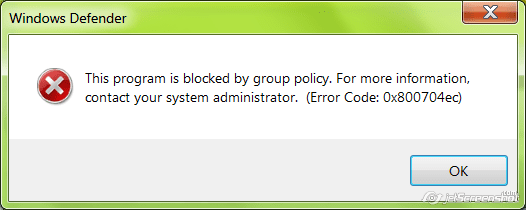
This doesn't work either: When I activate Defender, I get the following error message:

2011-07-29_14-44.png

I guess our systems are configured so that Defender can't be started (which makes sense somehow, since it is pointless to run two antivirus programs in parralel).

Any other idea how to get rid of this message?
 

My Computer My Computer

OS
Windows 7
That means Start button

I see! I was confused, because there exists also an application orb.exe (just that I don't have it).

Well, Defender was not listed in the Startup list, so this doesn't help either...
 

My Computer My Computer

OS
Windows 7
Click on the start button, type services.msc, hit Rnter. Navigate to windows defender service, stop it if its running and set startup type to disabled.
 

My Computer My Computer

Computer Manufacturer/Model Number
Too many to describe...
OS
Windows 7 x64 pro/ Windows 7 x86 Pro/ XP SP3 x86
I found this thread (see link below; Nem's instructions). You can fix the problem by deleting a registry entry. I read about this solution in other threads and forums, too. Please back up your registry beforehand!http://www.sevenforums.com/system-security/77967-cannot-start-windows-defender.html
http://www.sevenforums.com/system-security/66006-window-defender.html
-------
Backing up the registry in XP:
http://support.microsoft.com/kb/322756

Backing up the registy in Vista:
http://windows.microsoft.com/en-US/windows-vista/Back-up-the-registry

Backing up the registry in Windows 7:
http://windows.microsoft.com/en-us/windows7/Back-up-the-registry
 

My Computer My Computer

OS
-
It may depend on which AV that you use. I know that Windows Defender worked properly with Outpost's Virus Buster, but when I installed Bit Defender, the installation automatically turned Windows Defender off. I assume that was due to the fact that having multiple AV is known to cause problems. Of course, if Windows Defender did work properly with the AV that you have, that is probably not the reason that it doesn't work now. The question is, how was Windows Defender turned off...by you, group policy or by the AV?
 

My Computer My Computer

Computer Manufacturer/Model Number
DIY
OS
W7x64 Pro, SuSe 12.1/** W7 x64 Pro, XP MCE
CPU
Phenom II 1090T w/Noctua NH-D14 /**4400+ X2 w/CM Hyper TX 3
Motherboard
ASRock 890FX Deluxe 4/**A8N-SLI
Memory
2 x 2GB Patriot PGS34g1600LLKA/**4x1GB Corsair VS
Graphics Card(s)
EVGA GTX460 SC/**EVGA 8800GTS
Sound Card
Asus Xonar D2X/**Xonar D1
Monitor(s) Displays
Acer X233H, Dell E152FPc /**LG M237-WD
Screen Resolution
1920x1080 & 1024x768/**1980x1080
Hard Drives
WDC 2TB, 1.5TB, 1TB, 500GB,Seagate 500GB , Maxtor 80GB /**500GB Seagate & WDC 1TB Black
PSU
CM RS600 w/ APC BX1000G/**Antec 500 TP w/ APC BX1000
Case
HAF922/**Antec 1040IIB
Cooling
3x200mm, 1x140 and 1x120mm/**5x80mm fans
Keyboard
Logitech Media USB/**Saitek Eclipse
Mouse
Cordless Trackman Wheel/**Ditto
Internet Speed
3.3Mbps
Other Info
SB 560 5.1 w/ Sennheiser RS140/**Creative T20 speakers, Dvico FusionHDTV7 Gold RT, Cisco E3000, HP 5510V AIO, Linksys E3000, Belkin F5U237 hub and **F5D8055 adapter
(** = 2nd rig)
rovf,
let's get you a solid working system.

100% uninstall Norton, 100% uninstall any anti-virus software you have on your computer.

Do NOT muck around with the registry.

Doi NOT muck around with the registry.

Now install and use Microsoft Security Essentials (MSE). Link in my sig.

After performing all of these actions, get back to us and report the status.
 

My Computer My Computer

Computer Manufacturer/Model Number
Toshiba Satellite S875D-S7239 laptop
OS
MS Windows 7 Ultimate SP1 64-bit
CPU
AMD A10-4600M
Motherboard
AMD Pumori (Socket FT1)
Memory
6.00 GB Dual-Channel DDR3 @ 798MHz (11-11-12-28)
Graphics Card(s)
AMD Radeon HD 7660G
Sound Card
High Definition Audio Device
Monitor(s) Displays
Generic PnP Monitor (1600x900@60Hz)
Screen Resolution
1600x900@60Hz
Hard Drives
SSD 119GB Corsair CSSD-V128GB2 ATA Device
Keyboard
Standard PS/2 Keyboard
Mouse
HP Wireless Optical Mobile Mouse Model FHA-3410
Internet Speed
What the local pub, local coffee shop offers.
Other Info
Optical Drive:MATSHITA BD-CMB UJ160B ATA Device


Also have an Asus ha1002xp netbook with Win 7 Ultimate installed.
rovf,
let's get you a solid working system.

100% uninstall Norton, 100% uninstall any anti-virus software you have on your computer.

And what do you think my employer will say if I change by my own the company-wide security guidelines?

If it were my *own* computer, I would just replace the whole Windows stuff by Linux and this would also get rid of the problem, but as it turns out, it isn't.
 

My Computer My Computer

OS
Windows 7
I was unaware that we were talking about a company system.

I will now withdraw to avoid any legal problems and suggest that you contact Microsoft for support.
 

My Computer My Computer

Computer Manufacturer/Model Number
Toshiba Satellite S875D-S7239 laptop
OS
MS Windows 7 Ultimate SP1 64-bit
CPU
AMD A10-4600M
Motherboard
AMD Pumori (Socket FT1)
Memory
6.00 GB Dual-Channel DDR3 @ 798MHz (11-11-12-28)
Graphics Card(s)
AMD Radeon HD 7660G
Sound Card
High Definition Audio Device
Monitor(s) Displays
Generic PnP Monitor (1600x900@60Hz)
Screen Resolution
1600x900@60Hz
Hard Drives
SSD 119GB Corsair CSSD-V128GB2 ATA Device
Keyboard
Standard PS/2 Keyboard
Mouse
HP Wireless Optical Mobile Mouse Model FHA-3410
Internet Speed
What the local pub, local coffee shop offers.
Other Info
Optical Drive:MATSHITA BD-CMB UJ160B ATA Device


Also have an Asus ha1002xp netbook with Win 7 Ultimate installed.
rovf,
let's get you a solid working system.

100% uninstall Norton, 100% uninstall any anti-virus software you have on your computer.

And what do you think my employer will say if I change by my own the company-wide security guidelines?

If it were my *own* computer, I would just replace the whole Windows stuff by Linux and this would also get rid of the problem, but as it turns out, it isn't.

Since it's a company computer, why can't your company's IT Dept take care of the issue?
 

My Computer My Computer

Computer type
Laptop
Computer Manufacturer/Model Number
Sony Vaio VPCEB47GM Laptop
OS
Win 7 Pro 64-bit
CPU
Intel i5 2.4 Ghz
Memory
8GB DDR3
Graphics Card(s)
Intel HD 3000
Sound Card
IDT High Definition
Monitor(s) Displays
15.6 WGXA Anti-Glare LED
Screen Resolution
1280x800
Hard Drives
640Gb 7200rpm
Antivirus
MSE
Browser
Opera (primary) with IE9 backup
Since it's a company computer, why can't your company's IT Dept take care of the issue?

I think I will finally revert to this. Basically, I prefer researching on my own how to do things, because I then learn something, plus it's usually faster; but this case is probably too complicated, so I will hand it over to our IT...

Thanks to all who tried helping.
 

My Computer My Computer

OS
Windows 7
The question is, how was Windows Defender turned off...by you, group policy or by the AV?

Good question. I didn't turn it off knowingly. Whether the AV did it (Trend Micro Office Scan) I don't know. It might be turned off by group policy, because everyone in our group has the same AV software (this is required), and nobody uses Defender (actually, even if I wanted to use Defender, I could not turn it on - the message says that it is forbidden to switch it on, due to group policy). So best guess: It is turned off by group policy.

Interestingly, I am the only one who gets ths warning message on logon...
 

My Computer My Computer

OS
Windows 7
Back
Top