Solved Change my default email program from Outlook to Hotmail

roving

New member
Member
VIP
Local time
7:29 AM
Messages
98
When I respond to a "contact us" on a website or want my scanner to send the document by email, Outlook email is automatically chosen for the email program to send it. I don't use Outlook as an email program but use Hotmail or Yahoo for email. I have looked for a way to de-select Outlook and select Hotmail or Yahoo instead, and have not found where this can be done. Any suggestions out there on how this can be accomplished? TIA! Dick
 

My Computer My Computer

At a glance

Windows 8 ProIntel Core 2 quad Q6600 2.4Ghz4 GhzNvidia GeForce 8400GS
Computer type
PC/Desktop
Computer Manufacturer/Model Number
HP d4996t
OS
Windows 8 Pro
CPU
Intel Core 2 quad Q6600 2.4Ghz
Motherboard
Asustek
Memory
4 Ghz
Graphics Card(s)
Nvidia GeForce 8400GS
Sound Card
Soundblaster X-Fi Extreme Audio
Monitor(s) Displays
Hyundai 22" widescreen
Hard Drives
400 GB 279 G free
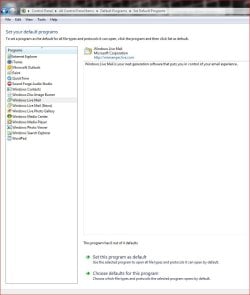
I would think the easiest way would be via Start>Default Programs>Set your default programs.

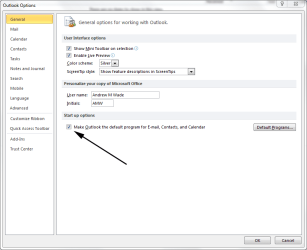
You haven't said which version of Outlook you're using, but in Outlook 2010 you can change it under Options.

Out.PNG
 

My Computer My Computer

At a glance

Windows 7 Ultimate SP1 64-BitIntel Core i7 870 @ 2.93GHz8Gb Dual-Channel DDR3 @ 664MHznVidia GeForce GTX 460 1024MB dedicated RAM
Computer Manufacturer/Model Number
HP Pavilion Elite 495UK
OS
Windows 7 Ultimate SP1 64-Bit
CPU
Intel Core i7 870 @ 2.93GHz
Motherboard
MSI 2A9C (CPU1)
Memory
8Gb Dual-Channel DDR3 @ 664MHz
Graphics Card(s)
nVidia GeForce GTX 460 1024MB dedicated RAM
Sound Card
Realtek HD Audio
Monitor(s) Displays
HP2310i
Screen Resolution
1920 x 1080
Hard Drives
1x1954GB Hitachi HDS22020ALA 330 (RAID), 1x1954GB Hitachi External for backup and storage
PSU
460W
Case
HP Elite
Cooling
Air cooled
Keyboard
Logitech K750 solar-powered keyboard
Mouse
Logitech Wireless M180 mouse
Internet Speed
2Mb
Other Info
Pure Avanti Flow Internet Radio with iPod Dock, 64Gb iPod, HP USB Speakers, Sony MDR-V500 Headphones, Sony Vaio F-Series Laptop
Go to Contorl Panel, click Default Programs, click Set your default programs, highlight the program that you want and click the Set this program as default

It should now be used as the default program.

Capture.JPG

Let me know if this helps
 

My Computer My Computer

At a glance

Windows 10 ProIntel Core i7-4770K (3.5Ghz)32 gig Corsair Dominator Platinum (4x8Gig)Sapphire Tri-X R9 Fury
Computer type
PC/Desktop
Computer Manufacturer/Model Number
Custom built by me.
OS
Windows 10 Pro
CPU
Intel Core i7-4770K (3.5Ghz)
Motherboard
Gigabyte G1 Sniper 5 (F10 Bios)
Memory
32 gig Corsair Dominator Platinum (4x8Gig)
Graphics Card(s)
Sapphire Tri-X R9 Fury
Sound Card
Soundblaster ZXR
Monitor(s) Displays
NEC PA242W 24" LCD Monitor
Screen Resolution
1920 x 1200
Hard Drives
Primary - Samsung 850 Pro (512gig), Samsung 840 Pro (256gig), 2TB WD Caviar Black.
PSU
EVGA Supernova 1000 G2
Case
Cooler Master HAF X
Cooling
Corsair H100i with Corsair Air Series SP120 Quiet Fans
Keyboard
Logitech Wireless Wave
Mouse
Logitech Performance MX
Internet Speed
High Speed Cable
Antivirus
Norton Security
Browser
IE11
Other Info
Memory Timings - 1866MHz @ 9-9-9-27-1T @ 1.5 volts
Thanks to both of you! No joy here. Using Outlook 2003 and nowhere within it can I find an option for selecting another default email program to replace it. The 'default programs' shows no listing of Hotmail or Yahoo but only Live Mail. I use Yahoo and Hotmail as I am in Mexico for about six months and have no active ISP in the US during that time so need a portable ISP. Could there be a Registry entry that could be changed to either Yahoo or Hotmail? If that is possible then I'll have to find the proper entry for either of them. Your efforts are really appreciated.
 

My Computer My Computer

At a glance

Windows 8 ProIntel Core 2 quad Q6600 2.4Ghz4 GhzNvidia GeForce 8400GS
Computer type
PC/Desktop
Computer Manufacturer/Model Number
HP d4996t
OS
Windows 8 Pro
CPU
Intel Core 2 quad Q6600 2.4Ghz
Motherboard
Asustek
Memory
4 Ghz
Graphics Card(s)
Nvidia GeForce 8400GS
Sound Card
Soundblaster X-Fi Extreme Audio
Monitor(s) Displays
Hyundai 22" widescreen
Hard Drives
400 GB 279 G free
Thanks to both of you! No joy here. Using Outlook 2003 and nowhere within it can I find an option for selecting another default email program to replace it.

True, because that's not where the control panel is. Winddows, Start, Control Panel.


Go to Contorl Panel, click Default Programs, click Set your default programs, highlight the program that you want and click the Set this program as default

It should now be used as the default program.

View attachment 168727

Let me know if this helps

@ seavixen32, please see his post (apparently I need to reread it too) anyway......

When I respond to a "contact us" on a website or want my scanner to send the document by email, Outlook email is automatically chosen for the email program to send it. I don't use Outlook as an email program but use Hotmail or Yahoo for email. I have looked for a way to de-select Outlook and select Hotmail or Yahoo instead, and have not found where this can be done. Any suggestions out there on how this can be accomplished? TIA! Dick

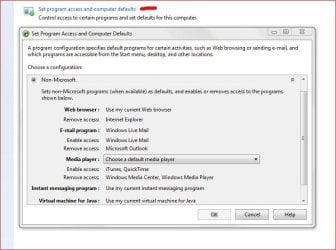
With that I'm not sure how you would set Hotmail or Yahoo as defaults. And looking at what I posted I don't see those under "Set program access and computer defaults"

Custom Default settings.JPG

Actually hotmail is now Live Mail and if that's the case use the example I gave in my first post to you, or the one I quoted.
 
Last edited:

My Computer My Computer

At a glance

Windows 10 ProIntel Core i7-4770K (3.5Ghz)32 gig Corsair Dominator Platinum (4x8Gig)Sapphire Tri-X R9 Fury
Computer type
PC/Desktop
Computer Manufacturer/Model Number
Custom built by me.
OS
Windows 10 Pro
CPU
Intel Core i7-4770K (3.5Ghz)
Motherboard
Gigabyte G1 Sniper 5 (F10 Bios)
Memory
32 gig Corsair Dominator Platinum (4x8Gig)
Graphics Card(s)
Sapphire Tri-X R9 Fury
Sound Card
Soundblaster ZXR
Monitor(s) Displays
NEC PA242W 24" LCD Monitor
Screen Resolution
1920 x 1200
Hard Drives
Primary - Samsung 850 Pro (512gig), Samsung 840 Pro (256gig), 2TB WD Caviar Black.
PSU
EVGA Supernova 1000 G2
Case
Cooler Master HAF X
Cooling
Corsair H100i with Corsair Air Series SP120 Quiet Fans
Keyboard
Logitech Wireless Wave
Mouse
Logitech Performance MX
Internet Speed
High Speed Cable
Antivirus
Norton Security
Browser
IE11
Other Info
Memory Timings - 1866MHz @ 9-9-9-27-1T @ 1.5 volts
The 2003 Outlook choices are not quite yours, but I did what you suggested and set Live Mail as the default, scanned a letter and up popped a connection to Live mail. Worked fine. Many thanks!
 

My Computer My Computer

At a glance

Windows 8 ProIntel Core 2 quad Q6600 2.4Ghz4 GhzNvidia GeForce 8400GS
Computer type
PC/Desktop
Computer Manufacturer/Model Number
HP d4996t
OS
Windows 8 Pro
CPU
Intel Core 2 quad Q6600 2.4Ghz
Motherboard
Asustek
Memory
4 Ghz
Graphics Card(s)
Nvidia GeForce 8400GS
Sound Card
Soundblaster X-Fi Extreme Audio
Monitor(s) Displays
Hyundai 22" widescreen
Hard Drives
400 GB 279 G free
Very pleased to hear it.

Thanks for taking time out to keep us updated.
 

My Computer My Computer

At a glance

Windows 7 Ultimate SP1 64-BitIntel Core i7 870 @ 2.93GHz8Gb Dual-Channel DDR3 @ 664MHznVidia GeForce GTX 460 1024MB dedicated RAM
Computer Manufacturer/Model Number
HP Pavilion Elite 495UK
OS
Windows 7 Ultimate SP1 64-Bit
CPU
Intel Core i7 870 @ 2.93GHz
Motherboard
MSI 2A9C (CPU1)
Memory
8Gb Dual-Channel DDR3 @ 664MHz
Graphics Card(s)
nVidia GeForce GTX 460 1024MB dedicated RAM
Sound Card
Realtek HD Audio
Monitor(s) Displays
HP2310i
Screen Resolution
1920 x 1080
Hard Drives
1x1954GB Hitachi HDS22020ALA 330 (RAID), 1x1954GB Hitachi External for backup and storage
PSU
460W
Case
HP Elite
Cooling
Air cooled
Keyboard
Logitech K750 solar-powered keyboard
Mouse
Logitech Wireless M180 mouse
Internet Speed
2Mb
Other Info
Pure Avanti Flow Internet Radio with iPod Dock, 64Gb iPod, HP USB Speakers, Sony MDR-V500 Headphones, Sony Vaio F-Series Laptop
Thanks for the feedback.

Peace :cool:
 

My Computer My Computer

At a glance

Windows 10 ProIntel Core i7-4770K (3.5Ghz)32 gig Corsair Dominator Platinum (4x8Gig)Sapphire Tri-X R9 Fury
Computer type
PC/Desktop
Computer Manufacturer/Model Number
Custom built by me.
OS
Windows 10 Pro
CPU
Intel Core i7-4770K (3.5Ghz)
Motherboard
Gigabyte G1 Sniper 5 (F10 Bios)
Memory
32 gig Corsair Dominator Platinum (4x8Gig)
Graphics Card(s)
Sapphire Tri-X R9 Fury
Sound Card
Soundblaster ZXR
Monitor(s) Displays
NEC PA242W 24" LCD Monitor
Screen Resolution
1920 x 1200
Hard Drives
Primary - Samsung 850 Pro (512gig), Samsung 840 Pro (256gig), 2TB WD Caviar Black.
PSU
EVGA Supernova 1000 G2
Case
Cooler Master HAF X
Cooling
Corsair H100i with Corsair Air Series SP120 Quiet Fans
Keyboard
Logitech Wireless Wave
Mouse
Logitech Performance MX
Internet Speed
High Speed Cable
Antivirus
Norton Security
Browser
IE11
Other Info
Memory Timings - 1866MHz @ 9-9-9-27-1T @ 1.5 volts
Back
Top