
Installing Win 7 on old Dell P3

strollin

Old Guys Rule!
Guru
Gold Member
VIP
Local time
10:47 AM
Messages
2,786
Location
N. Calif
I have an old Dell machine that refuses to boot from either a Win 7 install DVD or a Win 7 System Repair CD. It has no trouble booting from other bootable CDs (not sure about other bootable DVDs). It boots from a Win XP install CD or various Linux boot CDs so the problem doesn't appear to be the drive itself.

The Win 7 install DVD and System Repair CD both work fine on other machines.

Does anyone have any ideas why this machine can't seem to boot Win 7 from DVD or CD?

I got Win 7 installed on the machine by other means (long story) and it boots Win 7 from the hdd fine so it's not that it can't handle Win 7 itself.

It bugs me that I can't boot from these disks!
 

My Computer My Computer

Computer type
PC/Desktop
Computer Manufacturer/Model Number
Home Built desktop, Dell G15 5511 Gaming laptop,MS Surface Pro 7 tablet
OS
W10 Pro desktop, W11 laptop, W11 Pro tablet (all 64-bit)
CPU
3.7Ghz 8700K i7, i7-11800H, i7-1065G7
Motherboard
ASUS TUF Z370-Pro Gaming in desktop
Memory
16G desktop, 16G laptop, 4G tablet
Graphics Card(s)
AMD Radeon RX580, RTX 3060, Intel Iris Plus
Sound Card
High Definition Audio (Built-in to mobo)
Monitor(s) Displays
Samsung U32J59 32" (2x), 15.6", 12"
Screen Resolution
3840x2160, 3840x2160, 1920x1080, 2160x1440
Hard Drives
500G SSD for OS; 2T, 10T & 15T HDDs for Data on Desktop, 1TB SSD laptop, 128G SSD tablet.
PSU
Corsair CX 750M
Case
Antec 100
Cooling
CM 212+
Keyboard
IBM Model M - used continuously since 1986
Mouse
Microsoft Pro IntelliMouse
Internet Speed
400M down 8M up
Antivirus
Windows Defender
Browser
FireFox
Other Info
Built my first computer (8Mhz 8088cpu, 640K RAM, 20MB HDD, 2 360K floppy drives) in 1985 and have been building them for myself, relatives and friends ever since.
I think I can help on this. Your old Dell doesn't have the system requirements that are required to run Setup. You have to have at least 512 Megabytes of ram for setup to run at all.

Windows 7 system requirements - Microsoft Windows

This link will tell you about the system requirements for running Windows 7 at all.
 

My Computer My Computer

Computer Manufacturer/Model Number
Acer/Emachines
OS
Windows 7 Ultimate Service Pack 1 RC 1 64 bit
CPU
Mobile Intel Celeron 900, 2200 MHz
Motherboard
Emachines E525
Memory
2 GB
Graphics Card(s)
Mobile Intel(R) 4 Series Express Chipset Family (816120 KB)
Sound Card
Realtek ALC272 @ Intel 82801IB ICH9 - High Definition Audio
Monitor(s) Displays
Chi Mei N156B3-L02 [15.6" LCD]
Hard Drives
WDC WD2500BEVT-22A23T0 ATA Device (232 GB, IDE) (Western Digital)
Thanks for the response but it isn't failing setup, it refuses to boot or even recognize that there is bootable media present so it never starts setup. The machine is a 1Ghz P3 with 512M RAM.
 

My Computer My Computer

Computer type
PC/Desktop
Computer Manufacturer/Model Number
Home Built desktop, Dell G15 5511 Gaming laptop,MS Surface Pro 7 tablet
OS
W10 Pro desktop, W11 laptop, W11 Pro tablet (all 64-bit)
CPU
3.7Ghz 8700K i7, i7-11800H, i7-1065G7
Motherboard
ASUS TUF Z370-Pro Gaming in desktop
Memory
16G desktop, 16G laptop, 4G tablet
Graphics Card(s)
AMD Radeon RX580, RTX 3060, Intel Iris Plus
Sound Card
High Definition Audio (Built-in to mobo)
Monitor(s) Displays
Samsung U32J59 32" (2x), 15.6", 12"
Screen Resolution
3840x2160, 3840x2160, 1920x1080, 2160x1440
Hard Drives
500G SSD for OS; 2T, 10T & 15T HDDs for Data on Desktop, 1TB SSD laptop, 128G SSD tablet.
PSU
Corsair CX 750M
Case
Antec 100
Cooling
CM 212+
Keyboard
IBM Model M - used continuously since 1986
Mouse
Microsoft Pro IntelliMouse
Internet Speed
400M down 8M up
Antivirus
Windows Defender
Browser
FireFox
Other Info
Built my first computer (8Mhz 8088cpu, 640K RAM, 20MB HDD, 2 360K floppy drives) in 1985 and have been building them for myself, relatives and friends ever since.
You need a new type DVD/CD drive.
 

My Computer My Computer

OS
ME/XP/Vista/Win7

My Computer My Computer

Computer Manufacturer/Model Number
* BFK Customs *
OS
W 7 64-bit Ultimate
CPU
Intel Q9550 Yorkfield
Motherboard
ASUS P5Q Pro
Memory
8GB Dominator 8500C5D
Graphics Card(s)
ATI : XFX 5870
Sound Card
Realtek HD Audio 7-1
Monitor(s) Displays
1x 47" LCD HDMI & 3x 26" LCD HDMI
Screen Resolution
1920x1080P & 1920x1200
Hard Drives
1x 80GB Intel X25-M G2 SSD : 1x 500GB & 1x 640GB WD Caviar Black(s)
PSU
Corsair 620HX
Case
Cooler Master RC-690
Cooling
Tuniq Tower 120, 2x 140mm and 3x 120mm case fans
Keyboard
Microsoft 500
Mouse
Razer Diamondback 3G
Internet Speed
14 Mb/s
Other Info
1x Koutech 3Gb/s SATA HDD Hot Swap Rack

My Computer My Computer

Computer type
PC/Desktop
Computer Manufacturer/Model Number
Home Built desktop, Dell G15 5511 Gaming laptop,MS Surface Pro 7 tablet
OS
W10 Pro desktop, W11 laptop, W11 Pro tablet (all 64-bit)
CPU
3.7Ghz 8700K i7, i7-11800H, i7-1065G7
Motherboard
ASUS TUF Z370-Pro Gaming in desktop
Memory
16G desktop, 16G laptop, 4G tablet
Graphics Card(s)
AMD Radeon RX580, RTX 3060, Intel Iris Plus
Sound Card
High Definition Audio (Built-in to mobo)
Monitor(s) Displays
Samsung U32J59 32" (2x), 15.6", 12"
Screen Resolution
3840x2160, 3840x2160, 1920x1080, 2160x1440
Hard Drives
500G SSD for OS; 2T, 10T & 15T HDDs for Data on Desktop, 1TB SSD laptop, 128G SSD tablet.
PSU
Corsair CX 750M
Case
Antec 100
Cooling
CM 212+
Keyboard
IBM Model M - used continuously since 1986
Mouse
Microsoft Pro IntelliMouse
Internet Speed
400M down 8M up
Antivirus
Windows Defender
Browser
FireFox
Other Info
Built my first computer (8Mhz 8088cpu, 640K RAM, 20MB HDD, 2 360K floppy drives) in 1985 and have been building them for myself, relatives and friends ever since.
Yes, I got it installed and working but now I'm trying to understand why it can't boot from Win 7 media, regardless of whether it is a DVD or a CD. I'd really like to understand why.

In case anyone is interested, I installed the hdd in another machine and installed Win 7 there. Then I used the sysprep /generalize command to remove the machine specific stuff. After that I installed the hdd back in the old machine and booted it, Win 7 installed all the required drivers and I had a working machine.
 

My Computer My Computer

Computer type
PC/Desktop
Computer Manufacturer/Model Number
Home Built desktop, Dell G15 5511 Gaming laptop,MS Surface Pro 7 tablet
OS
W10 Pro desktop, W11 laptop, W11 Pro tablet (all 64-bit)
CPU
3.7Ghz 8700K i7, i7-11800H, i7-1065G7
Motherboard
ASUS TUF Z370-Pro Gaming in desktop
Memory
16G desktop, 16G laptop, 4G tablet
Graphics Card(s)
AMD Radeon RX580, RTX 3060, Intel Iris Plus
Sound Card
High Definition Audio (Built-in to mobo)
Monitor(s) Displays
Samsung U32J59 32" (2x), 15.6", 12"
Screen Resolution
3840x2160, 3840x2160, 1920x1080, 2160x1440
Hard Drives
500G SSD for OS; 2T, 10T & 15T HDDs for Data on Desktop, 1TB SSD laptop, 128G SSD tablet.
PSU
Corsair CX 750M
Case
Antec 100
Cooling
CM 212+
Keyboard
IBM Model M - used continuously since 1986
Mouse
Microsoft Pro IntelliMouse
Internet Speed
400M down 8M up
Antivirus
Windows Defender
Browser
FireFox
Other Info
Built my first computer (8Mhz 8088cpu, 640K RAM, 20MB HDD, 2 360K floppy drives) in 1985 and have been building them for myself, relatives and friends ever since.
That's what I do when I run out of time to troubleshoot problem installs. Congrats on nice work.

Did you try the one-time BIOS boot menu key to trigger DVD?

Try writing the installer ISO to flash stick using UltraISO trial: On File tab select Open DVD, on Bootable tab select Write Disk Image, Format, Write. Boot under USB or HD's.
 
This machine's BIOS is so old it doesn't support USB as a boot device. One of the first things I tried was an external USB DVD drive but there's no boot option for it. Once the machine boots it can use the USB drive, just can't boot from it.

I appreciate the alternative install method suggestions but I am trying to understand what is different about Win 7 media that this machine can't boot from it yet can boot other install disks fine.

More info: I just stuck a Vista install DVD in the drive and rebooted, I got prompted "Press any key to boot from CD:", pressed Enter and it booted into Vista setup fine. Removed the Vista DVD, put in a Win 7 DVD and rebooted, no prompt to boot from CD, went straight to hdd and booted from there.

There must be something unique about the Win 7 boot media.
 
Last edited:

My Computer My Computer

Computer type
PC/Desktop
Computer Manufacturer/Model Number
Home Built desktop, Dell G15 5511 Gaming laptop,MS Surface Pro 7 tablet
OS
W10 Pro desktop, W11 laptop, W11 Pro tablet (all 64-bit)
CPU
3.7Ghz 8700K i7, i7-11800H, i7-1065G7
Motherboard
ASUS TUF Z370-Pro Gaming in desktop
Memory
16G desktop, 16G laptop, 4G tablet
Graphics Card(s)
AMD Radeon RX580, RTX 3060, Intel Iris Plus
Sound Card
High Definition Audio (Built-in to mobo)
Monitor(s) Displays
Samsung U32J59 32" (2x), 15.6", 12"
Screen Resolution
3840x2160, 3840x2160, 1920x1080, 2160x1440
Hard Drives
500G SSD for OS; 2T, 10T & 15T HDDs for Data on Desktop, 1TB SSD laptop, 128G SSD tablet.
PSU
Corsair CX 750M
Case
Antec 100
Cooling
CM 212+
Keyboard
IBM Model M - used continuously since 1986
Mouse
Microsoft Pro IntelliMouse
Internet Speed
400M down 8M up
Antivirus
Windows Defender
Browser
FireFox
Other Info
Built my first computer (8Mhz 8088cpu, 640K RAM, 20MB HDD, 2 360K floppy drives) in 1985 and have been building them for myself, relatives and friends ever since.
If I have time over the weekend, I'll dig out a P3, & test.
 

My Computer My Computer

OS
ME/XP/Vista/Win7
More info: I just stuck a Vista install DVD in the drive and rebooted, I got prompted "Press any key to boot from CD:", pressed Enter and it booted into Vista setup fine. Removed the Vista DVD, put in a Win 7 DVD and rebooted, no prompt to boot from CD, went straight to hdd and booted from there.

There must be something unique about the Win 7 boot media.

Do this again but this time remove the Vista DVD after it boots up and replace with the Win7 DVD, see if it will then proceed with install.
 
More info: I just stuck a Vista install DVD in the drive and rebooted, I got prompted "Press any key to boot from CD:", pressed Enter and it booted into Vista setup fine. Removed the Vista DVD, put in a Win 7 DVD and rebooted, no prompt to boot from CD, went straight to hdd and booted from there.

There must be something unique about the Win 7 boot media.

Do this again but this time remove the Vista DVD after it boots up and replace with the Win7 DVD, see if it will then proceed with install.
I kinda doubt that will work but regardless, it is an alternative method and won't help me understand why it won't boot from the Win 7 media.

BTW, I have tried both disks I have burned from ISOs, as well as "factory" produced disks with identical results.
 

My Computer My Computer

Computer type
PC/Desktop
Computer Manufacturer/Model Number
Home Built desktop, Dell G15 5511 Gaming laptop,MS Surface Pro 7 tablet
OS
W10 Pro desktop, W11 laptop, W11 Pro tablet (all 64-bit)
CPU
3.7Ghz 8700K i7, i7-11800H, i7-1065G7
Motherboard
ASUS TUF Z370-Pro Gaming in desktop
Memory
16G desktop, 16G laptop, 4G tablet
Graphics Card(s)
AMD Radeon RX580, RTX 3060, Intel Iris Plus
Sound Card
High Definition Audio (Built-in to mobo)
Monitor(s) Displays
Samsung U32J59 32" (2x), 15.6", 12"
Screen Resolution
3840x2160, 3840x2160, 1920x1080, 2160x1440
Hard Drives
500G SSD for OS; 2T, 10T & 15T HDDs for Data on Desktop, 1TB SSD laptop, 128G SSD tablet.
PSU
Corsair CX 750M
Case
Antec 100
Cooling
CM 212+
Keyboard
IBM Model M - used continuously since 1986
Mouse
Microsoft Pro IntelliMouse
Internet Speed
400M down 8M up
Antivirus
Windows Defender
Browser
FireFox
Other Info
Built my first computer (8Mhz 8088cpu, 640K RAM, 20MB HDD, 2 360K floppy drives) in 1985 and have been building them for myself, relatives and friends ever since.
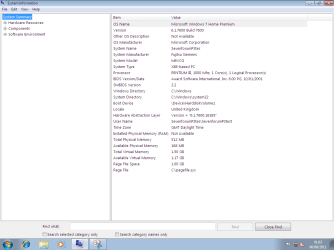
Tested with MS Windows 7 DVD, not downloaded ISO, installed with no problems.

SevenforumP3test.png
 

My Computer My Computer

OS
ME/XP/Vista/Win7
Back
Top