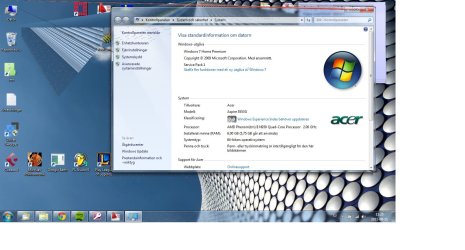
My ACER installs two graphic drivers.

qwacker

New member
Local time
4:22 AM
Messages
4
Ohoy!

I have a ACER Aspire 5553G, with ATI Mobility Radeon HD 5650.

My computer automatically installs (besides the card above) a HD 4270 driver.

When I disable the 4270 driver and only use the real 5650, the screen goes nuts (Pixel-dancing and shapes everywhere) but the HDMI-out works.

However, if I disable my 5650 the screen is fine but the HDMI-out doesn't work.

I've tried to uninstall all my drivers, used driver sweeper and started out fresh, but it doesn't work.

Any dear soul out there who have a clue?

/Q
 

My Computer My Computer

At a glance

Windows 7 x64 Home
OS
Windows 7 x64 Home

My Computer My Computer

At a glance

Windows 7 x64Intel i7 2600kG.skill Ripjaw 16gigs @ 1866Nvidia gtx580 (evga)
Computer Manufacturer/Model Number
Insane hobo technologies. ;-)
OS
Windows 7 x64
CPU
Intel i7 2600k
Motherboard
Asrock z68 extreme 4 gen 3
Memory
G.skill Ripjaw 16gigs @ 1866
Graphics Card(s)
Nvidia gtx580 (evga)
Sound Card
Integrated HD audio + hdmi
Monitor(s) Displays
24" ASUS widescreen + 42" insignia
Screen Resolution
1080p (1920x1080)
Hard Drives
128 Samsung 830
256 Samsung 840
3 x 1tb storage drive (various)
1 western digital 1tb (eSATA)
1 Seagate 1tb (eSATA)
PSU
1 kilowatt SLI/Crossfire rated Silverstone modular
Case
NZXT Phantom + additional 220 fan
Cooling
Zalmann
Keyboard
Microsoft wireless 3000 (v2)
Mouse
MS - wireless 5000 (bluetrack)
Internet Speed
depends on if you ask me or my provider.
Other Info
The above information is provided as is, and the author assumes no responsibility for issues it may cause with your sanity or fanboyism.
What happens if you uninstall the driver in device manager and then install your driver?
BTW you need this driver
 

My Computer My Computer

At a glance

Windows 7 Ultimate 64 bit SP1Intel(R) Core(TM) i5-2500K12GB Kingston Hyperx 1600MHzAsus GTS 450
Computer type
PC/Desktop
Computer Manufacturer/Model Number
Custom Built PC
OS
Windows 7 Ultimate 64 bit SP1
CPU
Intel(R) Core(TM) i5-2500K
Motherboard
Gigabyte Technology Co., Ltd. Z68X-UD3-B3
Memory
12GB Kingston Hyperx 1600MHz
Graphics Card(s)
Asus GTS 450
PSU
500W Coolink
Other Info
Genius G-Pen F610 (PenPad)
Thanks alot for taking time and supporting me! I appriciate it.

I tried all suggestions above, and still nothing!

Here is a printscreen of how it looks on my screen - do you think it could be that the hardware, the graphic card is broken?
 

Attachments

  • pixelerror.jpg
    pixelerror.jpg
    139.5 KB · Views: 145

My Computer My Computer

At a glance

Windows 7 x64 Home
OS
Windows 7 x64 Home
Er, that doesn't look good. Please go ahead and re-run the windows experience index test, and report back if the problem gets worse during the test or doesn't change.
 

My Computer My Computer

At a glance

Windows 7 Ultimate 64 bit SP1Intel(R) Core(TM) i5-2500K12GB Kingston Hyperx 1600MHzAsus GTS 450
Computer type
PC/Desktop
Computer Manufacturer/Model Number
Custom Built PC
OS
Windows 7 Ultimate 64 bit SP1
CPU
Intel(R) Core(TM) i5-2500K
Motherboard
Gigabyte Technology Co., Ltd. Z68X-UD3-B3
Memory
12GB Kingston Hyperx 1600MHz
Graphics Card(s)
Asus GTS 450
PSU
500W Coolink
Other Info
Genius G-Pen F610 (PenPad)
I didn't notice any difference.


(Although the grade went up to 5,9)
 

My Computer My Computer

At a glance

Windows 7 x64 Home
OS
Windows 7 x64 Home
Well.. I re-did the test once again, to pay more attention. And during the test the pixel-dancing is reduced to almost nothing.

(1 minute later)
The test is running and I don't see any pixel error.


(Test done)
Screen messy again!
 

My Computer My Computer

At a glance

Windows 7 x64 Home
OS
Windows 7 x64 Home
I have a ACER Aspire 5553G, with ATI Mobility Radeon HD 5650.

My computer automatically installs (besides the card above) a HD 4270 driver.

It may have something to do with the fact that it has the HD 4250 integrated into the motherboard/chipset,

AMD M880G Chipset

as well as the dedicated HD 5650 installed in it, which is normal with all AMD xxxG series chipsets. With that said if this was a desktop it would just be a matter of going into the bios and disabling the onboard video, but with it being the laptop variant and from Acer that may not be possible. If you haven't have a look in the bios and see if the option is there, and if so disable it and see if that also fixes the HDMI problem.
 

My Computer My Computer

At a glance

Win 7 Ultimate x64FX-8350 @ 4.6 GHz so farADATA XPG V1 Series Black 8GB DDR3 1600Sapphire R9 270x Dual-X
Computer type
PC/Desktop
Computer Manufacturer/Model Number
Me
OS
Win 7 Ultimate x64
CPU
FX-8350 @ 4.6 GHz so far
Motherboard
Asus M5A97 EVO
Memory
ADATA XPG V1 Series Black 8GB DDR3 1600
Graphics Card(s)
Sapphire R9 270x Dual-X
Sound Card
Xonar DGX w/ Corsair Vengence 1300
Monitor(s) Displays
Acer S232HL Abid
Screen Resolution
1920x1080
Hard Drives
120 GB OCZ Vertex 3
500 GB Seagate 7200.12
PSU
Antec Earthwatts 650W Green
Case
Antec Three Hundred
Cooling
Cooler Master 212 EVO
Keyboard
Logitech G510
Mouse
Logitech G500s
Internet Speed
35000/3000
Also, it can happen rarely that it is a hardware problem, maybe the pcb got damaged somehow around the gfx unit, and when the computer is idle it gives that srtange look, but when it gets load and gets hot the wires are connecting well again and the effect is gone.
Well, this is my guess. :sarc:

SG
 

My Computer My Computer

At a glance

Windows 7 Ultimate 64 bit SP1Intel(R) Core(TM) i5-2500K12GB Kingston Hyperx 1600MHzAsus GTS 450
Computer type
PC/Desktop
Computer Manufacturer/Model Number
Custom Built PC
OS
Windows 7 Ultimate 64 bit SP1
CPU
Intel(R) Core(TM) i5-2500K
Motherboard
Gigabyte Technology Co., Ltd. Z68X-UD3-B3
Memory
12GB Kingston Hyperx 1600MHz
Graphics Card(s)
Asus GTS 450
PSU
500W Coolink
Other Info
Genius G-Pen F610 (PenPad)
Back
Top