Startup programs critique

bru

New member
Pro User
Local time
6:27 AM
Messages
417
Location
A suburb of Chicago
I know I can get rid of a few more programs at startup; MaxMenuMgr, AdobeARM, SunJavaUpdateSched and probably all the HP related ones.

Start up time isn't bad and since things are working good I'm a bit hesitant to make changes but thought I would get some opinions on what can be disabled.

One thing I don't quite understand is if an entry is disabled how does it ever become active if needed? If I disable some of the update checker programs I think the checkers will not be run no matter what.

Thanks!
 

Attachments

My Computer

Computer Manufacturer/Model Number
HP p6608f
OS
Win 7 Home Premium x64
CPU
Intel Core i3-540 3.07 GHz
Motherboard
MS-7613 (Iona-GL8E)
Memory
4 GB (2 X 2) Dual-Channel PC-10600 DDR3 @ 665MHz (9-9-9-24)
Graphics Card(s)
Integrated Intel H57
Sound Card
Integrated Realtek ALC888S Audio
Monitor(s) Displays
17" SDM-HS73 (a vestige from my old computer)
Screen Resolution
1280 X 1024
Hard Drives
750GB SATA 7200 RPM
PSU
250W
Keyboard
HP USB keyboard
Mouse
HP USB optical mouse
Internet Speed
15Mbps/1Mbps
I general you can disable everything except those that you absolutely want to run from the first minute. Those are e.g. the AV program, the sidebar (if any gadgets are running) and whatever you put yourself (directly or indirectly) into the startup folder - e.g. a Dock.

However, there are some that will not function if they are not permanently running - the update checkers are a typical example because they have to make some periodic, automatic scans for updates. All otheres will get started when they are needed.
 

My Computer

Computer Manufacturer/Model Number
HP, Dell, Gateway, Toshiba - 4 laptops and 2 desktops
OS
Vista, Windows7, Mint Mate, Zorin, Windows 8
CPU
from 1.6GHz Duo to i7
Monitor(s) Displays
2x HP w2207
Hard Drives
5x HDD, 7x SSD, 12x Externals
Keyboard
with trackball - no mices
Mouse
Trackball mice
Internet Speed
DSL 6000
I know I can get rid of a few more programs at startup; MaxMenuMgr, AdobeARM, SunJavaUpdateSched and probably all the HP related ones.

Start up time isn't bad and since things are working good I'm a bit hesitant to make changes but thought I would get some opinions on what can be disabled.

One thing I don't quite understand is if an entry is disabled how does it ever become active if needed? If I disable some of the update checker programs I think the checkers will not be run no matter what.

Thanks!

Start > in the search box, type msconfig > press Enter > Startup tab ......
To disable = uncheck the box
To enable = check the box.
Click OK when done.

CAREFUL. Make sure you know which is to be disabled.
 
Last edited:

My Computer

Computer Manufacturer/Model Number
Acer Aspire 7741Z
OS
Windows 7 Home Premium 64-bit, SP1
CPU
Intel Pentium P6200, Cores 2, 2.13 GHz
Memory
4 GB
Graphics Card(s)
Intel HD
Sound Card
unknown
Monitor(s) Displays
17.3 inches
Screen Resolution
1600 x 900
Hard Drives
640 GB, 5400 PRM
Far better is to set them to manual in the services panel. Type services.msc in the run line from the start menu. If you disable things in Msconfig they will not start when an application needs them, this way set to manual they wont run at start up and will be able to run as required.
 

My Computer

Computer Manufacturer/Model Number
DIY
OS
Windows 7 home premium x64
CPU
AMD FX-4100 AM3+ 3.6GHz 12MB Black Edition
Motherboard
Asus M5A97 Pro
Memory
Crsair vengeance 12Gb DDR3 1600MHz CL9
Graphics Card(s)
Asus GTX 560 1GB
Sound Card
Realtek onboard
Monitor(s) Displays
Hanns G 1680x1050 native
Hard Drives
OCZ 128Gb Petrol ssd
2x500 Gb Samsung
PSU
OCZ StealthXstream II 500W
Internet Speed
8Mb or better
If you disable things in Msconfig they will not start when an application needs them
That is not so. And setting the service to manual does not do anything for you if you want the startups out of the RAM.
 

My Computer

Computer Manufacturer/Model Number
HP, Dell, Gateway, Toshiba - 4 laptops and 2 desktops
OS
Vista, Windows7, Mint Mate, Zorin, Windows 8
CPU
from 1.6GHz Duo to i7
Monitor(s) Displays
2x HP w2207
Hard Drives
5x HDD, 7x SSD, 12x Externals
Keyboard
with trackball - no mices
Mouse
Trackball mice
Internet Speed
DSL 6000
I always try to maintain a clean boot for absolute best performance, only allowing AV and gadgets into Startup list on msconfig or CCleaner>Tools. All others can wait until you click on them, otherwise they are freeloaders on CPU/RAM, Startup and can spy on you and cause issues.

Check back periodically to see that nothing has written itself into the list; if so uninstall it or turn it off in its Program preferences - the harder they hide it usually means they really want to spy on you.

Next outsmart them by going into msconfig>Services tab and "Hide all MS services" then see what's running without your knowledge. Uncheck these and check back on them as well.

You now have the cleanest boot.
 
Start > in the search box, type msconfig > press Enter > Startup tab ......
To disable = uncheck the box
To enable = check the box.
Click OK when done.

CAREFUL. Make sure you know which is to be disabled.
Hi !
I know this is an old thread but Thank You for the help ! :-) My MediaSmart volume bar stopped launching on startup
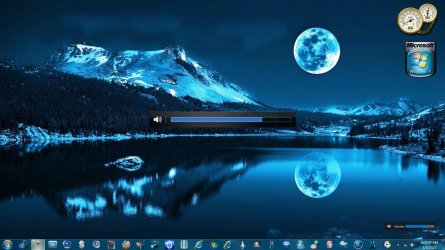
the other day & I had to click the HP MS icon to get it to work when I powered up my desktop. I went to system configuration > startup tab & saw HP MediaSmart SmartMenu was unchecked. I checked & applied it & VIOLA !!
I luv my HP volume bar ! (The more toys the better !!)

Cheers !! Cheers !!.gif


OSD Volume Bars.jpg HP MediaSmart Volume Bar.PNG

- - - Updated - - -
 

My Computer

Computer type
PC/Desktop
Computer Manufacturer/Model Number
HP Pavilion / P6670T
OS
Windows 7 Home Premium 64 bit
CPU
Intel Core i3
Motherboard
HP
Memory
4 GB
Graphics Card(s)
Intel HD Graphics
Sound Card
Realtek HD Audio
Monitor(s) Displays
HP M22f
Screen Resolution
1920 x 1080
Hard Drives
Hitachi
Case
Mid
Keyboard
Microsoft 600
Mouse
Microsoft 3500 Cyan Blue, Logitech M325, Blue
Internet Speed
Fast enough !!
Antivirus
MSE
Browser
IE 11, MS Edge
Other Info
TV Tuner w/Windows Media Center
External Speakers: Creative Labs T40 Series II
Back
Top