Solved Flickering under score _ on start up screen

EFH

New member
Member
Local time
6:08 PM
Messages
36
Location
South Africa
I upgraded my pc yesterday and reinstalled Windows 7. Now on the starting Windows screen I have a little underscore blinking in the top left corner of the screen.

Is it something to be worried about? What could it be?
 

My Computer My Computer

At a glance

Windows 7 Pro 64 BitIntel i52500K Quad Core @ 3.30 GHz (for now...)8GB Transcend DDR3 1333 (for now...)Leadtek Winfast GTS 250 (V2) 1GB
Computer Manufacturer/Model Number
Me, Myself, I
OS
Windows 7 Pro 64 Bit
CPU
Intel i52500K Quad Core @ 3.30 GHz (for now...)
Motherboard
Asus P8P67 Pro
Memory
8GB Transcend DDR3 1333 (for now...)
Graphics Card(s)
Leadtek Winfast GTS 250 (V2) 1GB
Sound Card
Realtek 7.1 Surround
Monitor(s) Displays
Acer V233H 23' Wide
Screen Resolution
1920x1080
Hard Drives
Seagate Barracuda 7200.10 -> 500Gb
Seagate Barracuda 7200.12 -> 1TB
PSU
Gigabyte Supreme 550W
Case
Javelin Warrior
Cooling
Coolermaster CPU Cooler Hyper TX3 Twin Fan
Keyboard
Logitec Wireless
Mouse
Logitec Wireless
Internet Speed
ADSL
Other Info
Soon to be overclocked....
Does your computer actually complete its startup procedure and boot to a working desktop?

Did you carry out a clean install of Windows 7 or an upgrade?

The cursor will flash for a little while as the computer goes through the POST procedure, but if the computer boots to your desktop you should be OK.

If your computer doesn't startup you may need to rebuild the Master Boot Record (MBR).

http://www.sevenforums.com/tutorials/20864-mbr-restore-windows-7-master-boot-record-18.html
 

My Computer My Computer

At a glance

Windows 7 Ultimate SP1 64-BitIntel Core i7 870 @ 2.93GHz8Gb Dual-Channel DDR3 @ 664MHznVidia GeForce GTX 460 1024MB dedicated RAM
Computer Manufacturer/Model Number
HP Pavilion Elite 495UK
OS
Windows 7 Ultimate SP1 64-Bit
CPU
Intel Core i7 870 @ 2.93GHz
Motherboard
MSI 2A9C (CPU1)
Memory
8Gb Dual-Channel DDR3 @ 664MHz
Graphics Card(s)
nVidia GeForce GTX 460 1024MB dedicated RAM
Sound Card
Realtek HD Audio
Monitor(s) Displays
HP2310i
Screen Resolution
1920 x 1080
Hard Drives
1x1954GB Hitachi HDS22020ALA 330 (RAID), 1x1954GB Hitachi External for backup and storage
PSU
460W
Case
HP Elite
Cooling
Air cooled
Keyboard
Logitech K750 solar-powered keyboard
Mouse
Logitech Wireless M180 mouse
Internet Speed
2Mb
Other Info
Pure Avanti Flow Internet Radio with iPod Dock, 64Gb iPod, HP USB Speakers, Sony MDR-V500 Headphones, Sony Vaio F-Series Laptop
Hello EFH,

This could probably the issue with Graphics driver update. If you are using the default Windows 7 graphics driver, try updating the Vendor Graphics driver.
 

My Computer My Computer

At a glance

Windows 7 Ultimate x64 SP1Intel Core i34 GB DDR3
Computer Manufacturer/Model Number
Dell Inspiron N5010
OS
Windows 7 Ultimate x64 SP1
CPU
Intel Core i3
Memory
4 GB DDR3
Screen Resolution
1366 X 768
Hard Drives
Seagate 500 GB
Internet Speed
4 MBPS
What did you upgrade?
 

My Computer My Computer

At a glance

ME/XP/Vista/Win7
OS
ME/XP/Vista/Win7
All MBR Repair commands are automated in Win7 Startup Repair, whose myriad tests all need to be completed to ascertain boot problems with certainty and apply the needed repairs.

Recheck all the connections for changed hardware, confirm that it is detected in BIOS setup and properly set.

Is there a newer BIOS update? If not clear the CMOS: Clear CMOS - 3 Ways to Clear the CMOS - Reset BIOS

While in BIOS setup set SATA controller to AHCI to try install.
 
To answer theog - I did the following:
1. New motherboard - Asus P8P67 Pro
2. New CPU - Intel i5 2500K
3. New Ram - DDR 3 1333

To Venths - I downloaded and installed the latest nVidea driver for my GTS250.

To seavixen32 - I did a clean install...

To gregrocker - I downloaded the latest Bios updates from the Asus site, when I get home I'll flash the Bios to the latest version and check.

Thanks so far!
 

My Computer My Computer

At a glance

Windows 7 Pro 64 BitIntel i52500K Quad Core @ 3.30 GHz (for now...)8GB Transcend DDR3 1333 (for now...)Leadtek Winfast GTS 250 (V2) 1GB
Computer Manufacturer/Model Number
Me, Myself, I
OS
Windows 7 Pro 64 Bit
CPU
Intel i52500K Quad Core @ 3.30 GHz (for now...)
Motherboard
Asus P8P67 Pro
Memory
8GB Transcend DDR3 1333 (for now...)
Graphics Card(s)
Leadtek Winfast GTS 250 (V2) 1GB
Sound Card
Realtek 7.1 Surround
Monitor(s) Displays
Acer V233H 23' Wide
Screen Resolution
1920x1080
Hard Drives
Seagate Barracuda 7200.10 -> 500Gb
Seagate Barracuda 7200.12 -> 1TB
PSU
Gigabyte Supreme 550W
Case
Javelin Warrior
Cooling
Coolermaster CPU Cooler Hyper TX3 Twin Fan
Keyboard
Logitec Wireless
Mouse
Logitec Wireless
Internet Speed
ADSL
Other Info
Soon to be overclocked....
Optional Windows Updates is the way Win7 delivers newer drivers.

This is not XP - Win7 is the expert on its own drivers.

Driver programs are counterproductive.

You only need to import drivers missing in Device Manager.

MS didn't spend a billion dollars paying to build WIn7 drivers to get them into the installer and optional Updates so that Users would have to use old XP methods.
 
Optional Windows Updates is the way Win7 delivers newer drivers.

This is not XP - Win7 is the expert on its own drivers.

Driver programs are counterproductive.

You only need to import drivers missing in Device Manager.

MS didn't spend a billion dollars paying to build WIn7 drivers to get them into the installer and optional Updates so that Users would have to use old XP methods.

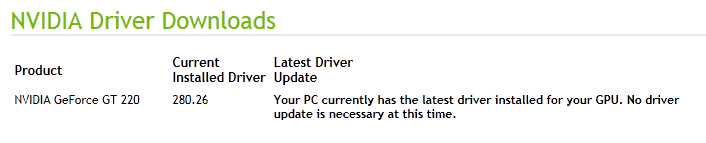
Nvidia001.PNG

Nvidia002.PNG


Why would I install Windows 7 update, as screenshot below

Nvidia003.PNG

so I can have a Flickering under score on start up screen?
 

My Computer My Computer

At a glance

ME/XP/Vista/Win7
OS
ME/XP/Vista/Win7
As stated repeatedly, where performance problems exist then try other drivers. By all means try another display driver to see if it helps.

But Users here are often getting advice from the XP era to put all their drivers on a stick to import them immediately after install, which defeats the purpose of the first driver-complete OS via the installer and optional Updates.

This is how I interpreted your comment
I hope you do not update the Graphic Card from Windows updates.
 
Users here are often getting advice from the XP era


Win XP drivers (or Vista) would be best used than Windows Update drivers.


the first driver-complete OS via the installer and optional Updates.


What OS are talking about? (not any Windows I have used)


So you saying, no need to load driver on this MOBO,(NOTE: for this example)
http://www.sevenforums.com/tutorials/68505-sata-driver-load-windows-7-vista-setup.html

The best place for downloading drivers is from the OEM manufacturer's website.
 

My Computer My Computer

At a glance

ME/XP/Vista/Win7
OS
ME/XP/Vista/Win7
The blinking underscore bar in the top left of the black screen before the Windows screen comes on is on my 2 PC's.

The 2003 XP of my parents did it and 8yrs. later still does.
My 2005 XP from day one and still does it.

Even this one with Win 7 does it sometimes at least. I'm not sure it did it this morning.

After 8 years I don't even pay attention to it anymore.

I must be missing something if it is a problem. :confused:
 

My Computer My Computer

At a glance

Windows7 Pro 64bit SP-1; Windows XP Pro 32bitIntel Core i7-870 Lynnfield 2.93GHz LGA 1156 ...8GB@1400MHz Crucial Ballistix DDR3-1600 4x2GBASUS ENGTX460 DirectCU/2DI/1GD5 1GB 256-bit G...
Computer Manufacturer/Model Number
Hopalong/ Godzilla
OS
Windows7 Pro 64bit SP-1; Windows XP Pro 32bit
CPU
Intel Core i7-870 Lynnfield 2.93GHz LGA 1156 95W Quad-Core
Motherboard
ASUS P7P55D-E PRO
Memory
8GB@1400MHz Crucial Ballistix DDR3-1600 4x2GB
Graphics Card(s)
ASUS ENGTX460 DirectCU/2DI/1GD5 1GB 256-bit GDDR5
Sound Card
VIA Onboard
Monitor(s) Displays
Asus VS248H-P 24"; Samsung SyncMaster 941BW 19"ws
Screen Resolution
1920x1080; 1440x900
Hard Drives
Samsung 830 120GB SSD
Intel 320 120GB SSD
Western Digital Caviar Black WD7501AALS 750GB 7200 RPM SATA 3.0Gb/s
Western Digital Caviar Black WD6401AALS 640GB 7200 RPM SATA 3.0Gb/s
PSU
COOLER MASTER Silent Pro RS850-AMBAJ3-US 850W Modular
Case
COOLER MASTER HAF 932 RC-932-KKN5-GP Black
Cooling
Scythe "Mugen-2 Rev.B" (2 ScytheKaze-Jyuni PWM fans)
Keyboard
Logitech K-320
Mouse
Kensington
Antivirus
Avast Inernet Suite
Browser
IE 9 ; Chrome
Users here are often getting advice from the XP era


Win XP drivers (or Vista) would be best used than Windows Update drivers.


the first driver-complete OS via the installer and optional Updates.


What OS are talking about? (not any Windows I have used)


So you saying, no need to load driver on this MOBO,(NOTE: for this example)
http://www.sevenforums.com/tutorials/68505-sata-driver-load-windows-7-vista-setup.html

The best place for downloading drivers is from the OEM manufacturer's website.

MS spent nearly a billion dollars under the Win7 WHQL program to pay manufacturers to build drivers so that they could have them first in the installer/SP's and then via optional Windows Updates, and so that manufacturers would not hold out to force us to buy newer hardware as they did in Vista.

I was given a tour of one of these dozen worldwide labs while in Seattle at the MVP convention, and it is most impressive.

Yet some insist on using XP methods of changing out all the drivers issued by the installer and ignoring optional Updates because they are judging by XP and early Vista standards.

In hundreds of installs of Win7 representing thousands of drivers via installer and Updates, I've only had two bad Updates I can remember which were easily rolled back. Of course there are always stray drivers missing after install which need to be imported, but they are growing fewer.
 
No I didn't use the Windows XP driver I downloaded the latest Windows 7 / Vista 64 driver directly from nVidia.
 

My Computer My Computer

At a glance

Windows 7 Pro 64 BitIntel i52500K Quad Core @ 3.30 GHz (for now...)8GB Transcend DDR3 1333 (for now...)Leadtek Winfast GTS 250 (V2) 1GB
Computer Manufacturer/Model Number
Me, Myself, I
OS
Windows 7 Pro 64 Bit
CPU
Intel i52500K Quad Core @ 3.30 GHz (for now...)
Motherboard
Asus P8P67 Pro
Memory
8GB Transcend DDR3 1333 (for now...)
Graphics Card(s)
Leadtek Winfast GTS 250 (V2) 1GB
Sound Card
Realtek 7.1 Surround
Monitor(s) Displays
Acer V233H 23' Wide
Screen Resolution
1920x1080
Hard Drives
Seagate Barracuda 7200.10 -> 500Gb
Seagate Barracuda 7200.12 -> 1TB
PSU
Gigabyte Supreme 550W
Case
Javelin Warrior
Cooling
Coolermaster CPU Cooler Hyper TX3 Twin Fan
Keyboard
Logitec Wireless
Mouse
Logitec Wireless
Internet Speed
ADSL
Other Info
Soon to be overclocked....
An important thing to remember is that if you replace OEM drivers with the latest manufacturer's drivers you can encounter problems as OEM drivers may not have the same functionality as drivers direct from the manufacturer.

As gregrocker quite rightly says: "The best place for downloading drivers is from the OEM manufacturer's website."
 

My Computer My Computer

At a glance

Windows 7 Ultimate SP1 64-BitIntel Core i7 870 @ 2.93GHz8Gb Dual-Channel DDR3 @ 664MHznVidia GeForce GTX 460 1024MB dedicated RAM
Computer Manufacturer/Model Number
HP Pavilion Elite 495UK
OS
Windows 7 Ultimate SP1 64-Bit
CPU
Intel Core i7 870 @ 2.93GHz
Motherboard
MSI 2A9C (CPU1)
Memory
8Gb Dual-Channel DDR3 @ 664MHz
Graphics Card(s)
nVidia GeForce GTX 460 1024MB dedicated RAM
Sound Card
Realtek HD Audio
Monitor(s) Displays
HP2310i
Screen Resolution
1920 x 1080
Hard Drives
1x1954GB Hitachi HDS22020ALA 330 (RAID), 1x1954GB Hitachi External for backup and storage
PSU
460W
Case
HP Elite
Cooling
Air cooled
Keyboard
Logitech K750 solar-powered keyboard
Mouse
Logitech Wireless M180 mouse
Internet Speed
2Mb
Other Info
Pure Avanti Flow Internet Radio with iPod Dock, 64Gb iPod, HP USB Speakers, Sony MDR-V500 Headphones, Sony Vaio F-Series Laptop
An important thing to remember is that if you replace OEM drivers with the latest manufacturer's drivers you can encounter problems as OEM drivers may not have the same functionality as drivers direct from the manufacturer.

As gregrocker quite rightly says: "The best place for downloading drivers is from the OEM manufacturer's website."

Hi seavixen32

the first driver-complete OS via the installer and optional Updates.


The best place for downloading drivers is from the OEM manufacturer's website.
 

My Computer My Computer

At a glance

ME/XP/Vista/Win7
OS
ME/XP/Vista/Win7
I agree with seavixen's point that if you are going to import drivers missing in the Device Manager, use the computer manufacturer's Support Downloads website first before going to the Device OEM Downloads page.

Computer manufacturers often customize OEM Device drivers.
 
Thanks for all the suggestions!
 

My Computer My Computer

At a glance

Windows 7 Pro 64 BitIntel i52500K Quad Core @ 3.30 GHz (for now...)8GB Transcend DDR3 1333 (for now...)Leadtek Winfast GTS 250 (V2) 1GB
Computer Manufacturer/Model Number
Me, Myself, I
OS
Windows 7 Pro 64 Bit
CPU
Intel i52500K Quad Core @ 3.30 GHz (for now...)
Motherboard
Asus P8P67 Pro
Memory
8GB Transcend DDR3 1333 (for now...)
Graphics Card(s)
Leadtek Winfast GTS 250 (V2) 1GB
Sound Card
Realtek 7.1 Surround
Monitor(s) Displays
Acer V233H 23' Wide
Screen Resolution
1920x1080
Hard Drives
Seagate Barracuda 7200.10 -> 500Gb
Seagate Barracuda 7200.12 -> 1TB
PSU
Gigabyte Supreme 550W
Case
Javelin Warrior
Cooling
Coolermaster CPU Cooler Hyper TX3 Twin Fan
Keyboard
Logitec Wireless
Mouse
Logitec Wireless
Internet Speed
ADSL
Other Info
Soon to be overclocked....
Back
Top