I made an account just to post better instructions for this tweak, as virtually every guide on the internet gets it wrong. I have tested this extensively and the tweak
does work provided you do it properly. This works best for USB powered HDDs (and SSDs), which are bottlenecked by the default USB protocols (generally, the speed before the tweak is probably 20-40% slower than the internal speed of the device, so that a faster disk will still be faster than a slower disk near the centre of the spindle, however even in the second case it will be slower than the actual read speed so it's not a hard bottleneck, but a general reduction in speed or overhead).
This post gets it right. Creating a key "VVVVPPPP" does nothing, nor does putting the DWORD entry into the existing key "054C00C1".
First, you need to install the hotfix. Secondly, you need to look at the properties for the removable drive and get the VID and PID from "Parent", as per post above. You then combine these two 4 hexadecimal digit IDs to to create the value for key. Note, you will need to do this for each type of device you want increased transfer speed for. However, you can create a key which is VVVVxxxx which will work for any device of a particular vendor (eg. 0BC2xxxx works for multiple different Seagate products). Unfortunately, xxxxxxxx does not work (as a wildcard for all devices).
So create key named above under usbstor, and place the MaximumTransferLength DWORD entry in there. A reboot is required to see the difference.
For my drives, I found even going just to 512k was enough to max out the bandwidth of my devices actual speed. For testing, you must transfer some large files (multi GB). If you do smaller files, windows caching will mess up the results (even though write caching is supposedly disabled). I found the difference even greater on encrypted (TrueCrypt) drives. When you copy files, the transfer rate will start very high (caching), then slow down. You should notice that it slows down less and at the end of the transfer, the average speed (ie. actual) is faster when using this tweak. Unlikely it will speed up most flash memory because these are usually only 20 MB/sec write or so maximum, so no use making this tweak for those. It also
does work on USB 2.0 ports/HDDs (at least for me), it speeds them up closer to the theoretical maximum of USB 2.0. I went from ~25 MB/sec read/write to just over 40 MB/sec read/write. YMMV, I found the performance increase higher on my PC which has USB 3.0 ports than my laptop which only has USB 2.0 (but the laptop was certainly still faster than before the tweak). USB 3.0 writes were improved essentially to what I estimate was the maximum for my HDDs.
Hopefully these instructions should help anyone needing help with this tweak. I preferred using this method over installing the ASUS Suite / BOT driver on my two PCs.
Edit: Upon further testing, the USB 2.0 devices couldn't handle 2MB when doing read+writes. Working fine though on 512k, which gives me just as good speed (it's already 8x more efficient in terms of required transaction). 2MB is probably only required for super-fast SSD type drives.



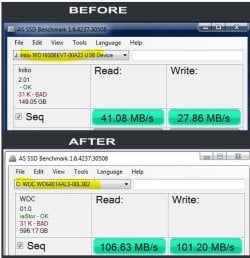
 ) Have you seen any proof anywhere that this does actually work.


