Front audio Panel doesn't work (ASUS P7P55D motherboard)

questionesse

New member
Local time
11:18 PM
Messages
46
Hey there,

I'm using the onboard sound of my ASUS P7P55D motherboard.
The back audio connectors work fine, but I somehow can't use the front panel that I connected to the mobo (yellow cable).

Is there a trick or any setting to activate it with win7 professional x64?

I also tried changing to AC97 in BIOS, didn't help...

thx!
 

Attachments

  • C360_2011-08-25 15-28-41.jpg
    C360_2011-08-25 15-28-41.jpg
    148.7 KB · Views: 238

My Computer My Computer

At a glance

win7 prof.2GB
Computer Manufacturer/Model Number
eee1000h
OS
win7 prof.
Memory
2GB
Check which it is that the csae has as they are wired differently between HD Audio and AC97,

fpaudio.PNG

It is also possible that that fpaudio block is wired wrong and neither will work. If that is what it is it will take pulling and reseating the various wires in the block; not easy but can be done.
 

My Computer My Computer

At a glance

Win 7 Ultimate x64FX-8350 @ 4.6 GHz so farADATA XPG V1 Series Black 8GB DDR3 1600Sapphire R9 270x Dual-X
Computer type
PC/Desktop
Computer Manufacturer/Model Number
Me
OS
Win 7 Ultimate x64
CPU
FX-8350 @ 4.6 GHz so far
Motherboard
Asus M5A97 EVO
Memory
ADATA XPG V1 Series Black 8GB DDR3 1600
Graphics Card(s)
Sapphire R9 270x Dual-X
Sound Card
Xonar DGX w/ Corsair Vengence 1300
Monitor(s) Displays
Acer S232HL Abid
Screen Resolution
1920x1080
Hard Drives
120 GB OCZ Vertex 3
500 GB Seagate 7200.12
PSU
Antec Earthwatts 650W Green
Case
Antec Three Hundred
Cooling
Cooler Master 212 EVO
Keyboard
Logitech G510
Mouse
Logitech G500s
Internet Speed
35000/3000
ah - I just added the BIOS option while you answered!

thx for your fast reply though!

I also tried changing to AC97 in BIOS, didn't help...
I am not sure what kind of front panel that is - how to indicate that? The problem is that I can't access the back connector of the front panel that easily without deconstructing almot the whole system...

If I get that right, HD audio and AC97 plug into the same connector, so the cable is in the right spot either ways, isn't it?
 

My Computer My Computer

At a glance

win7 prof.2GB
Computer Manufacturer/Model Number
eee1000h
OS
win7 prof.
Memory
2GB
Cable's in the right spot, but can't tell from looking at it whether it is AC97 or HD Audio. If you don't have it check your case manufacturer's site for the manual and hopefully it will say which it is supposed to be.
 

My Computer My Computer

At a glance

Win 7 Ultimate x64FX-8350 @ 4.6 GHz so farADATA XPG V1 Series Black 8GB DDR3 1600Sapphire R9 270x Dual-X
Computer type
PC/Desktop
Computer Manufacturer/Model Number
Me
OS
Win 7 Ultimate x64
CPU
FX-8350 @ 4.6 GHz so far
Motherboard
Asus M5A97 EVO
Memory
ADATA XPG V1 Series Black 8GB DDR3 1600
Graphics Card(s)
Sapphire R9 270x Dual-X
Sound Card
Xonar DGX w/ Corsair Vengence 1300
Monitor(s) Displays
Acer S232HL Abid
Screen Resolution
1920x1080
Hard Drives
120 GB OCZ Vertex 3
500 GB Seagate 7200.12
PSU
Antec Earthwatts 650W Green
Case
Antec Three Hundred
Cooling
Cooler Master 212 EVO
Keyboard
Logitech G510
Mouse
Logitech G500s
Internet Speed
35000/3000
found it, it's a CHIEFTEC BA-01B-B-B-400
says 2x USB2.0, 1x IEEE 1394 Firewire, Mic-in, Line-out (HD-Ready)

so the BIOS Setting was correct. Anything I need to activate in the audio settings?

thx
 

My Computer My Computer

At a glance

win7 prof.2GB
Computer Manufacturer/Model Number
eee1000h
OS
win7 prof.
Memory
2GB
any other ideas? I'm not that familiar with audio settings in win7 - but there are a lot of options so I assume it could be some wrong setting...
 

My Computer My Computer

At a glance

win7 prof.2GB
Computer Manufacturer/Model Number
eee1000h
OS
win7 prof.
Memory
2GB
You've set the Front panel type to AC97, as mentioned.
You probably need to install the Realtek AC97 codec software.
I'm not sure if you can use it with the Realtek HD Audio software, so you may need to uninstall it.

You may be able to use both codecs together or it may be one of those either/or situations.
I don't know.
Good Luck!

http://www.realtek.com.tw/downloads/
 
Last edited:

My Computer My Computer

At a glance

Windows 7 Home Premium 64 bitIntel Core i7-4790G.SKILL 8GB (2 x 4GB) DDR3 F3-10666CL9D-8GBNTAMD Radeon R7 250
Computer type
PC/Desktop
Computer Manufacturer/Model Number
Custom Build
OS
Windows 7 Home Premium 64 bit
CPU
Intel Core i7-4790
Motherboard
GA-Z87X-D3H
Memory
G.SKILL 8GB (2 x 4GB) DDR3 F3-10666CL9D-8GBNT
Graphics Card(s)
AMD Radeon R7 250
Sound Card
Realtek ALC892
Monitor(s) Displays
Samsung UN32EH5000, Dell 1703FPT
Screen Resolution
1920 x 1080, 1280 x 1024
Hard Drives
WD5003AZEX
WD10EZEX
Samsung HD103SJ
Samsung 128 GB 840 PRO
PSU
SeaSonic M12II SS-500GM
Case
Fractal Design Define R4
Cooling
Zalman CNPS9900ALED
Keyboard
Logitech K800
Mouse
Logitech M705
Internet Speed
16 Mbps
Antivirus
Avast
Browser
Firefox
Other Info
Bose Companion 2 Multimedia Speakers
You've set the Front panel type to AC97, as mentioned.
You probably need to install the Realtek AC97 codec software.
I'm not sure if you can use it with the Realtek HD Audio software, so you may need to uninstall it.

Doesn't work that way, the onboard audio still needs the HD driver. The only reason for that option in the bios is so that the fpaudio connectors on the motherboard can be connected to the front panel audio on the case regardless of how the case is wired.

Don't have anything here that has Realtek audio but found this elsewhere,

realtekfpaudio.PNG

Try it by matching that setting with the one in the bios until you hit the combo that works.
 

My Computer My Computer

At a glance

Win 7 Ultimate x64FX-8350 @ 4.6 GHz so farADATA XPG V1 Series Black 8GB DDR3 1600Sapphire R9 270x Dual-X
Computer type
PC/Desktop
Computer Manufacturer/Model Number
Me
OS
Win 7 Ultimate x64
CPU
FX-8350 @ 4.6 GHz so far
Motherboard
Asus M5A97 EVO
Memory
ADATA XPG V1 Series Black 8GB DDR3 1600
Graphics Card(s)
Sapphire R9 270x Dual-X
Sound Card
Xonar DGX w/ Corsair Vengence 1300
Monitor(s) Displays
Acer S232HL Abid
Screen Resolution
1920x1080
Hard Drives
120 GB OCZ Vertex 3
500 GB Seagate 7200.12
PSU
Antec Earthwatts 650W Green
Case
Antec Three Hundred
Cooling
Cooler Master 212 EVO
Keyboard
Logitech G510
Mouse
Logitech G500s
Internet Speed
35000/3000
On my case the cable from the front panel audio jacks has two plugs on it. One is AC97 and the other is HD Audio, each one is wired different. I have to match the BIOS setting to the plug I use.
This might help.
http://www.sevenforums.com/sound-audio/44491-ac97-hd-audio-front-panel-layouts.html

EDIT: If you can look though the manual fro your motherboard and see if it gives the pin out for the audio header. Then do the same thing with your case manual and compare the two to see if they match.
 

My Computer My Computer

At a glance

Windows 10 Education 64 bitAMD Phenom II X4 980 Black Edition Deneb 3.7GHz8GB 4GBx2 Kingston PC10600 DDR3 1333 MemoryZotac NVIDIA Geforce GT640 2 Gig DDR3 PCIe
Computer type
PC/Desktop
Computer Manufacturer/Model Number
Home Built
OS
Windows 10 Education 64 bit
CPU
AMD Phenom II X4 980 Black Edition Deneb 3.7GHz
Motherboard
Asus M4N68T-M V2 µATX Motherboard
Memory
8GB 4GBx2 Kingston PC10600 DDR3 1333 Memory
Graphics Card(s)
Zotac NVIDIA Geforce GT640 2 Gig DDR3 PCIe
Sound Card
VIA VT1708s High Definition Audio 8-channel Onboard
Monitor(s) Displays
22" LG E2242 1080p and 2 19" I-INC AG191D
Screen Resolution
1280x1024 - 1920x1080 - 1280x1024
Hard Drives
Crucial M100 256 GB SSD and 500 GB WD Blue SATA
PSU
Thermaltake TR 620
Case
Power Up Black ATX Mid-Tower Case
Cooling
Stock heatsink and fan
Keyboard
Logitech Wireless K350 Wave
Mouse
Logitech Wireless M570 Trackman Wheel
Internet Speed
80 Mbps Down 30 Mbps Up
Antivirus
Windows Defender
Browser
Internet Explorer 11
Other Info
HP DVD1040e Lightscribe - External USB2
umm - I don't have any Realtek codec installed - didn't know I need that for onboard sound...thought they were making soundcards.
That's the one you mean? Realtek AC'97 - Freeware - EN - Download.CHIP.eu

my hardware manager mentions one HD audio device and an ATI HD audio device, nothing from realtek.

I don't get the jacks part - there is just that one for audio, so what should be wrong?

thx guys!
 

My Computer My Computer

At a glance

win7 prof.2GB
Computer Manufacturer/Model Number
eee1000h
OS
win7 prof.
Memory
2GB

My Computer My Computer

At a glance

Win 7 Ultimate x64FX-8350 @ 4.6 GHz so farADATA XPG V1 Series Black 8GB DDR3 1600Sapphire R9 270x Dual-X
Computer type
PC/Desktop
Computer Manufacturer/Model Number
Me
OS
Win 7 Ultimate x64
CPU
FX-8350 @ 4.6 GHz so far
Motherboard
Asus M5A97 EVO
Memory
ADATA XPG V1 Series Black 8GB DDR3 1600
Graphics Card(s)
Sapphire R9 270x Dual-X
Sound Card
Xonar DGX w/ Corsair Vengence 1300
Monitor(s) Displays
Acer S232HL Abid
Screen Resolution
1920x1080
Hard Drives
120 GB OCZ Vertex 3
500 GB Seagate 7200.12
PSU
Antec Earthwatts 650W Green
Case
Antec Three Hundred
Cooling
Cooler Master 212 EVO
Keyboard
Logitech G510
Mouse
Logitech G500s
Internet Speed
35000/3000
OMG - if that's it I go and hide somewhere! But since the back jacks worked fine I thought win7 system drivers did the job...

I'm having trouble installing the driver - I get messages cause of signature issues - the install anyway option just results in new popups with the same issue - and the installation doesn't progress. any ideas on that?

thx!
 

My Computer My Computer

At a glance

win7 prof.2GB
Computer Manufacturer/Model Number
eee1000h
OS
win7 prof.
Memory
2GB
umm - I don't have any Realtek codec installed - didn't know I need that for onboard sound...thought they were making soundcards.
That's the one you mean? Realtek AC'97 - Freeware - EN - Download.CHIP.eu

my hardware manager mentions one HD audio device and an ATI HD audio device, nothing from realtek.

I don't get the jacks part - there is just that one for audio, so what should be wrong?

thx guys!

On board sound still needs a driver to work. It's still essentially a sound card its just built into the motherboard. Windows 7 may install drivers for it but to get the full functionality you may have to install the driver package from your motherboard manufacturer. Go to the support section of your motherboard manufacturer and download the recommended driver for your model of motherboard. It should have the most likely hood of working correctly.

As for the front panel jacks, you need to know if they are AC97 or HD Audio, then set the motherboard BIOS to match them. The pin out of the connector has to match the pin out of the motherboard header.

EDIT: What is the make and model of your case?
 

My Computer My Computer

At a glance

Windows 10 Education 64 bitAMD Phenom II X4 980 Black Edition Deneb 3.7GHz8GB 4GBx2 Kingston PC10600 DDR3 1333 MemoryZotac NVIDIA Geforce GT640 2 Gig DDR3 PCIe
Computer type
PC/Desktop
Computer Manufacturer/Model Number
Home Built
OS
Windows 10 Education 64 bit
CPU
AMD Phenom II X4 980 Black Edition Deneb 3.7GHz
Motherboard
Asus M4N68T-M V2 µATX Motherboard
Memory
8GB 4GBx2 Kingston PC10600 DDR3 1333 Memory
Graphics Card(s)
Zotac NVIDIA Geforce GT640 2 Gig DDR3 PCIe
Sound Card
VIA VT1708s High Definition Audio 8-channel Onboard
Monitor(s) Displays
22" LG E2242 1080p and 2 19" I-INC AG191D
Screen Resolution
1280x1024 - 1920x1080 - 1280x1024
Hard Drives
Crucial M100 256 GB SSD and 500 GB WD Blue SATA
PSU
Thermaltake TR 620
Case
Power Up Black ATX Mid-Tower Case
Cooling
Stock heatsink and fan
Keyboard
Logitech Wireless K350 Wave
Mouse
Logitech Wireless M570 Trackman Wheel
Internet Speed
80 Mbps Down 30 Mbps Up
Antivirus
Windows Defender
Browser
Internet Explorer 11
Other Info
HP DVD1040e Lightscribe - External USB2
With the way Realtek's servers function (dial up speeds or less most of the time) its possible something in it got corrupted. Download it again from here and see if it will install. May also have to disable your anti-virus to get it to install.

But since the back jacks worked fine I thought win7 system drivers did the job...

The Windows default audio driver when it detects and installs (won't for most Creative sound cards) provides just enough basic functionality that you get sound, you want things to actually work properly you need to install the proper driver.
 

My Computer My Computer

At a glance

Win 7 Ultimate x64FX-8350 @ 4.6 GHz so farADATA XPG V1 Series Black 8GB DDR3 1600Sapphire R9 270x Dual-X
Computer type
PC/Desktop
Computer Manufacturer/Model Number
Me
OS
Win 7 Ultimate x64
CPU
FX-8350 @ 4.6 GHz so far
Motherboard
Asus M5A97 EVO
Memory
ADATA XPG V1 Series Black 8GB DDR3 1600
Graphics Card(s)
Sapphire R9 270x Dual-X
Sound Card
Xonar DGX w/ Corsair Vengence 1300
Monitor(s) Displays
Acer S232HL Abid
Screen Resolution
1920x1080
Hard Drives
120 GB OCZ Vertex 3
500 GB Seagate 7200.12
PSU
Antec Earthwatts 650W Green
Case
Antec Three Hundred
Cooling
Cooler Master 212 EVO
Keyboard
Logitech G510
Mouse
Logitech G500s
Internet Speed
35000/3000
hmm - I tried the WIn7 executable
Vista, Windows7 Driver(64bits) Driver only (Executable file)R2.642011/8/19
How can I check if it's properly installed - where should it be listed?
The front jack still doesn't work. Or is there anything I need to configure now?
 

My Computer My Computer

At a glance

win7 prof.2GB
Computer Manufacturer/Model Number
eee1000h
OS
win7 prof.
Memory
2GB
Try te connect the jack at other direction, as long as it doesn't have any keyring.
And at each direction try to change the BIOS setting.

Sent from my GT-I9000T using Tapatalk
 

My Computer My Computer

At a glance

Kubuntu 64bit
OS
Kubuntu 64bit
wouldn't fit from the arrangement of pins and pinholes it fits just in one orientation.
But since the case manual says the front panel is HD Audio and BIOS is set to this, at least that should be covered...

I'm more concerned if I installed the right driver - correctely.

I took that one
Screenshot
 

My Computer My Computer

At a glance

win7 prof.2GB
Computer Manufacturer/Model Number
eee1000h
OS
win7 prof.
Memory
2GB
anyone got more advice?
 

My Computer My Computer

At a glance

win7 prof.2GB
Computer Manufacturer/Model Number
eee1000h
OS
win7 prof.
Memory
2GB
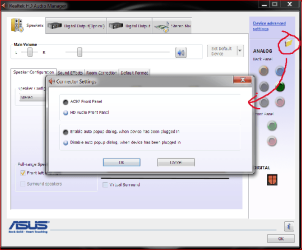
On my gigabyte mothetboard I had to check the disable front panel jack detection setting in the analog back panel connector settings of the realtek HD audio manager to get my mike and headset to work.
 

My Computer My Computer

At a glance

Win7 Home Premium 64 bitAMD Phenom II X2 555 Black4 GB Kingston DDR2 800Sapphire ATI Raedon HD6570 2GB DDR3
Computer Manufacturer/Model Number
ME
OS
Win7 Home Premium 64 bit
CPU
AMD Phenom II X2 555 Black
Motherboard
Gigabyte GA-MA770-UD3
Memory
4 GB Kingston DDR2 800
Graphics Card(s)
Sapphire ATI Raedon HD6570 2GB DDR3
Sound Card
Built in
Monitor(s) Displays
HP 2010i
Screen Resolution
1600x900
Hard Drives
2 WD 500GB Caviar blue
1 WD 250GB
1 WD 80GB (usb)
Case
Antec P-160
Cooling
Hyper 212 EVO
Keyboard
Logitech K320
Mouse
Logitech Trackman Wheel Optical
umm - how did we come up with the realtek?
Asus states it's a VIA Chip...
ASUSTeK Computer Inc. - Motherboards- ASUS P7P55D

VIA® VT1828S 8-Channel High Definition Audio CODEC
- Absolute Pitch BD192/24
- DTS Surround Sensation UltraPC
- BD audio layer Content Protection
- Supports Jack-Detection, Multi-streaming, Front Panel Jack-Retasking
- Optical S/PDIF out ports at back I/O
 

My Computer My Computer

At a glance

win7 prof.2GB
Computer Manufacturer/Model Number
eee1000h
OS
win7 prof.
Memory
2GB
Back
Top