Solved Image your system with free Macrium

As you said, the HDD speed is certainly a limiting factor. But more compression needs more CPU. So that could play a role in favor of EaseUS. Maybe you can make a comparison imaging to an internal HDD.

But then again, a different configuration (slower CPU, faster disk, etc.) may yield different results. I run my images in the background. So length of time is not a big deal.

Can't do I'm afraid. Only the one internal disk.
 

My Computer My Computer

Computer type
Laptop
Computer Manufacturer/Model Number
Hewlett-Packard/G62-107SA Notebook
OS
Microsoft Windows 7 Home Premium 64-bit Service Pack 1
CPU
Intel(R) Core(TM) i3 CPU M 330 @ 2.13GHz
Motherboard
Hewlett-Packard 1425
Memory
8 GB DDR3
Graphics Card(s)
Intel(R) HD Graphics
Sound Card
Realtek High Definition Audio
Monitor(s) Displays
Builtin
Screen Resolution
1366 x 768 x 32 bits (4294967296 colors) @ 60 Hz
Hard Drives
250 GB SATA Hard Disk Drive 7200 rpm
2TB Seagate GoFlex USB 2 Drive
1TB Iomega Prestige USB 2 Drive
1.5TB Iomega Prestige USB 2 Drive (Samsung)
2TB WD MyBook Live NAS.
Mouse
Logitech Anywhere MX
Internet Speed
152 Mbs download 10 Mbs upload
Antivirus
Norton 360
Browser
Chrome
As you said, the HDD speed is certainly a limiting factor. But more compression needs more CPU. So that could play a role in favor of EaseUS. Maybe you can make a comparison imaging to an internal HDD.

But then again, a different configuration (slower CPU, faster disk, etc.) may yield different results. I run my images in the background. So length of time is not a big deal.

Can't do I'm afraid. Only the one internal disk.
Could you use Windows Disk Management to Shrink drive C:\
and then create a new partition for images in the space released ?
 

My Computer My Computer

Computer Manufacturer/Model Number
ASUSTeK Computer INC. M3A32-MVP DELUXE (CPU 1)
OS
Windows 7 Ultimate 64 bit SP1 x64
CPU
AMD Phenom X4 9500
Motherboard
ASUSTeK M3A32-MVP Deluxe (CPU 1)
Memory
8 GB
Graphics Card(s)
ATI Radeon HD 4600 Series
Sound Card
AMD High Definition Audio Device
Monitor(s) Displays
SyncMaster (1680x1050@60Hz)
Hard Drives
59GB OCZ-VERTEX2 ATA Device
+
977GB SAMSUNG HD103SJ ATA Device
+
625GB WDC WD6401AALS-00L3B2 ATA Device
As you said, the HDD speed is certainly a limiting factor. But more compression needs more CPU. So that could play a role in favor of EaseUS. Maybe you can make a comparison imaging to an internal HDD.

But then again, a different configuration (slower CPU, faster disk, etc.) may yield different results. I run my images in the background. So length of time is not a big deal.

Can't do I'm afraid. Only the one internal disk.
Could you use Windows Disk Management to Shrink drive C:\
and then create a new partition for images in the space released ?

Not easily. All 4 partitions came as defined so I would have to convert to logical. I thought about doing it some time ago to create a separate data partition but I just kept running into issues.
 

My Computer My Computer

Computer type
Laptop
Computer Manufacturer/Model Number
Hewlett-Packard/G62-107SA Notebook
OS
Microsoft Windows 7 Home Premium 64-bit Service Pack 1
CPU
Intel(R) Core(TM) i3 CPU M 330 @ 2.13GHz
Motherboard
Hewlett-Packard 1425
Memory
8 GB DDR3
Graphics Card(s)
Intel(R) HD Graphics
Sound Card
Realtek High Definition Audio
Monitor(s) Displays
Builtin
Screen Resolution
1366 x 768 x 32 bits (4294967296 colors) @ 60 Hz
Hard Drives
250 GB SATA Hard Disk Drive 7200 rpm
2TB Seagate GoFlex USB 2 Drive
1TB Iomega Prestige USB 2 Drive
1.5TB Iomega Prestige USB 2 Drive (Samsung)
2TB WD MyBook Live NAS.
Mouse
Logitech Anywhere MX
Internet Speed
152 Mbs download 10 Mbs upload
Antivirus
Norton 360
Browser
Chrome
In fact I did that on a laptop the wife uses for travelling. Rather than having her lug an external disk, I occasionally put an image into an extra partition on the single disk. That way she can at least bail herself out of any system trouble. That does not help when the HDD breaks, but that would require my intervention anyhow. That is the only laptop where I kept the HDD and did not install an SSD - just for that reason to have enough real estate.
 

My Computer My Computer

Computer Manufacturer/Model Number
HP, Dell, Gateway, Toshiba - 4 laptops and 2 desktops
OS
Vista, Windows7, Mint Mate, Zorin, Windows 8
CPU
from 1.6GHz Duo to i7
Monitor(s) Displays
2x HP w2207
Hard Drives
5x HDD, 7x SSD, 12x Externals
Keyboard
with trackball - no mices
Mouse
Trackball mice
Internet Speed
DSL 6000
Yes. Well the laptop is my only PC ATM so I didn't fancy doing anything exotic on it. Sometime soon I will get my self a desktop and set that up the way I want it. There always seems to be something more urgent to spend the money on however.
 

My Computer My Computer

Computer type
Laptop
Computer Manufacturer/Model Number
Hewlett-Packard/G62-107SA Notebook
OS
Microsoft Windows 7 Home Premium 64-bit Service Pack 1
CPU
Intel(R) Core(TM) i3 CPU M 330 @ 2.13GHz
Motherboard
Hewlett-Packard 1425
Memory
8 GB DDR3
Graphics Card(s)
Intel(R) HD Graphics
Sound Card
Realtek High Definition Audio
Monitor(s) Displays
Builtin
Screen Resolution
1366 x 768 x 32 bits (4294967296 colors) @ 60 Hz
Hard Drives
250 GB SATA Hard Disk Drive 7200 rpm
2TB Seagate GoFlex USB 2 Drive
1TB Iomega Prestige USB 2 Drive
1.5TB Iomega Prestige USB 2 Drive (Samsung)
2TB WD MyBook Live NAS.
Mouse
Logitech Anywhere MX
Internet Speed
152 Mbs download 10 Mbs upload
Antivirus
Norton 360
Browser
Chrome
I have found speed wise all software on default settings to a USB3 connected external HDD. Speed in rank order:
1) Easeus (clear winner)
2) Macrium
3) Windows

I thought 1) & 2) was similar default compression and 3) was little or none.
Compression and the speed cost of the compression is a big unknown.
Also the location on the spinning disk the image is stored can make a very significant difference to speed. Radial velocity and transfer rate to magnetic media etc. Observed fact.
 

My Computer My Computer

Computer type
PC/Desktop
Computer Manufacturer/Model Number
Own build
OS
Windows 7x64 Home Premium SP1
CPU
Intel i7 2600k
Motherboard
ASUS P8Z68 Deluxe
Memory
G.Skill Ripjaws (DDR3-1600) 2x4GB
Graphics Card(s)
Nvidia GeForce GTS 450; Intel HD Graphics 3000(GT2+)
Monitor(s) Displays
Dell Ultrasharp IPS panel U2311H, Samsung SyncMaster P2350
Screen Resolution
1920x1080
Hard Drives
Samsung 850 Pro SSD 256GB, Samsung SSD 840 120GB, Seagates 1TB Barracuda ST31000528AS x2
PSU
Seasonic M12II 520W
Case
Lian Li Lancool PC-K60
Cooling
Case: 1x120mm, 3x140mm CPU: Hyper 212+
Keyboard
Logitech MK520 (wireless)
Mouse
Logitech MK520
Internet Speed
6-7 Mbps
Antivirus
Norton Security Premium, Malwarebytes on 2 (MSE on 3rd PC)
Browser
FireFox
Other Info
Audio: Logitech Z523 2.1
Yes, if you are on windows 7 x64 you can use my little app to make macrium pe3 instead of downloading WAIK.

Regarding the "little app" you referenced, if it streamlines the making of a non-linux recovery disk for use with Macrium under Win 7 64 bit, how can one get the app? Thanks!
 

My Computer My Computer

OS
Windows 7 Home x64
Instal macrium v5. The trial version is fine any edition you like.

2. D/l this, unzip it. View attachment 172858 (It is to be run on 64 bit win 7 only )

Inside is a .7z file.

Un 7-zip that onto your Drive - you should have a folder C:\Easype-x64-v2

Inside is an app called RunMeAsAdminv2.exe

Rt click it and run as admin.

Takes about 1 min to make the pe3 media for you.
 

My Computers My Computers

System One System Two

  • Computer type
    PC/Desktop
    OS
    7 X64
    CPU
    i5 8400
    Motherboard
    gigabyte b365m ds3h
    Memory
    2x8gb 3200mhz
    Hard Drives
    various
    PSU
    pure power 11 400w cm
    Case
    Coolermaster
    Cooling
    cryorig m9i
  • Computer type
    PC/Desktop
    OS
    7x64
    CPU
    g5400
    Motherboard
    ga b365m ds3h
    Memory
    8gb ddr4 2400
    PSU
    xfx pro 450w
Instal macrium v5. The trial version is fine any edition you like.

2. D/l this, unzip it. View attachment 172858 (It is to be run on 64 bit win 7 only )

Inside is a .7z file.

Un 7-zip that onto your Drive - you should have a folder C:\Easype-x64-v2

Inside is an app called RunMeAsAdminv2.exe

Rt click it and run as admin.

Takes about 1 min to make the pe3 media for you.

Thanks for this!

Sorry, but your program is new to me -- what does RunMeAsAdminv2.exe do? Does it create an ISO file to make a PE3 runtime CD? What about the Macrium files which will be needed on the CD? If your EXE finds them on my HDD and then includes them, that's one handy program!
 

My Computer My Computer

OS
Windows 7 Home x64
Does it create an ISO file to make a PE3 runtime CD? ...If your EXE finds them on my HDD and then includes them, that's one handy program!

Yes, that's exactly what it does. No need for WAIK.
 

My Computers My Computers

System One System Two

  • Computer type
    PC/Desktop
    OS
    7 X64
    CPU
    i5 8400
    Motherboard
    gigabyte b365m ds3h
    Memory
    2x8gb 3200mhz
    Hard Drives
    various
    PSU
    pure power 11 400w cm
    Case
    Coolermaster
    Cooling
    cryorig m9i
  • Computer type
    PC/Desktop
    OS
    7x64
    CPU
    g5400
    Motherboard
    ga b365m ds3h
    Memory
    8gb ddr4 2400
    PSU
    xfx pro 450w
Takes about 1 min to make the pe3 media for you.
I recall that it took alot longer for me, and it (RunMeAsAdminV2.exe) does not give you progress indicators so JDH1 leave the thing alone until you're sure it's finished (I recall it will even offer to burn a disk for you at the very end!).
 

My Computer My Computer

Computer type
Laptop
Computer Manufacturer/Model Number
Dell Latitude E6540 Laptop
OS
Windows 7 Professional 64bit
CPU
Intel Core i7 4600M @ 2.90GHz
Motherboard
Dell Inc. 0CYT5F (SOCKET 0)
Memory
16.0GB Dual-Channel DDR3 @ 797MHz (11-11-11-28)
Graphics Card(s)
Intel HD Graphics 4600 (Dell) 2048MB ATI AMD Radeon HD 8790M
Sound Card
Realtek High Definition Audio
Monitor(s) Displays
HP ZR30w (2560x1600@60Hz)
Hard Drives
256GB LITEONIT LMT-256M6M-41 mm SATA (SSD)
1TB Samsung SSD 860 EVO mSATA SATA (SSD)
2TB USB 3.0 USB Device
115GB SanDisk Ultra Fit USB
Other Info
Multiple Dell E-Port Plus II Port Replicator/Docking Stations 0Y72NH USB 3.0 + 130W AC Adapters
Takes about 1 min to make the pe3 media for you.
I recall that it took alot longer for me, and it (RunMeAsAdminV2.exe) does not give you progress indicators so JDH1 leave the thing alone until you're sure it's finished (I recall it will even offer to burn a disk for you at the very end!).

Great, thanks for the tips. Since my burner is external, it'll be interesting to see if this EXE will be able to locate and use it.
 

My Computer My Computer

OS
Windows 7 Home x64
Does it create an ISO file to make a PE3 runtime CD? ...If your EXE finds them on my HDD and then includes them, that's one handy program!
Yes, that's exactly what it does. No need for WAIK.

Thanks, I DL'ed the file earlier and now look forward to trying it!
 

My Computer My Computer

OS
Windows 7 Home x64
I installed Ubuntu Oneiric Alpha 3 as a dual boot with windows 7 and had to use the alternate install cd. When I logged into windows and looked at my disc I saw that Ubuntu had been installed in front of windows and was labeled C: . I decided to remove Ubuntu but could not extend into the empty space, so I re wrote the MBR with easy bcd and did a restore with Macrium. When I rebooted I had a grub rescue prompt. I have no idea what happened. I decided I would need to re install windows and then restore the back up .I decided I would use a Windows 7 upgrade disc and not the recovery disc that came with the pc because I did not want all the system crap and I figured it would take forever to re install windows. After putting the disc in it would not let me install over what was on the disc so I deleted everything. I may have deleted the MSR I can't remember but it is there now so I guess if I did it either restored itself or I never deleted it. At this point it did allow me to install Windows 7. After installing I did not activate it or update it. I immediately put in the Macrium rescue cd and restored the back up. It worked but it initially gave me an error that the vendor id did not match up or something so I put in the system recovery cd from the manufacturer and clicked on repair windows. It did find a problem and asked if I wanted to fix it. I clicked on yes and rebooted. It worked but the process turned what was an MBR disc into a GPT disc (GUID Partition Table). How about that. The one time I used it it saved my system. Now I can't use it anymore because Macrium will not work with GPT. I had to create a backup on my hard disc with windows back up. I liked how Macrium allowed me to put the whole thing on a 14 gig USB.
 
Last edited:

My Computer My Computer

Computer Manufacturer/Model Number
Samsung rv520
OS
Windows Seven, Ubuntu
CPU
Intel
Graphics Card(s)
Intel
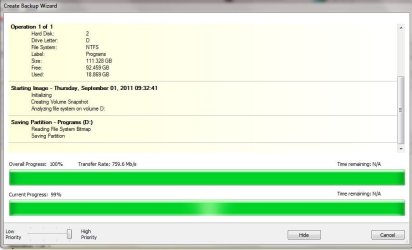
Been liking Macrium a lot - but this just happened, stuck on 99%, I had to use Task Manager to shut it down. I then tried to verify the image but Macrium couldn't see it.
 

Attachments

  • macrium.JPG
    macrium.JPG
    46.2 KB · Views: 7

My Computer My Computer

Computer Manufacturer/Model Number
self-built
OS
Windows 7 Ultimate x64
CPU
Phenom II x4 965
Motherboard
GA-MA785GT-UD3H
Memory
4gb
Graphics Card(s)
Asus GTX 460 768mb
Sound Card
Asus Xonar DX
Monitor(s) Displays
BenQ G2222HDL
Hard Drives
OCZ Vertex 2E 60gb

WD 1TB Caviar Green
PSU
Antec True Power New 650w
Case
CM 690 II
Cooling
Hyper 212+
I tried again and it's done the same thing - I have waited 5 mins with it on 99%, it seems stuck.
 

My Computer My Computer

Computer Manufacturer/Model Number
self-built
OS
Windows 7 Ultimate x64
CPU
Phenom II x4 965
Motherboard
GA-MA785GT-UD3H
Memory
4gb
Graphics Card(s)
Asus GTX 460 768mb
Sound Card
Asus Xonar DX
Monitor(s) Displays
BenQ G2222HDL
Hard Drives
OCZ Vertex 2E 60gb

WD 1TB Caviar Green
PSU
Antec True Power New 650w
Case
CM 690 II
Cooling
Hyper 212+
Been liking Macrium a lot - but this just happened, stuck on 99%, I had to use Task Manager to shut it down. I then tried to verify the image but Macrium couldn't see it.
No way that anything could see an image if the file size is zero,
and I guess the file size is zero if the file creation failed at 99%.

Perhaps if you launch Windows Task manager or Process Explorer you might see that something (e.g. malware protection) is in conflict and using 90+% of the CPU core that Macrium is using.
 

My Computer My Computer

Computer Manufacturer/Model Number
ASUSTeK Computer INC. M3A32-MVP DELUXE (CPU 1)
OS
Windows 7 Ultimate 64 bit SP1 x64
CPU
AMD Phenom X4 9500
Motherboard
ASUSTeK M3A32-MVP Deluxe (CPU 1)
Memory
8 GB
Graphics Card(s)
ATI Radeon HD 4600 Series
Sound Card
AMD High Definition Audio Device
Monitor(s) Displays
SyncMaster (1680x1050@60Hz)
Hard Drives
59GB OCZ-VERTEX2 ATA Device
+
977GB SAMSUNG HD103SJ ATA Device
+
625GB WDC WD6401AALS-00L3B2 ATA Device
Been liking Macrium a lot - but this just happened, stuck on 99%, I had to use Task Manager to shut it down. I then tried to verify the image but Macrium couldn't see it.
No way that anything could see an image if the file size is zero,
and I guess the file size is zero if the file creation failed at 99%.

Perhaps if you launch Windows Task manager or Process Explorer you might see that something (e.g. malware protection) is in conflict and using 90+% of the CPU core that Macrium is using.


The file size was 10GB not 0, but that doesn't matter, it stopped on 99% and the image is not complete - the reason I tried verifying was to confirm that.

I will have a look at Task Manager and see if anything odd is happening. Thanks.
 

My Computer My Computer

Computer Manufacturer/Model Number
self-built
OS
Windows 7 Ultimate x64
CPU
Phenom II x4 965
Motherboard
GA-MA785GT-UD3H
Memory
4gb
Graphics Card(s)
Asus GTX 460 768mb
Sound Card
Asus Xonar DX
Monitor(s) Displays
BenQ G2222HDL
Hard Drives
OCZ Vertex 2E 60gb

WD 1TB Caviar Green
PSU
Antec True Power New 650w
Case
CM 690 II
Cooling
Hyper 212+
Hi Stonebear,

Is there a chance your HDD you are imaging might be fragmented> Can you check that, and then defragment it if neccessary? I'm not 100% sure this is an issue.....just a suggestion.

Regards,
Golden
 

My Computer My Computer

Computer type
PC/Desktop
Computer Manufacturer/Model Number
Golden Mk. I.4
OS
Windows 10 Pro x64 ; Xubuntu x64
CPU
Intel i7 860 @ 2.80 GHz O/C'ed to 4.0GHz
Motherboard
Gigabyte P55A-UD3R Rev.1. Award BIOS F13
Memory
16GB Corsair Vengance DDR3 @ 661 MHz Dual Channel (9-9-9-24)
Graphics Card(s)
EVGA NVidia GTX 560 1024MB
Sound Card
Realtek Integrated
Monitor(s) Displays
Dual Samsung SyncMaster 2494HS
Screen Resolution
1920*1080 and 1920*1080
Hard Drives
1*Samsung 840 EVO 120GB SSD;
1*OCZ Vertex 2 60GB SSD;
2*Samsung F3 SpinPoint 1TB in RAID0;
1*Samsung F1 SpinPoint 1TB;
2*Western Digital 1TB External USB 3.0
1*Western Digital 500GB External USB 3.0
1*Seagate 500GB External USB 2.0
PSU
Thermaltake ToughPower QFan 750W
Case
Thermaltake Element S VK60001W2Z
Cooling
Corsair H60 Water Cooling, 2*230mm and 2*80mm case fans
Keyboard
Logitech G110
Mouse
Logitech MX518
I am backing up to a drive connected by esta, never tried that before so that seems the obvious culprit. I forgot to mention that! Sorry.

The drive works fine in other respects though, I just recently ran WD-Lifeguard extended diagnostics on it because I hadn't used it for a while, it has lots of space on it and is not defragmented. I just dragged and dropped a 10GB file onto it and it transferred at 100MBs.

So if it the problem the problem only exists between it and Macrium.

@Golden, it isn't defragmented.
 

My Computer My Computer

Computer Manufacturer/Model Number
self-built
OS
Windows 7 Ultimate x64
CPU
Phenom II x4 965
Motherboard
GA-MA785GT-UD3H
Memory
4gb
Graphics Card(s)
Asus GTX 460 768mb
Sound Card
Asus Xonar DX
Monitor(s) Displays
BenQ G2222HDL
Hard Drives
OCZ Vertex 2E 60gb

WD 1TB Caviar Green
PSU
Antec True Power New 650w
Case
CM 690 II
Cooling
Hyper 212+
Back
Top