
Solved BSOD playing WoW - happens occasionally

Deception

New member
Member
VIP
Local time
2:52 PM
Messages
105
I read the BSOD Posting Instructions thread and zipped up the appropriate information/files so hopefully someone can help me out...
 

My Computer My Computer

Computer type
PC/Desktop
Computer Manufacturer/Model Number
Custom Build
OS
Windows 7 Ultimate x64
CPU
Intel i7-3770K Ivy Bridge 3.5GHz (3.9GHz Turbo) LGA 1155 77W
Motherboard
Gigabyte Z77-D3H (rev. 1.0)
Memory
CORSAIR Vengeance 16GB (4x4GB) 240-Pin DDR3 1600 (PC3 12800)
Graphics Card(s)
Radeon HD 6970 2GB 256-bit GDDR5
Sound Card
Integrated Audio VIA VT2021 codec
Monitor(s) Displays
Dual (19'' Samsung 1440 x 900 (2ms) SyncMaster Widescreen)
Screen Resolution
Dual (1440x900)
Hard Drives
Windows: Crucial M4 CT128M4SSD2CCA - 128 GB, SATA III MLC Internal Solid State Drive (SSD)

WD Caviar Blue - 500 GB, SATA 3.0 Gb/s, 16 MB Cache, 7200 RPM (WD5000AAKS)
WD Caviar Black - 1 TB, SATA 6.0 Gb/s, 64MB Cache, 7200 RPM (WD1002FAEX)
PSU
CORSAIR HX850 - 80 PLUS GOLD Certified
Case
COOLER MASTER HAF 922
Cooling
COOLER MASTER Hyper 212 Plus
Keyboard
Razer Deathstalker
Mouse
Razer DeathAdder
Antivirus
Microsoft Security Essentials
Browser
Google Chrome
Other Info
Microsoft LifeCam Cinema, A40 Audio System - MLG Edition, M-Audio Bx8 D2's

My Computer My Computer

Computer Manufacturer/Model Number
HP Pavillion dv-7 1005 Tx
OS
Win 8 Release candidate 8400
CPU
[email protected]
Memory
4 gigs
Graphics Card(s)
Nvidia 9600M
Sound Card
HD built-in
Monitor(s) Displays
17" Wxga
Screen Resolution
1440x900
Cooling
none
Internet Speed
45Mb down 5Mb up
I'm using Microsoft Security Essentials. Why is this not showing it? wtf..

Can someone tell me why this isn't updated? zigzag somehow knew I used Kaspersky yet I ran this test today and don't even have that installed anymore....
 
Last edited:

My Computer My Computer

Computer type
PC/Desktop
Computer Manufacturer/Model Number
Custom Build
OS
Windows 7 Ultimate x64
CPU
Intel i7-3770K Ivy Bridge 3.5GHz (3.9GHz Turbo) LGA 1155 77W
Motherboard
Gigabyte Z77-D3H (rev. 1.0)
Memory
CORSAIR Vengeance 16GB (4x4GB) 240-Pin DDR3 1600 (PC3 12800)
Graphics Card(s)
Radeon HD 6970 2GB 256-bit GDDR5
Sound Card
Integrated Audio VIA VT2021 codec
Monitor(s) Displays
Dual (19'' Samsung 1440 x 900 (2ms) SyncMaster Widescreen)
Screen Resolution
Dual (1440x900)
Hard Drives
Windows: Crucial M4 CT128M4SSD2CCA - 128 GB, SATA III MLC Internal Solid State Drive (SSD)

WD Caviar Blue - 500 GB, SATA 3.0 Gb/s, 16 MB Cache, 7200 RPM (WD5000AAKS)
WD Caviar Black - 1 TB, SATA 6.0 Gb/s, 64MB Cache, 7200 RPM (WD1002FAEX)
PSU
CORSAIR HX850 - 80 PLUS GOLD Certified
Case
COOLER MASTER HAF 922
Cooling
COOLER MASTER Hyper 212 Plus
Keyboard
Razer Deathstalker
Mouse
Razer DeathAdder
Antivirus
Microsoft Security Essentials
Browser
Google Chrome
Other Info
Microsoft LifeCam Cinema, A40 Audio System - MLG Edition, M-Audio Bx8 D2's
I'm using Microsoft Security Essentials. Why is this not showing it? wtf..

Can someone tell me why this isn't updated? zigzag somehow knew I used Kaspersky yet I ran this test today and don't even have that installed anymore....


Your newest DMP has Kaspersky installed and loading. (see snip)
 

My Computer My Computer

Computer Manufacturer/Model Number
HP Pavillion dv-7 1005 Tx
OS
Win 8 Release candidate 8400
CPU
[email protected]
Memory
4 gigs
Graphics Card(s)
Nvidia 9600M
Sound Card
HD built-in
Monitor(s) Displays
17" Wxga
Screen Resolution
1440x900
Cooling
none
Internet Speed
45Mb down 5Mb up
So maybe I haven't had them as recent as I thought... hmmm.. maybe i've just been freezing up and haven't to power down by pressing the power button. Would any of the stuff I provided show those freeze ups and such? It happens a lot when i'm just sitting on Facebook and such.
 

My Computer My Computer

Computer type
PC/Desktop
Computer Manufacturer/Model Number
Custom Build
OS
Windows 7 Ultimate x64
CPU
Intel i7-3770K Ivy Bridge 3.5GHz (3.9GHz Turbo) LGA 1155 77W
Motherboard
Gigabyte Z77-D3H (rev. 1.0)
Memory
CORSAIR Vengeance 16GB (4x4GB) 240-Pin DDR3 1600 (PC3 12800)
Graphics Card(s)
Radeon HD 6970 2GB 256-bit GDDR5
Sound Card
Integrated Audio VIA VT2021 codec
Monitor(s) Displays
Dual (19'' Samsung 1440 x 900 (2ms) SyncMaster Widescreen)
Screen Resolution
Dual (1440x900)
Hard Drives
Windows: Crucial M4 CT128M4SSD2CCA - 128 GB, SATA III MLC Internal Solid State Drive (SSD)

WD Caviar Blue - 500 GB, SATA 3.0 Gb/s, 16 MB Cache, 7200 RPM (WD5000AAKS)
WD Caviar Black - 1 TB, SATA 6.0 Gb/s, 64MB Cache, 7200 RPM (WD1002FAEX)
PSU
CORSAIR HX850 - 80 PLUS GOLD Certified
Case
COOLER MASTER HAF 922
Cooling
COOLER MASTER Hyper 212 Plus
Keyboard
Razer Deathstalker
Mouse
Razer DeathAdder
Antivirus
Microsoft Security Essentials
Browser
Google Chrome
Other Info
Microsoft LifeCam Cinema, A40 Audio System - MLG Edition, M-Audio Bx8 D2's
So maybe I haven't had them as recent as I thought... hmmm.. maybe i've just been freezing up and haven't to power down by pressing the power button. Would any of the stuff I provided show those freeze ups and such? It happens a lot when i'm just sitting on Facebook and such.

For freezing check event viewer

There are several ways to find what the problem is. The best is to go into event viewer (type eventvwr in search). Event viewer (local) and look for the critical errors listed in the last day, week, etc. Then go to the windows log>application tab. Finally the windows Logs>system tabs.

You want to look for critical errors (they have red in the left column ).

When you find them you want to look for critical errors that say app hang, app crash, or anything that relates to the problem.

When you find them please note the event ID, and the source codes and tell us what they are.
 

My Computer My Computer

Computer Manufacturer/Model Number
HP Pavillion dv-7 1005 Tx
OS
Win 8 Release candidate 8400
CPU
[email protected]
Memory
4 gigs
Graphics Card(s)
Nvidia 9600M
Sound Card
HD built-in
Monitor(s) Displays
17" Wxga
Screen Resolution
1440x900
Cooling
none
Internet Speed
45Mb down 5Mb up
For freezing check event viewer

When you find them please note the event ID, and the source codes and tell us what they are.

Event ID 1002...

I'll just post screenshots of the details. ;)
 

My Computer My Computer

Computer type
PC/Desktop
Computer Manufacturer/Model Number
Custom Build
OS
Windows 7 Ultimate x64
CPU
Intel i7-3770K Ivy Bridge 3.5GHz (3.9GHz Turbo) LGA 1155 77W
Motherboard
Gigabyte Z77-D3H (rev. 1.0)
Memory
CORSAIR Vengeance 16GB (4x4GB) 240-Pin DDR3 1600 (PC3 12800)
Graphics Card(s)
Radeon HD 6970 2GB 256-bit GDDR5
Sound Card
Integrated Audio VIA VT2021 codec
Monitor(s) Displays
Dual (19'' Samsung 1440 x 900 (2ms) SyncMaster Widescreen)
Screen Resolution
Dual (1440x900)
Hard Drives
Windows: Crucial M4 CT128M4SSD2CCA - 128 GB, SATA III MLC Internal Solid State Drive (SSD)

WD Caviar Blue - 500 GB, SATA 3.0 Gb/s, 16 MB Cache, 7200 RPM (WD5000AAKS)
WD Caviar Black - 1 TB, SATA 6.0 Gb/s, 64MB Cache, 7200 RPM (WD1002FAEX)
PSU
CORSAIR HX850 - 80 PLUS GOLD Certified
Case
COOLER MASTER HAF 922
Cooling
COOLER MASTER Hyper 212 Plus
Keyboard
Razer Deathstalker
Mouse
Razer DeathAdder
Antivirus
Microsoft Security Essentials
Browser
Google Chrome
Other Info
Microsoft LifeCam Cinema, A40 Audio System - MLG Edition, M-Audio Bx8 D2's
For freezing check event viewer

When you find them please note the event ID, and the source codes and tell us what they are.

Event ID 1002...

I'll just post screenshots of the details. ;)

We are looking for critical errors that say app hang, or app crash. Critical errors have a red sign in the left hand column. That is a level 2 informational alert only.

Plus we need event ID 1022 AND source ???????

I posted it in the screenshot... It has everything you just listed.

In case you can't see it...

Source: Application Hang
Event ID: 1022
 

My Computer My Computer

Computer type
PC/Desktop
Computer Manufacturer/Model Number
Custom Build
OS
Windows 7 Ultimate x64
CPU
Intel i7-3770K Ivy Bridge 3.5GHz (3.9GHz Turbo) LGA 1155 77W
Motherboard
Gigabyte Z77-D3H (rev. 1.0)
Memory
CORSAIR Vengeance 16GB (4x4GB) 240-Pin DDR3 1600 (PC3 12800)
Graphics Card(s)
Radeon HD 6970 2GB 256-bit GDDR5
Sound Card
Integrated Audio VIA VT2021 codec
Monitor(s) Displays
Dual (19'' Samsung 1440 x 900 (2ms) SyncMaster Widescreen)
Screen Resolution
Dual (1440x900)
Hard Drives
Windows: Crucial M4 CT128M4SSD2CCA - 128 GB, SATA III MLC Internal Solid State Drive (SSD)

WD Caviar Blue - 500 GB, SATA 3.0 Gb/s, 16 MB Cache, 7200 RPM (WD5000AAKS)
WD Caviar Black - 1 TB, SATA 6.0 Gb/s, 64MB Cache, 7200 RPM (WD1002FAEX)
PSU
CORSAIR HX850 - 80 PLUS GOLD Certified
Case
COOLER MASTER HAF 922
Cooling
COOLER MASTER Hyper 212 Plus
Keyboard
Razer Deathstalker
Mouse
Razer DeathAdder
Antivirus
Microsoft Security Essentials
Browser
Google Chrome
Other Info
Microsoft LifeCam Cinema, A40 Audio System - MLG Edition, M-Audio Bx8 D2's
For freezing check event viewer

When you find them please note the event ID, and the source codes and tell us what they are.

Event ID 1002...

I'll just post screenshots of the details. ;)

My apologies. You are correct. Event ID 1002 is often related to .NET framework.

Can you run a system file check and report the results?

Run a system file check to verify and repair your system files.
To do this type cmd in search, then right click to run as administrator, then
SFC /SCANNOW

Read here for more information http://www.sevenforums.com/tutorials/1538-sfc-scannow-command-system-file-checker.html

Let us know the results from the report at the end.
 

My Computer My Computer

Computer Manufacturer/Model Number
HP Pavillion dv-7 1005 Tx
OS
Win 8 Release candidate 8400
CPU
[email protected]
Memory
4 gigs
Graphics Card(s)
Nvidia 9600M
Sound Card
HD built-in
Monitor(s) Displays
17" Wxga
Screen Resolution
1440x900
Cooling
none
Internet Speed
45Mb down 5Mb up
Here are the results..
 

My Computer My Computer

Computer type
PC/Desktop
Computer Manufacturer/Model Number
Custom Build
OS
Windows 7 Ultimate x64
CPU
Intel i7-3770K Ivy Bridge 3.5GHz (3.9GHz Turbo) LGA 1155 77W
Motherboard
Gigabyte Z77-D3H (rev. 1.0)
Memory
CORSAIR Vengeance 16GB (4x4GB) 240-Pin DDR3 1600 (PC3 12800)
Graphics Card(s)
Radeon HD 6970 2GB 256-bit GDDR5
Sound Card
Integrated Audio VIA VT2021 codec
Monitor(s) Displays
Dual (19'' Samsung 1440 x 900 (2ms) SyncMaster Widescreen)
Screen Resolution
Dual (1440x900)
Hard Drives
Windows: Crucial M4 CT128M4SSD2CCA - 128 GB, SATA III MLC Internal Solid State Drive (SSD)

WD Caviar Blue - 500 GB, SATA 3.0 Gb/s, 16 MB Cache, 7200 RPM (WD5000AAKS)
WD Caviar Black - 1 TB, SATA 6.0 Gb/s, 64MB Cache, 7200 RPM (WD1002FAEX)
PSU
CORSAIR HX850 - 80 PLUS GOLD Certified
Case
COOLER MASTER HAF 922
Cooling
COOLER MASTER Hyper 212 Plus
Keyboard
Razer Deathstalker
Mouse
Razer DeathAdder
Antivirus
Microsoft Security Essentials
Browser
Google Chrome
Other Info
Microsoft LifeCam Cinema, A40 Audio System - MLG Edition, M-Audio Bx8 D2's

My Computer My Computer

Computer Manufacturer/Model Number
HP Pavillion dv-7 1005 Tx
OS
Win 8 Release candidate 8400
CPU
[email protected]
Memory
4 gigs
Graphics Card(s)
Nvidia 9600M
Sound Card
HD built-in
Monitor(s) Displays
17" Wxga
Screen Resolution
1440x900
Cooling
none
Internet Speed
45Mb down 5Mb up
Here are the results..

How often does this BSOD? Is it only with one specific game?

Very rarely. And yes because I only play WoW.

But remember I said it wasn't a BSOD - figured that out - it also happens when i'm simply browsing the interwebs, my screen just freezes up. I can move my mouse but nothing else -- I can hit CTRL ALT DELETE and then try to open up task manager but my monitor is just black...?
 

My Computer My Computer

Computer type
PC/Desktop
Computer Manufacturer/Model Number
Custom Build
OS
Windows 7 Ultimate x64
CPU
Intel i7-3770K Ivy Bridge 3.5GHz (3.9GHz Turbo) LGA 1155 77W
Motherboard
Gigabyte Z77-D3H (rev. 1.0)
Memory
CORSAIR Vengeance 16GB (4x4GB) 240-Pin DDR3 1600 (PC3 12800)
Graphics Card(s)
Radeon HD 6970 2GB 256-bit GDDR5
Sound Card
Integrated Audio VIA VT2021 codec
Monitor(s) Displays
Dual (19'' Samsung 1440 x 900 (2ms) SyncMaster Widescreen)
Screen Resolution
Dual (1440x900)
Hard Drives
Windows: Crucial M4 CT128M4SSD2CCA - 128 GB, SATA III MLC Internal Solid State Drive (SSD)

WD Caviar Blue - 500 GB, SATA 3.0 Gb/s, 16 MB Cache, 7200 RPM (WD5000AAKS)
WD Caviar Black - 1 TB, SATA 6.0 Gb/s, 64MB Cache, 7200 RPM (WD1002FAEX)
PSU
CORSAIR HX850 - 80 PLUS GOLD Certified
Case
COOLER MASTER HAF 922
Cooling
COOLER MASTER Hyper 212 Plus
Keyboard
Razer Deathstalker
Mouse
Razer DeathAdder
Antivirus
Microsoft Security Essentials
Browser
Google Chrome
Other Info
Microsoft LifeCam Cinema, A40 Audio System - MLG Edition, M-Audio Bx8 D2's
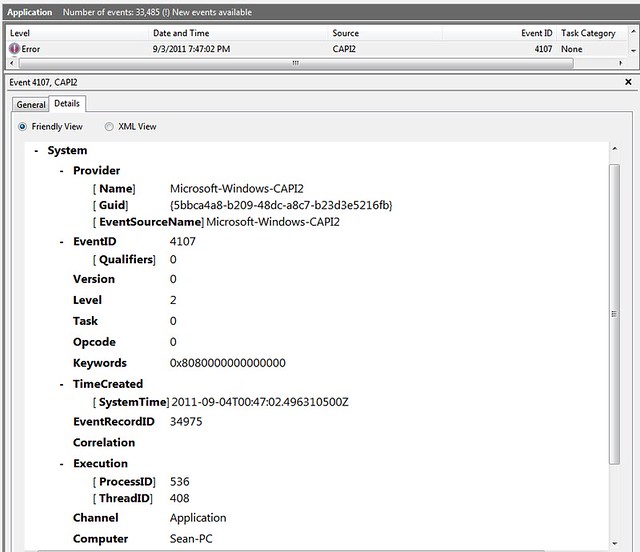
UPDATE: Just had a new BSOD here is the Eventvwr...
I had iTunes open, Google Chrome (Youtube and Facebook), and League of Legends (I wasn't actually playing a game). I think that was about it.

6110335985_5d94be69ed_z.jpg
 

My Computer My Computer

Computer type
PC/Desktop
Computer Manufacturer/Model Number
Custom Build
OS
Windows 7 Ultimate x64
CPU
Intel i7-3770K Ivy Bridge 3.5GHz (3.9GHz Turbo) LGA 1155 77W
Motherboard
Gigabyte Z77-D3H (rev. 1.0)
Memory
CORSAIR Vengeance 16GB (4x4GB) 240-Pin DDR3 1600 (PC3 12800)
Graphics Card(s)
Radeon HD 6970 2GB 256-bit GDDR5
Sound Card
Integrated Audio VIA VT2021 codec
Monitor(s) Displays
Dual (19'' Samsung 1440 x 900 (2ms) SyncMaster Widescreen)
Screen Resolution
Dual (1440x900)
Hard Drives
Windows: Crucial M4 CT128M4SSD2CCA - 128 GB, SATA III MLC Internal Solid State Drive (SSD)

WD Caviar Blue - 500 GB, SATA 3.0 Gb/s, 16 MB Cache, 7200 RPM (WD5000AAKS)
WD Caviar Black - 1 TB, SATA 6.0 Gb/s, 64MB Cache, 7200 RPM (WD1002FAEX)
PSU
CORSAIR HX850 - 80 PLUS GOLD Certified
Case
COOLER MASTER HAF 922
Cooling
COOLER MASTER Hyper 212 Plus
Keyboard
Razer Deathstalker
Mouse
Razer DeathAdder
Antivirus
Microsoft Security Essentials
Browser
Google Chrome
Other Info
Microsoft LifeCam Cinema, A40 Audio System - MLG Edition, M-Audio Bx8 D2's

My Computer My Computer

Computer Manufacturer/Model Number
HP Pavillion dv-7 1005 Tx
OS
Win 8 Release candidate 8400
CPU
[email protected]
Memory
4 gigs
Graphics Card(s)
Nvidia 9600M
Sound Card
HD built-in
Monitor(s) Displays
17" Wxga
Screen Resolution
1440x900
Cooling
none
Internet Speed
45Mb down 5Mb up
UPDATE: Just had a new BSOD here is the Eventvwr...
I had iTunes open, Google Chrome (Youtube and Facebook), and League of Legends (I wasn't actually playing a game). I think that was about it.

6110335985_5d94be69ed_z.jpg

Event ID 4107 is an expired trust certificate. Please go here and run the fix-it. Event ID 4107 or Event ID 11 is logged in the Application log in Windows and in Windows Server

Should I do the Fix it or "let me fix it myself" -- could easily do it, what is your suggestion?
 

My Computer My Computer

Computer type
PC/Desktop
Computer Manufacturer/Model Number
Custom Build
OS
Windows 7 Ultimate x64
CPU
Intel i7-3770K Ivy Bridge 3.5GHz (3.9GHz Turbo) LGA 1155 77W
Motherboard
Gigabyte Z77-D3H (rev. 1.0)
Memory
CORSAIR Vengeance 16GB (4x4GB) 240-Pin DDR3 1600 (PC3 12800)
Graphics Card(s)
Radeon HD 6970 2GB 256-bit GDDR5
Sound Card
Integrated Audio VIA VT2021 codec
Monitor(s) Displays
Dual (19'' Samsung 1440 x 900 (2ms) SyncMaster Widescreen)
Screen Resolution
Dual (1440x900)
Hard Drives
Windows: Crucial M4 CT128M4SSD2CCA - 128 GB, SATA III MLC Internal Solid State Drive (SSD)

WD Caviar Blue - 500 GB, SATA 3.0 Gb/s, 16 MB Cache, 7200 RPM (WD5000AAKS)
WD Caviar Black - 1 TB, SATA 6.0 Gb/s, 64MB Cache, 7200 RPM (WD1002FAEX)
PSU
CORSAIR HX850 - 80 PLUS GOLD Certified
Case
COOLER MASTER HAF 922
Cooling
COOLER MASTER Hyper 212 Plus
Keyboard
Razer Deathstalker
Mouse
Razer DeathAdder
Antivirus
Microsoft Security Essentials
Browser
Google Chrome
Other Info
Microsoft LifeCam Cinema, A40 Audio System - MLG Edition, M-Audio Bx8 D2's
I would just go for the fix it for me option and then save and clear the event logs to see if the error shows up again if it does then try then manual method.
 

My Computer My Computer

Computer Manufacturer/Model Number
Alienware
OS
Windows 7 Ultimate x64
CPU
I7
Motherboard
GA-X58-USB3
Memory
6 x 1.5V DDR3 DIMM sockets supporting up to 24 GB of system
Graphics Card(s)
GeForce GTX 580
Sound Card
Realtek ALC892 codec 2/4/5.1/7.1-channel
Monitor(s) Displays
NEC Display Solutions E321 Black 32"
Screen Resolution
1366 x 768
Hard Drives
OCZ Colossus LT Series OCZSSD2-1CLSLT1T 3.5" 1TB SATA II MLC Internal Solid State Drive
PSU
XFX Black Edition XPS-850W-BES 850W ATX12V
Case
Antec
Cooling
Zalman
Keyboard
Microsoft
Mouse
Microsoft
I did the "Fix it for me" option and everything was successful so hopefully this doesn't happen again.

I will post back if something comes up! Thanks for the help :D
 

My Computer My Computer

Computer type
PC/Desktop
Computer Manufacturer/Model Number
Custom Build
OS
Windows 7 Ultimate x64
CPU
Intel i7-3770K Ivy Bridge 3.5GHz (3.9GHz Turbo) LGA 1155 77W
Motherboard
Gigabyte Z77-D3H (rev. 1.0)
Memory
CORSAIR Vengeance 16GB (4x4GB) 240-Pin DDR3 1600 (PC3 12800)
Graphics Card(s)
Radeon HD 6970 2GB 256-bit GDDR5
Sound Card
Integrated Audio VIA VT2021 codec
Monitor(s) Displays
Dual (19'' Samsung 1440 x 900 (2ms) SyncMaster Widescreen)
Screen Resolution
Dual (1440x900)
Hard Drives
Windows: Crucial M4 CT128M4SSD2CCA - 128 GB, SATA III MLC Internal Solid State Drive (SSD)

WD Caviar Blue - 500 GB, SATA 3.0 Gb/s, 16 MB Cache, 7200 RPM (WD5000AAKS)
WD Caviar Black - 1 TB, SATA 6.0 Gb/s, 64MB Cache, 7200 RPM (WD1002FAEX)
PSU
CORSAIR HX850 - 80 PLUS GOLD Certified
Case
COOLER MASTER HAF 922
Cooling
COOLER MASTER Hyper 212 Plus
Keyboard
Razer Deathstalker
Mouse
Razer DeathAdder
Antivirus
Microsoft Security Essentials
Browser
Google Chrome
Other Info
Microsoft LifeCam Cinema, A40 Audio System - MLG Edition, M-Audio Bx8 D2's
Just got another BSOD when Shutting down my computer

Log Name: System
Source: Microsoft Antimalware
Date: 9/5/2011 3:46:15 PM
Event ID: 3002
Task Category: None
Level: Error
Keywords: Classic
User: N/A
Computer: Sean-PC
Description:
Microsoft Antimalware Real-Time Protection feature has encountered an error and failed.
Feature: Behavior Monitoring
Error Code: 0x80004005
Error description: Unspecified error
Reason: The filter driver requires an up-to-date engine in order to function. You must install the latest definition updates in order to enable real-time protection.
 

My Computer My Computer

Computer type
PC/Desktop
Computer Manufacturer/Model Number
Custom Build
OS
Windows 7 Ultimate x64
CPU
Intel i7-3770K Ivy Bridge 3.5GHz (3.9GHz Turbo) LGA 1155 77W
Motherboard
Gigabyte Z77-D3H (rev. 1.0)
Memory
CORSAIR Vengeance 16GB (4x4GB) 240-Pin DDR3 1600 (PC3 12800)
Graphics Card(s)
Radeon HD 6970 2GB 256-bit GDDR5
Sound Card
Integrated Audio VIA VT2021 codec
Monitor(s) Displays
Dual (19'' Samsung 1440 x 900 (2ms) SyncMaster Widescreen)
Screen Resolution
Dual (1440x900)
Hard Drives
Windows: Crucial M4 CT128M4SSD2CCA - 128 GB, SATA III MLC Internal Solid State Drive (SSD)

WD Caviar Blue - 500 GB, SATA 3.0 Gb/s, 16 MB Cache, 7200 RPM (WD5000AAKS)
WD Caviar Black - 1 TB, SATA 6.0 Gb/s, 64MB Cache, 7200 RPM (WD1002FAEX)
PSU
CORSAIR HX850 - 80 PLUS GOLD Certified
Case
COOLER MASTER HAF 922
Cooling
COOLER MASTER Hyper 212 Plus
Keyboard
Razer Deathstalker
Mouse
Razer DeathAdder
Antivirus
Microsoft Security Essentials
Browser
Google Chrome
Other Info
Microsoft LifeCam Cinema, A40 Audio System - MLG Edition, M-Audio Bx8 D2's
So anyways... I re-installed Windows 7 64bit to a SSD that I got for Christmas and everything has been running pretty smoothly, I don't think I have had any BSOD's since then.. BUT today I have gotten two already... I installed my Radeon 6970 yesterday and it might be the issue. If not please help me out determine what it is and what the heck I need to do.. :|

These two BSOD's happened while WoW was in Windowed mode on my Primary monitor and youtube/facebook on Google Chrome was open on my second monitor.
 

My Computer My Computer

Computer type
PC/Desktop
Computer Manufacturer/Model Number
Custom Build
OS
Windows 7 Ultimate x64
CPU
Intel i7-3770K Ivy Bridge 3.5GHz (3.9GHz Turbo) LGA 1155 77W
Motherboard
Gigabyte Z77-D3H (rev. 1.0)
Memory
CORSAIR Vengeance 16GB (4x4GB) 240-Pin DDR3 1600 (PC3 12800)
Graphics Card(s)
Radeon HD 6970 2GB 256-bit GDDR5
Sound Card
Integrated Audio VIA VT2021 codec
Monitor(s) Displays
Dual (19'' Samsung 1440 x 900 (2ms) SyncMaster Widescreen)
Screen Resolution
Dual (1440x900)
Hard Drives
Windows: Crucial M4 CT128M4SSD2CCA - 128 GB, SATA III MLC Internal Solid State Drive (SSD)

WD Caviar Blue - 500 GB, SATA 3.0 Gb/s, 16 MB Cache, 7200 RPM (WD5000AAKS)
WD Caviar Black - 1 TB, SATA 6.0 Gb/s, 64MB Cache, 7200 RPM (WD1002FAEX)
PSU
CORSAIR HX850 - 80 PLUS GOLD Certified
Case
COOLER MASTER HAF 922
Cooling
COOLER MASTER Hyper 212 Plus
Keyboard
Razer Deathstalker
Mouse
Razer DeathAdder
Antivirus
Microsoft Security Essentials
Browser
Google Chrome
Other Info
Microsoft LifeCam Cinema, A40 Audio System - MLG Edition, M-Audio Bx8 D2's
I do know that I only have a 600watt Power Supply and when most people have this GPU.. they run with like 850w and what not. Let me know if there is a way to test this and figure this out because honestly it might be the issue. It also might NOT be soooo help me figure this out people so I know if I need to return this card or not! Got 60days usually.
 

My Computer My Computer

Computer type
PC/Desktop
Computer Manufacturer/Model Number
Custom Build
OS
Windows 7 Ultimate x64
CPU
Intel i7-3770K Ivy Bridge 3.5GHz (3.9GHz Turbo) LGA 1155 77W
Motherboard
Gigabyte Z77-D3H (rev. 1.0)
Memory
CORSAIR Vengeance 16GB (4x4GB) 240-Pin DDR3 1600 (PC3 12800)
Graphics Card(s)
Radeon HD 6970 2GB 256-bit GDDR5
Sound Card
Integrated Audio VIA VT2021 codec
Monitor(s) Displays
Dual (19'' Samsung 1440 x 900 (2ms) SyncMaster Widescreen)
Screen Resolution
Dual (1440x900)
Hard Drives
Windows: Crucial M4 CT128M4SSD2CCA - 128 GB, SATA III MLC Internal Solid State Drive (SSD)

WD Caviar Blue - 500 GB, SATA 3.0 Gb/s, 16 MB Cache, 7200 RPM (WD5000AAKS)
WD Caviar Black - 1 TB, SATA 6.0 Gb/s, 64MB Cache, 7200 RPM (WD1002FAEX)
PSU
CORSAIR HX850 - 80 PLUS GOLD Certified
Case
COOLER MASTER HAF 922
Cooling
COOLER MASTER Hyper 212 Plus
Keyboard
Razer Deathstalker
Mouse
Razer DeathAdder
Antivirus
Microsoft Security Essentials
Browser
Google Chrome
Other Info
Microsoft LifeCam Cinema, A40 Audio System - MLG Edition, M-Audio Bx8 D2's
Back
Top