MKV and subtitles in WMC - Not working

HDRoadKing

New member
Local time
12:30 PM
Messages
58
Location
Graham, NC
Hi all,

Hoping someone can shed some light on my problem and how to fix it. The issue I'm having is that I am unable to get subtitles working in WMC. Basically I only want them for non-english speaking parts in a movie. Here's my setup:

Win7 Enterprise SP1 (32-bit)
WMC
Media Browser plug-in
CoreAVC video codec
FFShow

I have the MKV file and .sub files in the same folder and they are named the same as well, but I can't get them to display.

Any suggestions?

Thanks in advance,
Mike
 

My Computer My Computer

At a glance

Windows 7 Ultimate x64Core i5 2500K @ 4.6GhzG.SKILL 16GB DDR3eVGA GeForce 465GTX
Computer Manufacturer/Model Number
Custom PC
OS
Windows 7 Ultimate x64
CPU
Core i5 2500K @ 4.6Ghz
Motherboard
ASRock P67 Extreme4 Gen3
Memory
G.SKILL 16GB DDR3
Graphics Card(s)
eVGA GeForce 465GTX
Sound Card
Creative X-Fi Fatality
Monitor(s) Displays
Dual Acer 22" Widescreens
Screen Resolution
3360 X 1050
Hard Drives
1 x Corsair 120GB SSD
2 x 320GB Seagate 7200rpm
RAID 0
PSU
Thermaltake 850 TruPower
Case
Corsair 600T
Cooling
Corsair Hydro Series H70
Mouse
Logitech MX518 Gaming mouse
Internet Speed
Road Runner Turbo 30Mbs

My Computer My Computer

At a glance

Microsoft Windows 7 Home Premium 64-bit 7600IIx4 amd athelon 635 processor2x2gbati radeon HD 5450
Computer Manufacturer/Model Number
Hewlett packard/p6512uk
OS
Microsoft Windows 7 Home Premium 64-bit 7600
CPU
IIx4 amd athelon 635 processor
Motherboard
FOXCONN 2AA9
Memory
2x2gb
Graphics Card(s)
ati radeon HD 5450
Sound Card
(1) Realtek High Definition Audio (2) AMD High Definition
Monitor(s) Displays
samsung lcd tv 32"
Screen Resolution
1360x 768
Hard Drives
(1) WDC WD10 01FAES-60Z2A0 SATA Disk Device (2) Maxtor OneTouch USB Device (3) ST310003 33AS USB Device (4) WD My Book 1111 USB Device
PSU
?
Cooling
air!
Keyboard
wireless hp
Mouse
wireless Hp,optical
Internet Speed
1.10mb/s
Antivirus
MSE
Browser
Firefox
I have no idea why people would suggest using alternate players such as VLC when the question posed is specific to playback in Media Center within the Media Center forum section.

For MKV's with subs to playback in Media Center, uninstall FFDshow (because it is included in the following suggestion), and Install the Win7codecs. If you have a 64bit operating system, you will also need to x64Components addon.

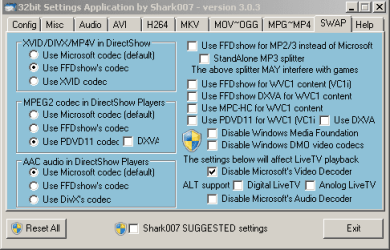
To get the MKV's with subs working in Media Center, disable the Microsoft Video decoder on the SWAP TAB of the Settings Application.
 

My Computer My Computer

At a glance

Windows 7 Ultimate 64biti7 2600k16GB (4x4) corsair vengeanceIntel HD3000 iGPU / AMD HD6870 1024MB
Computer Manufacturer/Model Number
Selfbuilt
OS
Windows 7 Ultimate 64bit
CPU
i7 2600k
Motherboard
asus P8Z68-V LE
Memory
16GB (4x4) corsair vengeance
Graphics Card(s)
Intel HD3000 iGPU / AMD HD6870 1024MB
Sound Card
bitstreamed to an Onkyo 609
Monitor(s) Displays
Asus VE278 27" LED / Bravia EX7 60" LED
Screen Resolution
native 1080p x2
Hard Drives
4x 2TB int. + 2x 2TB external and a SSD for the boot drive.
PSU
650w Antec
Case
NZXT tempest evo
Cooling
air/stock
Keyboard
Dell
Mouse
logitech m505
Internet Speed
dual: cable/blackberry tether for travel use
Other Info
BD re-writer //
asus notebook G73Jw
Thanks for the info shark007, the reason I suggested vlc was as i already stated i have this issue and found a workaround,i did say it doesn't answer the question. now i have the solution and can inform people correctly in future,thanks.
i also use sharks007 codecs
 

My Computer My Computer

At a glance

Microsoft Windows 7 Home Premium 64-bit 7600IIx4 amd athelon 635 processor2x2gbati radeon HD 5450
Computer Manufacturer/Model Number
Hewlett packard/p6512uk
OS
Microsoft Windows 7 Home Premium 64-bit 7600
CPU
IIx4 amd athelon 635 processor
Motherboard
FOXCONN 2AA9
Memory
2x2gb
Graphics Card(s)
ati radeon HD 5450
Sound Card
(1) Realtek High Definition Audio (2) AMD High Definition
Monitor(s) Displays
samsung lcd tv 32"
Screen Resolution
1360x 768
Hard Drives
(1) WDC WD10 01FAES-60Z2A0 SATA Disk Device (2) Maxtor OneTouch USB Device (3) ST310003 33AS USB Device (4) WD My Book 1111 USB Device
PSU
?
Cooling
air!
Keyboard
wireless hp
Mouse
wireless Hp,optical
Internet Speed
1.10mb/s
Antivirus
MSE
Browser
Firefox
Thanks Shark! One question though, will installing this codec have any impact on CoreAVC? The only reason I ask, is that my HTPC is running on an Atom board and without CoreAVC offloading the processing to the GPU using CUDA, MKV's stutter horribly.
 

My Computer My Computer

At a glance

Windows 7 Ultimate x64Core i5 2500K @ 4.6GhzG.SKILL 16GB DDR3eVGA GeForce 465GTX
Computer Manufacturer/Model Number
Custom PC
OS
Windows 7 Ultimate x64
CPU
Core i5 2500K @ 4.6Ghz
Motherboard
ASRock P67 Extreme4 Gen3
Memory
G.SKILL 16GB DDR3
Graphics Card(s)
eVGA GeForce 465GTX
Sound Card
Creative X-Fi Fatality
Monitor(s) Displays
Dual Acer 22" Widescreens
Screen Resolution
3360 X 1050
Hard Drives
1 x Corsair 120GB SSD
2 x 320GB Seagate 7200rpm
RAID 0
PSU
Thermaltake 850 TruPower
Case
Corsair 600T
Cooling
Corsair Hydro Series H70
Mouse
Logitech MX518 Gaming mouse
Internet Speed
Road Runner Turbo 30Mbs
Uninstall CoreAVC and Haali (before installing my codecs)
On the H264 TAB, select LAVCUVID, this also uses CUDA.
IMO, CoreAVC is a waste of money these days. (poorest support on the planet)

If the subs do not work woth LAVCUVID, give ffdshow dxva a try on the H264 tab.
 

My Computer My Computer

At a glance

Windows 7 Ultimate 64biti7 2600k16GB (4x4) corsair vengeanceIntel HD3000 iGPU / AMD HD6870 1024MB
Computer Manufacturer/Model Number
Selfbuilt
OS
Windows 7 Ultimate 64bit
CPU
i7 2600k
Motherboard
asus P8Z68-V LE
Memory
16GB (4x4) corsair vengeance
Graphics Card(s)
Intel HD3000 iGPU / AMD HD6870 1024MB
Sound Card
bitstreamed to an Onkyo 609
Monitor(s) Displays
Asus VE278 27" LED / Bravia EX7 60" LED
Screen Resolution
native 1080p x2
Hard Drives
4x 2TB int. + 2x 2TB external and a SSD for the boot drive.
PSU
650w Antec
Case
NZXT tempest evo
Cooling
air/stock
Keyboard
Dell
Mouse
logitech m505
Internet Speed
dual: cable/blackberry tether for travel use
Other Info
BD re-writer //
asus notebook G73Jw
I'll give that a try and let you know how it goes.

Many thanks for your help so far!
 

My Computer My Computer

At a glance

Windows 7 Ultimate x64Core i5 2500K @ 4.6GhzG.SKILL 16GB DDR3eVGA GeForce 465GTX
Computer Manufacturer/Model Number
Custom PC
OS
Windows 7 Ultimate x64
CPU
Core i5 2500K @ 4.6Ghz
Motherboard
ASRock P67 Extreme4 Gen3
Memory
G.SKILL 16GB DDR3
Graphics Card(s)
eVGA GeForce 465GTX
Sound Card
Creative X-Fi Fatality
Monitor(s) Displays
Dual Acer 22" Widescreens
Screen Resolution
3360 X 1050
Hard Drives
1 x Corsair 120GB SSD
2 x 320GB Seagate 7200rpm
RAID 0
PSU
Thermaltake 850 TruPower
Case
Corsair 600T
Cooling
Corsair Hydro Series H70
Mouse
Logitech MX518 Gaming mouse
Internet Speed
Road Runner Turbo 30Mbs
Uninstall CoreAVC and Haali (before installing my codecs)
On the H264 TAB, select LAVCUVID, this also uses CUDA.
IMO, CoreAVC is a waste of money these days. (poorest support on the planet)

If the subs do not work woth LAVCUVID, give ffdshow dxva a try on the H264 tab.


No joy :(

I tried with both LAVCUVID and ffdshow dxva and still no subtitles either in WMC or just in WMP. I did as you suggested and removed both CoreAVC, ffdshow and Haali prior to installing your codec pack.

There is literally nothing else on this HTPC, just the OS, drivers, MediaBrowser add-on and your codec pack.

Any other thoughts?
 

My Computer My Computer

At a glance

Windows 7 Ultimate x64Core i5 2500K @ 4.6GhzG.SKILL 16GB DDR3eVGA GeForce 465GTX
Computer Manufacturer/Model Number
Custom PC
OS
Windows 7 Ultimate x64
CPU
Core i5 2500K @ 4.6Ghz
Motherboard
ASRock P67 Extreme4 Gen3
Memory
G.SKILL 16GB DDR3
Graphics Card(s)
eVGA GeForce 465GTX
Sound Card
Creative X-Fi Fatality
Monitor(s) Displays
Dual Acer 22" Widescreens
Screen Resolution
3360 X 1050
Hard Drives
1 x Corsair 120GB SSD
2 x 320GB Seagate 7200rpm
RAID 0
PSU
Thermaltake 850 TruPower
Case
Corsair 600T
Cooling
Corsair Hydro Series H70
Mouse
Logitech MX518 Gaming mouse
Internet Speed
Road Runner Turbo 30Mbs
for some people, disabling UAC (User Account Control) can cause these problems.
If you had disabled UAC I suggest you...

1. uninstall the codecs
2. set UAC to the 'Default' setting, re-boot the computer
3. re-install the codecs (edit, use the button on the Help TAB to associate MKV's with the Windows players) and apply the settings previously suggested
 

My Computer My Computer

At a glance

Windows 7 Ultimate 64biti7 2600k16GB (4x4) corsair vengeanceIntel HD3000 iGPU / AMD HD6870 1024MB
Computer Manufacturer/Model Number
Selfbuilt
OS
Windows 7 Ultimate 64bit
CPU
i7 2600k
Motherboard
asus P8Z68-V LE
Memory
16GB (4x4) corsair vengeance
Graphics Card(s)
Intel HD3000 iGPU / AMD HD6870 1024MB
Sound Card
bitstreamed to an Onkyo 609
Monitor(s) Displays
Asus VE278 27" LED / Bravia EX7 60" LED
Screen Resolution
native 1080p x2
Hard Drives
4x 2TB int. + 2x 2TB external and a SSD for the boot drive.
PSU
650w Antec
Case
NZXT tempest evo
Cooling
air/stock
Keyboard
Dell
Mouse
logitech m505
Internet Speed
dual: cable/blackberry tether for travel use
Other Info
BD re-writer //
asus notebook G73Jw
for some people, disabling UAC (User Account Control) can cause these problems.
If you had disabled UAC I suggest you...

1. uninstall the codecs
2. set UAC to the 'Default' setting, re-boot the computer
3. re-install the codecs (edit, use the button on the Help TAB to associate MKV's with the Windows players) and apply the settings previously suggested


Sorry, still no luck. Here are screenshots of the settings just in case I've missed something.
 

Attachments

  • Capture1.PNG
    Capture1.PNG
    8.3 KB · Views: 55
  • Capture2.PNG
    Capture2.PNG
    7.4 KB · Views: 47

My Computer My Computer

At a glance

Windows 7 Ultimate x64Core i5 2500K @ 4.6GhzG.SKILL 16GB DDR3eVGA GeForce 465GTX
Computer Manufacturer/Model Number
Custom PC
OS
Windows 7 Ultimate x64
CPU
Core i5 2500K @ 4.6Ghz
Motherboard
ASRock P67 Extreme4 Gen3
Memory
G.SKILL 16GB DDR3
Graphics Card(s)
eVGA GeForce 465GTX
Sound Card
Creative X-Fi Fatality
Monitor(s) Displays
Dual Acer 22" Widescreens
Screen Resolution
3360 X 1050
Hard Drives
1 x Corsair 120GB SSD
2 x 320GB Seagate 7200rpm
RAID 0
PSU
Thermaltake 850 TruPower
Case
Corsair 600T
Cooling
Corsair Hydro Series H70
Mouse
Logitech MX518 Gaming mouse
Internet Speed
Road Runner Turbo 30Mbs
do you get playback... without subs?
if so, try the ffdshow dxva decoder on the H264 TAB

also, some mkv's contain wvc1 video (instead of h264) in which case you need to set ffdshow for wvc1 on the SWAP TAB
 

My Computer My Computer

At a glance

Windows 7 Ultimate 64biti7 2600k16GB (4x4) corsair vengeanceIntel HD3000 iGPU / AMD HD6870 1024MB
Computer Manufacturer/Model Number
Selfbuilt
OS
Windows 7 Ultimate 64bit
CPU
i7 2600k
Motherboard
asus P8Z68-V LE
Memory
16GB (4x4) corsair vengeance
Graphics Card(s)
Intel HD3000 iGPU / AMD HD6870 1024MB
Sound Card
bitstreamed to an Onkyo 609
Monitor(s) Displays
Asus VE278 27" LED / Bravia EX7 60" LED
Screen Resolution
native 1080p x2
Hard Drives
4x 2TB int. + 2x 2TB external and a SSD for the boot drive.
PSU
650w Antec
Case
NZXT tempest evo
Cooling
air/stock
Keyboard
Dell
Mouse
logitech m505
Internet Speed
dual: cable/blackberry tether for travel use
Other Info
BD re-writer //
asus notebook G73Jw
With all the settings changes, the video always plays. Just no subtitles. I've tried the new settings you suggested and still no subs, both trying in WMC and WMP.
 

My Computer My Computer

At a glance

Windows 7 Ultimate x64Core i5 2500K @ 4.6GhzG.SKILL 16GB DDR3eVGA GeForce 465GTX
Computer Manufacturer/Model Number
Custom PC
OS
Windows 7 Ultimate x64
CPU
Core i5 2500K @ 4.6Ghz
Motherboard
ASRock P67 Extreme4 Gen3
Memory
G.SKILL 16GB DDR3
Graphics Card(s)
eVGA GeForce 465GTX
Sound Card
Creative X-Fi Fatality
Monitor(s) Displays
Dual Acer 22" Widescreens
Screen Resolution
3360 X 1050
Hard Drives
1 x Corsair 120GB SSD
2 x 320GB Seagate 7200rpm
RAID 0
PSU
Thermaltake 850 TruPower
Case
Corsair 600T
Cooling
Corsair Hydro Series H70
Mouse
Logitech MX518 Gaming mouse
Internet Speed
Road Runner Turbo 30Mbs
I'm guessing there is something wrong with the subtitle file itself.
open it in notepad, it should look similar to the following:
{82}{135}Ragesh 3|Centauri Tarým Kolonisi
{140}{185}Dünya Saati ile 10:00
{305}{365}Nöbetçi Subay Ayla|nöbeti devralýyor.
{370}{412}Gidebilirsin.
{453}{565}Dur. Olaðan dýþý bir durum var.|Yerini tespit edeceðim.
{600}{658}Sektör 3'te|atlama noktasý oluþuyor.
{662}{712}Büyük Yaratýcý adýna.
{795}{820}Mayýnlar aktif!
 

My Computer My Computer

At a glance

Windows 7 Ultimate 64biti7 2600k16GB (4x4) corsair vengeanceIntel HD3000 iGPU / AMD HD6870 1024MB
Computer Manufacturer/Model Number
Selfbuilt
OS
Windows 7 Ultimate 64bit
CPU
i7 2600k
Motherboard
asus P8Z68-V LE
Memory
16GB (4x4) corsair vengeance
Graphics Card(s)
Intel HD3000 iGPU / AMD HD6870 1024MB
Sound Card
bitstreamed to an Onkyo 609
Monitor(s) Displays
Asus VE278 27" LED / Bravia EX7 60" LED
Screen Resolution
native 1080p x2
Hard Drives
4x 2TB int. + 2x 2TB external and a SSD for the boot drive.
PSU
650w Antec
Case
NZXT tempest evo
Cooling
air/stock
Keyboard
Dell
Mouse
logitech m505
Internet Speed
dual: cable/blackberry tether for travel use
Other Info
BD re-writer //
asus notebook G73Jw
Well, I'm not sure exactly what was the problem, but I decided to just to a complete re-install on my HTPC just in case some old codecs or something was causing the problem.

Now that I have everything installed again (clean OS with just drivers and Shark007 codec pack) I've started testing again.

Good news: Subtitles are working in movies. Tried an MKV (with the associated .srt file) and subtitles work great both in Media player and WMC.

Bad news: Subtitles are on all the time! I know I can turn them off by right clicking the FFDShow icon in the systray and un-checking subtitles, but this is a HTPC with no mouse or keyboard and boots straight into WMC.

Please tell me there's an easy way to toggle subtitles on and off in WMC or with the remote.

Thanks again for any help!
Mike
 

My Computer My Computer

At a glance

Windows 7 Ultimate x64Core i5 2500K @ 4.6GhzG.SKILL 16GB DDR3eVGA GeForce 465GTX
Computer Manufacturer/Model Number
Custom PC
OS
Windows 7 Ultimate x64
CPU
Core i5 2500K @ 4.6Ghz
Motherboard
ASRock P67 Extreme4 Gen3
Memory
G.SKILL 16GB DDR3
Graphics Card(s)
eVGA GeForce 465GTX
Sound Card
Creative X-Fi Fatality
Monitor(s) Displays
Dual Acer 22" Widescreens
Screen Resolution
3360 X 1050
Hard Drives
1 x Corsair 120GB SSD
2 x 320GB Seagate 7200rpm
RAID 0
PSU
Thermaltake 850 TruPower
Case
Corsair 600T
Cooling
Corsair Hydro Series H70
Mouse
Logitech MX518 Gaming mouse
Internet Speed
Road Runner Turbo 30Mbs
When adding subtitles to BD format I use MkvToolnix: run mmg.exe (GUI for MkvMerge) and mux the subtitle in with "Export only forced". This forces subtitles only for foreign language segments.
 

My Computer My Computer

At a glance

Windows 7x64 Home Premium SP1Intel i7 2600kG.Skill Ripjaws (DDR3-1600) 2x4GBNvidia GeForce GTS 450; Intel HD Graphics 300...
Computer type
PC/Desktop
Computer Manufacturer/Model Number
Own build
OS
Windows 7x64 Home Premium SP1
CPU
Intel i7 2600k
Motherboard
ASUS P8Z68 Deluxe
Memory
G.Skill Ripjaws (DDR3-1600) 2x4GB
Graphics Card(s)
Nvidia GeForce GTS 450; Intel HD Graphics 3000(GT2+)
Monitor(s) Displays
Dell Ultrasharp IPS panel U2311H, Samsung SyncMaster P2350
Screen Resolution
1920x1080
Hard Drives
Samsung 850 Pro SSD 256GB, Samsung SSD 840 120GB, Seagates 1TB Barracuda ST31000528AS x2
PSU
Seasonic M12II 520W
Case
Lian Li Lancool PC-K60
Cooling
Case: 1x120mm, 3x140mm CPU: Hyper 212+
Keyboard
Logitech MK520 (wireless)
Mouse
Logitech MK520
Internet Speed
6-7 Mbps
Antivirus
Norton Security Premium, Malwarebytes on 2 (MSE on 3rd PC)
Browser
FireFox
Other Info
Audio: Logitech Z523 2.1
Please tell me there's an easy way to toggle subtitles on and off in WMC or with the remote.

Thanks again for any help!
Mike

download and use Media Control (http://damienbt.free. fr/index.php - remove the space before fr/index.php)
also, get the x64 version when you have an x64 operating system.

Be sure a video is playing, and using ffdshow for decoding, (icons in the sytem tray) before accessing the Media Control configurations. An important setting is 'apply minimal ffdshow settings' or something worded close to that.
 
Last edited:

My Computer My Computer

At a glance

Windows 7 Ultimate 64biti7 2600k16GB (4x4) corsair vengeanceIntel HD3000 iGPU / AMD HD6870 1024MB
Computer Manufacturer/Model Number
Selfbuilt
OS
Windows 7 Ultimate 64bit
CPU
i7 2600k
Motherboard
asus P8Z68-V LE
Memory
16GB (4x4) corsair vengeance
Graphics Card(s)
Intel HD3000 iGPU / AMD HD6870 1024MB
Sound Card
bitstreamed to an Onkyo 609
Monitor(s) Displays
Asus VE278 27" LED / Bravia EX7 60" LED
Screen Resolution
native 1080p x2
Hard Drives
4x 2TB int. + 2x 2TB external and a SSD for the boot drive.
PSU
650w Antec
Case
NZXT tempest evo
Cooling
air/stock
Keyboard
Dell
Mouse
logitech m505
Internet Speed
dual: cable/blackberry tether for travel use
Other Info
BD re-writer //
asus notebook G73Jw
Shark007 you were right on the money. Media Control was just what I needed! Now I can turn on and off subs with my remote :D

All your help with this is greatly appreciated sir!

Mike
 

My Computer My Computer

At a glance

Windows 7 Ultimate x64Core i5 2500K @ 4.6GhzG.SKILL 16GB DDR3eVGA GeForce 465GTX
Computer Manufacturer/Model Number
Custom PC
OS
Windows 7 Ultimate x64
CPU
Core i5 2500K @ 4.6Ghz
Motherboard
ASRock P67 Extreme4 Gen3
Memory
G.SKILL 16GB DDR3
Graphics Card(s)
eVGA GeForce 465GTX
Sound Card
Creative X-Fi Fatality
Monitor(s) Displays
Dual Acer 22" Widescreens
Screen Resolution
3360 X 1050
Hard Drives
1 x Corsair 120GB SSD
2 x 320GB Seagate 7200rpm
RAID 0
PSU
Thermaltake 850 TruPower
Case
Corsair 600T
Cooling
Corsair Hydro Series H70
Mouse
Logitech MX518 Gaming mouse
Internet Speed
Road Runner Turbo 30Mbs
One last issue that just cropped up though. The subtitles come back even after I've shut them off. For example, I start a movie, disable the subtitles. Then if I start it where I left off the subtitles are back even if I've never restarted WMC.

Is there any way to just set it to have no subtitles shown except the forced ones for non-english dialog by default?
 

My Computer My Computer

At a glance

Windows 7 Ultimate x64Core i5 2500K @ 4.6GhzG.SKILL 16GB DDR3eVGA GeForce 465GTX
Computer Manufacturer/Model Number
Custom PC
OS
Windows 7 Ultimate x64
CPU
Core i5 2500K @ 4.6Ghz
Motherboard
ASRock P67 Extreme4 Gen3
Memory
G.SKILL 16GB DDR3
Graphics Card(s)
eVGA GeForce 465GTX
Sound Card
Creative X-Fi Fatality
Monitor(s) Displays
Dual Acer 22" Widescreens
Screen Resolution
3360 X 1050
Hard Drives
1 x Corsair 120GB SSD
2 x 320GB Seagate 7200rpm
RAID 0
PSU
Thermaltake 850 TruPower
Case
Corsair 600T
Cooling
Corsair Hydro Series H70
Mouse
Logitech MX518 Gaming mouse
Internet Speed
Road Runner Turbo 30Mbs
Is there any way to just set it to have no subtitles shown except the forced ones for non-english dialog by default?

google is your friend.
search for, download, and use, subtitle files that only contain the forced subs in the language you wish.
this way, you can just leave them on
 

My Computer My Computer

At a glance

Windows 7 Ultimate 64biti7 2600k16GB (4x4) corsair vengeanceIntel HD3000 iGPU / AMD HD6870 1024MB
Computer Manufacturer/Model Number
Selfbuilt
OS
Windows 7 Ultimate 64bit
CPU
i7 2600k
Motherboard
asus P8Z68-V LE
Memory
16GB (4x4) corsair vengeance
Graphics Card(s)
Intel HD3000 iGPU / AMD HD6870 1024MB
Sound Card
bitstreamed to an Onkyo 609
Monitor(s) Displays
Asus VE278 27" LED / Bravia EX7 60" LED
Screen Resolution
native 1080p x2
Hard Drives
4x 2TB int. + 2x 2TB external and a SSD for the boot drive.
PSU
650w Antec
Case
NZXT tempest evo
Cooling
air/stock
Keyboard
Dell
Mouse
logitech m505
Internet Speed
dual: cable/blackberry tether for travel use
Other Info
BD re-writer //
asus notebook G73Jw
Back
Top