Solved Acer Aspire One Happy Android Dual-boot

CrystalizeD

New member
Local time
12:54 AM
Messages
6
When I turn on my acer aspire one, it first boots on Android. Android was its main operating system. In Android, there is a button to switch to Windows. I rarely use Android and I wanted to make Windows to be booted first. I saw this option in 'msconfig' and I changed it. It worked! Now, whenever I turn on, Windows boots up first. But now, I wanted to use Android but I cannot see the option on msconfig again :( .

How do I boot Android now?
 

My Computer My Computer

At a glance

Windows 7 Ultimate 32 bitIntel Atom N550 1.50Ghz2048 MBIntel GMA 3150
Computer Manufacturer/Model Number
Acer AOHAPPY
OS
Windows 7 Ultimate 32 bit
CPU
Intel Atom N550 1.50Ghz
Memory
2048 MB
Graphics Card(s)
Intel GMA 3150
Sound Card
Realtek High Definition Audio
Screen Resolution
1024 x 600
We always assume you have made your Recovery Disks using the OEM manufacturer's app the first day you had your new PC.
& made the Startup Repair CD.

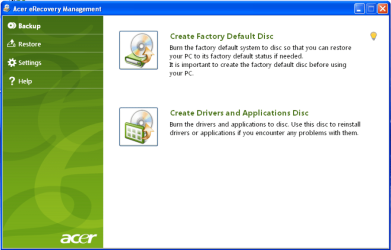
Take a look in eRcovery, there may be a option to reset boot for Android.

Acer001.PNG


You can Order Acer recovery disks from here:
https://secure.tx.acer.com/RCDB/Main.aspx?brand=acer
 

My Computer My Computer

At a glance

ME/XP/Vista/Win7
OS
ME/XP/Vista/Win7
Right click Computer, select Properties, then Advanced Options, then Startup options.

See if Android appears in the dropdown menu. If so, tick the box to show OS menu at boot for 10-30 seconds.
 
Thanks for the replies! :)

No. Android doesn't show up in the drop-down menu. :(

Nevermind. :) Now I just want to know how to choose which operating system is to be booted in the startup. :) Please help

Edit:
Hi theog!

I cant find my recovery disk :(
 

My Computer My Computer

At a glance

Windows 7 Ultimate 32 bitIntel Atom N550 1.50Ghz2048 MBIntel GMA 3150
Computer Manufacturer/Model Number
Acer AOHAPPY
OS
Windows 7 Ultimate 32 bit
CPU
Intel Atom N550 1.50Ghz
Memory
2048 MB
Graphics Card(s)
Intel GMA 3150
Sound Card
Realtek High Definition Audio
Screen Resolution
1024 x 600
What operating system should I add? (Windows, Linux/BSD, Mac, and NeoGrub)
There is no Android :(
 

My Computer My Computer

At a glance

Windows 7 Ultimate 32 bitIntel Atom N550 1.50Ghz2048 MBIntel GMA 3150
Computer Manufacturer/Model Number
Acer AOHAPPY
OS
Windows 7 Ultimate 32 bit
CPU
Intel Atom N550 1.50Ghz
Memory
2048 MB
Graphics Card(s)
Intel GMA 3150
Sound Card
Realtek High Definition Audio
Screen Resolution
1024 x 600
Thanks for the replies! :)

No. Android doesn't show up in the drop-down menu. :(

Nevermind. :) Now I just want to know how to choose which operating system is to be booted in the startup. :) Please help

Edit:
Hi theog!

I cant find my recovery disk :(

Acer Empowering Technology > Acer eRecovery Management.
Acer Support - Answers, E-Mail, Chat - How can I restore my computer with the backup discs I created?

Manual how to use Acer eRecovery Management here:
ftp://ftp.support.acer-euro.com/not...s guide/Acer eRecovery Management English.pdf


You can Order Acer recovery disks from here:
https://secure.tx.acer.com/RCDB/Main.aspx?brand=acer
 

My Computer My Computer

At a glance

ME/XP/Vista/Win7
OS
ME/XP/Vista/Win7
I think you're going to have to call Acer Tech support to find out how to restore the Android Dual Boot.

There isn't anything readily available on the web to answer the problem, and apparently EasyBCD hasn't caught up with Android yet - although there is a Linux tab to check out since Android is Linux-based.

The fact that it's Linux might even mean it requires GRUB bootloader but I would want to check with Acer first before imposing GRUB on Win7 as it can corrupt it beyond repair.

Please let us know what you find out so it can help others. Someone may still chime in here with the solution, but I would remove the Solved flag at the top of the thread.
 
In Windows, click Start button, click on All Programs and look for Acer.
Under Acer (or possibly as stand alone) you may have "Acer Configuration Manager for Android(TM)". If yes, launch it.
The first tab, Boot Options, will have "Select the system you want ot use to boot your computer" - Windows or Android.
Change it to Android.
Hope you can find "Acer Configuration Manager for Android(TM)" still being on your HDD.
rgds
 

My Computer My Computer

At a glance

Windows 7 Home Premium
OS
Windows 7 Home Premium
...

You said that there is a button to change it to Windows,how can I get to this button. (I amwanting to convert my Android to windows. Please reply, thanks. :sarc:
 

My Computer My Computer

At a glance

Windows 7 Home Premium 32bit
OS
Windows 7 Home Premium 32bit
Back
Top