Solved SSD space is disappearing. Troublshooted almost everything already.

I think they are rolled up into one under the "Junk Files Cleaner" in the free version.

Found it, thanks.

All items found are tiny-- half a MB or less for most of them.
 

My Computer My Computer

At a glance

Windows 7 Professional 64 bitIntel i5-2500k2 x 4GB G-Skill ripsawGeForce Evga 460 1GB
OS
Windows 7 Professional 64 bit
CPU
Intel i5-2500k
Motherboard
ASrock p67 extreme 4
Memory
2 x 4GB G-Skill ripsaw
Graphics Card(s)
GeForce Evga 460 1GB
Hard Drives
Crucial M4 SSD 64GB &
Samsung SATA III 1TB
PSU
Corsair 650TX
Cooling
Cooler Master N520
Ok guys. I'll point you to a valuable tool in such cases:

RESMON.EXE
 

My Computer My Computer

At a glance

MS Windows 7 Ultimate SP1 64-bitAMD A10-4600M6.00 GB Dual-Channel DDR3 @ 798MHz (11-11-12-28)AMD Radeon HD 7660G
Computer Manufacturer/Model Number
Toshiba Satellite S875D-S7239 laptop
OS
MS Windows 7 Ultimate SP1 64-bit
CPU
AMD A10-4600M
Motherboard
AMD Pumori (Socket FT1)
Memory
6.00 GB Dual-Channel DDR3 @ 798MHz (11-11-12-28)
Graphics Card(s)
AMD Radeon HD 7660G
Sound Card
High Definition Audio Device
Monitor(s) Displays
Generic PnP Monitor (1600x900@60Hz)
Screen Resolution
1600x900@60Hz
Hard Drives
SSD 119GB Corsair CSSD-V128GB2 ATA Device
Keyboard
Standard PS/2 Keyboard
Mouse
HP Wireless Optical Mobile Mouse Model FHA-3410
Internet Speed
What the local pub, local coffee shop offers.
Other Info
Optical Drive:MATSHITA BD-CMB UJ160B ATA Device


Also have an Asus ha1002xp netbook with Win 7 Ultimate installed.

My Computer My Computer

At a glance

Windows 7 Professional 64 bitIntel i5-2500k2 x 4GB G-Skill ripsawGeForce Evga 460 1GB
OS
Windows 7 Professional 64 bit
CPU
Intel i5-2500k
Motherboard
ASrock p67 extreme 4
Memory
2 x 4GB G-Skill ripsaw
Graphics Card(s)
GeForce Evga 460 1GB
Hard Drives
Crucial M4 SSD 64GB &
Samsung SATA III 1TB
PSU
Corsair 650TX
Cooling
Cooler Master N520
It will also puree
 

My Computer My Computer

At a glance

MS Windows 7 Ultimate SP1 64-bitAMD A10-4600M6.00 GB Dual-Channel DDR3 @ 798MHz (11-11-12-28)AMD Radeon HD 7660G
Computer Manufacturer/Model Number
Toshiba Satellite S875D-S7239 laptop
OS
MS Windows 7 Ultimate SP1 64-bit
CPU
AMD A10-4600M
Motherboard
AMD Pumori (Socket FT1)
Memory
6.00 GB Dual-Channel DDR3 @ 798MHz (11-11-12-28)
Graphics Card(s)
AMD Radeon HD 7660G
Sound Card
High Definition Audio Device
Monitor(s) Displays
Generic PnP Monitor (1600x900@60Hz)
Screen Resolution
1600x900@60Hz
Hard Drives
SSD 119GB Corsair CSSD-V128GB2 ATA Device
Keyboard
Standard PS/2 Keyboard
Mouse
HP Wireless Optical Mobile Mouse Model FHA-3410
Internet Speed
What the local pub, local coffee shop offers.
Other Info
Optical Drive:MATSHITA BD-CMB UJ160B ATA Device


Also have an Asus ha1002xp netbook with Win 7 Ultimate installed.
How can I get it to do such things?
 

My Computer My Computer

At a glance

Windows 7 Professional 64 bitIntel i5-2500k2 x 4GB G-Skill ripsawGeForce Evga 460 1GB
OS
Windows 7 Professional 64 bit
CPU
Intel i5-2500k
Motherboard
ASrock p67 extreme 4
Memory
2 x 4GB G-Skill ripsaw
Graphics Card(s)
GeForce Evga 460 1GB
Hard Drives
Crucial M4 SSD 64GB &
Samsung SATA III 1TB
PSU
Corsair 650TX
Cooling
Cooler Master N520
Go to basic cooking school: WIN + F1 key combo | type Resource Monitor

WIN is the key with the microsoft flag on top.
 

My Computer My Computer

At a glance

MS Windows 7 Ultimate SP1 64-bitAMD A10-4600M6.00 GB Dual-Channel DDR3 @ 798MHz (11-11-12-28)AMD Radeon HD 7660G
Computer Manufacturer/Model Number
Toshiba Satellite S875D-S7239 laptop
OS
MS Windows 7 Ultimate SP1 64-bit
CPU
AMD A10-4600M
Motherboard
AMD Pumori (Socket FT1)
Memory
6.00 GB Dual-Channel DDR3 @ 798MHz (11-11-12-28)
Graphics Card(s)
AMD Radeon HD 7660G
Sound Card
High Definition Audio Device
Monitor(s) Displays
Generic PnP Monitor (1600x900@60Hz)
Screen Resolution
1600x900@60Hz
Hard Drives
SSD 119GB Corsair CSSD-V128GB2 ATA Device
Keyboard
Standard PS/2 Keyboard
Mouse
HP Wireless Optical Mobile Mouse Model FHA-3410
Internet Speed
What the local pub, local coffee shop offers.
Other Info
Optical Drive:MATSHITA BD-CMB UJ160B ATA Device


Also have an Asus ha1002xp netbook with Win 7 Ultimate installed.
Go to basic cooking school: WIN + F1 key combo | type Resource Monitor

WIN is the key with the microsoft flag on top.

Someone from my other forum suggested I open it up as well, but never got around to getting back to me as to using it.

When I have it open, what am I looking for? This was the part I was referring to. Getting it open was within my limited skill :).
 

My Computer My Computer

At a glance

Windows 7 Professional 64 bitIntel i5-2500k2 x 4GB G-Skill ripsawGeForce Evga 460 1GB
OS
Windows 7 Professional 64 bit
CPU
Intel i5-2500k
Motherboard
ASrock p67 extreme 4
Memory
2 x 4GB G-Skill ripsaw
Graphics Card(s)
GeForce Evga 460 1GB
Hard Drives
Crucial M4 SSD 64GB &
Samsung SATA III 1TB
PSU
Corsair 650TX
Cooling
Cooler Master N520
Knowledge, my friend, Knowledge!
 

My Computer My Computer

At a glance

MS Windows 7 Ultimate SP1 64-bitAMD A10-4600M6.00 GB Dual-Channel DDR3 @ 798MHz (11-11-12-28)AMD Radeon HD 7660G
Computer Manufacturer/Model Number
Toshiba Satellite S875D-S7239 laptop
OS
MS Windows 7 Ultimate SP1 64-bit
CPU
AMD A10-4600M
Motherboard
AMD Pumori (Socket FT1)
Memory
6.00 GB Dual-Channel DDR3 @ 798MHz (11-11-12-28)
Graphics Card(s)
AMD Radeon HD 7660G
Sound Card
High Definition Audio Device
Monitor(s) Displays
Generic PnP Monitor (1600x900@60Hz)
Screen Resolution
1600x900@60Hz
Hard Drives
SSD 119GB Corsair CSSD-V128GB2 ATA Device
Keyboard
Standard PS/2 Keyboard
Mouse
HP Wireless Optical Mobile Mouse Model FHA-3410
Internet Speed
What the local pub, local coffee shop offers.
Other Info
Optical Drive:MATSHITA BD-CMB UJ160B ATA Device


Also have an Asus ha1002xp netbook with Win 7 Ultimate installed.
Hello SNsCPU, can you confirm that you have trim enabled?

To enable TRIM, start a Command Prompt window (in Administrator mode, type “CMD” in the Search bar from the Windows Start Menu) and
enter the following command:fsutil behavior set disabledeletenotify 0


How do I know if TRIM is working in Windows 7?[/size]

To check if trim is working open the Elevated command Prompt window, type the following: fsutil behavior query disabledeletenotify

Results explained below:
DisableDeleteNotify = 1 (Windows TRIM commands are disabled)
DisableDeleteNotify = 0 (Windows TRIM commands are enabled)

When windows deletes files on a SSD they are marked for deletion but not actually deleted until trim does its job, this is not a problem for windows as it knows that the files have been marked for deletion. When another program looks at your SSD it may see the undeleted files and misreport the space and this is what I believe is happening here.

With trim enabled log off and leave the PC alone for approximately 2 hours the first time and thereafter one hour a week This will give the trim command time to work and free up the space on your SSD.

Even with trim working, because of the way it deletes blocks on the drive there will always be some unerased cells on the drive.

Have a look here for a more complete explanation; How to Enable TRIM Support for Your SSD « Corsair® Blog

 
Last edited:

My Computer My Computer

At a glance

Windows 7 Ultimate x64Intel Core i7-2600K16 GB G Skill F3-10666 CL9D-4GBRLATI Radeon HD 6870
Computer Manufacturer/Model Number
Something I threw together
OS
Windows 7 Ultimate x64
CPU
Intel Core i7-2600K
Motherboard
Asus P8P67
Memory
16 GB G Skill F3-10666 CL9D-4GBRL
Graphics Card(s)
ATI Radeon HD 6870
Sound Card
ATI Radeon HDMI / Realtek ALC892
Monitor(s) Displays
2 x 22" standard monitors / LG32LC56v TV to watch films
Screen Resolution
1920 x1080
Hard Drives
2 x OCZ Vertex2 111.79GB
3 x Samsung103SJ
1 x Samsung103UJ
1 x WD3200BEVT
1 x Hitachi5K320-160
PSU
Thermaltake Toughpower Cable Management 750W
Case
Antec 300
Cooling
Noctua NH-U12P SE2 and 5 120mm Case fans
Keyboard
Microsoft Comfort Curve Keyboard 2000
Mouse
Hama M3110 / Logitech M305
Internet Speed
16000
Other Info
I have also used Fedora, Suse, Ubuntu Linux
And all other Windows from 95 to date except ME
Hello SNsCPU, can you confirm that you have trim enabled?

To enable TRIM, start a Command Prompt window (in Administrator mode, type “CMD” in the Search bar from the Windows Start Menu) and
enter the following command:fsutil behavior set disabledeletenotify 0


How do I know if TRIM is working in Windows 7?[/size]

To check if trim is working open the Elevated command Prompt window, type the following: fsutil behavior query disabledeletenotify

Results explained below:
DisableDeleteNotify = 1 (Windows TRIM commands are disabled)
DisableDeleteNotify = 0 (Windows TRIM commands are enabled)

When windows deletes files on a SSD they are marked for deletion but not actually deleted until trim does its job, this is not a problem for windows as it knows that the files have been marked for deletion. When another program looks at your SSD it may see the undeleted files and misreport the space and this is what I believe is happening here.

With trim enabled log off and leave the PC alone for approximately 2 hours the first time and thereafter one hour a week This will give the trim command time to work and free up the space on your SSD.

Even with trim working, because of the way it deletes blocks on the drive there will always be some unerased cells on the drive.

Have a look here for a more complete explanation; How to Enable TRIM Support for Your SSD « Corsair® Blog

TRIM is currently enabled. I'll log off and see what happens in a few hours. I hope this is the money maker!

Thanks for all the help everyone!

Edit: Out of curiosity, is TRIM something that should already be enabled by default for SSD's or would users always need to enable this manually? I'm just asking because if the former, no way I would have known how to disable it, even if by mistake! :)
 
Last edited:

My Computer My Computer

At a glance

Windows 7 Professional 64 bitIntel i5-2500k2 x 4GB G-Skill ripsawGeForce Evga 460 1GB
OS
Windows 7 Professional 64 bit
CPU
Intel i5-2500k
Motherboard
ASrock p67 extreme 4
Memory
2 x 4GB G-Skill ripsaw
Graphics Card(s)
GeForce Evga 460 1GB
Hard Drives
Crucial M4 SSD 64GB &
Samsung SATA III 1TB
PSU
Corsair 650TX
Cooling
Cooler Master N520
Was away for around 5 hours, no change. Still losing drive space rapidly. I've lost around 600MB since last night when I got rid of the hiberfil system file.
 
Last edited:

My Computer My Computer

At a glance

Windows 7 Professional 64 bitIntel i5-2500k2 x 4GB G-Skill ripsawGeForce Evga 460 1GB
OS
Windows 7 Professional 64 bit
CPU
Intel i5-2500k
Motherboard
ASrock p67 extreme 4
Memory
2 x 4GB G-Skill ripsaw
Graphics Card(s)
GeForce Evga 460 1GB
Hard Drives
Crucial M4 SSD 64GB &
Samsung SATA III 1TB
PSU
Corsair 650TX
Cooling
Cooler Master N520
Found another forum thread pertaining to missing disk space. Someone with a 160GB SSD was missing almost 100GB free space. Determined it had something to do with Windows Media Player art cache. Once deleted it freed up about 78GB.

Losing freespace on SSD X25-M 160GB G2
 

My Computer My Computer

At a glance

Win 7 Pro 64-bitIntel i5 2.4 Ghz8GB DDR3Intel HD 3000
Computer type
Laptop
Computer Manufacturer/Model Number
Sony Vaio VPCEB47GM Laptop
OS
Win 7 Pro 64-bit
CPU
Intel i5 2.4 Ghz
Memory
8GB DDR3
Graphics Card(s)
Intel HD 3000
Sound Card
IDT High Definition
Monitor(s) Displays
15.6 WGXA Anti-Glare LED
Screen Resolution
1280x800
Hard Drives
640Gb 7200rpm
Antivirus
MSE
Browser
Opera (primary) with IE9 backup
Found another forum thread pertaining to missing disk space. Someone with a 160GB SSD was missing almost 100GB free space. Determined it had something to do with Windows Media Player art cache. Once deleted it freed up about 78GB.

Losing freespace on SSD X25-M 160GB G2

Thanks for digging that up for me. Unfortunately, that's not the culprit. No folder exists.

Reading through, the OP in that thread caught it through Treesize file. My case is bizarre because all 3rd party programs AREN'T detecting all this missing space.

Since my last post 3 hours ago, I've lost an additional 100MB.
 

My Computer My Computer

At a glance

Windows 7 Professional 64 bitIntel i5-2500k2 x 4GB G-Skill ripsawGeForce Evga 460 1GB
OS
Windows 7 Professional 64 bit
CPU
Intel i5-2500k
Motherboard
ASrock p67 extreme 4
Memory
2 x 4GB G-Skill ripsaw
Graphics Card(s)
GeForce Evga 460 1GB
Hard Drives
Crucial M4 SSD 64GB &
Samsung SATA III 1TB
PSU
Corsair 650TX
Cooling
Cooler Master N520
Sorry if I may have missed it, but have you run a disk check on the drive?
 

My Computer My Computer

At a glance

Main - Windows 7 Pro SP1 64-Bit; 2nd - Window...Main - Core i7 2600K; 2nd - Core i7 920Main - 16GB Corsair Vengeance; 2nd - 12GB Cor...Main - XFX Radeon 6870 1GB; 2nd - XFX Radeon ...
Computer Manufacturer/Model Number
Self
OS
Main - Windows 7 Pro SP1 64-Bit; 2nd - Windows Server 2008 R2
CPU
Main - Core i7 2600K; 2nd - Core i7 920
Motherboard
Main - Asus P8Z68-V Pro/Gen3; 2nd - Gigabyte GA-EX58-UDR3
Memory
Main - 16GB Corsair Vengeance; 2nd - 12GB Corsair Vengeance
Graphics Card(s)
Main - XFX Radeon 6870 1GB; 2nd - XFX Radeon 4870 1GB
Sound Card
Both: Onboard Realtek Azalia
Monitor(s) Displays
Main - Hann 25" + I-INC 25" + Acer 23"; 2nd - Upgrading Soon
Screen Resolution
Main - 1920x1080 (All Three Monitors); 2nd - Upgrading Soon
Hard Drives
Main - (1) Crucial M4 128GB (Boot)
Main - (1) Seagate 2TB 64MB Cache (Data)
Main - (1) Seagate 2TB 64MB Cache (Data Backup)
2nd - (1) Intel X25-M SSD 80GB (Boot)
2nd - (3) Seagate 1TB 32MB Cache (Data Backup)
2nd - (1) Seagate 320GB (Because)
PSU
Main - OCZ 600W Modular; 2nd - OCZ 600W
Case
Main - Thermaltake Element G; 2nd - NZXT something or other
Cooling
Main - Corsair H80; 2nd - Prolimatech Megahalems
Keyboard
Main - Razer Reclusa; 2nd - Old MS Keyboard
Mouse
Main - Logitech MX Revolution; 2nd - Old MS Mouse
Internet Speed
20Mbps Time-Warner Cable
Sorry if I may have missed it, but have you run a disk check on the drive?

Have not, but just did. Everything came out fine.
 

My Computer My Computer

At a glance

Windows 7 Professional 64 bitIntel i5-2500k2 x 4GB G-Skill ripsawGeForce Evga 460 1GB
OS
Windows 7 Professional 64 bit
CPU
Intel i5-2500k
Motherboard
ASrock p67 extreme 4
Memory
2 x 4GB G-Skill ripsaw
Graphics Card(s)
GeForce Evga 460 1GB
Hard Drives
Crucial M4 SSD 64GB &
Samsung SATA III 1TB
PSU
Corsair 650TX
Cooling
Cooler Master N520
You've done a lot of research so perhaps you've already seen this posting. Someone wanted to install Crysis 2 on his SSD. He needed 9GB free space and was surprised it had only 3GB free. He found out his winsxs folder was 9GB. (Yours is 6.2GB according to one of your screenshots.) Here's how he reclaimed disk space:

How to Maximize Space on your SSD Hard Drive - XDude's Knowledge Emporium

Since I'm not an expert in anything, I don't know if this is your problem, or one of perhaps several contributing factors, or if it has absolutely nothing at all to do with what you're experiencing. Just throwing this out for your consideration and, hopefully, some comments and thoughts from other forum members.
 

My Computer My Computer

At a glance

Win 7 Pro 64-bitIntel i5 2.4 Ghz8GB DDR3Intel HD 3000
Computer type
Laptop
Computer Manufacturer/Model Number
Sony Vaio VPCEB47GM Laptop
OS
Win 7 Pro 64-bit
CPU
Intel i5 2.4 Ghz
Memory
8GB DDR3
Graphics Card(s)
Intel HD 3000
Sound Card
IDT High Definition
Monitor(s) Displays
15.6 WGXA Anti-Glare LED
Screen Resolution
1280x800
Hard Drives
640Gb 7200rpm
Antivirus
MSE
Browser
Opera (primary) with IE9 backup
You've done a lot of research so perhaps you've already seen this posting. Someone wanted to install Crysis 2 on his SSD. He needed 9GB free space and was surprised it had only 3GB free. He found out his winsxs folder was 9GB. (Yours is 6.2GB according to one of your screenshots.) Here's how he reclaimed disk space:

How to Maximize Space on your SSD Hard Drive - XDude's Knowledge Emporium

Since I'm not an expert in anything, I don't know if this is your problem, or one of perhaps several contributing factors, or if it has absolutely nothing at all to do with what you're experiencing. Just throwing this out for your consideration and, hopefully, some comments and thoughts from other forum members.

Thank you. I will look in to this, though this addresses a different a issue. However, this will possibly give my drive a little more life.

In the interest of keeping this pointed in the right direction and to help steer wandering minds of other gurus that may just be tuning in to this growing thread, I'll refresh:

My root issue is that my drive space is constantly disappearing and we have no idea where it's going. As time goes on, there is unaccounted used disk space that is growing in size and eating away at my drive's capacity. This unaccounted disk space isn't appearing in any physical file or folder that any of these 3rd party programs are picking up.

As my screenshots from previous pages show, there is around 14-15GB of space that is mysteriously missing somewhere and this number keeps growing.

Again, I really appreciate all the help and time everyone has given!

PS, another 100MB has disappeared. This is close to almost a full GB since last night-- just vanished.
 

My Computer My Computer

At a glance

Windows 7 Professional 64 bitIntel i5-2500k2 x 4GB G-Skill ripsawGeForce Evga 460 1GB
OS
Windows 7 Professional 64 bit
CPU
Intel i5-2500k
Motherboard
ASrock p67 extreme 4
Memory
2 x 4GB G-Skill ripsaw
Graphics Card(s)
GeForce Evga 460 1GB
Hard Drives
Crucial M4 SSD 64GB &
Samsung SATA III 1TB
PSU
Corsair 650TX
Cooling
Cooler Master N520
You've done a lot of research so perhaps you've already seen this posting. Someone wanted to install Crysis 2 on his SSD. He needed 9GB free space and was surprised it had only 3GB free. He found out his winsxs folder was 9GB. (Yours is 6.2GB according to one of your screenshots.) Here's how he reclaimed disk space:

How to Maximize Space on your SSD Hard Drive - XDude's Knowledge Emporium

Since I'm not an expert in anything, I don't know if this is your problem, or one of perhaps several contributing factors, or if it has absolutely nothing at all to do with what you're experiencing. Just throwing this out for your consideration and, hopefully, some comments and thoughts from other forum members.

Thank you. I will look in to this, though this addresses a different a issue. My root issue is that my drive space is constantly disappearing and we have no idea where it's going. As time goes on, there is unaccounted disk space that is growing in size and eating away at my drive's capacity. This unaccounted disk space isn't appearing in any physical file or folder that any of these 3rd party programs are picking up.

Sorry if I was mistaken. I got the impression that the winsxs folder constantly increases over time with new files. Like I keep saying, I'm not an expert in anything. :D
 

My Computer My Computer

At a glance

Win 7 Pro 64-bitIntel i5 2.4 Ghz8GB DDR3Intel HD 3000
Computer type
Laptop
Computer Manufacturer/Model Number
Sony Vaio VPCEB47GM Laptop
OS
Win 7 Pro 64-bit
CPU
Intel i5 2.4 Ghz
Memory
8GB DDR3
Graphics Card(s)
Intel HD 3000
Sound Card
IDT High Definition
Monitor(s) Displays
15.6 WGXA Anti-Glare LED
Screen Resolution
1280x800
Hard Drives
640Gb 7200rpm
Antivirus
MSE
Browser
Opera (primary) with IE9 backup
You've done a lot of research so perhaps you've already seen this posting. Someone wanted to install Crysis 2 on his SSD. He needed 9GB free space and was surprised it had only 3GB free. He found out his winsxs folder was 9GB. (Yours is 6.2GB according to one of your screenshots.) Here's how he reclaimed disk space:

How to Maximize Space on your SSD Hard Drive - XDude's Knowledge Emporium

Since I'm not an expert in anything, I don't know if this is your problem, or one of perhaps several contributing factors, or if it has absolutely nothing at all to do with what you're experiencing. Just throwing this out for your consideration and, hopefully, some comments and thoughts from other forum members.

Thank you. I will look in to this, though this addresses a different a issue. My root issue is that my drive space is constantly disappearing and we have no idea where it's going. As time goes on, there is unaccounted disk space that is growing in size and eating away at my drive's capacity. This unaccounted disk space isn't appearing in any physical file or folder that any of these 3rd party programs are picking up.

Sorry if I was mistaken. I got the impression that the winsxs folder constantly increases over time with new files. Like I keep saying, I'm not an expert in anything. :D

No worries! I know this thread is getting long so it's going to be hard to catch up with everything. I appreciate the insight! Believe me, I'm sure you're a million steps ahead of me on the road to being an "expert". :D

A general notation:

If this was a system file, hidden file, or folder related issue, we would see this from all the disk storage readers we've been using. Instead, what these programs are showing is that my files and folders are remaining static in size while my free space is magically disappearing into the abyss.
 

My Computer My Computer

At a glance

Windows 7 Professional 64 bitIntel i5-2500k2 x 4GB G-Skill ripsawGeForce Evga 460 1GB
OS
Windows 7 Professional 64 bit
CPU
Intel i5-2500k
Motherboard
ASrock p67 extreme 4
Memory
2 x 4GB G-Skill ripsaw
Graphics Card(s)
GeForce Evga 460 1GB
Hard Drives
Crucial M4 SSD 64GB &
Samsung SATA III 1TB
PSU
Corsair 650TX
Cooling
Cooler Master N520
Hi,

I'm not sure if this is a solution to the problem, but perhaps it can help you monitor what is going on:

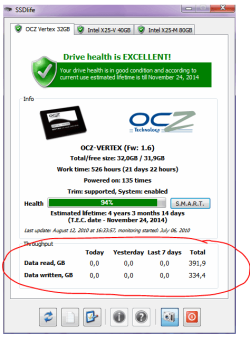
Download, install and try this FREE version of SSDLife. Screenshots on the wepage suggest it can monitor the read/write daily, so perhaps this might help you track down the issue.

Regards,
Golden
 

Attachments

  • Capture.PNG
    Capture.PNG
    22.8 KB · Views: 27

My Computer My Computer

At a glance

Windows 10 Pro x64 ; Xubuntu x64Intel i7 860 @ 2.80 GHz O/C'ed to 4.0GHz16GB Corsair Vengance DDR3 @ 661 MHz Dual Cha...EVGA NVidia GTX 560 1024MB
Computer type
PC/Desktop
Computer Manufacturer/Model Number
Golden Mk. I.4
OS
Windows 10 Pro x64 ; Xubuntu x64
CPU
Intel i7 860 @ 2.80 GHz O/C'ed to 4.0GHz
Motherboard
Gigabyte P55A-UD3R Rev.1. Award BIOS F13
Memory
16GB Corsair Vengance DDR3 @ 661 MHz Dual Channel (9-9-9-24)
Graphics Card(s)
EVGA NVidia GTX 560 1024MB
Sound Card
Realtek Integrated
Monitor(s) Displays
Dual Samsung SyncMaster 2494HS
Screen Resolution
1920*1080 and 1920*1080
Hard Drives
1*Samsung 840 EVO 120GB SSD;
1*OCZ Vertex 2 60GB SSD;
2*Samsung F3 SpinPoint 1TB in RAID0;
1*Samsung F1 SpinPoint 1TB;
2*Western Digital 1TB External USB 3.0
1*Western Digital 500GB External USB 3.0
1*Seagate 500GB External USB 2.0
PSU
Thermaltake ToughPower QFan 750W
Case
Thermaltake Element S VK60001W2Z
Cooling
Corsair H60 Water Cooling, 2*230mm and 2*80mm case fans
Keyboard
Logitech G110
Mouse
Logitech MX518
Back
Top