
Solved SSD space is disappearing. Troublshooted almost everything already.

My Computer My Computer

At a glance

Windows 10 Home x64INTEL Core i5-750 Quad-Core 3.37GHzHyperX Fury Black Series 8GB (2 x 4GB) 1866MhzEVGA GeForce GTX 750 Superclocked 1GB 128-Bit...
Computer type
PC/Desktop
OS
Windows 10 Home x64
CPU
INTEL Core i5-750 Quad-Core 3.37GHz
Motherboard
ASUS P7P55D
Memory
HyperX Fury Black Series 8GB (2 x 4GB) 1866Mhz
Graphics Card(s)
EVGA GeForce GTX 750 Superclocked 1GB 128-Bit GDDR5
Monitor(s) Displays
LG 32MA68HY 32" IPS
Screen Resolution
1920 x 1080
Hard Drives
Samsung 840 Evo 120GB, SEAGATE 500GB Barracuda® 7200.12, SATA 3 Gb/s, 7200 RPM, 16MB cache
PSU
ANTEC TruePower New TP-550, 80 PLUS, 550W
Case
ANTEC Three Hundred Illusion
Cooling
COOLER MASTER Hyper 212 Plus, 4 x 120mm 1 x 140mm Noctua's
Internet Speed
85 + Mbps
Antivirus
Avast
Browser
Vivaldi
OK, 2 things to try, you can undo them if they don't uncover something.

Click to Show Hidden Files, Folders, and Drives, and unclick To Show Protected Operating System Files

http://www.sevenforums.com/tutorials/394-hidden-files-folders-show-hide.html

Now what do the Sniffers show?

A Guy

I believe these disk storage programs take in to account all hidden and system files already regardless if they are hidden.

Anywho, I showed hidden folders as well as system files and the programs show the same things.
 

My Computer My Computer

At a glance

Windows 7 Professional 64 bitIntel i5-2500k2 x 4GB G-Skill ripsawGeForce Evga 460 1GB
OS
Windows 7 Professional 64 bit
CPU
Intel i5-2500k
Motherboard
ASrock p67 extreme 4
Memory
2 x 4GB G-Skill ripsaw
Graphics Card(s)
GeForce Evga 460 1GB
Hard Drives
Crucial M4 SSD 64GB &
Samsung SATA III 1TB
PSU
Corsair 650TX
Cooling
Cooler Master N520
I believe windows does, but was unsure of the 3rd party programs. As I don't have hibernation turned on, I couldn't confirm. The hiberfil.sys and Recycler files are the most likely suspect for losing space. I'd suggest turning off hibernation to see if that makes the difference, once again, you can always turn it back on with no ill affects.

http://www.sevenforums.com/tutorials/819-hibernate-enable-disable.html

Sorry if it seems I am jumping you through hoops, but if the usual things don't work, it is a real puzzler.

A Guy

P.S. Does space sniffer show the hiberfil.sys file? Perhaps a full screen shot of just SS would be helpful.
 

My Computer My Computer

At a glance

Windows 10 Home x64INTEL Core i5-750 Quad-Core 3.37GHzHyperX Fury Black Series 8GB (2 x 4GB) 1866MhzEVGA GeForce GTX 750 Superclocked 1GB 128-Bit...
Computer type
PC/Desktop
OS
Windows 10 Home x64
CPU
INTEL Core i5-750 Quad-Core 3.37GHz
Motherboard
ASUS P7P55D
Memory
HyperX Fury Black Series 8GB (2 x 4GB) 1866Mhz
Graphics Card(s)
EVGA GeForce GTX 750 Superclocked 1GB 128-Bit GDDR5
Monitor(s) Displays
LG 32MA68HY 32" IPS
Screen Resolution
1920 x 1080
Hard Drives
Samsung 840 Evo 120GB, SEAGATE 500GB Barracuda® 7200.12, SATA 3 Gb/s, 7200 RPM, 16MB cache
PSU
ANTEC TruePower New TP-550, 80 PLUS, 550W
Case
ANTEC Three Hundred Illusion
Cooling
COOLER MASTER Hyper 212 Plus, 4 x 120mm 1 x 140mm Noctua's
Internet Speed
85 + Mbps
Antivirus
Avast
Browser
Vivaldi
I believe windows does, but was unsure of the 3rd party programs. As I don't have hibernation turned on, I couldn't confirm. The hiberfil.sys and Recycler files are the most likely suspect for losing space. I'd suggest turning off hibernation to see if that makes the difference, once again, you can always turn it back on with no ill affects.

http://www.sevenforums.com/tutorials/819-hibernate-enable-disable.html

Sorry if it seems I am jumping you through hoops, but if the usual things don't work, it is a real puzzler.

A Guy

P.S. Does space sniffer show the hiberfil.sys file? Perhaps a full screen shot of just SS would be helpful.

Yes, Treesize File, Windirstat, and Sniffer all show the pagefile and hiberfil system files. You can actually "see" it in my SS from my previous post. For Treesize File and Windirstat, the system files are listed under "Files" and the large blue boxes you see on Sniffer behind these two programs are the pagefile and hiberfil system files.

Hibernation on my computer was already set to OFF as the default setting of my power plan setting. However, Hybrid Sleep was set to ON though and I turned that setting OFF.

No worries, I really appreciate all the help you've been providing! This is just very frustrating as all of these computer gurus haven't been able to figure out what's going on. It really is a puzzler! One of them just gave up and suggested I call the manufacturer to see if this is a known issue for this particular SSD. My google search didn't really find anything though.
 

My Computer My Computer

At a glance

Windows 7 Professional 64 bitIntel i5-2500k2 x 4GB G-Skill ripsawGeForce Evga 460 1GB
OS
Windows 7 Professional 64 bit
CPU
Intel i5-2500k
Motherboard
ASrock p67 extreme 4
Memory
2 x 4GB G-Skill ripsaw
Graphics Card(s)
GeForce Evga 460 1GB
Hard Drives
Crucial M4 SSD 64GB &
Samsung SATA III 1TB
PSU
Corsair 650TX
Cooling
Cooler Master N520
I have asked the Gurus for more eyes. If Hibernation is disabled, there should be no hiberfil.sys file. Unless there is a backup program writing files that are somehow hidden from windows, it is a puzzle. Hang in there, someone else with new ideas will be along. I'm not abandoning you :)

A Guy

P.S. Would still like to see a full windows shot of Space Sniffer only :)
 

My Computer My Computer

At a glance

Windows 10 Home x64INTEL Core i5-750 Quad-Core 3.37GHzHyperX Fury Black Series 8GB (2 x 4GB) 1866MhzEVGA GeForce GTX 750 Superclocked 1GB 128-Bit...
Computer type
PC/Desktop
OS
Windows 10 Home x64
CPU
INTEL Core i5-750 Quad-Core 3.37GHz
Motherboard
ASUS P7P55D
Memory
HyperX Fury Black Series 8GB (2 x 4GB) 1866Mhz
Graphics Card(s)
EVGA GeForce GTX 750 Superclocked 1GB 128-Bit GDDR5
Monitor(s) Displays
LG 32MA68HY 32" IPS
Screen Resolution
1920 x 1080
Hard Drives
Samsung 840 Evo 120GB, SEAGATE 500GB Barracuda® 7200.12, SATA 3 Gb/s, 7200 RPM, 16MB cache
PSU
ANTEC TruePower New TP-550, 80 PLUS, 550W
Case
ANTEC Three Hundred Illusion
Cooling
COOLER MASTER Hyper 212 Plus, 4 x 120mm 1 x 140mm Noctua's
Internet Speed
85 + Mbps
Antivirus
Avast
Browser
Vivaldi
I have asked the Gurus for more eyes. If Hibernation is disabled, there should be no hiberfil.sys file. Unless there is a backup program writing files that are somehow hidden from windows, it is a puzzle. Hang in there, someone else with new ideas will be along. I'm not abandoning you :)

A Guy

In the aforementioned link you gave me in your previous post regarding "enabling/disabling hibernation", there is an option to DISABLE hibernation which removes the hiberfil file completely OR simply turning hibernation off. I simply have it turned off as you specified in your post, NOT disabled.

I really appreciate the help from you and those you are seeking help from!

Edit: didn't catch your edit, I'll def post a SS for you.

Edit x2: Here are the SS's. The first SS is WIHTOUT free space being shown and the 2nd SS is WITH the free space being shown.

sniffer1.jpg


sniffer2.jpg
 

My Computer My Computer

At a glance

Windows 7 Professional 64 bitIntel i5-2500k2 x 4GB G-Skill ripsawGeForce Evga 460 1GB
OS
Windows 7 Professional 64 bit
CPU
Intel i5-2500k
Motherboard
ASrock p67 extreme 4
Memory
2 x 4GB G-Skill ripsaw
Graphics Card(s)
GeForce Evga 460 1GB
Hard Drives
Crucial M4 SSD 64GB &
Samsung SATA III 1TB
PSU
Corsair 650TX
Cooling
Cooler Master N520
You could disable hibernation, which would remove the hiberfil.sys file. But I suspect that will just lower the amount of used space reported, and not increase the free space, based on your current information. Might be worth a try though, as you can re-enable it and it will recreate the file. A Guy
 

My Computer My Computer

At a glance

Windows 10 Home x64INTEL Core i5-750 Quad-Core 3.37GHzHyperX Fury Black Series 8GB (2 x 4GB) 1866MhzEVGA GeForce GTX 750 Superclocked 1GB 128-Bit...
Computer type
PC/Desktop
OS
Windows 10 Home x64
CPU
INTEL Core i5-750 Quad-Core 3.37GHz
Motherboard
ASUS P7P55D
Memory
HyperX Fury Black Series 8GB (2 x 4GB) 1866Mhz
Graphics Card(s)
EVGA GeForce GTX 750 Superclocked 1GB 128-Bit GDDR5
Monitor(s) Displays
LG 32MA68HY 32" IPS
Screen Resolution
1920 x 1080
Hard Drives
Samsung 840 Evo 120GB, SEAGATE 500GB Barracuda® 7200.12, SATA 3 Gb/s, 7200 RPM, 16MB cache
PSU
ANTEC TruePower New TP-550, 80 PLUS, 550W
Case
ANTEC Three Hundred Illusion
Cooling
COOLER MASTER Hyper 212 Plus, 4 x 120mm 1 x 140mm Noctua's
Internet Speed
85 + Mbps
Antivirus
Avast
Browser
Vivaldi
when you disabled hibernation did you restart your system to stop the hibernation ?
if not try that and it should be gone..

scrooge
 

My Computer My Computer

At a glance

win 7 ( 64 bit)Intel Core i7-870 Lynnfield 2.93GHz 8MB L3 Ca...G.SKILL Sniper Series 16GB (4 x 4GB) 240-Pin ...ATI Radeon HD6800 Series
Computer Manufacturer/Model Number
home build
OS
win 7 ( 64 bit)
CPU
Intel Core i7-870 Lynnfield 2.93GHz 8MB L3 Cache LGA 1156 95
Motherboard
ASUS P7P55 LX LGA 1156
Memory
G.SKILL Sniper Series 16GB (4 x 4GB) 240-Pin DDR3 SDRAM
Graphics Card(s)
ATI Radeon HD6800 Series
Sound Card
hdmi
Monitor(s) Displays
42" lg 3d tv
Screen Resolution
1920 x 1080
Hard Drives
1 ssd pci-e revodrive
4 seagate 1.5 tb
PSU
Rosewill BRONZE Series RBR1000-M 1000W Continuous@40°C, 80Pl
Case
CoolMaster 922
Cooling
CORSAIR CWCH60 Hydro Series H60 High Performance Liquid CPU
Keyboard
logtech
Mouse
logitect
Internet Speed
5 mbit
You could disable hibernation, which would remove the hiberfil.sys file. But I suspect that will just lower the amount of used space reported, and not increase the free space, based on your current information. Might be worth a try though, as you can re-enable it and it will recreate the file. A Guy

I've disabled hibernation, thus removing the hiberfil system file. This INCREASED my FREE space available and DECREASED my USED space according to Sniffer.

Again, these two numbers added together from Sniffer equal 44.6GB-- the same as before; this is clearly not the total capacity of my drive. I imagine this gave me a little more life, but over time my free space will continue to disappear!
 

My Computer My Computer

At a glance

Windows 7 Professional 64 bitIntel i5-2500k2 x 4GB G-Skill ripsawGeForce Evga 460 1GB
OS
Windows 7 Professional 64 bit
CPU
Intel i5-2500k
Motherboard
ASrock p67 extreme 4
Memory
2 x 4GB G-Skill ripsaw
Graphics Card(s)
GeForce Evga 460 1GB
Hard Drives
Crucial M4 SSD 64GB &
Samsung SATA III 1TB
PSU
Corsair 650TX
Cooling
Cooler Master N520
As I suspected, it only showed the difference of the hibernation file, not explain the difference in total space. You don't have any backup programs running do you? Any kind of recovery, backup?

A Guy

P.S. Thanks for the screen shots, very helpful to confirm there is some hidden space missing somehow, and increasing in size.
 

My Computer My Computer

At a glance

Windows 10 Home x64INTEL Core i5-750 Quad-Core 3.37GHzHyperX Fury Black Series 8GB (2 x 4GB) 1866MhzEVGA GeForce GTX 750 Superclocked 1GB 128-Bit...
Computer type
PC/Desktop
OS
Windows 10 Home x64
CPU
INTEL Core i5-750 Quad-Core 3.37GHz
Motherboard
ASUS P7P55D
Memory
HyperX Fury Black Series 8GB (2 x 4GB) 1866Mhz
Graphics Card(s)
EVGA GeForce GTX 750 Superclocked 1GB 128-Bit GDDR5
Monitor(s) Displays
LG 32MA68HY 32" IPS
Screen Resolution
1920 x 1080
Hard Drives
Samsung 840 Evo 120GB, SEAGATE 500GB Barracuda® 7200.12, SATA 3 Gb/s, 7200 RPM, 16MB cache
PSU
ANTEC TruePower New TP-550, 80 PLUS, 550W
Case
ANTEC Three Hundred Illusion
Cooling
COOLER MASTER Hyper 212 Plus, 4 x 120mm 1 x 140mm Noctua's
Internet Speed
85 + Mbps
Antivirus
Avast
Browser
Vivaldi
As I suspected, it only showed the difference of the hibernation file, not explain the difference in total space. You don't have any backup programs running do you? Any kind of recovery, backup?

A Guy

P.S. Thanks for the screen shots, very helpful to confirm there is some hidden space missing somehow, and increasing in size.

No backup programs running at all. No recovery or backup being done.

When I built this new computer rig two months ago, the only big things I remember installing on this SSD were the following:

-Windows 7
-MS Office
-misc small programs such as Internet Explorer, Google Chrome, AIM, Avast antivirus etc.
-Adobe Creative Suite (this was eventually uninstalled and moved to my other drive to free up some space since it was disappearing)

Other than this, nothing else was changed, unless Windows 7 by default has some backup program that runs in the background? Again, this system is only two months old, so it hasn't been around the block long enough for there to have been some freak program installed from years back that I may have forgotten. It truly is a clean drive with minimal wear and tear and very few programs installed.

I definitely concur with this statement though!:

P.S. Thanks for the screen shots, very helpful to confirm there is some hidden space missing somehow, and increasing in size

This "hidden space" that keeps increasing in size is what has constantly been increasing and eating up my drive capacity since I first noticed this phenomenom about a month ago.
 

My Computer My Computer

At a glance

Windows 7 Professional 64 bitIntel i5-2500k2 x 4GB G-Skill ripsawGeForce Evga 460 1GB
OS
Windows 7 Professional 64 bit
CPU
Intel i5-2500k
Motherboard
ASrock p67 extreme 4
Memory
2 x 4GB G-Skill ripsaw
Graphics Card(s)
GeForce Evga 460 1GB
Hard Drives
Crucial M4 SSD 64GB &
Samsung SATA III 1TB
PSU
Corsair 650TX
Cooling
Cooler Master N520
Hello Steven and welcome to Seven Forums. My usual disclaimer: I'm not an expert at anything. :)

Just out of curiosity, how much space do you have set aside for the recycle bin and what happens to your available free space if you set it to 0%? Right click on recycle bin desktop icon > Properties. (If there's anything in the recyle bin that you might want to keep I'd suggest you save it before changing it to 0%.)
 

My Computer My Computer

At a glance

Win 7 Pro 64-bitIntel i5 2.4 Ghz8GB DDR3Intel HD 3000
Computer type
Laptop
Computer Manufacturer/Model Number
Sony Vaio VPCEB47GM Laptop
OS
Win 7 Pro 64-bit
CPU
Intel i5 2.4 Ghz
Memory
8GB DDR3
Graphics Card(s)
Intel HD 3000
Sound Card
IDT High Definition
Monitor(s) Displays
15.6 WGXA Anti-Glare LED
Screen Resolution
1280x800
Hard Drives
640Gb 7200rpm
Antivirus
MSE
Browser
Opera (primary) with IE9 backup
Hello Steven and welcome to Seven Forums. My usual disclaimer: I'm not an expert at anything. :)

Just out of curiosity, how much space do you have set aside for the recycle bin and what happens to your available free space if you set it to 0%? Right click on recycle bin desktop icon > Properties. (If there's anything in the recyle bin that you might want to keep I'd suggest you save it before changing it to 0%.)

I'm probably too illiterate on these matters to have known if you're an expert or not anyway :cool:.

Currently it's set to 5100 MB.

When I set it to 0, no immediately changes appear with any of the disk space.
 

My Computer My Computer

At a glance

Windows 7 Professional 64 bitIntel i5-2500k2 x 4GB G-Skill ripsawGeForce Evga 460 1GB
OS
Windows 7 Professional 64 bit
CPU
Intel i5-2500k
Motherboard
ASrock p67 extreme 4
Memory
2 x 4GB G-Skill ripsaw
Graphics Card(s)
GeForce Evga 460 1GB
Hard Drives
Crucial M4 SSD 64GB &
Samsung SATA III 1TB
PSU
Corsair 650TX
Cooling
Cooler Master N520
Sorry, I forgot to mention you should reboot after changing the recycle bin's reserved space. :confused: (Told you I'm not an expert in anything.)
 

My Computer My Computer

At a glance

Win 7 Pro 64-bitIntel i5 2.4 Ghz8GB DDR3Intel HD 3000
Computer type
Laptop
Computer Manufacturer/Model Number
Sony Vaio VPCEB47GM Laptop
OS
Win 7 Pro 64-bit
CPU
Intel i5 2.4 Ghz
Memory
8GB DDR3
Graphics Card(s)
Intel HD 3000
Sound Card
IDT High Definition
Monitor(s) Displays
15.6 WGXA Anti-Glare LED
Screen Resolution
1280x800
Hard Drives
640Gb 7200rpm
Antivirus
MSE
Browser
Opera (primary) with IE9 backup
Sorry, I forgot to mention you should reboot after changing the recycle bin's reserved space. :confused: (Told you I'm not an expert in anything.)

Done. No affect.
 

My Computer My Computer

At a glance

Windows 7 Professional 64 bitIntel i5-2500k2 x 4GB G-Skill ripsawGeForce Evga 460 1GB
OS
Windows 7 Professional 64 bit
CPU
Intel i5-2500k
Motherboard
ASrock p67 extreme 4
Memory
2 x 4GB G-Skill ripsaw
Graphics Card(s)
GeForce Evga 460 1GB
Hard Drives
Crucial M4 SSD 64GB &
Samsung SATA III 1TB
PSU
Corsair 650TX
Cooling
Cooler Master N520
Until I read this...

...No backup programs running at all. No recovery or backup being done...
...I thought you had a "Safe Mirror" problem going on:

http://www.sevenforums.com/general-discussion/140838-syswow64-safe-mirror.html

I'm posting this because it wouldn't hurt to check it anyway. (You may have to enable "View Hidden files and Folders" and "View Protected Operating System Files" in order to see it.)

Safe Mirror is used when you are using a differential backup program to maintain folder syncing. When you delete a file in the backup folder it also gets deleted in the source folder. To protect you in case of a goof it stashes a copy in the path mentioned in the first post of the thread above. I was merrily sorting out stuff in my backup thinking I was deleting things I didn't want any more and it was all piling up in the "C:\Windows\SysWOW64\config\systemprofile\AppData\Local\Safe mirror" folder.

Like I said, it wouldn't hurt to look. :)
 

My Computer My Computer

At a glance

Main - Windows 7 Pro SP1 64-Bit; 2nd - Window...Main - Core i7 2600K; 2nd - Core i7 920Main - 16GB Corsair Vengeance; 2nd - 12GB Cor...Main - XFX Radeon 6870 1GB; 2nd - XFX Radeon ...
Computer Manufacturer/Model Number
Self
OS
Main - Windows 7 Pro SP1 64-Bit; 2nd - Windows Server 2008 R2
CPU
Main - Core i7 2600K; 2nd - Core i7 920
Motherboard
Main - Asus P8Z68-V Pro/Gen3; 2nd - Gigabyte GA-EX58-UDR3
Memory
Main - 16GB Corsair Vengeance; 2nd - 12GB Corsair Vengeance
Graphics Card(s)
Main - XFX Radeon 6870 1GB; 2nd - XFX Radeon 4870 1GB
Sound Card
Both: Onboard Realtek Azalia
Monitor(s) Displays
Main - Hann 25" + I-INC 25" + Acer 23"; 2nd - Upgrading Soon
Screen Resolution
Main - 1920x1080 (All Three Monitors); 2nd - Upgrading Soon
Hard Drives
Main - (1) Crucial M4 128GB (Boot)
Main - (1) Seagate 2TB 64MB Cache (Data)
Main - (1) Seagate 2TB 64MB Cache (Data Backup)
2nd - (1) Intel X25-M SSD 80GB (Boot)
2nd - (3) Seagate 1TB 32MB Cache (Data Backup)
2nd - (1) Seagate 320GB (Because)
PSU
Main - OCZ 600W Modular; 2nd - OCZ 600W
Case
Main - Thermaltake Element G; 2nd - NZXT something or other
Cooling
Main - Corsair H80; 2nd - Prolimatech Megahalems
Keyboard
Main - Razer Reclusa; 2nd - Old MS Keyboard
Mouse
Main - Logitech MX Revolution; 2nd - Old MS Mouse
Internet Speed
20Mbps Time-Warner Cable
Until I read this...

...No backup programs running at all. No recovery or backup being done...
...I thought you had a "Safe Mirror" problem going on:

http://www.sevenforums.com/general-discussion/140838-syswow64-safe-mirror.html

I'm posting this because it wouldn't hurt to check it anyway. (You may have to enable "View Hidden files and Folders" and "View Protected Operating System Files" in order to see it.)

Safe Mirror is used when you are using a differential backup program to maintain folder syncing. When you delete a file in the backup folder it also gets deleted in the source folder. To protect you in case of a goof it stashes a copy in the path mentioned in the first post of the thread above. I was merrily sorting out stuff in my backup thinking I was deleting things I didn't want any more and it was all piling up in the "C:\Windows\SysWOW64\config\systemprofile\AppData\Local\Safe mirror" folder.

Like I said, it wouldn't hurt to look. :)

Went all the way down to AppData\Local... No safe mirror folder exists.

Thanks to everyone who are trying to help! I really appreciate it.
 

My Computer My Computer

At a glance

Windows 7 Professional 64 bitIntel i5-2500k2 x 4GB G-Skill ripsawGeForce Evga 460 1GB
OS
Windows 7 Professional 64 bit
CPU
Intel i5-2500k
Motherboard
ASrock p67 extreme 4
Memory
2 x 4GB G-Skill ripsaw
Graphics Card(s)
GeForce Evga 460 1GB
Hard Drives
Crucial M4 SSD 64GB &
Samsung SATA III 1TB
PSU
Corsair 650TX
Cooling
Cooler Master N520
Try running Revo Uninstaller Free and see what the various built-in cleaners come up with. While I trust Revo (it's one of the few programs with a robust free version for which I was willing to pay for the "pro" version), be cautious with what it deletes. For right now, safest would be to just do the scans and check the file sizes for the stuff it finds - it may provide a lead on where your space is going.
 

My Computer My Computer

At a glance

Main - Windows 7 Pro SP1 64-Bit; 2nd - Window...Main - Core i7 2600K; 2nd - Core i7 920Main - 16GB Corsair Vengeance; 2nd - 12GB Cor...Main - XFX Radeon 6870 1GB; 2nd - XFX Radeon ...
Computer Manufacturer/Model Number
Self
OS
Main - Windows 7 Pro SP1 64-Bit; 2nd - Windows Server 2008 R2
CPU
Main - Core i7 2600K; 2nd - Core i7 920
Motherboard
Main - Asus P8Z68-V Pro/Gen3; 2nd - Gigabyte GA-EX58-UDR3
Memory
Main - 16GB Corsair Vengeance; 2nd - 12GB Corsair Vengeance
Graphics Card(s)
Main - XFX Radeon 6870 1GB; 2nd - XFX Radeon 4870 1GB
Sound Card
Both: Onboard Realtek Azalia
Monitor(s) Displays
Main - Hann 25" + I-INC 25" + Acer 23"; 2nd - Upgrading Soon
Screen Resolution
Main - 1920x1080 (All Three Monitors); 2nd - Upgrading Soon
Hard Drives
Main - (1) Crucial M4 128GB (Boot)
Main - (1) Seagate 2TB 64MB Cache (Data)
Main - (1) Seagate 2TB 64MB Cache (Data Backup)
2nd - (1) Intel X25-M SSD 80GB (Boot)
2nd - (3) Seagate 1TB 32MB Cache (Data Backup)
2nd - (1) Seagate 320GB (Because)
PSU
Main - OCZ 600W Modular; 2nd - OCZ 600W
Case
Main - Thermaltake Element G; 2nd - NZXT something or other
Cooling
Main - Corsair H80; 2nd - Prolimatech Megahalems
Keyboard
Main - Razer Reclusa; 2nd - Old MS Keyboard
Mouse
Main - Logitech MX Revolution; 2nd - Old MS Mouse
Internet Speed
20Mbps Time-Warner Cable
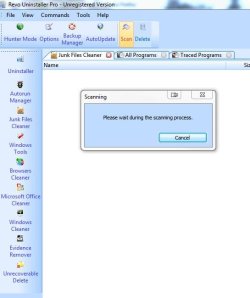
Try running Revo Uninstaller Free and see what the various built-in cleaners come up with. While I trust Revo (it's one of the few programs with a robust free version for which I was willing to pay for the "pro" version), be cautious with what it deletes. For right now, safest would be to just do the scans and check the file sizes for the stuff it finds - it may provide a lead on where your space is going.

Finished installing it, but having a hard time finding any scanning options. For the various cleaners it has on the left navigation pane, they only provide options for cleaning and deleting the selected item-- nothing for scanning.
 

My Computer My Computer

At a glance

Windows 7 Professional 64 bitIntel i5-2500k2 x 4GB G-Skill ripsawGeForce Evga 460 1GB
OS
Windows 7 Professional 64 bit
CPU
Intel i5-2500k
Motherboard
ASrock p67 extreme 4
Memory
2 x 4GB G-Skill ripsaw
Graphics Card(s)
GeForce Evga 460 1GB
Hard Drives
Crucial M4 SSD 64GB &
Samsung SATA III 1TB
PSU
Corsair 650TX
Cooling
Cooler Master N520
I think they are rolled up into one under the "Junk Files Cleaner" in the free version.
 

Attachments

  • Revo Junk Files.JPG
    Revo Junk Files.JPG
    36.4 KB · Views: 19

My Computer My Computer

At a glance

Main - Windows 7 Pro SP1 64-Bit; 2nd - Window...Main - Core i7 2600K; 2nd - Core i7 920Main - 16GB Corsair Vengeance; 2nd - 12GB Cor...Main - XFX Radeon 6870 1GB; 2nd - XFX Radeon ...
Computer Manufacturer/Model Number
Self
OS
Main - Windows 7 Pro SP1 64-Bit; 2nd - Windows Server 2008 R2
CPU
Main - Core i7 2600K; 2nd - Core i7 920
Motherboard
Main - Asus P8Z68-V Pro/Gen3; 2nd - Gigabyte GA-EX58-UDR3
Memory
Main - 16GB Corsair Vengeance; 2nd - 12GB Corsair Vengeance
Graphics Card(s)
Main - XFX Radeon 6870 1GB; 2nd - XFX Radeon 4870 1GB
Sound Card
Both: Onboard Realtek Azalia
Monitor(s) Displays
Main - Hann 25" + I-INC 25" + Acer 23"; 2nd - Upgrading Soon
Screen Resolution
Main - 1920x1080 (All Three Monitors); 2nd - Upgrading Soon
Hard Drives
Main - (1) Crucial M4 128GB (Boot)
Main - (1) Seagate 2TB 64MB Cache (Data)
Main - (1) Seagate 2TB 64MB Cache (Data Backup)
2nd - (1) Intel X25-M SSD 80GB (Boot)
2nd - (3) Seagate 1TB 32MB Cache (Data Backup)
2nd - (1) Seagate 320GB (Because)
PSU
Main - OCZ 600W Modular; 2nd - OCZ 600W
Case
Main - Thermaltake Element G; 2nd - NZXT something or other
Cooling
Main - Corsair H80; 2nd - Prolimatech Megahalems
Keyboard
Main - Razer Reclusa; 2nd - Old MS Keyboard
Mouse
Main - Logitech MX Revolution; 2nd - Old MS Mouse
Internet Speed
20Mbps Time-Warner Cable
Back
Top