Overclocking i7 860 on p7p55-M

darksupernova

New member
Power User
Local time
7:43 PM
Messages
55
Hey guys,

Just looking for some advice regarding overclocking.

So, heres my rig:

Antec P183 Case
Intel Core i7 860 2.8GHz Socket LGA 1156 8MB L3 Cache
Crucial 4GB (2x2GB) DDR3 1333MHz/PC3-10600 Memory Kit CL9 1.5V
Antec TruePower New 650W Modular PSU
Arctic Cooling Freezer 7 Pro rev 2 Heatpipe CPU Cooler
Asus P7P55-M P55 Socket

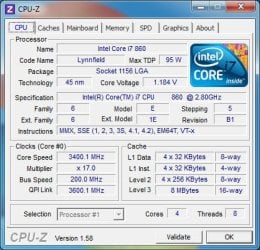
Currently I have a stable overclock at 3.6Ghz (3600MHz x 20), but there seems to be some sort of power saving going on, the vCore keeps dropping from 1.216 to 1.080 and the freq down to 1620MHz x 9.
Ive been searching around for power saving options such as EIST but cant find anything. Does anyone have any ideas?

Thanks,

Max

EDIT-Update:

Okay so the searching I did around the internet turned up several power saving options in the BIOS. I have these all disabled (including intel speedstep). A few of the options people say to turn off just vanish when I switch to manual overclocking, so I am assuming that these are automatically disabled. The other reason I feel safe assuming this is because it has only started doing this on newer bios updates, in the older versions the options were still there.
In this motherboard you cant specify your VCore voltage, you can only set the VCore over voltage. Now I read that this was the extra voltage over 1.0v. Its currently set at 0.2v. However I've noticed that when I open up CPU-Z, whether under stress testing or not the voltage seems to fluctuate. I have tried enabling and disabling certain voltages but just cant seem to get it to stop this drop. Max temps on Coretemp and Real Temp are ~72 Celcius.
When the voltage drops, the bus speed stays the same, but the multiple drops to 9, making the speed 1620.0MHz..... It seems to spend more time at the 9 multiplier than at 20...
If anyone has any ideas please enlighten me!

Update 2
I thought about playing with prime95 when not over clocked and a strange thing happened. The processor runs at 133.8 x 22 = 2.943GHz @ 1.128v, but when you activate the torture test the voltage drops to 1.072v...now i really have no idea whats going on. I activated intel turbo boost and another feature for allowing the OS to control the freq. of the CPU, but why would the voltage drop? Also why is nothing else changing?
 
Last edited:

My Computer My Computer

At a glance

Windows 8 ProIntel Core i7 860 @ 3.6GHzCrucial 8GB (2x4GB) DDR3 1866MhzSapphire ATI Radeon HD 5850 1024MB GDDR5
Computer Manufacturer/Model Number
Me
OS
Windows 8 Pro
CPU
Intel Core i7 860 @ 3.6GHz
Motherboard
Asus P7P55-M
Memory
Crucial 8GB (2x4GB) DDR3 1866Mhz
Graphics Card(s)
Sapphire ATI Radeon HD 5850 1024MB GDDR5
Sound Card
Creative Sound Blaster HS-1100 Arena USB Surround Sound Head
Monitor(s) Displays
Asus VG236H 120Hz
Screen Resolution
1080p
Hard Drives
120GB OCZ Agility 3 SATA3 + 2.5TB Total SATA2
PSU
Antec TruePower 650W Modular PSU
Case
Antec P183 Noise Reducing case
Cooling
4x120mm Antec 3-speed fans + Arctic Cooling Freezer7 CPU fan
Keyboard
G15 (orange backlight)
Mouse
Logitech G9
Internet Speed
125Mb/s Virgin Media
Other Info
Steel Series Metal mouse matt
I just played around with an 860 on an EVGA board. I did not spend too much time with it but I found on that chip it was happy till 3.6 and then the temps went too high. He had a nice cooler Zalman 9700 I think. Hit almost 99C with prime 95. Backed it down to 3.5Ghz and it was happy running at 62C full load.
I can’t believe that chip tops out at 3.5 but I did not have all weekend and that is sometimes how long it takes to find the happy spot on the CPU.

Personally I have had great success with my 920 CPU stock 2.6 running everyday at 3.850.
The voltage is the key along with temps. If you run faster you need more power, more power more heat.
Properly installing the heat sink and fan can make a big difference too. What are your temps (speedfan, core temp)
PS.
Turbo mode can be turned off in the bios.
You may need a bigger power supply.
Try 1.3 – 1.4 Volts on the Vcore and see how far it goes with the temps.
Have a look here > Guide to Overclocking the Core I7 860 to 4.0GHz on a Evga P55 FTW 200 - Overclock.net - Overclocking.net
 

My Computer My Computer

At a glance

Windows 7 Pro 64 BitI7 92012GB DDR32X GTX 295
Computer Manufacturer/Model Number
Self Built
OS
Windows 7 Pro 64 Bit
CPU
I7 920
Motherboard
EVGA Classfied 760
Memory
12GB DDR3
Graphics Card(s)
2X GTX 295
Sound Card
Onboard Realtek
Monitor(s) Displays
3X 20.1 Inch 1X 24 inch
Hard Drives
3X 1TB WD RE3 RAID 0 + 2X 2TB Green Drive 2X 1TB USB 2.0 external
PSU
Antec 1000 Watt
Case
Cooler Master Haf-X
Cooling
Zalman 9900 Max
Hey thanks for the reply!

Well I found the weird setting that was making my multiplier drop, it was something called CPU TM functions, although the bios just muttered something about spare cycles....hmmm glad i found it though.

You may be right about my PSU. I was running stable for 10 mins (not long i know) at 3.8GHz, temps were about 80 Celsius (too high i know), but then the computer just turned off! Does this sound like a power issue to you? Im now playing around with 3.6GHz, although im not terribly sure what I'm doing. I have most things set to auto and was just playing around with VCore. When you start introducing other variables, (ICM, VTT, DRAM etc...) how are supposed to know which one to change when you encounter an error?

Thanks for the link, reading now. Seems to be about the only thread I havnt scoured so thanks!

Max
 

My Computer My Computer

At a glance

Windows 8 ProIntel Core i7 860 @ 3.6GHzCrucial 8GB (2x4GB) DDR3 1866MhzSapphire ATI Radeon HD 5850 1024MB GDDR5
Computer Manufacturer/Model Number
Me
OS
Windows 8 Pro
CPU
Intel Core i7 860 @ 3.6GHz
Motherboard
Asus P7P55-M
Memory
Crucial 8GB (2x4GB) DDR3 1866Mhz
Graphics Card(s)
Sapphire ATI Radeon HD 5850 1024MB GDDR5
Sound Card
Creative Sound Blaster HS-1100 Arena USB Surround Sound Head
Monitor(s) Displays
Asus VG236H 120Hz
Screen Resolution
1080p
Hard Drives
120GB OCZ Agility 3 SATA3 + 2.5TB Total SATA2
PSU
Antec TruePower 650W Modular PSU
Case
Antec P183 Noise Reducing case
Cooling
4x120mm Antec 3-speed fans + Arctic Cooling Freezer7 CPU fan
Keyboard
G15 (orange backlight)
Mouse
Logitech G9
Internet Speed
125Mb/s Virgin Media
Other Info
Steel Series Metal mouse matt
Okay new post to draw attention away from all the info above for those who cant be bothered to read it all...!
My Problem:

I am overclocking, no errore in prime95 and temps not going over ~70 or ~80 (3.6GHZ and 3.8GHz respectively) when suddenly the computer just switches off, any ideas?

I am only adjusting the bus speed, the multiplier and the vCore over voltage, everything else is on auto.

Thanks,

Max
 

My Computer My Computer

At a glance

Windows 8 ProIntel Core i7 860 @ 3.6GHzCrucial 8GB (2x4GB) DDR3 1866MhzSapphire ATI Radeon HD 5850 1024MB GDDR5
Computer Manufacturer/Model Number
Me
OS
Windows 8 Pro
CPU
Intel Core i7 860 @ 3.6GHz
Motherboard
Asus P7P55-M
Memory
Crucial 8GB (2x4GB) DDR3 1866Mhz
Graphics Card(s)
Sapphire ATI Radeon HD 5850 1024MB GDDR5
Sound Card
Creative Sound Blaster HS-1100 Arena USB Surround Sound Head
Monitor(s) Displays
Asus VG236H 120Hz
Screen Resolution
1080p
Hard Drives
120GB OCZ Agility 3 SATA3 + 2.5TB Total SATA2
PSU
Antec TruePower 650W Modular PSU
Case
Antec P183 Noise Reducing case
Cooling
4x120mm Antec 3-speed fans + Arctic Cooling Freezer7 CPU fan
Keyboard
G15 (orange backlight)
Mouse
Logitech G9
Internet Speed
125Mb/s Virgin Media
Other Info
Steel Series Metal mouse matt
It is common and by design that the core voltage will drop under load. It is called droop and is designated by Vdroop.

Your CPU will power off if it gets too hot, but that threshold is well above 80c. It probably was unstable and crashed.

What are your overclock Voltage settings. It would help to know everything you have changed.
 

My Computer My Computer

At a glance

Windows 10 Pro. EFI boot partition, full EFI ...i7 4770k 4.4GHz (44-44-43-43 turbo) @ 1.248V16GB (8GBx2) @2200 MHz G.skill Sniper 10-11-1...MSI GTX 970 Gaming 4G
Computer type
PC/Desktop
Computer Manufacturer/Model Number
Home built (GeneO industries)/Model 4
OS
Windows 10 Pro. EFI boot partition, full EFI boot
CPU
i7 4770k 4.4GHz (44-44-43-43 turbo) @ 1.248V
Motherboard
ASUS Maximus VI Hero
Memory
16GB (8GBx2) @2200 MHz G.skill Sniper 10-11-10-30-1, 1.6V
Graphics Card(s)
MSI GTX 970 Gaming 4G
Sound Card
Onboard SupremeFX Audio
Monitor(s) Displays
NEC Spectraview 2490WUXi-SV
Screen Resolution
1920 x 1200
Hard Drives
Samsung 850 Pro 256GB (OS), Samsung 2x 128GB 840 Pro SSD in RAID0, 3x WD Blue 6Gb/s 1TB RAID0, WD 2TB Black external USB 3.0, 2TB WD20EARS Green external USB 3.0, 2x 500GB Seagate and 1 750 GB external USB, 1x 350GB external USB3
PSU
Seasonic X-850 (2012 KM3 model)
Case
Fractal Design Define R4
Cooling
NH-D14, NF-F12, NF-A15; NF-P14, NF-P12,NF-A14, S12A PWM
Keyboard
Cooler Master Storm Quickfire Rapid - Brown
Mouse
Logitech G602
Internet Speed
126.4 Mb/s down, 24.3 Mb/s up
Other Info
USB 3.0 x8 , SATA III x8, eSATA, USB 2.0 x6. Samsung DVD R/W drive.

WEI: CPU 7.8, Memory 7.9, Graphics 7.9, Disk 7.9
Intel TurboBoost is what allows it to be overclocked (and indeed run at full speed), so make sure that isn't turned off (might be SpeedStep for you).

Sounds like you really need a better cooler on that CPU, 80C is a tad high for that low of an overclock.

~Lordbob
 

My Computer My Computer

At a glance

Windows 7 Ultimate x64, Mint 9Intel i5-2500k2x 4Gb Corsair VENGEANCE DDR3-1600NVidia GeForce N260GTX Twin Frozr
Computer Manufacturer/Model Number
Hera
OS
Windows 7 Ultimate x64, Mint 9
CPU
Intel i5-2500k
Motherboard
ASUS P8P67 Pro
Memory
2x 4Gb Corsair VENGEANCE DDR3-1600
Graphics Card(s)
NVidia GeForce N260GTX Twin Frozr
Sound Card
Realtek HD OnBoard Audio
Monitor(s) Displays
ASUS 24" Monitor
Screen Resolution
1920x1080
Hard Drives
G.SKILL Phoenix Series 60GB SATA II MLC Internal Solid State Drive (SSD)
SAMSUNG Spinpoint F3R 1TB 7200 RPM 32MB Cache SATA II
PSU
Cooler Master Real Power Pro 750W
Case
Cooler Master Haf 932
Cooling
Fans
Keyboard
Razer Tarantula
Mouse
Razer Lachesis
Internet Speed
not fast enough
Hi, thanks for the replies.

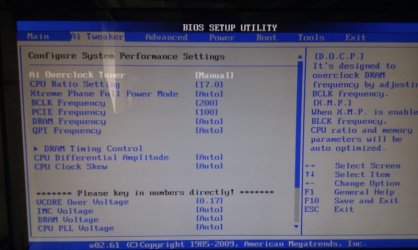
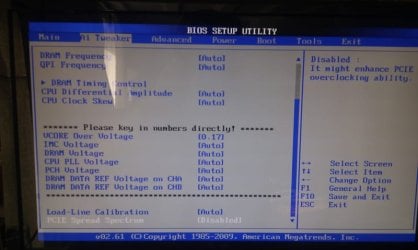
@GeneO, I have been playing around with all the settings, but even after a days worth of reading I was still left unsure which ones I should be changing. I saw a thread with positive results on my motherboard where they only changed the vCore over voltage, however other threads changed the ICM, DRAM and PLL too.

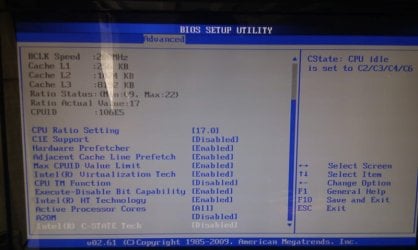
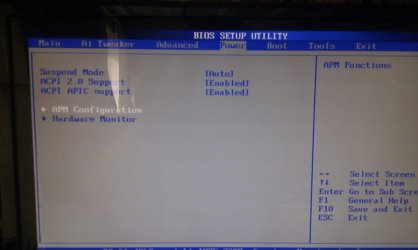
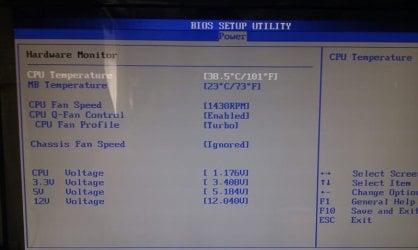
Here are the screenshots of my bios, these are all the overclocking settings I have access to.
(See attached)

@Lordbob75
The turbo function disappear when set 'AI Overclock Tuner' to 'Manual'. This setting is required in order to access any frequency and voltage settings.
If you look at screenshot 3, you can see a setting called C1E Support, CPU TM Function and C-STATE Tech; I read to turn these off for a more stable overclock. These are the settings I was having trouble with in my first post relating to the multiplier drop. Are these the settings you could be referring to?
 

Attachments

  • 1.jpg
    1.jpg
    61.3 KB · Views: 216
  • 2.jpg
    2.jpg
    59.3 KB · Views: 193
  • 3.jpg
    3.jpg
    64 KB · Views: 195
  • 4.jpg
    4.jpg
    39.7 KB · Views: 173
  • 5.jpg
    5.jpg
    49 KB · Views: 178
  • CPU-Z.jpg
    CPU-Z.jpg
    72.2 KB · Views: 167
Last edited:

My Computer My Computer

At a glance

Windows 8 ProIntel Core i7 860 @ 3.6GHzCrucial 8GB (2x4GB) DDR3 1866MhzSapphire ATI Radeon HD 5850 1024MB GDDR5
Computer Manufacturer/Model Number
Me
OS
Windows 8 Pro
CPU
Intel Core i7 860 @ 3.6GHz
Motherboard
Asus P7P55-M
Memory
Crucial 8GB (2x4GB) DDR3 1866Mhz
Graphics Card(s)
Sapphire ATI Radeon HD 5850 1024MB GDDR5
Sound Card
Creative Sound Blaster HS-1100 Arena USB Surround Sound Head
Monitor(s) Displays
Asus VG236H 120Hz
Screen Resolution
1080p
Hard Drives
120GB OCZ Agility 3 SATA3 + 2.5TB Total SATA2
PSU
Antec TruePower 650W Modular PSU
Case
Antec P183 Noise Reducing case
Cooling
4x120mm Antec 3-speed fans + Arctic Cooling Freezer7 CPU fan
Keyboard
G15 (orange backlight)
Mouse
Logitech G9
Internet Speed
125Mb/s Virgin Media
Other Info
Steel Series Metal mouse matt
Intel TurboBoost is what allows it to be overclocked (and indeed run at full speed), so make sure that isn't turned off (might be SpeedStep for you).

Sounds like you really need a better cooler on that CPU, 80C is a tad high for that low of an overclock.

~Lordbob

turboboost isn't required to overclock. turboboost will automatically overclock one core when others are idle. In fact, if you want to overclock all cores, you should usually turn it off or it may boost one of the overclocked cores beyond what you expected when the others are idle, and your system will become unstable. That is probably why the MB disables it when it is overclocked.
 
Last edited:

My Computer My Computer

At a glance

Windows 10 Pro. EFI boot partition, full EFI ...i7 4770k 4.4GHz (44-44-43-43 turbo) @ 1.248V16GB (8GBx2) @2200 MHz G.skill Sniper 10-11-1...MSI GTX 970 Gaming 4G
Computer type
PC/Desktop
Computer Manufacturer/Model Number
Home built (GeneO industries)/Model 4
OS
Windows 10 Pro. EFI boot partition, full EFI boot
CPU
i7 4770k 4.4GHz (44-44-43-43 turbo) @ 1.248V
Motherboard
ASUS Maximus VI Hero
Memory
16GB (8GBx2) @2200 MHz G.skill Sniper 10-11-10-30-1, 1.6V
Graphics Card(s)
MSI GTX 970 Gaming 4G
Sound Card
Onboard SupremeFX Audio
Monitor(s) Displays
NEC Spectraview 2490WUXi-SV
Screen Resolution
1920 x 1200
Hard Drives
Samsung 850 Pro 256GB (OS), Samsung 2x 128GB 840 Pro SSD in RAID0, 3x WD Blue 6Gb/s 1TB RAID0, WD 2TB Black external USB 3.0, 2TB WD20EARS Green external USB 3.0, 2x 500GB Seagate and 1 750 GB external USB, 1x 350GB external USB3
PSU
Seasonic X-850 (2012 KM3 model)
Case
Fractal Design Define R4
Cooling
NH-D14, NF-F12, NF-A15; NF-P14, NF-P12,NF-A14, S12A PWM
Keyboard
Cooler Master Storm Quickfire Rapid - Brown
Mouse
Logitech G602
Internet Speed
126.4 Mb/s down, 24.3 Mb/s up
Other Info
USB 3.0 x8 , SATA III x8, eSATA, USB 2.0 x6. Samsung DVD R/W drive.

WEI: CPU 7.8, Memory 7.9, Graphics 7.9, Disk 7.9
I wouldn't turn off Intel TM function. It should only affect your performance if the processor is way overheating to protect your processor. It may turn C1E on, which will lower frequency on a core when it is idle. This also doesn't affect performance but does power and temps so I leave it on. Besides that I see you have only bumped up Vcore which is good.

You have moderately overclocked so it is probably stable with just the increase in Vcore. Going higher, you may need to change the IMC and other voltages, but read up a lot first or you can get into trouble.

When you say stable and quote a load temperature, how are you arriving at that? You should run Prime95 torture test with a large custom FFT size and with using about 75% of your memory and with round -off checking enabled for at least half a day without errors or crashing before you can call it stable. And your need to monitor the temperature. If you want this to be a 24x7 overclock, your temperatures while running Prime95 this should not exceed 72c in my opinion. If it does then you need better cooling.
 
Last edited:

My Computer My Computer

At a glance

Windows 10 Pro. EFI boot partition, full EFI ...i7 4770k 4.4GHz (44-44-43-43 turbo) @ 1.248V16GB (8GBx2) @2200 MHz G.skill Sniper 10-11-1...MSI GTX 970 Gaming 4G
Computer type
PC/Desktop
Computer Manufacturer/Model Number
Home built (GeneO industries)/Model 4
OS
Windows 10 Pro. EFI boot partition, full EFI boot
CPU
i7 4770k 4.4GHz (44-44-43-43 turbo) @ 1.248V
Motherboard
ASUS Maximus VI Hero
Memory
16GB (8GBx2) @2200 MHz G.skill Sniper 10-11-10-30-1, 1.6V
Graphics Card(s)
MSI GTX 970 Gaming 4G
Sound Card
Onboard SupremeFX Audio
Monitor(s) Displays
NEC Spectraview 2490WUXi-SV
Screen Resolution
1920 x 1200
Hard Drives
Samsung 850 Pro 256GB (OS), Samsung 2x 128GB 840 Pro SSD in RAID0, 3x WD Blue 6Gb/s 1TB RAID0, WD 2TB Black external USB 3.0, 2TB WD20EARS Green external USB 3.0, 2x 500GB Seagate and 1 750 GB external USB, 1x 350GB external USB3
PSU
Seasonic X-850 (2012 KM3 model)
Case
Fractal Design Define R4
Cooling
NH-D14, NF-F12, NF-A15; NF-P14, NF-P12,NF-A14, S12A PWM
Keyboard
Cooler Master Storm Quickfire Rapid - Brown
Mouse
Logitech G602
Internet Speed
126.4 Mb/s down, 24.3 Mb/s up
Other Info
USB 3.0 x8 , SATA III x8, eSATA, USB 2.0 x6. Samsung DVD R/W drive.

WEI: CPU 7.8, Memory 7.9, Graphics 7.9, Disk 7.9
Intel TurboBoost is what allows it to be overclocked (and indeed run at full speed), so make sure that isn't turned off (might be SpeedStep for you).

Sounds like you really need a better cooler on that CPU, 80C is a tad high for that low of an overclock.

~Lordbob

turboboost isn't required to overclock. turboboost will automatically overclock one core when others are idle. In fact, if you want to overclock all cores, you should usually turn it off or it may boost one of the overclocked cores beyond what you expected when the others are idle, and your system will become unstable. That is probably why the MB disables it when it is overclocked.
I recall my motherboard and chipset (sandybridge) requiring TurboBoost in order to run the CPU at full speed at all. I might be wrong though and I don't have my desktop to check at the moment.

~Lordbob
 

My Computer My Computer

At a glance

Windows 7 Ultimate x64, Mint 9Intel i5-2500k2x 4Gb Corsair VENGEANCE DDR3-1600NVidia GeForce N260GTX Twin Frozr
Computer Manufacturer/Model Number
Hera
OS
Windows 7 Ultimate x64, Mint 9
CPU
Intel i5-2500k
Motherboard
ASUS P8P67 Pro
Memory
2x 4Gb Corsair VENGEANCE DDR3-1600
Graphics Card(s)
NVidia GeForce N260GTX Twin Frozr
Sound Card
Realtek HD OnBoard Audio
Monitor(s) Displays
ASUS 24" Monitor
Screen Resolution
1920x1080
Hard Drives
G.SKILL Phoenix Series 60GB SATA II MLC Internal Solid State Drive (SSD)
SAMSUNG Spinpoint F3R 1TB 7200 RPM 32MB Cache SATA II
PSU
Cooler Master Real Power Pro 750W
Case
Cooler Master Haf 932
Cooling
Fans
Keyboard
Razer Tarantula
Mouse
Razer Lachesis
Internet Speed
not fast enough
That may be true for the non "k" series Sandybridge processors -they are crippled as far as overclocking, but I believe with the k seies you should be able to turn off turbo-boost and overclock.

In any case, this is not a Sandybridge and this previous generation can be overclocked with turbo off. You really should turn off turbo-boost if you want to overclock (same is true on Sandybridge, but you cannot on the non k series).
 

My Computer My Computer

At a glance

Windows 10 Pro. EFI boot partition, full EFI ...i7 4770k 4.4GHz (44-44-43-43 turbo) @ 1.248V16GB (8GBx2) @2200 MHz G.skill Sniper 10-11-1...MSI GTX 970 Gaming 4G
Computer type
PC/Desktop
Computer Manufacturer/Model Number
Home built (GeneO industries)/Model 4
OS
Windows 10 Pro. EFI boot partition, full EFI boot
CPU
i7 4770k 4.4GHz (44-44-43-43 turbo) @ 1.248V
Motherboard
ASUS Maximus VI Hero
Memory
16GB (8GBx2) @2200 MHz G.skill Sniper 10-11-10-30-1, 1.6V
Graphics Card(s)
MSI GTX 970 Gaming 4G
Sound Card
Onboard SupremeFX Audio
Monitor(s) Displays
NEC Spectraview 2490WUXi-SV
Screen Resolution
1920 x 1200
Hard Drives
Samsung 850 Pro 256GB (OS), Samsung 2x 128GB 840 Pro SSD in RAID0, 3x WD Blue 6Gb/s 1TB RAID0, WD 2TB Black external USB 3.0, 2TB WD20EARS Green external USB 3.0, 2x 500GB Seagate and 1 750 GB external USB, 1x 350GB external USB3
PSU
Seasonic X-850 (2012 KM3 model)
Case
Fractal Design Define R4
Cooling
NH-D14, NF-F12, NF-A15; NF-P14, NF-P12,NF-A14, S12A PWM
Keyboard
Cooler Master Storm Quickfire Rapid - Brown
Mouse
Logitech G602
Internet Speed
126.4 Mb/s down, 24.3 Mb/s up
Other Info
USB 3.0 x8 , SATA III x8, eSATA, USB 2.0 x6. Samsung DVD R/W drive.

WEI: CPU 7.8, Memory 7.9, Graphics 7.9, Disk 7.9
Arctic Cooling Freezer 7 Pro rev 2 Heatpipe CPU Cooler

That will give you trouble forever. Figure 3.4 max. OC with that cooler. It is designed for older chips. P4, Dual core etc. I have one on my P4 on a different PC.
I know it fits and is supposed to work but it is just too small for OC'ing very much on i800 series CPUs.

You need at least a Scythe Mugen-2 preferably twin fan in a push-pull. You can look at my specs. I can run about 60C or less at 3.6GHz using the Asus software.
Turbo and everything turned on.

You need more cooling.
My two cents. :D
Mike
 

My Computer My Computer

At a glance

Windows7 Pro 64bit SP-1; Windows XP Pro 32bitIntel Core i7-870 Lynnfield 2.93GHz LGA 1156 ...8GB@1400MHz Crucial Ballistix DDR3-1600 4x2GBASUS ENGTX460 DirectCU/2DI/1GD5 1GB 256-bit G...
Computer Manufacturer/Model Number
Hopalong/ Godzilla
OS
Windows7 Pro 64bit SP-1; Windows XP Pro 32bit
CPU
Intel Core i7-870 Lynnfield 2.93GHz LGA 1156 95W Quad-Core
Motherboard
ASUS P7P55D-E PRO
Memory
8GB@1400MHz Crucial Ballistix DDR3-1600 4x2GB
Graphics Card(s)
ASUS ENGTX460 DirectCU/2DI/1GD5 1GB 256-bit GDDR5
Sound Card
VIA Onboard
Monitor(s) Displays
Asus VS248H-P 24"; Samsung SyncMaster 941BW 19"ws
Screen Resolution
1920x1080; 1440x900
Hard Drives
Samsung 830 120GB SSD
Intel 320 120GB SSD
Western Digital Caviar Black WD7501AALS 750GB 7200 RPM SATA 3.0Gb/s
Western Digital Caviar Black WD6401AALS 640GB 7200 RPM SATA 3.0Gb/s
PSU
COOLER MASTER Silent Pro RS850-AMBAJ3-US 850W Modular
Case
COOLER MASTER HAF 932 RC-932-KKN5-GP Black
Cooling
Scythe "Mugen-2 Rev.B" (2 ScytheKaze-Jyuni PWM fans)
Keyboard
Logitech K-320
Mouse
Kensington
Antivirus
Avast Inernet Suite
Browser
IE 9 ; Chrome
If you have the extreme edition you can set the clock to whatever you want the all other editions have a "MAX" you can set in the bios.

So say your chip has a max BCLK of 20 you can set it to 18 and still over clock the CPU.

Finding the right combination is the trick and is not likely to be a quick and easy thing.

I suggest a bigger power supply and the best cooler
:note:
 

My Computer My Computer

At a glance

Windows 7 Pro 64 BitI7 92012GB DDR32X GTX 295
Computer Manufacturer/Model Number
Self Built
OS
Windows 7 Pro 64 Bit
CPU
I7 920
Motherboard
EVGA Classfied 760
Memory
12GB DDR3
Graphics Card(s)
2X GTX 295
Sound Card
Onboard Realtek
Monitor(s) Displays
3X 20.1 Inch 1X 24 inch
Hard Drives
3X 1TB WD RE3 RAID 0 + 2X 2TB Green Drive 2X 1TB USB 2.0 external
PSU
Antec 1000 Watt
Case
Cooler Master Haf-X
Cooling
Zalman 9900 Max
I wouldn't turn off Intel TM function. It should only affect your performance if the processor is way overheating to protect your processor. It may turn C1E on, which will lower frequency on a core when it is idle. This also doesn't affect performance but does power and temps so I leave it on. Besides that I see you have only bumped up Vcore which is good.

You have moderately overclocked so it is probably stable with just the increase in Vcore. Going higher, you may need to change the IMC and other voltages, but read up a lot first or you can get into trouble.

When you say stable and quote a load temperature, how are you arriving at that? You should run Prime95 torture test with a large custom FFT size and with using about 75% of your memory and with round -off checking enabled for at least half a day without errors or crashing before you can call it stable. And your need to monitor the temperature. If you want this to be a 24x7 overclock, your temperatures while running Prime95 this should not exceed 72c in my opinion. If it does then you need better cooling.

Thanks for the reply, but the problem I'm having is that the computer just shuts off (dies) after about 10 mins when running prime95. As stated above, temps only get to about ~70, which is nowhere near the TJ Max....What do you think this could be?

Max
 

My Computer My Computer

At a glance

Windows 8 ProIntel Core i7 860 @ 3.6GHzCrucial 8GB (2x4GB) DDR3 1866MhzSapphire ATI Radeon HD 5850 1024MB GDDR5
Computer Manufacturer/Model Number
Me
OS
Windows 8 Pro
CPU
Intel Core i7 860 @ 3.6GHz
Motherboard
Asus P7P55-M
Memory
Crucial 8GB (2x4GB) DDR3 1866Mhz
Graphics Card(s)
Sapphire ATI Radeon HD 5850 1024MB GDDR5
Sound Card
Creative Sound Blaster HS-1100 Arena USB Surround Sound Head
Monitor(s) Displays
Asus VG236H 120Hz
Screen Resolution
1080p
Hard Drives
120GB OCZ Agility 3 SATA3 + 2.5TB Total SATA2
PSU
Antec TruePower 650W Modular PSU
Case
Antec P183 Noise Reducing case
Cooling
4x120mm Antec 3-speed fans + Arctic Cooling Freezer7 CPU fan
Keyboard
G15 (orange backlight)
Mouse
Logitech G9
Internet Speed
125Mb/s Virgin Media
Other Info
Steel Series Metal mouse matt
Your power supply has plenty power. I have the same one with an I5-760 @ 3.8 GHz (same as the I7-860 except hyperthreading is disabled) and have plenty of headroom, so don't listen to that advice.. I am using a CM Hyper 212+ cooler and it is plenty adequate, so if you are having cooling problems. look into a 212 - you don;t need the "best" cooler unless you feel you have to have the best.

Your computer is shutting off either because the temperature is too high or your overclock is unstable. Overclocking needs to be done incrementally and takes time to determine what is limiting or making the system unstable.
 

My Computer My Computer

At a glance

Windows 10 Pro. EFI boot partition, full EFI ...i7 4770k 4.4GHz (44-44-43-43 turbo) @ 1.248V16GB (8GBx2) @2200 MHz G.skill Sniper 10-11-1...MSI GTX 970 Gaming 4G
Computer type
PC/Desktop
Computer Manufacturer/Model Number
Home built (GeneO industries)/Model 4
OS
Windows 10 Pro. EFI boot partition, full EFI boot
CPU
i7 4770k 4.4GHz (44-44-43-43 turbo) @ 1.248V
Motherboard
ASUS Maximus VI Hero
Memory
16GB (8GBx2) @2200 MHz G.skill Sniper 10-11-10-30-1, 1.6V
Graphics Card(s)
MSI GTX 970 Gaming 4G
Sound Card
Onboard SupremeFX Audio
Monitor(s) Displays
NEC Spectraview 2490WUXi-SV
Screen Resolution
1920 x 1200
Hard Drives
Samsung 850 Pro 256GB (OS), Samsung 2x 128GB 840 Pro SSD in RAID0, 3x WD Blue 6Gb/s 1TB RAID0, WD 2TB Black external USB 3.0, 2TB WD20EARS Green external USB 3.0, 2x 500GB Seagate and 1 750 GB external USB, 1x 350GB external USB3
PSU
Seasonic X-850 (2012 KM3 model)
Case
Fractal Design Define R4
Cooling
NH-D14, NF-F12, NF-A15; NF-P14, NF-P12,NF-A14, S12A PWM
Keyboard
Cooler Master Storm Quickfire Rapid - Brown
Mouse
Logitech G602
Internet Speed
126.4 Mb/s down, 24.3 Mb/s up
Other Info
USB 3.0 x8 , SATA III x8, eSATA, USB 2.0 x6. Samsung DVD R/W drive.

WEI: CPU 7.8, Memory 7.9, Graphics 7.9, Disk 7.9
Your power supply has plenty power. I have the same one with an I5-760 @ 3.8 GHz (same as the I7-860 except hyperthreading is disabled) and have plenty of headroom, so don't listen to that advice.. I am using a CM Hyper 212+ cooler and it is plenty adequate, so if you are having cooling problems. look into a 212 - you don;t need the "best" cooler unless you feel you have to have the best.

Your computer is shutting off either because the temperature is too high or your overclock is unstable. Overclocking needs to be done incrementally and takes time to determine what is limiting or making the system unstable.
Basically this. Sounds suspiciously like a CPU overclocking problem, either from heat or voltage problems. Either way, get a decent cooler on it (full copper with at least 1 fan if you can) and play around with the CPU settings to get it stable. This can take HOURS, so make sure you are really prepared to put in the time to get it nice and stable.

~Lordbob
 

My Computer My Computer

At a glance

Windows 7 Ultimate x64, Mint 9Intel i5-2500k2x 4Gb Corsair VENGEANCE DDR3-1600NVidia GeForce N260GTX Twin Frozr
Computer Manufacturer/Model Number
Hera
OS
Windows 7 Ultimate x64, Mint 9
CPU
Intel i5-2500k
Motherboard
ASUS P8P67 Pro
Memory
2x 4Gb Corsair VENGEANCE DDR3-1600
Graphics Card(s)
NVidia GeForce N260GTX Twin Frozr
Sound Card
Realtek HD OnBoard Audio
Monitor(s) Displays
ASUS 24" Monitor
Screen Resolution
1920x1080
Hard Drives
G.SKILL Phoenix Series 60GB SATA II MLC Internal Solid State Drive (SSD)
SAMSUNG Spinpoint F3R 1TB 7200 RPM 32MB Cache SATA II
PSU
Cooler Master Real Power Pro 750W
Case
Cooler Master Haf 932
Cooling
Fans
Keyboard
Razer Tarantula
Mouse
Razer Lachesis
Internet Speed
not fast enough
The most irritating thing is this vcore Over voltage, why cant it just be a simple voltage!

Just messing around, I turned off my overclocking off and turned on all the power saving, turbe and TM functions and booted up. Just ran CPU-z and saw these settings and voltages:

(See attached)

Doesnt that voltage seem rather low for that clock speed? Also the max multiplier I can set in the BIOS is 22, so how is this managing 25? Perhaps the reason I am getting such high temps is because Im putting way too much voltage into it. Youll notice in an earlier screenshot I was runnint 3.4GHz at ~1.2v and this is running 3.3GHz @ ~0.85v....
Where should I even be starting with this over voltage setting?!

Ill look into getting a better cooler as well, it can only help! What do you think about this: Linky UPDATE: This one: V8 Linky OR V10 Link Scan // V10 Link Cool Master
I am also considering this, no point in doing a job half way (please read question after link{!}) Corsair H80 Liquid
Do you think that the gain in performance from having a ~£70 cooler for gaming would be more than spending ~£70 extra on a new graphics card when I get round to it?


@LTFUbar, I know this wont be a quick job, but due to this over voltage setting (I have no idea what its really doing) I'm not really sure where im starting!

Thanks for you advice Lordbob, but I have already spent a day on this, I think I need to get a new cooler, even though I already have quite a big one with a fan on it. Without the CPU TM (Thermal monitor) the computer just dies. However, the CPU will happily overclock itself to 3.3/3.4 GHZ with a voltage around 0.8-1v, but I dont know how Im going to set this voltage directly...what a pain.
 

Attachments

  • CPU-Z.jpg
    CPU-Z.jpg
    78.3 KB · Views: 9
Last edited:

My Computer My Computer

At a glance

Windows 8 ProIntel Core i7 860 @ 3.6GHzCrucial 8GB (2x4GB) DDR3 1866MhzSapphire ATI Radeon HD 5850 1024MB GDDR5
Computer Manufacturer/Model Number
Me
OS
Windows 8 Pro
CPU
Intel Core i7 860 @ 3.6GHz
Motherboard
Asus P7P55-M
Memory
Crucial 8GB (2x4GB) DDR3 1866Mhz
Graphics Card(s)
Sapphire ATI Radeon HD 5850 1024MB GDDR5
Sound Card
Creative Sound Blaster HS-1100 Arena USB Surround Sound Head
Monitor(s) Displays
Asus VG236H 120Hz
Screen Resolution
1080p
Hard Drives
120GB OCZ Agility 3 SATA3 + 2.5TB Total SATA2
PSU
Antec TruePower 650W Modular PSU
Case
Antec P183 Noise Reducing case
Cooling
4x120mm Antec 3-speed fans + Arctic Cooling Freezer7 CPU fan
Keyboard
G15 (orange backlight)
Mouse
Logitech G9
Internet Speed
125Mb/s Virgin Media
Other Info
Steel Series Metal mouse matt
does it shutdown when you run prime95 and it isn't overclocked?

Also, after you boot up it would be good to see if there is some information in the system event log about the reason for the shutdown.
 
Last edited:

My Computer My Computer

At a glance

Windows 10 Pro. EFI boot partition, full EFI ...i7 4770k 4.4GHz (44-44-43-43 turbo) @ 1.248V16GB (8GBx2) @2200 MHz G.skill Sniper 10-11-1...MSI GTX 970 Gaming 4G
Computer type
PC/Desktop
Computer Manufacturer/Model Number
Home built (GeneO industries)/Model 4
OS
Windows 10 Pro. EFI boot partition, full EFI boot
CPU
i7 4770k 4.4GHz (44-44-43-43 turbo) @ 1.248V
Motherboard
ASUS Maximus VI Hero
Memory
16GB (8GBx2) @2200 MHz G.skill Sniper 10-11-10-30-1, 1.6V
Graphics Card(s)
MSI GTX 970 Gaming 4G
Sound Card
Onboard SupremeFX Audio
Monitor(s) Displays
NEC Spectraview 2490WUXi-SV
Screen Resolution
1920 x 1200
Hard Drives
Samsung 850 Pro 256GB (OS), Samsung 2x 128GB 840 Pro SSD in RAID0, 3x WD Blue 6Gb/s 1TB RAID0, WD 2TB Black external USB 3.0, 2TB WD20EARS Green external USB 3.0, 2x 500GB Seagate and 1 750 GB external USB, 1x 350GB external USB3
PSU
Seasonic X-850 (2012 KM3 model)
Case
Fractal Design Define R4
Cooling
NH-D14, NF-F12, NF-A15; NF-P14, NF-P12,NF-A14, S12A PWM
Keyboard
Cooler Master Storm Quickfire Rapid - Brown
Mouse
Logitech G602
Internet Speed
126.4 Mb/s down, 24.3 Mb/s up
Other Info
USB 3.0 x8 , SATA III x8, eSATA, USB 2.0 x6. Samsung DVD R/W drive.

WEI: CPU 7.8, Memory 7.9, Graphics 7.9, Disk 7.9
The computer does not shut down when running prime95 at stock clock speed. Good idea about the system event log. I'll look into it. I dont have enough time to play overclocker right now, but next week I'll have some more time to tinker and if I get stuck again, I'll update this thread.

Thanks for all your help so far!

Max
 

My Computer My Computer

At a glance

Windows 8 ProIntel Core i7 860 @ 3.6GHzCrucial 8GB (2x4GB) DDR3 1866MhzSapphire ATI Radeon HD 5850 1024MB GDDR5
Computer Manufacturer/Model Number
Me
OS
Windows 8 Pro
CPU
Intel Core i7 860 @ 3.6GHz
Motherboard
Asus P7P55-M
Memory
Crucial 8GB (2x4GB) DDR3 1866Mhz
Graphics Card(s)
Sapphire ATI Radeon HD 5850 1024MB GDDR5
Sound Card
Creative Sound Blaster HS-1100 Arena USB Surround Sound Head
Monitor(s) Displays
Asus VG236H 120Hz
Screen Resolution
1080p
Hard Drives
120GB OCZ Agility 3 SATA3 + 2.5TB Total SATA2
PSU
Antec TruePower 650W Modular PSU
Case
Antec P183 Noise Reducing case
Cooling
4x120mm Antec 3-speed fans + Arctic Cooling Freezer7 CPU fan
Keyboard
G15 (orange backlight)
Mouse
Logitech G9
Internet Speed
125Mb/s Virgin Media
Other Info
Steel Series Metal mouse matt
Back
Top