
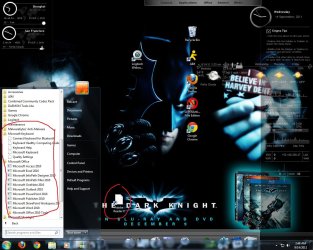
Microsoft Office 2010 and AdobeReader icon are wrong

darknightz0117

New member
Member
VIP
Local time
3:56 PM
Messages
179
Sorry I couldn't think of a more official way to put it. But that is my basic problem . After installing all the updates (I installed a fresh copy of Windows 7), the icons for all the Microsoft Office programs as well as Adobe Reader X and Microsoft Keyboard became weird. I attached a screenshot to better explain myself. I haven't tried uninstalling or anything yet, but I would like to keep that as a last resort.
 

Attachments
  • Icons.jpg
    Icons.jpg
    165.9 KB · Views: 67

My Computer My Computer

At a glance

Windows 7AMD Phenom II X4 5552x2GB OCZ Platinum Edition DDR3 PC3-10666Sapphire Radeon 6870
OS
Windows 7
CPU
AMD Phenom II X4 555
Motherboard
Biostar TA785G3
Memory
2x2GB OCZ Platinum Edition DDR3 PC3-10666
Graphics Card(s)
Sapphire Radeon 6870
Hard Drives
Generic SSD (64GB)
Samsung F3 (1TB)
Seagate (1TB)
Case
Antec 300

My Computer My Computer

At a glance

win 7 X64 Ultimate SP1I3770KG Skill F3-14900CL9-4GBXL x 4NVIDIA GeForce GTX670 + Intel 4000
Computer Manufacturer/Model Number
BGC (Bob's Garage Crew)
OS
win 7 X64 Ultimate SP1
CPU
I3770K
Motherboard
Asus P8Z77-V Deluxe
Memory
G Skill F3-14900CL9-4GBXL x 4
Graphics Card(s)
NVIDIA GeForce GTX670 + Intel 4000
Sound Card
Realtek HD 5.1 (MOB)
Monitor(s) Displays
Asus VW224T (1)
Screen Resolution
1920 x 1080
Hard Drives
SATA Corsair Force GT 2.5" 180GB (System) Sata 3
OCZ Vertex3 120GB
OCZ Vertex 2 120GB 2.5" SATA II
ST31000524AS 1000.2GB
WD15EARS (External)
PSU
CoolerMaster 1000 Watt
Case
CoolerMaster HAF X
Cooling
CPU -- CoolerMaster 520N
Keyboard
MS Wireless 3000 V2
Mouse
MS Wireless 3000 V2
Internet Speed
Cable
Antivirus
Norton Internet Security
Browser
IE9
Other Info
AMI Bios 1805
OC'd 3%

My Computer My Computer

At a glance

Windows 7AMD Phenom II X4 5552x2GB OCZ Platinum Edition DDR3 PC3-10666Sapphire Radeon 6870
OS
Windows 7
CPU
AMD Phenom II X4 555
Motherboard
Biostar TA785G3
Memory
2x2GB OCZ Platinum Edition DDR3 PC3-10666
Graphics Card(s)
Sapphire Radeon 6870
Hard Drives
Generic SSD (64GB)
Samsung F3 (1TB)
Seagate (1TB)
Case
Antec 300
Trying to Help

Couple of things: (you may have already tried)

1. Left click the the icon in question. Select properties and try changing the icon. You will have to navigate in win explorer to the exe (might be a dll) till you see the correct icon. Select and save.

2. Create a new shortcut by navigating in win explorer to the exe and left click and create a new shortcut. See if it comes up with the correct icon.
 

My Computer My Computer

At a glance

win 7 X64 Ultimate SP1I3770KG Skill F3-14900CL9-4GBXL x 4NVIDIA GeForce GTX670 + Intel 4000
Computer Manufacturer/Model Number
BGC (Bob's Garage Crew)
OS
win 7 X64 Ultimate SP1
CPU
I3770K
Motherboard
Asus P8Z77-V Deluxe
Memory
G Skill F3-14900CL9-4GBXL x 4
Graphics Card(s)
NVIDIA GeForce GTX670 + Intel 4000
Sound Card
Realtek HD 5.1 (MOB)
Monitor(s) Displays
Asus VW224T (1)
Screen Resolution
1920 x 1080
Hard Drives
SATA Corsair Force GT 2.5" 180GB (System) Sata 3
OCZ Vertex3 120GB
OCZ Vertex 2 120GB 2.5" SATA II
ST31000524AS 1000.2GB
WD15EARS (External)
PSU
CoolerMaster 1000 Watt
Case
CoolerMaster HAF X
Cooling
CPU -- CoolerMaster 520N
Keyboard
MS Wireless 3000 V2
Mouse
MS Wireless 3000 V2
Internet Speed
Cable
Antivirus
Norton Internet Security
Browser
IE9
Other Info
AMI Bios 1805
OC'd 3%
Back
Top