Solved search .wav to .mp3 converter and more

mowh

New member
Member
Local time
7:15 PM
Messages
42
Hey,

I search for a tool which can convert many .wav-files one after the other - save the new .mp3 in the old folder (where the .wav-files are) and deletes the .wav-files. I know it is complicated but such a tool would be very nice. And if it is possible to convert other files into mp3 too - that would be great ;-)

Hope you know such a tool.
Greets,mowh.
 

My Computer My Computer

At a glance

Windows 7 Prof. x64AMD Athlon 64 X2 6000+Kingston 4GBASUS Geforce 9800GTX+
OS
Windows 7 Prof. x64
CPU
AMD Athlon 64 X2 6000+
Motherboard
M2N SLI DELUXE
Memory
Kingston 4GB
Graphics Card(s)
ASUS Geforce 9800GTX+
Sound Card
On Board
Monitor(s) Displays
Samsung
Screen Resolution
1680x1050
Hello Mowh,

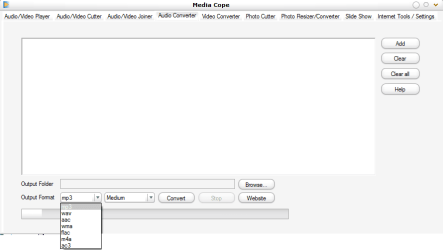
You might like to try media cope. The application is free allowing adio/video playing cutter , joiner , and including your preference video/audio converter . It also support batch conversion; however, the quality is limited to the default setting which is medium. selecting higher level might occur the popup error massage yet available for individual conversion.

Additionally, the Arabic language is not supported . You might rename to others (just in case you have Arabic file name)

media cope.png

I am not pretty sure whether this is exactly what you are looking for yet hope this help a little bit . :)
 

My Computer My Computer

At a glance

Windows 7 Ultimate 32 bit , Window 7Intel(R) Core(TM) i5 CPUM 430 @ 2.27GHz, Inte...2.00 GB,NVIDIA GeForce 310M
Computer type
PC/Desktop
Computer Manufacturer/Model Number
Acer Aspire 4740G , Acer Aspire4930
OS
Windows 7 Ultimate 32 bit , Window 7
CPU
Intel(R) Core(TM) i5 CPUM 430 @ 2.27GHz, Intel core duo pro
Motherboard
Acer Aspire 4740 Acer Aspire4930
Memory
2.00 GB,
Graphics Card(s)
NVIDIA GeForce 310M
Sound Card
(1) Realtek High Definition Audio (2) NVIDIA High Definiti
Monitor(s) Displays
Mobile PC Display
Screen Resolution
1366x768
Hard Drives
WDC WD5000BEVT-22A0RT0 ATA Device , 500 GB
Mouse
TECFON
Hey,

I search for a tool which can convert many .wav-files one after the other - save the new .mp3 in the old folder (where the .wav-files are) and deletes the .wav-files. I know it is complicated but such a tool would be very nice. And if it is possible to convert other files into mp3 too - that would be great ;-)

Hope you know such a tool.
Greets,mowh.

Switch will do just what you want:

Audio Sound File Converter Software. Convert wav mp3 dvd midi flac dvf wma etc.
 

My Computer My Computer

At a glance

Windows 7 Home Premium SP1, 64-bitIntel Skylake i5-6600K, not overclocked8 GB HyperX DDR4-2666 (2 x 4 GB)none; graphics are integrated on CPU
Computer type
PC/Desktop
Computer Manufacturer/Model Number
Ignatz Special; 4 speed manual gearbox; factory air conditioning; one of one
OS
Windows 7 Home Premium SP1, 64-bit
CPU
Intel Skylake i5-6600K, not overclocked
Motherboard
AsRock Z170M Extreme 4, micro ATX
Memory
8 GB HyperX DDR4-2666 (2 x 4 GB)
Graphics Card(s)
none; graphics are integrated on CPU
Sound Card
onboard: Realtek ALC1150; external: USB Behringer UF0-202
Monitor(s) Displays
Dell S2340M 23 inch IPS
Screen Resolution
1600 x 900
Hard Drives
System: Crucial MX100 series SSD, 128 GB;
Data: Samsung Spinpoint 103SJ, 1 TB;
Backup: WD Caviar Green WD30EZRX-00D8PB0, 3 TB
PSU
Rosewill SilentNight 500 watt fanless, semi-modular
Case
Antec Solo II
Cooling
Noctua NH-U12S; Noctua F12 intake, Noctua S12A exhaust
Keyboard
Microsoft 200 6JH-00001 USB
Mouse
Dell or Microsoft optical wired; USB
Antivirus
Microsoft Security Essentials and Malwarebytes Premium
Browser
Pale Moon
Other Info
All fans PWM; speeds at idle: CPU circa 500 rpm; intake circa 600 rpm; exhaust circa 600 rpm; CPU temps 27 idle and 47 C load in a warm room (27 C/81 F) when running Intel Extreme Tuning Utility stress test.
Switch is a good one, I second the recommendation.
 

My Computer My Computer

At a glance

W7 Professional x64AMD Athlon II X3 445 Rana 3.10 GHzPNY XLR DDR3 1600 4x2GBNVIDIA GeForce GTS 450 (fermi) 1GB GDDR5
Computer Manufacturer/Model Number
Pugh Technologies
OS
W7 Professional x64
CPU
AMD Athlon II X3 445 Rana 3.10 GHz
Motherboard
MSI 870A-G54
Memory
PNY XLR DDR3 1600 4x2GB
Graphics Card(s)
NVIDIA GeForce GTS 450 (fermi) 1GB GDDR5
Sound Card
Realtek ALC892 onboard
Monitor(s) Displays
ASUS VE205t, Viewsonic VX2035WM
Screen Resolution
1600x900, 1600x1050
Hard Drives
977GB Hitachi Hitachi HDS721010CLA332
244GB Western Digital WDC WD2500AAJS-65B4A0
488GB Western Digital WDC WD5000AAJS-00A8B0
488GB Western Digital WDC WD5000AAKS-00UU3A0
PSU
Antec EarthWatts EA650 650W
Case
ThermalTake Armor A90 Mid Tower
Cooling
3x 120mm in, 1x 120mm & 200mm out, self built hydro-cooler
Keyboard
Logitec 55
Mouse
Razer Deathadder
Internet Speed
20 Mbps D/L, 9 Mbps U/L
Hi
i tried out switch and it works fine. But is there an option to delete the original file? (if you convert an *.ogg to an *.mp3, the *.ogg should be deleted)

In Media Cope i havent found an option to save it in the same folder as source files and no option to delete the old one automatically.

Thanks for your replies.
greets.mowh
 

My Computer My Computer

At a glance

Windows 7 Prof. x64AMD Athlon 64 X2 6000+Kingston 4GBASUS Geforce 9800GTX+
OS
Windows 7 Prof. x64
CPU
AMD Athlon 64 X2 6000+
Motherboard
M2N SLI DELUXE
Memory
Kingston 4GB
Graphics Card(s)
ASUS Geforce 9800GTX+
Sound Card
On Board
Monitor(s) Displays
Samsung
Screen Resolution
1680x1050
Hi
i tried out switch and it works fine. But is there an option to delete the original file?

Yes.

Choose options from the file menu.

Then select "delete source file after successful conversion".

I don't use it because I manually play all converted files to confirm they play OK.Then I manually delete the originals.
 

My Computer My Computer

At a glance

Windows 7 Home Premium SP1, 64-bitIntel Skylake i5-6600K, not overclocked8 GB HyperX DDR4-2666 (2 x 4 GB)none; graphics are integrated on CPU
Computer type
PC/Desktop
Computer Manufacturer/Model Number
Ignatz Special; 4 speed manual gearbox; factory air conditioning; one of one
OS
Windows 7 Home Premium SP1, 64-bit
CPU
Intel Skylake i5-6600K, not overclocked
Motherboard
AsRock Z170M Extreme 4, micro ATX
Memory
8 GB HyperX DDR4-2666 (2 x 4 GB)
Graphics Card(s)
none; graphics are integrated on CPU
Sound Card
onboard: Realtek ALC1150; external: USB Behringer UF0-202
Monitor(s) Displays
Dell S2340M 23 inch IPS
Screen Resolution
1600 x 900
Hard Drives
System: Crucial MX100 series SSD, 128 GB;
Data: Samsung Spinpoint 103SJ, 1 TB;
Backup: WD Caviar Green WD30EZRX-00D8PB0, 3 TB
PSU
Rosewill SilentNight 500 watt fanless, semi-modular
Case
Antec Solo II
Cooling
Noctua NH-U12S; Noctua F12 intake, Noctua S12A exhaust
Keyboard
Microsoft 200 6JH-00001 USB
Mouse
Dell or Microsoft optical wired; USB
Antivirus
Microsoft Security Essentials and Malwarebytes Premium
Browser
Pale Moon
Other Info
All fans PWM; speeds at idle: CPU circa 500 rpm; intake circa 600 rpm; exhaust circa 600 rpm; CPU temps 27 idle and 47 C load in a warm room (27 C/81 F) when running Intel Extreme Tuning Utility stress test.
Back
Top