
Superfast machine

Robert Cartman

New member
Power User
Local time
3:18 PM
Messages
303
Location
Belgium & Hungary
Hi!
I'm planning to build a vrey fast machine.
I'm going to use SSD drives, but after I read this thread I don't know what to do. If it slows down after a while or stop working because of the limited life of an SSD I don't think it worth the price.
Questions:
If I put every file what must be changing (write,rewrite,delete) during the usage of the system, for example the swap file, to a ramdrive, will it solve that problem?
How can I do that? How can i find all the files what need to move there? Can I move them?
What is the biggest size for a ramdrive what can made? (I think 10Gb is needed)
If only the "static" files will be on the SSD will it speed up my system?
Am I crazy or just stupid? :)
 

My Computer

Computer Manufacturer/Model Number
home made
OS
Windows 7 RTM x64
CPU
AMD X2 5000+
Motherboard
Asrock
Memory
4GB
Graphics Card(s)
Nvidia 9400GT
Sound Card
onboard 6Ch
Monitor(s) Displays
Medion 22" + HannSpree 22"
Screen Resolution
1680X1050 + 1920X1080
Hard Drives
Intel SSD 80GB
WD 1.5 TB
WD 1 TB
Samsung 1TB X 3
PSU
noname
Case
noname
Cooling
Zalman
Keyboard
DeLUX multimedia keyboard
Mouse
Microsoft
Internet Speed
25MB/s
An SSD will slow down to a certain speed and then plateau out. It will still have a much faster sequential read than than any mechanical hard drive.
 

My Computer

Computer type
PC/Desktop
Computer Manufacturer/Model Number
Systems by SmartEyeball
OS
8 Pro x64
CPU
i7 3770K 4.6GHz
Motherboard
ASUS P8Z77 WS
Memory
16GB G.Skill Trident X 2666mhz
Graphics Card(s)
x2 EVGA 780 Ti Superclocked SLI
Sound Card
SB X-FI Surround 5.1 PRO USB / ATH-AD900 Headphones
Monitor(s) Displays
x3 Dell U2410 / 58" Samsung
Screen Resolution
5760*1200/ 1920*1200
Hard Drives
2x Intel 520 240GB (RAID 0) * 2x WD Caviar Blacks 2TB (RAID 0) * 2TB WD Caviar Black * Sony Optirac DVD
PSU
Silverstone Strider Evolution 1200W
Case
Thermaltake Level 10 GT Snow Edition
Cooling
Noctua NH-D14
Keyboard
Topre Realforce // Ducky Shine MX Black // Filco Ninja TKL
Mouse
Thermaltake Theron (Highly Recommended) + Razer Imperator
Antivirus
MSE
Browser
IE, FF, WaterFox
Other Info
GT Extreme V2 Sim Racing Cockpit + 40" LCD and K/B Mouse stand ▼
Fanatec CSR Elite Wheel + Clubsport V1 Pedals + CSR shifter/7G-H ▼Saitek X52 Pro ▼ TrackIR 5 Pro
Buttkicker v2 Seat Rumbler with Dedicated 5.1 and Sub Woofer attached to frame ▼
=
Bloody Big Grin
I wish I had the money for a SSD. I never knew about the slow down issue but it doesnt appear to be a big deal.

Id love to get my hands on one. Gotta try and find the places that sell them the cheapest, though I have a feeling that still wont be cheap enough.
 

My Computer

Computer Manufacturer/Model Number
Built
OS
Windows 7 RTM
CPU
Intel I7 920 2.67 ghz
Motherboard
EVGA X58
Memory
6GB CORSAIR DOMINATOR
Graphics Card(s)
GeForce GTX 260 Core 216 896MB 448-bit GDDR3 PCI Express 2.0
I think they will be cheaper soon and for me it would be enough 16GB for the system.
The RAM prices are also very down now so it is not a big investigation to make that big ramdrive.
 

My Computer

Computer Manufacturer/Model Number
home made
OS
Windows 7 RTM x64
CPU
AMD X2 5000+
Motherboard
Asrock
Memory
4GB
Graphics Card(s)
Nvidia 9400GT
Sound Card
onboard 6Ch
Monitor(s) Displays
Medion 22" + HannSpree 22"
Screen Resolution
1680X1050 + 1920X1080
Hard Drives
Intel SSD 80GB
WD 1.5 TB
WD 1 TB
Samsung 1TB X 3
PSU
noname
Case
noname
Cooling
Zalman
Keyboard
DeLUX multimedia keyboard
Mouse
Microsoft
Internet Speed
25MB/s
SSD drives "slow down". Yes. They begin at a million times faster than disk drives and stabilize at .999 million times faster. A non-issue in this context.

A RAM drive is not the solution.
  • Page File in RAM: Reduces amount of available RAM, increasing need for page operation. Self defeating.
  • Config/Ini files: Lost on power cycle. Yes, some apps keep config data in temp files.
  • Browser cache/cookies: Lost on power cycle.
  • Ad infinitum...
The difference between smooth and superfast is likely discernable only in benchmarking. Pragmatically, unless you are editing video or RAW images, there is such a thing as wasted RAM.

A 32-core CPU running at 3000+ TeraHZ with 4 thousand GB of DDR9 RAM won't give you a "superfast PC" if you have onboard video and your goal is to play Crysis.

My point being - the definition of superfast PC begins with - What do you want the PC to do? Remember, a PC is a set of peripherals wrapped around a microprocessor, enabling a user to do almost anything fairly well. In contrast, an XBox 360 is a set of peripherals wrapped around a microprocessor, enabling a user to do one thing very well.

And, in the PC environment, what is superfast today will not be superfast this time next year.

Having said that...

SSD or HDD - You need to modify your Win7 install files. Place User Profiles on a different drive than System Files. If you do this AFTER OS install, plenty of data continues to reside at C:\Users. Also, environment variables need to be changed to place TEMP off C:\Windows\Temp. The list goes on...
 
........
My point being - the definition of superfast PC begins with - What do you want the PC to do? Remember, a PC is a set of peripherals wrapped around a microprocessor, enabling a user to do almost anything fairly well. ......

Nicely said. I never thought about that way although that is pretty obvious. A "fast" PC is very subjective to what the user has experienced in the past. Someone who has been running an old P4 single core with 512Mb RAM, old IDE hard drive, and a low end graphics card, would most likely think that same system would be a fast computer if that got more RAM and a newly installed OS (with no malware, spyware, adware, etc.). It just depends on what you are used to.

One area that people need to concentrate on when building or purchasing a new PC or laptop for running Windows 7 is the graphics adapter. The more onboard DRAM, the better. Go with at least 256MB or 512MB if you can afford it. Don't skimp on that, it can make all the difference in the world. Windows 7 runs best with tons of RAM also, so spend some money in that area as well. Run a 64-bit OS to make better use of the RAM and newer motherboard and CPU technology.

Best Video Cards
NVIDIA GeForce GTX 295 or 285
ATI Radeon HD 4870 X2

Best CPU
Intel Core i7 Processor 975 or 965 Extreme
Intel Core i7 Processor 950

Source: Futuremark
http://service.futuremark.com/hardware/graphics_cards/ati_radeon_hd_4870_x2
 

My Computer

Computer Manufacturer/Model Number
Dell Inspiron 1525 Notebook
OS
Windows 7
CPU
rocessor Intel(R) Pentium(R) Dual CPU T2390 @ 1.86GHz, 1867
Motherboard
Intel(R) ICH8 Family Chipset
Memory
Installed Physical Memory (RAM) 4 GB
Graphics Card(s)
Mobile Intel(R) 965 Express Chipset Family (Sux)
Sound Card
Intel(R) High Definition Audio HDMI
SSD drives "slow down". Yes. They begin at a million times faster than disk drives and stabilize at .999 million times faster. A non-issue in this context.

A RAM drive is not the solution.
  • Page File in RAM: Reduces amount of available RAM, increasing need for page operation. Self defeating.
  • Config/Ini files: Lost on power cycle. Yes, some apps keep config data in temp files.
  • Browser cache/cookies: Lost on power cycle.
  • Ad infinitum...
The difference between smooth and superfast is likely discernable only in benchmarking. Pragmatically, unless you are editing video or RAW images, there is such a thing as wasted RAM.

A 32-core CPU running at 3000+ TeraHZ with 4 thousand GB of DDR9 RAM won't give you a "superfast PC" if you have onboard video and your goal is to play Crysis.

My point being - the definition of superfast PC begins with - What do you want the PC to do? Remember, a PC is a set of peripherals wrapped around a microprocessor, enabling a user to do almost anything fairly well. In contrast, an XBox 360 is a set of peripherals wrapped around a microprocessor, enabling a user to do one thing very well.

And, in the PC environment, what is superfast today will not be superfast this time next year.

Having said that...

SSD or HDD - You need to modify your Win7 install files. Place User Profiles on a different drive than System Files. If you do this AFTER OS install, plenty of data continues to reside at C:\Users. Also, environment variables need to be changed to place TEMP off C:\Windows\Temp. The list goes on...

With enough RAM I can turn off the swapfile without problems.
I don't want to build a PC what you or everyone will like, I just thinking about how can I increase the systems disk perfirmance.
I do know that a fast system is not only an ssd drive, but now and here I'm talking about the disk speed, so we don't need to definie what is a super fast PC.
And why did you tell this: "what is superfast today will not be superfast this time next year."? Yes its true. And the water is wet. :)


AND... yes I DO wnat to use in that machine a very good video card and of course a X64 OS and a lot of RAM....and so on.

Please stay at the theme, how can I make a "read-only" ssd system disk.
 

My Computer

Computer Manufacturer/Model Number
home made
OS
Windows 7 RTM x64
CPU
AMD X2 5000+
Motherboard
Asrock
Memory
4GB
Graphics Card(s)
Nvidia 9400GT
Sound Card
onboard 6Ch
Monitor(s) Displays
Medion 22" + HannSpree 22"
Screen Resolution
1680X1050 + 1920X1080
Hard Drives
Intel SSD 80GB
WD 1.5 TB
WD 1 TB
Samsung 1TB X 3
PSU
noname
Case
noname
Cooling
Zalman
Keyboard
DeLUX multimedia keyboard
Mouse
Microsoft
Internet Speed
25MB/s
I've almost forgatten.
The ramdrive is really not the best idea, so i have to use a single HDD instead ramdrive.
But I think it will still be faster then without the SSD.
 

My Computer

Computer Manufacturer/Model Number
home made
OS
Windows 7 RTM x64
CPU
AMD X2 5000+
Motherboard
Asrock
Memory
4GB
Graphics Card(s)
Nvidia 9400GT
Sound Card
onboard 6Ch
Monitor(s) Displays
Medion 22" + HannSpree 22"
Screen Resolution
1680X1050 + 1920X1080
Hard Drives
Intel SSD 80GB
WD 1.5 TB
WD 1 TB
Samsung 1TB X 3
PSU
noname
Case
noname
Cooling
Zalman
Keyboard
DeLUX multimedia keyboard
Mouse
Microsoft
Internet Speed
25MB/s
No need to be rude when someone's trying to help. People don't always know you or what your capacity or knowledge is, so you can politely say, "Thanks for the great info - it's all true but I already knew that, and I want to focus on this particular aspect".

Lighten up!
 

My Computer

Computer Manufacturer/Model Number
Custom workstation /// Lenovo X61t tablet notebook
OS
Windows 7 RTM x64
CPU
Core i7 980X @ 4.04GHz OC /// Core Duo L7500 @ 1.6GHz
Motherboard
Asus P6T6 WS Revolution ///
Memory
12GB G. Skill @ DDR-1600 OC /// 4GB
Graphics Card(s)
Saphire HD4870 Toxic 1GB /// Intel Mobile GMA X3100
Monitor(s) Displays
Dual Eizo 24" SX2461W /// 12"
Screen Resolution
1920x1200 /// 1400x1050
Hard Drives
Workstation:
5x 750GB Barracuda-11 on Areca ARC-1220;
4x 1.5TB Barracuda-11 on Intel ICH10R;
Volumes:
300GB RAID 0, 2.7TB RAID 10 on Intel;
100GB RAID 0, 1.4TB RAID 10 on Areca ///
Notebook: G.Skill Titan 256GB SSD
PSU
Tagan ITZ 1100
Case
GHS-1500 ///
Cooling
Thermalright IFX-14 + a slew of stealth fans ///
Keyboard
Logitech Edge ///
Mouse
Logitech Wireless Optical Trackball
Internet Speed
5Mbps down / 820Kbps up
Other Info
Main use: photography;
DVD Drive: L.G GGW-H20L Blu-Ray / DVD;
OC: QPI/DRAM @ 1.33v, CPU @ 1.293v, DRAM Bus @ 1.65v, CPU PLL @ 1.88v, CPU mult = 25x, BCLK = 160, DDR3-1604 @ 7-8-7-24
I almost forgot :D ... 16GB may not be enough. A vanilla install seems to take up about 13GB actual space, and the 16GB drive is not really 16GB in real use. I wish those marketing people would use real numbers.
 

My Computer

Computer Manufacturer/Model Number
Custom workstation /// Lenovo X61t tablet notebook
OS
Windows 7 RTM x64
CPU
Core i7 980X @ 4.04GHz OC /// Core Duo L7500 @ 1.6GHz
Motherboard
Asus P6T6 WS Revolution ///
Memory
12GB G. Skill @ DDR-1600 OC /// 4GB
Graphics Card(s)
Saphire HD4870 Toxic 1GB /// Intel Mobile GMA X3100
Monitor(s) Displays
Dual Eizo 24" SX2461W /// 12"
Screen Resolution
1920x1200 /// 1400x1050
Hard Drives
Workstation:
5x 750GB Barracuda-11 on Areca ARC-1220;
4x 1.5TB Barracuda-11 on Intel ICH10R;
Volumes:
300GB RAID 0, 2.7TB RAID 10 on Intel;
100GB RAID 0, 1.4TB RAID 10 on Areca ///
Notebook: G.Skill Titan 256GB SSD
PSU
Tagan ITZ 1100
Case
GHS-1500 ///
Cooling
Thermalright IFX-14 + a slew of stealth fans ///
Keyboard
Logitech Edge ///
Mouse
Logitech Wireless Optical Trackball
Internet Speed
5Mbps down / 820Kbps up
Other Info
Main use: photography;
DVD Drive: L.G GGW-H20L Blu-Ray / DVD;
OC: QPI/DRAM @ 1.33v, CPU @ 1.293v, DRAM Bus @ 1.65v, CPU PLL @ 1.88v, CPU mult = 25x, BCLK = 160, DDR3-1604 @ 7-8-7-24
Really sorry I did not want to hurt anyone! Next time I'll try to be more polite and calm.
 

My Computer

Computer Manufacturer/Model Number
home made
OS
Windows 7 RTM x64
CPU
AMD X2 5000+
Motherboard
Asrock
Memory
4GB
Graphics Card(s)
Nvidia 9400GT
Sound Card
onboard 6Ch
Monitor(s) Displays
Medion 22" + HannSpree 22"
Screen Resolution
1680X1050 + 1920X1080
Hard Drives
Intel SSD 80GB
WD 1.5 TB
WD 1 TB
Samsung 1TB X 3
PSU
noname
Case
noname
Cooling
Zalman
Keyboard
DeLUX multimedia keyboard
Mouse
Microsoft
Internet Speed
25MB/s
@Robert, SF is really a great place and we appreciate you sharing your views.

Yes, marketing has always taken advantage of the hexadecimal to decimal conversion factor regarding hard drive capacities. Let's see, 8 bits in a byte, 16 bytes to make a hexadecimal character, seek, read, write, ....... of forget it, I will stay happy with the crap on the box. ;)
 

My Computer

Computer Manufacturer/Model Number
Dell Inspiron 1525 Notebook
OS
Windows 7
CPU
rocessor Intel(R) Pentium(R) Dual CPU T2390 @ 1.86GHz, 1867
Motherboard
Intel(R) ICH8 Family Chipset
Memory
Installed Physical Memory (RAM) 4 GB
Graphics Card(s)
Mobile Intel(R) 965 Express Chipset Family (Sux)
Sound Card
Intel(R) High Definition Audio HDMI
Really sorry I did not want to hurt anyone! Next time I'll try to be more polite and calm.
No problem, Robert. I also just realized sometimes when one expresses in a second language things don't come off exactly as one planned :). Happy SSD hunting!
 

My Computer

Computer Manufacturer/Model Number
Custom workstation /// Lenovo X61t tablet notebook
OS
Windows 7 RTM x64
CPU
Core i7 980X @ 4.04GHz OC /// Core Duo L7500 @ 1.6GHz
Motherboard
Asus P6T6 WS Revolution ///
Memory
12GB G. Skill @ DDR-1600 OC /// 4GB
Graphics Card(s)
Saphire HD4870 Toxic 1GB /// Intel Mobile GMA X3100
Monitor(s) Displays
Dual Eizo 24" SX2461W /// 12"
Screen Resolution
1920x1200 /// 1400x1050
Hard Drives
Workstation:
5x 750GB Barracuda-11 on Areca ARC-1220;
4x 1.5TB Barracuda-11 on Intel ICH10R;
Volumes:
300GB RAID 0, 2.7TB RAID 10 on Intel;
100GB RAID 0, 1.4TB RAID 10 on Areca ///
Notebook: G.Skill Titan 256GB SSD
PSU
Tagan ITZ 1100
Case
GHS-1500 ///
Cooling
Thermalright IFX-14 + a slew of stealth fans ///
Keyboard
Logitech Edge ///
Mouse
Logitech Wireless Optical Trackball
Internet Speed
5Mbps down / 820Kbps up
Other Info
Main use: photography;
DVD Drive: L.G GGW-H20L Blu-Ray / DVD;
OC: QPI/DRAM @ 1.33v, CPU @ 1.293v, DRAM Bus @ 1.65v, CPU PLL @ 1.88v, CPU mult = 25x, BCLK = 160, DDR3-1604 @ 7-8-7-24
Thx!
 

My Computer

Computer Manufacturer/Model Number
home made
OS
Windows 7 RTM x64
CPU
AMD X2 5000+
Motherboard
Asrock
Memory
4GB
Graphics Card(s)
Nvidia 9400GT
Sound Card
onboard 6Ch
Monitor(s) Displays
Medion 22" + HannSpree 22"
Screen Resolution
1680X1050 + 1920X1080
Hard Drives
Intel SSD 80GB
WD 1.5 TB
WD 1 TB
Samsung 1TB X 3
PSU
noname
Case
noname
Cooling
Zalman
Keyboard
DeLUX multimedia keyboard
Mouse
Microsoft
Internet Speed
25MB/s
...
Questions:
If I put every file what must be changing (write,rewrite,delete) during the usage of the system, for example the swap file, to a ramdrive, will it solve that problem?
How can I do that? How can i find all the files what need to move there? Can I move them?
What is the biggest size for a ramdrive what can made? (I think 10Gb is needed)
If only the "static" files will be on the SSD will it speed up my system?
Am I crazy or just stupid?

Your rude retort notwithstanding, I will revisit your question(s).

If I put every file what must be changing (write,rewrite,delete) during the usage of the system, for example the swap file, to a ramdrive, will it solve that problem?

No. SSD technology is what it is and how you use it will not change that fact.

How can I do that? How can i find all the files what need to move there? Can I move them?

Move the page file:
Computer, Properties, Advanced System Settings, Advanced, Performance.Settings, Advanced, Virtual Memory.Change

Move TEMP:
See environment variables when you are near the page file settings.

Move User Profiles:
Plenty of websites will outline how to modify your OS install to do this. This MUST BE DONE during install to be complete.

Move Log Files and other system drive writes:
Good luck. In 29 years of IT, I have yet to find them all. Everybody wants to hardcode something.

Also, the page file is there for a reason. You will never have enough RAM to guarantee that it will never be called. Assume that it will be called rarely and there is no effective penalty for placing it on an SSD. If you place it on an HDD, and it is called, it will not be superfast. But, we are talking about discerning nanoseconds and milliseconds.

What is the biggest size for a ramdrive what can made? (I think 10Gb is needed)

Check out Gavotte Ramdisk with GUI - free, no size limit, GUI.
Edit: Does not work in 7x64. Web search seems to indicate a lack of viable 64 bit options.

If only the "static" files will be on the SSD will it speed up my system?

Yes, and No. It ALL comes back to "What do you want to do?" In some applications, SSD is actually SLOWER than HDD. Of course, if all you want to do is benchmark or turn on Windows or open applications or surf, then Hell Yeah!

Am I crazy or just stupid?

Either or.

Please stay at the theme, how can I make a "read-only" ssd system disk.

From the command line:
example: attrib +R *.* /S /D

Dollar for dollar - you are better off using RAID volumes.
 
Thank You Antman! I'm appologise.
I'm happy to see your answers!
I think you are right it is too complicated and not sure that finally it will be "superfast".
So maybe it is better to wait 'till the SSDs became better in writing and lifetime, or use simple HDDs in raid.
BUT inspite of all the problems with it I will try to do it - with some compromise- because I like the challenge! And I want to see how fast will it be finally.

What I planning to do:
-Move every system folders -like Program Files- to a HDD
-No swap file (A lot of people lives without it having no issues)
-Move temp files to a ramdrive or HDD
-For storage use a HDD of course
-
-
-User Profiles... yes its a problem but at least I can reduce the usage of it.
-16GB for the system is not enough so it must be 32. (Thx DJG!)

Any other idea?
 

My Computer

Computer Manufacturer/Model Number
home made
OS
Windows 7 RTM x64
CPU
AMD X2 5000+
Motherboard
Asrock
Memory
4GB
Graphics Card(s)
Nvidia 9400GT
Sound Card
onboard 6Ch
Monitor(s) Displays
Medion 22" + HannSpree 22"
Screen Resolution
1680X1050 + 1920X1080
Hard Drives
Intel SSD 80GB
WD 1.5 TB
WD 1 TB
Samsung 1TB X 3
PSU
noname
Case
noname
Cooling
Zalman
Keyboard
DeLUX multimedia keyboard
Mouse
Microsoft
Internet Speed
25MB/s
I admire tenacity

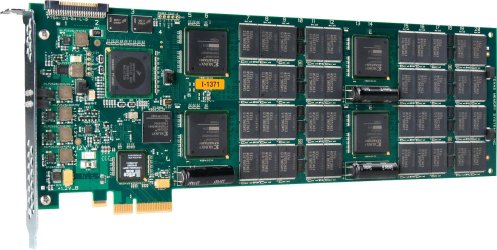
I want one of these.

RamSan-20 highlights:
  • 450GB Flash storage
  • 120,000 IOPS
  • 700 MB/s random sustained external throughput
  • ECC and RAID
  • Embedded CPU controller.
Check out StorageSearch.com before you make a purchase. It will be a bit overwhelming at first, but you will make a better decision in which SSD you purchase.

Moving Program Files is also during OS install.

IMO, Moving User Profiles is paramount. Your registry files are there. Most of your system IO occurs there. I will find you a link.
 

Attachments

  • 20a.jpg
    20a.jpg
    220.3 KB · Views: 17
I liked the old way better.

Windows® Automated Installation Kit (AIK) for Windows® 7 RC

Expect some problems while doing this. You can create a Virtual Machine to test your results. I use Sun VirtualBox but there are a few options available.

Once you get this into your bag of tricks, you will never go back.
 
Hey that RamSan-20 costs 18.000$! I'll never have that! :)

Windows® Automated Installation Kit (AIK) for Windows® 7 RC
I'll check this out!

Can I run a x64 system in VirtualBox?
 

My Computer

Computer Manufacturer/Model Number
home made
OS
Windows 7 RTM x64
CPU
AMD X2 5000+
Motherboard
Asrock
Memory
4GB
Graphics Card(s)
Nvidia 9400GT
Sound Card
onboard 6Ch
Monitor(s) Displays
Medion 22" + HannSpree 22"
Screen Resolution
1680X1050 + 1920X1080
Hard Drives
Intel SSD 80GB
WD 1.5 TB
WD 1 TB
Samsung 1TB X 3
PSU
noname
Case
noname
Cooling
Zalman
Keyboard
DeLUX multimedia keyboard
Mouse
Microsoft
Internet Speed
25MB/s
Hey that RamSan-20 costs 18.000$! I'll never have that!

Can I run a x64 system in VirtualBox?

When you are my age, these things will be common and cheap - if not obsolote.

If your system supports 64-bit and all appropriate options are set, yes.

I have one customer system running 32 bit Vista on an AMD 64 bit machine with Win7 RC1 64-bit running in VBox. It was for a "show me" test and is not a recommended configuration.

I once had a superfast monster machine. 486-66, 16 MB RAM (12 meg RAM drive) SCSI drive (40 meg I think). Fastest machine in the neighborhood, but it was built to do only one thing. Reformat data from an AS400 for processing in FoxPro.
 
Back
Top