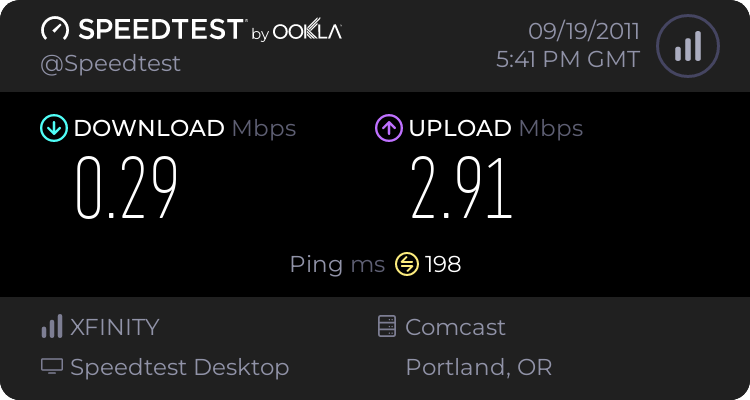
SLOW network all of a sudden?

LiquidSnak

Resident Weeaboo
Guru
Gold Member
VIP
Local time
4:13 PM
Messages
2,213
Location
Portland, OR


It's been like this for a couple days now, and I'm baffled. I RMA'd my ASUS PCE-N13 already, I'm on an N network, and it's faster if I connect through my laptop sharing internet over a cable... I don't have any idea where to start because I've never had this problem before o.O
 

My Computer My Computer

Computer Manufacturer/Model Number
Pugh Technologies
OS
W7 Professional x64
CPU
AMD Athlon II X3 445 Rana 3.10 GHz
Motherboard
MSI 870A-G54
Memory
PNY XLR DDR3 1600 4x2GB
Graphics Card(s)
NVIDIA GeForce GTS 450 (fermi) 1GB GDDR5
Sound Card
Realtek ALC892 onboard
Monitor(s) Displays
ASUS VE205t, Viewsonic VX2035WM
Screen Resolution
1600x900, 1600x1050
Hard Drives
977GB Hitachi Hitachi HDS721010CLA332
244GB Western Digital WDC WD2500AAJS-65B4A0
488GB Western Digital WDC WD5000AAJS-00A8B0
488GB Western Digital WDC WD5000AAKS-00UU3A0
PSU
Antec EarthWatts EA650 650W
Case
ThermalTake Armor A90 Mid Tower
Cooling
3x 120mm in, 1x 120mm & 200mm out, self built hydro-cooler
Keyboard
Logitec 55
Mouse
Razer Deathadder
Internet Speed
20 Mbps D/L, 9 Mbps U/L
Call your ISP and see if they are doing some kind of work on the lines in your area or if there are any outages or disruptions that might be causing you slow down.
 

My Computer My Computer

Computer Manufacturer/Model Number
Custom built
OS
Windows 7 Ultimate 64 bit
CPU
AMD Phenom II X4 965 Black Edition
Motherboard
Gigabyte GA-MA790X-DS4
Memory
GSkill 4 X 2 GB PC 8500
Graphics Card(s)
XFX Radeon HD 6790 D
Sound Card
On board RealTek HD
Monitor(s) Displays
Dual monitors:Samsung SyncMaster S20B300
Screen Resolution
1600 X 900
Hard Drives
Seagate Barracuda 1TB (primary)
Seagate Barracuda 2 X 320 GB
PSU
Ultra X4 750 watt fully modular
Case
Thermaltake Overseer RX 1 full tower
Cooling
Core-Contact 92 mm CPU Cooler
Keyboard
Logitech G510
Mouse
Razor DeathAdder
Internet Speed
50/5 Mbps UL/DL
Other Info
Optical: Super Muliti DVD burner w/lightscribe, Hauppauge WinTV HVR-1800
It's normal on my laptop, my friend's and sister's computers as well...
 

My Computer My Computer

Computer Manufacturer/Model Number
Pugh Technologies
OS
W7 Professional x64
CPU
AMD Athlon II X3 445 Rana 3.10 GHz
Motherboard
MSI 870A-G54
Memory
PNY XLR DDR3 1600 4x2GB
Graphics Card(s)
NVIDIA GeForce GTS 450 (fermi) 1GB GDDR5
Sound Card
Realtek ALC892 onboard
Monitor(s) Displays
ASUS VE205t, Viewsonic VX2035WM
Screen Resolution
1600x900, 1600x1050
Hard Drives
977GB Hitachi Hitachi HDS721010CLA332
244GB Western Digital WDC WD2500AAJS-65B4A0
488GB Western Digital WDC WD5000AAJS-00A8B0
488GB Western Digital WDC WD5000AAKS-00UU3A0
PSU
Antec EarthWatts EA650 650W
Case
ThermalTake Armor A90 Mid Tower
Cooling
3x 120mm in, 1x 120mm & 200mm out, self built hydro-cooler
Keyboard
Logitec 55
Mouse
Razer Deathadder
Internet Speed
20 Mbps D/L, 9 Mbps U/L
It could be incorrrect router settings i.e. MTU (Maximum Transfer Units).
 

My Computer My Computer

Computer Manufacturer/Model Number
Look in my Signature.
OS
Win7 H.Prem. 32bit+SP1
It could be incorrrect router settings i.e. MTU (Maximum Transfer Units).
and how would one A: find out what the CORRECT router settings are, and B: change it.?

maximum transfer units.... what exactly does that mean and does it vary, and if so, what determining factors are involved? o.O

(not trying to necro this thread, no worries - will start a new one if requested)
 

My Computer My Computer

Computer Manufacturer/Model Number
Compaq Presario CQ56
OS
Windows 7 home premium x64
I think all these machines are connected to same router(?) and therefore the speedtest posted above is not an ISP bottleneck but a machine to router bottleneck? Although it's a wireless N connection to the router have you noticed a change in signal strength? I would be searching for the fault on your machine. you could check your MTU settings per this link.
 

My Computer My Computer

Computer type
PC/Desktop
Computer Manufacturer/Model Number
Self Build
OS
Windows 7 Ultimate x64
CPU
Intel Core2 Quad Q8300 2.5Ghz
Motherboard
Asus P5QD Turbo
Memory
Kingston HyperX 4x1GB DDR2 1066Mhz
Graphics Card(s)
Asus/Nvidia 9500GT 1GB
Sound Card
On-Board HD
Monitor(s) Displays
22" Widescreen TFT
Screen Resolution
1920x1080
Hard Drives
2x 320Gb Seagate SATAII RAID 0
2x 80Gb Seagate SATAII RAID 0
1x 1tb hybrid (8gb ssd)
PSU
650w
Case
ATX
Cooling
140mm front, 120mm Rear, 80mm Chipset + stock CPU and GPU
Keyboard
Plastic one
Mouse
Plastic one
Internet Speed
4Mbps
Other Info
Laptop: HP Elitebook 2560p
i5 @2.7Ghz 4GB DDR3


It's been like this for a couple days now, and I'm baffled. I RMA'd my ASUS PCE-N13 already, I'm on an N network, and it's faster if I connect through my laptop sharing internet over a cable... I don't have any idea where to start because I've never had this problem before o.O

Does this happen in Safe mode with Networking?

Some programs affect Internet speed as I found out earlier this year ;)
 

My Computer My Computer

Computer type
PC/Desktop
Computer Manufacturer/Model Number
Custom Built
OS
Windows 7 Professional x64 SP1 ; Windows Server 2012 R2 Standard
CPU
Intel Core i5 2400 @ 3.10GHz
Motherboard
Foxconn H67MP-S/-V/H67MP
Memory
8.0GB DDR3 @ 665MHz (2GBx4)
Graphics Card(s)
AMD Radeon HD 6870
Sound Card
Realtek High Definition Audio
Monitor(s) Displays
AOC 2243W & SMB1930NW
Screen Resolution
1440x900 & 1920x1080
Hard Drives
977GB Seagate ST31000524AS ATA Drive (SATA)
250GB WD iSCSI attached Drive
PSU
750W Gaming PSU
Case
Novatech Night
Cooling
Fan
Keyboard
Dell Standard PS/2 Keyboard
Mouse
R.A.T 07 Gaming Mouse
Internet Speed
Download: 10 Mbps Ping: 30ms Upload: 0.81 Mbps
Browser
Google Chrome
Other Info
Optiarc DVD RW AD-5260S ATA Device
It could be incorrrect router settings i.e. MTU (Maximum Transfer Units).
and how would one A: find out what the CORRECT router settings are, and B: change it.?

maximum transfer units.... what exactly does that mean and does it vary, and if so, what determining factors are involved? o.O

(not trying to necro this thread, no worries - will start a new one if requested)
Your ISP should tell correct settings, if not, here's how.
-
To see your present MTU.
Open a command prompt, by typing cmd in the start menu search box, then type:-
netsh interface ipv4 show subinterfaces then press enter.
-
To determine your optimum MTU.

Most common ones to try are 1392/1400/1432/1492 (1432 is the usual recommended MTU for Talk Talk but may not work for all).
You can try these ones, or you can diagnose the exact figure yourself as below.
First, log into your router and set MTU to 1500 just for testing purposes.
Open a command prompt. As above.
In the cmd window type: ping -f -l 1472 google.co.uk
(the l is a lower case L, and note there are spaces after ping, f, l, and 1472)
You may get output that says something like "packet needs to fragment but DF set", or 100% packet loss, or “request timed
out”.
If you do, then type that command again, reducing the value of 1472 by small increments until you find the largest number
which works with no lost packets. Then just add 28 to this number to set the MTU in your router settings.
EG: max value with no packet loss = 1464, add 28 = optimum MTU of 1492.
-
To change the MTU value in your computer.

Although you may have now entered the right MTU setting in the router, you may need to adjust the MTU in your computer
system, as this may still be showing a default MTU which is different from your router MTU.
You can download Dr TCP which can do this via an easy to use interface, however this does not work for Vista/Win7. So this
needs to be done via a command prompt.
Open a command prompt (cmd) run as administrator and type: ipconfig/all
Make a note of the exact names of the network devices.
They are the words directly after “adapter". Eg: “Local Area Connection" or "Wireless Network Connection". now use the
following command to set the MTU value:

Change 1432 to your previously found result if needed.

netsh interface ipv4 set subinterface "Wireless Network Connection" mtu=1432 store=persistent
netsh interface ipv4 set subinterface "Local Area Connection" mtu=1432 store=persistent
-
More details on how to do this at: ::. Kitz - Vista MTU .::

However, if you find that you are getting the “element not found message” when following above instructions, try the below
procedure.
Rather than use the name of the interface, use its numerical ID. To get that ID, enter the following in a command prompt:
netsh interface ipv4 show interfaces
-
Once you know the ID for the interface you want to tweak, use that rather than the description:
netsh interface ipv4 set subinterface “X? mtu=1432 store=persistent (where 'x' is the ID of the interface).
Change 1432 to your previously found result if needed.

 

My Computer My Computer

Computer Manufacturer/Model Number
Look in my Signature.
OS
Win7 H.Prem. 32bit+SP1
What is loopback pseudo-interface 1?

Also, everything is set correctly now, except the router, of which I forgot my password... :/
 

My Computer My Computer

Computer Manufacturer/Model Number
Pugh Technologies
OS
W7 Professional x64
CPU
AMD Athlon II X3 445 Rana 3.10 GHz
Motherboard
MSI 870A-G54
Memory
PNY XLR DDR3 1600 4x2GB
Graphics Card(s)
NVIDIA GeForce GTS 450 (fermi) 1GB GDDR5
Sound Card
Realtek ALC892 onboard
Monitor(s) Displays
ASUS VE205t, Viewsonic VX2035WM
Screen Resolution
1600x900, 1600x1050
Hard Drives
977GB Hitachi Hitachi HDS721010CLA332
244GB Western Digital WDC WD2500AAJS-65B4A0
488GB Western Digital WDC WD5000AAJS-00A8B0
488GB Western Digital WDC WD5000AAKS-00UU3A0
PSU
Antec EarthWatts EA650 650W
Case
ThermalTake Armor A90 Mid Tower
Cooling
3x 120mm in, 1x 120mm & 200mm out, self built hydro-cooler
Keyboard
Logitec 55
Mouse
Razer Deathadder
Internet Speed
20 Mbps D/L, 9 Mbps U/L
Sorry I'm not that clever. Looks like you will need to 'Factory Reset' it.
 

My Computer My Computer

Computer Manufacturer/Model Number
Look in my Signature.
OS
Win7 H.Prem. 32bit+SP1
What is loopback pseudo-interface 1?

Also, everything is set correctly now, except the router, of which I forgot my password... :/

Loopback is your own machine, 127.0.0.1 is the address to test your own machines IP stack.

As for the router... if you tell us the make and model, we should be able to assist you in getting into it!
 

My Computer My Computer

Computer Manufacturer/Model Number
Homebrew PC - "Alpha_Dawg"
OS
Windows 7 Ultimate 64 bit Steve Ballmer Signature Edition
CPU
Intel Core 2 Quad - Q9550 - 2.83GHz stock - OC'd to 3.6GHz
Motherboard
Gigabyte EP45-UD3P
Memory
4GB DDR2 800MHz (PC6400) OCZ Reaper
Graphics Card(s)
Nvidia GE Force 8800 GTS
Sound Card
Asus Xonar DX
Monitor(s) Displays
Samsung SyncMaster 2333HD
Screen Resolution
1920 x 1080
Hard Drives
WD Caviar Black 750GB - 7200RPM - 32MB cache
WD Caviar Green 1.5TB - 5400RPM - 64MB cache
WD Caviar Green 2.0TB - 5400RPM - 64MB cache
PSU
PC Power & Cooling Silencer 750
Case
Gigabyte 3D Aurora
Cooling
Case is Air - 5ea. 120mm fans (mix of Arctic and Xigmatec)
Keyboard
MS Natural Wireless KB
Mouse
MS Wireless Mouse
Internet Speed
50 mbps down/5 mbps up
Other Info
AVerMedia - AVerTVHD G2 Dual Tuner Card
(sorry for the delayed response, I was called off for a week :/)

I've never heard of that term for it, oh well. It's a linksys WRT300N, and it's set correctly as well.

:/ It baffles me because this only happens on my Desktop with my ASUS PCE-13, not on my Win 7 laptop, or either of the mac lappy's in the house.
 

My Computer My Computer

Computer Manufacturer/Model Number
Pugh Technologies
OS
W7 Professional x64
CPU
AMD Athlon II X3 445 Rana 3.10 GHz
Motherboard
MSI 870A-G54
Memory
PNY XLR DDR3 1600 4x2GB
Graphics Card(s)
NVIDIA GeForce GTS 450 (fermi) 1GB GDDR5
Sound Card
Realtek ALC892 onboard
Monitor(s) Displays
ASUS VE205t, Viewsonic VX2035WM
Screen Resolution
1600x900, 1600x1050
Hard Drives
977GB Hitachi Hitachi HDS721010CLA332
244GB Western Digital WDC WD2500AAJS-65B4A0
488GB Western Digital WDC WD5000AAJS-00A8B0
488GB Western Digital WDC WD5000AAKS-00UU3A0
PSU
Antec EarthWatts EA650 650W
Case
ThermalTake Armor A90 Mid Tower
Cooling
3x 120mm in, 1x 120mm & 200mm out, self built hydro-cooler
Keyboard
Logitec 55
Mouse
Razer Deathadder
Internet Speed
20 Mbps D/L, 9 Mbps U/L
Your router is what is known as a Pre N or Draft N router, meaning that the router was released before the IEEE approved the new 802.11n wireless standards. Have you tried updating the firmware on the router? Check the Linksys support site for the latest firmware.

I would also suspect the Asus PCE-13 wireless adapter as it may be bad, or incompatible with the router. Try updating the firmware on router first, if that doesnt help... return the ASUS PCE-13 for a different model/brand!
 

My Computer My Computer

Computer Manufacturer/Model Number
Homebrew PC - "Alpha_Dawg"
OS
Windows 7 Ultimate 64 bit Steve Ballmer Signature Edition
CPU
Intel Core 2 Quad - Q9550 - 2.83GHz stock - OC'd to 3.6GHz
Motherboard
Gigabyte EP45-UD3P
Memory
4GB DDR2 800MHz (PC6400) OCZ Reaper
Graphics Card(s)
Nvidia GE Force 8800 GTS
Sound Card
Asus Xonar DX
Monitor(s) Displays
Samsung SyncMaster 2333HD
Screen Resolution
1920 x 1080
Hard Drives
WD Caviar Black 750GB - 7200RPM - 32MB cache
WD Caviar Green 1.5TB - 5400RPM - 64MB cache
WD Caviar Green 2.0TB - 5400RPM - 64MB cache
PSU
PC Power & Cooling Silencer 750
Case
Gigabyte 3D Aurora
Cooling
Case is Air - 5ea. 120mm fans (mix of Arctic and Xigmatec)
Keyboard
MS Natural Wireless KB
Mouse
MS Wireless Mouse
Internet Speed
50 mbps down/5 mbps up
Other Info
AVerMedia - AVerTVHD G2 Dual Tuner Card
Back
Top