Removing the warning when you log off

Shukaku

New member
Local time
4:07 PM
Messages
29
Hi

I use a program called Shut It! 1.1 so when a logoff or shutdown has been initiated, it displays a message. However, this message can't be seen because of Windows 7's annoying warning when a program is either open or preventing it from shutting down or logging off.

Is there any way to remove this feature so I can use the features of Shut It ?

Many thanks.
 

My Computer My Computer

Computer Manufacturer/Model Number
Custom Built
OS
Windows 7 Professional 64-bit
CPU
Intel Core 2 Quad Q9505 2.83GHz
Memory
8GB
Graphics Card(s)
ATI Radeon HD 5700
Sound Card
Realtek HD Audio
Monitor(s) Displays
Generic PnP Monitor (23" TV)
Screen Resolution
1920x1080 (with 1024x768 extended display)
Hard Drives
1TB WDC WD10EARS-00Y5B1 ATA
PSU
550W (Can't confirm)
Keyboard
Microsoft Comfort Curve 2000 v1
Mouse
Microsoft Basic Optical Mouse
Internet Speed
6.5Mbps Download, 0.35Mbps Upload
Hi Shukaku, welcome to 7F :)

I think you are describing the UAC that is built-into win 7.
Screen goes dark and a dialog box pops up asking you if you really want to allow Shut It! 1.1 to proceed with what you asked it to do.

Usual procedure is to say yes for the UAC, and then you have to OK shut it's question if it is what you want to do.

The only way I know of is to shut off the UAC :( But then you are left with a much less secure system.
Some reading: User Account Control
 

My Computer My Computer

Computer type
PC/Desktop
Computer Manufacturer/Model Number
Gateway DX4831-01e (Mid-Tower Desktop)
OS
Originally Win 7 Hm Prem x64 Ver 6.1.7600 Build 7601-SP1 | Upgraded to Windows 10 December 14, 2019
CPU
Intel i3 530 2.93GHz, 2933MHz 2 Cores 4 Logical Processors
Motherboard
Gateway H57M01 133 megahertz
Memory
6GB of 1,333MHz DDR3 SDRAM
Graphics Card(s)
32MB Intel Graphics Media Accelerator HD IGChip
Sound Card
Realtek High Definition Audio
Monitor(s) Displays
Gateway HX2000 20inch TFT active matrix TN
Screen Resolution
1600 x 900 x 59 hertz
Hard Drives
WDC WD10EADS-00M2B0 [HDD] (1000.20 GB) -- drive 0,
HL-DT-ST DVDRAM GH41N [CD-ROM dr]
Four card readers, and Four USB 2.0
PSU
300watts.
Case
Mid-Tower Desktop
Cooling
Stock from Gateway
Keyboard
Natural Ergonomic Keyboard 4000, see Other Info
Mouse
Orig. Gateway wore out now using Insignia USB wired optical
Internet Speed
Vz FIOS 10ms png 57.64Mbps down 65.53Mbps up Speedtest.org
Antivirus
Zamana Anti-logger with Anti-malware, MSE, Windows Firewall,
Browser
IE11.0.9600.19399-Upd ver11.0.135, Firefox 68.0.1 x64
Other Info
System Specs by Belarc.

BIOS: American Megatrends Inc. P01-A0 11/17/2009

Replaced the MS 'Natural' Standard PS/2 Enhanced 101-102 Keyboard with a new Natural Ergonomic Keyboard 4000 on August 1st 2014.

Canon Pixma MG3222 Printer.

Updated to IE11 on 12102015 | Fios Quantum Router g1100

Additional AV: SpywareBlaster, manual Mbam, SAS
Hi Shukaku, welcome to 7F :)
Thanks for the welcome! :D

I think you are describing the UAC that is built-into win 7.
Screen goes dark and a dialog box pops up asking you if you really want to allow Shut It! 1.1 to proceed with what you asked it to do.

Usual procedure is to say yes for the UAC, and then you have to OK shut it's question if it is what you want to do.

The only way I know of is to shut off the UAC :( But then you are left with a much less secure system.

Some reading: User Account Control
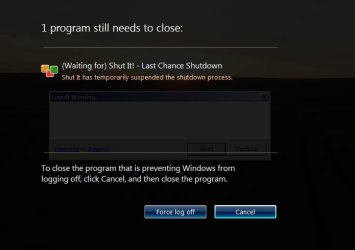
Unfortunately, this is not what I am referring to. Open up some programs and make one show a dialog or something that will stop Windows closing down. Now logoff and you should see what I mean. It'll look like the image I've attached below. I always disable UAC as it's very annoying in my network
 

Attachments

  • warning.jpg
    warning.jpg
    20.7 KB · Views: 14

My Computer My Computer

Computer Manufacturer/Model Number
Custom Built
OS
Windows 7 Professional 64-bit
CPU
Intel Core 2 Quad Q9505 2.83GHz
Memory
8GB
Graphics Card(s)
ATI Radeon HD 5700
Sound Card
Realtek HD Audio
Monitor(s) Displays
Generic PnP Monitor (23" TV)
Screen Resolution
1920x1080 (with 1024x768 extended display)
Hard Drives
1TB WDC WD10EARS-00Y5B1 ATA
PSU
550W (Can't confirm)
Keyboard
Microsoft Comfort Curve 2000 v1
Mouse
Microsoft Basic Optical Mouse
Internet Speed
6.5Mbps Download, 0.35Mbps Upload
I don't think there's a way to disable this feature in Windows.
 

My Computer My Computer

Computer type
Laptop
Computer Manufacturer/Model Number
Custom
OS
Windows 7 Home Premium x64
CPU
Intel Core i5 2500K
Motherboard
MSI MS-7750
Memory
8GB DDR3
Graphics Card(s)
nVidia GeForce GTX650 Ti BOOST
Sound Card
Realtek
Monitor(s) Displays
21' Philips
Screen Resolution
Full HD
Hard Drives
1TB
PSU
500W
My apologies, I missed your thread topic. :o

As a matter of fact I have come across this. All I have done was to close the offending program(s), and then Windows would shut-down the session.

Never thought as being that much of a big deal, but since you are using a third-party program to do the shut-down for you I can see your consternation.

After reading about Shut it 1.1 From Delphiness.com, and here Download Shut it 1.1 Free - This application allows you to schedule your shut down with great ease. - Softpedia
I think you may be expecting too much from this app.

From the Developers Site:
Shut It is a shutdown monitor. In essence it monitors system shutdown requests via the WM_QUERYENDSESSION windows message. When it detects a shutdown, it will temporarily stop the shutdown until user interaction or a timeout period has elapsed. Shut It runs from a small icon in the system tray (beside the clock if visible).
Why?
I use multiple desktops and VMWare, and quite often I forget a VMware session is running in the background before its too late. Shut It is designed to give me a "last chance" before closing the session.
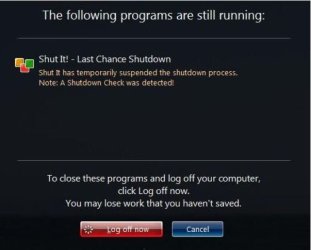
As far as I can see the program is doing what it is designed to do, and that warning you are getting looks exactly like the one on the Developers site, that is not a Windows warning dialog box.
However, this message can't be seen because of Windows 7's annoying warning when a program is either open or preventing it from shutting down or logging off.

The first snip is from the Developer, the second is yours:
1q.JPG1q1.JPG

In simpler terms: Shut it gives the user time to close out other programs so the user will not lose any work.

Are you looking for a program that will just nuke anything in its way and log off to a power off/down ending?
 

My Computer My Computer

Computer type
PC/Desktop
Computer Manufacturer/Model Number
Gateway DX4831-01e (Mid-Tower Desktop)
OS
Originally Win 7 Hm Prem x64 Ver 6.1.7600 Build 7601-SP1 | Upgraded to Windows 10 December 14, 2019
CPU
Intel i3 530 2.93GHz, 2933MHz 2 Cores 4 Logical Processors
Motherboard
Gateway H57M01 133 megahertz
Memory
6GB of 1,333MHz DDR3 SDRAM
Graphics Card(s)
32MB Intel Graphics Media Accelerator HD IGChip
Sound Card
Realtek High Definition Audio
Monitor(s) Displays
Gateway HX2000 20inch TFT active matrix TN
Screen Resolution
1600 x 900 x 59 hertz
Hard Drives
WDC WD10EADS-00M2B0 [HDD] (1000.20 GB) -- drive 0,
HL-DT-ST DVDRAM GH41N [CD-ROM dr]
Four card readers, and Four USB 2.0
PSU
300watts.
Case
Mid-Tower Desktop
Cooling
Stock from Gateway
Keyboard
Natural Ergonomic Keyboard 4000, see Other Info
Mouse
Orig. Gateway wore out now using Insignia USB wired optical
Internet Speed
Vz FIOS 10ms png 57.64Mbps down 65.53Mbps up Speedtest.org
Antivirus
Zamana Anti-logger with Anti-malware, MSE, Windows Firewall,
Browser
IE11.0.9600.19399-Upd ver11.0.135, Firefox 68.0.1 x64
Other Info
System Specs by Belarc.

BIOS: American Megatrends Inc. P01-A0 11/17/2009

Replaced the MS 'Natural' Standard PS/2 Enhanced 101-102 Keyboard with a new Natural Ergonomic Keyboard 4000 on August 1st 2014.

Canon Pixma MG3222 Printer.

Updated to IE11 on 12102015 | Fios Quantum Router g1100

Additional AV: SpywareBlaster, manual Mbam, SAS
When you think of it, the warning should be when you log on!!

'Dis here be Windoze boy!! Anyt'ing can happin' at any time!! Keep dee eyze open man!
 

My Computer My Computer

Computer Manufacturer/Model Number
HP Media Center
OS
Windows 7 32 bit
CPU
AMD 5200+ dual core
Memory
2 GB
Graphics Card(s)
NVidia GeForce 6150SE 128 MB
Monitor(s) Displays
CRT
Screen Resolution
1280x1024
Hard Drives
500 GB Sata internal :

SIIG USB 3.0 docking stations w/WD Caviar Black 6 Gb/s drives
Keyboard
PS/2
Mouse
PS/2 Wheel Mouse
Other Info
SIIG USB 3.0 PCIexpress card.
Are you looking for a program that will just nuke anything in its way and log off to a power off/down ending?

I don't know what you mean. All I'm looking for is a way to remove Window's message when programs are running that prevent it shutting down, so I can use the Shut It! program, because currently, both Windows and Shut It! are doing the same thing.

I also know what Shut It! does, I simply want to use it as my local College uses it.
 
Last edited:

My Computer My Computer

Computer Manufacturer/Model Number
Custom Built
OS
Windows 7 Professional 64-bit
CPU
Intel Core 2 Quad Q9505 2.83GHz
Memory
8GB
Graphics Card(s)
ATI Radeon HD 5700
Sound Card
Realtek HD Audio
Monitor(s) Displays
Generic PnP Monitor (23" TV)
Screen Resolution
1920x1080 (with 1024x768 extended display)
Hard Drives
1TB WDC WD10EARS-00Y5B1 ATA
PSU
550W (Can't confirm)
Keyboard
Microsoft Comfort Curve 2000 v1
Mouse
Microsoft Basic Optical Mouse
Internet Speed
6.5Mbps Download, 0.35Mbps Upload
When you think of it, the warning should be when you log on!!

'Dis here be Windoze boy!! Anyt'ing can happin' at any time!! Keep dee eyze open man!

:roflmao: +1
 

My Computer My Computer

Computer type
Laptop
Computer Manufacturer/Model Number
Custom
OS
Windows 7 Home Premium x64
CPU
Intel Core i5 2500K
Motherboard
MSI MS-7750
Memory
8GB DDR3
Graphics Card(s)
nVidia GeForce GTX650 Ti BOOST
Sound Card
Realtek
Monitor(s) Displays
21' Philips
Screen Resolution
Full HD
Hard Drives
1TB
PSU
500W
Are you looking for a program that will just nuke anything in its way and log off to a power off/down ending?
I don't know what you mean.
To nuke, as in the context I meant, means to indiscriminately shutdown a program whether or not it is ready to do so.

All I'm looking for is a way to remove Window's message when programs are running that prevent it shutting down, so I can use the Shut It! program, because currently, both Windows and Shut It! are doing the same thing.
These are older solutions, but they probably will not apply to Windows 7.
If you have the APM tab in Power Options in Control Panel click on, and enable APM. Also check the BIOS.
If you can find the file C:\Windows\Logos.sys, rename it to old. your machine will then shutdown without the warning, but then that defeats the purpose of the shut it program.

I also know what Shut It! does, I simply want to use it as my local College uses it.
How does your local College use it?
Are your collegian friends also having this problem?
Maybe it would behoove you to ask at University?

I am looking into this Dialog Boxes, but I am running out of time and I need to go and do some errands.
 

My Computer My Computer

Computer type
PC/Desktop
Computer Manufacturer/Model Number
Gateway DX4831-01e (Mid-Tower Desktop)
OS
Originally Win 7 Hm Prem x64 Ver 6.1.7600 Build 7601-SP1 | Upgraded to Windows 10 December 14, 2019
CPU
Intel i3 530 2.93GHz, 2933MHz 2 Cores 4 Logical Processors
Motherboard
Gateway H57M01 133 megahertz
Memory
6GB of 1,333MHz DDR3 SDRAM
Graphics Card(s)
32MB Intel Graphics Media Accelerator HD IGChip
Sound Card
Realtek High Definition Audio
Monitor(s) Displays
Gateway HX2000 20inch TFT active matrix TN
Screen Resolution
1600 x 900 x 59 hertz
Hard Drives
WDC WD10EADS-00M2B0 [HDD] (1000.20 GB) -- drive 0,
HL-DT-ST DVDRAM GH41N [CD-ROM dr]
Four card readers, and Four USB 2.0
PSU
300watts.
Case
Mid-Tower Desktop
Cooling
Stock from Gateway
Keyboard
Natural Ergonomic Keyboard 4000, see Other Info
Mouse
Orig. Gateway wore out now using Insignia USB wired optical
Internet Speed
Vz FIOS 10ms png 57.64Mbps down 65.53Mbps up Speedtest.org
Antivirus
Zamana Anti-logger with Anti-malware, MSE, Windows Firewall,
Browser
IE11.0.9600.19399-Upd ver11.0.135, Firefox 68.0.1 x64
Other Info
System Specs by Belarc.

BIOS: American Megatrends Inc. P01-A0 11/17/2009

Replaced the MS 'Natural' Standard PS/2 Enhanced 101-102 Keyboard with a new Natural Ergonomic Keyboard 4000 on August 1st 2014.

Canon Pixma MG3222 Printer.

Updated to IE11 on 12102015 | Fios Quantum Router g1100

Additional AV: SpywareBlaster, manual Mbam, SAS
To nuke, as in the context I meant, means to indiscriminately shutdown a program whether or not it is ready to do so.
Nah, I don't want this.

These are older solutions, but they probably will not apply to Windows 7.
If you have the APM tab in Power Options in Control Panel click on, and enable APM. Also check the BIOS.
If you can find the file C:\Windows\Logos.sys, rename it to old. your machine will then shutdown without the warning, but then that defeats the purpose of the shut it program.
I will try and find this stuff and get back to you.

How does your local College use it?
Are your collegian friends also having this problem?
Maybe it would behoove you to ask at University?

I am looking into this Dialog Boxes, but I am running out of time and I need to go and do some errands.
Well, their computers use Windows XP, so all the features are enabled. They have it set up so that if you log off or shutdown the program, it displays a message indicating you have initiated a shutdown procedure. They don't have this problem since they use XP as mentioned above.
 

My Computer My Computer

Computer Manufacturer/Model Number
Custom Built
OS
Windows 7 Professional 64-bit
CPU
Intel Core 2 Quad Q9505 2.83GHz
Memory
8GB
Graphics Card(s)
ATI Radeon HD 5700
Sound Card
Realtek HD Audio
Monitor(s) Displays
Generic PnP Monitor (23" TV)
Screen Resolution
1920x1080 (with 1024x768 extended display)
Hard Drives
1TB WDC WD10EARS-00Y5B1 ATA
PSU
550W (Can't confirm)
Keyboard
Microsoft Comfort Curve 2000 v1
Mouse
Microsoft Basic Optical Mouse
Internet Speed
6.5Mbps Download, 0.35Mbps Upload
I used a program called "PC Auto Shutdown" when I was running vista and Win 7 (w/o SP1). Didn't get that screen. Try it if you want to.
 

My Computer My Computer

Computer Manufacturer/Model Number
Custom
OS
7 ultimate x64
CPU
i7 920 @ 3.5ghz
Motherboard
P6t Deluxe
Memory
6gb corsair dominator
Graphics Card(s)
Gigabyte Geforce GTX 460 1GB SLI
Sound Card
onboard
Monitor(s) Displays
samsung BX2450
Screen Resolution
1920x1080
Hard Drives
Seagate 7200.11 1Tb; WD green EADS 1TB
PSU
corsair tx750
Case
CM HAF 922
Cooling
coolermaster V8 + standard case fans
Keyboard
Logitech Classic Keyboard
Mouse
Logitech G500
Internet Speed
256k :P

My Computer My Computer

Computer type
PC/Desktop
Computer Manufacturer/Model Number
Gateway DX4831-01e (Mid-Tower Desktop)
OS
Originally Win 7 Hm Prem x64 Ver 6.1.7600 Build 7601-SP1 | Upgraded to Windows 10 December 14, 2019
CPU
Intel i3 530 2.93GHz, 2933MHz 2 Cores 4 Logical Processors
Motherboard
Gateway H57M01 133 megahertz
Memory
6GB of 1,333MHz DDR3 SDRAM
Graphics Card(s)
32MB Intel Graphics Media Accelerator HD IGChip
Sound Card
Realtek High Definition Audio
Monitor(s) Displays
Gateway HX2000 20inch TFT active matrix TN
Screen Resolution
1600 x 900 x 59 hertz
Hard Drives
WDC WD10EADS-00M2B0 [HDD] (1000.20 GB) -- drive 0,
HL-DT-ST DVDRAM GH41N [CD-ROM dr]
Four card readers, and Four USB 2.0
PSU
300watts.
Case
Mid-Tower Desktop
Cooling
Stock from Gateway
Keyboard
Natural Ergonomic Keyboard 4000, see Other Info
Mouse
Orig. Gateway wore out now using Insignia USB wired optical
Internet Speed
Vz FIOS 10ms png 57.64Mbps down 65.53Mbps up Speedtest.org
Antivirus
Zamana Anti-logger with Anti-malware, MSE, Windows Firewall,
Browser
IE11.0.9600.19399-Upd ver11.0.135, Firefox 68.0.1 x64
Other Info
System Specs by Belarc.

BIOS: American Megatrends Inc. P01-A0 11/17/2009

Replaced the MS 'Natural' Standard PS/2 Enhanced 101-102 Keyboard with a new Natural Ergonomic Keyboard 4000 on August 1st 2014.

Canon Pixma MG3222 Printer.

Updated to IE11 on 12102015 | Fios Quantum Router g1100

Additional AV: SpywareBlaster, manual Mbam, SAS
Hi. Yes, I have seen this problem before, it occured before I upgraded my PC to 64-bit (I originally ran a 32-bit OS). I am also running SP1 so this problem shouldn't appear for me.

I think we're getting confused here. You seem to know what I'm talking about, but I've not seen a response that could remove what I mean. Someone mentioned above that it may not be possible, but if it would be possible even via a modification or registry edit, it would be very appreciated.
 

My Computer My Computer

Computer Manufacturer/Model Number
Custom Built
OS
Windows 7 Professional 64-bit
CPU
Intel Core 2 Quad Q9505 2.83GHz
Memory
8GB
Graphics Card(s)
ATI Radeon HD 5700
Sound Card
Realtek HD Audio
Monitor(s) Displays
Generic PnP Monitor (23" TV)
Screen Resolution
1920x1080 (with 1024x768 extended display)
Hard Drives
1TB WDC WD10EARS-00Y5B1 ATA
PSU
550W (Can't confirm)
Keyboard
Microsoft Comfort Curve 2000 v1
Mouse
Microsoft Basic Optical Mouse
Internet Speed
6.5Mbps Download, 0.35Mbps Upload
I found the above link to the KB Article here: Disable waiting for background programs to close? - Neowin Forums

There is a registry modification that you can try there.

But, I feel you will be disappointed because there is no way that you can disable that screen because it is a built in self-preservation feature of the OS.
In order for Windows to shut down properly all other programs have to be closed in order for it to close. If they are not then there is a chance the OS can be corrupted.

If I do come across a solution I will be sure to post back, otherwise I have run out of suggestions.
 

My Computer My Computer

Computer type
PC/Desktop
Computer Manufacturer/Model Number
Gateway DX4831-01e (Mid-Tower Desktop)
OS
Originally Win 7 Hm Prem x64 Ver 6.1.7600 Build 7601-SP1 | Upgraded to Windows 10 December 14, 2019
CPU
Intel i3 530 2.93GHz, 2933MHz 2 Cores 4 Logical Processors
Motherboard
Gateway H57M01 133 megahertz
Memory
6GB of 1,333MHz DDR3 SDRAM
Graphics Card(s)
32MB Intel Graphics Media Accelerator HD IGChip
Sound Card
Realtek High Definition Audio
Monitor(s) Displays
Gateway HX2000 20inch TFT active matrix TN
Screen Resolution
1600 x 900 x 59 hertz
Hard Drives
WDC WD10EADS-00M2B0 [HDD] (1000.20 GB) -- drive 0,
HL-DT-ST DVDRAM GH41N [CD-ROM dr]
Four card readers, and Four USB 2.0
PSU
300watts.
Case
Mid-Tower Desktop
Cooling
Stock from Gateway
Keyboard
Natural Ergonomic Keyboard 4000, see Other Info
Mouse
Orig. Gateway wore out now using Insignia USB wired optical
Internet Speed
Vz FIOS 10ms png 57.64Mbps down 65.53Mbps up Speedtest.org
Antivirus
Zamana Anti-logger with Anti-malware, MSE, Windows Firewall,
Browser
IE11.0.9600.19399-Upd ver11.0.135, Firefox 68.0.1 x64
Other Info
System Specs by Belarc.

BIOS: American Megatrends Inc. P01-A0 11/17/2009

Replaced the MS 'Natural' Standard PS/2 Enhanced 101-102 Keyboard with a new Natural Ergonomic Keyboard 4000 on August 1st 2014.

Canon Pixma MG3222 Printer.

Updated to IE11 on 12102015 | Fios Quantum Router g1100

Additional AV: SpywareBlaster, manual Mbam, SAS
I will try the suggestion posted there, if you can find further solutions, it would be appreciated :)
 

My Computer My Computer

Computer Manufacturer/Model Number
Custom Built
OS
Windows 7 Professional 64-bit
CPU
Intel Core 2 Quad Q9505 2.83GHz
Memory
8GB
Graphics Card(s)
ATI Radeon HD 5700
Sound Card
Realtek HD Audio
Monitor(s) Displays
Generic PnP Monitor (23" TV)
Screen Resolution
1920x1080 (with 1024x768 extended display)
Hard Drives
1TB WDC WD10EARS-00Y5B1 ATA
PSU
550W (Can't confirm)
Keyboard
Microsoft Comfort Curve 2000 v1
Mouse
Microsoft Basic Optical Mouse
Internet Speed
6.5Mbps Download, 0.35Mbps Upload
Back
Top