Acer Aspire One D255 - removing Android and installing a second Win

castalla

New member
Local time
8:50 AM
Messages
24
I just acquired this Acer - it installs Win 7 Starter on startup. I refused the Android install.

I checked the partitions - there's one with the Acer recovery data. C partion has Win7, and D has Android. BCD says there's only one bootloader entry - Win 7.

I want to install Win7 Ultimate but keep the original 7 Starter.

Can I simply delete the D partition, resize the C partition and recreate a new D partition for the Ultimate install?

I guess this will give me a boot choice of Windows 7 and Windows 7 (!) - I think I can rename these using BCD so I won't get confused.

I'm slightly reluctant to proceed just in case there sme weird Acer bootloader which might prevent the dual boot.

Any comments?
 

My Computer My Computer

At a glance

Vista
OS
Vista
I would say YES, but the Acer Recovery Partition would most likely be made unusable.
So make sure & make the Acer Recovery Disks.
 

My Computer My Computer

At a glance

ME/XP/Vista/Win7
OS
ME/XP/Vista/Win7
Thanks!

Given these netbooks don't have CD drives, etc. how do I create a recovery disk?

Is it made to a usb stick?
 

My Computer My Computer

At a glance

Vista
OS
Vista
Some do some don't, I had to connect a USB DVD burner to my Daughters HP netbook to burn the recovery disk set.
 

My Computer My Computer

At a glance

Windows 10 Education 64 bitAMD Phenom II X4 980 Black Edition Deneb 3.7GHz8GB 4GBx2 Kingston PC10600 DDR3 1333 MemoryZotac NVIDIA Geforce GT640 2 Gig DDR3 PCIe
Computer type
PC/Desktop
Computer Manufacturer/Model Number
Home Built
OS
Windows 10 Education 64 bit
CPU
AMD Phenom II X4 980 Black Edition Deneb 3.7GHz
Motherboard
Asus M4N68T-M V2 µATX Motherboard
Memory
8GB 4GBx2 Kingston PC10600 DDR3 1333 Memory
Graphics Card(s)
Zotac NVIDIA Geforce GT640 2 Gig DDR3 PCIe
Sound Card
VIA VT1708s High Definition Audio 8-channel Onboard
Monitor(s) Displays
22" LG E2242 1080p and 2 19" I-INC AG191D
Screen Resolution
1280x1024 - 1920x1080 - 1280x1024
Hard Drives
Crucial M100 256 GB SSD and 500 GB WD Blue SATA
PSU
Thermaltake TR 620
Case
Power Up Black ATX Mid-Tower Case
Cooling
Stock heatsink and fan
Keyboard
Logitech Wireless K350 Wave
Mouse
Logitech Wireless M570 Trackman Wheel
Internet Speed
80 Mbps Down 30 Mbps Up
Antivirus
Windows Defender
Browser
Internet Explorer 11
Other Info
HP DVD1040e Lightscribe - External USB2
Oh'oh ... this looks a bit more complicated than I first thought.

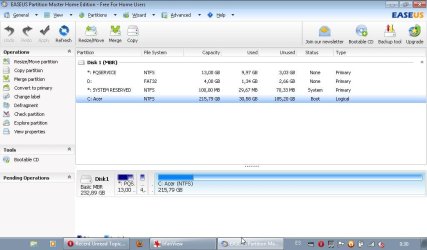
Looking at the partions again, there are actually 4, as follows:

PQSERVICE (none) (primary)
D (none) (primary)
SYSTEM RESERVED (system) (primary)
C (boot) (logical)

On another PC with just win7, this has 2 partions:

SYSTEM RESERVED (system) (primary)
C (boot) (primary)

I´m now even more hesitant to mess with the Acer - why is one logical but other is primary?

Any further comments welcome.
 

My Computer My Computer

At a glance

Vista
OS
Vista
They've made Win7 partition Logical so that you can add as many Logical subpartitions as you wish, otherwise you'd be stuck with 4 Primary which would convert to a Dynamic disk (meant only to span partitions on multiple HD's) if you tried to add a fifth Primary - a real mess we clean up here regularly. It doesn't mean anything except that you'll need a boot partition (SysReserved) unless and until C is converted to Primary, marked Active and the SYstem boot files are written to it by running Startup REpair a few times.

For now, I'd boot the Ultimate DVD and install to D. It will autoconfigure a Dual Boot with Starter and see Ultimate as C when booted into it.

Later we can show you how to easily remove and recover the space for Starter when you realize there's no reason to keep it, along with the Recovery partition once you figure out a way to make the CD's or flash stick to have in case you ever want to restore to factory condition to use your Ultimate elsewhere. Of course you can always clean reinstall Starter with the Product Key on its COA sticker by unlocking the Ultimate DVD

Adapt the steps for getting a perfect Ultimate install here: Perfect Reinstall

Any questions?
 
When I´ve done a dual boot before I´ve always resized the original C disk and then created a new partition, and then installing to the new partition.

Are you saying I don´t need to do this?

I´m gettting very confused. Sorry.
 

My Computer My Computer

At a glance

Vista
OS
Vista
If your version of Ultimate is an OEM version you might consider not entering the product code during the install, just leave it blank. You can run it like that for 30 days as a trial, longer if you use the rearm trick. That way your windows 7 Ultimate won't get locked to this PC if you accidentally activate it or it activates automatically. It just makes it easier to use it on another PC later if you decide to stay with Starter on this one. ;)
 

My Computer My Computer

At a glance

Windows 10 Education 64 bitAMD Phenom II X4 980 Black Edition Deneb 3.7GHz8GB 4GBx2 Kingston PC10600 DDR3 1333 MemoryZotac NVIDIA Geforce GT640 2 Gig DDR3 PCIe
Computer type
PC/Desktop
Computer Manufacturer/Model Number
Home Built
OS
Windows 10 Education 64 bit
CPU
AMD Phenom II X4 980 Black Edition Deneb 3.7GHz
Motherboard
Asus M4N68T-M V2 µATX Motherboard
Memory
8GB 4GBx2 Kingston PC10600 DDR3 1333 Memory
Graphics Card(s)
Zotac NVIDIA Geforce GT640 2 Gig DDR3 PCIe
Sound Card
VIA VT1708s High Definition Audio 8-channel Onboard
Monitor(s) Displays
22" LG E2242 1080p and 2 19" I-INC AG191D
Screen Resolution
1280x1024 - 1920x1080 - 1280x1024
Hard Drives
Crucial M100 256 GB SSD and 500 GB WD Blue SATA
PSU
Thermaltake TR 620
Case
Power Up Black ATX Mid-Tower Case
Cooling
Stock heatsink and fan
Keyboard
Logitech Wireless K350 Wave
Mouse
Logitech Wireless M570 Trackman Wheel
Internet Speed
80 Mbps Down 30 Mbps Up
Antivirus
Windows Defender
Browser
Internet Explorer 11
Other Info
HP DVD1040e Lightscribe - External USB2
When I´ve done a dual boot before I´ve always resized the original C disk and then created a new partition, and then installing to the new partition.

Are you saying I don´t need to do this?

I´m gettting very confused. Sorry.

Didn't you say there is a D partition which is there to install Android which you don't want?

My suggestion if you must keep Starter is to boot the Win7 Ultimate Disk and Custom install to D if the space is already available and not needed for Android. Or you can certainly shrink C in Disk Mgmt to make a Logical subpartiiton for Ultimate install, perhaps deleting D.

First post back a screenshot of your maximized Disk Management drive map with listings showing all columns, using the Snipping Tool in the Start Menu, so we can advise you better.
 
Last edited:
Okay ' I´ll post a pic tomorrow.

Struggling to install a wifi ptinter at the moment!
 

My Computer My Computer

At a glance

Vista
OS
Vista
The partition pic is attached ......


The contents of D seem to be only Android program files - as I said I didn´t actually install Android.
 

Attachments

  • PARTITION.jpg
    PARTITION.jpg
    62.5 KB · Views: 144
Last edited:

My Computer My Computer

At a glance

Vista
OS
Vista
Okay - this now becoming more critical!

I really need to install Ultimate on this PC '- the Starter version is useless! I´ve spent hours trying to install a wifi printer without success. I installed the same printer on Ultimate on another PC without any problems. Starter is just useless.

So, I need help on how to install just Ultimate on this new PC. To hell with whatever in already installed - it´s obviously rubbish!

So, if I boot to the Win install, is there an option to use the whole disk for the install via a reformat? I can´t recall the install sequence.
 

My Computer My Computer

At a glance

Vista
OS
Vista
Did you even read the steps given for a Perfect Reinstall which are based on what works best with hundreds of successful installs here?

It's all there, you just have to read and ask back any questions instead of complain about how complicated this is.
 
Thanks. Read and understood.
 

My Computer My Computer

At a glance

Vista
OS
Vista
One option is to use anytime upgrade. You just type in your ultimate product code and Starter becomes Ultimate without having to install anything or even put a disk in. If you want to nuke everything boot from your Ultimate DVD. During the install you do have the option to delete, create, and format partitions.
 

My Computer My Computer

At a glance

Windows 10 Education 64 bitAMD Phenom II X4 980 Black Edition Deneb 3.7GHz8GB 4GBx2 Kingston PC10600 DDR3 1333 MemoryZotac NVIDIA Geforce GT640 2 Gig DDR3 PCIe
Computer type
PC/Desktop
Computer Manufacturer/Model Number
Home Built
OS
Windows 10 Education 64 bit
CPU
AMD Phenom II X4 980 Black Edition Deneb 3.7GHz
Motherboard
Asus M4N68T-M V2 µATX Motherboard
Memory
8GB 4GBx2 Kingston PC10600 DDR3 1333 Memory
Graphics Card(s)
Zotac NVIDIA Geforce GT640 2 Gig DDR3 PCIe
Sound Card
VIA VT1708s High Definition Audio 8-channel Onboard
Monitor(s) Displays
22" LG E2242 1080p and 2 19" I-INC AG191D
Screen Resolution
1280x1024 - 1920x1080 - 1280x1024
Hard Drives
Crucial M100 256 GB SSD and 500 GB WD Blue SATA
PSU
Thermaltake TR 620
Case
Power Up Black ATX Mid-Tower Case
Cooling
Stock heatsink and fan
Keyboard
Logitech Wireless K350 Wave
Mouse
Logitech Wireless M570 Trackman Wheel
Internet Speed
80 Mbps Down 30 Mbps Up
Antivirus
Windows Defender
Browser
Internet Explorer 11
Other Info
HP DVD1040e Lightscribe - External USB2
We're here to help you as needed. The thread can remain open to keep us posted as you proceed.
 
Back
Top