Media browser searching for movies

zerodegreec

New member
Local time
2:37 PM
Messages
73
I have a box set of star wars. I cannot get wallpaper or icon to load for the box set. No I have found Meta Browser and assumed it could be used to find the proper title for some of my problem movie filters. How can I search for this type of thing???
 

My Computer My Computer

At a glance

w7 dual boot vista32Core2Duo T5800 2GHz4gigNVIDIA GeForce 9600M GT
Computer Manufacturer/Model Number
HP Pavilion dv7
OS
w7 dual boot vista32
CPU
Core2Duo T5800 2GHz
Motherboard
HP
Memory
4gig
Graphics Card(s)
NVIDIA GeForce 9600M GT

My Computer My Computer

At a glance

7 Ultimate x64AMD Athlon 64X2 4600+ 2.51Ghz6GB DDR2 900 Kingston2x BFG Nvidia 9600 GT-OC
Computer Manufacturer/Model Number
Custom Built Rig BY ME "My Baby"
OS
7 Ultimate x64
CPU
AMD Athlon 64X2 4600+ 2.51Ghz
Motherboard
ASUS M2N-E SLI
Memory
6GB DDR2 900 Kingston
Graphics Card(s)
2x BFG Nvidia 9600 GT-OC
Sound Card
SoundBlaster XF-I
Monitor(s) Displays
19"acer, 22"acer, 19"acer, 48" HITACHI HDTV
Screen Resolution
1400x900, 1680x1050, 1400x900, 1920x1080
Hard Drives
Seagate 500GB Sata
Seagate 500GB Sata
Seagate 500GB Sata
Seagate 500GB Sata
Seagate 320 Sata (Primary)
Western Digital 500GB IDE
Western Digital 300GB IDE
Maxter 720 Sata (USB)
PSU
BFG 800 Watt SLI Power Supply
Case
Game Master
Cooling
Thermotake
Keyboard
Logitech (Bluetooth)
Mouse
Logitech (Bluetooth)
Internet Speed
Turbo Cable
Other Info
ATI 650HD TV Tuner X2,
Samsung (Light scribe) DVD-R,
Sony (Dual Layer) DVD-R
Thank you Demonseed

As for the Metadata and xml files where and how do you go about finding these? may be a dumb question but here goes.

The movie folders I have are used to find the info (genre, actors, run time, etc, etc. I thought that Metabrowser would let me search for the info manually so that I could enter the correct name(s) on some of my movies that were not found automatically. But I cant get the metabrowser to work for me. any links to topics on this and or how to name movies correctly?

also, when looking at the details of a movie, when I go into the actors for the movie I dont get any pics. Is this something that should be automatic? or a setting I need to change?

thanks.
 

My Computer My Computer

At a glance

w7 dual boot vista32Core2Duo T5800 2GHz4gigNVIDIA GeForce 9600M GT
Computer Manufacturer/Model Number
HP Pavilion dv7
OS
w7 dual boot vista32
CPU
Core2Duo T5800 2GHz
Motherboard
HP
Memory
4gig
Graphics Card(s)
NVIDIA GeForce 9600M GT
Thank you Demonseed

As for the Metadata and xml files where and how do you go about finding these? may be a dumb question but here goes.

The movie folders I have are used to find the info (genre, actors, run time, etc, etc. I thought that Metabrowser would let me search for the info manually so that I could enter the correct name(s) on some of my movies that were not found automatically. But I cant get the metabrowser to work for me. any links to topics on this and or how to name movies correctly?

also, when looking at the details of a movie, when I go into the actors for the movie I dont get any pics. Is this something that should be automatic? or a setting I need to change?

thanks.
When a movie wont list right just right click it at treat as movie, then you will see what you were looking for.

The actors wount show if you have not shown Meta browser where you imagesbyname folder is.
After you show it, it will dl the actors into that folder.
 

My Computer My Computer

At a glance

7 Ultimate x64AMD Athlon 64X2 4600+ 2.51Ghz6GB DDR2 900 Kingston2x BFG Nvidia 9600 GT-OC
Computer Manufacturer/Model Number
Custom Built Rig BY ME "My Baby"
OS
7 Ultimate x64
CPU
AMD Athlon 64X2 4600+ 2.51Ghz
Motherboard
ASUS M2N-E SLI
Memory
6GB DDR2 900 Kingston
Graphics Card(s)
2x BFG Nvidia 9600 GT-OC
Sound Card
SoundBlaster XF-I
Monitor(s) Displays
19"acer, 22"acer, 19"acer, 48" HITACHI HDTV
Screen Resolution
1400x900, 1680x1050, 1400x900, 1920x1080
Hard Drives
Seagate 500GB Sata
Seagate 500GB Sata
Seagate 500GB Sata
Seagate 500GB Sata
Seagate 320 Sata (Primary)
Western Digital 500GB IDE
Western Digital 300GB IDE
Maxter 720 Sata (USB)
PSU
BFG 800 Watt SLI Power Supply
Case
Game Master
Cooling
Thermotake
Keyboard
Logitech (Bluetooth)
Mouse
Logitech (Bluetooth)
Internet Speed
Turbo Cable
Other Info
ATI 650HD TV Tuner X2,
Samsung (Light scribe) DVD-R,
Sony (Dual Layer) DVD-R
When a movie wont list right just right click it at treat as movie, then you will see what you were looking for.

Right click the movie or the folder? Not while in Media center?

The actors wount show if you have not shown Meta browser where you imagesbyname folder is.
After you show it, it will dl the actors into that folder.

I have shown meta browser where my newly created imagesbyname folder. Do I need to keek meta browser running at all times? will it auto load the images? what settings should I have on?
 

My Computer My Computer

At a glance

w7 dual boot vista32Core2Duo T5800 2GHz4gigNVIDIA GeForce 9600M GT
Computer Manufacturer/Model Number
HP Pavilion dv7
OS
w7 dual boot vista32
CPU
Core2Duo T5800 2GHz
Motherboard
HP
Memory
4gig
Graphics Card(s)
NVIDIA GeForce 9600M GT
"When a movie wont list right just right click it at treat as movie, then you will see what you were looking for." In Meta/Browser, you said it shows the meta hohe pagh on some movies. On those, right click the folder and set to "Treat as Movie"

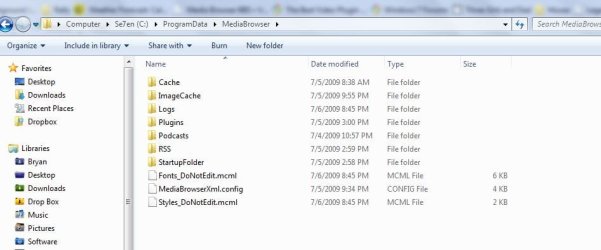
The "imagesbyname" folder goes in the C:/ProgramData/MediaBrowser/imagesbyname
(ProgramData is a hidden Folder)

If you read my post a little better you will see everything you want to know about the imagesbyname folder.
I also have my folder available for download to give you a jump start on building a soled collection of actors images.
 

My Computer My Computer

At a glance

7 Ultimate x64AMD Athlon 64X2 4600+ 2.51Ghz6GB DDR2 900 Kingston2x BFG Nvidia 9600 GT-OC
Computer Manufacturer/Model Number
Custom Built Rig BY ME "My Baby"
OS
7 Ultimate x64
CPU
AMD Athlon 64X2 4600+ 2.51Ghz
Motherboard
ASUS M2N-E SLI
Memory
6GB DDR2 900 Kingston
Graphics Card(s)
2x BFG Nvidia 9600 GT-OC
Sound Card
SoundBlaster XF-I
Monitor(s) Displays
19"acer, 22"acer, 19"acer, 48" HITACHI HDTV
Screen Resolution
1400x900, 1680x1050, 1400x900, 1920x1080
Hard Drives
Seagate 500GB Sata
Seagate 500GB Sata
Seagate 500GB Sata
Seagate 500GB Sata
Seagate 320 Sata (Primary)
Western Digital 500GB IDE
Western Digital 300GB IDE
Maxter 720 Sata (USB)
PSU
BFG 800 Watt SLI Power Supply
Case
Game Master
Cooling
Thermotake
Keyboard
Logitech (Bluetooth)
Mouse
Logitech (Bluetooth)
Internet Speed
Turbo Cable
Other Info
ATI 650HD TV Tuner X2,
Samsung (Light scribe) DVD-R,
Sony (Dual Layer) DVD-R
and you wonder why I said that the program is one of the most difficult to understand. I like what it does...but the process to make it work is not very well documented (from what I have found)

I am NOT green when it comes to making programs like this work (I regularly do things like making a x86 OSX mac OS work on PC's I know my way around computers. This software is painful) I will stick with it, but the amount of time I have spent on it is starting to turn me off...hell at the end of the day its just to play my movies and TV shows...
 

Attachments

  • Capture.JPG
    Capture.JPG
    46 KB · Views: 70

My Computer My Computer

At a glance

w7 dual boot vista32Core2Duo T5800 2GHz4gigNVIDIA GeForce 9600M GT
Computer Manufacturer/Model Number
HP Pavilion dv7
OS
w7 dual boot vista32
CPU
Core2Duo T5800 2GHz
Motherboard
HP
Memory
4gig
Graphics Card(s)
NVIDIA GeForce 9600M GT
Create the folder and you'll be on you way.

afterwords using meta/browser go in the options and show it the folder as well.

   Note
turn off MB when adding the folder


And you right its not very well documented, that's why I put together that monster of a post! Telling all about it and how to set it up.
All you need to do is spend a good hour and read everything that is in my post firs page and it will (or should be) clear as day.
 

My Computer My Computer

At a glance

7 Ultimate x64AMD Athlon 64X2 4600+ 2.51Ghz6GB DDR2 900 Kingston2x BFG Nvidia 9600 GT-OC
Computer Manufacturer/Model Number
Custom Built Rig BY ME "My Baby"
OS
7 Ultimate x64
CPU
AMD Athlon 64X2 4600+ 2.51Ghz
Motherboard
ASUS M2N-E SLI
Memory
6GB DDR2 900 Kingston
Graphics Card(s)
2x BFG Nvidia 9600 GT-OC
Sound Card
SoundBlaster XF-I
Monitor(s) Displays
19"acer, 22"acer, 19"acer, 48" HITACHI HDTV
Screen Resolution
1400x900, 1680x1050, 1400x900, 1920x1080
Hard Drives
Seagate 500GB Sata
Seagate 500GB Sata
Seagate 500GB Sata
Seagate 500GB Sata
Seagate 320 Sata (Primary)
Western Digital 500GB IDE
Western Digital 300GB IDE
Maxter 720 Sata (USB)
PSU
BFG 800 Watt SLI Power Supply
Case
Game Master
Cooling
Thermotake
Keyboard
Logitech (Bluetooth)
Mouse
Logitech (Bluetooth)
Internet Speed
Turbo Cable
Other Info
ATI 650HD TV Tuner X2,
Samsung (Light scribe) DVD-R,
Sony (Dual Layer) DVD-R
thanks for all the help. I have started to update all my movies.

One question I had was in regards to actors. Meta Browser "downloads" the actors but most of the actors pictures do not show up (big name ones for the most part dont show up). any ideas?
 

My Computer My Computer

At a glance

w7 dual boot vista32Core2Duo T5800 2GHz4gigNVIDIA GeForce 9600M GT
Computer Manufacturer/Model Number
HP Pavilion dv7
OS
w7 dual boot vista32
CPU
Core2Duo T5800 2GHz
Motherboard
HP
Memory
4gig
Graphics Card(s)
NVIDIA GeForce 9600M GT
Yea there being pulled from the MovieDB which is still very young, and there is still a lot of growing still for them to go as a host of info. But unlike IMDB it is legal to pull from MovieDB for commercial use.
 

My Computer My Computer

At a glance

7 Ultimate x64AMD Athlon 64X2 4600+ 2.51Ghz6GB DDR2 900 Kingston2x BFG Nvidia 9600 GT-OC
Computer Manufacturer/Model Number
Custom Built Rig BY ME "My Baby"
OS
7 Ultimate x64
CPU
AMD Athlon 64X2 4600+ 2.51Ghz
Motherboard
ASUS M2N-E SLI
Memory
6GB DDR2 900 Kingston
Graphics Card(s)
2x BFG Nvidia 9600 GT-OC
Sound Card
SoundBlaster XF-I
Monitor(s) Displays
19"acer, 22"acer, 19"acer, 48" HITACHI HDTV
Screen Resolution
1400x900, 1680x1050, 1400x900, 1920x1080
Hard Drives
Seagate 500GB Sata
Seagate 500GB Sata
Seagate 500GB Sata
Seagate 500GB Sata
Seagate 320 Sata (Primary)
Western Digital 500GB IDE
Western Digital 300GB IDE
Maxter 720 Sata (USB)
PSU
BFG 800 Watt SLI Power Supply
Case
Game Master
Cooling
Thermotake
Keyboard
Logitech (Bluetooth)
Mouse
Logitech (Bluetooth)
Internet Speed
Turbo Cable
Other Info
ATI 650HD TV Tuner X2,
Samsung (Light scribe) DVD-R,
Sony (Dual Layer) DVD-R
Back
Top