not getting a login prompt for win7 file share on xp laptop.

F0ICE

New member
Local time
9:59 AM
Messages
14
i have set up a folder for file sharing on my windows 7 Home premium PC so i can access it one my laptop running windows XP Pro.

when i try to access the win7 shared folder from XP i don't get a login prompt and can access the folder with Read/Write access.

i have win7 set to require a password and if i try to access the same folder from a vista PC i get a log in prompt like i expect but not on XP
 

My Computer My Computer

At a glance

Windows 7 Home Premium 64-bitAMD Athlon X2 3800+ Dual Core @ 2.00 GHz Toledo4x1GB Dual Channel DDR PC3200Gigabyte GV R435OC-512I Radeon HD 4350
OS
Windows 7 Home Premium 64-bit
CPU
AMD Athlon X2 3800+ Dual Core @ 2.00 GHz Toledo
Motherboard
ASUS A8R32-MVP Deluxe
Memory
4x1GB Dual Channel DDR PC3200
Graphics Card(s)
Gigabyte GV R435OC-512I Radeon HD 4350
Sound Card
Realtek HD Audio
Monitor(s) Displays
HP vs17 LCD VIZIO 32" LCD HDTV
Screen Resolution
1280x1024+1920x1080
Hard Drives
Hitachi Deskstar 250GB
Seagate Barracuda 1TB 7200RPM
Seagate 3TB External Drive
PSU
550W
On your XP PC are you clicking 'My Network Places' ?
 

My Computer My Computer

At a glance

Win7 H.Prem. 32bit+SP1
Computer Manufacturer/Model Number
Look in my Signature.
OS
Win7 H.Prem. 32bit+SP1
yes i am clicking my network places the view workgroup computers.

whats strange is a few hours later i suddenly started getting the prompt for no apparent reason.

even though things are working now does any one have any idea as to why the prompt wasn't showing up before?
 

My Computer My Computer

At a glance

Windows 7 Home Premium 64-bitAMD Athlon X2 3800+ Dual Core @ 2.00 GHz Toledo4x1GB Dual Channel DDR PC3200Gigabyte GV R435OC-512I Radeon HD 4350
OS
Windows 7 Home Premium 64-bit
CPU
AMD Athlon X2 3800+ Dual Core @ 2.00 GHz Toledo
Motherboard
ASUS A8R32-MVP Deluxe
Memory
4x1GB Dual Channel DDR PC3200
Graphics Card(s)
Gigabyte GV R435OC-512I Radeon HD 4350
Sound Card
Realtek HD Audio
Monitor(s) Displays
HP vs17 LCD VIZIO 32" LCD HDTV
Screen Resolution
1280x1024+1920x1080
Hard Drives
Hitachi Deskstar 250GB
Seagate Barracuda 1TB 7200RPM
Seagate 3TB External Drive
PSU
550W
Your credentials were probably cached, so you wouldn't get a prompt until the cache was cleared. There's a local security policy you can change that will prevent password caching.
 

My Computer My Computer

At a glance

Windows 7 Ultimate x64 SP1Core i7-2670QM8GB DDR3 PC3-10600Intel HD Graphics 3000 + GeForce GT 540M
Computer Manufacturer/Model Number
Dell XPS 15 L502x
OS
Windows 7 Ultimate x64 SP1
CPU
Core i7-2670QM
Memory
8GB DDR3 PC3-10600
Graphics Card(s)
Intel HD Graphics 3000 + GeForce GT 540M
Screen Resolution
1920x1080
Hard Drives
1TB 5400RPM Seagate
Your credentials were probably cached, so you wouldn't get a prompt until the cache was cleared. There's a local security policy you can change that will prevent password caching.
thanks for the info. since Home premium doesn't allow local policy editing is there a way to clear the cache manually?
 

My Computer My Computer

At a glance

Windows 7 Home Premium 64-bitAMD Athlon X2 3800+ Dual Core @ 2.00 GHz Toledo4x1GB Dual Channel DDR PC3200Gigabyte GV R435OC-512I Radeon HD 4350
OS
Windows 7 Home Premium 64-bit
CPU
AMD Athlon X2 3800+ Dual Core @ 2.00 GHz Toledo
Motherboard
ASUS A8R32-MVP Deluxe
Memory
4x1GB Dual Channel DDR PC3200
Graphics Card(s)
Gigabyte GV R435OC-512I Radeon HD 4350
Sound Card
Realtek HD Audio
Monitor(s) Displays
HP vs17 LCD VIZIO 32" LCD HDTV
Screen Resolution
1280x1024+1920x1080
Hard Drives
Hitachi Deskstar 250GB
Seagate Barracuda 1TB 7200RPM
Seagate 3TB External Drive
PSU
550W

My Computer My Computer

At a glance

Windows 7 Ultimate x64 SP1Core i7-2670QM8GB DDR3 PC3-10600Intel HD Graphics 3000 + GeForce GT 540M
Computer Manufacturer/Model Number
Dell XPS 15 L502x
OS
Windows 7 Ultimate x64 SP1
CPU
Core i7-2670QM
Memory
8GB DDR3 PC3-10600
Graphics Card(s)
Intel HD Graphics 3000 + GeForce GT 540M
Screen Resolution
1920x1080
Hard Drives
1TB 5400RPM Seagate
Using this method, worked for me.

View attachment 176806

Although a good guide for sharing in general, it doesn't really address the question of caching network passwords, and how to prevent that from happening on a Home Premium installation (as it doesn't have the ability to edit local security policies).
 

My Computer My Computer

At a glance

Windows 7 Ultimate x64 SP1Core i7-2670QM8GB DDR3 PC3-10600Intel HD Graphics 3000 + GeForce GT 540M
Computer Manufacturer/Model Number
Dell XPS 15 L502x
OS
Windows 7 Ultimate x64 SP1
CPU
Core i7-2670QM
Memory
8GB DDR3 PC3-10600
Graphics Card(s)
Intel HD Graphics 3000 + GeForce GT 540M
Screen Resolution
1920x1080
Hard Drives
1TB 5400RPM Seagate
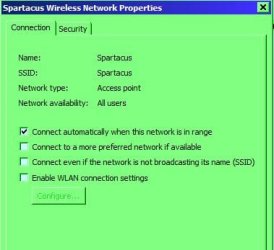
You can have it set to stop auto connection.

RR.JPG
 

My Computer My Computer

At a glance

Win7 H.Prem. 32bit+SP1
Computer Manufacturer/Model Number
Look in my Signature.
OS
Win7 H.Prem. 32bit+SP1
Yes, that's true, but it doesn't stop the caching issue. If you connect to the share, it won't ask for a password if it's been cached.
 

My Computer My Computer

At a glance

Windows 7 Ultimate x64 SP1Core i7-2670QM8GB DDR3 PC3-10600Intel HD Graphics 3000 + GeForce GT 540M
Computer Manufacturer/Model Number
Dell XPS 15 L502x
OS
Windows 7 Ultimate x64 SP1
CPU
Core i7-2670QM
Memory
8GB DDR3 PC3-10600
Graphics Card(s)
Intel HD Graphics 3000 + GeForce GT 540M
Screen Resolution
1920x1080
Hard Drives
1TB 5400RPM Seagate
Back
Top