Easy Transfer - Not enough memory

barcar

New member
Local time
9:56 PM
Messages
3
Location
Bexhill-on-Sea
I have just installed Windows 7. When I try to use the Easy Transfer saved file from the old, Vista, version, the system tells me that I don't have enough memory to use this facility.

When I check the usage on my main C: drive I find that there is a file called Windows.old which is using almost all of the drive memory. Can I copy this file to a backup drive and then delete the original, or is it required to stay on the C: drive?
If it must stay on the C: drive, how can I transfer the information saved on the Easy Transfer file?
 

My Computer

Computer Manufacturer/Model Number
Dell Inspiron 530
OS
Windows 7, Professional, 64 bit
I have just installed Windows 7. When I try to use the Easy Transfer saved file from the old, Vista, version, the system tells me that I don't have enough memory to use this facility.

When I check the usage on my main C: drive I find that there is a file called Windows.old which is using almost all of the drive memory. Can I copy this file to a backup drive and then delete the original, or is it required to stay on the C: drive?
If it must stay on the C: drive, how can I transfer the information saved on the Easy Transfer file?

If the message is not enough memory it is not referring to HD space. It is referring to ram. If we knew your system specs we could give you a more informed reply.

The windows.old folder is where easy transfer is looking and needs to be there (I believe)
 

My Computer

Computer Manufacturer/Model Number
HP Pavillion dv-7 1005 Tx
OS
Win 8 Release candidate 8400
CPU
[email protected]
Memory
4 gigs
Graphics Card(s)
Nvidia 9600M
Sound Card
HD built-in
Monitor(s) Displays
17" Wxga
Screen Resolution
1440x900
Cooling
none
Internet Speed
45Mb down 5Mb up
Thanks, zizzag3142, for your comments. The reference is to HD memory not to RAM.
 

My Computer

Computer Manufacturer/Model Number
Dell Inspiron 530
OS
Windows 7, Professional, 64 bit
Thanks, zizzag3142, for your comments. The reference is to HD memory not to RAM.

Any chance with could get a screenshot of the error message?
 

My Computer

Computer Manufacturer/Model Number
HP Pavillion dv-7 1005 Tx
OS
Win 8 Release candidate 8400
CPU
[email protected]
Memory
4 gigs
Graphics Card(s)
Nvidia 9600M
Sound Card
HD built-in
Monitor(s) Displays
17" Wxga
Screen Resolution
1440x900
Cooling
none
Internet Speed
45Mb down 5Mb up
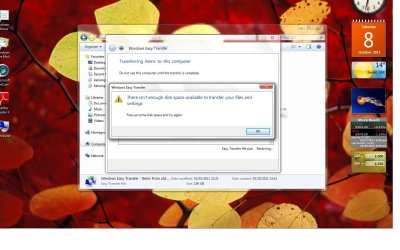
As requested by zigzag3143, here is a screenshot of the message I have received.


Transfer Fail.jpg

Thanks also to theog for their reply.
 

My Computer

Computer Manufacturer/Model Number
Dell Inspiron 530
OS
Windows 7, Professional, 64 bit
As requested by zigzag3143, here is a screenshot of the message I have received.


View attachment 178389

Thanks also to theog for their reply.


As I said previously it is space not memory. As Theog stated if you dont need anything from the previous install you can delete the window.old folder by running disk cleanup BUT thats where the files and settings are.
 

My Computer

Computer Manufacturer/Model Number
HP Pavillion dv-7 1005 Tx
OS
Win 8 Release candidate 8400
CPU
[email protected]
Memory
4 gigs
Graphics Card(s)
Nvidia 9600M
Sound Card
HD built-in
Monitor(s) Displays
17" Wxga
Screen Resolution
1440x900
Cooling
none
Internet Speed
45Mb down 5Mb up
Back
Top