Macrium Reflect

nenny

New member
Local time
9:12 AM
Messages
8
Dell computer with Intel Celeron cpu, 2.0 GHz and 3.0 gb memory.

Prior to installing Windows 7 Pro I had Vista Home Premium (came preinstalled on the pc, and had not be partitioned). I had made the rescue disks was prepared to restore to factory conditions. I even had Macrium Reflect image.

Try as I might, after Vista became very unstable, I could not get factory conditions restored. Macrium image from an external hard drive took over 24 hrs to restore the image (which would not boot either).

Finally I decided to install Windows 7 Pro. That went very well and has been activated. I then partitioned the hard drive as shown below.

harddrives.jpg

I have installed the latest version of the free Macrium and created a new restore disk (and checked it). I then made an image and placed that image on drive J. I am not going to put that image on an external HDD. BTW when I booted up from the restore disk Macrium does not see drive J, it sees it as drive F.

This my question: why did it take so long to restore the Macrium image (with vista) and can anyone give me an idea why after it was restored it did not actually work.

Can I reasonally expect Macrium to work since installing Win 7?

Thanks in advance
 

My Computer My Computer

At a glance

Windows 7 32 bit
OS
Windows 7 32 bit
Which restore disc?

Linux or pe?

Dunno about the Linux disc , but the pe disc should show you the same drive letters you see when you are booted into windows.

Macrium is unique in doing that.

Quite useful for the average punter who only has one o/s - bit of a pain for everyone else.
 

My Computers My Computers

  • At a glance

    7 X64i5 84002x8gb 3200mhz
    Computer type
    PC/Desktop
    OS
    7 X64
    CPU
    i5 8400
    Motherboard
    gigabyte b365m ds3h
    Memory
    2x8gb 3200mhz
    Hard Drives
    various
    PSU
    pure power 11 400w cm
    Case
    Coolermaster
    Cooling
    cryorig m9i
  • At a glance

    7x64g54008gb ddr4 2400
    Computer type
    PC/Desktop
    OS
    7x64
    CPU
    g5400
    Motherboard
    ga b365m ds3h
    Memory
    8gb ddr4 2400
    PSU
    xfx pro 450w
I have never use that software, so far the only one worked for me was the minitool partition wizzard. While the famous Paragon and some others were quite unreliable.
The other soft that i use is Todo backup, its a very basic backingup software but it works...
I am not sure why the restoration took so long, the reason for this might have been the lack of free space on the disk which really slows down copying data from one side to another. It took much less time to restore windows 7 because it was a clean install and there was headroom on the disk to use.

Cheers!
 

My Computer My Computer

At a glance

Windows 7 Ultimate 64 bit SP1Intel(R) Core(TM) i5-2500K12GB Kingston Hyperx 1600MHzAsus GTS 450
Computer type
PC/Desktop
Computer Manufacturer/Model Number
Custom Built PC
OS
Windows 7 Ultimate 64 bit SP1
CPU
Intel(R) Core(TM) i5-2500K
Motherboard
Gigabyte Technology Co., Ltd. Z68X-UD3-B3
Memory
12GB Kingston Hyperx 1600MHz
Graphics Card(s)
Asus GTS 450
PSU
500W Coolink
Other Info
Genius G-Pen F610 (PenPad)
I have used Macrium on W7 and have had no trouble restoring on a multi partition system. Restores as fast as Acronis.

If your Vista system had the same factory partitions it is possible that your MBR (Boot) was on a separate partition and may not have been backed up by Macrium?? Also, Macrium does incremental backups so you may have restored only a portion of files. Many variables and uncertain of the cause.

Macrium works fine on W7.
 

My Computer My Computer

At a glance

Windows 7 SP1 x64AMD 9850 X4CorsairATI Radeon
Computer Manufacturer/Model Number
Home Built
OS
Windows 7 SP1 x64
CPU
AMD 9850 X4
Motherboard
ASUS
Memory
Corsair
Graphics Card(s)
ATI Radeon
Sound Card
Sigmatel
Monitor(s) Displays
Dell
Screen Resolution
1600X900
Hard Drives
(1) WD 1TB
Cooling
Corsair H60
Internet Speed
UVerse 12MB
Dell computer with Intel Celeron cpu, 2.0 GHz and 3.0 gb memory.

Prior to installing Windows 7 Pro I had Vista Home Premium (came preinstalled on the pc, and had not be partitioned). I had made the rescue disks was prepared to restore to factory conditions. I even had Macrium Reflect image.

Try as I might, after Vista became very unstable, I could not get factory conditions restored. Macrium image from an external hard drive took over 24 hrs to restore the image (which would not boot either).

Finally I decided to install Windows 7 Pro. That went very well and has been activated. I then partitioned the hard drive as shown below.

View attachment 178666

I have installed the latest version of the free Macrium and created a new restore disk (and checked it). I then made an image and placed that image on drive J. I am not going to put that image on an external HDD. BTW when I booted up from the restore disk Macrium does not see drive J, it sees it as drive F.

This my question: why did it take so long to restore the Macrium image (with vista) and can anyone give me an idea why after it was restored it did not actually work.

Can I reasonally expect Macrium to work since installing Win 7?

Thanks in advance

I used Macrium 5.0 to clone my system disk on a Windows 7 Professional 64 bit PC. It worked perfectly. Drive letter remained the same. I recall something about logical partitions. Not sure, but maybe only primary partitions can be used?

Good luck, Jim
 

My Computer My Computer

At a glance

Windows 7 Professional 64bit SP1Intel Core i7 QUAD CORE 930 2.8 GHzKingston DDR3-1333 6GBXFX Radeon HD 5700 1GB
Computer Manufacturer/Model Number
Puget Custom Computers
OS
Windows 7 Professional 64bit SP1
CPU
Intel Core i7 QUAD CORE 930 2.8 GHz
Motherboard
Asus P6X58D Premium
Memory
Kingston DDR3-1333 6GB
Graphics Card(s)
XFX Radeon HD 5700 1GB
Sound Card
On Board
Monitor(s) Displays
Samsung SyncMaster 226 BW
Screen Resolution
1680x1050
Hard Drives
2 Western Digital Cavier Blue 500GB
PSU
Antec CP-850 850 Watt
Case
Antec P183
Cooling
Gelid Tranquillo
Keyboard
Microsoft Wirelsss 3000
Mouse
Kensington Expert Mouse K64325
Internet Speed
20 Mbps
WinPE Boot CD's have better drivers than Linux.
Linux can be slower, and even be unable to perform a restore.
I found Acronis was 3 times slower using LINUX to restore a backup from an NTFS partition than a FAT32 partition on an external USB2 drive.
Under live Windows Acronis Created the backup to either NTFS or FAT32 in about the same time as LINUX took restoring from FAT32

It was common on the Wilders-Acronis forum to find posts from people that created Images that were validated,
but in the hour of need they found the Linux Boot CD had no drivers suitable for their hardware.

I learnt from their mistake and never trust a new Boot CD unless :-
I have a previous Boot CD that is proven to work with my current imaging system ;
or
I first use the Boot CD to restore to unallocated space,
and then under Windows I compare C:\ with the new restored partition using the free portable 64 bit BestSync
Download BestSync

I have just BestSync and it took 14 Seconds to compare C:\ with P:\ and identify 226 files different between them
out of 82224 files, and the changes to backup total 492.01 MB.
Those differences were not restoration errors,
but changes to file sizes and date stamps etc because Windows never stands still,
and Comodo has just updated a 200 MB Bases.cav signature database,
and I have just updated Macrium Reflect which has my full confidence.

NB One of the things I did with Windows 7 when first installed was to use its Disc Management to shrink it down to 25 GB. That left me plenty of unallocated space for experimental restorations.

It is of course possible that for some reason your restore was being done in USB1 mode instead of USB2.
 

My Computer My Computer

At a glance

Windows 7 Ultimate 64 bit SP1 x64AMD Phenom X4 95008 GBATI Radeon HD 4600 Series
Computer Manufacturer/Model Number
ASUSTeK Computer INC. M3A32-MVP DELUXE (CPU 1)
OS
Windows 7 Ultimate 64 bit SP1 x64
CPU
AMD Phenom X4 9500
Motherboard
ASUSTeK M3A32-MVP Deluxe (CPU 1)
Memory
8 GB
Graphics Card(s)
ATI Radeon HD 4600 Series
Sound Card
AMD High Definition Audio Device
Monitor(s) Displays
SyncMaster (1680x1050@60Hz)
Hard Drives
59GB OCZ-VERTEX2 ATA Device
+
977GB SAMSUNG HD103SJ ATA Device
+
625GB WDC WD6401AALS-00L3B2 ATA Device
I have also heard of the restore from a Linux disk hanging at 100% and when re-run restored ok.
 

My Computer My Computer

At a glance

Microsoft Windows 7 Home Premium 64-bit Servi...Intel(R) Core(TM) i3 CPU M 330 @ 2.13GHz8 GB DDR3Intel(R) HD Graphics
Computer type
Laptop
Computer Manufacturer/Model Number
Hewlett-Packard/G62-107SA Notebook
OS
Microsoft Windows 7 Home Premium 64-bit Service Pack 1
CPU
Intel(R) Core(TM) i3 CPU M 330 @ 2.13GHz
Motherboard
Hewlett-Packard 1425
Memory
8 GB DDR3
Graphics Card(s)
Intel(R) HD Graphics
Sound Card
Realtek High Definition Audio
Monitor(s) Displays
Builtin
Screen Resolution
1366 x 768 x 32 bits (4294967296 colors) @ 60 Hz
Hard Drives
250 GB SATA Hard Disk Drive 7200 rpm
2TB Seagate GoFlex USB 2 Drive
1TB Iomega Prestige USB 2 Drive
1.5TB Iomega Prestige USB 2 Drive (Samsung)
2TB WD MyBook Live NAS.
Mouse
Logitech Anywhere MX
Internet Speed
152 Mbs download 10 Mbs upload
Antivirus
Norton 360
Browser
Chrome
Another factor can be the driver for the HD controller in the PC. I was using Paragon Drive Backup. It worked flawlessly on my HP AMD dual core. I got an HP AMD quad core and was not as lucky. Turns out there's a Raid controller in the quad that's not set up to do anything useful. The same controller controls the optical drive. Since the boot CD could not see the HD using the normal Sata driver, it switched to "compatibility mode." Restoring from an external USB that used to take 45 minutes to an hour, became a 9 hour overnight job. Fortunately it completed successfully.

After that I bought Macrium 4.2. It worked at normal speed. But you can't assume anything. You have to boot the CD and go into the restore program. If it says something about having to use Compatibility Mode then chances are you're in for a long haul.

The Macrium 5 and also the ToDo Easus backup have USB 3.0 support. Much faster restores are possible compared to USB 2.0.

Also I wouldn't depend only on your backup being on another partition. If that drive fails there's no way to read the backup image. You should at least have a backup of the backup on a drive not connected to the machine.
 

My Computer My Computer

At a glance

Windows 7 32 bitAMD 5200+ dual core2 GBNVidia GeForce 6150SE 128 MB
Computer Manufacturer/Model Number
HP Media Center
OS
Windows 7 32 bit
CPU
AMD 5200+ dual core
Memory
2 GB
Graphics Card(s)
NVidia GeForce 6150SE 128 MB
Monitor(s) Displays
CRT
Screen Resolution
1280x1024
Hard Drives
500 GB Sata internal :

SIIG USB 3.0 docking stations w/WD Caviar Black 6 Gb/s drives
Keyboard
PS/2
Mouse
PS/2 Wheel Mouse
Other Info
SIIG USB 3.0 PCIexpress card.
I believe Macrium V5 free is now available. V4 free appears unavailable.
 

My Computer My Computer

At a glance

Windows 7x64 Home Premium SP1Intel i7 2600kG.Skill Ripjaws (DDR3-1600) 2x4GBNvidia GeForce GTS 450; Intel HD Graphics 300...
Computer type
PC/Desktop
Computer Manufacturer/Model Number
Own build
OS
Windows 7x64 Home Premium SP1
CPU
Intel i7 2600k
Motherboard
ASUS P8Z68 Deluxe
Memory
G.Skill Ripjaws (DDR3-1600) 2x4GB
Graphics Card(s)
Nvidia GeForce GTS 450; Intel HD Graphics 3000(GT2+)
Monitor(s) Displays
Dell Ultrasharp IPS panel U2311H, Samsung SyncMaster P2350
Screen Resolution
1920x1080
Hard Drives
Samsung 850 Pro SSD 256GB, Samsung SSD 840 120GB, Seagates 1TB Barracuda ST31000528AS x2
PSU
Seasonic M12II 520W
Case
Lian Li Lancool PC-K60
Cooling
Case: 1x120mm, 3x140mm CPU: Hyper 212+
Keyboard
Logitech MK520 (wireless)
Mouse
Logitech MK520
Internet Speed
6-7 Mbps
Antivirus
Norton Security Premium, Malwarebytes on 2 (MSE on 3rd PC)
Browser
FireFox
Other Info
Audio: Logitech Z523 2.1
I believe Macrium V5 free is now available. V4 free appears unavailable.

From what I read on their forum, the Linux boot CD for 5 free is available with USB 3.0 support. I haven't tried it though. I tried the USB 3.0 support in Easus ToDo Linux boot and it worked on my machine. It's probably the same Linux boot core with Macrium restore app stuck on. But that's just my guess.
 

My Computer My Computer

At a glance

Windows 7 32 bitAMD 5200+ dual core2 GBNVidia GeForce 6150SE 128 MB
Computer Manufacturer/Model Number
HP Media Center
OS
Windows 7 32 bit
CPU
AMD 5200+ dual core
Memory
2 GB
Graphics Card(s)
NVidia GeForce 6150SE 128 MB
Monitor(s) Displays
CRT
Screen Resolution
1280x1024
Hard Drives
500 GB Sata internal :

SIIG USB 3.0 docking stations w/WD Caviar Black 6 Gb/s drives
Keyboard
PS/2
Mouse
PS/2 Wheel Mouse
Other Info
SIIG USB 3.0 PCIexpress card.

My Computer My Computer

At a glance

Windows 7 Professional SP1 32-bitIntel Core 2 Duo E6600 2.4GHz4GB DDR2-667 (4x1GB in dual-channel config)nVidia GeForce 9800 GT
Computer type
PC/Desktop
Computer Manufacturer/Model Number
Custom-built
OS
Windows 7 Professional SP1 32-bit
CPU
Intel Core 2 Duo E6600 2.4GHz
Motherboard
Asus PL5D2
Memory
4GB DDR2-667 (4x1GB in dual-channel config)
Graphics Card(s)
nVidia GeForce 9800 GT
Sound Card
Creative X-Fi XtremeMusic
Monitor(s) Displays
Acer P236H
Screen Resolution
1920x1200 (DVI)
Hard Drives
OCZ SSD Vertex Plus 60GB SATA (Firmware 3.55), 64MB cache
Hitachi HD321KJ SATA, 320GB, 7200rpm, 16MB cache
PSU
Antec TruePower 2.0
Case
Cooler Master Centurion
Cooling
Too many fans
Keyboard
Standard
Mouse
Microsoft wireless optical mouse
Internet Speed
AT&T U-verse (18mbit/sec)
Antivirus
Microsoft Security Essentials
Browser
Firefox
Other Info
Other devices:
Compaq CQ-60 laptop
Google Nexus 7 (2012) tablet
Nvidia SHIELD tablet (US/LTE)
Hardkernel ODROID-XU single-board computer (Samsung Exynos 5420)
The Note: at the link says only if you have a valid license key.
 

My Computer My Computer

At a glance

Windows 7x64 Home Premium SP1Intel i7 2600kG.Skill Ripjaws (DDR3-1600) 2x4GBNvidia GeForce GTS 450; Intel HD Graphics 300...
Computer type
PC/Desktop
Computer Manufacturer/Model Number
Own build
OS
Windows 7x64 Home Premium SP1
CPU
Intel i7 2600k
Motherboard
ASUS P8Z68 Deluxe
Memory
G.Skill Ripjaws (DDR3-1600) 2x4GB
Graphics Card(s)
Nvidia GeForce GTS 450; Intel HD Graphics 3000(GT2+)
Monitor(s) Displays
Dell Ultrasharp IPS panel U2311H, Samsung SyncMaster P2350
Screen Resolution
1920x1080
Hard Drives
Samsung 850 Pro SSD 256GB, Samsung SSD 840 120GB, Seagates 1TB Barracuda ST31000528AS x2
PSU
Seasonic M12II 520W
Case
Lian Li Lancool PC-K60
Cooling
Case: 1x120mm, 3x140mm CPU: Hyper 212+
Keyboard
Logitech MK520 (wireless)
Mouse
Logitech MK520
Internet Speed
6-7 Mbps
Antivirus
Norton Security Premium, Malwarebytes on 2 (MSE on 3rd PC)
Browser
FireFox
Other Info
Audio: Logitech Z523 2.1
You can also use the WinPE rescue environment with the free edition but you need to download the WAIK (1.5GB) to create it.
 

My Computer My Computer

At a glance

Microsoft Windows 7 Home Premium 64-bit Servi...Intel(R) Core(TM) i3 CPU M 330 @ 2.13GHz8 GB DDR3Intel(R) HD Graphics
Computer type
Laptop
Computer Manufacturer/Model Number
Hewlett-Packard/G62-107SA Notebook
OS
Microsoft Windows 7 Home Premium 64-bit Service Pack 1
CPU
Intel(R) Core(TM) i3 CPU M 330 @ 2.13GHz
Motherboard
Hewlett-Packard 1425
Memory
8 GB DDR3
Graphics Card(s)
Intel(R) HD Graphics
Sound Card
Realtek High Definition Audio
Monitor(s) Displays
Builtin
Screen Resolution
1366 x 768 x 32 bits (4294967296 colors) @ 60 Hz
Hard Drives
250 GB SATA Hard Disk Drive 7200 rpm
2TB Seagate GoFlex USB 2 Drive
1TB Iomega Prestige USB 2 Drive
1.5TB Iomega Prestige USB 2 Drive (Samsung)
2TB WD MyBook Live NAS.
Mouse
Logitech Anywhere MX
Internet Speed
152 Mbs download 10 Mbs upload
Antivirus
Norton 360
Browser
Chrome
Which restore disc?
Linux or pe?

I made the Linux restore disc using Macrium. I have never used the pe. Is there any advantage using the pe restore disk?

The only time I had ever seen Macrium show partitions mislabeled was when I had more than one HDD installed on a pc.

I have used Macrium on several computers and this was the first time it had failed me. I suspect it has more to do with the computer being Dell than with Macrium. The only reason I bought the Dell (was used) I got a great deal on it.

When I installed Win 7, one mistake I may have made was NOT formatting C drive before installing Win 7. The reason I say that is because when I booted up, I had the options of loading Win 7 or Vista. That was easily corrected.

If I ever have to use Macrium to restore and it takes that long to restore the image, I would just reinstall Win 7 as that takes less than one hour.

BTW thanks for all the replys.
 

My Computer My Computer

At a glance

Windows 7 32 bit
OS
Windows 7 32 bit
The PE disk can often see drives that the Linux disk fails to pick up. In addition the PE disk interface is more like the installed version of Macrium in layout and has a few more features.

You might like to read this article. http://kb.macrium.com/KnowledgebaseArticle50082.aspx
 

My Computer My Computer

At a glance

Microsoft Windows 7 Home Premium 64-bit Servi...Intel(R) Core(TM) i3 CPU M 330 @ 2.13GHz8 GB DDR3Intel(R) HD Graphics
Computer type
Laptop
Computer Manufacturer/Model Number
Hewlett-Packard/G62-107SA Notebook
OS
Microsoft Windows 7 Home Premium 64-bit Service Pack 1
CPU
Intel(R) Core(TM) i3 CPU M 330 @ 2.13GHz
Motherboard
Hewlett-Packard 1425
Memory
8 GB DDR3
Graphics Card(s)
Intel(R) HD Graphics
Sound Card
Realtek High Definition Audio
Monitor(s) Displays
Builtin
Screen Resolution
1366 x 768 x 32 bits (4294967296 colors) @ 60 Hz
Hard Drives
250 GB SATA Hard Disk Drive 7200 rpm
2TB Seagate GoFlex USB 2 Drive
1TB Iomega Prestige USB 2 Drive
1.5TB Iomega Prestige USB 2 Drive (Samsung)
2TB WD MyBook Live NAS.
Mouse
Logitech Anywhere MX
Internet Speed
152 Mbs download 10 Mbs upload
Antivirus
Norton 360
Browser
Chrome
@nenny
I still consider that there is still some uncertainty that Macrium will continue to support a free version of their product. Because the only link to a free V5 is via a 3rd party I believe Macrium has been removed from the forum's free programs list. My understanding is that the Administrator will reinsert it on the list if the issue is sorted out.
So if "free" is important then you might want to look at other imaging products as well.
 

My Computer My Computer

At a glance

Windows 7x64 Home Premium SP1Intel i7 2600kG.Skill Ripjaws (DDR3-1600) 2x4GBNvidia GeForce GTS 450; Intel HD Graphics 300...
Computer type
PC/Desktop
Computer Manufacturer/Model Number
Own build
OS
Windows 7x64 Home Premium SP1
CPU
Intel i7 2600k
Motherboard
ASUS P8Z68 Deluxe
Memory
G.Skill Ripjaws (DDR3-1600) 2x4GB
Graphics Card(s)
Nvidia GeForce GTS 450; Intel HD Graphics 3000(GT2+)
Monitor(s) Displays
Dell Ultrasharp IPS panel U2311H, Samsung SyncMaster P2350
Screen Resolution
1920x1080
Hard Drives
Samsung 850 Pro SSD 256GB, Samsung SSD 840 120GB, Seagates 1TB Barracuda ST31000528AS x2
PSU
Seasonic M12II 520W
Case
Lian Li Lancool PC-K60
Cooling
Case: 1x120mm, 3x140mm CPU: Hyper 212+
Keyboard
Logitech MK520 (wireless)
Mouse
Logitech MK520
Internet Speed
6-7 Mbps
Antivirus
Norton Security Premium, Malwarebytes on 2 (MSE on 3rd PC)
Browser
FireFox
Other Info
Audio: Logitech Z523 2.1
@nenny
I still consider that there is still some uncertainty that Macrium will continue to support a free version of their product. Because the only link to a free V5 is via a 3rd party I believe Macrium has been removed from the forum's free programs list. My understanding is that the Administrator will reinsert it on the list if the issue is sorted out.
So if "free" is important then you might want to look at other imaging products as well.

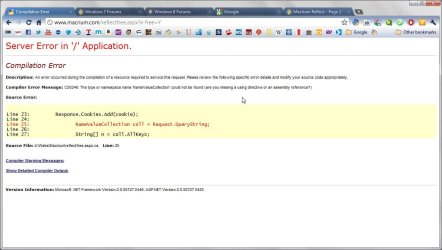
It looks more like a c**k up than something deliberate.

2011-10-11 10-06-05_Compilation Error - Google Chrome.jpg
 

My Computer My Computer

At a glance

Microsoft Windows 7 Home Premium 64-bit Servi...Intel(R) Core(TM) i3 CPU M 330 @ 2.13GHz8 GB DDR3Intel(R) HD Graphics
Computer type
Laptop
Computer Manufacturer/Model Number
Hewlett-Packard/G62-107SA Notebook
OS
Microsoft Windows 7 Home Premium 64-bit Service Pack 1
CPU
Intel(R) Core(TM) i3 CPU M 330 @ 2.13GHz
Motherboard
Hewlett-Packard 1425
Memory
8 GB DDR3
Graphics Card(s)
Intel(R) HD Graphics
Sound Card
Realtek High Definition Audio
Monitor(s) Displays
Builtin
Screen Resolution
1366 x 768 x 32 bits (4294967296 colors) @ 60 Hz
Hard Drives
250 GB SATA Hard Disk Drive 7200 rpm
2TB Seagate GoFlex USB 2 Drive
1TB Iomega Prestige USB 2 Drive
1.5TB Iomega Prestige USB 2 Drive (Samsung)
2TB WD MyBook Live NAS.
Mouse
Logitech Anywhere MX
Internet Speed
152 Mbs download 10 Mbs upload
Antivirus
Norton 360
Browser
Chrome
I hope so. As you may realize I use, have recommended and like Macrium.
(The paid version is just a bit expensive for me running a number of PCs in the home. Plus licenses tied to a specific PC is more to manage).
 

My Computer My Computer

At a glance

Windows 7x64 Home Premium SP1Intel i7 2600kG.Skill Ripjaws (DDR3-1600) 2x4GBNvidia GeForce GTS 450; Intel HD Graphics 300...
Computer type
PC/Desktop
Computer Manufacturer/Model Number
Own build
OS
Windows 7x64 Home Premium SP1
CPU
Intel i7 2600k
Motherboard
ASUS P8Z68 Deluxe
Memory
G.Skill Ripjaws (DDR3-1600) 2x4GB
Graphics Card(s)
Nvidia GeForce GTS 450; Intel HD Graphics 3000(GT2+)
Monitor(s) Displays
Dell Ultrasharp IPS panel U2311H, Samsung SyncMaster P2350
Screen Resolution
1920x1080
Hard Drives
Samsung 850 Pro SSD 256GB, Samsung SSD 840 120GB, Seagates 1TB Barracuda ST31000528AS x2
PSU
Seasonic M12II 520W
Case
Lian Li Lancool PC-K60
Cooling
Case: 1x120mm, 3x140mm CPU: Hyper 212+
Keyboard
Logitech MK520 (wireless)
Mouse
Logitech MK520
Internet Speed
6-7 Mbps
Antivirus
Norton Security Premium, Malwarebytes on 2 (MSE on 3rd PC)
Browser
FireFox
Other Info
Audio: Logitech Z523 2.1
Yes it is a bit. I have the single licence standard version which is $45+tax and a four licence household pack costs double.
 

My Computer My Computer

At a glance

Microsoft Windows 7 Home Premium 64-bit Servi...Intel(R) Core(TM) i3 CPU M 330 @ 2.13GHz8 GB DDR3Intel(R) HD Graphics
Computer type
Laptop
Computer Manufacturer/Model Number
Hewlett-Packard/G62-107SA Notebook
OS
Microsoft Windows 7 Home Premium 64-bit Service Pack 1
CPU
Intel(R) Core(TM) i3 CPU M 330 @ 2.13GHz
Motherboard
Hewlett-Packard 1425
Memory
8 GB DDR3
Graphics Card(s)
Intel(R) HD Graphics
Sound Card
Realtek High Definition Audio
Monitor(s) Displays
Builtin
Screen Resolution
1366 x 768 x 32 bits (4294967296 colors) @ 60 Hz
Hard Drives
250 GB SATA Hard Disk Drive 7200 rpm
2TB Seagate GoFlex USB 2 Drive
1TB Iomega Prestige USB 2 Drive
1.5TB Iomega Prestige USB 2 Drive (Samsung)
2TB WD MyBook Live NAS.
Mouse
Logitech Anywhere MX
Internet Speed
152 Mbs download 10 Mbs upload
Antivirus
Norton 360
Browser
Chrome

My Computer My Computer

At a glance

Win 7 Pro 64-bitIntel i5 2.4 Ghz8GB DDR3Intel HD 3000
Computer type
Laptop
Computer Manufacturer/Model Number
Sony Vaio VPCEB47GM Laptop
OS
Win 7 Pro 64-bit
CPU
Intel i5 2.4 Ghz
Memory
8GB DDR3
Graphics Card(s)
Intel HD 3000
Sound Card
IDT High Definition
Monitor(s) Displays
15.6 WGXA Anti-Glare LED
Screen Resolution
1280x800
Hard Drives
640Gb 7200rpm
Antivirus
MSE
Browser
Opera (primary) with IE9 backup
Back
Top