
Putting retail version on OEM computer

I would boot the Reinstallation DVD to clean reinstall following these steps to get a much superior install to the Recovery Disks with their preinstalled Bloatware: Reinstalling Windows 7

Since they provided you with Apps disk you can reinstall select apps you want without having to dump the whole mess in as Recovery Disks would do.

But I would not use the Drivers disk, instead use your Tag number at the Support Downloads webpage to get the very latest drivers for any which are missing in Device manager after install and optional Windows Updates has a day or two to track down any newer or missing. Until then put any wireless driver on a stick so you can get online for this purpose.
 
There was another thread concerning Dell and that they will ship an install (W7 Home Premium) if you ask. If you have this, your apps and drivers then for me the clean install way is THE way here (like gregrockers advice I think).
Not many OEMs do this !

I'm puzzled about the reference to the Adobe photoshop products though?
 

My Computer My Computer

At a glance

Windows 7x64 Home Premium SP1Intel i7 2600kG.Skill Ripjaws (DDR3-1600) 2x4GBNvidia GeForce GTS 450; Intel HD Graphics 300...
Computer type
PC/Desktop
Computer Manufacturer/Model Number
Own build
OS
Windows 7x64 Home Premium SP1
CPU
Intel i7 2600k
Motherboard
ASUS P8Z68 Deluxe
Memory
G.Skill Ripjaws (DDR3-1600) 2x4GB
Graphics Card(s)
Nvidia GeForce GTS 450; Intel HD Graphics 3000(GT2+)
Monitor(s) Displays
Dell Ultrasharp IPS panel U2311H, Samsung SyncMaster P2350
Screen Resolution
1920x1080
Hard Drives
Samsung 850 Pro SSD 256GB, Samsung SSD 840 120GB, Seagates 1TB Barracuda ST31000528AS x2
PSU
Seasonic M12II 520W
Case
Lian Li Lancool PC-K60
Cooling
Case: 1x120mm, 3x140mm CPU: Hyper 212+
Keyboard
Logitech MK520 (wireless)
Mouse
Logitech MK520
Internet Speed
6-7 Mbps
Antivirus
Norton Security Premium, Malwarebytes on 2 (MSE on 3rd PC)
Browser
FireFox
Other Info
Audio: Logitech Z523 2.1
I would boot the Reinstallation DVD to clean reinstall following these steps to get a much superior install to the Recovery Disks with their preinstalled Bloatware: Reinstalling Windows 7

Since they provided you with Apps disk you can reinstall select apps you want without having to dump the whole mess in as Recovery Disks would do.

But I would not use the Drivers disk, instead use your Tag number at the Support Downloads webpage to get the very latest drivers for any which are missing in Device manager after install and optional Windows Updates has a day or two to track down any newer or missing. Until then put any wireless driver on a stick so you can get online for this purpose.

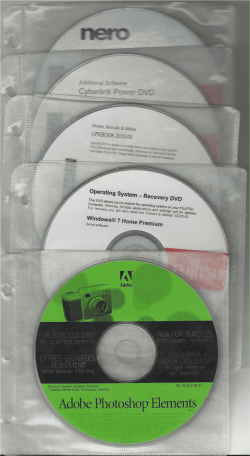
I'll have to take a look and see exactly what is on the Disc and I will report back.

Why would timp4411 do reinstall to confirm want is on each disk.
 

My Computer My Computer

At a glance

ME/XP/Vista/Win7
OS
ME/XP/Vista/Win7
I would boot the Reinstallation DVD to clean reinstall following these steps to get a much superior install to the Recovery Disks with their preinstalled Bloatware: Reinstalling Windows 7

Since they provided you with Apps disk you can reinstall select apps you want without having to dump the whole mess in as Recovery Disks would do.

But I would not use the Drivers disk, instead use your Tag number at the Support Downloads webpage to get the very latest drivers for any which are missing in Device manager after install and optional Windows Updates has a day or two to track down any newer or missing. Until then put any wireless driver on a stick so you can get online for this purpose.

Thanks for the tip. I don't want to use their OS reinstall disc since it's Win & Home Premium and I did an "AnyTime" in place upgrade to Win7 Ultimate.

I do have the install disc for Ultimate and would use it to do any clean reinstalls.

I am currently up and running and wanted to try to re-load the dell "Stage" software. I dont' even know if I would use it or if it's just another case of Bloatware, btu I wanted to at least take a look at it. But even the "Stage" apps disc they sent me has older version and I get an error message that there is an new version already installed on my system, even though I can't see it.

Sounds like I'l' be going using regedit and getting rid of any remnants of the programs that apparently became corrupted.

Or... I guess I could do a total clean install of win7 Ultimate and start over. If I load the older version of the Stage program, they may update themselves.

Unfortunately, I've already invested a good bit of times installing some programs on the new system.

I'm going to have to ponder this dilemma.

Do you think I would be better off to do a clean install ? I could get also re-partition the drive and get rid of the oem portion too I guess.

I wonder exactly is on the "Recovery" partition on my drive ?

Thanks
 

My Computer My Computer

At a glance

Win7 Ultimate 64bit
OS
Win7 Ultimate 64bit
over to you gregrocker it's too convoluted for me.
 

My Computer My Computer

At a glance

Windows 7x64 Home Premium SP1Intel i7 2600kG.Skill Ripjaws (DDR3-1600) 2x4GBNvidia GeForce GTS 450; Intel HD Graphics 300...
Computer type
PC/Desktop
Computer Manufacturer/Model Number
Own build
OS
Windows 7x64 Home Premium SP1
CPU
Intel i7 2600k
Motherboard
ASUS P8Z68 Deluxe
Memory
G.Skill Ripjaws (DDR3-1600) 2x4GB
Graphics Card(s)
Nvidia GeForce GTS 450; Intel HD Graphics 3000(GT2+)
Monitor(s) Displays
Dell Ultrasharp IPS panel U2311H, Samsung SyncMaster P2350
Screen Resolution
1920x1080
Hard Drives
Samsung 850 Pro SSD 256GB, Samsung SSD 840 120GB, Seagates 1TB Barracuda ST31000528AS x2
PSU
Seasonic M12II 520W
Case
Lian Li Lancool PC-K60
Cooling
Case: 1x120mm, 3x140mm CPU: Hyper 212+
Keyboard
Logitech MK520 (wireless)
Mouse
Logitech MK520
Internet Speed
6-7 Mbps
Antivirus
Norton Security Premium, Malwarebytes on 2 (MSE on 3rd PC)
Browser
FireFox
Other Info
Audio: Logitech Z523 2.1
I always lean in favor of the clean reinstall if there is a question at hand. The learning experience alone expands your awareness of your OS and computer each time and gains User confidence. Plus with built-in Backup Imaging you don't really have to ever reinstall again if you keep a baseline and then currently updated images to choose from - a good reason to strive to get it perfect.

I would google Stage software (never heard of it) to read all about it, then test it on this install if you want with the option to reinstall at some point going forward. If this is a generic name for the preinstalled apps I would Just Say No except to favorite apps you find you need.

You should be able to clean reinstall with the Ultimate disk using the Anytime Upgrade key but we need more confirmation that this is possible in all cases. Of course if it's not the case you can simply reinstall using your HP reinstallation DVD which should auto-activate then unlock with Anytime key in minutes. Then capture it after initial Setup to use the Image in the future.

Look over these steps to get a Perfect Reinstall of factory OEM.
 
I'm puzzled about the reference to the Adobe photoshop products though?

Dell send out set of DVD like the Fujitsu set below.

DVD set - 2.png
 

My Computer My Computer

At a glance

ME/XP/Vista/Win7
OS
ME/XP/Vista/Win7
It's s full retail disc of Ultimate but the key works for anytime upgrades.

I think I'll bite the bullet and do a clean install so I know where I am with nothing else lurking in the depths that "I" did not put there.

BTW... OT But, I read that Office 64bit isn't compatible with a lot of add-ons, like the MS Office Compatibilty Pack.

I need backwards compatibility.... so is that old news or has Office 64bit been tweked to run the add-on apps ?

Thanks
 

My Computer My Computer

At a glance

Win7 Ultimate 64bit
OS
Win7 Ultimate 64bit
So you have a retail key and disk but used just the key to unlock features using Anytime Upgrade?

I thought you might have an Anytime key, which is not yet clear will work in all cases to clean reinstall the higher version since it would be a substantial loophole to save lots of money unless it is launched from a confirmed-lesser-version.

I'd ask about Office backward compatibility in our Office forum.

Don't they ship those Adobe disks when you Custom order Adobe's premium programs in advance? Or are those trialware?
 
So you have a retail key and disk but used just the key to unlock features using Anytime Upgrade?

I thought you might have an Anytime key, which is not yet clear will work in all cases to clean reinstall the higher version since it would be a substantial loophole to save lots of money unless it is launched from a confirmed-lesser-version.

Yes... full retail and key does work to do anytime upgrade. I did it that way as it was a lot quicker to just plug in a key rather than loading it all from the start.
 

My Computer My Computer

At a glance

Win7 Ultimate 64bit
OS
Win7 Ultimate 64bit
I thought you might have an Anytime key, which is not yet clear will work in all cases to clean reinstall the higher version since it would be a substantial loophole to save lots of money unless it is launched from a confirmed-lesser-version.

It has always been clear, NO you can not do a clean install with a anytime key.


Windows Anytime Upgrade - Upgrade your Windows 7 edition - Microsoft Windows

Can I use Windows Anytime Upgrade to upgrade a previous version of Windows to Windows 7?


No. Windows Anytime Upgrade can't upgrade previous versions of Windows to Windows 7. Windows Anytime Upgrade is designed only to upgrade your computer from one edition of Windows 7 to another edition of Windows 7.


Note

To use Windows Anytime Upgrade, your computer must be running an activated copy of Windows 7.
 

My Computer My Computer

At a glance

ME/XP/Vista/Win7
OS
ME/XP/Vista/Win7
It may have been clear to you but that doesn't mean that it is clearly established here and cannot be done.

Please cite where Users have failed using Anytime key to clean reinstall the higher version.

MS also says retail Upgrade version must have an activated copy of Windows installed but there is a workaround for those not wanting to install the qualifying version or installing to a cleaned or new HD. In addition the installer will accept Upgrade version key upfront if any version of Windows is detected on the drive.
 
Back
Top