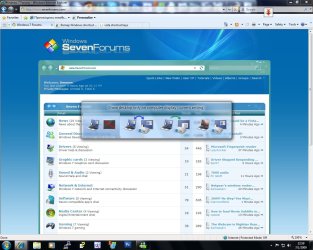
New shortcuts keys in Windows 7.

limneos

MIA
Guru
VIP
Local time
3:41 PM
Messages
1,009
Has anyone seen this shorctut Windows + P? To me it switches between modes of connected projectors.

I'm not sure I had tested this on Vista, but I think it's a new shortcut/feature..
 

Attachments

  • shortcuts.jpg
    shortcuts.jpg
    150.1 KB · Views: 487

My Computer My Computer

Computer Manufacturer/Model Number
ENIAC
OS
Windows 7 RC 7100 32bit/64bit
CPU
Intel Core2Duo E4500 2.20 GHz
Motherboard
ASUS P5LD2-X/1333
Memory
2x1GB Kinsgston DDR2 800MHz
Graphics Card(s)
Nvidia 8500GT
Sound Card
Onboard High Definition Audio Device
Monitor(s) Displays
Sony Bravia 42"
Case
LINKW 2222
Cooling
Standard Intel
Keyboard
Some cheap one
Mouse
Microsoft Intellimouse something
Internet Speed
24MBps ADSL
Cool.
 

My Computer My Computer

Computer Manufacturer/Model Number
Dell XPS420
OS
Vista Ult 64 bit Seven Ult RTM x64
CPU
Intel Core2 Quad Q6600 2.40 gigahertz
Memory
Crucial Ballistix 4x2GB PC2 6400
Graphics Card(s)
NVIDIA GeForce 8600 GTS 256 MB
Sound Card
Creative SB X-Fi audio
Monitor(s) Displays
HP w2207 + HPvs15
Screen Resolution
1680x1050 + 1024x768
Hard Drives
2-WD5000AAKS-500 GB
WD5000AAV-500 GB external
Keyboard
Microsoft Comfort Curve
Mouse
MX Revolution
Other Info
Wacom Intuos 2 Graphics Tablet
Experience Index=5.5
wow that'll come in handy!
 

My Computer My Computer

OS
Windows 7 Ultimate Beta 7000
CPU
AMD Athlon 64 X2 5000+ Brisbane 2.6GHz Black Edition
Motherboard
ASUS M2A-VM
Memory
Kingston 2GB DDR2 667
Monitor(s) Displays
Acer AL2216Wbd 22" Widescreen
Screen Resolution
1680x1050
Hard Drives
HITACHI 500GB SATA
Other Info
Laptop: Compaq C700
my favs are win+e, win+tab and win+pause
 

My Computer My Computer

OS
Windows 7 Beta x86

My Computer My Computer

Computer Manufacturer/Model Number
Tx2500z Tablet Pc/Homemade Server
OS
Windows 7 Ult x64(x2), HomePrem x32(x4), Server 08 (+VM), 08 R2 (VM) , SuSe 11.2 (VM), XP 32 (VM)
CPU
Turion X2 ultra (oh well came with laptop)/P4 @3.2 (yes P4)
Motherboard
IDK HP Motherboard / Intel DG965SS
Memory
OCZ Dual Channel 4GB kit/ 1gb Dual Channel
Graphics Card(s)
HD 3200 graphics /GMA x3100 (yay for intergrated!!)
Sound Card
Realtek HD Audio(mic working, well sort of)/Siig IC-70012
Monitor(s) Displays
built-in Hp 12" laptop screen/ Acer 19"
Screen Resolution
1280x800 /1440x900
Cooling
All Air Cooled
Mouse
Logi MX Rev. /MS Wheel Optical 1.1A /Logitech Optical Mouse
Internet Speed
College baby but its still routed through vpn to 1536k...
Other Info
love my wacom pen and pressure sensitivity...
wished it worked in 7, SUSE for that matter though
FOUR MORE :)

Win + Up arrow => MAXIMIZE Window
Win + Down arrow => MINIMIZE Window
Win + Left arrow => Moves Window to the LEFT side of the Screen
Win + Right arrow => Moves Window to the RIGHT side of the Screen

Kind regards,

Catfish
 

My Computer My Computer

Computer Manufacturer/Model Number
Dell Laptop
OS
Windows 7 Ultimate x64 Build 7600
CPU
Intel Core 2 Duo T7500
Memory
4 Gb
Graphics Card(s)
NVIDIA Quadro NVS 135M (Prerelease - WDDM 1.1)
Screen Resolution
1440x900
Internet Speed
10 Mb
I also found that you can also cycle through the win+ left or right arrow. Left snap, right snap, back to start position. All using the left arrow key.

Gary
 

My Computer My Computer

Computer Manufacturer/Model Number
Dell XPS420
OS
Vista Ult 64 bit Seven Ult RTM x64
CPU
Intel Core2 Quad Q6600 2.40 gigahertz
Memory
Crucial Ballistix 4x2GB PC2 6400
Graphics Card(s)
NVIDIA GeForce 8600 GTS 256 MB
Sound Card
Creative SB X-Fi audio
Monitor(s) Displays
HP w2207 + HPvs15
Screen Resolution
1680x1050 + 1024x768
Hard Drives
2-WD5000AAKS-500 GB
WD5000AAV-500 GB external
Keyboard
Microsoft Comfort Curve
Mouse
MX Revolution
Other Info
Wacom Intuos 2 Graphics Tablet
Experience Index=5.5
Some great short cuts there Catfish, good find.
 

My Computer My Computer

Computer Manufacturer/Model Number
Home Brew
OS
Windows 7 Ultimate Vista Ultimate x64
CPU
Core 2 Duo E8500 3.16Ghz @ 3.8Ghz
Motherboard
eVGA 750i FTW
Memory
2x2Gigs Patriot PC2-6400 LL
Graphics Card(s)
Inno3D GeForce GTX260 216 SP
Monitor(s) Displays
ASUS VW222U 22" 2ms Response time
Screen Resolution
1680x1050
Hard Drives
SATA 150GB
SATA II 250GB
USB IDE 750GB Ext.
PSU
HYTEC 600W & Thermaltake 650W Toughpower Power Exp
Case
Thermaltake Armor LCS (Liquid Cooling System)
Cooling
Liquid Cooling System
Keyboard
Logitech G15 Gaming Keyboard
Mouse
Logitech G9 Gaming Mouse
yeah that will make things quicker, sometimes i feel lazy for wanting stuff to have easy shortcuts like that lol
 

My Computer My Computer

OS
Windows 7 Ultimate Beta 7000
CPU
AMD Athlon 64 X2 5000+ Brisbane 2.6GHz Black Edition
Motherboard
ASUS M2A-VM
Memory
Kingston 2GB DDR2 667
Monitor(s) Displays
Acer AL2216Wbd 22" Widescreen
Screen Resolution
1680x1050
Hard Drives
HITACHI 500GB SATA
Other Info
Laptop: Compaq C700
my favs are win+e, win+tab and win+pause
This post was the most useful for me! i was searching for a shortcut for the 3D-Flip! :D

Also the projector shortcut was listed in the feature list. :)
 

My Computer My Computer

Computer Manufacturer/Model Number
Hp 530
OS
Windows 7 RC1
CPU
Core Duo,1.6Ghz
Motherboard
T2300
Memory
1GB
I HATE the new Windows Key+E, I used to use it all the time to open My Computer but now it opens "Libraries".

EDIT - Well this says it's supposed to open "Computer" for me, but it opens Libraries as I said...

Windows logo key
Open or close the Start menu
Windows logo key +Pause
Display the System Properties dialog box
Windows logo key +D
Display the desktop
Windows logo key +M
Minimize all windows
Windows logo key +Shift+M
Restore minimized windows to the desktop
Windows logo key +E
Open Computer
Windows logo key +F
Search for a file or folder
Ctrl+Windows logo key +F
Search for computers (if you are on a network)
Windows logo key +L
Lock your computer or switch users
Windows logo key +R
Open the Run dialog box
Windows logo key +T
Cycle through programs on the taskbar
Windows logo key +Tab
Cycle through programs on the taskbar by using Windows Flip 3-D
Ctrl+Windows logo key +Tab
Use the arrow keys to cycle through programs on the taskbar by using Windows Flip 3-D
Ctrl+Windows logo key +B
Switch to the program that displayed a message in the notification area
Windows logo key +Spacebar
Preview the desktop
Windows logo key +G
Cycle through gadgets
Windows logo key +U
Open Ease of Access Center
Windows logo key +X
Open Windows Mobility Center
Windows logo key with any number key
Open the Quick Launch shortcut that is in the position that corresponds to the number. For example, Windows logo key +1 to launch the first shortcut in the Quick Launch menu.


Press F1 to bring up help, then type Windows Shortcut Keys and under the third link it brings up the Windows Key Shortcuts
 

My Computer My Computer

Computer Manufacturer/Model Number
HP dv7-3080us
OS
Microsoft Windows 7 x64 Ultimate
CPU
Intel Core i7 720M 1.6-2.8GHz
Motherboard
HP dv7-3080us
Memory
6GB DDR3 1066MHz RAM
Graphics Card(s)
NVIDIA GeForce 230M
Sound Card
HP dv7-3080us
Monitor(s) Displays
17.3" BrightView LED/LCD (1650x900) ViewSonic 22" LCD 1080p
Screen Resolution
17.3" BrightView LED/LCD (1650x900) ViewSonic 22" LCD 1080p
Hard Drives
500GB OS Drive
100GB OS Partition
400GB Media Partition

640GB Secondary Drive for Movies
PSU
HP dv7-3080us
Case
HP dv7-3080us
Cooling
HP dv7-3080us
Keyboard
HP dv7-3080us - Microsoft Wireless Keyboard 6000 v3.0
Mouse
Logitech G7
I HATE the new Windows Key+E, I used to use it all the time to open My Computer but now it opens "Libraries".

Well, Libraries is extremely similar to My Computer; the drives are just located on the left.

CatFish said:
FOUR MORE :)

Win + Up arrow => MAXIMIZE Window
Win + Down arrow => MINIMIZE Window
Win + Left arrow => Moves Window to the LEFT side of the Screen
Win + Right arrow => Moves Window to the RIGHT side of the Screen

Kind regards,

Catfish

This is very useful. Thanks bro! :D
 

My Computer My Computer

OS
7 Professional x64 - SP1
CPU
Phenom II x4 955BE
Motherboard
Asus M4A88TD-V
Memory
2 x 4GB GSkill Ripjaws DDR3-1333
Graphics Card(s)
XFX Radeon 5770
Monitor(s) Displays
Samsung P2770HD - 27"; Samsung 953BW - 19"
Screen Resolution
1920x1080; 1440x900
Hard Drives
Corsair Force Series 3 180 GB; Samsung 7200RPM/500GB; Samsung 5400RPM/2TB (Backup)
PSU
Antec BP550 (80+ Cert.)
Case
Cooler Master HAF 912
Cooling
Cooler Master Hyper 212 Plus + 5x120mm fans
Keyboard
Logitech K750 Solar
Mouse
Razer Mamba
Display the desktop
Windows logo key +M
WOW that show desktop shortcut is going to save loads of time for me, thank you!!
 

My Computer My Computer

OS
Windows 7 Ultimate Beta 7000
CPU
AMD Athlon 64 X2 5000+ Brisbane 2.6GHz Black Edition
Motherboard
ASUS M2A-VM
Memory
Kingston 2GB DDR2 667
Monitor(s) Displays
Acer AL2216Wbd 22" Widescreen
Screen Resolution
1680x1050
Hard Drives
HITACHI 500GB SATA
Other Info
Laptop: Compaq C700
Some more :)

Win + U = Ease of Access Center
Win + "+" = Zoom in the desktop
Win + "-" = Zoom out the desktop
Win + Space = Hides the desktop, Boss Mode :)

Kind regards.
 

My Computer My Computer

Computer Manufacturer/Model Number
Dell Laptop
OS
Windows 7 Ultimate x64 Build 7600
CPU
Intel Core 2 Duo T7500
Memory
4 Gb
Graphics Card(s)
NVIDIA Quadro NVS 135M (Prerelease - WDDM 1.1)
Screen Resolution
1440x900
Internet Speed
10 Mb
Windows logo key with any number key
Open the Quick Launch shortcut that is in the position that corresponds to the number. For example, Windows logo key +1 to launch the first shortcut in the Quick Launch menu.
How do you launch a program that is beyond the 10th place? For example, Outlook is in position 12, and pressing Windows logo key + 12 obviously doesn't work. Instead it launches programs in position 1 and 2.

I want to to be able to program a macro on my Logitech G500 mouse to launch Outlook and, if it is already open, switch to it. Simply setting the mouse button to launch outlook.exe will open a new instance of Outlook every time the button is pressed.
 

My Computer My Computer

OS
Windows 7
Back
Top