Solved old asus mobo can i update bios with windows 7?

iliketurtles

New member
Local time
3:13 AM
Messages
6
Hey guys i have an old Asus mother board A8N-SLI Premium
link to asus ASUSTeK Computer Inc. - Motherboards- ASUS A8N-SLI Premium

im getting blue screen errors with new ram and new stata drives i installed i wanted to update bios but on the site it doesnt list Windows 7 as supported operating system in downloads section.

I downloaded Bios utility and received error "Does not support this operating system: WNT_.1H_MCE"

im not a tech wizard but i read that i can create a boot disk from the .bin file and update bios that way but im bit nervous about that so i thought i post here first

any advice appreciated thanks
 

My Computer My Computer

At a glance

windows 7 64bit
OS
windows 7 64bit
forgot to add the memory im using.

2GBx two
G Skill DDR3 1333
installed correctly according to manual

i guess i can change the ram to the old one i had and see if it still blue screens to isolate issue to mobo / HDD
 

My Computer My Computer

At a glance

windows 7 64bit
OS
windows 7 64bit
What are your boot options ?? The latest non beta update is just under 460k, which would fit on a floppy and is in the list when you choose DOS as the OS. They also list the BIOS when you choose Linux as the OS and getting a live Linux disk is easy. Windows PE should give you another option, but you'll have to base it upon an OS that's supported, such as XP or Vista.

Whatever you decide to do, make sure you read and follow the instructions carefully.
 

My Computer My Computer

At a glance

Windows 7 Professional 64 bit4096
Computer Manufacturer/Model Number
Dell Optiplex
OS
Windows 7 Professional 64 bit
Memory
4096
@pricetech when you say boot options atm i just had it set to "boot from CD" because i was reinstalling windows.

ill change boot option to HDD? is that what you mean or am i totally off
 

My Computer My Computer

At a glance

windows 7 64bit
OS
windows 7 64bit
forgot to add the memory im using.

2GBx two
G Skill DDR3 1333
installed correctly according to manual

No you're not. That board is a socket 939 and only accepts good old DDR.

The latest non beta update is just under 460k, which would fit on a floppy and is in the list when you choose DOS as the OS.
If you're going to go the floppy route better to read the manual (or download it if you lost it) and use the built in EZ Flash utility. It is also possible that the Asus Update utility for Vista 64 will work and allow you to flash from within Windows. If you do have a floppy drive, I would just go with the EZ Flash method instead.
 

My Computer My Computer

At a glance

Win 7 Ultimate x64FX-8350 @ 4.6 GHz so farADATA XPG V1 Series Black 8GB DDR3 1600Sapphire R9 270x Dual-X
Computer type
PC/Desktop
Computer Manufacturer/Model Number
Me
OS
Win 7 Ultimate x64
CPU
FX-8350 @ 4.6 GHz so far
Motherboard
Asus M5A97 EVO
Memory
ADATA XPG V1 Series Black 8GB DDR3 1600
Graphics Card(s)
Sapphire R9 270x Dual-X
Sound Card
Xonar DGX w/ Corsair Vengence 1300
Monitor(s) Displays
Acer S232HL Abid
Screen Resolution
1920x1080
Hard Drives
120 GB OCZ Vertex 3
500 GB Seagate 7200.12
PSU
Antec Earthwatts 650W Green
Case
Antec Three Hundred
Cooling
Cooler Master 212 EVO
Keyboard
Logitech G510
Mouse
Logitech G500s
Internet Speed
35000/3000
forgot to add the memory im using.

2GBx two
G Skill DDR3 1333
installed correctly according to manual

No you're not. That board is a socket 939 and only accepts good old DDR.

The latest non beta update is just under 460k, which would fit on a floppy and is in the list when you choose DOS as the OS.
If you're going to go the floppy route better to read the manual (or download it if you lost it) and use the built in EZ Flash utility. It is also possible that the Asus Update utility for Vista 64 will work and allow you to flash from within Windows. If you do have a floppy drive, I would just go with the EZ Flash method instead.

hey thanks ill try it but regarding the ram

the sticker says G Skill

DDR3-1333 2gb 1.5v F3-10666CL9D-4GBNQ
i have 2 of them so 4gb
is that why im having problems its not suppose to work?
 

My Computer My Computer

At a glance

windows 7 64bit
OS
windows 7 64bit
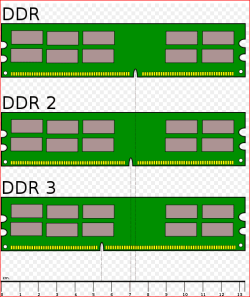
Work, it shouldn't have even fit in the slots. DDR3 is 240 pin and DDR is only 184 pin. They are also notched differently,

ddr.PNG

You either don't have the board you think you do, or you managed to somehow jam something where it will not fit (and if you did, the computer wouldn't even boot).
 

My Computer My Computer

At a glance

Win 7 Ultimate x64FX-8350 @ 4.6 GHz so farADATA XPG V1 Series Black 8GB DDR3 1600Sapphire R9 270x Dual-X
Computer type
PC/Desktop
Computer Manufacturer/Model Number
Me
OS
Win 7 Ultimate x64
CPU
FX-8350 @ 4.6 GHz so far
Motherboard
Asus M5A97 EVO
Memory
ADATA XPG V1 Series Black 8GB DDR3 1600
Graphics Card(s)
Sapphire R9 270x Dual-X
Sound Card
Xonar DGX w/ Corsair Vengence 1300
Monitor(s) Displays
Acer S232HL Abid
Screen Resolution
1920x1080
Hard Drives
120 GB OCZ Vertex 3
500 GB Seagate 7200.12
PSU
Antec Earthwatts 650W Green
Case
Antec Three Hundred
Cooling
Cooler Master 212 EVO
Keyboard
Logitech G510
Mouse
Logitech G500s
Internet Speed
35000/3000
oh i feel bit retarded sorry :S

i just ran a scan and i have a Gigabyte GA-EP45T-EXTREME P45 Motherboard thats mind blow

i went to buy ram yesterday and was suprised DDR400 didnt fit it said it would in manual.

still blue screening though =/

i just replaced ram with the old one waiting to see if it still crashes

always wondered why on startup it says gigabyte not asus lol


EDIT
i removed 2gb ram and PC hasnt crashed for an hour =/ why would less ram be better?
 
Last edited:

My Computer My Computer

At a glance

windows 7 64bit
OS
windows 7 64bit
k fixed

first the manual i had was not for my machine explains why ram didnt fit lol.

ran CPU-Z to see mobo and chipset info

updated latesd chipset drivers found on intel site
realized one of the RAM sticks was faulty so i just put in old 2x 2gb DDR3 1333
ran windows memory test

PC has stopped bluescreening (: feels good man /thread
 

My Computer My Computer

At a glance

windows 7 64bit
OS
windows 7 64bit
Back
Top