Solved Unable to remove MagicISO context menu from right click menu in Win 7

JordanJP

New member
Local time
1:08 AM
Messages
296
Hey it's been a while since I've last been here, I really enjoy this Win 7 community hope everyone is doing well.

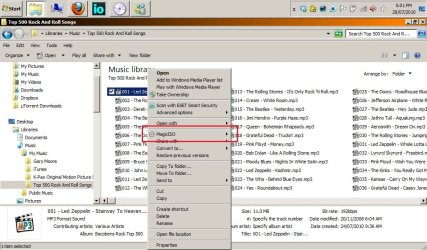
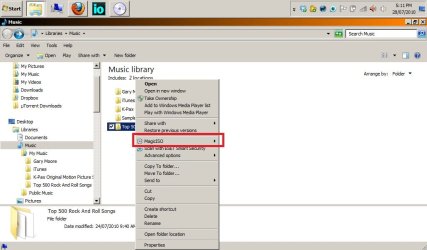
Anyway let me cut to the chase, basically I want to be able to remove the MagicISO context menu from the right click context menu in Windows 7.

See pics to understand what I'm talking about.

Even after unchecking the "Enable Shell Integration" (see picture 3) option in MagicISO Maker, it still shows up, and when I open the program again the check box is still ticked for that particular option.

I know I never had any issue in Vista or XP, but in this version of Windows it seems unable to work.

I looked on the http://www.magiciso.com website for an update to the program but there doesn't seem to be any at the moment. I've got the latest Build 0281.

Call me a "control/neat/OCD freak" who wants and needs everything in his life to be almost perfect ! LOL but really, I just like my right click context menu to be nice and tidy. I don't use MagicISO that often and when I do I do all my work within the program. Therefore I don't need the MagicISO option to be present.

Anyway I hope my issue is clear, perhaps I would have to modify the registry or something ?

Thanks for all your help I appreciate it !:)

Jordan
 

Attachments

  • How to remove Magic ISO context menu 1.jpg
    How to remove Magic ISO context menu 1.jpg
    109.2 KB · Views: 1,296
  • How to remove Magic ISO context menu 2.jpg
    How to remove Magic ISO context menu 2.jpg
    60.9 KB · Views: 886
  • How to remove Magic ISO context menu 3.jpg
    How to remove Magic ISO context menu 3.jpg
    68.6 KB · Views: 1,158

My Computer My Computer

At a glance

Windows 7 baby ! : DIntel Core i7 720QM @ 1.60GHz6.0GB Dual-Channel DDR3 @ 662MHzATI Mobility Radeon HD 5650
Computer Manufacturer/Model Number
HP Envy 17 4054ca
OS
Windows 7 baby ! : D
CPU
Intel Core i7 720QM @ 1.60GHz
Motherboard
Hewlett-Packard 1449 (CPU)
Memory
6.0GB Dual-Channel DDR3 @ 662MHz
Graphics Card(s)
ATI Mobility Radeon HD 5650
Sound Card
IDT High Definition Audio CODEC
Monitor(s) Displays
Generic PnP Monitor @ 1600x900
Screen Resolution
1600X900
Hard Drives
78.15GB INTEL SSDSA2M080G2GC ATA Device (IDE)
Hello Jordan,

You can use either ShellExView or ShellMenuView to make disabling that context menu item easy.

Hope this helps,
Shawn
 

My Computer My Computer

At a glance

64-bit Windows 11 Pro for WorkstationsIntel i7-8700K OC'd to 5 GHz64 GB (4x16GB) G.SKILL TridentZ RGB DDR4 3600...ASUS ROG-STRIX-GTX1080TI-O11G-GAMING
Computer type
PC/Desktop
Computer Manufacturer/Model Number
Self built custom
OS
64-bit Windows 11 Pro for Workstations
CPU
Intel i7-8700K OC'd to 5 GHz
Motherboard
ASUS ROG Maximus XI Formula Z390
Memory
64 GB (4x16GB) G.SKILL TridentZ RGB DDR4 3600 MHz
Graphics Card(s)
ASUS ROG-STRIX-GTX1080TI-O11G-GAMING
Sound Card
Integrated
Monitor(s) Displays
2 x Samsung Odyssey G7 27"
Screen Resolution
2560x1440
Hard Drives
1TB Samsung 990 PRO M.2,
4TB Samsung 990 PRO PRO M.2,
TerraMaster F8 SSD Plus NAS
PSU
Seasonic Prime Titanium 850W
Case
Thermaltake Core P3
Cooling
Corsair Hydro H115i
Keyboard
Logitech wireless K800
Mouse
Logitech MX Master 4
Internet Speed
2 Gb/s Download and 100 Mb/s Upload
Antivirus
Malwarebyte Anti-Malware Premium
Browser
Google Chrome
Other Info
Logitech Z625 speaker system,
Logitech BRIO 4K Pro webcam,
HP Color LaserJet Pro MFP M477fdn,
APC SMART-UPS RT 1000 XL - SURT1000XLI,
Galaxy S23 Plus phone

My Computer My Computer

At a glance

Windows 7 baby ! : DIntel Core i7 720QM @ 1.60GHz6.0GB Dual-Channel DDR3 @ 662MHzATI Mobility Radeon HD 5650
Computer Manufacturer/Model Number
HP Envy 17 4054ca
OS
Windows 7 baby ! : D
CPU
Intel Core i7 720QM @ 1.60GHz
Motherboard
Hewlett-Packard 1449 (CPU)
Memory
6.0GB Dual-Channel DDR3 @ 662MHz
Graphics Card(s)
ATI Mobility Radeon HD 5650
Sound Card
IDT High Definition Audio CODEC
Monitor(s) Displays
Generic PnP Monitor @ 1600x900
Screen Resolution
1600X900
Hard Drives
78.15GB INTEL SSDSA2M080G2GC ATA Device (IDE)
You're welcome Jordan, and welcome back. :)
 

My Computer My Computer

At a glance

64-bit Windows 11 Pro for WorkstationsIntel i7-8700K OC'd to 5 GHz64 GB (4x16GB) G.SKILL TridentZ RGB DDR4 3600...ASUS ROG-STRIX-GTX1080TI-O11G-GAMING
Computer type
PC/Desktop
Computer Manufacturer/Model Number
Self built custom
OS
64-bit Windows 11 Pro for Workstations
CPU
Intel i7-8700K OC'd to 5 GHz
Motherboard
ASUS ROG Maximus XI Formula Z390
Memory
64 GB (4x16GB) G.SKILL TridentZ RGB DDR4 3600 MHz
Graphics Card(s)
ASUS ROG-STRIX-GTX1080TI-O11G-GAMING
Sound Card
Integrated
Monitor(s) Displays
2 x Samsung Odyssey G7 27"
Screen Resolution
2560x1440
Hard Drives
1TB Samsung 990 PRO M.2,
4TB Samsung 990 PRO PRO M.2,
TerraMaster F8 SSD Plus NAS
PSU
Seasonic Prime Titanium 850W
Case
Thermaltake Core P3
Cooling
Corsair Hydro H115i
Keyboard
Logitech wireless K800
Mouse
Logitech MX Master 4
Internet Speed
2 Gb/s Download and 100 Mb/s Upload
Antivirus
Malwarebyte Anti-Malware Premium
Browser
Google Chrome
Other Info
Logitech Z625 speaker system,
Logitech BRIO 4K Pro webcam,
HP Color LaserJet Pro MFP M477fdn,
APC SMART-UPS RT 1000 XL - SURT1000XLI,
Galaxy S23 Plus phone
How exactly do you remove them? I ran both those prgrams but can't see anything related to MagicIso.
 
Last edited:

My Computer My Computer

At a glance

Windows 7 Ultimate x64
OS
Windows 7 Ultimate x64
Run ShellExView choose MShellExtMenu Class extension name and press disable section item
 

My Computer My Computer

At a glance

Windows 7 Ultimate x64
OS
Windows 7 Ultimate x64
Or just run CCleaner and clean the Registry :)
 

My Computer My Computer

At a glance

Windows 7 Ultimate SP1 x64Intel Core I5-3570K16GB Corsair Vengeance DDR3 1600 MHzEvga Geforce GTX 660
Computer type
PC/Desktop
Computer Manufacturer/Model Number
Custom
OS
Windows 7 Ultimate SP1 x64
CPU
Intel Core I5-3570K
Motherboard
Gigabyte Z77-D3H
Memory
16GB Corsair Vengeance DDR3 1600 MHz
Graphics Card(s)
Evga Geforce GTX 660
Sound Card
Integrated
Monitor(s) Displays
HP 2009m
Screen Resolution
1600x900
Hard Drives
2 Internal 500 GB
1 External 3TB
1 120GB SSD (OS)
PSU
750 Watt
Case
Thermaltake VM600M1W2Z Dokker Tower Case
Keyboard
Razer Deathstalker Ultimate
Mouse
Roccat Kova+
Antivirus
Kaspersky Antivirus 2013
Browser
Mozilla Firefox
Or just run CCleaner and clean the Registry :)

If you use that option I would do the CCleaner backup and also ERUNT and maybe a Restore Point. Just recently CCleaner had an issue with the registry cleaning tool hosing things. It may be fixed in the current release, but a little caution is good.
 

My Computer My Computer

At a glance

Windows 7 32 bitAMD 5200+ dual core2 GBNVidia GeForce 6150SE 128 MB
Computer Manufacturer/Model Number
HP Media Center
OS
Windows 7 32 bit
CPU
AMD 5200+ dual core
Memory
2 GB
Graphics Card(s)
NVidia GeForce 6150SE 128 MB
Monitor(s) Displays
CRT
Screen Resolution
1280x1024
Hard Drives
500 GB Sata internal :

SIIG USB 3.0 docking stations w/WD Caviar Black 6 Gb/s drives
Keyboard
PS/2
Mouse
PS/2 Wheel Mouse
Other Info
SIIG USB 3.0 PCIexpress card.
Just recently CCleaner had an issue with the registry cleaning tool hosing things. It may be fixed in the current release, but a little caution is good.

<curious> What was that issue? </curious>
 

My Computer My Computer

At a glance

Windows 7 Professional SP1 32-bitIntel Core 2 Duo E6600 2.4GHz4GB DDR2-667 (4x1GB in dual-channel config)nVidia GeForce 9800 GT
Computer type
PC/Desktop
Computer Manufacturer/Model Number
Custom-built
OS
Windows 7 Professional SP1 32-bit
CPU
Intel Core 2 Duo E6600 2.4GHz
Motherboard
Asus PL5D2
Memory
4GB DDR2-667 (4x1GB in dual-channel config)
Graphics Card(s)
nVidia GeForce 9800 GT
Sound Card
Creative X-Fi XtremeMusic
Monitor(s) Displays
Acer P236H
Screen Resolution
1920x1200 (DVI)
Hard Drives
OCZ SSD Vertex Plus 60GB SATA (Firmware 3.55), 64MB cache
Hitachi HD321KJ SATA, 320GB, 7200rpm, 16MB cache
PSU
Antec TruePower 2.0
Case
Cooler Master Centurion
Cooling
Too many fans
Keyboard
Standard
Mouse
Microsoft wireless optical mouse
Internet Speed
AT&T U-verse (18mbit/sec)
Antivirus
Microsoft Security Essentials
Browser
Firefox
Other Info
Other devices:
Compaq CQ-60 laptop
Google Nexus 7 (2012) tablet
Nvidia SHIELD tablet (US/LTE)
Hardkernel ODROID-XU single-board computer (Samsung Exynos 5420)
Just recently CCleaner had an issue with the registry cleaning tool hosing things. It may be fixed in the current release, but a little caution is good.

<curious> What was that issue? </curious>

I don't remember exactly how they described it. But I had to use ERDNT to fix my registry. I don't know if the CCleaner backup worked since I relied on ERUNT and a restore point to back me up. They say it's fixed in the latest release. If you want the gory details it must be in their change log.
 

My Computer My Computer

At a glance

Windows 7 32 bitAMD 5200+ dual core2 GBNVidia GeForce 6150SE 128 MB
Computer Manufacturer/Model Number
HP Media Center
OS
Windows 7 32 bit
CPU
AMD 5200+ dual core
Memory
2 GB
Graphics Card(s)
NVidia GeForce 6150SE 128 MB
Monitor(s) Displays
CRT
Screen Resolution
1280x1024
Hard Drives
500 GB Sata internal :

SIIG USB 3.0 docking stations w/WD Caviar Black 6 Gb/s drives
Keyboard
PS/2
Mouse
PS/2 Wheel Mouse
Other Info
SIIG USB 3.0 PCIexpress card.
Interesting. I do read every changelog and usually they aren't that detailed. Anyway, I was curious since I never had an issue with CCleaner's registry cleaner.
 

My Computer My Computer

At a glance

Windows 7 Professional SP1 32-bitIntel Core 2 Duo E6600 2.4GHz4GB DDR2-667 (4x1GB in dual-channel config)nVidia GeForce 9800 GT
Computer type
PC/Desktop
Computer Manufacturer/Model Number
Custom-built
OS
Windows 7 Professional SP1 32-bit
CPU
Intel Core 2 Duo E6600 2.4GHz
Motherboard
Asus PL5D2
Memory
4GB DDR2-667 (4x1GB in dual-channel config)
Graphics Card(s)
nVidia GeForce 9800 GT
Sound Card
Creative X-Fi XtremeMusic
Monitor(s) Displays
Acer P236H
Screen Resolution
1920x1200 (DVI)
Hard Drives
OCZ SSD Vertex Plus 60GB SATA (Firmware 3.55), 64MB cache
Hitachi HD321KJ SATA, 320GB, 7200rpm, 16MB cache
PSU
Antec TruePower 2.0
Case
Cooler Master Centurion
Cooling
Too many fans
Keyboard
Standard
Mouse
Microsoft wireless optical mouse
Internet Speed
AT&T U-verse (18mbit/sec)
Antivirus
Microsoft Security Essentials
Browser
Firefox
Other Info
Other devices:
Compaq CQ-60 laptop
Google Nexus 7 (2012) tablet
Nvidia SHIELD tablet (US/LTE)
Hardkernel ODROID-XU single-board computer (Samsung Exynos 5420)
Interesting. I do read every changelog and usually they aren't that detailed. Anyway, I was curious since I never had an issue with CCleaner's registry cleaner.

Instead of calling it a "bug" the change log has this line:
Improved "Unused File Extensions" registry rule improvements.

The unused file extension cleanup was what caused me to use ERDNT to fix it.
Evidently it was only on the previous build. I got so used to having no problems that I stopped using the CCleaner backup when doing registry cleaning. But I had several other layers of backup so it was no biggie.
 

My Computer My Computer

At a glance

Windows 7 32 bitAMD 5200+ dual core2 GBNVidia GeForce 6150SE 128 MB
Computer Manufacturer/Model Number
HP Media Center
OS
Windows 7 32 bit
CPU
AMD 5200+ dual core
Memory
2 GB
Graphics Card(s)
NVidia GeForce 6150SE 128 MB
Monitor(s) Displays
CRT
Screen Resolution
1280x1024
Hard Drives
500 GB Sata internal :

SIIG USB 3.0 docking stations w/WD Caviar Black 6 Gb/s drives
Keyboard
PS/2
Mouse
PS/2 Wheel Mouse
Other Info
SIIG USB 3.0 PCIexpress card.
Back
Top