...
When you add RAM to an OEM there is the possibility of the RAM not being able to get enough voltage. On any OEM computer their BIOS won't allow you to adjust the voltage or frequency settings, one good thing is that they usually set the voltage fairly high, but, it might not be high enough for 18GB RAM.
If you have further issues try running with the original 6GB, if the system runs with no errors (crashes, failed updates, etc.) you can try running the 12GB (take out the 6GB first) and see if there are any errors.
If you have no issues with either the 6GB or 12GB RAM but problems with the 18GB RAM, the above reason will likely be the cause, not enough voltage for the RAM to run correctly.
With an OEM (Dell) system you have no choice but to run the amount of RAM the system settings will allow.
What are the brand, frequency, timings and stated voltage settings for the two different sets of RAM?
You can find these by downloading
CPUZ and post a snip of the CPU, Mainboard, Memory, and SPD tabs for each set of RAM (SPD tab for each set of RAM, this is the manufacturers recommended/tested frequencies and timings).
For posting the information , enter 'Snipping tool' in the Start button > Search box, hit enter. Select the area you want to post and save to a convenient place.
How to Post a Screenshot in Seven Forums
This information will help us to determine if the two RAM sets are conflicting.
It is completely normal for RAM to pass memtest86+ several times and then show errors on the fifth or sixth run, it's just they way electronics are, intermittent errors can be very fickle.
This is why your system will run fine for a while and then under certain circumstances give errors/crashes, or blame other hardware/software as the cause.
As for putting the SATA cable for your boot drive into the SATA 0 port, it was the standard for Dell a couple of years ago and still is, as mentioned, for custom builds.
Didn't mean for you to try and move the physical component, just where the SATA cable plugs into the motherboard.
Your Dell system may be designed to run with the ODD in SATA 0, the blue port from your picture, at this point it is a non-issue, you can just leave it where it is.
When testing your RAM, as mentioned in the previous post, and since you have already started:
1) Test the 6GB (3X2GB) Dell Nanya RAM first.
If no errors,
2) Then pull the 6GB (3X2GB) out.
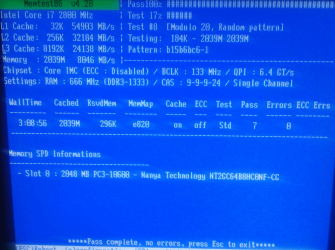
3) Install the 12Gb (3X4GB) Kingston RAM and test with memteset86+ for a full 7 passes.
As you have noticed already, the more RAM you have installed the longer the tests will take, be patient, all these tests are very important.
If there are no errors,
4) Install all 18GB RAM (3X2GB and 3X4GB) and run memtest86+ for a full 7 passes, this will take a long time to complete.
If there are no errors, this indicates your RAM is good but, doesn't mean that it is absolutely 100% good.
It is a fact of electronics and therefore hardware, especially RAM, that tests can not guaranty that there are no problems with the components.
At this stage, all tests pass and no errors, you can move to testing other components.
If you have any errors during the RAM resting, this can be due to faulty RAM or a bad motherboard RAM slot.
If you get an error with 3 RAM cards installed, test each RAM card in the previous testing motherboard slot, one at a time. This will identify the bad RAM card or bad motherboard RAM slot.
Let us know if you have any questions.