System Restore how to set to show every past restore point inc/manual

MSwhip

New member
Member
VIP
Local time
6:05 AM
Messages
101
I am having difficulties with this.
1. Does Win 7 limit the quantity of past restore points it shows upon user request?
2. If stored elsewhere where do I find them?
3. Is there a way to set it up to show at least the last 10 restore pointsd created, or is there a smaller limit.
Right now the one and only restore point that is available is the last one. So it is like a revolving door every time a new restore point gets created, the previous one gets dropped and does not show any longer.

Given my limited competence with computer knowledge please post answers in layman terms as in Step 1.. 2 3. type.

I would appreciate help over this.

Thank you kindly
 
Last edited:

My Computer My Computer

At a glance

Windows 7 Home Premium 64 bitAMD A10-7870K + onboard Radeon HD Graphics16 GB in 2 slots: 2 x 8GB Kingston Hyper Blu ...Nvidia GT 740 GT SC 4 GB GDRR5 + onboard Rade...
Computer type
PC/Desktop
Computer Manufacturer/Model Number
Custom Built
OS
Windows 7 Home Premium 64 bit
CPU
AMD A10-7870K + onboard Radeon HD Graphics
Motherboard
ASUS A88XM-E
Memory
16 GB in 2 slots: 2 x 8GB Kingston Hyper Blu DDR3 1600Mhz
Graphics Card(s)
Nvidia GT 740 GT SC 4 GB GDRR5 + onboard Radeon HD Graphics
Sound Card
Realtek
Monitor(s) Displays
Dell W2309 16:9 Aspect ratio
Hard Drives
Drive 0: Intel 320 Series 160GB
Drive 1: WD Caviar Black 2TB Sata 2 (no OS installed on it))

External Enclosure USB 2.0 or eSata Interfaces linked to the Desktop PC contain 4 mechanical HDDs for total storage cap
PSU
Corsair RM 550 Modular
Case
Antec P70
Cooling
N/A
Internet Speed
1000 (*UP TO) Mbps Download 50 Mbps Upload (*UP TO)
Antivirus
Active online AVG and Avira -
Browser
Most current Firefox and/or Waterfox alternatively
Other Info
Periodic Scans of the 2 hardware Drives with Malwarebytes, SuperMalwarebytes and Spybot and Destroy
Hi
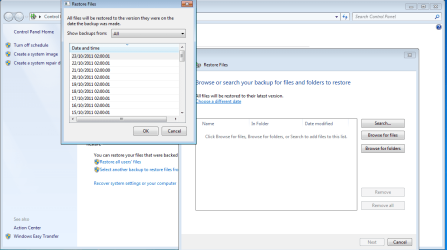
I believe that if you go to Backup and Restore (Start button, type Backup in the search bar at the bottom of the start menu), then click Restore button, on the screen that pops up is a blue link that says "Choose a different Date".. This will then allow you to select which backup you would like to recover your data from..

Is that what you are looking for. Apologies If I have mis-understood you.
 

Attachments

  • Restore.png
    Restore.png
    34.6 KB · Views: 105

My Computer My Computer

At a glance

Windows 7Intel E6600 @ 2.9Ghz4GB Crucial DDR2 PC6400EVGA GTS 260 768mb
OS
Windows 7
CPU
Intel E6600 @ 2.9Ghz
Motherboard
Gigabyte EP45 UD3
Memory
4GB Crucial DDR2 PC6400
Graphics Card(s)
EVGA GTS 260 768mb
Monitor(s) Displays
24" DGM
Screen Resolution
1920x1200
Hard Drives
1.5TB
1TB
750GB
500GB x 2
PSU
750w Corsair
you are on the right track of things.. only that when I ask to see restore point/s it just shows me one -the last one-... although i am aware that there have been quite a few prior to that one and when I click on "show more restore points" nothing shows. Additionally, each time a new restore point is created, automatically or "manually" by me the new created restore point just replaces the previous one, and that one just dissapears.

I need to find out what is going on, and if in fact they are being saved somewhere how do I go about finding them.

Thank you for your interest in helping out.
 

My Computer My Computer

At a glance

Windows 7 Home Premium 64 bitAMD A10-7870K + onboard Radeon HD Graphics16 GB in 2 slots: 2 x 8GB Kingston Hyper Blu ...Nvidia GT 740 GT SC 4 GB GDRR5 + onboard Rade...
Computer type
PC/Desktop
Computer Manufacturer/Model Number
Custom Built
OS
Windows 7 Home Premium 64 bit
CPU
AMD A10-7870K + onboard Radeon HD Graphics
Motherboard
ASUS A88XM-E
Memory
16 GB in 2 slots: 2 x 8GB Kingston Hyper Blu DDR3 1600Mhz
Graphics Card(s)
Nvidia GT 740 GT SC 4 GB GDRR5 + onboard Radeon HD Graphics
Sound Card
Realtek
Monitor(s) Displays
Dell W2309 16:9 Aspect ratio
Hard Drives
Drive 0: Intel 320 Series 160GB
Drive 1: WD Caviar Black 2TB Sata 2 (no OS installed on it))

External Enclosure USB 2.0 or eSata Interfaces linked to the Desktop PC contain 4 mechanical HDDs for total storage cap
PSU
Corsair RM 550 Modular
Case
Antec P70
Cooling
N/A
Internet Speed
1000 (*UP TO) Mbps Download 50 Mbps Upload (*UP TO)
Antivirus
Active online AVG and Avira -
Browser
Most current Firefox and/or Waterfox alternatively
Other Info
Periodic Scans of the 2 hardware Drives with Malwarebytes, SuperMalwarebytes and Spybot and Destroy
The number of restore points that can be stored and kept depends on the size of the shadowstorage. Open an elevated command prompt (run as admin) and run this commend:

vssadmin list shadowstorage

The Maximum tells you the size of the shadowstorage. The Allocated tells you the amount that is currently used.

If you want to see the individual restore points, run:

vssadmin list shadows

The restore points are dated.

If you want to change the size of your shadowstorage - e.g. on C: to 20GB, run this command.

vssadmin resize shadowstorage for=/C: on=/C: /maxsize=20GB

If you want a different size, just change the "20"

PS: Note that each restore point is typically 500MB to 1GB in size.
 

My Computer My Computer

At a glance

Vista, Windows7, Mint Mate, Zorin, Windows 8from 1.6GHz Duo to i7
Computer Manufacturer/Model Number
HP, Dell, Gateway, Toshiba - 4 laptops and 2 desktops
OS
Vista, Windows7, Mint Mate, Zorin, Windows 8
CPU
from 1.6GHz Duo to i7
Monitor(s) Displays
2x HP w2207
Hard Drives
5x HDD, 7x SSD, 12x Externals
Keyboard
with trackball - no mices
Mouse
Trackball mice
Internet Speed
DSL 6000
responding to whs

all your suggestions sound great.. i will try that later today, thank you for your fast response
 

My Computer My Computer

At a glance

Windows 7 Home Premium 64 bitAMD A10-7870K + onboard Radeon HD Graphics16 GB in 2 slots: 2 x 8GB Kingston Hyper Blu ...Nvidia GT 740 GT SC 4 GB GDRR5 + onboard Rade...
Computer type
PC/Desktop
Computer Manufacturer/Model Number
Custom Built
OS
Windows 7 Home Premium 64 bit
CPU
AMD A10-7870K + onboard Radeon HD Graphics
Motherboard
ASUS A88XM-E
Memory
16 GB in 2 slots: 2 x 8GB Kingston Hyper Blu DDR3 1600Mhz
Graphics Card(s)
Nvidia GT 740 GT SC 4 GB GDRR5 + onboard Radeon HD Graphics
Sound Card
Realtek
Monitor(s) Displays
Dell W2309 16:9 Aspect ratio
Hard Drives
Drive 0: Intel 320 Series 160GB
Drive 1: WD Caviar Black 2TB Sata 2 (no OS installed on it))

External Enclosure USB 2.0 or eSata Interfaces linked to the Desktop PC contain 4 mechanical HDDs for total storage cap
PSU
Corsair RM 550 Modular
Case
Antec P70
Cooling
N/A
Internet Speed
1000 (*UP TO) Mbps Download 50 Mbps Upload (*UP TO)
Antivirus
Active online AVG and Avira -
Browser
Most current Firefox and/or Waterfox alternatively
Other Info
Periodic Scans of the 2 hardware Drives with Malwarebytes, SuperMalwarebytes and Spybot and Destroy
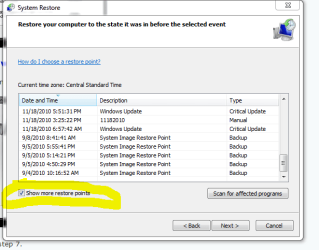
When you get to the window below make sure you check the box "Show more restore points."
I circled it in yellow on Snip below.
 

Attachments

  • Sys restore2.PNG
    Sys restore2.PNG
    14.3 KB · Views: 9,806

My Computer My Computer

At a glance

Windows7 Pro 64bit SP-1; Windows XP Pro 32bitIntel Core i7-870 Lynnfield 2.93GHz LGA 1156 ...8GB@1400MHz Crucial Ballistix DDR3-1600 4x2GBASUS ENGTX460 DirectCU/2DI/1GD5 1GB 256-bit G...
Computer Manufacturer/Model Number
Hopalong/ Godzilla
OS
Windows7 Pro 64bit SP-1; Windows XP Pro 32bit
CPU
Intel Core i7-870 Lynnfield 2.93GHz LGA 1156 95W Quad-Core
Motherboard
ASUS P7P55D-E PRO
Memory
8GB@1400MHz Crucial Ballistix DDR3-1600 4x2GB
Graphics Card(s)
ASUS ENGTX460 DirectCU/2DI/1GD5 1GB 256-bit GDDR5
Sound Card
VIA Onboard
Monitor(s) Displays
Asus VS248H-P 24"; Samsung SyncMaster 941BW 19"ws
Screen Resolution
1920x1080; 1440x900
Hard Drives
Samsung 830 120GB SSD
Intel 320 120GB SSD
Western Digital Caviar Black WD7501AALS 750GB 7200 RPM SATA 3.0Gb/s
Western Digital Caviar Black WD6401AALS 640GB 7200 RPM SATA 3.0Gb/s
PSU
COOLER MASTER Silent Pro RS850-AMBAJ3-US 850W Modular
Case
COOLER MASTER HAF 932 RC-932-KKN5-GP Black
Cooling
Scythe "Mugen-2 Rev.B" (2 ScytheKaze-Jyuni PWM fans)
Keyboard
Logitech K-320
Mouse
Kensington
Antivirus
Avast Inernet Suite
Browser
IE 9 ; Chrome

My Computer My Computer

At a glance

Vista, Windows7, Mint Mate, Zorin, Windows 8from 1.6GHz Duo to i7
Computer Manufacturer/Model Number
HP, Dell, Gateway, Toshiba - 4 laptops and 2 desktops
OS
Vista, Windows7, Mint Mate, Zorin, Windows 8
CPU
from 1.6GHz Duo to i7
Monitor(s) Displays
2x HP w2207
Hard Drives
5x HDD, 7x SSD, 12x Externals
Keyboard
with trackball - no mices
Mouse
Trackball mice
Internet Speed
DSL 6000
Back
Top