
Solved Help with a complete system image restore from VHD files?

AriKona

"Older" Member
Local time
2:52 PM
Messages
22
Location
Scottsdale, Arizona
Not as simple as the title sounds. Believe me.

To start: I did a complete backup of my system a month ago. I saved it on an external HD. There are three directories: Backup (Date) with two VHD files in this directory, Catalog, SPPMetadataCache and a file entitled MediaID. Well, about a week ago, I was having a hard time logging on to the system. I would get to the password and the system would not allow any keyboard entry and would not respond to Ctrl-Alt-Del. After a few attempts to figurer out the problem, I decided to do an image restore. When attempting this through the Control Panel, system repair disc and Windows 7 Installation disc, nothing worked because none of them recognized the VHD files. (I should add here that this is Windows 7 Ultimate on a two 1 Terabyte drive system in Raid 0 array - :(). Well, I reformatted the drives so I now have drive C: and D: and have the absolute minimal installation of Windows 7 Ult. on the computer. In doing some research I found that I could view the files with Windows Virtual Hard Drive and all the files are still there. So, this brings me to the question:

Can I (and if I can, how do I) restore the original backup of one month ago to the system?

I have read that Windows Virtual Hard Drive has a limit of 172 Gb so that might not work as the backup is 214Gb in size. I have downloaded Virtual Box in case I need it. My main concern is to return the system to original configuration (sans the Raid array) without having to re-install all the programs and reconfigure all of the ones I would have to install.

So why should I want to restore versus re-install? I have 20,432 folders and 176,000 files that date back to 1985 and many programs that have been downloaded and modified on this system and just don't want to spend that kind of time. So saying, if you have the answer or can direct me to it (I did a search without success on this specific problem), I would very much appreciate it.

Don
 

My Computer My Computer

Computer Manufacturer/Model Number
Made by myself
OS
Windows 7 Ultimate 32 bit
CPU
AMD Phenom II X2 550 3.1GHz
Motherboard
Gigabyte MA790X-UD4P
Memory
8 GB DDR2 (4 I can't use.....yet)
Graphics Card(s)
ATI Radeon HD 5670
Sound Card
Audigy 2 Platinum
Monitor(s) Displays
Samsung EX2220
Screen Resolution
1920x1080
Hard Drives
2 Western Digital 1TByte SATA HDs
PSU
Antec Earthwatts EA500D
Case
Antec Full Tower
Cooling
3 case fans, 1 CPU fan, 1 Graphics card fan
Keyboard
Dell Minimum Footprint SK8115
Mouse
Logitech Trackman Wheel
Internet Speed
Fast
Other Info
Philips Mpix WebCam
Canoscan LiDE 35
Lexmark E350d
Creative Inspire 6.1
3'x3'x2' Box full of computer parts
Hello Don, and welcome to Seven Forums.

If you did a system image backup, then you should be able to do a system image recovery at boot to restore the image backup with the date you want.

Hope this helps for now,
Shawn
 

My Computer My Computer

Computer type
PC/Desktop
Computer Manufacturer/Model Number
Self built custom
OS
64-bit Windows 11 Pro for Workstations
CPU
Intel i7-8700K OC'd to 5 GHz
Motherboard
ASUS ROG Maximus XI Formula Z390
Memory
64 GB (4x16GB) G.SKILL TridentZ RGB DDR4 3600 MHz
Graphics Card(s)
ASUS ROG-STRIX-GTX1080TI-O11G-GAMING
Sound Card
Integrated
Monitor(s) Displays
2 x Samsung Odyssey G7 27"
Screen Resolution
2560x1440
Hard Drives
1TB Samsung 990 PRO M.2,
4TB Samsung 990 PRO PRO M.2,
TerraMaster F8 SSD Plus NAS
PSU
Seasonic Prime Titanium 850W
Case
Thermaltake Core P3
Cooling
Corsair Hydro H115i
Keyboard
Logitech wireless K800
Mouse
Logitech MX Master 4
Internet Speed
2 Gb/s Download and 100 Mb/s Upload
Antivirus
Malwarebyte Anti-Malware Premium
Browser
Google Chrome
Other Info
Logitech Z625 speaker system,
Logitech BRIO 4K Pro webcam,
HP Color LaserJet Pro MFP M477fdn,
APC SMART-UPS RT 1000 XL - SURT1000XLI,
Galaxy S23 Plus phone
Thank you for the post Shawn, but that was the first thing I tried. The problem is that the restore part of backup-and-restore does not recognize VHD files and would not allow me to access the system image. There must be some way to access them through Virtual Hard Drive or Virtual Box in order to do an all-or-nothing system restore from image, but so far I am coming up empty handed on this one. Thanks for the reply. At least people are reading this request.:)
 

My Computer My Computer

Computer Manufacturer/Model Number
Made by myself
OS
Windows 7 Ultimate 32 bit
CPU
AMD Phenom II X2 550 3.1GHz
Motherboard
Gigabyte MA790X-UD4P
Memory
8 GB DDR2 (4 I can't use.....yet)
Graphics Card(s)
ATI Radeon HD 5670
Sound Card
Audigy 2 Platinum
Monitor(s) Displays
Samsung EX2220
Screen Resolution
1920x1080
Hard Drives
2 Western Digital 1TByte SATA HDs
PSU
Antec Earthwatts EA500D
Case
Antec Full Tower
Cooling
3 case fans, 1 CPU fan, 1 Graphics card fan
Keyboard
Dell Minimum Footprint SK8115
Mouse
Logitech Trackman Wheel
Internet Speed
Fast
Other Info
Philips Mpix WebCam
Canoscan LiDE 35
Lexmark E350d
Creative Inspire 6.1
3'x3'x2' Box full of computer parts
Don,

Is it still not in it's original WindowsImageBackup folder as in the NOTE box at the top of this tutorial?
 

My Computer My Computer

Computer type
PC/Desktop
Computer Manufacturer/Model Number
Self built custom
OS
64-bit Windows 11 Pro for Workstations
CPU
Intel i7-8700K OC'd to 5 GHz
Motherboard
ASUS ROG Maximus XI Formula Z390
Memory
64 GB (4x16GB) G.SKILL TridentZ RGB DDR4 3600 MHz
Graphics Card(s)
ASUS ROG-STRIX-GTX1080TI-O11G-GAMING
Sound Card
Integrated
Monitor(s) Displays
2 x Samsung Odyssey G7 27"
Screen Resolution
2560x1440
Hard Drives
1TB Samsung 990 PRO M.2,
4TB Samsung 990 PRO PRO M.2,
TerraMaster F8 SSD Plus NAS
PSU
Seasonic Prime Titanium 850W
Case
Thermaltake Core P3
Cooling
Corsair Hydro H115i
Keyboard
Logitech wireless K800
Mouse
Logitech MX Master 4
Internet Speed
2 Gb/s Download and 100 Mb/s Upload
Antivirus
Malwarebyte Anti-Malware Premium
Browser
Google Chrome
Other Info
Logitech Z625 speaker system,
Logitech BRIO 4K Pro webcam,
HP Color LaserJet Pro MFP M477fdn,
APC SMART-UPS RT 1000 XL - SURT1000XLI,
Galaxy S23 Plus phone
It is indeed. However, the system only recognizes another backup which was done after the new install following a complete re-formatting of the HDs and does not contain all the old files, folders and system files.

I am supposedly going to hear from a level 2 tech at Microsoft tomorrow. My guess is this another epic fail on the part of MS and I will have to reconstruct piece by piece (something I dread doing). Thanks for the input.

Don
 

My Computer My Computer

Computer Manufacturer/Model Number
Made by myself
OS
Windows 7 Ultimate 32 bit
CPU
AMD Phenom II X2 550 3.1GHz
Motherboard
Gigabyte MA790X-UD4P
Memory
8 GB DDR2 (4 I can't use.....yet)
Graphics Card(s)
ATI Radeon HD 5670
Sound Card
Audigy 2 Platinum
Monitor(s) Displays
Samsung EX2220
Screen Resolution
1920x1080
Hard Drives
2 Western Digital 1TByte SATA HDs
PSU
Antec Earthwatts EA500D
Case
Antec Full Tower
Cooling
3 case fans, 1 CPU fan, 1 Graphics card fan
Keyboard
Dell Minimum Footprint SK8115
Mouse
Logitech Trackman Wheel
Internet Speed
Fast
Other Info
Philips Mpix WebCam
Canoscan LiDE 35
Lexmark E350d
Creative Inspire 6.1
3'x3'x2' Box full of computer parts

My Computer My Computer

Computer type
PC/Desktop
Computer Manufacturer/Model Number
Self built custom
OS
64-bit Windows 11 Pro for Workstations
CPU
Intel i7-8700K OC'd to 5 GHz
Motherboard
ASUS ROG Maximus XI Formula Z390
Memory
64 GB (4x16GB) G.SKILL TridentZ RGB DDR4 3600 MHz
Graphics Card(s)
ASUS ROG-STRIX-GTX1080TI-O11G-GAMING
Sound Card
Integrated
Monitor(s) Displays
2 x Samsung Odyssey G7 27"
Screen Resolution
2560x1440
Hard Drives
1TB Samsung 990 PRO M.2,
4TB Samsung 990 PRO PRO M.2,
TerraMaster F8 SSD Plus NAS
PSU
Seasonic Prime Titanium 850W
Case
Thermaltake Core P3
Cooling
Corsair Hydro H115i
Keyboard
Logitech wireless K800
Mouse
Logitech MX Master 4
Internet Speed
2 Gb/s Download and 100 Mb/s Upload
Antivirus
Malwarebyte Anti-Malware Premium
Browser
Google Chrome
Other Info
Logitech Z625 speaker system,
Logitech BRIO 4K Pro webcam,
HP Color LaserJet Pro MFP M477fdn,
APC SMART-UPS RT 1000 XL - SURT1000XLI,
Galaxy S23 Plus phone
Yes, it is and when I attempt to restore from it I get to step seven and the top box is checked and grayed out. When I press next (because I have no idea what "drivers" they are talking about, I get the following error: "Error: The system cannot find the specified file 0x80070002." and it stops and allows me to restart.

I don't know what "file" it is looking for as I have combed the backup folders and can't find this file anywhere.
:confused:
Any ideas?

Don
 

My Computer My Computer

Computer Manufacturer/Model Number
Made by myself
OS
Windows 7 Ultimate 32 bit
CPU
AMD Phenom II X2 550 3.1GHz
Motherboard
Gigabyte MA790X-UD4P
Memory
8 GB DDR2 (4 I can't use.....yet)
Graphics Card(s)
ATI Radeon HD 5670
Sound Card
Audigy 2 Platinum
Monitor(s) Displays
Samsung EX2220
Screen Resolution
1920x1080
Hard Drives
2 Western Digital 1TByte SATA HDs
PSU
Antec Earthwatts EA500D
Case
Antec Full Tower
Cooling
3 case fans, 1 CPU fan, 1 Graphics card fan
Keyboard
Dell Minimum Footprint SK8115
Mouse
Logitech Trackman Wheel
Internet Speed
Fast
Other Info
Philips Mpix WebCam
Canoscan LiDE 35
Lexmark E350d
Creative Inspire 6.1
3'x3'x2' Box full of computer parts
Don,

Check out Scenario 3 in each section of the MS KB article below to see if that may apply and work for you for this error.

Error code 0x8100002F and or error code 0x80070002 when you back up files in Windows 7


Scenario 3 resolution
For information about how to resolve this issue, see the following Microsoft Knowledge Base article:
976972 (You encounter problems when you move data over USB from a Windows 7 or Windows Server 2008 R2-based computer that has an NVIDIA USB EHCI chipset and at least 4GB of RAM ) You encounter problems when you move data over USB from a Windows 7 or Windows Server 2008 R2-based computer that has an NVIDIA USB EHCI chipset and at least 4GB of RAM
 

My Computer My Computer

Computer type
PC/Desktop
Computer Manufacturer/Model Number
Self built custom
OS
64-bit Windows 11 Pro for Workstations
CPU
Intel i7-8700K OC'd to 5 GHz
Motherboard
ASUS ROG Maximus XI Formula Z390
Memory
64 GB (4x16GB) G.SKILL TridentZ RGB DDR4 3600 MHz
Graphics Card(s)
ASUS ROG-STRIX-GTX1080TI-O11G-GAMING
Sound Card
Integrated
Monitor(s) Displays
2 x Samsung Odyssey G7 27"
Screen Resolution
2560x1440
Hard Drives
1TB Samsung 990 PRO M.2,
4TB Samsung 990 PRO PRO M.2,
TerraMaster F8 SSD Plus NAS
PSU
Seasonic Prime Titanium 850W
Case
Thermaltake Core P3
Cooling
Corsair Hydro H115i
Keyboard
Logitech wireless K800
Mouse
Logitech MX Master 4
Internet Speed
2 Gb/s Download and 100 Mb/s Upload
Antivirus
Malwarebyte Anti-Malware Premium
Browser
Google Chrome
Other Info
Logitech Z625 speaker system,
Logitech BRIO 4K Pro webcam,
HP Color LaserJet Pro MFP M477fdn,
APC SMART-UPS RT 1000 XL - SURT1000XLI,
Galaxy S23 Plus phone
I should also add that I have gone to: HKEY_LOCAL_MACHINE\SOFTWARE\Microsoft\Windows NT\CurrentVersion\ProfileList) and there are only 4 fiels with no redundancy. My concern is that when the OS was re-installed, I was not there and I wonder if that might be a factor. I still show as Admin. Also, if the restore ever works, will it reformat and then attempt to restore the files in a Raid array or will it restore to a single drive?

Still waiting for MS to call. What a joke. :rolleyes:

Don

Our messages crossed in the circuits. Yes, I have read the article. I have downloaded the file and attempted to install it. All I get is "This update does not apply to this computer."

I have tried to restore from a USB hard drive and have copied the files to the D: drive to restore to C:, all without success. I would like to resolve the 0x8007002 and I believe the rest will work.

Don
 
Last edited by a moderator:

My Computer My Computer

Computer Manufacturer/Model Number
Made by myself
OS
Windows 7 Ultimate 32 bit
CPU
AMD Phenom II X2 550 3.1GHz
Motherboard
Gigabyte MA790X-UD4P
Memory
8 GB DDR2 (4 I can't use.....yet)
Graphics Card(s)
ATI Radeon HD 5670
Sound Card
Audigy 2 Platinum
Monitor(s) Displays
Samsung EX2220
Screen Resolution
1920x1080
Hard Drives
2 Western Digital 1TByte SATA HDs
PSU
Antec Earthwatts EA500D
Case
Antec Full Tower
Cooling
3 case fans, 1 CPU fan, 1 Graphics card fan
Keyboard
Dell Minimum Footprint SK8115
Mouse
Logitech Trackman Wheel
Internet Speed
Fast
Other Info
Philips Mpix WebCam
Canoscan LiDE 35
Lexmark E350d
Creative Inspire 6.1
3'x3'x2' Box full of computer parts
It depends on if they did something to the HDD that your image backup was saved to.

No, RAID or single partitions will not matter. It only matters what was included ( selected partition(s) and size of partition(s) ) when the image was created. It will restore it back exactly the same way (partition(s) and size) to the HDD.
 

My Computer My Computer

Computer type
PC/Desktop
Computer Manufacturer/Model Number
Self built custom
OS
64-bit Windows 11 Pro for Workstations
CPU
Intel i7-8700K OC'd to 5 GHz
Motherboard
ASUS ROG Maximus XI Formula Z390
Memory
64 GB (4x16GB) G.SKILL TridentZ RGB DDR4 3600 MHz
Graphics Card(s)
ASUS ROG-STRIX-GTX1080TI-O11G-GAMING
Sound Card
Integrated
Monitor(s) Displays
2 x Samsung Odyssey G7 27"
Screen Resolution
2560x1440
Hard Drives
1TB Samsung 990 PRO M.2,
4TB Samsung 990 PRO PRO M.2,
TerraMaster F8 SSD Plus NAS
PSU
Seasonic Prime Titanium 850W
Case
Thermaltake Core P3
Cooling
Corsair Hydro H115i
Keyboard
Logitech wireless K800
Mouse
Logitech MX Master 4
Internet Speed
2 Gb/s Download and 100 Mb/s Upload
Antivirus
Malwarebyte Anti-Malware Premium
Browser
Google Chrome
Other Info
Logitech Z625 speaker system,
Logitech BRIO 4K Pro webcam,
HP Color LaserJet Pro MFP M477fdn,
APC SMART-UPS RT 1000 XL - SURT1000XLI,
Galaxy S23 Plus phone
If you can attach (mount) the VHD, you can image the attached VHD with free Macrium and restore that.

Note: the partition to which you restore must be at least the siue of the original partition.
 

My Computer My Computer

Computer Manufacturer/Model Number
HP, Dell, Gateway, Toshiba - 4 laptops and 2 desktops
OS
Vista, Windows7, Mint Mate, Zorin, Windows 8
CPU
from 1.6GHz Duo to i7
Monitor(s) Displays
2x HP w2207
Hard Drives
5x HDD, 7x SSD, 12x Externals
Keyboard
with trackball - no mices
Mouse
Trackball mice
Internet Speed
DSL 6000

My Computer My Computer

Computer type
PC/Desktop
Computer Manufacturer/Model Number
Self built custom
OS
64-bit Windows 11 Pro for Workstations
CPU
Intel i7-8700K OC'd to 5 GHz
Motherboard
ASUS ROG Maximus XI Formula Z390
Memory
64 GB (4x16GB) G.SKILL TridentZ RGB DDR4 3600 MHz
Graphics Card(s)
ASUS ROG-STRIX-GTX1080TI-O11G-GAMING
Sound Card
Integrated
Monitor(s) Displays
2 x Samsung Odyssey G7 27"
Screen Resolution
2560x1440
Hard Drives
1TB Samsung 990 PRO M.2,
4TB Samsung 990 PRO PRO M.2,
TerraMaster F8 SSD Plus NAS
PSU
Seasonic Prime Titanium 850W
Case
Thermaltake Core P3
Cooling
Corsair Hydro H115i
Keyboard
Logitech wireless K800
Mouse
Logitech MX Master 4
Internet Speed
2 Gb/s Download and 100 Mb/s Upload
Antivirus
Malwarebyte Anti-Malware Premium
Browser
Google Chrome
Other Info
Logitech Z625 speaker system,
Logitech BRIO 4K Pro webcam,
HP Color LaserJet Pro MFP M477fdn,
APC SMART-UPS RT 1000 XL - SURT1000XLI,
Galaxy S23 Plus phone
Booting from a virtual hard drive will not help as I want the system returned to the original configuration and all files back in their original place. Did I mention that there are over 214 Gbs of data? MS VHD has a 172 GB ceiling.

This time during an attempt I received the message that it couldn't find a file to restore from. Due to a forced restart I could not screen capture the error message. It suggested that I may have excluded a drive from the restore (which I didn't) or several other potential problems (it was a rather long message). The error message comes when I have gone all the way through to it actually saying the next step will reformat the drives.

Question: If I am restoring from D: to C:, will it attempt to reformat BOTH drives? I copied the files to D: to speed up the process.

Don
 

My Computer My Computer

Computer Manufacturer/Model Number
Made by myself
OS
Windows 7 Ultimate 32 bit
CPU
AMD Phenom II X2 550 3.1GHz
Motherboard
Gigabyte MA790X-UD4P
Memory
8 GB DDR2 (4 I can't use.....yet)
Graphics Card(s)
ATI Radeon HD 5670
Sound Card
Audigy 2 Platinum
Monitor(s) Displays
Samsung EX2220
Screen Resolution
1920x1080
Hard Drives
2 Western Digital 1TByte SATA HDs
PSU
Antec Earthwatts EA500D
Case
Antec Full Tower
Cooling
3 case fans, 1 CPU fan, 1 Graphics card fan
Keyboard
Dell Minimum Footprint SK8115
Mouse
Logitech Trackman Wheel
Internet Speed
Fast
Other Info
Philips Mpix WebCam
Canoscan LiDE 35
Lexmark E350d
Creative Inspire 6.1
3'x3'x2' Box full of computer parts
If you can attach (mount) the VHD, you can image the attached VHD with free Macrium and restore that.

Note: the partition to which you restore must be at least the siue of the original partition.

I currently have Virtual Box, which can attach a VHD and I can put the files on it. But, since the main problem is the restore program, will I be able to use the image to recreate an exact C: disc of what was originally a C/D: Raid 0 array? If it will
work, I am all for it.

Is there any advantage of using Macrium over Virtual Box?

Don
 

My Computer My Computer

Computer Manufacturer/Model Number
Made by myself
OS
Windows 7 Ultimate 32 bit
CPU
AMD Phenom II X2 550 3.1GHz
Motherboard
Gigabyte MA790X-UD4P
Memory
8 GB DDR2 (4 I can't use.....yet)
Graphics Card(s)
ATI Radeon HD 5670
Sound Card
Audigy 2 Platinum
Monitor(s) Displays
Samsung EX2220
Screen Resolution
1920x1080
Hard Drives
2 Western Digital 1TByte SATA HDs
PSU
Antec Earthwatts EA500D
Case
Antec Full Tower
Cooling
3 case fans, 1 CPU fan, 1 Graphics card fan
Keyboard
Dell Minimum Footprint SK8115
Mouse
Logitech Trackman Wheel
Internet Speed
Fast
Other Info
Philips Mpix WebCam
Canoscan LiDE 35
Lexmark E350d
Creative Inspire 6.1
3'x3'x2' Box full of computer parts
If you can attach (mount) the VHD, you can image the attached VHD with free Macrium and restore that.

Note: the partition to which you restore must be at least the siue of the original partition.

I currently have Virtual Box, which can attach a VHD and I can put the files on it. But, since the main problem is the restore program, will I be able to use the image to recreate an exact C: disc of what was originally a C/D: Raid 0 array? If it will
work, I am all for it.

Is there any advantage of using Macrium over Virtual Box?

Don
In the past I have imaged attached VHDs with Macrium and was able to restore those as non-VHDs. You have to use the Macrium Linux restore CD for that (easy to make). You should try to mount the VHD in a running Win7 or Vista system though (via Disk Management) and image it from there.

I fail to see the advantage of vBox being in the middle. vBox is not an imaging program.

The only problem you might run into is that you may not have an operational 100MB active partition that contains the bootmgr. In that case you will have to fix the bootmgr in C:. That one you have to play by ear.

Here is a tutorial about Macrium in case you never used it: http://www.sevenforums.com/tutorials/73828-imaging-free-macrium.html?ltr=I
 

My Computer My Computer

Computer Manufacturer/Model Number
HP, Dell, Gateway, Toshiba - 4 laptops and 2 desktops
OS
Vista, Windows7, Mint Mate, Zorin, Windows 8
CPU
from 1.6GHz Duo to i7
Monitor(s) Displays
2x HP w2207
Hard Drives
5x HDD, 7x SSD, 12x Externals
Keyboard
with trackball - no mices
Mouse
Trackball mice
Internet Speed
DSL 6000
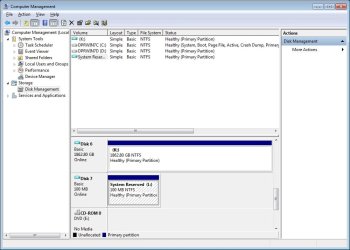
O.K., I have mounted the VHD files.
(See attached screen caps.) VHD is a picture of the two VHDs.
Main is the files in the first VHD and is the contents of Drive K:.
The other one (Drive L:) says it has 100Mbytes of data, but when I open it, it says it is empty.
Drive 6 (which is a virtual hard drive on a 931 Gbyte drive and contains main backup file) is showing 1862.80Gbytes, which was the original configuration.
I don't know how it can have that size when it is on a 931 GByte drive.

How can I restore these to a single (C:) drive?
 

Attachments

  • VHD.jpg
    VHD.jpg
    69.9 KB · Views: 46
  • Main.jpg
    Main.jpg
    87.8 KB · Views: 17
Last edited:

My Computer My Computer

Computer Manufacturer/Model Number
Made by myself
OS
Windows 7 Ultimate 32 bit
CPU
AMD Phenom II X2 550 3.1GHz
Motherboard
Gigabyte MA790X-UD4P
Memory
8 GB DDR2 (4 I can't use.....yet)
Graphics Card(s)
ATI Radeon HD 5670
Sound Card
Audigy 2 Platinum
Monitor(s) Displays
Samsung EX2220
Screen Resolution
1920x1080
Hard Drives
2 Western Digital 1TByte SATA HDs
PSU
Antec Earthwatts EA500D
Case
Antec Full Tower
Cooling
3 case fans, 1 CPU fan, 1 Graphics card fan
Keyboard
Dell Minimum Footprint SK8115
Mouse
Logitech Trackman Wheel
Internet Speed
Fast
Other Info
Philips Mpix WebCam
Canoscan LiDE 35
Lexmark E350d
Creative Inspire 6.1
3'x3'x2' Box full of computer parts
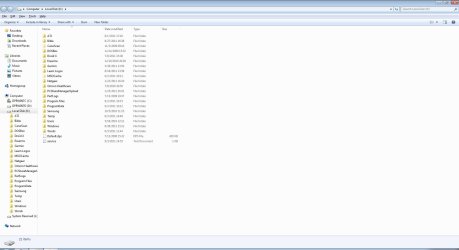
Additional information: Drive K: has 193,771 files; 21,240 folders; 147,710,491,882 bytes of information. (However, when read as a single file it is 214GByte).
See why I want it back?

If it was safe to write over C: with the information contained in this directory (K:) and be assured that the files were there to recreate the former C: drive (and allow it to boot), I would. My problem is: Are ALL the files, including system, in that single directory (K:)? and would copying them to C: give me a bootable system back to the backup date?
 

My Computer My Computer

Computer Manufacturer/Model Number
Made by myself
OS
Windows 7 Ultimate 32 bit
CPU
AMD Phenom II X2 550 3.1GHz
Motherboard
Gigabyte MA790X-UD4P
Memory
8 GB DDR2 (4 I can't use.....yet)
Graphics Card(s)
ATI Radeon HD 5670
Sound Card
Audigy 2 Platinum
Monitor(s) Displays
Samsung EX2220
Screen Resolution
1920x1080
Hard Drives
2 Western Digital 1TByte SATA HDs
PSU
Antec Earthwatts EA500D
Case
Antec Full Tower
Cooling
3 case fans, 1 CPU fan, 1 Graphics card fan
Keyboard
Dell Minimum Footprint SK8115
Mouse
Logitech Trackman Wheel
Internet Speed
Fast
Other Info
Philips Mpix WebCam
Canoscan LiDE 35
Lexmark E350d
Creative Inspire 6.1
3'x3'x2' Box full of computer parts
1. Drive 6 (K) is your image
2. Since it is so huge, shrink it as much as possible
3. Take an image of the shrunk K with Macrium
4. Restore the image to the biggest possible partition (Macrium has problems restoring to partition smaller than the original. But since this came from a Raid partition, I am not really sure of the implications).
5. If that does not work, we'll try Paragon. It can restore to smaller partitions.
6. Disregard the 100MB active partition for the time being. It may still be intact. Else we will have to deal with that too.

Note: If you restore K, it is NOT active and do not restore the MBR
 

My Computer My Computer

Computer Manufacturer/Model Number
HP, Dell, Gateway, Toshiba - 4 laptops and 2 desktops
OS
Vista, Windows7, Mint Mate, Zorin, Windows 8
CPU
from 1.6GHz Duo to i7
Monitor(s) Displays
2x HP w2207
Hard Drives
5x HDD, 7x SSD, 12x Externals
Keyboard
with trackball - no mices
Mouse
Trackball mice
Internet Speed
DSL 6000
Additional information: Drive K has 193,771 files; 21,240 folders; 147,710,491,882 bytes of information. (However, when read as a single file it is 214GByte).
See why I want it back?

If it was safe to write over C: with the information contained in this directory (K and be assured that the files were there to recreate the former C: drive (and allow it to boot), I would. My problem is: Are ALL the files, including system, in that single directory (K ? and would copying them to C: give me a bootable system back to the backup date?
Windows 7 imaging (which I use!) can be fussy. Corruption of the small mediaid file will cause auto image location to fail.

I have been able to do the following:
(1) Like whs suggests Mount the main vhd (your K) shrink, image with Macrium then reimage to an appropriate sized partition. This may require you to temporarily create another primary partition on C:. I did it as an exercise quite some time ago and worked for me.
OR
(2) Simply copy your folders out of the mounted image (K in your case).
It could be that there are some hidden and system files not shown in the mounted VHD accounting for the size difference.
I would prefer to use another partition or external HDD (slow) but see no problems in copying out to a separate root folder on C:.
You only want to copy out data not OS or installed programs.
 

My Computer My Computer

Computer type
PC/Desktop
Computer Manufacturer/Model Number
Own build
OS
Windows 7x64 Home Premium SP1
CPU
Intel i7 2600k
Motherboard
ASUS P8Z68 Deluxe
Memory
G.Skill Ripjaws (DDR3-1600) 2x4GB
Graphics Card(s)
Nvidia GeForce GTS 450; Intel HD Graphics 3000(GT2+)
Monitor(s) Displays
Dell Ultrasharp IPS panel U2311H, Samsung SyncMaster P2350
Screen Resolution
1920x1080
Hard Drives
Samsung 850 Pro SSD 256GB, Samsung SSD 840 120GB, Seagates 1TB Barracuda ST31000528AS x2
PSU
Seasonic M12II 520W
Case
Lian Li Lancool PC-K60
Cooling
Case: 1x120mm, 3x140mm CPU: Hyper 212+
Keyboard
Logitech MK520 (wireless)
Mouse
Logitech MK520
Internet Speed
6-7 Mbps
Antivirus
Norton Security Premium, Malwarebytes on 2 (MSE on 3rd PC)
Browser
FireFox
Other Info
Audio: Logitech Z523 2.1
1. Drive 6 (K) is your image
2. Since it is so huge, shrink it as much as possible
3. Take an image of the shrunk K with Macrium
4. Restore the image to the biggest possible partition (Macrium has problems restoring to partition smaller than the original. But since this came from a Raid partition, I am not really sure of the implications).
5. If that does not work, we'll try Paragon. It can restore to smaller partitions.
6. Disregard the 100MB active partition for the time being. It may still be intact. Else we will have to deal with that too.

Note: If you restore K, it is NOT active and do not restore the MBR

So, let me get this straight:
1. K: is the "unbootable" image of what my C/D drives contained.
2. The image says it is 1,800+ GBytes, but is mounted in less than half the space of a 931 Gbyte drive. How do you shrink that? The files are only ~200 GByte in size.
3. I will when I know how to "shrink" it.
4. I assume you mean a partition created on a drive other than C: as it is already partitioned for maximum usage.
5. O.K.
6. Do I need the 100Mbyte (Sytem reserved) partition? It was set up when I first setup Windows 7 and I always wondered why it was there in the first place.

Is there not a way to make the contents of Drive K: bootable and simply copy everything on K: to C: and overwrite everything on C: or copy and then make it bootable?

The sad part of this whole debacle is that Windows 7 should have been able to backup and restore like it says it can. Just another reason not to believe the claims of MS.:mad:
 

My Computer My Computer

Computer Manufacturer/Model Number
Made by myself
OS
Windows 7 Ultimate 32 bit
CPU
AMD Phenom II X2 550 3.1GHz
Motherboard
Gigabyte MA790X-UD4P
Memory
8 GB DDR2 (4 I can't use.....yet)
Graphics Card(s)
ATI Radeon HD 5670
Sound Card
Audigy 2 Platinum
Monitor(s) Displays
Samsung EX2220
Screen Resolution
1920x1080
Hard Drives
2 Western Digital 1TByte SATA HDs
PSU
Antec Earthwatts EA500D
Case
Antec Full Tower
Cooling
3 case fans, 1 CPU fan, 1 Graphics card fan
Keyboard
Dell Minimum Footprint SK8115
Mouse
Logitech Trackman Wheel
Internet Speed
Fast
Other Info
Philips Mpix WebCam
Canoscan LiDE 35
Lexmark E350d
Creative Inspire 6.1
3'x3'x2' Box full of computer parts
Back
Top