O'C my i7 920 processor, but temperature is pretty high

Diabolical

New member
Member
VIP
Local time
5:16 AM
Messages
143
i overclocked my process from 2.67ghz to 3.8ghz, i got a i7 920 processor, with dual Ati Radeon 5970's. My processor is Liquid cooled but its idle temperature is at 58C to 63C, is that high for being at a idle state? how high would it go if i play Battlefield 3 with maxed graphics? i got a Alienware Area 51. I'm not sure if my liquid cooling is really working becuase without me O'C the idle temperature is around 48-53C. How can i make sure that the Liquid cooling is working?
 

My Computer My Computer

At a glance

Window 7 Home premium 64 bit1.15 TerabyteDual Ati radeon 5970
OS
Window 7 Home premium 64 bit
Memory
1.15 Terabyte
Graphics Card(s)
Dual Ati radeon 5970
Screen Resolution
1920X1200
Cooling
Liquid cooling / Fans
58 to 63 at idle is too hot. It sounds to me like your thermal paste might not be applied properly between your CPU and your heatsink.
 

My Computer My Computer

At a glance

Windows 7 Ultimate x64Intel Q9550 2.83Ghz OC'd to 3.40Ghz8GB G.Skill PI DDR2-800, 4-4-4-12 timingsEVGA 1280MB Nvidia GeForce GTX570
Computer Manufacturer/Model Number
Self-Built in July 2009
OS
Windows 7 Ultimate x64
CPU
Intel Q9550 2.83Ghz OC'd to 3.40Ghz
Motherboard
Gigabyte GA-EP45-UD3R rev. 1.1, F12 BIOS
Memory
8GB G.Skill PI DDR2-800, 4-4-4-12 timings
Graphics Card(s)
EVGA 1280MB Nvidia GeForce GTX570
Sound Card
Realtek ALC899A 8 channel onboard audio
Monitor(s) Displays
23" Acer x233H
Screen Resolution
1920x1080
Hard Drives
Intel X25-M 80GB Gen 2 SSD
Western Digital 1TB Caviar Black, 32MB cache. WD1001FALS
PSU
Corsair 620HX modular
Case
Antec P182
Cooling
stock
Keyboard
ABS M1 Mechanical
Mouse
Logitech G9 Laser Mouse
Internet Speed
15/2 cable modem
Other Info
Windows and Linux enthusiast. Logitech G35 Headset.
ok well, i finish playing some of battlefield 3 at High Graphics, it lagged and spiked a bit, but for the most part it ran pretty smooth, I tried Ultra high graphics but i experience extreme lagg, this game is intense, ull need to O'C your processor to 4.2-4.5 GHZ in order to play at Ultra High graphics.. But besides the point, my average temperature was about 72C-76C while playing, is that normal?
 

My Computer My Computer

At a glance

Window 7 Home premium 64 bit1.15 TerabyteDual Ati radeon 5970
OS
Window 7 Home premium 64 bit
Memory
1.15 Terabyte
Graphics Card(s)
Dual Ati radeon 5970
Screen Resolution
1920X1200
Cooling
Liquid cooling / Fans
58 to 63 at idle is too hot. It sounds to me like your thermal paste might not be applied properly between your CPU and your heatsink.
i doubt is the pasting between the heatstink and my cpu considering that the pc was made from alienware, i had it for a couple of years now, some people said to try to dust out my pc, i haven tried that yet
 

My Computer My Computer

At a glance

Window 7 Home premium 64 bit1.15 TerabyteDual Ati radeon 5970
OS
Window 7 Home premium 64 bit
Memory
1.15 Terabyte
Graphics Card(s)
Dual Ati radeon 5970
Screen Resolution
1920X1200
Cooling
Liquid cooling / Fans
My Q9550 is running at 3.4Ghz and isn't breaking above 30-40% with settings at High.
 

My Computer My Computer

At a glance

Windows 7 Ultimate x64Intel Q9550 2.83Ghz OC'd to 3.40Ghz8GB G.Skill PI DDR2-800, 4-4-4-12 timingsEVGA 1280MB Nvidia GeForce GTX570
Computer Manufacturer/Model Number
Self-Built in July 2009
OS
Windows 7 Ultimate x64
CPU
Intel Q9550 2.83Ghz OC'd to 3.40Ghz
Motherboard
Gigabyte GA-EP45-UD3R rev. 1.1, F12 BIOS
Memory
8GB G.Skill PI DDR2-800, 4-4-4-12 timings
Graphics Card(s)
EVGA 1280MB Nvidia GeForce GTX570
Sound Card
Realtek ALC899A 8 channel onboard audio
Monitor(s) Displays
23" Acer x233H
Screen Resolution
1920x1080
Hard Drives
Intel X25-M 80GB Gen 2 SSD
Western Digital 1TB Caviar Black, 32MB cache. WD1001FALS
PSU
Corsair 620HX modular
Case
Antec P182
Cooling
stock
Keyboard
ABS M1 Mechanical
Mouse
Logitech G9 Laser Mouse
Internet Speed
15/2 cable modem
Other Info
Windows and Linux enthusiast. Logitech G35 Headset.
58 to 63 at idle is too hot. It sounds to me like your thermal paste might not be applied properly between your CPU and your heatsink.
i doubt is the pasting between the heatstink and my cpu considering that the pc was made from alienware, i had it for a couple of years now, some people said to try to dust out my pc, i haven tried that yet
Dusting is a good idea. Also, if your thermal paste is a couple years old I would clean it off and reapply it.
 

My Computer My Computer

At a glance

Main - Windows 7 Pro SP1 64-Bit; 2nd - Window...Main - Core i7 2600K; 2nd - Core i7 920Main - 16GB Corsair Vengeance; 2nd - 12GB Cor...Main - XFX Radeon 6870 1GB; 2nd - XFX Radeon ...
Computer Manufacturer/Model Number
Self
OS
Main - Windows 7 Pro SP1 64-Bit; 2nd - Windows Server 2008 R2
CPU
Main - Core i7 2600K; 2nd - Core i7 920
Motherboard
Main - Asus P8Z68-V Pro/Gen3; 2nd - Gigabyte GA-EX58-UDR3
Memory
Main - 16GB Corsair Vengeance; 2nd - 12GB Corsair Vengeance
Graphics Card(s)
Main - XFX Radeon 6870 1GB; 2nd - XFX Radeon 4870 1GB
Sound Card
Both: Onboard Realtek Azalia
Monitor(s) Displays
Main - Hann 25" + I-INC 25" + Acer 23"; 2nd - Upgrading Soon
Screen Resolution
Main - 1920x1080 (All Three Monitors); 2nd - Upgrading Soon
Hard Drives
Main - (1) Crucial M4 128GB (Boot)
Main - (1) Seagate 2TB 64MB Cache (Data)
Main - (1) Seagate 2TB 64MB Cache (Data Backup)
2nd - (1) Intel X25-M SSD 80GB (Boot)
2nd - (3) Seagate 1TB 32MB Cache (Data Backup)
2nd - (1) Seagate 320GB (Because)
PSU
Main - OCZ 600W Modular; 2nd - OCZ 600W
Case
Main - Thermaltake Element G; 2nd - NZXT something or other
Cooling
Main - Corsair H80; 2nd - Prolimatech Megahalems
Keyboard
Main - Razer Reclusa; 2nd - Old MS Keyboard
Mouse
Main - Logitech MX Revolution; 2nd - Old MS Mouse
Internet Speed
20Mbps Time-Warner Cable
Also you should clean the inside of the case and just because it is a "Alienware" does not mean it is bullet proof from issues. You ask for solutions so please be polite and do slam the brand name in are faces when we suggest a solution.
 

My Computer My Computer

At a glance

Windows 7 Pro x64 SP1 and Mac OS X 10.8.3Intel Core i7-3820 Sandy Bridge-E at 4.75 GHz8 x Corsair 8GB DDR3 64 GB Kit @1866 Overcloc...GTX 580 and MSI R6870
Computer Manufacturer/Model Number
Asus
OS
Windows 7 Pro x64 SP1 and Mac OS X 10.8.3
CPU
Intel Core i7-3820 Sandy Bridge-E at 4.75 GHz
Motherboard
ASUS Rampage IV Extreme
Memory
8 x Corsair 8GB DDR3 64 GB Kit @1866 Overclocked @2000
Graphics Card(s)
GTX 580 and MSI R6870
Sound Card
HDMI on GPU and ACL898
Monitor(s) Displays
32" Sony EX-500 120Hz
Screen Resolution
1920x1080P
Hard Drives
1 x Corsair Force Series GT CSSD-F60GBGT-BK (OS)
2 x Western Digital Caviar Black Sata III 750GB (Raid 0)
1 x Western Digital Caviar Black Sata III 1TB (Media)
2 x Western Digital Caviar Black Sata II 640GB (Raid 0)
PSU
Corsair Professional Series Gold AX850
Case
Corsair 800D
Cooling
Corsair H80 High Performance Liquid CPU Cooler
Keyboard
HP Wireless Elite Keyboard
Mouse
HP Wireless Elite Mouse
Internet Speed
Cable, VisionTek Bigfoot Killer 2100 Gaming Network Card
Other Info
4 x GELID Solutions FN-TX12-15 120mm Case Fan with Superior Temperature Control
1 x Corsair 140mm Case Fan
1 x SilverStone FP55B Aluminum front panel 5.25" to a 3.5" bay converter
1 x Ultra Card Reader
1 x Sony Blu-ray Burner BD-5300S-0B
i overclocked my process from 2.67ghz to 3.8ghz, i got a i7 920 processor, with dual Ati Radeon 5970's. My processor is Liquid cooled but its idle temperature is at 58C to 63C, is that high for being at a idle state? how high would it go if i play Battlefield 3 with maxed graphics? i got a Alienware Area 51. I'm not sure if my liquid cooling is really working becuase without me O'C the idle temperature is around 48-53C. How can i make sure that the Liquid cooling is working?
Do you know what the idle temperatures were when the computer was new? Even 48-53C without overclocking is a little warm, especially for a liquid cooled. My i7 920 with the stock Intel cooler ran around 41C. I rebuilt later with a new case, Noctua cooler and fans and without overclocking this i7 920 idles around 21-23C depending upon the ambient temp.

As others have said, try dusting out the case and all the fans.
 

My Computer My Computer

At a glance

Windows 10 Pro 64 bitCore i7 6700K Skylake 4.0GHzCorsair Vengeance LPX DDR4 32GB 3000MHzAsus Radeon RX480 Strix 8GB
Computer type
PC/Desktop
Computer Manufacturer/Model Number
Wordsworth 5000
OS
Windows 10 Pro 64 bit
CPU
Core i7 6700K Skylake 4.0GHz
Motherboard
Asus Z170 Pro
Memory
Corsair Vengeance LPX DDR4 32GB 3000MHz
Graphics Card(s)
Asus Radeon RX480 Strix 8GB
Sound Card
Asus Xonar DSX
Monitor(s) Displays
HP 2709m
Screen Resolution
1920x1080
Hard Drives
Intel 600p M.2 PCIe NVMe SSD 512GB; Intel 335 SSD 240GB ;Western Digital Caviar Black 1TB
PSU
Thermaltake Toughpower Grand Platinum 850W
Case
Lian Li PC-B70
Cooling
CPU-Noctua NH D15, GPU-Stock, Case-Noctua 2x140, 2x120
Keyboard
Microsoft Natural Ergo 4000
Mouse
Microsoft Wireless Optical 1000
Internet Speed
Cable
Other Info
HP bd 340,
HP bd 240,
Klipsch Promedia 5.1 THX
Where is the computer placed, a well ventilhated room? They are rediculusly high for watercooling. I usually dust out my computer every month and check over cables and such to make sure everythi
ng is In working order. Is the fans in your case (not sure if they are changeable) around the right way for good airflow?
 

My Computer My Computer

At a glance

Windows 7 64 Home PremiumIntel Core I5 2500k Overclocked to 4.5ghz.G.Skill 8gb 2x4 1600mhz sniper CL9 1.25w2x Gigabyte GTX560 OC TI 1G 900Mhz GDDR5 PCIE...
Computer Manufacturer/Model Number
Cosmos II Gaming Rig
OS
Windows 7 64 Home Premium
CPU
Intel Core I5 2500k Overclocked to 4.5ghz.
Motherboard
ASUS z68 pro gen3 1155
Memory
G.Skill 8gb 2x4 1600mhz sniper CL9 1.25w
Graphics Card(s)
2x Gigabyte GTX560 OC TI 1G 900Mhz GDDR5 PCIE HDMI DVI sli
Sound Card
Realtek HD audio
Monitor(s) Displays
Samsung S27A950 27inch 3D LED
Screen Resolution
1920x1080
Hard Drives
Samsung 2TB Spinpoint F3/4EG EcoGreen HDD 32M
OCZ Agility 3 120gb
PSU
CoolerMaster 1000W Silent Pro Gold Modular
Case
Coolermaster Cosmos II
Cooling
6x 120mm 1x200m, Noctua D14.
Keyboard
G19 Logitech Keyboard
Mouse
Razer Naga mouse
Other Info
Logitech G930 Wireless 7.1 Headset
Razer Vespula speed mat
Logitech Z906 5.1 surround sound system
Razer Nostromo
Orange Led lighting kit
Also you should clean the inside of the case and just because it is a "Alienware" does not mean it is bullet proof from issues. You ask for solutions so please be polite and do slam the brand name in are faces when we suggest a solution.
Sorry IF YOU took it the wrong way, but i wasnt trying to show off at all, i was just saying or stating a hypothesis, im not a expert on computers like you guys. I fail to how i was being impolite, i just said i doubt its the pasting problem, they guy i said it to didnt take it the wrong way so why did you..? :sarc:
 

My Computer My Computer

At a glance

Window 7 Home premium 64 bit1.15 TerabyteDual Ati radeon 5970
OS
Window 7 Home premium 64 bit
Memory
1.15 Terabyte
Graphics Card(s)
Dual Ati radeon 5970
Screen Resolution
1920X1200
Cooling
Liquid cooling / Fans
well i dusted off my Desktop and the temperature dropped about 10C on each Core, its about 49-55C overclocked at 3.2 ghz.. for the heatstink i would have no idea how to do that, i really had never performed any operations inside of my desktop.. is there any test that you can do to test if the watercooling is really working?

P.S i found out that the liquid cooling got is Asetek liquid cooling, if any of you know any information on this type of cooling system :p
 
Last edited:

My Computer My Computer

At a glance

Window 7 Home premium 64 bit1.15 TerabyteDual Ati radeon 5970
OS
Window 7 Home premium 64 bit
Memory
1.15 Terabyte
Graphics Card(s)
Dual Ati radeon 5970
Screen Resolution
1920X1200
Cooling
Liquid cooling / Fans
...i found out that the liquid cooling got is Asetek liquid cooling, if any of you know any information on this type of cooling system :p
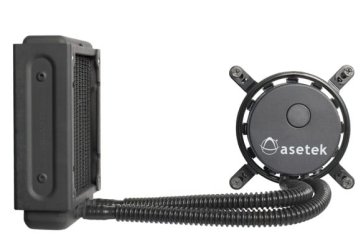
I'm pretty certain that is a sealed system liquid cooling setup, meaning that there is no user maintenance required (or even possible). Does it look similar to the picture attached at the bottom?

What you can do is replace the thermal paste between the cooler and the CPU. Since you've mentioned that you're not a computer expert it would not be a bad idea to get a more experienced person to help you do it. It's not hard at all but there are a few little tricks to getting it right - and a few places where a mistake could be costly.

This video might give you an idea:
 

Attachments

  • asetek-cooler1.jpg
    asetek-cooler1.jpg
    20 KB · Views: 5

My Computer My Computer

At a glance

Main - Windows 7 Pro SP1 64-Bit; 2nd - Window...Main - Core i7 2600K; 2nd - Core i7 920Main - 16GB Corsair Vengeance; 2nd - 12GB Cor...Main - XFX Radeon 6870 1GB; 2nd - XFX Radeon ...
Computer Manufacturer/Model Number
Self
OS
Main - Windows 7 Pro SP1 64-Bit; 2nd - Windows Server 2008 R2
CPU
Main - Core i7 2600K; 2nd - Core i7 920
Motherboard
Main - Asus P8Z68-V Pro/Gen3; 2nd - Gigabyte GA-EX58-UDR3
Memory
Main - 16GB Corsair Vengeance; 2nd - 12GB Corsair Vengeance
Graphics Card(s)
Main - XFX Radeon 6870 1GB; 2nd - XFX Radeon 4870 1GB
Sound Card
Both: Onboard Realtek Azalia
Monitor(s) Displays
Main - Hann 25" + I-INC 25" + Acer 23"; 2nd - Upgrading Soon
Screen Resolution
Main - 1920x1080 (All Three Monitors); 2nd - Upgrading Soon
Hard Drives
Main - (1) Crucial M4 128GB (Boot)
Main - (1) Seagate 2TB 64MB Cache (Data)
Main - (1) Seagate 2TB 64MB Cache (Data Backup)
2nd - (1) Intel X25-M SSD 80GB (Boot)
2nd - (3) Seagate 1TB 32MB Cache (Data Backup)
2nd - (1) Seagate 320GB (Because)
PSU
Main - OCZ 600W Modular; 2nd - OCZ 600W
Case
Main - Thermaltake Element G; 2nd - NZXT something or other
Cooling
Main - Corsair H80; 2nd - Prolimatech Megahalems
Keyboard
Main - Razer Reclusa; 2nd - Old MS Keyboard
Mouse
Main - Logitech MX Revolution; 2nd - Old MS Mouse
Internet Speed
20Mbps Time-Warner Cable
eh.. this looks kinda scary, and i do not know any computer experts other then my uncle, but he lives far from where i do (out of state), you think a computer repair shop will solve this?
 

My Computer My Computer

At a glance

Window 7 Home premium 64 bit1.15 TerabyteDual Ati radeon 5970
OS
Window 7 Home premium 64 bit
Memory
1.15 Terabyte
Graphics Card(s)
Dual Ati radeon 5970
Screen Resolution
1920X1200
Cooling
Liquid cooling / Fans
A shop would be glad to do it, but they might charge you an arm and a leg. If your temps fell 10C just from a fan cleaning I might be inclined to tell you to wait on the thermal paste. if you're not comfortable with the idea, you would be better off watching someone else do it before you try it yourself. Also, I would not remove the CPU from the socket like he shows in the video. That's just one more place for a beginner to go wrong.

Looking back at the bottom picture from my previous post, see the part on the left? If your cooler looks like that then that part is the radiator. Make sure it is dust-free and has good air circulation through it. The part on the right that says "asetek" is the cooler on the CPU. The coolant flows up one of the tubes where the heat is removed by the fan(s) blowing over the radiator, then the cooled fluid flows back down the other tube to cool the CPU. Keeping that radiator nice and clean makes it easier for it to dump the heat out of the back of your case. :)
 

My Computer My Computer

At a glance

Main - Windows 7 Pro SP1 64-Bit; 2nd - Window...Main - Core i7 2600K; 2nd - Core i7 920Main - 16GB Corsair Vengeance; 2nd - 12GB Cor...Main - XFX Radeon 6870 1GB; 2nd - XFX Radeon ...
Computer Manufacturer/Model Number
Self
OS
Main - Windows 7 Pro SP1 64-Bit; 2nd - Windows Server 2008 R2
CPU
Main - Core i7 2600K; 2nd - Core i7 920
Motherboard
Main - Asus P8Z68-V Pro/Gen3; 2nd - Gigabyte GA-EX58-UDR3
Memory
Main - 16GB Corsair Vengeance; 2nd - 12GB Corsair Vengeance
Graphics Card(s)
Main - XFX Radeon 6870 1GB; 2nd - XFX Radeon 4870 1GB
Sound Card
Both: Onboard Realtek Azalia
Monitor(s) Displays
Main - Hann 25" + I-INC 25" + Acer 23"; 2nd - Upgrading Soon
Screen Resolution
Main - 1920x1080 (All Three Monitors); 2nd - Upgrading Soon
Hard Drives
Main - (1) Crucial M4 128GB (Boot)
Main - (1) Seagate 2TB 64MB Cache (Data)
Main - (1) Seagate 2TB 64MB Cache (Data Backup)
2nd - (1) Intel X25-M SSD 80GB (Boot)
2nd - (3) Seagate 1TB 32MB Cache (Data Backup)
2nd - (1) Seagate 320GB (Because)
PSU
Main - OCZ 600W Modular; 2nd - OCZ 600W
Case
Main - Thermaltake Element G; 2nd - NZXT something or other
Cooling
Main - Corsair H80; 2nd - Prolimatech Megahalems
Keyboard
Main - Razer Reclusa; 2nd - Old MS Keyboard
Mouse
Main - Logitech MX Revolution; 2nd - Old MS Mouse
Internet Speed
20Mbps Time-Warner Cable
The best way that I have done is to remove the fans from the case every 3 to 6 months. Then take the removed fans to a well lit area, such as a desk, and clean them by hand. In my case I see about a 2-3 C drop in temps at most but it makes the fans last longer and I know I can leave my system running when I am not home and do not have to worry about something bad happening.

As for the radiator I put mine in a plastic bag which is doubled baged (all while still attached to the CPU) and use a can of compressed air to blow out the dust that sits in the inlets for the air flow. I only have the nosel of the can inside and the bag is closed. You hold the radiator towards the top of the bag and push the dust to the bottom. Not 100% at getting all of the dust but it gets most of it.
 

My Computer My Computer

At a glance

Windows 7 Pro x64 SP1 and Mac OS X 10.8.3Intel Core i7-3820 Sandy Bridge-E at 4.75 GHz8 x Corsair 8GB DDR3 64 GB Kit @1866 Overcloc...GTX 580 and MSI R6870
Computer Manufacturer/Model Number
Asus
OS
Windows 7 Pro x64 SP1 and Mac OS X 10.8.3
CPU
Intel Core i7-3820 Sandy Bridge-E at 4.75 GHz
Motherboard
ASUS Rampage IV Extreme
Memory
8 x Corsair 8GB DDR3 64 GB Kit @1866 Overclocked @2000
Graphics Card(s)
GTX 580 and MSI R6870
Sound Card
HDMI on GPU and ACL898
Monitor(s) Displays
32" Sony EX-500 120Hz
Screen Resolution
1920x1080P
Hard Drives
1 x Corsair Force Series GT CSSD-F60GBGT-BK (OS)
2 x Western Digital Caviar Black Sata III 750GB (Raid 0)
1 x Western Digital Caviar Black Sata III 1TB (Media)
2 x Western Digital Caviar Black Sata II 640GB (Raid 0)
PSU
Corsair Professional Series Gold AX850
Case
Corsair 800D
Cooling
Corsair H80 High Performance Liquid CPU Cooler
Keyboard
HP Wireless Elite Keyboard
Mouse
HP Wireless Elite Mouse
Internet Speed
Cable, VisionTek Bigfoot Killer 2100 Gaming Network Card
Other Info
4 x GELID Solutions FN-TX12-15 120mm Case Fan with Superior Temperature Control
1 x Corsair 140mm Case Fan
1 x SilverStone FP55B Aluminum front panel 5.25" to a 3.5" bay converter
1 x Ultra Card Reader
1 x Sony Blu-ray Burner BD-5300S-0B
Diabolical,
I would invest in several cans of compressed air or if you have access to a compressor like many people have in there garages with a reservoir tank on it then purchase or locate a high pressure nozzle. I don't like to clean with air inside the house so disconnect and take to a safe outdoor location. I use a soft paint brush, an old tooth brush, Q tips and air. Use the brushes first to get most of the dust then spray the fins of the radiator, mobo and fan blades. Look to see if your system has hidden front air intake fans, fans underneath and access and clean them all. This deep cleaning needs to be done once a year minimum and every quarter is best of more often if you have carpet and pets. When using the nozzle please use light blasts and remember there are delicate things in the computer so pin point the dust and dirt only and back away for mobo and overall dusting. Some say that we should hold the fan blades as they can become little generators when spinning so hold the blades stopped with your other hand. Concentrate on the radiator as I'm sure it still has lots of dust in it! Good luck and report back.
 

My Computer My Computer

At a glance

Windows 7 Ultimate 64i7 3770k OC'd 4.6 @ 1.17v, also FX 8120 & i5 ...32 gb G.Skill Sniper DDR3 10-12-12-31 @ 2133XFX Radeon 7870 2GB DDR5
Computer type
PC/Desktop
Computer Manufacturer/Model Number
A blend of brains, brawn and dumb luck.
OS
Windows 7 Ultimate 64
CPU
i7 3770k OC'd 4.6 @ 1.17v, also FX 8120 & i5 miniITX
Motherboard
MSI P67A-GD80 b3
Memory
32 gb G.Skill Sniper DDR3 10-12-12-31 @ 2133
Graphics Card(s)
XFX Radeon 7870 2GB DDR5
Sound Card
Sound Blaster Z Series Card
Monitor(s) Displays
(2) LG LED 23" 1920 x 1080 2ms Monitors via mini d-port
Screen Resolution
1680 X 1050 p
Hard Drives
Samsung 256 gb 830 SSD sata III
(1) 1 tb WD Black
(2) 1 tb Hitachi deskmates/sata II
(2) 1 tb WD green/sata II
(2) 3 tb Seagate Barracuda
(1) 120 gb OCZ Vertex SS
(1) Drobo 5N w/5 Seagate 3tb
PSU
EVGA modular 1000G2 80% gold rating & APC 1200 RS
Case
CoolerMaster Storm Styker
Cooling
7 case fans 140mm & 120mm, NZXT Kraken X60
Keyboard
(2) Logitech Illuminated Keyboards (1) usb (1) wireless
Mouse
Logitech G700 & T-BC21 - nano nx for the laptop
Internet Speed
Basic 120mbps down
Antivirus
Trend Micro Titanium Max Security & Malwarebytes Premium
Browser
Chrome and IE 10
Other Info
5 Noctua case fans + 3 Noctua in p/p on NZXT cooler
Integrated hot swap drive bays for 2.5" Drives
(2) Lite-on dvd/cd/Blu Ray optical 22X
Integrated fan controller and led on/off
HP Officejet Pro 8630 all-n-one
Hot-swappable 3.5" hard drive bay
Netgear Nighthawk router
Asus USB 3 & sata 6 PCIe card
Vantec IDE to sata adptr./Ultra sata adptr
Lenovo L420 i5 lappy with m sata
Drobo 5N advanced NAS
ok well, i finish playing some of battlefield 3 at High Graphics, it lagged and spiked a bit, but for the most part it ran pretty smooth, I tried Ultra high graphics but i experience extreme lagg, this game is intense, ull need to O'C your processor to 4.2-4.5 GHZ in order to play at Ultra High graphics.. But besides the point, my average temperature was about 72C-76C while playing, is that normal?

Dude. That doesn't seem right. Battlefield 3 does not use much processor at all. It runs as fast on an i3 as it does on a new Bulldozer (see the end of this article). Overclocking is not going to help that. I have a single 6970 and I play BF3 on Ultra flawlessly. You should be getting be getting somewhere around 100 fps with your graphics cards. Seriously. That said, I know there are some bugs with crossfire and bf3, update your drivers to 11.10 R3 and CAP 4, that will get you the best results.

And regarding the temperatures. No. That is not normal. That would be normal with a stock air cooler - either there is something wrong with your water cooling, or it is not mounted well with good thermal compound.

But again, update the video card drivers, that will make a huge difference for BF3
 

My Computer My Computer

At a glance

Windows 7 Home Premium 64 bitAMD A8 55002 x 2GB Gskill 1600MHz
Computer type
PC/Desktop
OS
Windows 7 Home Premium 64 bit
CPU
AMD A8 5500
Motherboard
MSI FM2-A75IA-E53
Memory
2 x 2GB Gskill 1600MHz
Hard Drives
OCz Agility 4 64GB
Case
Antec ISK 110
Is the overclocking completely necessary? I'm sure I could run at stock speeds and get somewhat of a good result.
 

My Computer My Computer

At a glance

Windows 7 64 Home PremiumIntel Core I5 2500k Overclocked to 4.5ghz.G.Skill 8gb 2x4 1600mhz sniper CL9 1.25w2x Gigabyte GTX560 OC TI 1G 900Mhz GDDR5 PCIE...
Computer Manufacturer/Model Number
Cosmos II Gaming Rig
OS
Windows 7 64 Home Premium
CPU
Intel Core I5 2500k Overclocked to 4.5ghz.
Motherboard
ASUS z68 pro gen3 1155
Memory
G.Skill 8gb 2x4 1600mhz sniper CL9 1.25w
Graphics Card(s)
2x Gigabyte GTX560 OC TI 1G 900Mhz GDDR5 PCIE HDMI DVI sli
Sound Card
Realtek HD audio
Monitor(s) Displays
Samsung S27A950 27inch 3D LED
Screen Resolution
1920x1080
Hard Drives
Samsung 2TB Spinpoint F3/4EG EcoGreen HDD 32M
OCZ Agility 3 120gb
PSU
CoolerMaster 1000W Silent Pro Gold Modular
Case
Coolermaster Cosmos II
Cooling
6x 120mm 1x200m, Noctua D14.
Keyboard
G19 Logitech Keyboard
Mouse
Razer Naga mouse
Other Info
Logitech G930 Wireless 7.1 Headset
Razer Vespula speed mat
Logitech Z906 5.1 surround sound system
Razer Nostromo
Orange Led lighting kit
#1 Rule. How Stable is this OC? did it pass a 24hr Prime95 run?
#2 What Voltage is the Vcore at?

There is a lot to over clocking, and a lot that will hinder results.
BTW AlienWare ain't anything to be proud of. i look at AlienWare the same i would a PC Pre-Built from a PC Store/Shop. Dell ect lol

this is more of a Guide than Copy my Settings!

My i7 920 @ 3.8Ghz for the last year and a half.
Room Temp was i think 23C & i use a H50 P/P.

might give you a idea of Temps and Vcore ect.

http://www.sevenforums.com/1346002-post638.html

Also Have a look here. i posted some good links that might help you out to.

http://www.sevenforums.com/1425733-post2.html

Hope it Helps.
Click sig to see my Cpuz.
 

My Computer My Computer

At a glance

Windows 7 64bit Ultimate SP1, VMware Windows ...Intel Core i7 920 @ 3.8 or 4.2 when i need itCorsair XMS3 12GB DDR3 1600 1.5vMSI GeForce GTX 560Ti OC Twin FrozR II
Computer Manufacturer/Model Number
Goonie Build 8 2010
OS
Windows 7 64bit Ultimate SP1, VMware Windows 7 64bit Ultimate SP1
CPU
Intel Core i7 920 @ 3.8 or 4.2 when i need it
Motherboard
Gigabyte GA-X58-UD5
Memory
Corsair XMS3 12GB DDR3 1600 1.5v
Graphics Card(s)
MSI GeForce GTX 560Ti OC Twin FrozR II
Sound Card
7.1 HD
Monitor(s) Displays
2x BenQ 24 LED 1080p + LG 50PK590 1080p
Screen Resolution
3840 x 1080p
Hard Drives
Intel X25-M 80GB OS/
Intel X25-M 160GB
Data Robotics Drobo V2 8TB
PSU
Corsair AX 750W ATX Modular
Case
Antec Fusion Remote Max
Cooling
Noctua NH D14
Keyboard
Logitech
Mouse
Logitech
Internet Speed
15Mbs Down 1.3Mbs Up
Other Info
Hauppauge HD PVR/
Pioneer 1017-k - 7.1 THX/
Xbox 360 250 Slim
SkyHD/LG 50PK590 TV
Back
Top