Show us your hard drive performance

@Maud Dib,
I've been able to do a W7 upgrade on a 30GB SSD. Couldn't on a 16GB but it worked on a 30.

My vanilla 7260 install uses up 13.1GB, so yeah there wouldn't be much left in a 16GB drive, esp. since there's even less after formatting and factoring in real-life capacity rather than advertised capacity (e.g. 750GB translates to 698GB) which I think comes from using 1000 in advertising rather than 1024, or maybe not ...

Confirms what I suspected. An SSD for W7 probably needs to be 64GB in size (1x64GB or 2x32GB Raid 0, etc). That drives up the cost to achieve SSD performance for the OS installation. The 2x32GB Raid will also be problematic for many stock system configurations that only have space/connections for 4 SATA devices.
 

My Computer

OS
XP Pro & Vista Home Premium (x86); Windows Ultimate 7600 x64 Retail
I just tested my Seagate 7200.12 1TB drive in my new machine and here are the results. I'm happy with everything except that Random Access Time number,
HDTune2.png
 

My Computer

Computer Manufacturer/Model Number
Self-Built in July 2009
OS
Windows 7 Ultimate x64
CPU
Intel Q9550 2.83Ghz OC'd to 3.40Ghz
Motherboard
Gigabyte GA-EP45-UD3R rev. 1.1, F12 BIOS
Memory
8GB G.Skill PI DDR2-800, 4-4-4-12 timings
Graphics Card(s)
EVGA 1280MB Nvidia GeForce GTX570
Sound Card
Realtek ALC899A 8 channel onboard audio
Monitor(s) Displays
23" Acer x233H
Screen Resolution
1920x1080
Hard Drives
Intel X25-M 80GB Gen 2 SSD
Western Digital 1TB Caviar Black, 32MB cache. WD1001FALS
PSU
Corsair 620HX modular
Case
Antec P182
Cooling
stock
Keyboard
ABS M1 Mechanical
Mouse
Logitech G9 Laser Mouse
Internet Speed
15/2 cable modem
Other Info
Windows and Linux enthusiast. Logitech G35 Headset.
Untitled.jpg

Heres mine i think......

Oh and hi, my first post here and just learning my way around.

Mark
 

My Computer

Computer Manufacturer/Model Number
Dell XPS 630i
OS
Windows 7
CPU
Quad core 2.66
Motherboard
Dell
Memory
4Gb
Graphics Card(s)
9800GT x 2
Sound Card
On board
Monitor(s) Displays
24"
Hard Drives
WD 320Gb
2x Samsung 500Gb
External 1Tb WD
PSU
Dell
Case
Dell
Cooling
Dell
I just tested my Seagate 7200.12 1TB drive in my new machine and here are the results. I'm happy with everything except that Random Access Time number,
HDTune2.png
Hey! I have the 40ns version of ur drive, every scrore is about the same as urs but my access time is around 13ms. Something is up with ur score, i have an ata100 that gets 21ms. Have u tried closing tasks running in the background in task manager, and change ur theme to basic and see if that helps. If the drive is being used when doing the test then its trying to multitask on a mechanical hard drive, which usually doesnt turn out the best.
 

My Computer

Computer Manufacturer/Model Number
Mad Customs #4
OS
Windows 7 7600 x64 (16385) Ultimate,Windows Vista x64 Ultimate
CPU
Intel Quad core Q9550 [email protected](AS5 lapped)(1845FSB)
Motherboard
EVGA 790i FTW DIGITAL PWM (AS5 re-pasted)
Memory
2gbx4 GSkill1600MHz9/9/9/24/2T-1.8v@1677MHz9/9/9/18/1T-1.8v
Graphics Card(s)
x2 Leadtek 9800GX2 Quad SLI(re-pasted/no cases)755/1120/1820
Sound Card
Crapative XF-i Plat
Monitor(s) Displays
Chimei22"ws(DVI)/LG32"LCD(HDMI)/Samsung 40"LCD(HDMI)
Screen Resolution
1680x1050/1360x768/1920x1080 (1080P)
Hard Drives
Seagate 1TB "40NS" 32mb sata2, Hitachi 500gb 16mb sata2 (backup storage), Sandisk 16gb micro SD (mobile storage)
PSU
Zalman 850-HP 850watt x6 12v@18A
Case
Tiled floor (nice and cold-usually 18c idle)
Cooling
fan forced 120 Xtreme (lapped)with push/pull setup
Keyboard
Logitech Di Novo Edge
Mouse
MX 1100
Internet Speed
Bigpond 17mbit/s cable=Max witnessed 2.5Mbyte/s down 30kb up
Other Info
Enzotech SLF-1+Enzotech CNB-EVGAi chipset coolers/Sunbeamtech Rheobus Extreme 30 Watt x 6 channel fan controller/Zalman ZM-MFC2 fan controller-Watt meter/Logitech G25 Racing Wheel/Logitech cordless number pad/OCZ NIA//HTPC:7600 x64/[email protected]/2x2Gb ST Proj.X DDR3 1800 9-9-9-24/Nvidia 8400GS 512Mb/Asus HDAV1.3 Delux(changed OPAmps to OPA627)/250Gb 16Mb 7200/480W PSU/Custom made cardboard box!!
Hey! I have the 40ns version of ur drive, every scrore is about the same as urs but my access time is around 13ms. Something is up with ur score, i have an ata100 that gets 21ms. Have u tried closing tasks running in the background in task manager, and change ur theme to basic and see if that helps. If the drive is being used when doing the test then its trying to multitask on a mechanical hard drive, which usually doesnt turn out the best.

Yes, I agree, his access times are a little too high. Perhaps the drive is badly fragmented, running low on space, or just not configured properly in Windows? The seek time should be around half of what is shown there.
 

My Computer

Computer Manufacturer/Model Number
custom build
OS
Windows 7 Ultimate 64-bit RTM
CPU
Intel Core i7 920 (D0), overclocked @ 3.6GHz (4.2GHz stable)
Motherboard
EVGA X58 A1
Memory
6GB of OCZ DDR3-1600 triple channel @ 7-7-7-20
Graphics Card(s)
EVGA GTX 295 Co-Op
Sound Card
Auzentech X Meridian 7.1
Monitor(s) Displays
(3x) Samsung 943BX, (1x) Samsung 2333HD, (1x) BenQ FP202W
Screen Resolution
3840x1024 + 1920x1080 + 1680x1050
Hard Drives
(4x) OCZ Vertex 30GB SATA2 SSDs on RAID 0 for 120GB total
(2x) Western Digital Black 1TB SATA2 on RAID 0
(1x) Lite-on DVD Burner and Blu-Ray player
PSU
PC Power & Cooling Super-quiet Silencer 910
Case
(modified) Tagan Black Pearl full tower, WCR edition
Cooling
Scythe Mugen2 CPU cooler, (5x) Scythe SFF21F, Zalaman cntrl.
Keyboard
Logitech G19
Mouse
Logitech G9x
Internet Speed
Comcast Cable, 22Mbps down and 5Mbps up
Other Info
Logitech Z-5500 Digital speaker system

My Computer

Computer Manufacturer/Model Number
custom build
OS
Windows 7 Ultimate 64-bit RTM
CPU
Intel Core i7 920 (D0), overclocked @ 3.6GHz (4.2GHz stable)
Motherboard
EVGA X58 A1
Memory
6GB of OCZ DDR3-1600 triple channel @ 7-7-7-20
Graphics Card(s)
EVGA GTX 295 Co-Op
Sound Card
Auzentech X Meridian 7.1
Monitor(s) Displays
(3x) Samsung 943BX, (1x) Samsung 2333HD, (1x) BenQ FP202W
Screen Resolution
3840x1024 + 1920x1080 + 1680x1050
Hard Drives
(4x) OCZ Vertex 30GB SATA2 SSDs on RAID 0 for 120GB total
(2x) Western Digital Black 1TB SATA2 on RAID 0
(1x) Lite-on DVD Burner and Blu-Ray player
PSU
PC Power & Cooling Super-quiet Silencer 910
Case
(modified) Tagan Black Pearl full tower, WCR edition
Cooling
Scythe Mugen2 CPU cooler, (5x) Scythe SFF21F, Zalaman cntrl.
Keyboard
Logitech G19
Mouse
Logitech G9x
Internet Speed
Comcast Cable, 22Mbps down and 5Mbps up
Other Info
Logitech Z-5500 Digital speaker system
Yes, I agree, his access times are a little too high. Perhaps the drive is badly fragmented, running low on space, or just not configured properly in Windows? The seek time should be around half of what is shown there.

My box is a brand new build. There is next to nothing installed, the box wasn't being used when the test was run. My hard drive is configured with a 150GB C drive and the remaining 800GB or so as the D drive. My C drive has 120GB free. My drive was defragged before this test was run.

I'm running on a Gigabyte GA-EP45-UD3R mobo, revision 1.1 on the latest BIOS, 8GB of RAM, an Intel Q9550 quad core CPU and an Nvidia 9800GTX+ video card.

I'm not running in AHCI or RAID mode, but rather native IDE. I'm also plugged into the Southbridge using the Intel ICH10R controller on the mobo.

I believe that I am using the native Windows 7 driver for the controller. Maybe I need to change that. Any suggestions?

The box seems extremely fast and my performance is fantastic..as far as I can tell. Without this benchmark result, I would have never suspected any problems whatsoever.

Edit: I do have write caching enabled on the drive under the Policies tab.
 

My Computer

Computer Manufacturer/Model Number
Self-Built in July 2009
OS
Windows 7 Ultimate x64
CPU
Intel Q9550 2.83Ghz OC'd to 3.40Ghz
Motherboard
Gigabyte GA-EP45-UD3R rev. 1.1, F12 BIOS
Memory
8GB G.Skill PI DDR2-800, 4-4-4-12 timings
Graphics Card(s)
EVGA 1280MB Nvidia GeForce GTX570
Sound Card
Realtek ALC899A 8 channel onboard audio
Monitor(s) Displays
23" Acer x233H
Screen Resolution
1920x1080
Hard Drives
Intel X25-M 80GB Gen 2 SSD
Western Digital 1TB Caviar Black, 32MB cache. WD1001FALS
PSU
Corsair 620HX modular
Case
Antec P182
Cooling
stock
Keyboard
ABS M1 Mechanical
Mouse
Logitech G9 Laser Mouse
Internet Speed
15/2 cable modem
Other Info
Windows and Linux enthusiast. Logitech G35 Headset.
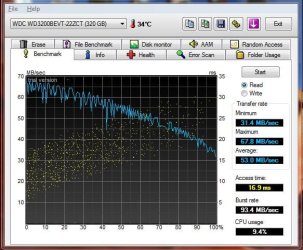
Just did a quick test on my laptops drive not sure what brand or model all i know is its 320gb
 

Attachments

  • LaptopReadBench.JPG
    LaptopReadBench.JPG
    80.2 KB · Views: 25

My Computer

Computer Manufacturer/Model Number
Asus M51Vr/Myself
OS
32bit-Vista Home Premium SP2, 32bit-Windows 7 Ultimate RC, also got Mac OS X 10.5.7 (in VMware)
CPU
Intel Centrino 2 (P8600) @2.4ghz/Intel Core i5
Motherboard
Intel PM45?/Gigabyte P55A-UD4
Memory
3gb DDR2/G.Skill Ripjaws 4gb 2000mhz DDR3
Graphics Card(s)
ATI Radeon HD3470 256mb/Gigabyte HD5850 1GB
Sound Card
Integrated/6ch Integrated
Monitor(s) Displays
15.4" WXGA/21.5" LG W2261V-PF
Screen Resolution
1280x800/1920x1080
Hard Drives
320gb HDD, 4 Partitions: 149gb "VistaOS", 20gb "Win7OS", 119gb "My Files", 10gb Hidden Factory Vista image./1TB Western Digital Black Caviar, single partition.
PSU
Corsair TX-850
Case
Lancool Dark Armor K62
Cooling
Stock Air Cooling/Coolermaster Hyper 212 Plus CPU cooler
Keyboard
Integrated/Saitek Eclipse II
Mouse
Asus Laptop Mini USB mouse/Steelseries Kinzu
Internet Speed
1.5mbits/s down, 256kbits/s up
I'm not running in AHCI or RAID mode, but rather native IDE. I'm also plugged into the Southbridge using the Intel ICH10R controller on the mobo.

I believe that I am using the native Windows 7 driver for the controller. Maybe I need to change that. Any suggestions?

Did you install the chipset drivers for your motherboard and its ICH10 southbridge? Download from Intel® X58 Express Chipset - Chipset information and downloads, or better yet, get it from your motherboard manufacturer's site.
 

My Computer

Computer Manufacturer/Model Number
custom build
OS
Windows 7 Ultimate 64-bit RTM
CPU
Intel Core i7 920 (D0), overclocked @ 3.6GHz (4.2GHz stable)
Motherboard
EVGA X58 A1
Memory
6GB of OCZ DDR3-1600 triple channel @ 7-7-7-20
Graphics Card(s)
EVGA GTX 295 Co-Op
Sound Card
Auzentech X Meridian 7.1
Monitor(s) Displays
(3x) Samsung 943BX, (1x) Samsung 2333HD, (1x) BenQ FP202W
Screen Resolution
3840x1024 + 1920x1080 + 1680x1050
Hard Drives
(4x) OCZ Vertex 30GB SATA2 SSDs on RAID 0 for 120GB total
(2x) Western Digital Black 1TB SATA2 on RAID 0
(1x) Lite-on DVD Burner and Blu-Ray player
PSU
PC Power & Cooling Super-quiet Silencer 910
Case
(modified) Tagan Black Pearl full tower, WCR edition
Cooling
Scythe Mugen2 CPU cooler, (5x) Scythe SFF21F, Zalaman cntrl.
Keyboard
Logitech G19
Mouse
Logitech G9x
Internet Speed
Comcast Cable, 22Mbps down and 5Mbps up
Other Info
Logitech Z-5500 Digital speaker system
Did you install the chipset drivers for your motherboard and its ICH10 southbridge? Download from Intel® X58 Express Chipset - Chipset information and downloads, or better yet, get it from your motherboard manufacturer's site.

I don't have the X58 chipset as I'm not using the LGA1366 chip, but rather I have the P45 chipset with the LGA 775 Q9550 Intel Quad Core Chip.

I've been on the Gigabyte website and they only driver that they show for the GA-EP45-UD3R rev 1.1 under Windows 7 (32 or 64), is an audio driver. I see that there is a driver for the SATA controller for Windows Vista (32 or 64).....but I'm not sure if it's wise to install that driver under Windows 7.

I checked the Intel website under the 4 series chipsets.....and I don't see anything other than a video driver for onboard video....which certainly doesn't apply to me.

Does it really make sense that this could be a driver issue since I'm getting nearly 100MB/s throughput on the device under the driver that I am currently using? It seems like if my driver was off and not setup properly...I wouldn't get the performance out of the drive that I am seeing.
 

My Computer

Computer Manufacturer/Model Number
Self-Built in July 2009
OS
Windows 7 Ultimate x64
CPU
Intel Q9550 2.83Ghz OC'd to 3.40Ghz
Motherboard
Gigabyte GA-EP45-UD3R rev. 1.1, F12 BIOS
Memory
8GB G.Skill PI DDR2-800, 4-4-4-12 timings
Graphics Card(s)
EVGA 1280MB Nvidia GeForce GTX570
Sound Card
Realtek ALC899A 8 channel onboard audio
Monitor(s) Displays
23" Acer x233H
Screen Resolution
1920x1080
Hard Drives
Intel X25-M 80GB Gen 2 SSD
Western Digital 1TB Caviar Black, 32MB cache. WD1001FALS
PSU
Corsair 620HX modular
Case
Antec P182
Cooling
stock
Keyboard
ABS M1 Mechanical
Mouse
Logitech G9 Laser Mouse
Internet Speed
15/2 cable modem
Other Info
Windows and Linux enthusiast. Logitech G35 Headset.
You should still install Intel chipset drivers from Intel or Gigabyte's site.

Download and install the Vista 64-bit one.
 

My Computer

Computer Manufacturer/Model Number
custom build
OS
Windows 7 Ultimate 64-bit RTM
CPU
Intel Core i7 920 (D0), overclocked @ 3.6GHz (4.2GHz stable)
Motherboard
EVGA X58 A1
Memory
6GB of OCZ DDR3-1600 triple channel @ 7-7-7-20
Graphics Card(s)
EVGA GTX 295 Co-Op
Sound Card
Auzentech X Meridian 7.1
Monitor(s) Displays
(3x) Samsung 943BX, (1x) Samsung 2333HD, (1x) BenQ FP202W
Screen Resolution
3840x1024 + 1920x1080 + 1680x1050
Hard Drives
(4x) OCZ Vertex 30GB SATA2 SSDs on RAID 0 for 120GB total
(2x) Western Digital Black 1TB SATA2 on RAID 0
(1x) Lite-on DVD Burner and Blu-Ray player
PSU
PC Power & Cooling Super-quiet Silencer 910
Case
(modified) Tagan Black Pearl full tower, WCR edition
Cooling
Scythe Mugen2 CPU cooler, (5x) Scythe SFF21F, Zalaman cntrl.
Keyboard
Logitech G19
Mouse
Logitech G9x
Internet Speed
Comcast Cable, 22Mbps down and 5Mbps up
Other Info
Logitech Z-5500 Digital speaker system
Alright, will give that a go tonight after I get home and will certainly report back my findings here. I appreciate the help.
 

My Computer

Computer Manufacturer/Model Number
Self-Built in July 2009
OS
Windows 7 Ultimate x64
CPU
Intel Q9550 2.83Ghz OC'd to 3.40Ghz
Motherboard
Gigabyte GA-EP45-UD3R rev. 1.1, F12 BIOS
Memory
8GB G.Skill PI DDR2-800, 4-4-4-12 timings
Graphics Card(s)
EVGA 1280MB Nvidia GeForce GTX570
Sound Card
Realtek ALC899A 8 channel onboard audio
Monitor(s) Displays
23" Acer x233H
Screen Resolution
1920x1080
Hard Drives
Intel X25-M 80GB Gen 2 SSD
Western Digital 1TB Caviar Black, 32MB cache. WD1001FALS
PSU
Corsair 620HX modular
Case
Antec P182
Cooling
stock
Keyboard
ABS M1 Mechanical
Mouse
Logitech G9 Laser Mouse
Internet Speed
15/2 cable modem
Other Info
Windows and Linux enthusiast. Logitech G35 Headset.
My Seagate 120GB 7200RPM Mobile gets a 5.3:)
 

My Computer

Computer Manufacturer/Model Number
Compal JFT02 (Custom Build Laptop)
OS
Windows 7 Home Premium x64 - Mac OS X 10.6.4 x64
CPU
Intel Core 2 Duo T9300 2.5 GHz
Motherboard
JFT02
Memory
4GB Kingston DDR2-800
Graphics Card(s)
NVIDIA Geforce 8600M GT (512MB Model)
Sound Card
Realtek HD Audio
Monitor(s) Displays
WUXGA Standard Laptop Display
Screen Resolution
1680*1050
Hard Drives
Toshiba 320GB 5400RPM Laptop HD
PSU
Standard Laptop Power Supply
Case
Standard Laptop Case
Cooling
Standard Laptop Cooling
Keyboard
Standard Laptop 105 Key-Keyboard
Mouse
Synaptics Touchpad
Internet Speed
Verizion Online DSL 3360/864 kbs (dl/up)
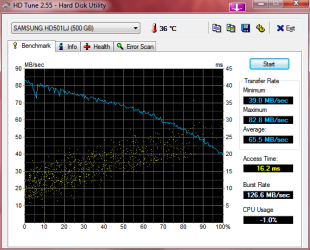
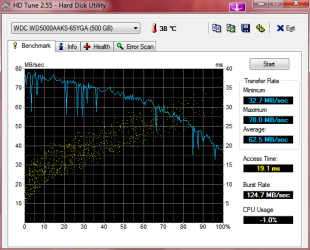
Well here are mine. I am disappointed in the WD Access Time.

I am a little unsure.... the rest looks about average for the drive types - yes/no?

WDC_WD5000AAKS-65YGA0 - Windows 7 and XP Pro Boot Disk
SAMSUNG_HD501LJ - Vista Boot Disk

I am definitely in the market for a WD Caviar Black 640 or 750GB or 1TB. I have read the 640 is best suited for OS installation....
 

Attachments

  • HDTune_Benchmark_SAMSUNG_HD501LJ.png
    HDTune_Benchmark_SAMSUNG_HD501LJ.png
    55 KB · Views: 27
  • HDTune_Benchmark_WDC_WD5000AAKS-65YGA.png
    HDTune_Benchmark_WDC_WD5000AAKS-65YGA.png
    55.3 KB · Views: 30

My Computer

OS
XP Pro & Vista Home Premium (x86); Windows Ultimate 7600 x64 Retail
Well guys...per the suggestions to try to install the SATA driver even if it was Vista64 didn't help at all

#1). The SATA driver wouldn't install. Said it wasn't supported by this OS
#2). I grabbed the Intel chipset driver for Vista 64 and installed and my controllers now show Intel ICH10 Family Storage Controllers.

So, I rebooted the box, ran HDTune and found that my performance was worse across the board...including my access time.

HDTuneIntelDriver.png


Guess I'm going to try and remove this and go back to where I was. Performance was better.

Edit: Actually, I've just decided to plop my Win7RC1 disk back into the machine and reinstall the OS and start out clean and see what I get.
 
Last edited:

My Computer

Computer Manufacturer/Model Number
Self-Built in July 2009
OS
Windows 7 Ultimate x64
CPU
Intel Q9550 2.83Ghz OC'd to 3.40Ghz
Motherboard
Gigabyte GA-EP45-UD3R rev. 1.1, F12 BIOS
Memory
8GB G.Skill PI DDR2-800, 4-4-4-12 timings
Graphics Card(s)
EVGA 1280MB Nvidia GeForce GTX570
Sound Card
Realtek ALC899A 8 channel onboard audio
Monitor(s) Displays
23" Acer x233H
Screen Resolution
1920x1080
Hard Drives
Intel X25-M 80GB Gen 2 SSD
Western Digital 1TB Caviar Black, 32MB cache. WD1001FALS
PSU
Corsair 620HX modular
Case
Antec P182
Cooling
stock
Keyboard
ABS M1 Mechanical
Mouse
Logitech G9 Laser Mouse
Internet Speed
15/2 cable modem
Other Info
Windows and Linux enthusiast. Logitech G35 Headset.
#1). The SATA driver wouldn't install. Said it wasn't supported by this OS

Was this a message given by Windows or a message given by the application? What exactly was the message and could you override its warning?

Your problem is still there, and the test results are going to fluctuate each time you run the test, regardless.

Also, are you sure your system is malware free?

Edit: Actually, I've just decided to plop my Win7RC1 disk back into the machine and reinstall the OS and start out clean and see what I get.

That might help. :)
 

My Computer

Computer Manufacturer/Model Number
custom build
OS
Windows 7 Ultimate 64-bit RTM
CPU
Intel Core i7 920 (D0), overclocked @ 3.6GHz (4.2GHz stable)
Motherboard
EVGA X58 A1
Memory
6GB of OCZ DDR3-1600 triple channel @ 7-7-7-20
Graphics Card(s)
EVGA GTX 295 Co-Op
Sound Card
Auzentech X Meridian 7.1
Monitor(s) Displays
(3x) Samsung 943BX, (1x) Samsung 2333HD, (1x) BenQ FP202W
Screen Resolution
3840x1024 + 1920x1080 + 1680x1050
Hard Drives
(4x) OCZ Vertex 30GB SATA2 SSDs on RAID 0 for 120GB total
(2x) Western Digital Black 1TB SATA2 on RAID 0
(1x) Lite-on DVD Burner and Blu-Ray player
PSU
PC Power & Cooling Super-quiet Silencer 910
Case
(modified) Tagan Black Pearl full tower, WCR edition
Cooling
Scythe Mugen2 CPU cooler, (5x) Scythe SFF21F, Zalaman cntrl.
Keyboard
Logitech G19
Mouse
Logitech G9x
Internet Speed
Comcast Cable, 22Mbps down and 5Mbps up
Other Info
Logitech Z-5500 Digital speaker system
Was this a message given by Windows or a message given by the application? What exactly was the message and could you override its warning?
Ok, I went to the Gigabyte website and I went to Support, Motherboards, Drivers and I typed in my model (GA-EP45-UD3R). I picked revision 1.1. For my OS, I picked Vista 64-bit. The Raid driver is called "intel ICH9R/ICh10R SATA RAID Driver. Once downloaded, I extract the contents and run iata_cd.exe. It throws the UAC saying program iata_cd.exe...verified publisher Intel Corporation. I click on Yes. It starts the install for the Intel Matrix storage manager driver. It brings me to the welcome screen, (version 6.2.1.1002). I click on Next to continue, it says, "This computer does not meet the minimum requirements for installing this software. Setup will exit". I'm left with an OK button. I did a right click, run as admin, and got the same thing.

A quick run through the readme says, "the Intel Chipset Software Installation Utility" must be installed prior to installing the Intel Maxtrix Storage manager. So, I've downloaded that now and have installed.

I then tried the SATA driver install again. This time, the installation starts and comes back with "This operating system is not supported. Setup will exit." I can click on OK. Win7 then says, it didn't install properly and gives me option to reinstall again with default settings. I say ok and the installer starts again. This time it starts up and says, "This computer does not meet the minimum requirements for installing this software. Setup will exit". I'm left with an OK button. I right click and choose Run As Admin, and I get "This computer does not meet the minimum requirements for installing this software. Setup will exit". I'm left with an OK button.

Also, are you sure your system is malware free?
I would certainly hope so. I downloaded the Windows 7 RC1 64-bit directly from Microsoft. I installed the OS and immediately tested. The machine wasn't even connected to the Internet.

I did reinstall my operating system last night. Tested and I am back to my original results...so my speeds average in the high 90's and peak in the 160-170 range...but I still see about 25-30ms access time.

 

My Computer

Computer Manufacturer/Model Number
Self-Built in July 2009
OS
Windows 7 Ultimate x64
CPU
Intel Q9550 2.83Ghz OC'd to 3.40Ghz
Motherboard
Gigabyte GA-EP45-UD3R rev. 1.1, F12 BIOS
Memory
8GB G.Skill PI DDR2-800, 4-4-4-12 timings
Graphics Card(s)
EVGA 1280MB Nvidia GeForce GTX570
Sound Card
Realtek ALC899A 8 channel onboard audio
Monitor(s) Displays
23" Acer x233H
Screen Resolution
1920x1080
Hard Drives
Intel X25-M 80GB Gen 2 SSD
Western Digital 1TB Caviar Black, 32MB cache. WD1001FALS
PSU
Corsair 620HX modular
Case
Antec P182
Cooling
stock
Keyboard
ABS M1 Mechanical
Mouse
Logitech G9 Laser Mouse
Internet Speed
15/2 cable modem
Other Info
Windows and Linux enthusiast. Logitech G35 Headset.
What block size are you guys using when you test your drives. My tests have all been with 64k blocks...which is the default I believe.

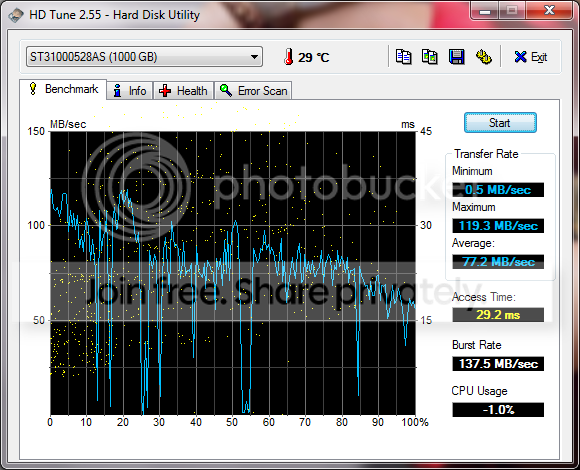
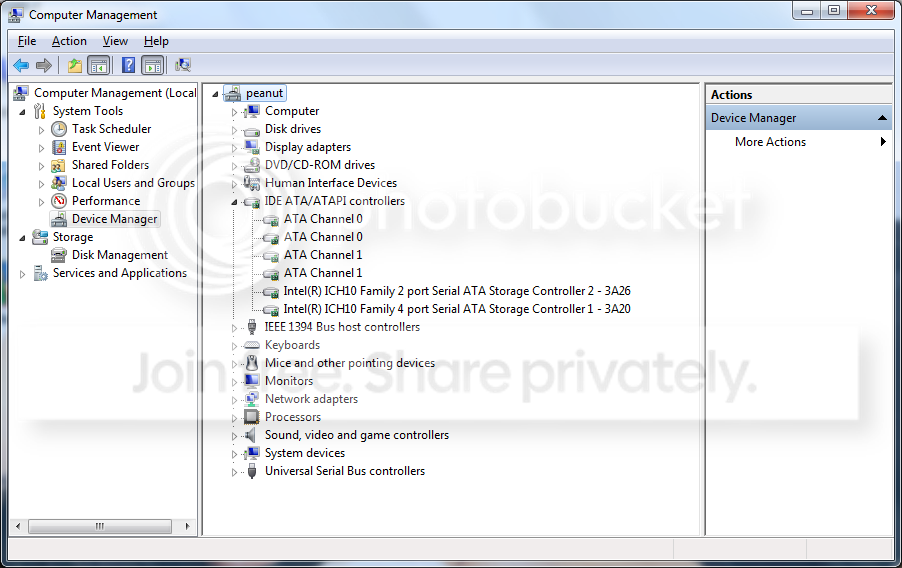
Here is what my device manager now shows after installing Intel chipset stuff to get the exact error messages for my above post;
DeviceMgr.png


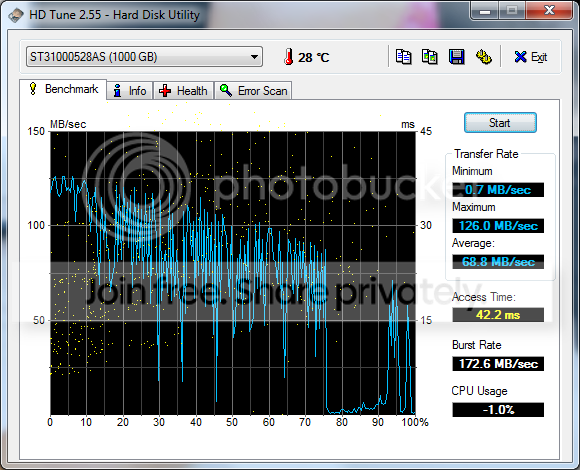
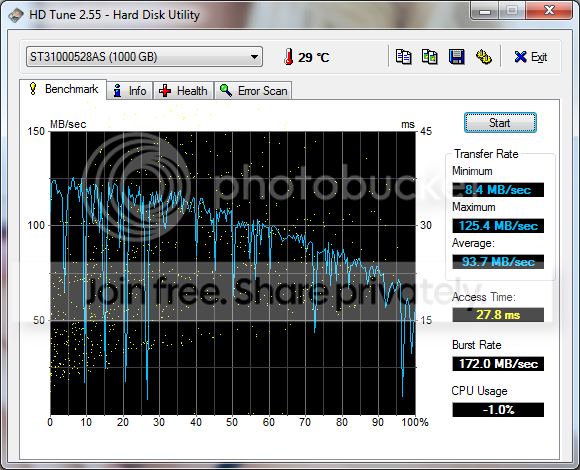
And here are 3 HDtune tests, all back to back.
HDtune1.png

HDtune2-1.png

HDtune3.png


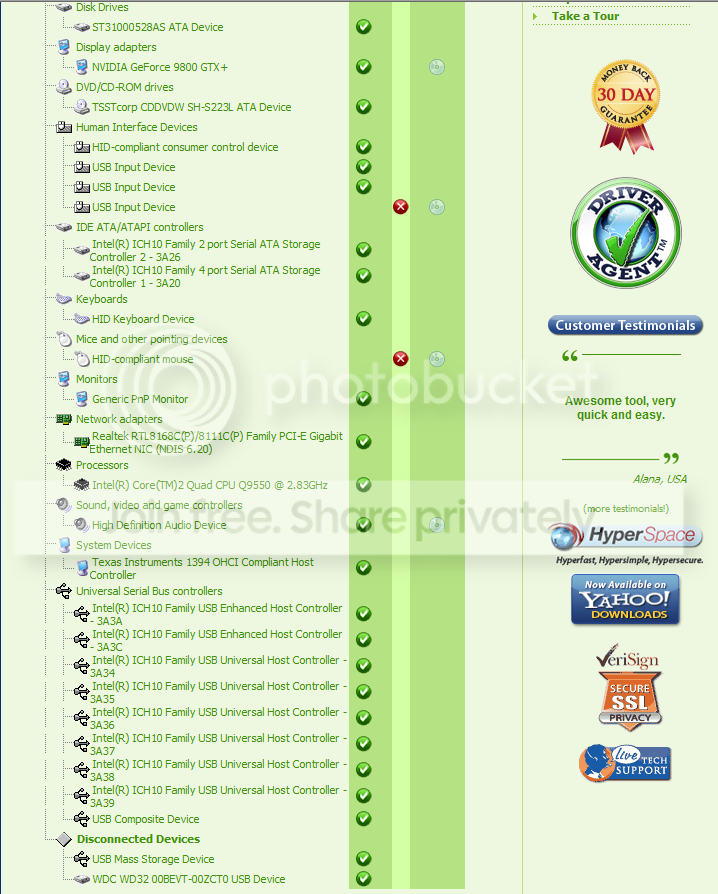
Finally, here are the results from a scan with driver agent on this computer;
DriveragentResults.png
 

My Computer

Computer Manufacturer/Model Number
Self-Built in July 2009
OS
Windows 7 Ultimate x64
CPU
Intel Q9550 2.83Ghz OC'd to 3.40Ghz
Motherboard
Gigabyte GA-EP45-UD3R rev. 1.1, F12 BIOS
Memory
8GB G.Skill PI DDR2-800, 4-4-4-12 timings
Graphics Card(s)
EVGA 1280MB Nvidia GeForce GTX570
Sound Card
Realtek ALC899A 8 channel onboard audio
Monitor(s) Displays
23" Acer x233H
Screen Resolution
1920x1080
Hard Drives
Intel X25-M 80GB Gen 2 SSD
Western Digital 1TB Caviar Black, 32MB cache. WD1001FALS
PSU
Corsair 620HX modular
Case
Antec P182
Cooling
stock
Keyboard
ABS M1 Mechanical
Mouse
Logitech G9 Laser Mouse
Internet Speed
15/2 cable modem
Other Info
Windows and Linux enthusiast. Logitech G35 Headset.
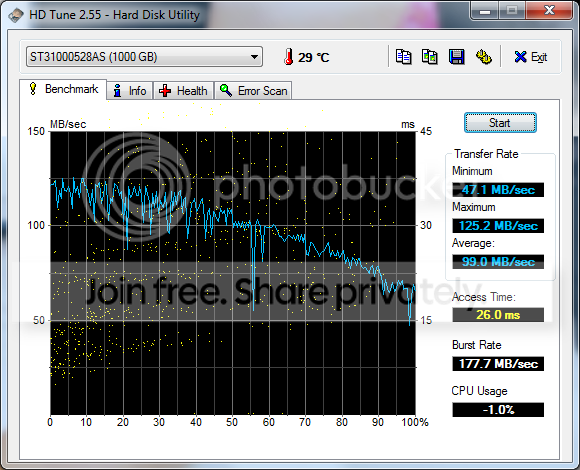
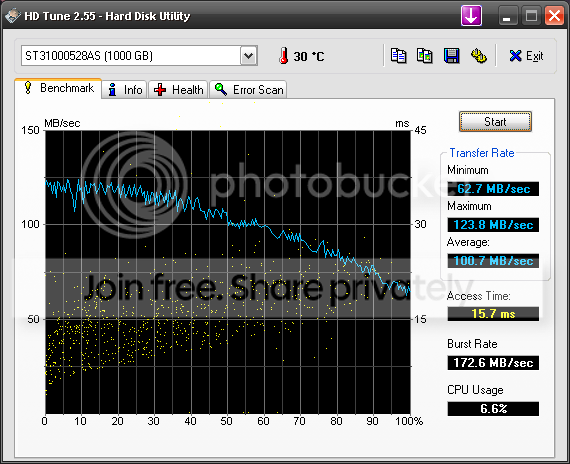
Just for curiosity sake (and because it's easy), I took the Seagate 7200.12 drive and moved it over to my AMD 4600+ box running Windows XP. I went ahead and ran HDtune against the drive on that machine and low and behold....

HDTuneTestSeagateinAMD.png


So, obviously there is nothing "physically" with the drive. However, there is obviously something going on with my new computer. Arghhhh....now I'm going to have to load Vista onto the machine (since gigabyte provides drivers) and benchmark there to see if the problem continues
 

My Computer

Computer Manufacturer/Model Number
Self-Built in July 2009
OS
Windows 7 Ultimate x64
CPU
Intel Q9550 2.83Ghz OC'd to 3.40Ghz
Motherboard
Gigabyte GA-EP45-UD3R rev. 1.1, F12 BIOS
Memory
8GB G.Skill PI DDR2-800, 4-4-4-12 timings
Graphics Card(s)
EVGA 1280MB Nvidia GeForce GTX570
Sound Card
Realtek ALC899A 8 channel onboard audio
Monitor(s) Displays
23" Acer x233H
Screen Resolution
1920x1080
Hard Drives
Intel X25-M 80GB Gen 2 SSD
Western Digital 1TB Caviar Black, 32MB cache. WD1001FALS
PSU
Corsair 620HX modular
Case
Antec P182
Cooling
stock
Keyboard
ABS M1 Mechanical
Mouse
Logitech G9 Laser Mouse
Internet Speed
15/2 cable modem
Other Info
Windows and Linux enthusiast. Logitech G35 Headset.
Well, short of going with Vista, I've tried everything that I can think of. I switched to a different SATA port, I switched the SATA cable to the same one I was using in my other computer.

I took the HD out of the Intel SATA controllers and plugged into the JMicron Gigabyte SATA controllers and tested and got same results. I then loaded the Gigabyte SATA 2 driver for Vista 64 for that controller and tested and still got 25ms-30ms access times on this drive with HDTune.

I'll put Vista on the computer tomorrow and load up the tools and see what happens. The real question is "if" performance is better under Vista....would I stick with Vista...or go with slower access times and use Windows 7 instead. My gut tells me Win7...as I have never been particularly fond of Vista.

Oh well, no more time to play tonight. This has got to wait.
 

My Computer

Computer Manufacturer/Model Number
Self-Built in July 2009
OS
Windows 7 Ultimate x64
CPU
Intel Q9550 2.83Ghz OC'd to 3.40Ghz
Motherboard
Gigabyte GA-EP45-UD3R rev. 1.1, F12 BIOS
Memory
8GB G.Skill PI DDR2-800, 4-4-4-12 timings
Graphics Card(s)
EVGA 1280MB Nvidia GeForce GTX570
Sound Card
Realtek ALC899A 8 channel onboard audio
Monitor(s) Displays
23" Acer x233H
Screen Resolution
1920x1080
Hard Drives
Intel X25-M 80GB Gen 2 SSD
Western Digital 1TB Caviar Black, 32MB cache. WD1001FALS
PSU
Corsair 620HX modular
Case
Antec P182
Cooling
stock
Keyboard
ABS M1 Mechanical
Mouse
Logitech G9 Laser Mouse
Internet Speed
15/2 cable modem
Other Info
Windows and Linux enthusiast. Logitech G35 Headset.
Back
Top