Does a lot of icons in the taskbar effect performance?

flycaster

New member
Member
VIP
Local time
8:39 AM
Messages
472
Location
Boynton Beach, FL
I like to keep an entirely clean desktop, so to do this I have all my apps down in the Windows taskbar. None of these items are in my startup, BTW. Anyway, I;d like to know if keeping a little over 2 dozen icons in the TB will effect performance in any manner?
 

My Computer My Computer

At a glance

Windows 7 HP 64-bit4GB/4GB
Computer Manufacturer/Model Number
Gateway DX4720-03/HP Pavilion dv6
OS
Windows 7 HP 64-bit
Memory
4GB/4GB
Antivirus
Avast Pro
Browser
Firefox, the latest
Nope, nothing you would notice above and beyond drawing the desktop.
 

My Computer My Computer

At a glance

Windows 10 Pro x64Intel Core i7 4790K @ 4.5GHz32GB DDR3Nvidia GeForce GTX970
Computer type
PC/Desktop
Computer Manufacturer/Model Number
Custom
OS
Windows 10 Pro x64
CPU
Intel Core i7 4790K @ 4.5GHz
Motherboard
Asus Maximus Hero VII
Memory
32GB DDR3
Graphics Card(s)
Nvidia GeForce GTX970
Sound Card
Realtek HD Audio
Screen Resolution
1920x1200
Hard Drives
1x Samsung 250GB SSD
4x WD RE 2TB (RAIDZ)
PSU
Corsair AX760i
Case
Fractal Design Define R4
Cooling
Noctua NH-D15
I like to keep an entirely clean desktop, so to do this I have all my apps down in the Windows taskbar. None of these items are in my startup, BTW. Anyway, I;d like to know if keeping a little over 2 dozen icons in the TB will effect performance in any manner?

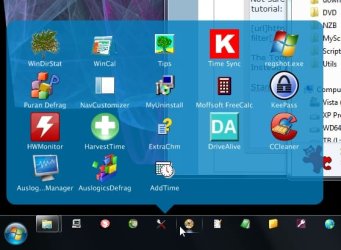
I found this free utility a nice way to organize tons of shortcuts in my taskbar:

StandaloneStack » Chris'n'Soft

it works on both Vista and Windows Seven

As you can see in the screen shot, I also use RocketDock, but the Taskbar section on the left looks pretty clean:

taskbar.png


The plethora of shortcuts are ensconced in stacks. Here's a shot of a open stack

stackshot.jpg
 

My Computer My Computer

At a glance

Windows 7 32 bitAMD 5200+ dual core2 GBNVidia GeForce 6150SE 128 MB
Computer Manufacturer/Model Number
HP Media Center
OS
Windows 7 32 bit
CPU
AMD 5200+ dual core
Memory
2 GB
Graphics Card(s)
NVidia GeForce 6150SE 128 MB
Monitor(s) Displays
CRT
Screen Resolution
1280x1024
Hard Drives
500 GB Sata internal :

SIIG USB 3.0 docking stations w/WD Caviar Black 6 Gb/s drives
Keyboard
PS/2
Mouse
PS/2 Wheel Mouse
Other Info
SIIG USB 3.0 PCIexpress card.
another taskbar organiser is bins ,ive been using it for some time now and thoroughly recommend it.
ive just noticed that bins is now for sale and no longer the free beta . the free beta is still working on my computer so thats good news.

Bins, by 1UP Industries

you may want to consider a dock also, i have over ninety folders and shorcuts on my object dock, i have it set to autohide and set to the top of my screen, i have used it for years and again thoroughly reccomend it

Stardock Corporation - Software - ObjectDock
 

My Computer My Computer

At a glance

Microsoft Windows 7 Home Premium 64-bit 7600IIx4 amd athelon 635 processor2x2gbati radeon HD 5450
Computer Manufacturer/Model Number
Hewlett packard/p6512uk
OS
Microsoft Windows 7 Home Premium 64-bit 7600
CPU
IIx4 amd athelon 635 processor
Motherboard
FOXCONN 2AA9
Memory
2x2gb
Graphics Card(s)
ati radeon HD 5450
Sound Card
(1) Realtek High Definition Audio (2) AMD High Definition
Monitor(s) Displays
samsung lcd tv 32"
Screen Resolution
1360x 768
Hard Drives
(1) WDC WD10 01FAES-60Z2A0 SATA Disk Device (2) Maxtor OneTouch USB Device (3) ST310003 33AS USB Device (4) WD My Book 1111 USB Device
PSU
?
Cooling
air!
Keyboard
wireless hp
Mouse
wireless Hp,optical
Internet Speed
1.10mb/s
Antivirus
MSE
Browser
Firefox
I too like a clean desktop and use the taskbar extensively.

Haven't noticed any untoward loss in performance.
 

My Computer My Computer

At a glance

Windows 7 Ultimate SP1 64-BitIntel Core i7 870 @ 2.93GHz8Gb Dual-Channel DDR3 @ 664MHznVidia GeForce GTX 460 1024MB dedicated RAM
Computer Manufacturer/Model Number
HP Pavilion Elite 495UK
OS
Windows 7 Ultimate SP1 64-Bit
CPU
Intel Core i7 870 @ 2.93GHz
Motherboard
MSI 2A9C (CPU1)
Memory
8Gb Dual-Channel DDR3 @ 664MHz
Graphics Card(s)
nVidia GeForce GTX 460 1024MB dedicated RAM
Sound Card
Realtek HD Audio
Monitor(s) Displays
HP2310i
Screen Resolution
1920 x 1080
Hard Drives
1x1954GB Hitachi HDS22020ALA 330 (RAID), 1x1954GB Hitachi External for backup and storage
PSU
460W
Case
HP Elite
Cooling
Air cooled
Keyboard
Logitech K750 solar-powered keyboard
Mouse
Logitech Wireless M180 mouse
Internet Speed
2Mb
Other Info
Pure Avanti Flow Internet Radio with iPod Dock, 64Gb iPod, HP USB Speakers, Sony MDR-V500 Headphones, Sony Vaio F-Series Laptop

My Computer My Computer

At a glance

Vista, Windows7, Mint Mate, Zorin, Windows 8from 1.6GHz Duo to i7
Computer Manufacturer/Model Number
HP, Dell, Gateway, Toshiba - 4 laptops and 2 desktops
OS
Vista, Windows7, Mint Mate, Zorin, Windows 8
CPU
from 1.6GHz Duo to i7
Monitor(s) Displays
2x HP w2207
Hard Drives
5x HDD, 7x SSD, 12x Externals
Keyboard
with trackball - no mices
Mouse
Trackball mice
Internet Speed
DSL 6000
I did "folder in folder" toolbars before I got onto RocketDock. They work ok, but I hate having to mouse hover to get the flip out menus to open. I'd rather click a category, then see all the icons in front of me. One more click it's running. But it's all personal preference.
 

My Computer My Computer

At a glance

Windows 7 32 bitAMD 5200+ dual core2 GBNVidia GeForce 6150SE 128 MB
Computer Manufacturer/Model Number
HP Media Center
OS
Windows 7 32 bit
CPU
AMD 5200+ dual core
Memory
2 GB
Graphics Card(s)
NVidia GeForce 6150SE 128 MB
Monitor(s) Displays
CRT
Screen Resolution
1280x1024
Hard Drives
500 GB Sata internal :

SIIG USB 3.0 docking stations w/WD Caviar Black 6 Gb/s drives
Keyboard
PS/2
Mouse
PS/2 Wheel Mouse
Other Info
SIIG USB 3.0 PCIexpress card.
I did "folder in folder" toolbars before I got onto RocketDock. They work ok, but I hate having to mouse hover to get the flip out menus to open. I'd rather click a category, then see all the icons in front of me. One more click it's running. But it's all personal preference.
I put those that I use all the time into the taskbar and the Rocket Dock. But there is only so much space. The other 50 or 60 lesser used programs/tools/folders/websites are in the toolbars. The advantage of the toolbar is that you have quasi no limit as to the number of entries.
 

My Computer My Computer

At a glance

Vista, Windows7, Mint Mate, Zorin, Windows 8from 1.6GHz Duo to i7
Computer Manufacturer/Model Number
HP, Dell, Gateway, Toshiba - 4 laptops and 2 desktops
OS
Vista, Windows7, Mint Mate, Zorin, Windows 8
CPU
from 1.6GHz Duo to i7
Monitor(s) Displays
2x HP w2207
Hard Drives
5x HDD, 7x SSD, 12x Externals
Keyboard
with trackball - no mices
Mouse
Trackball mice
Internet Speed
DSL 6000
I did "folder in folder" toolbars before I got onto RocketDock. They work ok, but I hate having to mouse hover to get the flip out menus to open. I'd rather click a category, then see all the icons in front of me. One more click it's running. But it's all personal preference.
I put those that I use all the time into the taskbar and the Rocket Dock. But there is only so much space. The other 50 or 60 lesser used programs/tools/folders/websites are in the toolbars. The advantage of the toolbar is that you have quasi no limit as to the number of entries.

My "folder in folder" effort wasn't wasted. I just moved the containing folder from Desktop to Documents. I dragged each category to RocketDock and made a custom icon for it.

The RocketDock Icons highlighted are folders from the old toolbar.


highlight.PNG
 

My Computer My Computer

At a glance

Windows 7 32 bitAMD 5200+ dual core2 GBNVidia GeForce 6150SE 128 MB
Computer Manufacturer/Model Number
HP Media Center
OS
Windows 7 32 bit
CPU
AMD 5200+ dual core
Memory
2 GB
Graphics Card(s)
NVidia GeForce 6150SE 128 MB
Monitor(s) Displays
CRT
Screen Resolution
1280x1024
Hard Drives
500 GB Sata internal :

SIIG USB 3.0 docking stations w/WD Caviar Black 6 Gb/s drives
Keyboard
PS/2
Mouse
PS/2 Wheel Mouse
Other Info
SIIG USB 3.0 PCIexpress card.
Yeah, that is certainly an option. Just requires an extra click to open an entry.
 

My Computer My Computer

At a glance

Vista, Windows7, Mint Mate, Zorin, Windows 8from 1.6GHz Duo to i7
Computer Manufacturer/Model Number
HP, Dell, Gateway, Toshiba - 4 laptops and 2 desktops
OS
Vista, Windows7, Mint Mate, Zorin, Windows 8
CPU
from 1.6GHz Duo to i7
Monitor(s) Displays
2x HP w2207
Hard Drives
5x HDD, 7x SSD, 12x Externals
Keyboard
with trackball - no mices
Mouse
Trackball mice
Internet Speed
DSL 6000
Yeah, that is certainly an option. Just requires an extra click to open an entry.

I don't mind an extra click or 2 if it saves me mouse hover and move. If the mouse is moved inadvertently off the opened toolbar, the whole thing closes and it's back to right click city. That gets old fast. Plus the stuff I want to access instantly I have pinned to taskbar or I give it an icon on RocketDock. For example the CD icon in the screen shot is just a doohicky that opens and closes the optical drive tray. I hate looking for it when I want it so it's right in the center of RocketDock. Stuff I use infrequently I may have a couple of levels down or even use Find And Run Robot (FARR) search as I type to dig them out.

And that doesn't even cover the hotkey stuff I run in the task tray. Guess I never met a launcher I didn't like.. unless it expects me to type with the shift key held down. There was one like that but I forget the name and have no wish to remember it. :)
 

My Computer My Computer

At a glance

Windows 7 32 bitAMD 5200+ dual core2 GBNVidia GeForce 6150SE 128 MB
Computer Manufacturer/Model Number
HP Media Center
OS
Windows 7 32 bit
CPU
AMD 5200+ dual core
Memory
2 GB
Graphics Card(s)
NVidia GeForce 6150SE 128 MB
Monitor(s) Displays
CRT
Screen Resolution
1280x1024
Hard Drives
500 GB Sata internal :

SIIG USB 3.0 docking stations w/WD Caviar Black 6 Gb/s drives
Keyboard
PS/2
Mouse
PS/2 Wheel Mouse
Other Info
SIIG USB 3.0 PCIexpress card.
Back
Top