
Solved Is there a .dll identifier application/utility?

Manigue

New member
Pro User
Local time
1:15 PM
Messages
189
Location
Pocomoke City, Maryland
Interested on an application/utility that will tell you or identify to which application a .dll file belongs.

My c:\windows\system32 directory has 2,413 .dll files. My entire c: drive has over 22,000+ .dll files.

I presume some are leftovers from games and/or apps/utilities I no longer have installed.

Would be nice if I could delete some of them knowing that they are no longer needed.

I also use cccleaner and auslogic reg cleaners on a regular basis but still, the .dll's remain.
 

My Computer

Computer type
PC/Desktop
Computer Manufacturer/Model Number
DIY Re-built.
OS
Windows 7 Home Premium 64Bits SP1
CPU
Intel i7-920
Motherboard
ASUS P6TD Deluxe
Memory
12 Gb (6x2GB Corsair XMS TR3X3G1600C9 G) Tri Channels
Graphics Card(s)
ASUS GTX-970 Turbo
Sound Card
ASUS On Board SoundMax
Monitor(s) Displays
Samsung UN46D6500 46" TV
Screen Resolution
1920x1080
Hard Drives
1 OCZ SSD Agility Sata III 120Gb
1 Samsung 1Tb
1 Samsung 750Gb
1 Western Digital 500Gb(Mounted in ext eSata case)
PSU
Enermax CUG-950W
Case
Full ATX (Generic)
Cooling
Fans (6) 80mm
Keyboard
Saitek Eclipse II
Mouse
Cyborg R.A.T-5
Internet Speed
Comcast 105.0 MBPS
Antivirus
AVG
Browser
Waterfox v40.02(x64)
Other Info
- Logitech X-530 5.1 Sound speakers.
- APC ES-1300.
- Arris TG862G/CT Modem/Router.
- Samsung BD-083A Blue Ray Player
- Lite On iHBS212 Blue Ray Burner
- Nippon Labs All-In-One Card Reader/Writer W/USB & eSata
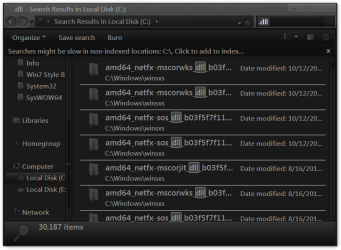
I am not aware of any program that will do that. I have over 30,000+ .dll in C and it was still counting.
I do not game so a majority of them are original.
I would just leave them alone they are probably not doing any harm they are probably not taking up very much disk space either.
Jerry
.dll - Search Results in Local Disk (C).png
 

My Computer

Computer type
Laptop
Computer Manufacturer/Model Number
Sager NP9170
OS
Win 7 Pro x64 / Win 10 Pro
CPU
Intel(R) Core(TM) i7-3630QM CPU @ 2.40GHz
Motherboard
CLEVO P170EM
Memory
12 GB
Graphics Card(s)
(1) Intel(R) HD Graphics 4000 (2) NVIDIA GeForce GTX 675M
Sound Card
(1) Realtek High Definition Audio (2) Intel(R) Display Aud
Monitor(s) Displays
17.3
Screen Resolution
1920x1080
Hard Drives
(1) Samsung 860 EVO 500GB(OS) (1) Samsung 860 EVO 500GB(Data)
Keyboard
Backlite
Antivirus
MSE, Malwarebytes Pro
Browser
Firefox
Other Info
DESKTOP: Custom-built.
OS: Win 10 Pro x64.
CASE: Rosewill R5.
CPU: Intel I5 4670K CPU @ 3.40GHz.
CPU COOLER: Cool Master Hyper 212 EVO.
MOTHERBOARD: Asus Z87-A.
MEMORY: Kingston HyperX 2x4 GB.
GPU: Nvidia Geforce 650 TI.
PSU: Corsair TX750.
DRIVES: (1) Samsung 840 120 GB SSD (2) Western Digital blue 500 GB 7200 RPM.
Most of these DLL files are stored in the winsxs cache. You don't want to touch winsxs, ever.

While it does contain multiple (differing) versions of many DLLs and other files, that's exactly why winsxs exists. Deleting older versions would defeat the purpose and break your system in major ways.

Besides - there simply is no reliable way of tracing every DLL on your system back to whatever uses it. You're only asking for trouble...and your numbers are perfectly within the norm already.
 

My Computer

Computer type
PC/Desktop
Computer Manufacturer/Model Number
Custom-built
OS
Windows 7 Professional SP1 32-bit
CPU
Intel Core 2 Duo E6600 2.4GHz
Motherboard
Asus PL5D2
Memory
4GB DDR2-667 (4x1GB in dual-channel config)
Graphics Card(s)
nVidia GeForce 9800 GT
Sound Card
Creative X-Fi XtremeMusic
Monitor(s) Displays
Acer P236H
Screen Resolution
1920x1200 (DVI)
Hard Drives
OCZ SSD Vertex Plus 60GB SATA (Firmware 3.55), 64MB cache
Hitachi HD321KJ SATA, 320GB, 7200rpm, 16MB cache
PSU
Antec TruePower 2.0
Case
Cooler Master Centurion
Cooling
Too many fans
Keyboard
Standard
Mouse
Microsoft wireless optical mouse
Internet Speed
AT&T U-verse (18mbit/sec)
Antivirus
Microsoft Security Essentials
Browser
Firefox
Other Info
Other devices:
Compaq CQ-60 laptop
Google Nexus 7 (2012) tablet
Nvidia SHIELD tablet (US/LTE)
Hardkernel ODROID-XU single-board computer (Samsung Exynos 5420)
Most of these DLL files are stored in the winsxs cache. You don't want to touch winsxs, ever.

While it does contain multiple (differing) versions of many DLLs and other files, that's exactly why winsxs exists. Deleting older versions would defeat the purpose and break your system in major ways.

Besides - there simply is no reliable way of tracing every DLL on your system back to whatever uses it. You're only asking for trouble...and your numbers are perfectly within the norm already.

+1. It's taking a chance that has a big time down side with hardly any up side. The saved space is negligible.
 

My Computer

Computer Manufacturer/Model Number
HP Media Center
OS
Windows 7 32 bit
CPU
AMD 5200+ dual core
Memory
2 GB
Graphics Card(s)
NVidia GeForce 6150SE 128 MB
Monitor(s) Displays
CRT
Screen Resolution
1280x1024
Hard Drives
500 GB Sata internal :

SIIG USB 3.0 docking stations w/WD Caviar Black 6 Gb/s drives
Keyboard
PS/2
Mouse
PS/2 Wheel Mouse
Other Info
SIIG USB 3.0 PCIexpress card.
Thanks for all replies.

I just thought that 22,000+ was something to worry about.

Will leave alone.
 

My Computer

Computer type
PC/Desktop
Computer Manufacturer/Model Number
DIY Re-built.
OS
Windows 7 Home Premium 64Bits SP1
CPU
Intel i7-920
Motherboard
ASUS P6TD Deluxe
Memory
12 Gb (6x2GB Corsair XMS TR3X3G1600C9 G) Tri Channels
Graphics Card(s)
ASUS GTX-970 Turbo
Sound Card
ASUS On Board SoundMax
Monitor(s) Displays
Samsung UN46D6500 46" TV
Screen Resolution
1920x1080
Hard Drives
1 OCZ SSD Agility Sata III 120Gb
1 Samsung 1Tb
1 Samsung 750Gb
1 Western Digital 500Gb(Mounted in ext eSata case)
PSU
Enermax CUG-950W
Case
Full ATX (Generic)
Cooling
Fans (6) 80mm
Keyboard
Saitek Eclipse II
Mouse
Cyborg R.A.T-5
Internet Speed
Comcast 105.0 MBPS
Antivirus
AVG
Browser
Waterfox v40.02(x64)
Other Info
- Logitech X-530 5.1 Sound speakers.
- APC ES-1300.
- Arris TG862G/CT Modem/Router.
- Samsung BD-083A Blue Ray Player
- Lite On iHBS212 Blue Ray Burner
- Nippon Labs All-In-One Card Reader/Writer W/USB & eSata
Congratulations for discovering what is probably the biggest architectural problem with Windows - the WINSXS directory. This directory gets increasingly large with every installation of any piece of software, Windows update, or anything else that changes files on the boot drive. There is only one method of reducing the size of WINSXS and this has only limited usability or benefit.

WINSXS stands for "Windows Side-by-Side" and means that there is a copy of every module Windows needs in the WINSXS folder. The idea behind this was to ensure it was possible to restore Windows back to a previoulsy good operating state in the event some evil piece of software was installed. Apparently Windows stuffs things into WINSXS on its own, without notifying any installer program, so that when you de-install something the de-installer does not know about what was put into WINSXS and cannot therefore delete it.

The net result of all this is, as you have discoveres, WINSXS keeps getting larger and larger. At some point is will consume your entire hard disk...if you keep yoru system long enough.

The only tool I've ever seen to reduce the size of WINSXS is the post-Windows Service Pack update clean up routine. For Windows 7 see this article for a description:

http://www.sevenforums.com/tutorials/122262-windows-7-sp1-disk-cleanup-tool.html

Previous versions (XP, Vista) have stand-alone tools that do the same thing, but only for Service Pack updates.

Note that if you manually delete things from WINSXS you may destroy Window's ability to restore things, and perhaps to also install new things. MS is not clear about what bad things happen when you mess with WINSXS, but they warn against doing so and I have not found anyone who has ever done anything with it.
 

My Computer

Computer type
PC/Desktop
Computer Manufacturer/Model Number
Custom built
OS
Win7-64
CPU
Intel i7-3770S
Motherboard
ASUS P8Z77-M
Memory
16GB
Graphics Card(s)
nVidia GT630
Sound Card
onboard
Monitor(s) Displays
dual
Screen Resolution
1920x1200 (primary) 1050x1680 (secondary)
Hard Drives
128GB SSD (boot)
64GB SSD (Temp/My Documents)
500GB (photos/videos)
1TB (rendered video, backups)
PSU
650W
Case
Thermaltake A30
Cooling
Thermaltake
Keyboard
Logitech Lighted
Mouse
Kensington Expert Mouse (trackball)
Internet Speed
FIOS 35/35
Antivirus
MS Security Essentials
Browser
Chrome (beta)

My Computer

Computer type
PC/Desktop
Computer Manufacturer/Model Number
DIY Re-built.
OS
Windows 7 Home Premium 64Bits SP1
CPU
Intel i7-920
Motherboard
ASUS P6TD Deluxe
Memory
12 Gb (6x2GB Corsair XMS TR3X3G1600C9 G) Tri Channels
Graphics Card(s)
ASUS GTX-970 Turbo
Sound Card
ASUS On Board SoundMax
Monitor(s) Displays
Samsung UN46D6500 46" TV
Screen Resolution
1920x1080
Hard Drives
1 OCZ SSD Agility Sata III 120Gb
1 Samsung 1Tb
1 Samsung 750Gb
1 Western Digital 500Gb(Mounted in ext eSata case)
PSU
Enermax CUG-950W
Case
Full ATX (Generic)
Cooling
Fans (6) 80mm
Keyboard
Saitek Eclipse II
Mouse
Cyborg R.A.T-5
Internet Speed
Comcast 105.0 MBPS
Antivirus
AVG
Browser
Waterfox v40.02(x64)
Other Info
- Logitech X-530 5.1 Sound speakers.
- APC ES-1300.
- Arris TG862G/CT Modem/Router.
- Samsung BD-083A Blue Ray Player
- Lite On iHBS212 Blue Ray Burner
- Nippon Labs All-In-One Card Reader/Writer W/USB & eSata
The best way after all is a clean re-install.

That's why some people save old backup images or make slipstream install with particular applications on a disc. Trouble is I'm always installing small utilities and I hate to lose all the little weird programs. :)

Usually there's a new faster machine before it becomes a problem though. If I had room to keep all my old PCs networked together then I'd have to do periodic house cleaning.
 

My Computer

Computer Manufacturer/Model Number
HP Media Center
OS
Windows 7 32 bit
CPU
AMD 5200+ dual core
Memory
2 GB
Graphics Card(s)
NVidia GeForce 6150SE 128 MB
Monitor(s) Displays
CRT
Screen Resolution
1280x1024
Hard Drives
500 GB Sata internal :

SIIG USB 3.0 docking stations w/WD Caviar Black 6 Gb/s drives
Keyboard
PS/2
Mouse
PS/2 Wheel Mouse
Other Info
SIIG USB 3.0 PCIexpress card.
Great, so to fix dll issues MS comes up with winsxs directory completely negating original dll purpose of saving space by reusing system calls by many different programs by using common library files (dll) and what happened to the concept of newer dll being down compatible to all older versions, so you only need one, the latest version? Call me crazy, but all this dll idea is a mess. I use portable application only unless there is no other way.
I have portable application that will show what dll files given program is using, but I guess this is not what you're looking for.
 

My Computer

OS
win7hp64
Back
Top