NetBIOS over TCP/IP Disabled and cannot enable

davron94

New member
Member
Local time
4:43 PM
Messages
32
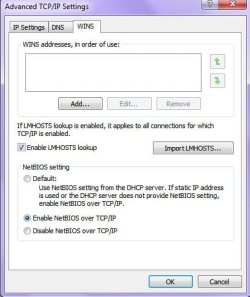
I'm having this issue where in the advanced WINS settings for the Network connections I have enabled the NetBIOS over TCP, but if I run the network information through the command prompt it states that it is disabled. I am also trying to mount shares on my network and I get the error message that it is disabled also. Does anyone know why this is occuring and what can be done to properly enable the setting?

thanks!
 

My Computer My Computer

At a glance

windows7Intel i58GB
Computer Manufacturer/Model Number
Dell Studio XPS 8100
OS
windows7
CPU
Intel i5
Memory
8GB
Hard Drives
1 TB
1TB MY Book
650TB MY Book
Check and see if the TCP/IP NetBIOS Helper service (Administrative Tools -> Services) is set to run automatically.
 

My Computer My Computer

At a glance

Windows 7 Professional SP1 32-bitIntel Core 2 Duo E6600 2.4GHz4GB DDR2-667 (4x1GB in dual-channel config)nVidia GeForce 9800 GT
Computer type
PC/Desktop
Computer Manufacturer/Model Number
Custom-built
OS
Windows 7 Professional SP1 32-bit
CPU
Intel Core 2 Duo E6600 2.4GHz
Motherboard
Asus PL5D2
Memory
4GB DDR2-667 (4x1GB in dual-channel config)
Graphics Card(s)
nVidia GeForce 9800 GT
Sound Card
Creative X-Fi XtremeMusic
Monitor(s) Displays
Acer P236H
Screen Resolution
1920x1200 (DVI)
Hard Drives
OCZ SSD Vertex Plus 60GB SATA (Firmware 3.55), 64MB cache
Hitachi HD321KJ SATA, 320GB, 7200rpm, 16MB cache
PSU
Antec TruePower 2.0
Case
Cooler Master Centurion
Cooling
Too many fans
Keyboard
Standard
Mouse
Microsoft wireless optical mouse
Internet Speed
AT&T U-verse (18mbit/sec)
Antivirus
Microsoft Security Essentials
Browser
Firefox
Other Info
Other devices:
Compaq CQ-60 laptop
Google Nexus 7 (2012) tablet
Nvidia SHIELD tablet (US/LTE)
Hardkernel ODROID-XU single-board computer (Samsung Exynos 5420)
Check and see if the TCP/IP NetBIOS Helper service (Administrative Tools -> Services) is set to run automatically.


It is already set to run Automatically.
 

My Computer My Computer

At a glance

windows7Intel i58GB
Computer Manufacturer/Model Number
Dell Studio XPS 8100
OS
windows7
CPU
Intel i5
Memory
8GB
Hard Drives
1 TB
1TB MY Book
650TB MY Book
Nothing from anyone on this????
 

My Computer My Computer

At a glance

windows7Intel i58GB
Computer Manufacturer/Model Number
Dell Studio XPS 8100
OS
windows7
CPU
Intel i5
Memory
8GB
Hard Drives
1 TB
1TB MY Book
650TB MY Book
Can you use your Snipping Tool to show us a better picture of what's going on?
 

My Computer My Computer

At a glance

Windows 7 / Windows 8.1Devils Canyon i7-4790K @ 4.8 GHz ~ 1.33vCorsair Vengeance Pro PC3-19200 DDR3 2400MHzEVGA GeForce GTX 980 SuperClocked ACX 2.0
Computer type
PC/Desktop
Computer Manufacturer/Model Number
Custom Desktop PC
OS
Windows 7 / Windows 8.1
CPU
Devils Canyon i7-4790K @ 4.8 GHz ~ 1.33v
Motherboard
Asus Z97 Deluxe
Memory
Corsair Vengeance Pro PC3-19200 DDR3 2400MHz
Graphics Card(s)
EVGA GeForce GTX 980 SuperClocked ACX 2.0
Sound Card
Realtek ALC1150 8 channels
Monitor(s) Displays
BenQ XL2720Z 27"
Screen Resolution
1920 x 1080 @ 144Hz
Hard Drives
SSD1: 512GB Samsung 850 Pro
SSD2: 1TB Samsung 850 EVO
SSD3: 1TB Samsung 850 EVO
HDD: 4TB Western Digital Black
Backup: Western Digital My Book Duo 8TB
PSU
Corsair HX1000i / CyberPower CP1500PFCLCD PFC Sinewave UPS 1
Case
Corsair Graphite 780T
Cooling
Custom single loop liquid; CPU delidded; Aerocool DS Fans
Keyboard
Logitech G710 Cherry MX Blue
Mouse
LogitechG502 Proteus Core
Internet Speed
Download: 119MBs /Upload 39.12MBs via Optimum 101 Ultra
Antivirus
MYOB
Browser
Firefox
Other Info
Cooling: EK-Supremecy MX Waterblock, XSPC AX360 Radiator, Swiftech MCP655 Series 12VDC D5 Pump, EK-RES x3 250 Reservoir, Primochill Ice Intensified Coolant, 11x AerocoolDS fans, Primochill Primoflex Avanced LRT Tubing
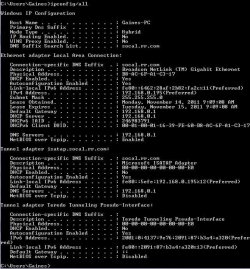
Here is the ipconfig/all:

Capture.JPG

It shows the NetBIOS over Tcpip being disabled. Whereas the Network settings shows it as being Enabled:

Network.JPG
 

My Computer My Computer

At a glance

windows7Intel i58GB
Computer Manufacturer/Model Number
Dell Studio XPS 8100
OS
windows7
CPU
Intel i5
Memory
8GB
Hard Drives
1 TB
1TB MY Book
650TB MY Book
Erm...your ipconfig output shows NetBIOS as enabled for your Broadcom Netlink Ethernet adapter, which is your actual, physical connection to the Internet.

I don't think you need to worry about the other adapters, as these are virtual ones.
I don't actually see anything wrong here.
 

My Computer My Computer

At a glance

Windows 7 Professional SP1 32-bitIntel Core 2 Duo E6600 2.4GHz4GB DDR2-667 (4x1GB in dual-channel config)nVidia GeForce 9800 GT
Computer type
PC/Desktop
Computer Manufacturer/Model Number
Custom-built
OS
Windows 7 Professional SP1 32-bit
CPU
Intel Core 2 Duo E6600 2.4GHz
Motherboard
Asus PL5D2
Memory
4GB DDR2-667 (4x1GB in dual-channel config)
Graphics Card(s)
nVidia GeForce 9800 GT
Sound Card
Creative X-Fi XtremeMusic
Monitor(s) Displays
Acer P236H
Screen Resolution
1920x1200 (DVI)
Hard Drives
OCZ SSD Vertex Plus 60GB SATA (Firmware 3.55), 64MB cache
Hitachi HD321KJ SATA, 320GB, 7200rpm, 16MB cache
PSU
Antec TruePower 2.0
Case
Cooler Master Centurion
Cooling
Too many fans
Keyboard
Standard
Mouse
Microsoft wireless optical mouse
Internet Speed
AT&T U-verse (18mbit/sec)
Antivirus
Microsoft Security Essentials
Browser
Firefox
Other Info
Other devices:
Compaq CQ-60 laptop
Google Nexus 7 (2012) tablet
Nvidia SHIELD tablet (US/LTE)
Hardkernel ODROID-XU single-board computer (Samsung Exynos 5420)
Erm...your ipconfig output shows NetBIOS as enabled for your Broadcom Netlink Ethernet adapter, which is your actual, physical connection to the Internet.

I don't think you need to worry about the other adapters, as these are virtual ones.
I don't actually see anything wrong here.

Ok, I feel really stupid! I should have looked at the report alot closer. Sorry to waste your time with that. Its just that when I try to mount shares (as noted in my first post) the message in SSH states that it is disabled:

Code:
session request to 192.168.0.195 failed (Called name not present) session request to 192 failed (Called name not present) session request to *SMBSERVER failed (Called name not present) NetBIOS over TCP disabled -- no workgroup available
 
Last edited:

My Computer My Computer

At a glance

windows7Intel i58GB
Computer Manufacturer/Model Number
Dell Studio XPS 8100
OS
windows7
CPU
Intel i5
Memory
8GB
Hard Drives
1 TB
1TB MY Book
650TB MY Book
Back
Top