Can't see album art in Windows Explorer, pls help

jk419

New member
Local time
5:14 AM
Messages
5
Guys pls help:cry: i can't see any album art in my windows explorer. I've searched for this everywhere and did everything out there but my problem isn't solved. Someone pls help. There is no problem in viewing album art in windows media player or any other audio players.
Pls help
 

My Computer My Computer

At a glance

Windows 7 Ultimate 32bit
OS
Windows 7 Ultimate 32bit

My Computer My Computer

At a glance

Windows 7 Home Premium x64 SP1intel(R)core(TM)2 duo CPU T6600 @ 2.20GHz3 gb ddr3ati radeon hd4570/512mb
Computer Manufacturer/Model Number
acer aspire 5935g
OS
Windows 7 Home Premium x64 SP1
CPU
intel(R)core(TM)2 duo CPU T6600 @ 2.20GHz
Motherboard
intel gm45/gm47 revision 07
Memory
3 gb ddr3
Graphics Card(s)
ati radeon hd4570/512mb
Monitor(s) Displays
lop156wh2-tle1 15.3 flat
Screen Resolution
1366x768
Hard Drives
OCZ-Agility3 60gig ssd
320gig external hdd
500gig external hdd
Mouse
Optical
Internet Speed
30Mbps Down/30Mbps Up

My Computer My Computer

At a glance

Microsoft Windows 10 Pro Insider Preview 64-bitIntel(R) Core(TM) i3-4130 CPU @ 3.40GHzCorsair Vengence 4GB x2 (8.00GB Dual-Channel ...2047MB GeForce GTS 450 (ZOTAC International)
Computer type
PC/Desktop
Computer Manufacturer/Model Number
Self Assembled
OS
Microsoft Windows 10 Pro Insider Preview 64-bit
CPU
Intel(R) Core(TM) i3-4130 CPU @ 3.40GHz
Motherboard
Gigabyte Technology Co., Ltd. B85M-D3H
Memory
Corsair Vengence 4GB x2 (8.00GB Dual-Channel DDR3 @ 798MHz)
Graphics Card(s)
2047MB GeForce GTS 450 (ZOTAC International)
Sound Card
Onboard (Realtek High Definition Audio)
Monitor(s) Displays
LG Flatron E2040T
Screen Resolution
1600x900
Hard Drives
Western Digital 1 TB
Seagate 500 GB
PSU
Corsair VS550
Case
Cooler Master K380
Cooling
Cooler Master Seidon 120V Plus
Keyboard
Logitech MK260r
Mouse
Logitech MK260r
Internet Speed
PMPL Broadband
Antivirus
Windows Defender + MBAM
Browser
Firefox
Other Info
Dell Studio 15" Laptop
I've tried it both but no change.........
I want to see the album art embedded in the audio file in the thumbnail view not the album art.jpg.
 

My Computer My Computer

At a glance

Windows 7 Ultimate 32bit
OS
Windows 7 Ultimate 32bit
Use Mp3tag - the universal Tag Editor .

Open a music folder in it ... select all tracks .... at the left bottom there is album art box - click it and choose the album art .jpg file , and then save the changes by ctrl+s .

Otherwise, place all the tracks of a particular album in a particular folder, place the album are picture in that folder, and rename it as "Folder.jpg", not anything else like album art.jpg.
 

My Computer My Computer

At a glance

Microsoft Windows 10 Pro Insider Preview 64-bitIntel(R) Core(TM) i3-4130 CPU @ 3.40GHzCorsair Vengence 4GB x2 (8.00GB Dual-Channel ...2047MB GeForce GTS 450 (ZOTAC International)
Computer type
PC/Desktop
Computer Manufacturer/Model Number
Self Assembled
OS
Microsoft Windows 10 Pro Insider Preview 64-bit
CPU
Intel(R) Core(TM) i3-4130 CPU @ 3.40GHz
Motherboard
Gigabyte Technology Co., Ltd. B85M-D3H
Memory
Corsair Vengence 4GB x2 (8.00GB Dual-Channel DDR3 @ 798MHz)
Graphics Card(s)
2047MB GeForce GTS 450 (ZOTAC International)
Sound Card
Onboard (Realtek High Definition Audio)
Monitor(s) Displays
LG Flatron E2040T
Screen Resolution
1600x900
Hard Drives
Western Digital 1 TB
Seagate 500 GB
PSU
Corsair VS550
Case
Cooler Master K380
Cooling
Cooler Master Seidon 120V Plus
Keyboard
Logitech MK260r
Mouse
Logitech MK260r
Internet Speed
PMPL Broadband
Antivirus
Windows Defender + MBAM
Browser
Firefox
Other Info
Dell Studio 15" Laptop
make sure your folder options are set as attached (unchecked "always show icons - never thumbnails") capture1 and then check and select more options to be seen in Large icons as in capture2 hope this helps
View attachment 183491

View attachment 183492
 
Last edited:

My Computer My Computer

At a glance

Windows 10 Home 64BitIntel Core i5 10400 @ 2.90GHz8.00GB Single-Channel Unknown @ 1329MHz (16-2...
Computer type
PC/Desktop
Computer Manufacturer/Model Number
Self assembled
OS
Windows 10 Home 64Bit
CPU
Intel Core i5 10400 @ 2.90GHz
Motherboard
Intel Corporation DG41WV (PROCESSOR)
Memory
8.00GB Single-Channel Unknown @ 1329MHz (16-20-20-38)
Sound Card
Realtek High Definition Audio
Monitor(s) Displays
DELL E170S
Screen Resolution
1280x1024 pixels
Hard Drives
931GB TOSHIBA DT01ACA100 (SATA)
238GB TEAM TM8PS7256G (SATA SSD)
Case
Nothing Fancy
Cooling
Fans
Keyboard
A4 Tech Co LTD
Mouse
A4 Tech Co Ltd/Logitech
Internet Speed
25 Mbps
the problem is still there...........i've tried everything. I'm have been using Mp3Tag for sometime, this problem with album art just started one day out of nowhere.
I can see the album art as in capture1 but when i enter the folder there is no art in thumbnail view - capture2
 

Attachments

  • Capture1.JPG
    Capture1.JPG
    23.8 KB · Views: 35
  • Capture2.JPG
    Capture2.JPG
    22.3 KB · Views: 30

My Computer My Computer

At a glance

Windows 7 Ultimate 32bit
OS
Windows 7 Ultimate 32bit
the problem is still there...........i've tried everything. I'm have been using Mp3Tag for sometime, this problem with album art just started one day out of nowhere.
I can see the album art as in capture1 but when i enter the folder there is no art in thumbnail view - capture2

get in the particular folder of the music you want & select them to be viewed in 'Tiles' as attached and see if it works?
edit : this is also supposed to work if you select them in thumbnail view
 
Last edited:

My Computer My Computer

At a glance

Windows 10 Home 64BitIntel Core i5 10400 @ 2.90GHz8.00GB Single-Channel Unknown @ 1329MHz (16-2...
Computer type
PC/Desktop
Computer Manufacturer/Model Number
Self assembled
OS
Windows 10 Home 64Bit
CPU
Intel Core i5 10400 @ 2.90GHz
Motherboard
Intel Corporation DG41WV (PROCESSOR)
Memory
8.00GB Single-Channel Unknown @ 1329MHz (16-20-20-38)
Sound Card
Realtek High Definition Audio
Monitor(s) Displays
DELL E170S
Screen Resolution
1280x1024 pixels
Hard Drives
931GB TOSHIBA DT01ACA100 (SATA)
238GB TEAM TM8PS7256G (SATA SSD)
Case
Nothing Fancy
Cooling
Fans
Keyboard
A4 Tech Co LTD
Mouse
A4 Tech Co Ltd/Logitech
Internet Speed
25 Mbps
Guys pls help:cry: i can't see any album art in my windows explorer. I've searched for this everywhere and did everything out there but my problem isn't solved. Someone pls help. There is no problem in viewing album art in windows media player or any other audio players.
Pls help
Just in passing, you might look at this other thread and discussion which went on earlier this year, also dealing specifically with the "loss of and corrupt album art cache".

It actually devolved from from the initial thread subject into a discussion and "how-to" of a terrific replacement for (or at least a "supplement" for, if you're psychologically married to) Windows Media Player and Windows Explorer... namely Jaangle.

In fact, the basic music playing, organizing, etc., capabilities of Explorer and WMP are quite limited. If you are a serious music collector and really get enjoyment out of being able to play music on your PC, view album art that you worked very hard to collect, etc., then you should at least look into something else besides Windows Explorer.

And I strongly recommend Jaangle.

(p.s. - imbedding album art inside the tags of music file tags will or should certainly "work", assuming software players that are capable of making use of that imbedded album art in ID3, FLAC, APE, WMV, etc., tag formats. And certainly MP3Tag can manage that imbedded art. But if your music collection is organized along "\artist\album" boundaries, you might seriously consider NOT imbedding the album art in each track from each album (which obviously duplicates the same album art JPG into each of those tracks) but rather use the "external album art" approach. This "external" approach places a single external JPG image file into that album's folder... with the JPG specifically named "cover.jpg". Virtually every software player ever written can understand the notion of external "cover.jpg" in an album folder and use it when playing any music file within that album folder which does not have its own imbedded internal album art in the tag for that music file. Just a suggestion, for saving space caused by duplicated album art... if you already organize by \Artist\Album.)
 

My Computer My Computer

At a glance

Windows 7 Pro x64 (1), Win7 Pro X64 (2)i5-3350p 3.1Ghz/6MB-cache (1); E8400 3.0Ghz/6...8GB PC3-12800 DDR3 (1); 4GB PC3-10600 DDR3 (2)ATI HD7750 (1), (see TV cards); ATI R7 250 (2)
Computer type
PC/Desktop
Computer Manufacturer/Model Number
Home-built, two systems (1) and (2)
OS
Windows 7 Pro x64 (1), Win7 Pro X64 (2)
CPU
i5-3350p 3.1Ghz/6MB-cache (1); E8400 3.0Ghz/6MB-cache (2)
Motherboard
ASUS P8Z77-V Pro (1); ASUS P5Q3 (2)
Memory
8GB PC3-12800 DDR3 (1); 4GB PC3-10600 DDR3 (2)
Graphics Card(s)
ATI HD7750 (1), (see TV cards); ATI R7 250 (2)
Sound Card
Realtek ALC892 HD Audio (1); Realtek ALC1200 HD Audio (2)
Monitor(s) Displays
Eizo HD2441W LCD, Eizo S2433W (1); Eizo 24" S2433W (2)
Screen Resolution
1920x1200, 1920x1200 (1); 1920x1200 (2)
Hard Drives
(1) 1TB SATA-II (7200RPM), 2x2TB SATA-III (7200RPM), 250GB SATA-III (10000RPM) for OS; 2x2TB external USB 3.0

(2) 320GB SATA-II (7200RPM), 750GB SATA-II (7200RPM), 150GB SATA-II (10000RPM) for OS; 2TB external USB 3.0
PSU
Nesteq ECS-6001 600W (1); Nesteq ECS-5001 500W (2)
Case
Acousti-Case 360 (1) and (2)
Cooling
Noctua NH-U12P SE2 for CPU, 2x120mm case fans (1) and (2)
Keyboard
IBM PS/2 (1) and (2)
Mouse
Logitech MX Revolution wireless (1); Microsoft wired (2)
Internet Speed
100mbps down / 10mbps up
Antivirus
Microsoft Security Essentials; Malwarebyte Anti-Malware Pro
Browser
Firefox
Other Info
Ceton InfiniTV 4-tuner cablecard-enabled TV card as well as Hauppauge HVR-2250 OTA/ATSC 2-tuner TV card in (1), running under Win7 WMC
As a try, you may change the .mp3 file association from Winamp to Windows Media Player.

Right click on any .mp3 file > Properties . In the window, Change the "Opens With" option to WMP.
 

My Computer My Computer

At a glance

Microsoft Windows 10 Pro Insider Preview 64-bitIntel(R) Core(TM) i3-4130 CPU @ 3.40GHzCorsair Vengence 4GB x2 (8.00GB Dual-Channel ...2047MB GeForce GTS 450 (ZOTAC International)
Computer type
PC/Desktop
Computer Manufacturer/Model Number
Self Assembled
OS
Microsoft Windows 10 Pro Insider Preview 64-bit
CPU
Intel(R) Core(TM) i3-4130 CPU @ 3.40GHz
Motherboard
Gigabyte Technology Co., Ltd. B85M-D3H
Memory
Corsair Vengence 4GB x2 (8.00GB Dual-Channel DDR3 @ 798MHz)
Graphics Card(s)
2047MB GeForce GTS 450 (ZOTAC International)
Sound Card
Onboard (Realtek High Definition Audio)
Monitor(s) Displays
LG Flatron E2040T
Screen Resolution
1600x900
Hard Drives
Western Digital 1 TB
Seagate 500 GB
PSU
Corsair VS550
Case
Cooler Master K380
Cooling
Cooler Master Seidon 120V Plus
Keyboard
Logitech MK260r
Mouse
Logitech MK260r
Internet Speed
PMPL Broadband
Antivirus
Windows Defender + MBAM
Browser
Firefox
Other Info
Dell Studio 15" Laptop
thanks for your replies........:D
 

My Computer My Computer

At a glance

Windows 7 Ultimate 32bit
OS
Windows 7 Ultimate 32bit
but my problem isn't solved yet......
 

My Computer My Computer

At a glance

Windows 7 Ultimate 32bit
OS
Windows 7 Ultimate 32bit
but my problem isn't solved yet......
You're going to have to provide more information... like a screenshot of MP3Tag showing one of the "problem" MP3 files that isn't showing the cover art.

I just ran my own experiment (although I don't normally use Windows Explorer to manage or view my music collection). Works perfectly for me.

I do NOT use imbedded album art inside of the tags in my MP3/FLAC files, because there's no reason I can justify for the duplication of imbedded JPG art into each music file for the same album. So normally I would only have "cover.jpg" as an external album art file in the album folder and no imbedded art duplicated into each music file's in that same album folder. But I did just that in my experiment, to see what would result.

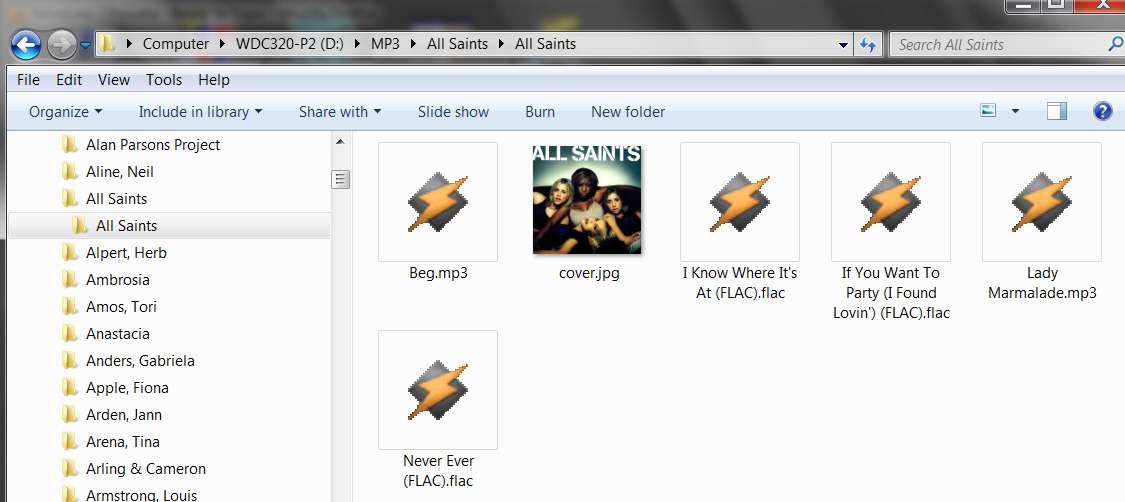
(1) Initially, Explorer showed only the "cover.jpg" thumbnail, and nothing for each MP3/FLAC file in that folder:

explorernotimbedded.jpg


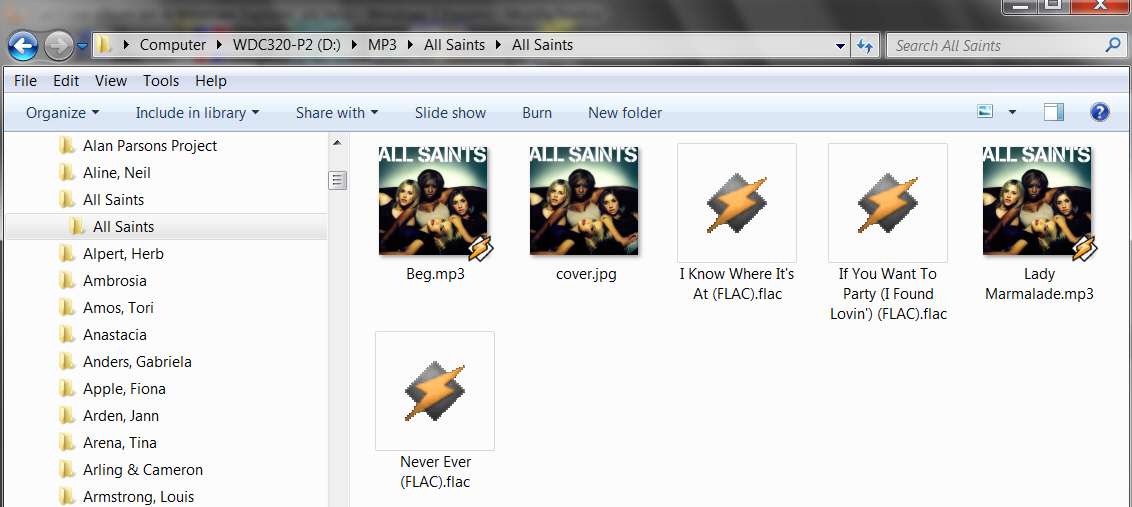
(2) Then I used MP3Tag to imbed the "cover.jpg" album art in that folder into EACH TAG (of each music file, MP3 and FLAC) in that folder. So now I had both imbedded album art in each tag, as well as the same "cover.jpg" album art in the folder. Results looked perfect:

explorertags.jpg


Note that Windows Explorer does not support tags in (or even play) FLAC files, so they still appeared as having no art. But if I look at those files with MP3Tag the imbedded album art is there, since FLAC tags DO support imbedded art and MP3Tag does support FLAC tags completely.


So... this is obviously how things SHOULD work. Everything works perfectly, and Windows Explorer shows the imbedded album art inside of ID3 tags (for MP3 files) even if it doesn't show imbedded art inside of FLAC tags.

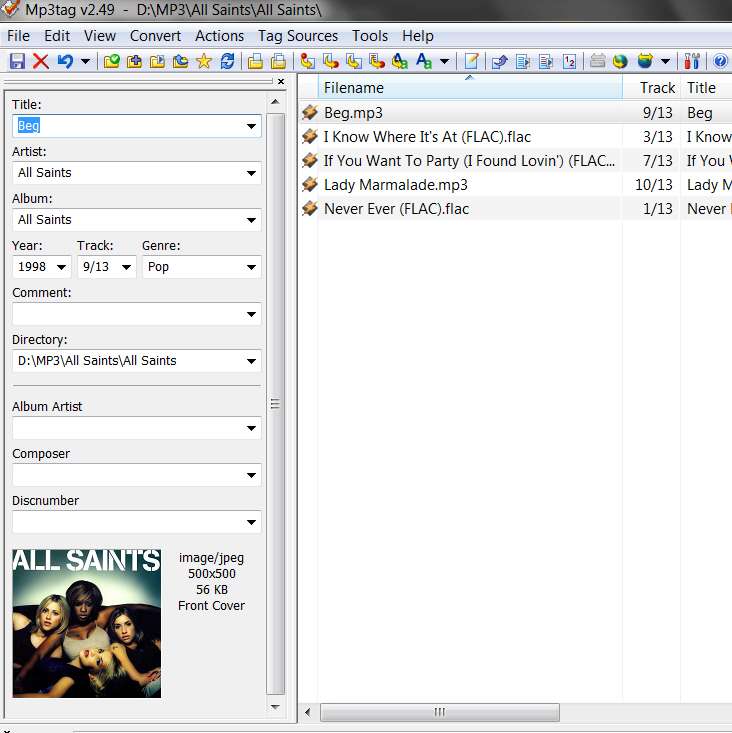
Now, looking at one of these MP3 files which currently has imbedded album art using MP3Tag, it looks like this. Do your files look the same, showing the imbedded art??

mp3tagart.jpg
 

My Computer My Computer

At a glance

Windows 7 Pro x64 (1), Win7 Pro X64 (2)i5-3350p 3.1Ghz/6MB-cache (1); E8400 3.0Ghz/6...8GB PC3-12800 DDR3 (1); 4GB PC3-10600 DDR3 (2)ATI HD7750 (1), (see TV cards); ATI R7 250 (2)
Computer type
PC/Desktop
Computer Manufacturer/Model Number
Home-built, two systems (1) and (2)
OS
Windows 7 Pro x64 (1), Win7 Pro X64 (2)
CPU
i5-3350p 3.1Ghz/6MB-cache (1); E8400 3.0Ghz/6MB-cache (2)
Motherboard
ASUS P8Z77-V Pro (1); ASUS P5Q3 (2)
Memory
8GB PC3-12800 DDR3 (1); 4GB PC3-10600 DDR3 (2)
Graphics Card(s)
ATI HD7750 (1), (see TV cards); ATI R7 250 (2)
Sound Card
Realtek ALC892 HD Audio (1); Realtek ALC1200 HD Audio (2)
Monitor(s) Displays
Eizo HD2441W LCD, Eizo S2433W (1); Eizo 24" S2433W (2)
Screen Resolution
1920x1200, 1920x1200 (1); 1920x1200 (2)
Hard Drives
(1) 1TB SATA-II (7200RPM), 2x2TB SATA-III (7200RPM), 250GB SATA-III (10000RPM) for OS; 2x2TB external USB 3.0

(2) 320GB SATA-II (7200RPM), 750GB SATA-II (7200RPM), 150GB SATA-II (10000RPM) for OS; 2TB external USB 3.0
PSU
Nesteq ECS-6001 600W (1); Nesteq ECS-5001 500W (2)
Case
Acousti-Case 360 (1) and (2)
Cooling
Noctua NH-U12P SE2 for CPU, 2x120mm case fans (1) and (2)
Keyboard
IBM PS/2 (1) and (2)
Mouse
Logitech MX Revolution wireless (1); Microsoft wired (2)
Internet Speed
100mbps down / 10mbps up
Antivirus
Microsoft Security Essentials; Malwarebyte Anti-Malware Pro
Browser
Firefox
Other Info
Ceton InfiniTV 4-tuner cablecard-enabled TV card as well as Hauppauge HVR-2250 OTA/ATSC 2-tuner TV card in (1), running under Win7 WMC
I can see the album art as in capture1 but when i enter the folder there is no art in thumbnail view - capture2
The icons you show in your capture2 do not look like the icons for "music files". They look like the icons for "playlist files".

Are you sure you're looking at the correct folder, and that it has been populated properly with MP3 files and not M3U files??

See my own screenshot above, of my own folder containing MP3/FLAC files. Note the Winamp icon for the MP3 files... which is NOT the Winamp icon for M3U (playlist) files as yours shows.

Unfortunately your screenshots for capture1 and 2 chopped off the bottom of each icon, so I can't see the file names underneath nor can I see the folder names. That would have been very informative.
 

My Computer My Computer

At a glance

Windows 7 Pro x64 (1), Win7 Pro X64 (2)i5-3350p 3.1Ghz/6MB-cache (1); E8400 3.0Ghz/6...8GB PC3-12800 DDR3 (1); 4GB PC3-10600 DDR3 (2)ATI HD7750 (1), (see TV cards); ATI R7 250 (2)
Computer type
PC/Desktop
Computer Manufacturer/Model Number
Home-built, two systems (1) and (2)
OS
Windows 7 Pro x64 (1), Win7 Pro X64 (2)
CPU
i5-3350p 3.1Ghz/6MB-cache (1); E8400 3.0Ghz/6MB-cache (2)
Motherboard
ASUS P8Z77-V Pro (1); ASUS P5Q3 (2)
Memory
8GB PC3-12800 DDR3 (1); 4GB PC3-10600 DDR3 (2)
Graphics Card(s)
ATI HD7750 (1), (see TV cards); ATI R7 250 (2)
Sound Card
Realtek ALC892 HD Audio (1); Realtek ALC1200 HD Audio (2)
Monitor(s) Displays
Eizo HD2441W LCD, Eizo S2433W (1); Eizo 24" S2433W (2)
Screen Resolution
1920x1200, 1920x1200 (1); 1920x1200 (2)
Hard Drives
(1) 1TB SATA-II (7200RPM), 2x2TB SATA-III (7200RPM), 250GB SATA-III (10000RPM) for OS; 2x2TB external USB 3.0

(2) 320GB SATA-II (7200RPM), 750GB SATA-II (7200RPM), 150GB SATA-II (10000RPM) for OS; 2TB external USB 3.0
PSU
Nesteq ECS-6001 600W (1); Nesteq ECS-5001 500W (2)
Case
Acousti-Case 360 (1) and (2)
Cooling
Noctua NH-U12P SE2 for CPU, 2x120mm case fans (1) and (2)
Keyboard
IBM PS/2 (1) and (2)
Mouse
Logitech MX Revolution wireless (1); Microsoft wired (2)
Internet Speed
100mbps down / 10mbps up
Antivirus
Microsoft Security Essentials; Malwarebyte Anti-Malware Pro
Browser
Firefox
Other Info
Ceton InfiniTV 4-tuner cablecard-enabled TV card as well as Hauppauge HVR-2250 OTA/ATSC 2-tuner TV card in (1), running under Win7 WMC
FIX!!

Okay, so I believe I've got a real fix for you. I've been dealing with a similar issue in Windows 7 for this same exact problem. Basically what I've come across is that something happened to the registration in Windows that altered the ability of these files to display thumbnails. The way I fixed this issue was to locate a resource online that would repair just the file extension with a registry hack.

For example, since I use Windows 7 and could not see thumbnails for some of my mp3 files, I went here:

http://www.sevenforums.com/tutorials/19449-default-file-type-associations-restore.html

and pulled down the reg file that would re-establish default settings for mp3 files. After downloading and running the registry file, I rebooted and after logging back in to windows, I found that I could see all my mp3 files with the thumbnails properly in place. I'm actually having the same problem with AVIs as well. I'm going to try this method again to pull down the reg file for AVIs and get thumbnails back for these types of files as well.

I've got a good feeling this will do the job for you. :)
 

My Computer My Computer

At a glance

Windows 7 Ultimate x64
OS
Windows 7 Ultimate x64
its simple open windows media player press ctrl+o

now you see a explorer to select music

go to mp3 containing folder & open it change view as large icon

(NB: open all mp3 folder and change the then go slowly top to bottom of folder)
 
Last edited:

My Computer My Computer

At a glance

windows 7 ultimate x64pentium dual core2gb
OS
windows 7 ultimate x64
CPU
pentium dual core
Motherboard
intel
Memory
2gb
Monitor(s) Displays
view sonic
Hard Drives
syngate
OP when I had a similar problem I followed this
 

My Computer My Computer

At a glance

Windows 7 Professional 64bit
OS
Windows 7 Professional 64bit
OP, did you ever fix your issue? I have more or less the same problem whereby m4a thumbnails are not showing in explorer. These are iTunes music files. I see preview art on the folder but if I open the folder all the m4a tracks just have the default windows music icon. Strangely m4p protected files seem to be ok and displaying the art. The art is embedded because if I physically open iTunes or Windows Media Player to play one of these tracks the programs display the relevant album art. Also if I browse over Network from another computer I can see the thumbnail art. Would clearing the thumbnail cache be a good solution?

I might add this is on a new windows 10 pc (fresh factory install last week) that this is happening on. I know this is a windows 7 forum but I am struggling to find similar stories relating to 10.

Cheers,
Wayne
 

My Computer My Computer

At a glance

Windows 7 Ultimate 64 bitSandybridge 2820 QM 2.3 ghz8 gbAMD Radeon 6970m
Computer type
Laptop
Computer Manufacturer/Model Number
Alienware M17RX3
OS
Windows 7 Ultimate 64 bit
CPU
Sandybridge 2820 QM 2.3 ghz
Memory
8 gb
Graphics Card(s)
AMD Radeon 6970m
Sound Card
Integrated
Monitor(s) Displays
Laptop 17"
Screen Resolution
1980x1080
Hard Drives
750 gb mechanical (7,200RPM) Seagate Momentous paired with OCZ Synapse 128 gb SSD cache drive
Internet Speed
55 mbits download, 12 mbits download
Antivirus
Microsoft Security Essentials
Browser
IE11, Mozilla
For benefit of others. I downloaded trial version of DbPowerAmp which seemed to restore the thumbnails, must have some built in m4a benefit. Clearing the thumbnail cache did not work.
 

My Computer My Computer

At a glance

Windows 7 Ultimate 64 bitSandybridge 2820 QM 2.3 ghz8 gbAMD Radeon 6970m
Computer type
Laptop
Computer Manufacturer/Model Number
Alienware M17RX3
OS
Windows 7 Ultimate 64 bit
CPU
Sandybridge 2820 QM 2.3 ghz
Memory
8 gb
Graphics Card(s)
AMD Radeon 6970m
Sound Card
Integrated
Monitor(s) Displays
Laptop 17"
Screen Resolution
1980x1080
Hard Drives
750 gb mechanical (7,200RPM) Seagate Momentous paired with OCZ Synapse 128 gb SSD cache drive
Internet Speed
55 mbits download, 12 mbits download
Antivirus
Microsoft Security Essentials
Browser
IE11, Mozilla
Back
Top