Solved How to permanently turn off "Install Google Chrome" prompt?

Golden

000
VIP
SF Team
Local time
7:39 AM
Messages
19,301
Location
South Australia
G'day,

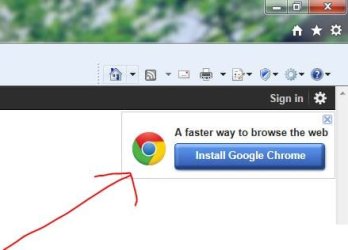
I recall seeing someone (Cluberti maybe?) posting the steps required to permanently turn off this prompt on the Google page? Can anyone recall what they were?

Regards,
Golden
 

Attachments

  • Capture.JPG
    Capture.JPG
    21.9 KB · Views: 80

My Computer My Computer

At a glance

Windows 10 Pro x64 ; Xubuntu x64Intel i7 860 @ 2.80 GHz O/C'ed to 4.0GHz16GB Corsair Vengance DDR3 @ 661 MHz Dual Cha...EVGA NVidia GTX 560 1024MB
Computer type
PC/Desktop
Computer Manufacturer/Model Number
Golden Mk. I.4
OS
Windows 10 Pro x64 ; Xubuntu x64
CPU
Intel i7 860 @ 2.80 GHz O/C'ed to 4.0GHz
Motherboard
Gigabyte P55A-UD3R Rev.1. Award BIOS F13
Memory
16GB Corsair Vengance DDR3 @ 661 MHz Dual Channel (9-9-9-24)
Graphics Card(s)
EVGA NVidia GTX 560 1024MB
Sound Card
Realtek Integrated
Monitor(s) Displays
Dual Samsung SyncMaster 2494HS
Screen Resolution
1920*1080 and 1920*1080
Hard Drives
1*Samsung 840 EVO 120GB SSD;
1*OCZ Vertex 2 60GB SSD;
2*Samsung F3 SpinPoint 1TB in RAID0;
1*Samsung F1 SpinPoint 1TB;
2*Western Digital 1TB External USB 3.0
1*Western Digital 500GB External USB 3.0
1*Seagate 500GB External USB 2.0
PSU
Thermaltake ToughPower QFan 750W
Case
Thermaltake Element S VK60001W2Z
Cooling
Corsair H60 Water Cooling, 2*230mm and 2*80mm case fans
Keyboard
Logitech G110
Mouse
Logitech MX518

My Computer My Computer

At a glance

Microsoft Windows 7 Ultimate: x64 (SP1)Intel® Core™ i5-2500K ProcessorKingston DDR3 HyperX 1600MHz 8GBASUS GTX 560 TI DirectCU II 900MHz
Computer Manufacturer/Model Number
Brewed
OS
Microsoft Windows 7 Ultimate: x64 (SP1)
CPU
Intel® Core™ i5-2500K Processor
Motherboard
ASUS P8Z68-V PRO
Memory
Kingston DDR3 HyperX 1600MHz 8GB
Graphics Card(s)
ASUS GTX 560 TI DirectCU II 900MHz
Sound Card
Realtek® ALC892 8-Channel High Definition Audio CODEC
Monitor(s) Displays
ACER LCD P246HBD 1920x1080 (24") - Dell 1280x800
Screen Resolution
ACER LCD P246HBD ~ [1920X1080] - DELL ~ [1280x800]
Hard Drives
500 GB WD Caviar SE116 7200rpm SATA2
PSU
Corsair 750W Power Supply
Case
Coolermaster CM Scout
Cooling
Zalman FS-C77 Fatal1ty CPU Cooler
Keyboard
Logitech G15
Mouse
Coolermaster Sentinel Advanced
Internet Speed
[↓ 10 MB/s DL] [↑ 1 MB/s UL]
Other Info
- ROCCAT™ Kave – Solid 5.1 Surround Sound Gaming Headset
- Not overclocking
Thanks. The debate is still raging - apparently the only way to do it is to click the "x" and close it each time. Howver, it keeps coming back even when Persistence=Enabled.

I wonder if this is an IE9 issue exclusively....
 

My Computer My Computer

At a glance

Windows 10 Pro x64 ; Xubuntu x64Intel i7 860 @ 2.80 GHz O/C'ed to 4.0GHz16GB Corsair Vengance DDR3 @ 661 MHz Dual Cha...EVGA NVidia GTX 560 1024MB
Computer type
PC/Desktop
Computer Manufacturer/Model Number
Golden Mk. I.4
OS
Windows 10 Pro x64 ; Xubuntu x64
CPU
Intel i7 860 @ 2.80 GHz O/C'ed to 4.0GHz
Motherboard
Gigabyte P55A-UD3R Rev.1. Award BIOS F13
Memory
16GB Corsair Vengance DDR3 @ 661 MHz Dual Channel (9-9-9-24)
Graphics Card(s)
EVGA NVidia GTX 560 1024MB
Sound Card
Realtek Integrated
Monitor(s) Displays
Dual Samsung SyncMaster 2494HS
Screen Resolution
1920*1080 and 1920*1080
Hard Drives
1*Samsung 840 EVO 120GB SSD;
1*OCZ Vertex 2 60GB SSD;
2*Samsung F3 SpinPoint 1TB in RAID0;
1*Samsung F1 SpinPoint 1TB;
2*Western Digital 1TB External USB 3.0
1*Western Digital 500GB External USB 3.0
1*Seagate 500GB External USB 2.0
PSU
Thermaltake ToughPower QFan 750W
Case
Thermaltake Element S VK60001W2Z
Cooling
Corsair H60 Water Cooling, 2*230mm and 2*80mm case fans
Keyboard
Logitech G110
Mouse
Logitech MX518
Thanks. The debate is still raging - apparently the only way to do it is to click the "x" and close it each time. Howver, it keeps coming back even when Persistence=Enabled.

I wonder if this is an IE9 issue exclusively....

Maybe Google will fix it sometime. :)

Hope it helped you,
FredeGail
 

My Computer My Computer

At a glance

Microsoft Windows 7 Ultimate: x64 (SP1)Intel® Core™ i5-2500K ProcessorKingston DDR3 HyperX 1600MHz 8GBASUS GTX 560 TI DirectCU II 900MHz
Computer Manufacturer/Model Number
Brewed
OS
Microsoft Windows 7 Ultimate: x64 (SP1)
CPU
Intel® Core™ i5-2500K Processor
Motherboard
ASUS P8Z68-V PRO
Memory
Kingston DDR3 HyperX 1600MHz 8GB
Graphics Card(s)
ASUS GTX 560 TI DirectCU II 900MHz
Sound Card
Realtek® ALC892 8-Channel High Definition Audio CODEC
Monitor(s) Displays
ACER LCD P246HBD 1920x1080 (24") - Dell 1280x800
Screen Resolution
ACER LCD P246HBD ~ [1920X1080] - DELL ~ [1280x800]
Hard Drives
500 GB WD Caviar SE116 7200rpm SATA2
PSU
Corsair 750W Power Supply
Case
Coolermaster CM Scout
Cooling
Zalman FS-C77 Fatal1ty CPU Cooler
Keyboard
Logitech G15
Mouse
Coolermaster Sentinel Advanced
Internet Speed
[↓ 10 MB/s DL] [↑ 1 MB/s UL]
Other Info
- ROCCAT™ Kave – Solid 5.1 Surround Sound Gaming Headset
- Not overclocking
You could just install it, and never use it. It is a great browser, and can be used as a back up if needed. That way the nags will stop for sure.
 

My Computer My Computer

At a glance

Windows 7 Ultimate
Computer type
Laptop
Computer Manufacturer/Model Number
Dell Inspiron
OS
Windows 7 Ultimate
You could just install it, and never use it. It is a great browser, and can be used as a back up if needed. That way the nags will stop for sure.

Another opportunity. :)
 

My Computer My Computer

At a glance

Microsoft Windows 7 Ultimate: x64 (SP1)Intel® Core™ i5-2500K ProcessorKingston DDR3 HyperX 1600MHz 8GBASUS GTX 560 TI DirectCU II 900MHz
Computer Manufacturer/Model Number
Brewed
OS
Microsoft Windows 7 Ultimate: x64 (SP1)
CPU
Intel® Core™ i5-2500K Processor
Motherboard
ASUS P8Z68-V PRO
Memory
Kingston DDR3 HyperX 1600MHz 8GB
Graphics Card(s)
ASUS GTX 560 TI DirectCU II 900MHz
Sound Card
Realtek® ALC892 8-Channel High Definition Audio CODEC
Monitor(s) Displays
ACER LCD P246HBD 1920x1080 (24") - Dell 1280x800
Screen Resolution
ACER LCD P246HBD ~ [1920X1080] - DELL ~ [1280x800]
Hard Drives
500 GB WD Caviar SE116 7200rpm SATA2
PSU
Corsair 750W Power Supply
Case
Coolermaster CM Scout
Cooling
Zalman FS-C77 Fatal1ty CPU Cooler
Keyboard
Logitech G15
Mouse
Coolermaster Sentinel Advanced
Internet Speed
[↓ 10 MB/s DL] [↑ 1 MB/s UL]
Other Info
- ROCCAT™ Kave – Solid 5.1 Surround Sound Gaming Headset
- Not overclocking
Even with Chrome installed, using IE9 on google.com will still prompt to install Chrome... Annoying, but I use Chrome 99% of the time anyway....
 

My Computer My Computer

At a glance

Windows 7 Ultimate SP1 x64i7 950 4ghz6GB G.Skill pc12800EVGA GTX 580 SC
Computer Manufacturer/Model Number
Custom build
OS
Windows 7 Ultimate SP1 x64
CPU
i7 950 4ghz
Motherboard
EVGA x58 FTW3
Memory
6GB G.Skill pc12800
Graphics Card(s)
EVGA GTX 580 SC
Sound Card
Xfi Titanium
Monitor(s) Displays
Samsung 24"
Screen Resolution
1920x1200
Hard Drives
Vertex 3 SSD 120Gb x2 RAID 0
4 x 1TB WD Black RAID 0
PSU
Thermaltake 850
Case
Mountain Mods U2-UFO Horizon
Cooling
Custom watercooling
Internet Speed
100 down 5 up
Guys,

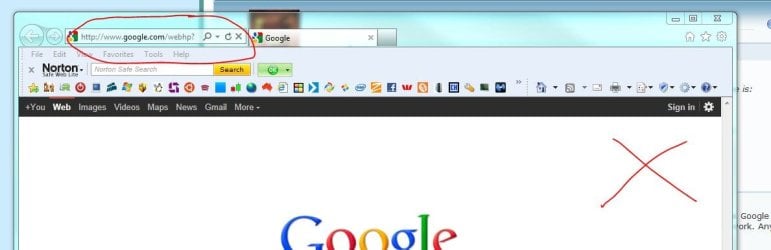
After searching around, I found the following fix if your home page is Google, which mine is:

1. In IE9, open Tools > Internet Options
2. In the Homepage box, replace www.google.com with www.google.com/webhp?
3. Finished - Chrome install pop-up has dissapeared (check by clicking both links above).

Simpler than installing Chrome I think ;)

Regards,
Golden
 

My Computer My Computer

At a glance

Windows 10 Pro x64 ; Xubuntu x64Intel i7 860 @ 2.80 GHz O/C'ed to 4.0GHz16GB Corsair Vengance DDR3 @ 661 MHz Dual Cha...EVGA NVidia GTX 560 1024MB
Computer type
PC/Desktop
Computer Manufacturer/Model Number
Golden Mk. I.4
OS
Windows 10 Pro x64 ; Xubuntu x64
CPU
Intel i7 860 @ 2.80 GHz O/C'ed to 4.0GHz
Motherboard
Gigabyte P55A-UD3R Rev.1. Award BIOS F13
Memory
16GB Corsair Vengance DDR3 @ 661 MHz Dual Channel (9-9-9-24)
Graphics Card(s)
EVGA NVidia GTX 560 1024MB
Sound Card
Realtek Integrated
Monitor(s) Displays
Dual Samsung SyncMaster 2494HS
Screen Resolution
1920*1080 and 1920*1080
Hard Drives
1*Samsung 840 EVO 120GB SSD;
1*OCZ Vertex 2 60GB SSD;
2*Samsung F3 SpinPoint 1TB in RAID0;
1*Samsung F1 SpinPoint 1TB;
2*Western Digital 1TB External USB 3.0
1*Western Digital 500GB External USB 3.0
1*Seagate 500GB External USB 2.0
PSU
Thermaltake ToughPower QFan 750W
Case
Thermaltake Element S VK60001W2Z
Cooling
Corsair H60 Water Cooling, 2*230mm and 2*80mm case fans
Keyboard
Logitech G110
Mouse
Logitech MX518
Guys,

After searching around, I found the following fix if your home page is Google, which mine is:

1. In IE9, open Tools > Internet Options
2. In the Homepage box, replace www.google.com with www.google.com/webhp?
3. Finished - Chrome install pop-up has dissapeared (check by clicking both links above).

Simpler than installing Chrome I think ;)

Regards,
Golden
Tried this Golden but it didn't work. Then, I even went to the Google home page, deleted the Google Chrome prompt and again re-set Google homepage using www.google.com/webhp? - It STILL didn't work. Any suggestions?
 

My Computer My Computer

At a glance

Vista 64 bit and 32 bit (SP2)Intel(R) Core(TM)2 Duo Processor T9400 (2.53 GHz4GB DDR2 System Memory (2 Dimm)512 MB NVIDIA GeForce 9600M GT
Computer Manufacturer/Model Number
HP Pavillion dv5t (generation 1)
OS
Vista 64 bit and 32 bit (SP2)
CPU
Intel(R) Core(TM)2 Duo Processor T9400 (2.53 GHz
Memory
4GB DDR2 System Memory (2 Dimm)
Graphics Card(s)
512 MB NVIDIA GeForce 9600M GT
Monitor(s) Displays
15.4" diagonal WSXGA+ High-Definition HP BrightView Widescre
Screen Resolution
1680 x 1050
Hard Drives
320GB 5400RPM SATA Hard Drive with HP ProtectSmart Hard Drive Protection
Keyboard
Built-in HP
Mouse
Built in - Synaptics TouchPad V6.5 on PS/2 Port
Internet Speed
Max
Other Info
~ Intel Next-Gen Wireless-N Mini-card w/Bluetooth ~ Blu-Ray ROM DVD+/-R/RW ~ Integ. HDTV Hybrid Tuner ~ 12 Cell Battery ~ MS Office (Home Premium) 2007 ~

Attachments

  • Capture.JPG
    Capture.JPG
    46.9 KB · Views: 52
Last edited:

My Computer My Computer

At a glance

Windows 10 Pro x64 ; Xubuntu x64Intel i7 860 @ 2.80 GHz O/C'ed to 4.0GHz16GB Corsair Vengance DDR3 @ 661 MHz Dual Cha...EVGA NVidia GTX 560 1024MB
Computer type
PC/Desktop
Computer Manufacturer/Model Number
Golden Mk. I.4
OS
Windows 10 Pro x64 ; Xubuntu x64
CPU
Intel i7 860 @ 2.80 GHz O/C'ed to 4.0GHz
Motherboard
Gigabyte P55A-UD3R Rev.1. Award BIOS F13
Memory
16GB Corsair Vengance DDR3 @ 661 MHz Dual Channel (9-9-9-24)
Graphics Card(s)
EVGA NVidia GTX 560 1024MB
Sound Card
Realtek Integrated
Monitor(s) Displays
Dual Samsung SyncMaster 2494HS
Screen Resolution
1920*1080 and 1920*1080
Hard Drives
1*Samsung 840 EVO 120GB SSD;
1*OCZ Vertex 2 60GB SSD;
2*Samsung F3 SpinPoint 1TB in RAID0;
1*Samsung F1 SpinPoint 1TB;
2*Western Digital 1TB External USB 3.0
1*Western Digital 500GB External USB 3.0
1*Seagate 500GB External USB 2.0
PSU
Thermaltake ToughPower QFan 750W
Case
Thermaltake Element S VK60001W2Z
Cooling
Corsair H60 Water Cooling, 2*230mm and 2*80mm case fans
Keyboard
Logitech G110
Mouse
Logitech MX518
You could just install it, and never use it. It is a great browser, and can be used as a back up if needed. That way the nags will stop for sure.

Another opportunity. :)


Chrome is already installed on my machine. But, I still get the annoying banner prompt and gmail login prompt.
One would think Microsoft would put a stop to this Google practice in IE or Windows. If there is a way to stop this, please advise. Although, I see Frederick posted a Google link to a fix below that I will try.

Thank you.
 

My Computer My Computer

At a glance

Windows 7 64 bit
Computer type
PC/Desktop
OS
Windows 7 64 bit
Hi,
The link posted does not work anymore or the alternative link to go to without the download Chrome stuff,
I just ignore the flags to download,
Cheers.
 

My Computer My Computer

At a glance

Win-7-Pro64bit 7-H-Prem-64biti7-5930K 2nd i9-9940x both water blocked VRM'...Trident-z 3200C14 2nd Trident-z 3600C16EVGA 1080ti ftw3 2nd Titan Xp both water blocked
Computer type
PC/Desktop
Computer Manufacturer/Model Number
Custom assembled by me :}
OS
Win-7-Pro64bit 7-H-Prem-64bit
CPU
i7-5930K 2nd i9-9940x both water blocked VRM's too
Motherboard
ASUS SABERTOOTH X99 2nd ASUS x299 Apex
Memory
Trident-z 3200C14 2nd Trident-z 3600C16
Graphics Card(s)
EVGA 1080ti ftw3 2nd Titan Xp both water blocked
Sound Card
Built-in Realtek
Monitor(s) Displays
1-AOC G2460PG 24"G-Sync 144Hz/ 2nd 1-ASUS VG248QE 24" 144Hz
Screen Resolution
1920 x 1080 144Hz
Hard Drives
2-Samsung M.2 Evo & Evo Plus
2-Samsung 850 EVO 500GB SSD's/ 3-2.5 W.D. Black 1tb-&3-1tb/3-3.5 WD Black 1tb hdd's
PSU
EVGA SuperNOVA 1000-P2 2nd 1200-P2
Case
2-Corsair Obsidian Series 450D Black ATX Mid Tower
Cooling
Custom water loops
Keyboard
Logitech G710+/ 2nd Logitech G910
Mouse
2-RedDragon M901 Perdition 16400 dpi Gaming mouse = wired
Internet Speed
Comcast Ping 19ms 89.31mbps download speed 6.12mbps upload
Antivirus
Malwarebytes Pro/ Superantispyware Pro
Browser
FireFox & Pale moon
Other Info
2nd ASUS X299 Apex/Intel i9-9940x with Custom water loop/7H-Prem-x64/Corsair 450D case/Ram Trident-z 3600C16 4x8gb / Samsung970Evo plus 500gb SSD/Dual ssd EZ swap evo/PSU EVGA SuperNova 1200w-P2 80+Platinum/GPU Titan Xp /8-ML-140 on push-pull on 2-280GTX rads
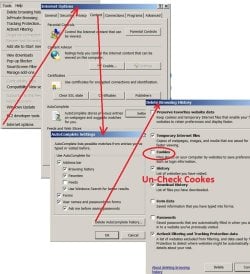
Hope this will help see attachment
 

Attachments

  • Turn off Install Google Chrome .jpg
    Turn off Install Google Chrome .jpg
    86.8 KB · Views: 0

My Computer My Computer

At a glance

W7 home premium SP1 64 bit
Computer Manufacturer/Model Number
H.P.
OS
W7 home premium SP1 64 bit
My home page is set to https://encrypted.google.com

If I block pop ups from:

encrypted.google.com##.gb_g
encrypted.google.com##.gb_ga

Then I don't see "Get Google Chrome" appear.

pop up filters.jpg
 

My Computer My Computer

At a glance

Microsoft Windows 7 Home Premium 64-bit 7601 ...AMD C-60 APU with Radeon(tm) HD Graphics4.00 GBAMD Radeon HD 6290 Graphics
Computer type
Laptop
Computer Manufacturer/Model Number
ASUS
OS
Microsoft Windows 7 Home Premium 64-bit 7601 Multiprocessor Free Service Pack 1
CPU
AMD C-60 APU with Radeon(tm) HD Graphics
Motherboard
ASUSTeK COMPUTER INC. X501U
Memory
4.00 GB
Graphics Card(s)
AMD Radeon HD 6290 Graphics
Sound Card
(1) AMD High Definition Audio Device (2) Realtek High Defi
Screen Resolution
1366 x 768 x 32 bits (4294967296 colors) @ 60 Hz
Hard Drives
Hitachi HTS545050A7E380 SATA Disk Device
Antivirus
Comodo CIS & FW, SecureAplus App Whitelisting, Threatfire
Browser
Cyberfox 64bit, Opera 64bit, Airfox
Other Info
Spy-The-Spy, HitmanPro.Alert, Norton Connect Safe, MJRegWatcher, BitDefender TrafficLight, Voodoo Shield, Zemana AntiMalware
Try This maybe

W10 64x IE11. I have APB adblock installed. I don't know but clicking the wee icon on the status bar click settings and there is a box that had been ticked viz; Allow some non-intrusive advertising. Unticking it seem to get rid of this "want chrome" box. I do use google as my home page and on tabs. Now it's gone. -- I guess something else will take it's place.:(
 

My Computer My Computer

At a glance

Windows 10 64x
Computer type
PC/Desktop
OS
Windows 10 64x
Back
Top