
Solved Is IE8 no longer supported by Win7?

idahosurge

New member
Member
Local time
11:50 AM
Messages
81
I got a new laptop and it has Win7 64b and IE9 on it. All the links I can find at Microsoft for IE8 do not show a download link for Win7 and when you try and use the link for Vista or Server 2008 you get a message that says your OS is not supported.

After googling and searching the net for an hour I finally found a link at SoftPedia, but after I downloaded IE8 and went to install I get the same error message "your OS is not supported". Same results for both the 32b and 64b versions.

I can not stand IE9!

How in the heck do you get IE8 installed on a Win7 computer now?

I have a Win7 desktop and laptop at home with IE8 so I know that you use to be able to install it. The laptop is less than two months old, it came with IE9, but somewhere I got IE8 and installed it. Now I can not find a link to IE8 any place that will work.

Any ideas?
 

My Computer My Computer

At a glance

Win7 Ult 64bi7 950Mushkin Redline #998691 DDR3 1600MHz @ 6-7-6-18BFG GTX 285OCFU
OS
Win7 Ult 64b
CPU
i7 950
Motherboard
P6T Deluxe v2
Memory
Mushkin Redline #998691 DDR3 1600MHz @ 6-7-6-18
Graphics Card(s)
BFG GTX 285OCFU
Monitor(s) Displays
Asus VW266H
Hard Drives
Seagate 7,200 RPM 750GB
WD VR 10,000 RPM 300GB
WD VR 10,000 PPM 600GB
PSU
Corsair 850TX
Case
HAF-932
Cooling
TRUE Rev C w/ Delta FFB1212EH-PWM Fan
Yeah, that is a problem. M$ in their infinite wisdom let you only migrate up - but not down. The only way I see is to burn the installation disk, slipstream that and take IE9 out. But make sure you have another browser in the installation disk so that you can download IE8.
 

My Computer My Computer

At a glance

Vista, Windows7, Mint Mate, Zorin, Windows 8from 1.6GHz Duo to i7
Computer Manufacturer/Model Number
HP, Dell, Gateway, Toshiba - 4 laptops and 2 desktops
OS
Vista, Windows7, Mint Mate, Zorin, Windows 8
CPU
from 1.6GHz Duo to i7
Monitor(s) Displays
2x HP w2207
Hard Drives
5x HDD, 7x SSD, 12x Externals
Keyboard
with trackball - no mices
Mouse
Trackball mice
Internet Speed
DSL 6000
You do not download IE8 its part of Win 7, you have to open Windows update & uninstall IE9 .
You will then have IE8 back.
 

My Computer My Computer

At a glance

Windows 7 Ultimate 64 bitIntel Core i7 4770K overclocked to 4.7GHz Qua...16GB Team Group Vulcan Gold 2133MHzATI Radeon HD 7880 Series Display adapter
Computer type
PC/Desktop
Computer Manufacturer/Model Number
self build
OS
Windows 7 Ultimate 64 bit
CPU
Intel Core i7 4770K overclocked to 4.7GHz Quad Core Haswell
Motherboard
Asus Z87 Pro (Socket 1150) ATX Motherboard
Memory
16GB Team Group Vulcan Gold 2133MHz
Graphics Card(s)
ATI Radeon HD 7880 Series Display adapter
Monitor(s) Displays
NEC LCD2690WUXi2
Screen Resolution
26" 1920 x 1200
Hard Drives
Samsung 500GB SSD 840 EVO SATA 6Gb/s
Samsung 250GB SSD 840 EVO SATA 6Gb/s
PSU
Corsair AX760 Platinum
Case
Cooler Master HAF X Gaming Tower
Cooling
XSPC RayStorm 750 RS360 Water cooling
Mouse
Razer Death Adder left handed
Internet Speed
126Mb download 11.5Mb up
Antivirus
Avast free
Browser
Opera
Other Info
Main Browser is Opera
Favorite software Adobe Lightroom & Photoshop
best plugins Nik software
Firewall : Private firewall 7
This is a Toshiba laptop so there is no installation disk. Also IE9 is not listed under Programs so I can not uninstall it.

There must be a way since on the Clevo laptop I bought less than two months ago I was able to get IE8 installed. It maybe that on the Clevo LT I had a Win7 DVD that installed IE9, but it was listed and I could uninstall it. I really do not remember what I did, but I did get IE8 installed.
 

My Computer My Computer

At a glance

Win7 Ult 64bi7 950Mushkin Redline #998691 DDR3 1600MHz @ 6-7-6-18BFG GTX 285OCFU
OS
Win7 Ult 64b
CPU
i7 950
Motherboard
P6T Deluxe v2
Memory
Mushkin Redline #998691 DDR3 1600MHz @ 6-7-6-18
Graphics Card(s)
BFG GTX 285OCFU
Monitor(s) Displays
Asus VW266H
Hard Drives
Seagate 7,200 RPM 750GB
WD VR 10,000 RPM 300GB
WD VR 10,000 PPM 600GB
PSU
Corsair 850TX
Case
HAF-932
Cooling
TRUE Rev C w/ Delta FFB1212EH-PWM Fan
What is it about IE9 that you don't like?

It is far more secure than IE8, but if you really do have an aversion to IE9, have you considered using Google Chrome instead?
 

My Computer My Computer

At a glance

Windows 7 Ultimate SP1 64-BitIntel Core i7 870 @ 2.93GHz8Gb Dual-Channel DDR3 @ 664MHznVidia GeForce GTX 460 1024MB dedicated RAM
Computer Manufacturer/Model Number
HP Pavilion Elite 495UK
OS
Windows 7 Ultimate SP1 64-Bit
CPU
Intel Core i7 870 @ 2.93GHz
Motherboard
MSI 2A9C (CPU1)
Memory
8Gb Dual-Channel DDR3 @ 664MHz
Graphics Card(s)
nVidia GeForce GTX 460 1024MB dedicated RAM
Sound Card
Realtek HD Audio
Monitor(s) Displays
HP2310i
Screen Resolution
1920 x 1080
Hard Drives
1x1954GB Hitachi HDS22020ALA 330 (RAID), 1x1954GB Hitachi External for backup and storage
PSU
460W
Case
HP Elite
Cooling
Air cooled
Keyboard
Logitech K750 solar-powered keyboard
Mouse
Logitech Wireless M180 mouse
Internet Speed
2Mb
Other Info
Pure Avanti Flow Internet Radio with iPod Dock, 64Gb iPod, HP USB Speakers, Sony MDR-V500 Headphones, Sony Vaio F-Series Laptop
As far as I know, it is in the Installed Updates section. Always has been.

Open Windows Update, look to the lower left corner of that window, click Installed Updates and scroll until you find it.
 

My Computer My Computer

At a glance

Windows 7 x64 Ultimate SP1Core i7-2630QM6 GB DDR3Nvidia GT 540M / Intel HD 3000 - Optimus swit...
Computer Manufacturer/Model Number
Asus N73SV
OS
Windows 7 x64 Ultimate SP1
CPU
Core i7-2630QM
Motherboard
Intel HM 65
Memory
6 GB DDR3
Graphics Card(s)
Nvidia GT 540M / Intel HD 3000 - Optimus switching
Sound Card
HD Audio (Intel Azalia/Realtek) ALC269
Monitor(s) Displays
LED flat panel
Screen Resolution
1920 x 1080
Hard Drives
2x Seagate Momentus 640 GB - 1,28 TB in total
Internet Speed
4 MB/256 kbps
Other Info
External HDs

WD Elements 1,5 TB
WD MyBook 500 GB
You do not download IE8 its part of Win 7, you have to open Windows update & uninstall IE9 .
You will then have IE8 back.
If IE9 comes as default, that would not work - I think.
 

My Computer My Computer

At a glance

Vista, Windows7, Mint Mate, Zorin, Windows 8from 1.6GHz Duo to i7
Computer Manufacturer/Model Number
HP, Dell, Gateway, Toshiba - 4 laptops and 2 desktops
OS
Vista, Windows7, Mint Mate, Zorin, Windows 8
CPU
from 1.6GHz Duo to i7
Monitor(s) Displays
2x HP w2207
Hard Drives
5x HDD, 7x SSD, 12x Externals
Keyboard
with trackball - no mices
Mouse
Trackball mice
Internet Speed
DSL 6000
SP1 can be made permanent, but I don't think IE9 can.
 

My Computer My Computer

At a glance

Windows 7 x64 Ultimate SP1Core i7-2630QM6 GB DDR3Nvidia GT 540M / Intel HD 3000 - Optimus swit...
Computer Manufacturer/Model Number
Asus N73SV
OS
Windows 7 x64 Ultimate SP1
CPU
Core i7-2630QM
Motherboard
Intel HM 65
Memory
6 GB DDR3
Graphics Card(s)
Nvidia GT 540M / Intel HD 3000 - Optimus switching
Sound Card
HD Audio (Intel Azalia/Realtek) ALC269
Monitor(s) Displays
LED flat panel
Screen Resolution
1920 x 1080
Hard Drives
2x Seagate Momentus 640 GB - 1,28 TB in total
Internet Speed
4 MB/256 kbps
Other Info
External HDs

WD Elements 1,5 TB
WD MyBook 500 GB
As far as I know, it is in the Installed Updates section. Always has been.

Open Windows Update, look to the lower left corner of that window, click Installed Updates and scroll until you find it.

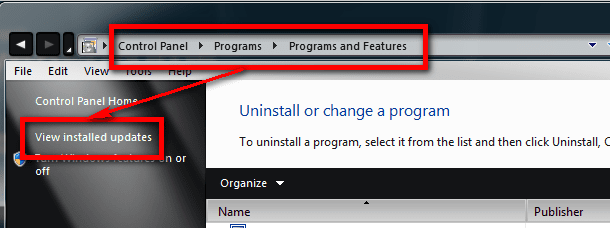
Open Control Panel > Uninstall a program > View installed updates (Control Panel Category view) or Control Panel > Programs and features > View installed updates (Control Panel Icon view), select IE9 and uninstall it.

Uninstall_IE9_1.PNG

Kari
 

My Computer My Computer

At a glance

Windows 10 Pro x64 EN-GB1.6 GHz Intel Core i7-720QM Processor6 GBATI Mobility Radeon HD 5850 Graphics
Computer type
Laptop
Computer Manufacturer/Model Number
HP ENVY 17-1150eg
OS
Windows 10 Pro x64 EN-GB
CPU
1.6 GHz Intel Core i7-720QM Processor
Memory
6 GB
Graphics Card(s)
ATI Mobility Radeon HD 5850 Graphics
Sound Card
Beats sound system with integrated subwoofer
Monitor(s) Displays
17" laptop display, 22" LED and 32" Full HD TV through HDMI
Screen Resolution
1600*900 (1), 1920*1080 (2&3)
Hard Drives
Internal: 2 x 500 GB SATA Hard Disk Drive 7200 rpm
External: 2TB for backups, 3TB USB3 network drive for media
Cooling
As Envy runs a bit warm, I have it on a Cooler Master pad
Keyboard
Logitech diNovo Media Desktop Laser (bluetooth)
Mouse
Logitech Performance Mouse MX
Internet Speed
50/10 Mbps VDSL
Antivirus
Windows Defender 4.3.9431.0
Browser
Maxthon 3.5.2., IE11
Kari, the way I understood, the IE9 came with the intallation - not as an update. That way it would be part of the system and may be difficult to remove. But maybe I am wrong.
 

My Computer My Computer

At a glance

Vista, Windows7, Mint Mate, Zorin, Windows 8from 1.6GHz Duo to i7
Computer Manufacturer/Model Number
HP, Dell, Gateway, Toshiba - 4 laptops and 2 desktops
OS
Vista, Windows7, Mint Mate, Zorin, Windows 8
CPU
from 1.6GHz Duo to i7
Monitor(s) Displays
2x HP w2207
Hard Drives
5x HDD, 7x SSD, 12x Externals
Keyboard
with trackball - no mices
Mouse
Trackball mice
Internet Speed
DSL 6000
...the way I understood, the IE9 came with the intallation - not as an update...
It depends on how one defines "installation". If it's hardcoded into Windows 7 SP1 that's one thing. But if it came with the OP's "Installation" from the company that manufactured the PC, that's another. When Windows 7 first came out a friend of mine was telling me about the new "Dock". Since I never saw that I had to look it up to discover it's really the "Dell Dock", added by Dell, which had no connection to Windows or Microsoft except as an added application.

As far as SP1 is concerned, I added that to my original Windows 7 and it did not upgrade my version of IE. In my case IE9 only appeared as an optional update on Windows Update, and can be easily hidden. But it's easy to install it thinking it's required since Microsoft may call it "important".
 

My Computer My Computer

At a glance

Windows 8 Pro w/MC 32-bitIntel Atom 1.86 GHz2 GBIntel GMA 500
Computer type
PC/Desktop
Computer Manufacturer/Model Number
OQO 2+
OS
Windows 8 Pro w/MC 32-bit
CPU
Intel Atom 1.86 GHz
Motherboard
OQO 2+
Memory
2 GB
Graphics Card(s)
Intel GMA 500
Sound Card
IDT
Monitor(s) Displays
LCD
Screen Resolution
800 x 480 (portable) 1280 x 1024 (docked)
Hard Drives
64 GB SSD
PSU
9 Ah Battery (portable) or OQO Brick (docked)
Case
Shirt Pocket Sized
Cooling
Tiny Fan
Keyboard
Slide out (portable) DiNovo Edge (docked)
Mouse
Eraser head (portable) Logitech Bluetooth (docked)
Internet Speed
WWAN or 802.11G (portable) T1 (docked)
Browser
IE 10
Other Info
DVD-RW OQO Docking Station
Kari, the way I understood, the IE9 came with the intallation - not as an update. That way it would be part of the system and may be difficult to remove. But maybe I am wrong.
You are most probably right. Thanks for pointing that out.

Kari
 

My Computer My Computer

At a glance

Windows 10 Pro x64 EN-GB1.6 GHz Intel Core i7-720QM Processor6 GBATI Mobility Radeon HD 5850 Graphics
Computer type
Laptop
Computer Manufacturer/Model Number
HP ENVY 17-1150eg
OS
Windows 10 Pro x64 EN-GB
CPU
1.6 GHz Intel Core i7-720QM Processor
Memory
6 GB
Graphics Card(s)
ATI Mobility Radeon HD 5850 Graphics
Sound Card
Beats sound system with integrated subwoofer
Monitor(s) Displays
17" laptop display, 22" LED and 32" Full HD TV through HDMI
Screen Resolution
1600*900 (1), 1920*1080 (2&3)
Hard Drives
Internal: 2 x 500 GB SATA Hard Disk Drive 7200 rpm
External: 2TB for backups, 3TB USB3 network drive for media
Cooling
As Envy runs a bit warm, I have it on a Cooler Master pad
Keyboard
Logitech diNovo Media Desktop Laser (bluetooth)
Mouse
Logitech Performance Mouse MX
Internet Speed
50/10 Mbps VDSL
Antivirus
Windows Defender 4.3.9431.0
Browser
Maxthon 3.5.2., IE11
If IE9 was installed at the factory by Toshiba, and if they removed the uninstall option, I don't think there's any way to uninstall IE9 without doing a reinstall of the operating system (probably using a pre-SP1 full install or upgrade disk so IE8 will be the default browser.)

In the alternative I think the best you can do is turn IE9 off. The core components will remain on your computer so other applications that depend on IE will still function, but IE9 will not be your active browser. So make sure you have another browser (Firefox, Chrome, Opera, etc) available.

http://www.sevenforums.com/tutorials/5023-windows-features-turn-off.html
 

My Computer My Computer

At a glance

Win 7 Pro 64-bitIntel i5 2.4 Ghz8GB DDR3Intel HD 3000
Computer type
Laptop
Computer Manufacturer/Model Number
Sony Vaio VPCEB47GM Laptop
OS
Win 7 Pro 64-bit
CPU
Intel i5 2.4 Ghz
Memory
8GB DDR3
Graphics Card(s)
Intel HD 3000
Sound Card
IDT High Definition
Monitor(s) Displays
15.6 WGXA Anti-Glare LED
Screen Resolution
1280x800
Hard Drives
640Gb 7200rpm
Antivirus
MSE
Browser
Opera (primary) with IE9 backup
If IE9 was installed at the factory by Toshiba, and if they removed the uninstall option,

Why on earth would Toshiba bother to remove the uninstall option , it's probably not even possible.
With Windows 7 to remove IE9 you remove the IE9 update & IE8 is automatically restored.
 

My Computer My Computer

At a glance

Windows 7 Ultimate 64 bitIntel Core i7 4770K overclocked to 4.7GHz Qua...16GB Team Group Vulcan Gold 2133MHzATI Radeon HD 7880 Series Display adapter
Computer type
PC/Desktop
Computer Manufacturer/Model Number
self build
OS
Windows 7 Ultimate 64 bit
CPU
Intel Core i7 4770K overclocked to 4.7GHz Quad Core Haswell
Motherboard
Asus Z87 Pro (Socket 1150) ATX Motherboard
Memory
16GB Team Group Vulcan Gold 2133MHz
Graphics Card(s)
ATI Radeon HD 7880 Series Display adapter
Monitor(s) Displays
NEC LCD2690WUXi2
Screen Resolution
26" 1920 x 1200
Hard Drives
Samsung 500GB SSD 840 EVO SATA 6Gb/s
Samsung 250GB SSD 840 EVO SATA 6Gb/s
PSU
Corsair AX760 Platinum
Case
Cooler Master HAF X Gaming Tower
Cooling
XSPC RayStorm 750 RS360 Water cooling
Mouse
Razer Death Adder left handed
Internet Speed
126Mb download 11.5Mb up
Antivirus
Avast free
Browser
Opera
Other Info
Main Browser is Opera
Favorite software Adobe Lightroom & Photoshop
best plugins Nik software
Firewall : Private firewall 7
Why on earth would Toshiba bother to remove the uninstall option , it's probably not even possible.
With Windows 7 to remove IE9 you remove the IE9 update & IE8 is automatically restored.

IE9 was originally offered as an "update" and updates can usually be uninstalled. Here's a Seven Forums tutorial and the official Microsoft article.

http://www.sevenforums.com/tutorials/24373-windows-update-uninstall-update.html

How do I install or uninstall Internet Explorer 9?

Why would Toshiba bother to remove an uninstaller? For the same reason they (along with most manufacturers) install bloatware and otherwise customize a machine. It's their product and they can do whatever they please, even to the point of deciding what's best for the eventual buyer. Like not being able to remove IE9.

If the uninstaller is removed, the update usually cannot be removed without some serious hacking of the system. To that end, I found these old Microsoft forum threads about uninstalling IE9 if it's not listed under installed updates. Disclaimer: use at your own risk.

uninstall ie9 - Internet Explorer 9 is not listed in updates - Microsoft Answers

Methods to Uninstall / Remove IE9 - Microsoft Answers
 

My Computer My Computer

At a glance

Win 7 Pro 64-bitIntel i5 2.4 Ghz8GB DDR3Intel HD 3000
Computer type
Laptop
Computer Manufacturer/Model Number
Sony Vaio VPCEB47GM Laptop
OS
Win 7 Pro 64-bit
CPU
Intel i5 2.4 Ghz
Memory
8GB DDR3
Graphics Card(s)
Intel HD 3000
Sound Card
IDT High Definition
Monitor(s) Displays
15.6 WGXA Anti-Glare LED
Screen Resolution
1280x800
Hard Drives
640Gb 7200rpm
Antivirus
MSE
Browser
Opera (primary) with IE9 backup
  • Like
Reactions: whs
You do not download IE8 its part of Win 7, you have to open Windows update & uninstall IE9 .
You will then have IE8 back.

This worked, thanks to all!

The first time I uninstalled IE9 the LT hung up on the "Preparing to configure Windows, do not shut off the computer" screen. After 15 minutes I shut it off with the power button, turned it back on and it went right back to the same screen. After 10 minutes I shut if off again and booted into safe mode. Safe mode said windows update failed and would set the LT back to the last settings. After two more reboots it was back to normal with IE9. Went ahead and tried it again and this time it uninstalled IE9 and updated everything without a hitch.

I now have IE8.
 

My Computer My Computer

At a glance

Win7 Ult 64bi7 950Mushkin Redline #998691 DDR3 1600MHz @ 6-7-6-18BFG GTX 285OCFU
OS
Win7 Ult 64b
CPU
i7 950
Motherboard
P6T Deluxe v2
Memory
Mushkin Redline #998691 DDR3 1600MHz @ 6-7-6-18
Graphics Card(s)
BFG GTX 285OCFU
Monitor(s) Displays
Asus VW266H
Hard Drives
Seagate 7,200 RPM 750GB
WD VR 10,000 RPM 300GB
WD VR 10,000 PPM 600GB
PSU
Corsair 850TX
Case
HAF-932
Cooling
TRUE Rev C w/ Delta FFB1212EH-PWM Fan
Kari, the way I understood, the IE9 came with the intallation - not as an update. That way it would be part of the system and may be difficult to remove. But maybe I am wrong.


IE9 was installed on the PC, but was listed under updates. It probably has to do with Toshiba's Win7 install routine.
 

My Computer My Computer

At a glance

Win7 Ult 64bi7 950Mushkin Redline #998691 DDR3 1600MHz @ 6-7-6-18BFG GTX 285OCFU
OS
Win7 Ult 64b
CPU
i7 950
Motherboard
P6T Deluxe v2
Memory
Mushkin Redline #998691 DDR3 1600MHz @ 6-7-6-18
Graphics Card(s)
BFG GTX 285OCFU
Monitor(s) Displays
Asus VW266H
Hard Drives
Seagate 7,200 RPM 750GB
WD VR 10,000 RPM 300GB
WD VR 10,000 PPM 600GB
PSU
Corsair 850TX
Case
HAF-932
Cooling
TRUE Rev C w/ Delta FFB1212EH-PWM Fan
Back
Top