
Solved Windows 7 Gif Viewer Works perfectly

goofwear

New member
I got the windows picture and fax viewer to work and display ANIMATED gifs on vista and Windows 7 please look here Windows 7 Gif viewer and for those leery of clicking on a new members link
Code:
http://www.goofwear.com/windows/
This works on 32 and 64 bit OS. Windows 7 Gif viewer I have used this on a win7 64bit desktop and a windows vista 32bit laptop, windows 7 64bit laptop. If you like it Please spread the world and a link to Windows 7 Gif viewer ... Please read the instruction on the page when installing. and after you install it and windows complains about it might not have installed right, just hit cancel.

Also here is my video
 

My Computer

OS
Windows 7 Ultimate x64 SP1
CPU
Intel(R) Core(TM)2 Quad CPU Q9400 @ 2.66GHz
Motherboard
Acer EG43M
Memory
8.00 GB
Graphics Card(s)
ATI Radeon HD 2600 XT
Sound Card
(1) High Definition Audio Device (2) Realtek High Definiti
Thanks buddy, works great for me. :thumbsup:
 

My Computer

Computer type
PC/Desktop
Computer Manufacturer/Model Number
Self Built
OS
Win 10 Pro x64
CPU
Intel I5-2500K @3.3GHz
Motherboard
Asrock P67 Extreme4
Memory
16GB G.Skill Ripjaws X (4x4GB)
Graphics Card(s)
EVGA GeForce 750 Ti SC 2GB
Sound Card
ASUS Xonar DG 5.1 Channels 24-bit 96KHz PCI Interface Sound
Monitor(s) Displays
auria eq2367
Screen Resolution
1920 x 1080
Hard Drives
250GB Samsung 850 EVO SSD
1TB WD Blue
1TB Hitachi
PSU
SeaSonic X 650W 80 Plus Gold
Case
Corsair Obsidian 750D
Cooling
Corsair H60, Three 140mm case fans
Keyboard
Logitech Wireless Keyboard K520
Mouse
Logitech Wireless Mouse M310
Internet Speed
Wave Broadband ~ 100 dn 5 up
Antivirus
Windows Defender, Malwarebytes Premium
Browser
Edge, IE11, Chrome
Other Info
Laptop specs: HP g7-1365dx /
CPU: AMD A6-3420M APU with Radeon(tm) HD Graphics /
RAM: Crucial 8Gb (2x4Gb) /
SSD: Crucial M4-CT128M4SSD2 ATA Device/ FW 000F /
GFX: AMD Radeon HD 6520G /
OS: Windows 10 Pro x64
Sorry for bump, is this legit?
 

My Computer

Computer Manufacturer/Model Number
Homemade
OS
Windows 7 Ultimate 32bit
CPU
Pentium 4 Prescot 3.0ghz HT
Motherboard
Asus P4S800D-X
Memory
1 Gig
Graphics Card(s)
Raedon HD 4670
Sound Card
None
Monitor(s) Displays
X2 Samsung Syncmaster 170n
PSU
Garbage
Yes this is legit, totally understandable it the Internet its hard to always trust people.
 

My Computer

OS
Windows 7 Ultimate x64 SP1
CPU
Intel(R) Core(TM)2 Quad CPU Q9400 @ 2.66GHz
Motherboard
Acer EG43M
Memory
8.00 GB
Graphics Card(s)
ATI Radeon HD 2600 XT
Sound Card
(1) High Definition Audio Device (2) Realtek High Definiti
Doesn't seem to work on my 64 bit build.
I get a dllrun pop up error.
Also, it says at the start of installing viewer to right click rundll.exe and set compatibility to XP SP2 or 3 and all I got after right click was "compatibility troubleshoot" as an option.
34ef2ed33a6e.jpg
 

My Computer

OS
Windows 7 Pro x64 SP1
Ok I just checked my compatibility on my windows 7 64bit and on Windows 7 you need to set it to vista. That should fix it. if not right click the installer and click run as admin. there is a registry key that needs to be install and you pc or antivirus may not let it install. If that doesent not work install this registry key. It is the same on in my installer.

Also did you se this here Index of ./downloads/64bit/

you can use this for the 64bit that way windows does not complain and say are you sure you want to run this program every time you click a pitcher.
 

Attachments

My Computer

OS
Windows 7 Ultimate x64 SP1
CPU
Intel(R) Core(TM)2 Quad CPU Q9400 @ 2.66GHz
Motherboard
Acer EG43M
Memory
8.00 GB
Graphics Card(s)
ATI Radeon HD 2600 XT
Sound Card
(1) High Definition Audio Device (2) Realtek High Definiti
Yes I did see that in your index but since it was "rundll.exe" I wasn't sure what to do with it.
I don't see this program in the start menu or add remove programs. What's with that?
Set what to Vista? How is this done?
How do I run the "gif.reg"?
 

My Computer

OS
Windows 7 Pro x64 SP1
No sorry about that I still post. Its just I never vist or log in here cause no one ever posts. I just logged in casue I got an email saying. Some one posted. The reason it dosent show up in the programfolder or start menus is because the simple installer I used exctracts th 4 files to the c drive and then runs a batch file to install the registey key and then deletes the batch file and registry key when finished. I chose the c drive because the registry file needs to the excat location of the exe and dll file. ... the gif.reg file is ran automaticly after you install it. If not the us 7zip and extract the install file and then run the reg file by double clicking it. Hope that helps if not let me know.
 

My Computer

OS
Windows 7 Ultimate x64 SP1
CPU
Intel(R) Core(TM)2 Quad CPU Q9400 @ 2.66GHz
Motherboard
Acer EG43M
Memory
8.00 GB
Graphics Card(s)
ATI Radeon HD 2600 XT
Sound Card
(1) High Definition Audio Device (2) Realtek High Definiti
I just got that error too, but after going to C, right clicking on the rundll32.exe, compatibility tab, change it to Vista, apply.

I ran the .reg file too.

It now works for me on my Seven Pro 64 SP1. :geek:
 

Attachments

  • rundll.JPG
    rundll.JPG
    110.8 KB · Views: 1,036
  • gif viewer.JPG
    gif viewer.JPG
    58.8 KB · Views: 710

My Computer

Computer type
PC/Desktop
Computer Manufacturer/Model Number
Self Built
OS
Win 10 Pro x64
CPU
Intel I5-2500K @3.3GHz
Motherboard
Asrock P67 Extreme4
Memory
16GB G.Skill Ripjaws X (4x4GB)
Graphics Card(s)
EVGA GeForce 750 Ti SC 2GB
Sound Card
ASUS Xonar DG 5.1 Channels 24-bit 96KHz PCI Interface Sound
Monitor(s) Displays
auria eq2367
Screen Resolution
1920 x 1080
Hard Drives
250GB Samsung 850 EVO SSD
1TB WD Blue
1TB Hitachi
PSU
SeaSonic X 650W 80 Plus Gold
Case
Corsair Obsidian 750D
Cooling
Corsair H60, Three 140mm case fans
Keyboard
Logitech Wireless Keyboard K520
Mouse
Logitech Wireless Mouse M310
Internet Speed
Wave Broadband ~ 100 dn 5 up
Antivirus
Windows Defender, Malwarebytes Premium
Browser
Edge, IE11, Chrome
Other Info
Laptop specs: HP g7-1365dx /
CPU: AMD A6-3420M APU with Radeon(tm) HD Graphics /
RAM: Crucial 8Gb (2x4Gb) /
SSD: Crucial M4-CT128M4SSD2 ATA Device/ FW 000F /
GFX: AMD Radeon HD 6520G /
OS: Windows 10 Pro x64
yeah that's what I thought I said here 32 bit needs tho be set to xp sp3 and 64 bit needs vista . in the screen shots
Code:
http://www.goofwear.com/windows/
 

My Computer

OS
Windows 7 Ultimate x64 SP1
CPU
Intel(R) Core(TM)2 Quad CPU Q9400 @ 2.66GHz
Motherboard
Acer EG43M
Memory
8.00 GB
Graphics Card(s)
ATI Radeon HD 2600 XT
Sound Card
(1) High Definition Audio Device (2) Realtek High Definiti
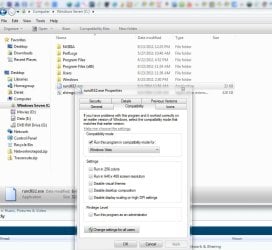
yeah that's what I thought I said here 32 bit needs tho be set to xp sp3 and 64 bit needs vista . in the screen shots
Code:
http://www.goofwear.com/windows/

Sometimes screenshots and step by step instructions help, just trying help you out.
 

My Computer

Computer type
PC/Desktop
Computer Manufacturer/Model Number
Self Built
OS
Win 10 Pro x64
CPU
Intel I5-2500K @3.3GHz
Motherboard
Asrock P67 Extreme4
Memory
16GB G.Skill Ripjaws X (4x4GB)
Graphics Card(s)
EVGA GeForce 750 Ti SC 2GB
Sound Card
ASUS Xonar DG 5.1 Channels 24-bit 96KHz PCI Interface Sound
Monitor(s) Displays
auria eq2367
Screen Resolution
1920 x 1080
Hard Drives
250GB Samsung 850 EVO SSD
1TB WD Blue
1TB Hitachi
PSU
SeaSonic X 650W 80 Plus Gold
Case
Corsair Obsidian 750D
Cooling
Corsair H60, Three 140mm case fans
Keyboard
Logitech Wireless Keyboard K520
Mouse
Logitech Wireless Mouse M310
Internet Speed
Wave Broadband ~ 100 dn 5 up
Antivirus
Windows Defender, Malwarebytes Premium
Browser
Edge, IE11, Chrome
Other Info
Laptop specs: HP g7-1365dx /
CPU: AMD A6-3420M APU with Radeon(tm) HD Graphics /
RAM: Crucial 8Gb (2x4Gb) /
SSD: Crucial M4-CT128M4SSD2 ATA Device/ FW 000F /
GFX: AMD Radeon HD 6520G /
OS: Windows 10 Pro x64
No problem. I figured the YouTube video and the pics on my website were enough, I tried to make it as simple as possible. I'm just glade its helping every one.
 

My Computer

OS
Windows 7 Ultimate x64 SP1
CPU
Intel(R) Core(TM)2 Quad CPU Q9400 @ 2.66GHz
Motherboard
Acer EG43M
Memory
8.00 GB
Graphics Card(s)
ATI Radeon HD 2600 XT
Sound Card
(1) High Definition Audio Device (2) Realtek High Definiti
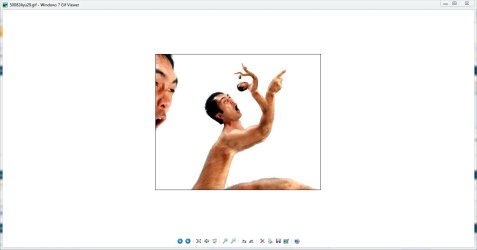
This worked as promised but is there a way to see the animation when just looking in an explore window and not have to open the gif?
 

My Computer

OS
7 64
Ok, this may sound dumb, but I have a question that's frustrating me. How do I get JPGs, BMPs, and PNGs set to be opened by this viewer as default? It flat out will NOT appear on the default list and the file rundll32.exe won't add to the list if you manually brows for it. I want to completely do away with the new dumb viewer that came with Seven, so I would very much like to set all of my photo files to open with this Photo and Fax Viewer replica when clicked.
Thank you in advance,
Kai
 

My Computer

OS
Windows XP, Windows 7

My Computer

OS
Windows 7 Ultimate x64 SP1
CPU
Intel(R) Core(TM)2 Quad CPU Q9400 @ 2.66GHz
Motherboard
Acer EG43M
Memory
8.00 GB
Graphics Card(s)
ATI Radeon HD 2600 XT
Sound Card
(1) High Definition Audio Device (2) Realtek High Definiti
@YoukaiChoGonou if you still have my windows 7 gif installer,. then use 7zip and extract the installer and then find gig.reg and right click and edit it
replace gif and GIF with the extension like png and PNG then when all done save as something like png.reg and then double click it and install the registry key. and then keep doing that for all the extensions you want., I'm not sure there might be and easier way do do it ill look into it

Code:
[HKEY_CLASSES_ROOT\.GIF]
@="GIFImage.Document"

[HKEY_CLASSES_ROOT\.GIF]
@="GIFImage.Document"

[HKEY_CLASSES_ROOT\GIFImage.Document]
"EditFlags"=dword:00010000
"FriendlyTypeName"=hex(2):40,00,25,00,53,00,79,00,73,00,74,00,65,00,6d,00,52,\
00,6f,00,6f,00,74,00,25,00,5c,00,73,00,79,00,73,00,74,00,65,00,6d,00,33,00,\
32,00,5c,00,73,00,68,00,69,00,6d,00,67,00,76,00,77,00,2e,00,64,00,6c,00,6c,\
00,2c,00,2d,00,33,00,30,00,36,00,00,00
"ImageOptionFlags"=dword:00000000
"BrowserFlags"=dword:00000008
@="GIF Image"

[HKEY_CLASSES_ROOT\GIFImage.Document\DefaultIcon]
@="shimgvw.dll,4"

[HKEY_CLASSES_ROOT\GIFImage.Document\shell]
@=""

[HKEY_CLASSES_ROOT\GIFImage.Document\shell\open]
"MuiVerb"="@shimgvw.dll,-550"

[HKEY_CLASSES_ROOT\GIFImage.Document\shell\open\command]
@="C:\\rundll32.exe C:\\shimgvw.dll,ImageView_Fullscreen %1"

[HKEY_CLASSES_ROOT\GIFImage.Document\shell\open\DropTarget]
"Clsid"="{E84FDA7C-1D6A-45F6-B725-CB260C236066}"

[HKEY_CLASSES_ROOT\GIFImage.Document\shell\printto]

[HKEY_CLASSES_ROOT\GIFImage.Document\shell\printto\command]
@="C:\\rundll32.exe C:\\shimgvw.dll,ImageView_PrintTo /pt \"%1\" \"%2\" \"%3\" \"%4\""
 

My Computer

OS
Windows 7 Ultimate x64 SP1
CPU
Intel(R) Core(TM)2 Quad CPU Q9400 @ 2.66GHz
Motherboard
Acer EG43M
Memory
8.00 GB
Graphics Card(s)
ATI Radeon HD 2600 XT
Sound Card
(1) High Definition Audio Device (2) Realtek High Definiti
Thank you, kindly! That did just the trick! I can't thank you enough for this program and the assistance.
 

My Computer

OS
Windows XP, Windows 7
This worked as promised but is there a way to see the animation when just looking in an explore window and not have to open the gif?
You mean see a thumbnail of it , but it wont be an animated thumbnail.. if that's all your looking for then this will show you how to enable thumb nails http://www.sevenforums.com/tutorials/11738-thumbnail-previews-enable-disable.html

No i can see the thumbnails just fine, just wanted to see if there was a way to have the animation visible in thumbnail view.
 

My Computer

OS
7 64
@ YoukaiChoGonou Your very welcome Im glad It helped you. If you guys want to help too you can post positive comments on the you tube video some people think its fake or a virus. silly norton users.

@ dc7391 I can try and work on that or try and hack something together but in the mean time there's not much I can do, But will do my best


My Computer

OS
Windows 7 Ultimate x64 SP1
CPU
Intel(R) Core(TM)2 Quad CPU Q9400 @ 2.66GHz
Motherboard
Acer EG43M
Memory
8.00 GB
Graphics Card(s)
ATI Radeon HD 2600 XT
Sound Card
(1) High Definition Audio Device (2) Realtek High Definiti
Back
Top