BSOD playing any game, error 0x00000101

CX gamer

New member
Local time
12:37 AM
Messages
15
Hi, you guys have been amazingly helpful last time, so I'm back. :D

This sound is the first indication of the problem. Whenever I play a game for longer than 10 minutes, this happens. Affected games: trackamania nations, trackmania united, CoD4, MW2, BO, Oblivion, .. Most games. Stepmania doesn't seem to have the problem, so I think it may be OpenGL/DirectX related.

This sound is also paired with severe FPS problems. After a few more minutes of play, I the BSOD;
http://i.imgur.com/yVmRS.jpg

One odd thing is that when I launch a game (for example CoD4, which boots quickly, because other games need to boot steam first :s) right after startup, and leave it running for say 10 minutes, the problem will not exist for the entire session, until I reboot.

Natively, I had Vista, after a month orso the problem started occuring. Then I clean installed W7 Home Premium, the problem didn't exist at first. After a month, same problem. Then I upgraded to W7 Ultimate, which gave the same story.
I'm confident that the problem is with an auto-update of something, I deliberately didn't instal any drivers manually.

Here is a sound clip, it's not 100% as I hear it, but it should give an idea.


CPU: Intel i7-920
GPU: NVIDIA 285 GTX
RAM: 6 Gb DDR3
OS: W7 Ultimate x64
The BSOD report of the sticky is attached.

Thanks for your future help. :)

CX

UPDATE:
Windows information:
- 64 bit.
- Not the original OS. At first this had Windows Vista Home Premium Dutch 64 bit, then Windows 7 Home Premium Dutch 64 bit as an upgrade I got cheaply from my ACER, and finally out of misery I got Windows 7 Ultimate English 64 bit.
- Full retail.

- I got my system just over 2 years ago.
- My current OS is about half a year old I estimate. The problem recurred over all OS's.

The proper report ZIP has been added. Once again, thanks for taking the time to check me out. :)
 
Last edited:

My Computer My Computer

At a glance

Windows 7Intel i7 2.67 Ghz x 86 Gb DDR3NVIDIA GeForce 285 GTX
Computer Manufacturer/Model Number
ACER Aspire G7710
OS
Windows 7
CPU
Intel i7 2.67 Ghz x 8
Motherboard
Dunno lol
Memory
6 Gb DDR3
Graphics Card(s)
NVIDIA GeForce 285 GTX
Sound Card
Dunno lol
Monitor(s) Displays
Flatron w2234S
Hard Drives
2 Tb
PSU
Dunno lol
Case
Orange
Cooling
Liquid
There have been no DMP files recorded on your Machine,,you'll have to check under your System properties for performance settings to make sure your recording the BSOD events..
 

My Computer My Computer

At a glance

Seven ultimate 32bitCore2Duo E57003GB DDR2HD5670
Computer Manufacturer/Model Number
Asus
OS
Seven ultimate 32bit
CPU
Core2Duo E5700
Motherboard
Asus p5qlem
Memory
3GB DDR2
Graphics Card(s)
HD5670
Sound Card
Onboard
Monitor(s) Displays
Philips 18.5 widescreen
Screen Resolution
Depends
Hard Drives
500GB Samsung 7200RPM
PSU
500w Sparta
Case
Aerocool
Cooling
Standard + 2x 40's inserted
Keyboard
Multimedia
Mouse
Genius
Internet Speed
10meg.
First of all, thanks for your quick reply.

Oh hmm. I can't seem to locate an option for that.

If I turned down my machine while it was collecting information in the BSOD, would that cause no DMP file to be written? I thought my system hang.
 

My Computer My Computer

At a glance

Windows 7Intel i7 2.67 Ghz x 86 Gb DDR3NVIDIA GeForce 285 GTX
Computer Manufacturer/Model Number
ACER Aspire G7710
OS
Windows 7
CPU
Intel i7 2.67 Ghz x 8
Motherboard
Dunno lol
Memory
6 Gb DDR3
Graphics Card(s)
NVIDIA GeForce 285 GTX
Sound Card
Dunno lol
Monitor(s) Displays
Flatron w2234S
Hard Drives
2 Tb
PSU
Dunno lol
Case
Orange
Cooling
Liquid

My Computer My Computer

At a glance

Windows 7 Ultimate 64bit SP1Intel Core 2 Quad Q66002X2GB DDR2 PC6400 800MHZ DUAL CHANNELXFX RADEON HD 6850 1GB GDDR5
Computer Manufacturer/Model Number
Custom Built by me.
OS
Windows 7 Ultimate 64bit SP1
CPU
Intel Core 2 Quad Q6600
Motherboard
Gigabyte GA-X38-DS4
Memory
2X2GB DDR2 PC6400 800MHZ DUAL CHANNEL
Graphics Card(s)
XFX RADEON HD 6850 1GB GDDR5
Sound Card
2/4/5.1/7.1-channel Realtek High Definition
Monitor(s) Displays
Samsung LE40A656F1 1080p 100Hz LCD HD TV 50,000:1
Screen Resolution
1366x768 in Desktop,1920x1080p in gaming and video
Hard Drives
C:\WD VelociRaptor 150 GB,10,000 RPM
E:\WESTERN DIGITAL WD15EADS 1.5TB CAVIAR GREEN SATA2 F:\WESTERN DIGITAL WD15EADS 1.5TB CAVIAR GREEN SATA2
PSU
THERMALTAKE W0229 TOUGHPOWER XT 750W
Case
A-Case Twin Engine BB
Cooling
3 x thermaltake smart case fan II + 1 arctic cooling fan
Keyboard
Wireless Logitech LX710
Mouse
Logitech Wireless Gaming Mouse G700
Internet Speed
ADSL 12000 plus
Other Info
Mouse Logitech G700,with 13 buttons who needs keyboard in RPG?

D:\Sony high speed sata Dvd Rewriter
Logitech Cordless Rumblepad 2
Alright thanks. Done. My settings were right, but it looks like I shouldn't have rebooted before the dump finished. I'll be back next BSOD. :)
 

My Computer My Computer

At a glance

Windows 7Intel i7 2.67 Ghz x 86 Gb DDR3NVIDIA GeForce 285 GTX
Computer Manufacturer/Model Number
ACER Aspire G7710
OS
Windows 7
CPU
Intel i7 2.67 Ghz x 8
Motherboard
Dunno lol
Memory
6 Gb DDR3
Graphics Card(s)
NVIDIA GeForce 285 GTX
Sound Card
Dunno lol
Monitor(s) Displays
Flatron w2234S
Hard Drives
2 Tb
PSU
Dunno lol
Case
Orange
Cooling
Liquid
We'll be waiting for them to start our analysis!!:cool:
 

My Computer My Computer

At a glance

Seven ultimate 32bitCore2Duo E57003GB DDR2HD5670
Computer Manufacturer/Model Number
Asus
OS
Seven ultimate 32bit
CPU
Core2Duo E5700
Motherboard
Asus p5qlem
Memory
3GB DDR2
Graphics Card(s)
HD5670
Sound Card
Onboard
Monitor(s) Displays
Philips 18.5 widescreen
Screen Resolution
Depends
Hard Drives
500GB Samsung 7200RPM
PSU
500w Sparta
Case
Aerocool
Cooling
Standard + 2x 40's inserted
Keyboard
Multimedia
Mouse
Genius
Internet Speed
10meg.
Updated OP, I can do this, right?
 

My Computer My Computer

At a glance

Windows 7Intel i7 2.67 Ghz x 86 Gb DDR3NVIDIA GeForce 285 GTX
Computer Manufacturer/Model Number
ACER Aspire G7710
OS
Windows 7
CPU
Intel i7 2.67 Ghz x 8
Motherboard
Dunno lol
Memory
6 Gb DDR3
Graphics Card(s)
NVIDIA GeForce 285 GTX
Sound Card
Dunno lol
Monitor(s) Displays
Flatron w2234S
Hard Drives
2 Tb
PSU
Dunno lol
Case
Orange
Cooling
Liquid


While we need the dmp file the screen snap gives us a clue


Best advice that I've seen about this error (from here: http://www.sevenforums.com/crashes-...lock-interrupt-bsod-101-error.html#post356791 )
What you're looking for will be in one of the following categories:

a) BIOS bug
b) a driver whose activity is causing the target processor to lock up
c) a hardware defect (temperature, voltage, dust, RFI, outright borkedness...)
So, check the drivers
Then check the inside of the case (temperature, voltage, dust, etc).
Then run some hardware stress tests

Try this free video stress test: FurMark: VGA Stress Test, Graphics Card and GPU Stability Test, Burn-in Test, OpenGL Benchmark and GPU Temperature | oZone3D.Net
Try this free stress test: Free Software - GIMPS
Prime95 Setup:
- extract the contents of the zip file to a location of your choice
- double click on the executable file
- select "Just stress testing"
- select the "Blend" test. If you've already run MemTest overnight you may want to run the "Small FFTs" test instead.
- "Number of torture test threads to run" should equal the number of CPU's times 2 (if you're using hyperthreading).
The easiest way to figure this out is to go to Task Manager...Performance tab - and see the number of boxes under CPU Usage History
Then run the test for 6 to 24 hours - or until you get errors (whichever comes first).
The Test selection box and the stress.txt file describes what components that the program stresses.

Then try replacing parts.
Then look up the versions of your BIOS to see what changes were done.
 

My Computer My Computer

At a glance

Win 8 Release candidate 8400[email protected]4 gigsNvidia 9600M
Computer Manufacturer/Model Number
HP Pavillion dv-7 1005 Tx
OS
Win 8 Release candidate 8400
CPU
[email protected]
Memory
4 gigs
Graphics Card(s)
Nvidia 9600M
Sound Card
HD built-in
Monitor(s) Displays
17" Wxga
Screen Resolution
1440x900
Cooling
none
Internet Speed
45Mb down 5Mb up
Thank you for the reply. I'm afraid I don't know enough about computers to know all correct BIOS settings, I just used the BIOS to change boot priority once or twice. I haven't seen any processes that suck up the CPU.
I wasn't aware that you needed a .dmp file also, I thought I had everything in the .zip file of the OP. I'll attach it to this file now. :)

I've already ran FurMark, while it was cool to watch, I didn't see a significant lowered performance. Yet this was when the problem wasn't active. If the problem is not active, it won't become active during that runtime. If the problem is active, it will remain until the next time the system shuts down, or until the next BSoD.

I will GIMPS this night. Do you want me to run it when the problem is active, or inactive? I know that the problem will only happen with some applications. I'm suspecting DirectX, and I don't suspect GIMPS using that, so it may not matter. I'll run it from the same partition in which all my games are located, if it matters.

Again, thanks for your help. I will update this topic when the benchmark is done.

EDIT: Put the .dmp inside of the .zip. :)
 

My Computer My Computer

At a glance

Windows 7Intel i7 2.67 Ghz x 86 Gb DDR3NVIDIA GeForce 285 GTX
Computer Manufacturer/Model Number
ACER Aspire G7710
OS
Windows 7
CPU
Intel i7 2.67 Ghz x 8
Motherboard
Dunno lol
Memory
6 Gb DDR3
Graphics Card(s)
NVIDIA GeForce 285 GTX
Sound Card
Dunno lol
Monitor(s) Displays
Flatron w2234S
Hard Drives
2 Tb
PSU
Dunno lol
Case
Orange
Cooling
Liquid
Thank you for the reply. I'm afraid I don't know enough about computers to know all correct BIOS settings, I just used the BIOS to change boot priority once or twice. I haven't seen any processes that suck up the CPU.
I wasn't aware that you needed a .dmp file also, I thought I had everything in the .zip file of the OP. I'll attach it to this file now. :)

I've already ran FurMark, while it was cool to watch, I didn't see a significant lowered performance. Yet this was when the problem wasn't active. If the problem is not active, it won't become active during that runtime. If the problem is active, it will remain until the next time the system shuts down, or until the next BSoD.

I will GIMPS this night. Do you want me to run it when the problem is active, or inactive? I know that the problem will only happen with some applications. I'm suspecting DirectX, and I don't suspect GIMPS using that, so it may not matter. I'll run it from the same partition in which all my games are located, if it matters.

Again, thanks for your help. I will update this topic when the benchmark is done.

EDIT: Put the .dmp inside of the .zip. :)

See previous suggestions

SYMBOL_NAME: ANALYSIS_INCONCLUSIVE

FOLLOWUP_NAME: MachineOwner

MODULE_NAME: Unknown_Module

IMAGE_NAME: Unknown_Image

DEBUG_FLR_IMAGE_TIMESTAMP: 0

FAILURE_BUCKET_ID: X64_CLOCK_WATCHDOG_TIMEOUT_8_PROC_ANALYSIS_INCONCLUSIVE

BUCKET_ID: X64_CLOCK_WATCHDOG_TIMEOUT_8_PROC_ANALYSIS_INCONCLUSIVE
 

My Computer My Computer

At a glance

Win 8 Release candidate 8400[email protected]4 gigsNvidia 9600M
Computer Manufacturer/Model Number
HP Pavillion dv-7 1005 Tx
OS
Win 8 Release candidate 8400
CPU
[email protected]
Memory
4 gigs
Graphics Card(s)
Nvidia 9600M
Sound Card
HD built-in
Monitor(s) Displays
17" Wxga
Screen Resolution
1440x900
Cooling
none
Internet Speed
45Mb down 5Mb up
Alright, I ran the CPU benchmark. I didn't have any errors, and my CPU seems to be very healthy judging by the times, compared to other CPU's of the same kind.
How would you like me to run FurMark? It renders without lagging at all.

EDIT: Thanks for those details, even though I don't know what they mean.
I'll ask a friend if he can swap parts with me, but that will be a while. I'll check my BIOS now.
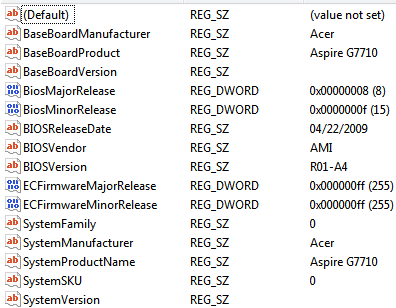
EDIT2:
QJnBC.png
 

My Computer My Computer

At a glance

Windows 7Intel i7 2.67 Ghz x 86 Gb DDR3NVIDIA GeForce 285 GTX
Computer Manufacturer/Model Number
ACER Aspire G7710
OS
Windows 7
CPU
Intel i7 2.67 Ghz x 8
Motherboard
Dunno lol
Memory
6 Gb DDR3
Graphics Card(s)
NVIDIA GeForce 285 GTX
Sound Card
Dunno lol
Monitor(s) Displays
Flatron w2234S
Hard Drives
2 Tb
PSU
Dunno lol
Case
Orange
Cooling
Liquid
Attention! Test, test. One two. Can everyone hear me?

Well I can't hear you. I updated my BIOS to the latest version provided by ACER. After a little bit of fiddling around, my network drivers were working again. But my audio drivers fail to install, as they fail to recognize plugged in audio devices. I did install Realtek HD Audio, which tells me there is nothing plugged in.

I've got two main audio devices;

  • One cable going out of the green hole to my the red and white holes of my hi-fi system.
  • One headset plugged into an USB (2.0)


Removing and replugging them doesn't do anything.

Device Manager finds;

  • Realtek High Definition Audio
  • USB Multi-Channel Audio Device


Is there any way to find them? Thank you.
 

My Computer My Computer

At a glance

Windows 7Intel i7 2.67 Ghz x 86 Gb DDR3NVIDIA GeForce 285 GTX
Computer Manufacturer/Model Number
ACER Aspire G7710
OS
Windows 7
CPU
Intel i7 2.67 Ghz x 8
Motherboard
Dunno lol
Memory
6 Gb DDR3
Graphics Card(s)
NVIDIA GeForce 285 GTX
Sound Card
Dunno lol
Monitor(s) Displays
Flatron w2234S
Hard Drives
2 Tb
PSU
Dunno lol
Case
Orange
Cooling
Liquid
Back
Top