
I'm at my wit's end with Realtek HD.
I put together my new machine yesterday and I'm thrilled with it. i2500k, 8gb GSkill, Samsung SSD and it flies. Took me a snap to install and just like a couple of years ago when I set up my old machine I've been at for 24 hours now, most of which have been awake trying to just get some damn sound to my speakers.
I've read hundreds of forum posts and tried everything from flashing the BIOS to various versions of the drivers but the results are always the same. No matter what port I plug my speakers into (a 2.1 system with a single 1/8th to 1/8th cable) Realtek will not recognize my speakers and will not even detect that a new device has been plugged in which is the most frustrating part.


As you can see from the images I'm getting output levels no problem whatsoever. And here's a couple of images of my settings:
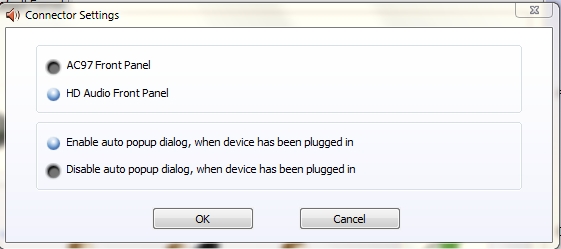
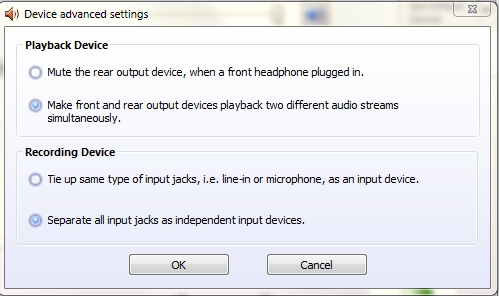
Speakers are fine, they work with my iPod just perfectly. Adding more frustration I connected a USB webcam with built-in microphone and when I make a call I can be heard well.
Is there anything else that I should be looking at?
To add a little info, I just disconnected the front panel audio connectors from the motherboard and that didn't change a thing either.
I'm beginning to think that the jacks themselves might have been DOA.
I put together my new machine yesterday and I'm thrilled with it. i2500k, 8gb GSkill, Samsung SSD and it flies. Took me a snap to install and just like a couple of years ago when I set up my old machine I've been at for 24 hours now, most of which have been awake trying to just get some damn sound to my speakers.
I've read hundreds of forum posts and tried everything from flashing the BIOS to various versions of the drivers but the results are always the same. No matter what port I plug my speakers into (a 2.1 system with a single 1/8th to 1/8th cable) Realtek will not recognize my speakers and will not even detect that a new device has been plugged in which is the most frustrating part.
As you can see from the images I'm getting output levels no problem whatsoever. And here's a couple of images of my settings:
Speakers are fine, they work with my iPod just perfectly. Adding more frustration I connected a USB webcam with built-in microphone and when I make a call I can be heard well.
Is there anything else that I should be looking at?
To add a little info, I just disconnected the front panel audio connectors from the motherboard and that didn't change a thing either.
I'm beginning to think that the jacks themselves might have been DOA.
Last edited by a moderator:
My Computer
At a glance
Win7 64bitQuad Core 2.332x2GB HyperX 1066Nvidia 9500GT 1GB
- OS
- Win7 64bit
- CPU
- Quad Core 2.33
- Motherboard
- Asus P5Q_E
- Memory
- 2x2GB HyperX 1066
- Graphics Card(s)
- Nvidia 9500GT 1GB
- Monitor(s) Displays
- Dell 200FP
- Hard Drives
- WDC 640gb
Seagate Barracuda 250gb


