
xfact2matty
New member
Hello,
For few months now the softwares cannot detect the installed hardwares [e.g. BIOS, System model, manufacturer, processor...] The dixdiag won't show anything [n/a], the software Speccy crashes every time [unknown system error 0x80041002] --similar fate for CPUZ, the system properties can't fetch anything either.
The system is working fine.
What could be the reason?
I cannot give my specs info because of that, all I know the motherboard is manufactured by AMD [AMD Smaphron LE...] and a Nvidia [Nvidia GeForce 6150SE...] built-in card.
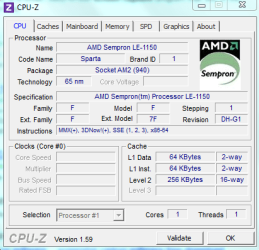
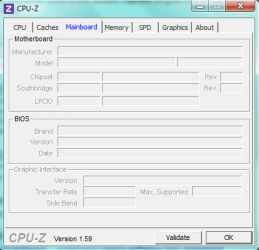
**Attachments included about partially successful attempt with CPUZ.
For few months now the softwares cannot detect the installed hardwares [e.g. BIOS, System model, manufacturer, processor...] The dixdiag won't show anything [n/a], the software Speccy crashes every time [unknown system error 0x80041002] --similar fate for CPUZ, the system properties can't fetch anything either.
The system is working fine.
What could be the reason?
I cannot give my specs info because of that, all I know the motherboard is manufactured by AMD [AMD Smaphron LE...] and a Nvidia [Nvidia GeForce 6150SE...] built-in card.
**Attachments included about partially successful attempt with CPUZ.
Attachments
My Computer
At a glance
Windows 7 Ultimate 32bitIntel core 2 duo 3 ghz2 GBASUS Nvidia 210 1 GB DDR3
- Computer Manufacturer/Model Number
- Lenovo
- OS
- Windows 7 Ultimate 32bit
- CPU
- Intel core 2 duo 3 ghz
- Motherboard
- Asus
- Memory
- 2 GB
- Graphics Card(s)
- ASUS Nvidia 210 1 GB DDR3
- Sound Card
- default
- Monitor(s) Displays
- 1
- Screen Resolution
- 1366X768
- Hard Drives
- Seagate 80 GB
- Case
- Lenovo
- Cooling
- 1 processor fan
- Keyboard
- PS/2
- Mouse
- USB optical
- Internet Speed
- 512mbps

