download music from exterior hard drive to Music and Videos partition

rikkidegraz

New member
Local time
5:37 PM
Messages
25
Location
Canada
The other day I posted my problem with getting a new computer which had win7 installed. When downloading all my backups which had been on an exterior drive, they ended up in strange places. Suddenly, I had libraries and the library had folders but all the folder were named differently. No more My Documents, my this, my that. Instead they dropped the my, which by itself would not have bee a big deal but then they put my document files into my music folder. Well that got me mad.

I'm a head-hunter and I keep everthing in Outlook Contacts. In those contacts I have links to my candidates' resumes folders. I also have links from my clients to their folders. However, after downloading, having thought I had done everything by the letter, I found the links didn't work. What a mess. I have over 1200 candidates categorized by qualifications. I have clients in a similar situation. Their links don't work either.

Then some very nice people from this site suggested I create partitions and lose the libraries. At first I was frightened. I had heard of partitions but had never been courageous enough to actually try them out. I was also angry with Microsoft because they changed things for no reason. Time is money and I'm losing money when I have to dick around with the computer instead of on the phone head-junting.

Feeling defeated, I bit the bullet, downloaded the software MiniTool Partition. It seemed easy enough but I have run into some snags.
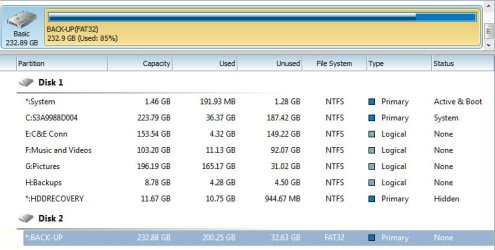
picture of window.jpg

In my need to get organized, I deleted all the music in the music folder under libraries. And I deleted the My Documents folder from there, also. I need to make E:C&E Conn much smaller. Look C: It's huge. I need that space for my pictures. I don't think I need H: Backups because I back up to an external hard drive.

Disk 2 is the external backup, I think. When I double click, I see all my files in there, including my music folder with all my music. How do I get them into F:Music and Videos partition?

Any help would be greatly appreciated.

Oh, I almost forgot, When I get a new resume in the email, I generally place it in a folder for later reading. Now, I can't place it in E:C&E. I get a message saying something like I need administrator permission. Well, I am the administrator.

Anyway - baby steps. Can you help me to tranfer the music from my external drive to F: Music and Videos?
 

My Computer My Computer

At a glance

Windows 7 Home Premium 64 biti7-2630qm cpu @ 2.00GHz6Gintel HD Graphics Family, NVIDIA GeForce GT 540M
Computer Manufacturer/Model Number
Toshiba Satellite
OS
Windows 7 Home Premium 64 bit
CPU
i7-2630qm cpu @ 2.00GHz
Motherboard
Intel
Memory
6G
Graphics Card(s)
intel HD Graphics Family, NVIDIA GeForce GT 540M
Sound Card
Intel Display Audio, Realtek High Definition Audio
Monitor(s) Displays
Generic PnP Monitor
Hard Drives
Hitachi, Optiarc DVD
Anyway - baby steps. Can you help me to tranfer the music from my external drive to F: Music and Videos?


Normally, you would just drag them (copy, not move) with the mouse--from the external drive to F:Music and Videos. Can't you do that? But I may be misunderstanding you.

However:

First I would decide how many partitions you ultimately want to end up with on your internal drive.

You need the one named system

You need C

You don't need the others.

Plan 1: put all of your personal files on C and subdivide C with a folder structure: Music, Pictures, Video, Work, whatever suits you. 2 total partitions.

Plan 2: put only Windows and programs on C, and put all data on D. Subdivide D with a similar folder structure. 3 total partitions.

Plan 3: Put Windows on C. Use several different data partitions D, E, F, and so on. One for each data type (music, video, pictures, etc). 4 or more total partitions.

I would lean toward plan 2. You seem to have chosen plan 3.

There are advantages and disadvantages to each of those 3 plans. Plan 3 works, but having a bunch of partitions can be wasteful because you can never anticipate the proper size and growth rate of the data type on a partition.

Your pictures partition is already 80% full.

If you know for sure that you want to stay with those particular partitions, you should be able to use that tool to resize them.

Or you could delete all but system and C, then shrink C to maybe 80, then make new D, E, F, etc.

So you have a lot of control.

If you have everything backed up to the external, I would disconnect it temporarily. That way you can't make an error and foul that drive up accidentally with the tool.

You had best confirm what is on H:backups.

What is supposedly on E:C&E Conn and why that peculiar name?

Report back with your ideas and results of moving those files with a mouse.
 

My Computer My Computer

At a glance

Windows 7 Home Premium SP1, 64-bitIntel Skylake i5-6600K, not overclocked8 GB HyperX DDR4-2666 (2 x 4 GB)none; graphics are integrated on CPU
Computer type
PC/Desktop
Computer Manufacturer/Model Number
Ignatz Special; 4 speed manual gearbox; factory air conditioning; one of one
OS
Windows 7 Home Premium SP1, 64-bit
CPU
Intel Skylake i5-6600K, not overclocked
Motherboard
AsRock Z170M Extreme 4, micro ATX
Memory
8 GB HyperX DDR4-2666 (2 x 4 GB)
Graphics Card(s)
none; graphics are integrated on CPU
Sound Card
onboard: Realtek ALC1150; external: USB Behringer UF0-202
Monitor(s) Displays
Dell S2340M 23 inch IPS
Screen Resolution
1600 x 900
Hard Drives
System: Crucial MX100 series SSD, 128 GB;
Data: Samsung Spinpoint 103SJ, 1 TB;
Backup: WD Caviar Green WD30EZRX-00D8PB0, 3 TB
PSU
Rosewill SilentNight 500 watt fanless, semi-modular
Case
Antec Solo II
Cooling
Noctua NH-U12S; Noctua F12 intake, Noctua S12A exhaust
Keyboard
Microsoft 200 6JH-00001 USB
Mouse
Dell or Microsoft optical wired; USB
Antivirus
Microsoft Security Essentials and Malwarebytes Premium
Browser
Pale Moon
Other Info
All fans PWM; speeds at idle: CPU circa 500 rpm; intake circa 600 rpm; exhaust circa 600 rpm; CPU temps 27 idle and 47 C load in a warm room (27 C/81 F) when running Intel Extreme Tuning Utility stress test.
No more My Documents, my this, my that. Instead they dropped the my, which by itself would not have bee a big deal but then they put my document files into my music folder. Well that got me mad.

I make a point of keeping everything in locations that I defined, like D:\music, etc. No libraries, no junctions (new links in Win7), etc. No windows defaults.

FWIW, I agree with ignatzatsonic that his option #2 is probably best.

If you're not used to fooling with partitions, expirement on one you don't need before you do anything with the important ones. Minitool Parition Wizard is reliable, and can do most operations without rebooting.
 

My Computer My Computer

At a glance

Windows 7 UltimatePentium Dual-Core CPU E5400 @ 2.70GHz4096MnVidia 8400GS
Computer Manufacturer/Model Number
eMachines ET1831-7
OS
Windows 7 Ultimate
CPU
Pentium Dual-Core CPU E5400 @ 2.70GHz
Motherboard
EMCP73VT-PM
Memory
4096M
Graphics Card(s)
nVidia 8400GS
Sound Card
built-in Realtek
Monitor(s) Displays
Acer 20"
Screen Resolution
1680x1050
Hard Drives
Seagate ST3750528AS ATA 500G
Other Info
Dual-boot with Linux.
Well, I don't know exactly how I did it but I did manage to make the "My Documents" partition larger and now everything seems to be in the right place. I also deleted the, now, extra partitions. So that seems to be somewhat resolved.

Thank you all for pointing me in the right direction. I know I have many more things to do to make this computer "mine".
 

My Computer My Computer

At a glance

Windows 7 Home Premium 64 biti7-2630qm cpu @ 2.00GHz6Gintel HD Graphics Family, NVIDIA GeForce GT 540M
Computer Manufacturer/Model Number
Toshiba Satellite
OS
Windows 7 Home Premium 64 bit
CPU
i7-2630qm cpu @ 2.00GHz
Motherboard
Intel
Memory
6G
Graphics Card(s)
intel HD Graphics Family, NVIDIA GeForce GT 540M
Sound Card
Intel Display Audio, Realtek High Definition Audio
Monitor(s) Displays
Generic PnP Monitor
Hard Drives
Hitachi, Optiarc DVD
Anyway - baby steps. Can you help me to tranfer the music from my external drive to F: Music and Videos?


Normally, you would just drag them (copy, not move) with the mouse--from the external drive to F:Music and Videos. Can't you do that? But I may be misunderstanding you.

However:

First I would decide how many partitions you ultimately want to end up with on your internal drive.

You need the one named system

You need C

You don't need the others.

Plan 1: put all of your personal files on C and subdivide C with a folder structure: Music, Pictures, Video, Work, whatever suits you. 2 total partitions.

Plan 2: put only Windows and programs on C, and put all data on D. Subdivide D with a similar folder structure. 3 total partitions.

Plan 3: Put Windows on C. Use several different data partitions D, E, F, and so on. One for each data type (music, video, pictures, etc). 4 or more total partitions.

I would lean toward plan 2. You seem to have chosen plan 3.

There are advantages and disadvantages to each of those 3 plans. Plan 3 works, but having a bunch of partitions can be wasteful because you can never anticipate the proper size and growth rate of the data type on a partition.

Your pictures partition is already 80% full.

If you know for sure that you want to stay with those particular partitions, you should be able to use that tool to resize them.

Or you could delete all but system and C, then shrink C to maybe 80, then make new D, E, F, etc.

So you have a lot of control.

If you have everything backed up to the external, I would disconnect it temporarily. That way you can't make an error and foul that drive up accidentally with the tool.

You had best confirm what is on H:backups.

What is supposedly on E:C&E Conn and why that peculiar name?

Report back with your ideas and results of moving those files with a mouse.
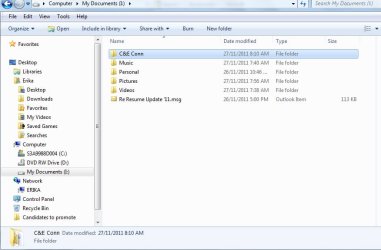
I've made changes. C&E Conn is the name of my company. As you can see, the "tree" on the left needs work. Is there a way to have the "My Documents" partition listed more prominently since I'll be accessing that partition all the time? I thought I'd attach pictures since that makes it easier to explain.
 

Attachments

  • tree.jpg
    tree.jpg
    63.3 KB · Views: 11
  • partitions.jpg
    partitions.jpg
    49.5 KB · Views: 10

My Computer My Computer

At a glance

Windows 7 Home Premium 64 biti7-2630qm cpu @ 2.00GHz6Gintel HD Graphics Family, NVIDIA GeForce GT 540M
Computer Manufacturer/Model Number
Toshiba Satellite
OS
Windows 7 Home Premium 64 bit
CPU
i7-2630qm cpu @ 2.00GHz
Motherboard
Intel
Memory
6G
Graphics Card(s)
intel HD Graphics Family, NVIDIA GeForce GT 540M
Sound Card
Intel Display Audio, Realtek High Definition Audio
Monitor(s) Displays
Generic PnP Monitor
Hard Drives
Hitachi, Optiarc DVD
It looks to me like C is really cramped--at least 95% full. C tends to grow over time due to Windows updates and newly installed programs. I would resize it to at least 60, preferably 80. You don't want it starved for space.

You should be able to reassign the drive letters of your "My Documents" partition to D and your DVD drive to E, using Windows Disk Management. First, change the DVD drive letter to E, and then reassign D to "My Documents".
 

My Computer My Computer

At a glance

Windows 7 Home Premium SP1, 64-bitIntel Skylake i5-6600K, not overclocked8 GB HyperX DDR4-2666 (2 x 4 GB)none; graphics are integrated on CPU
Computer type
PC/Desktop
Computer Manufacturer/Model Number
Ignatz Special; 4 speed manual gearbox; factory air conditioning; one of one
OS
Windows 7 Home Premium SP1, 64-bit
CPU
Intel Skylake i5-6600K, not overclocked
Motherboard
AsRock Z170M Extreme 4, micro ATX
Memory
8 GB HyperX DDR4-2666 (2 x 4 GB)
Graphics Card(s)
none; graphics are integrated on CPU
Sound Card
onboard: Realtek ALC1150; external: USB Behringer UF0-202
Monitor(s) Displays
Dell S2340M 23 inch IPS
Screen Resolution
1600 x 900
Hard Drives
System: Crucial MX100 series SSD, 128 GB;
Data: Samsung Spinpoint 103SJ, 1 TB;
Backup: WD Caviar Green WD30EZRX-00D8PB0, 3 TB
PSU
Rosewill SilentNight 500 watt fanless, semi-modular
Case
Antec Solo II
Cooling
Noctua NH-U12S; Noctua F12 intake, Noctua S12A exhaust
Keyboard
Microsoft 200 6JH-00001 USB
Mouse
Dell or Microsoft optical wired; USB
Antivirus
Microsoft Security Essentials and Malwarebytes Premium
Browser
Pale Moon
Other Info
All fans PWM; speeds at idle: CPU circa 500 rpm; intake circa 600 rpm; exhaust circa 600 rpm; CPU temps 27 idle and 47 C load in a warm room (27 C/81 F) when running Intel Extreme Tuning Utility stress test.
It looks to me like C is really cramped--at least 95% full. C tends to grow over time due to Windows updates and newly installed programs. I would resize it to at least 60, preferably 80. You don't want it starved for space.

You should be able to reassign the drive letters of your "My Documents" partition to D and your DVD drive to E, using Windows Disk Management. First, change the DVD drive letter to E, and then reassign D to "My Documents".

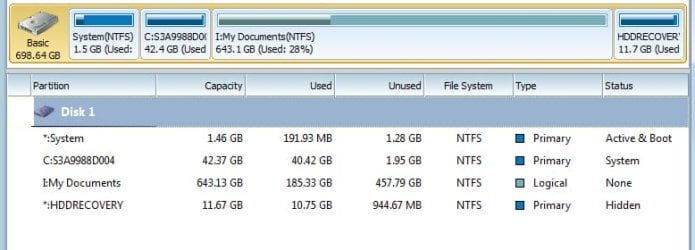
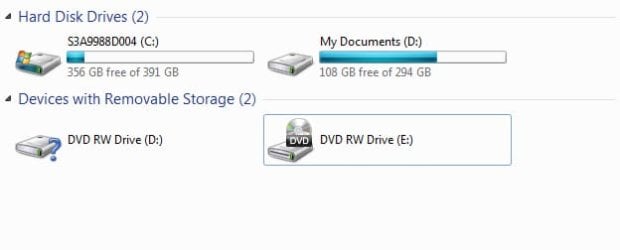
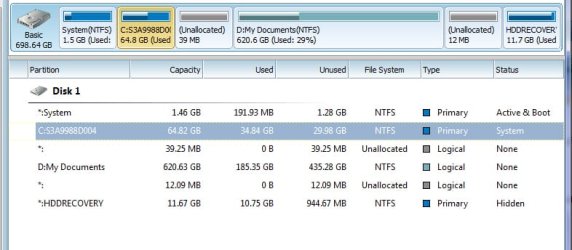
Thank you for getting back to me. I did as you said but now I have two icons for DVD drive. Also, the HDDRecovery won't let me change the size of the partition even though it takes up very little resources.

Should I worry?
 

Attachments

  • drives.jpg
    drives.jpg
    27.1 KB · Views: 9
  • minitool.jpg
    minitool.jpg
    50.1 KB · Views: 5

My Computer My Computer

At a glance

Windows 7 Home Premium 64 biti7-2630qm cpu @ 2.00GHz6Gintel HD Graphics Family, NVIDIA GeForce GT 540M
Computer Manufacturer/Model Number
Toshiba Satellite
OS
Windows 7 Home Premium 64 bit
CPU
i7-2630qm cpu @ 2.00GHz
Motherboard
Intel
Memory
6G
Graphics Card(s)
intel HD Graphics Family, NVIDIA GeForce GT 540M
Sound Card
Intel Display Audio, Realtek High Definition Audio
Monitor(s) Displays
Generic PnP Monitor
Hard Drives
Hitachi, Optiarc DVD
You appear to have made C much larger than needed. It is now nearly 400 GB.

Leave HDDRecovery partition alone. It is needed to restore your PC to the day of purchase if that is ever needed. It takes up relatively little space.

Type Disk Management into the Windows start button search box, go to Disk Management, and post a picture of what you see.

I wouldn't worry about the duplicate DVD drives just yet.
 

My Computer My Computer

At a glance

Windows 7 Home Premium SP1, 64-bitIntel Skylake i5-6600K, not overclocked8 GB HyperX DDR4-2666 (2 x 4 GB)none; graphics are integrated on CPU
Computer type
PC/Desktop
Computer Manufacturer/Model Number
Ignatz Special; 4 speed manual gearbox; factory air conditioning; one of one
OS
Windows 7 Home Premium SP1, 64-bit
CPU
Intel Skylake i5-6600K, not overclocked
Motherboard
AsRock Z170M Extreme 4, micro ATX
Memory
8 GB HyperX DDR4-2666 (2 x 4 GB)
Graphics Card(s)
none; graphics are integrated on CPU
Sound Card
onboard: Realtek ALC1150; external: USB Behringer UF0-202
Monitor(s) Displays
Dell S2340M 23 inch IPS
Screen Resolution
1600 x 900
Hard Drives
System: Crucial MX100 series SSD, 128 GB;
Data: Samsung Spinpoint 103SJ, 1 TB;
Backup: WD Caviar Green WD30EZRX-00D8PB0, 3 TB
PSU
Rosewill SilentNight 500 watt fanless, semi-modular
Case
Antec Solo II
Cooling
Noctua NH-U12S; Noctua F12 intake, Noctua S12A exhaust
Keyboard
Microsoft 200 6JH-00001 USB
Mouse
Dell or Microsoft optical wired; USB
Antivirus
Microsoft Security Essentials and Malwarebytes Premium
Browser
Pale Moon
Other Info
All fans PWM; speeds at idle: CPU circa 500 rpm; intake circa 600 rpm; exhaust circa 600 rpm; CPU temps 27 idle and 47 C load in a warm room (27 C/81 F) when running Intel Extreme Tuning Utility stress test.
You appear to have made C much larger than needed. It is now nearly 400 GB.

Leave HDDRecovery partition alone. It is needed to restore your PC to the day of purchase if that is ever needed. It takes up relatively little space.

Type Disk Management into the Windows start button search box, go to Disk Management, and post a picture of what you see.

I wouldn't worry about the duplicate DVD drives just yet.

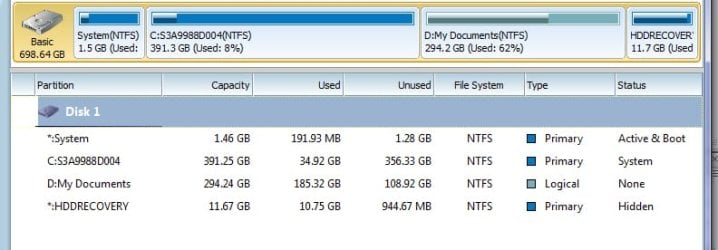
OK here is the picture you requested.
 

Attachments

  • disk manager.jpg
    disk manager.jpg
    65.6 KB · Views: 12

My Computer My Computer

At a glance

Windows 7 Home Premium 64 biti7-2630qm cpu @ 2.00GHz6Gintel HD Graphics Family, NVIDIA GeForce GT 540M
Computer Manufacturer/Model Number
Toshiba Satellite
OS
Windows 7 Home Premium 64 bit
CPU
i7-2630qm cpu @ 2.00GHz
Motherboard
Intel
Memory
6G
Graphics Card(s)
intel HD Graphics Family, NVIDIA GeForce GT 540M
Sound Card
Intel Display Audio, Realtek High Definition Audio
Monitor(s) Displays
Generic PnP Monitor
Hard Drives
Hitachi, Optiarc DVD
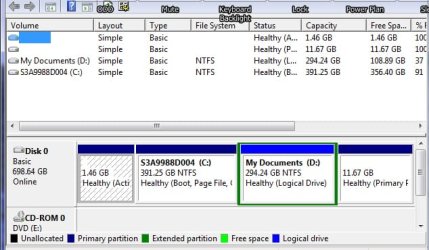
That looks pretty good, other than the way too large C.

I'm not sure what that first 1.46 GB partition is? Your boot files are on C, so you might be able to get rid of the 1.46 GB partition, depending on what else is on it. Or just leave it alone since it is quite small.

I see only 1 DVD drive in Disk Management, a good sign.

I would shrink C to maybe 80 and try to add the generated free space to D. Then post another screen shot of Disk Management.
 

My Computer My Computer

At a glance

Windows 7 Home Premium SP1, 64-bitIntel Skylake i5-6600K, not overclocked8 GB HyperX DDR4-2666 (2 x 4 GB)none; graphics are integrated on CPU
Computer type
PC/Desktop
Computer Manufacturer/Model Number
Ignatz Special; 4 speed manual gearbox; factory air conditioning; one of one
OS
Windows 7 Home Premium SP1, 64-bit
CPU
Intel Skylake i5-6600K, not overclocked
Motherboard
AsRock Z170M Extreme 4, micro ATX
Memory
8 GB HyperX DDR4-2666 (2 x 4 GB)
Graphics Card(s)
none; graphics are integrated on CPU
Sound Card
onboard: Realtek ALC1150; external: USB Behringer UF0-202
Monitor(s) Displays
Dell S2340M 23 inch IPS
Screen Resolution
1600 x 900
Hard Drives
System: Crucial MX100 series SSD, 128 GB;
Data: Samsung Spinpoint 103SJ, 1 TB;
Backup: WD Caviar Green WD30EZRX-00D8PB0, 3 TB
PSU
Rosewill SilentNight 500 watt fanless, semi-modular
Case
Antec Solo II
Cooling
Noctua NH-U12S; Noctua F12 intake, Noctua S12A exhaust
Keyboard
Microsoft 200 6JH-00001 USB
Mouse
Dell or Microsoft optical wired; USB
Antivirus
Microsoft Security Essentials and Malwarebytes Premium
Browser
Pale Moon
Other Info
All fans PWM; speeds at idle: CPU circa 500 rpm; intake circa 600 rpm; exhaust circa 600 rpm; CPU temps 27 idle and 47 C load in a warm room (27 C/81 F) when running Intel Extreme Tuning Utility stress test.
That looks pretty good, other than the way too large C.

I'm not sure what that first 1.46 GB partition is? Your boot files are on C, so you might be able to get rid of the 1.46 GB partition, depending on what else is on it. Or just leave it alone since it is quite small.

I see only 1 DVD drive in Disk Management, a good sign.

I would shrink C to maybe 80 and try to add the generated free space to D. Then post another screen shot of Disk Management.

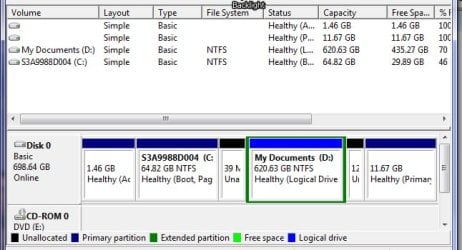
I shrunk it more. I wonder why it took so long? Yes, after reboot, the extra DVD drive disappeared.

I attached the HDDRecovery but if you look you'll see that you can't shrink it. How weird is that?
 

Attachments

  • partitions.jpg
    partitions.jpg
    59.7 KB · Views: 4
  • Resize HDD.jpg
    Resize HDD.jpg
    45.3 KB · Views: 3
  • disk management.jpg
    disk management.jpg
    58.6 KB · Views: 3

My Computer My Computer

At a glance

Windows 7 Home Premium 64 biti7-2630qm cpu @ 2.00GHz6Gintel HD Graphics Family, NVIDIA GeForce GT 540M
Computer Manufacturer/Model Number
Toshiba Satellite
OS
Windows 7 Home Premium 64 bit
CPU
i7-2630qm cpu @ 2.00GHz
Motherboard
Intel
Memory
6G
Graphics Card(s)
intel HD Graphics Family, NVIDIA GeForce GT 540M
Sound Card
Intel Display Audio, Realtek High Definition Audio
Monitor(s) Displays
Generic PnP Monitor
Hard Drives
Hitachi, Optiarc DVD
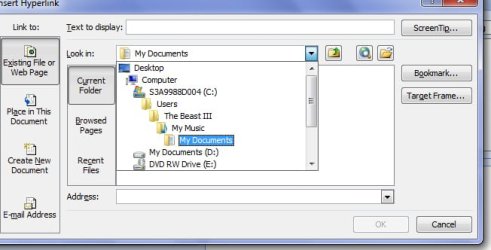
Here is another thing that really bothers me. I don't know what else to call it but a tree but it's the way the folders are arranged. My Documents folder is in the Music folder. Furthermore, I'm the sole user of this computer. I think the folders could be arranged in a much more simple way, don't you?
 

Attachments

  • tree.jpg
    tree.jpg
    47.5 KB · Views: 5

My Computer My Computer

At a glance

Windows 7 Home Premium 64 biti7-2630qm cpu @ 2.00GHz6Gintel HD Graphics Family, NVIDIA GeForce GT 540M
Computer Manufacturer/Model Number
Toshiba Satellite
OS
Windows 7 Home Premium 64 bit
CPU
i7-2630qm cpu @ 2.00GHz
Motherboard
Intel
Memory
6G
Graphics Card(s)
intel HD Graphics Family, NVIDIA GeForce GT 540M
Sound Card
Intel Display Audio, Realtek High Definition Audio
Monitor(s) Displays
Generic PnP Monitor
Hard Drives
Hitachi, Optiarc DVD
I would ignore the HDDRecovery partition considering its relatively small size and purpose.

I'm not sure what is going on with My Documents and My Music, but I had assumed the premise of this partition re-arrangement was to be able to save your personal data in folders of your own making on D rather than in the provided folder structure on C. Doing so would make My Documents and My Music on C irrelevant and ignorable.

What application or window is shown in that screen shot in post 12? Doesn't look like Windows Explorer.
 

My Computer My Computer

At a glance

Windows 7 Home Premium SP1, 64-bitIntel Skylake i5-6600K, not overclocked8 GB HyperX DDR4-2666 (2 x 4 GB)none; graphics are integrated on CPU
Computer type
PC/Desktop
Computer Manufacturer/Model Number
Ignatz Special; 4 speed manual gearbox; factory air conditioning; one of one
OS
Windows 7 Home Premium SP1, 64-bit
CPU
Intel Skylake i5-6600K, not overclocked
Motherboard
AsRock Z170M Extreme 4, micro ATX
Memory
8 GB HyperX DDR4-2666 (2 x 4 GB)
Graphics Card(s)
none; graphics are integrated on CPU
Sound Card
onboard: Realtek ALC1150; external: USB Behringer UF0-202
Monitor(s) Displays
Dell S2340M 23 inch IPS
Screen Resolution
1600 x 900
Hard Drives
System: Crucial MX100 series SSD, 128 GB;
Data: Samsung Spinpoint 103SJ, 1 TB;
Backup: WD Caviar Green WD30EZRX-00D8PB0, 3 TB
PSU
Rosewill SilentNight 500 watt fanless, semi-modular
Case
Antec Solo II
Cooling
Noctua NH-U12S; Noctua F12 intake, Noctua S12A exhaust
Keyboard
Microsoft 200 6JH-00001 USB
Mouse
Dell or Microsoft optical wired; USB
Antivirus
Microsoft Security Essentials and Malwarebytes Premium
Browser
Pale Moon
Other Info
All fans PWM; speeds at idle: CPU circa 500 rpm; intake circa 600 rpm; exhaust circa 600 rpm; CPU temps 27 idle and 47 C load in a warm room (27 C/81 F) when running Intel Extreme Tuning Utility stress test.
It's when I create a link from Outlook to the Resume file. "Insert Hyperlink". That's when I get that "tree".

I'm liking this arrangement much better. Now, when I want to get to my files, I click Computer and then Drive D which I called "My Documents". I put Computer on my desktop to make it easier to access.

What do you think? OK now?

And speaking of Windows Explorer, where did it go? I had it and then it disappeared and I don't know how to get it back. When I search on Google, I keep getting Internet Explorer.
 

My Computer My Computer

At a glance

Windows 7 Home Premium 64 biti7-2630qm cpu @ 2.00GHz6Gintel HD Graphics Family, NVIDIA GeForce GT 540M
Computer Manufacturer/Model Number
Toshiba Satellite
OS
Windows 7 Home Premium 64 bit
CPU
i7-2630qm cpu @ 2.00GHz
Motherboard
Intel
Memory
6G
Graphics Card(s)
intel HD Graphics Family, NVIDIA GeForce GT 540M
Sound Card
Intel Display Audio, Realtek High Definition Audio
Monitor(s) Displays
Generic PnP Monitor
Hard Drives
Hitachi, Optiarc DVD
Yeah, it looks fine. You are choppin' in tall cotton.

The only thing I noticed is that in the first picture in post 11, you can see 2 small pieces of unallocated space on either side of D. One is 12 mb, the other is 39 mb. I don't know if that is intentional and you can certainly ignore it with no harm done, but I'm obsessive enough that I would add that space to either C or D in the name of orderliness.

You should be able to bring up Windows Explorer by typing in explorer.exe in the Windows search box. You could make a shortcut to it and drag the shortcut to your taskbar at the bottom of the screen for easy access.

Good job.
 

My Computer My Computer

At a glance

Windows 7 Home Premium SP1, 64-bitIntel Skylake i5-6600K, not overclocked8 GB HyperX DDR4-2666 (2 x 4 GB)none; graphics are integrated on CPU
Computer type
PC/Desktop
Computer Manufacturer/Model Number
Ignatz Special; 4 speed manual gearbox; factory air conditioning; one of one
OS
Windows 7 Home Premium SP1, 64-bit
CPU
Intel Skylake i5-6600K, not overclocked
Motherboard
AsRock Z170M Extreme 4, micro ATX
Memory
8 GB HyperX DDR4-2666 (2 x 4 GB)
Graphics Card(s)
none; graphics are integrated on CPU
Sound Card
onboard: Realtek ALC1150; external: USB Behringer UF0-202
Monitor(s) Displays
Dell S2340M 23 inch IPS
Screen Resolution
1600 x 900
Hard Drives
System: Crucial MX100 series SSD, 128 GB;
Data: Samsung Spinpoint 103SJ, 1 TB;
Backup: WD Caviar Green WD30EZRX-00D8PB0, 3 TB
PSU
Rosewill SilentNight 500 watt fanless, semi-modular
Case
Antec Solo II
Cooling
Noctua NH-U12S; Noctua F12 intake, Noctua S12A exhaust
Keyboard
Microsoft 200 6JH-00001 USB
Mouse
Dell or Microsoft optical wired; USB
Antivirus
Microsoft Security Essentials and Malwarebytes Premium
Browser
Pale Moon
Other Info
All fans PWM; speeds at idle: CPU circa 500 rpm; intake circa 600 rpm; exhaust circa 600 rpm; CPU temps 27 idle and 47 C load in a warm room (27 C/81 F) when running Intel Extreme Tuning Utility stress test.
Thank you for all your help. It is much appreciated.
 

My Computer My Computer

At a glance

Windows 7 Home Premium 64 biti7-2630qm cpu @ 2.00GHz6Gintel HD Graphics Family, NVIDIA GeForce GT 540M
Computer Manufacturer/Model Number
Toshiba Satellite
OS
Windows 7 Home Premium 64 bit
CPU
i7-2630qm cpu @ 2.00GHz
Motherboard
Intel
Memory
6G
Graphics Card(s)
intel HD Graphics Family, NVIDIA GeForce GT 540M
Sound Card
Intel Display Audio, Realtek High Definition Audio
Monitor(s) Displays
Generic PnP Monitor
Hard Drives
Hitachi, Optiarc DVD
Back
Top