Having issues with all web browsers. Window disappears to the right.

Miss Allura

New member
Local time
4:26 PM
Messages
5
It's exactly as the topic says. I use mostly Mozilla or Chrome, and with either I click it to start the browser, and the window disappears completely to the right of my screen. The only time I can see it is when it zooms to minimize, otherwise it is completely out of sight.

I have tried to uninstall/reinstall already, also I've restarted my computer. Nothing has worked thusfar. Any help you can offer will be much appreciated.
 

My Computer My Computer

At a glance

Windows 7 Home PremiumAMD Phenom(tm) II X2 511 Processor5.00 GBATI Radeon HD 4200
OS
Windows 7 Home Premium
CPU
AMD Phenom(tm) II X2 511 Processor
Motherboard
FOXCONN 2AB1
Memory
5.00 GB
Graphics Card(s)
ATI Radeon HD 4200
Sound Card
(1) AMD High Definition Audio Device (2) Realtek High Defini
Monitor(s) Displays
HP 2311 Series Wide LCD Monitor
Screen Resolution
1920 x 1080
Hard Drives
ST375052 8AS SATA Disk Drive
Keyboard
HP 5335U
Welcome to Windows Seven Forums, Miss Allura.

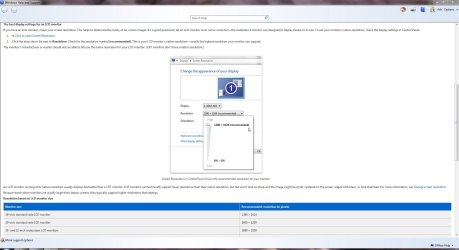
As the problem occurs with all browsers, you might want to check your screen resolution settings in your Control Panel. Chances are you've got the resolution set too high.

Resolution.JPG
 

My Computer My Computer

At a glance

Windows 7 Ultimate SP1 64-BitIntel Core i7 870 @ 2.93GHz8Gb Dual-Channel DDR3 @ 664MHznVidia GeForce GTX 460 1024MB dedicated RAM
Computer Manufacturer/Model Number
HP Pavilion Elite 495UK
OS
Windows 7 Ultimate SP1 64-Bit
CPU
Intel Core i7 870 @ 2.93GHz
Motherboard
MSI 2A9C (CPU1)
Memory
8Gb Dual-Channel DDR3 @ 664MHz
Graphics Card(s)
nVidia GeForce GTX 460 1024MB dedicated RAM
Sound Card
Realtek HD Audio
Monitor(s) Displays
HP2310i
Screen Resolution
1920 x 1080
Hard Drives
1x1954GB Hitachi HDS22020ALA 330 (RAID), 1x1954GB Hitachi External for backup and storage
PSU
460W
Case
HP Elite
Cooling
Air cooled
Keyboard
Logitech K750 solar-powered keyboard
Mouse
Logitech Wireless M180 mouse
Internet Speed
2Mb
Other Info
Pure Avanti Flow Internet Radio with iPod Dock, 64Gb iPod, HP USB Speakers, Sony MDR-V500 Headphones, Sony Vaio F-Series Laptop
Thanks for the reply.

However, this isn't the solution. I should have already put that I had my daughter check that - at all resolutions the issue is the same.
 

My Computer My Computer

At a glance

Windows 7 Home PremiumAMD Phenom(tm) II X2 511 Processor5.00 GBATI Radeon HD 4200
OS
Windows 7 Home Premium
CPU
AMD Phenom(tm) II X2 511 Processor
Motherboard
FOXCONN 2AB1
Memory
5.00 GB
Graphics Card(s)
ATI Radeon HD 4200
Sound Card
(1) AMD High Definition Audio Device (2) Realtek High Defini
Monitor(s) Displays
HP 2311 Series Wide LCD Monitor
Screen Resolution
1920 x 1080
Hard Drives
ST375052 8AS SATA Disk Drive
Keyboard
HP 5335U

My Computer My Computer

At a glance

Windows 7 Ultimate SP1 64-BitIntel Core i7 870 @ 2.93GHz8Gb Dual-Channel DDR3 @ 664MHznVidia GeForce GTX 460 1024MB dedicated RAM
Computer Manufacturer/Model Number
HP Pavilion Elite 495UK
OS
Windows 7 Ultimate SP1 64-Bit
CPU
Intel Core i7 870 @ 2.93GHz
Motherboard
MSI 2A9C (CPU1)
Memory
8Gb Dual-Channel DDR3 @ 664MHz
Graphics Card(s)
nVidia GeForce GTX 460 1024MB dedicated RAM
Sound Card
Realtek HD Audio
Monitor(s) Displays
HP2310i
Screen Resolution
1920 x 1080
Hard Drives
1x1954GB Hitachi HDS22020ALA 330 (RAID), 1x1954GB Hitachi External for backup and storage
PSU
460W
Case
HP Elite
Cooling
Air cooled
Keyboard
Logitech K750 solar-powered keyboard
Mouse
Logitech Wireless M180 mouse
Internet Speed
2Mb
Other Info
Pure Avanti Flow Internet Radio with iPod Dock, 64Gb iPod, HP USB Speakers, Sony MDR-V500 Headphones, Sony Vaio F-Series Laptop
I have updated that part of my profile with everything that I knew as a fact. It's a bit confusing as my daughter is the computer person, not me.
 

My Computer My Computer

At a glance

Windows 7 Home PremiumAMD Phenom(tm) II X2 511 Processor5.00 GBATI Radeon HD 4200
OS
Windows 7 Home Premium
CPU
AMD Phenom(tm) II X2 511 Processor
Motherboard
FOXCONN 2AB1
Memory
5.00 GB
Graphics Card(s)
ATI Radeon HD 4200
Sound Card
(1) AMD High Definition Audio Device (2) Realtek High Defini
Monitor(s) Displays
HP 2311 Series Wide LCD Monitor
Screen Resolution
1920 x 1080
Hard Drives
ST375052 8AS SATA Disk Drive
Keyboard
HP 5335U
I know this is a bit off subject, but how do you get 5GB Ram?

Interestingly enough, I was unable to find an HD4200 graphics driver off of the amd website :confused:
 

My Computer My Computer

At a glance

Microsoft Windows 8.1 Pro 64-bitIntel(R) Core(TM) i3-4130 CPU @ 3.40GHz8.00 GBNone
Computer type
PC/Desktop
Computer Manufacturer/Model Number
Custom Asus Build
OS
Microsoft Windows 8.1 Pro 64-bit
CPU
Intel(R) Core(TM) i3-4130 CPU @ 3.40GHz
Motherboard
B85M-E
Memory
8.00 GB
Graphics Card(s)
None
Sound Card
Realtek High Definition Audio
Monitor(s) Displays
Asus 23.6" Monitor
Screen Resolution
1920 x 1080 x 32 bits (4294967296 colors) @ 60 Hz
Hard Drives
INTEL SSDSC2BW180A4
Samsung SSD 840 PRO Series
PSU
Seasonic S12II-380Bronze
Case
Lian Li
Cooling
Fan, Passive
Keyboard
Logitech K120
Mouse
Microsoft Touch Mouse
Internet Speed
4ms Ping, 19.0 Mbps Download, 19.0 Mbps Upload
Antivirus
Eset Endpoint
Browser
Internet Explorer, Chrome
I know this is a bit off subject, but how do you get 5GB Ram?

Interestingly enough, I was unable to find an HD4200 graphics driver off of the amd website :confused:

The OP may have 2 sticks of 2gb and 2 sticks of 512mb.
:confused:
 

My Computer My Computer

At a glance

Windows 7 Home Premium 64 bitIntel Core i7-4790G.SKILL 8GB (2 x 4GB) DDR3 F3-10666CL9D-8GBNTAMD Radeon R7 250
Computer type
PC/Desktop
Computer Manufacturer/Model Number
Custom Build
OS
Windows 7 Home Premium 64 bit
CPU
Intel Core i7-4790
Motherboard
GA-Z87X-D3H
Memory
G.SKILL 8GB (2 x 4GB) DDR3 F3-10666CL9D-8GBNT
Graphics Card(s)
AMD Radeon R7 250
Sound Card
Realtek ALC892
Monitor(s) Displays
Samsung UN32EH5000, Dell 1703FPT
Screen Resolution
1920 x 1080, 1280 x 1024
Hard Drives
WD5003AZEX
WD10EZEX
Samsung HD103SJ
Samsung 128 GB 840 PRO
PSU
SeaSonic M12II SS-500GM
Case
Fractal Design Define R4
Cooling
Zalman CNPS9900ALED
Keyboard
Logitech K800
Mouse
Logitech M705
Internet Speed
16 Mbps
Antivirus
Avast
Browser
Firefox
Other Info
Bose Companion 2 Multimedia Speakers
I know this is a bit off subject, but how do you get 5GB Ram?

Interestingly enough, I was unable to find an HD4200 graphics driver off of the amd website :confused:

The OP may have 2 sticks of 2gb and 2 sticks of 512mb.
:confused:
Ah, true. Hadn't thought of that as most computers today come in 1-4GB per stick. This also leads me to believe that the computer is older as I mentioned I couldn't find a graphics driver for her. But then when did this problem start, and would the causes be known?
 

My Computer My Computer

At a glance

Microsoft Windows 8.1 Pro 64-bitIntel(R) Core(TM) i3-4130 CPU @ 3.40GHz8.00 GBNone
Computer type
PC/Desktop
Computer Manufacturer/Model Number
Custom Asus Build
OS
Microsoft Windows 8.1 Pro 64-bit
CPU
Intel(R) Core(TM) i3-4130 CPU @ 3.40GHz
Motherboard
B85M-E
Memory
8.00 GB
Graphics Card(s)
None
Sound Card
Realtek High Definition Audio
Monitor(s) Displays
Asus 23.6" Monitor
Screen Resolution
1920 x 1080 x 32 bits (4294967296 colors) @ 60 Hz
Hard Drives
INTEL SSDSC2BW180A4
Samsung SSD 840 PRO Series
PSU
Seasonic S12II-380Bronze
Case
Lian Li
Cooling
Fan, Passive
Keyboard
Logitech K120
Mouse
Microsoft Touch Mouse
Internet Speed
4ms Ping, 19.0 Mbps Download, 19.0 Mbps Upload
Antivirus
Eset Endpoint
Browser
Internet Explorer, Chrome
This is her daughter - I haven't looked at her specs - but will do when I come home tomorrow. However, the computer isn't old. It was bought late spring this year.

Also, you wouldn't find it on AMD website, I don't think. Wasn't ATI removed from AMD?
 

My Computer My Computer

At a glance

Windows 7 Home PremiumAMD Phenom(tm) II X2 511 Processor5.00 GBATI Radeon HD 4200
OS
Windows 7 Home Premium
CPU
AMD Phenom(tm) II X2 511 Processor
Motherboard
FOXCONN 2AB1
Memory
5.00 GB
Graphics Card(s)
ATI Radeon HD 4200
Sound Card
(1) AMD High Definition Audio Device (2) Realtek High Defini
Monitor(s) Displays
HP 2311 Series Wide LCD Monitor
Screen Resolution
1920 x 1080
Hard Drives
ST375052 8AS SATA Disk Drive
Keyboard
HP 5335U
This is her daughter - I haven't looked at her specs - but will do when I come home tomorrow. However, the computer isn't old. It was bought late spring this year.

Also, you wouldn't find it on AMD website, I don't think. Wasn't ATI removed from AMD?
I know this offers little to the actual solution to the problem, but which retailer did you get it from, if you don't mind my asking?
And has the computer always been doing this?
 

My Computer My Computer

At a glance

Microsoft Windows 8.1 Pro 64-bitIntel(R) Core(TM) i3-4130 CPU @ 3.40GHz8.00 GBNone
Computer type
PC/Desktop
Computer Manufacturer/Model Number
Custom Asus Build
OS
Microsoft Windows 8.1 Pro 64-bit
CPU
Intel(R) Core(TM) i3-4130 CPU @ 3.40GHz
Motherboard
B85M-E
Memory
8.00 GB
Graphics Card(s)
None
Sound Card
Realtek High Definition Audio
Monitor(s) Displays
Asus 23.6" Monitor
Screen Resolution
1920 x 1080 x 32 bits (4294967296 colors) @ 60 Hz
Hard Drives
INTEL SSDSC2BW180A4
Samsung SSD 840 PRO Series
PSU
Seasonic S12II-380Bronze
Case
Lian Li
Cooling
Fan, Passive
Keyboard
Logitech K120
Mouse
Microsoft Touch Mouse
Internet Speed
4ms Ping, 19.0 Mbps Download, 19.0 Mbps Upload
Antivirus
Eset Endpoint
Browser
Internet Explorer, Chrome
I believe she got it from Wal-mart? And no. She told me about it about a week ago. It originally started with Firefox, and now Chrome is doing it as well.

Last post for the night from me - thanks for the help so far - will try to fix her specs tomorrow.
 

My Computer My Computer

At a glance

Windows 7 Home PremiumAMD Phenom(tm) II X2 511 Processor5.00 GBATI Radeon HD 4200
OS
Windows 7 Home Premium
CPU
AMD Phenom(tm) II X2 511 Processor
Motherboard
FOXCONN 2AB1
Memory
5.00 GB
Graphics Card(s)
ATI Radeon HD 4200
Sound Card
(1) AMD High Definition Audio Device (2) Realtek High Defini
Monitor(s) Displays
HP 2311 Series Wide LCD Monitor
Screen Resolution
1920 x 1080
Hard Drives
ST375052 8AS SATA Disk Drive
Keyboard
HP 5335U
This only happens with the web browser and no other programs? Have you tried using Internet Explorer with similar effects?
 

My Computer My Computer

At a glance

Microsoft Windows 8.1 Pro 64-bitIntel(R) Core(TM) i3-4130 CPU @ 3.40GHz8.00 GBNone
Computer type
PC/Desktop
Computer Manufacturer/Model Number
Custom Asus Build
OS
Microsoft Windows 8.1 Pro 64-bit
CPU
Intel(R) Core(TM) i3-4130 CPU @ 3.40GHz
Motherboard
B85M-E
Memory
8.00 GB
Graphics Card(s)
None
Sound Card
Realtek High Definition Audio
Monitor(s) Displays
Asus 23.6" Monitor
Screen Resolution
1920 x 1080 x 32 bits (4294967296 colors) @ 60 Hz
Hard Drives
INTEL SSDSC2BW180A4
Samsung SSD 840 PRO Series
PSU
Seasonic S12II-380Bronze
Case
Lian Li
Cooling
Fan, Passive
Keyboard
Logitech K120
Mouse
Microsoft Touch Mouse
Internet Speed
4ms Ping, 19.0 Mbps Download, 19.0 Mbps Upload
Antivirus
Eset Endpoint
Browser
Internet Explorer, Chrome
The problem lies with your display settings, through control panes access the display icon, then go to change display settings, at some point you must have connected the display to an external device, TV or external laptop, all that has happened is that the display has reverted to the setting to display on another device, this can be reset with one click...Just click the option for display on main computer, hope this helps..
 

My Computer My Computer

At a glance

windows 7 home 32 bit
OS
windows 7 home 32 bit
I would agree with where jonah was going, though I would bet that this computer/laptop was connected to a secondary display and then the browsers/programs were moved over there and used but not moved back before the secondary display was removed.

Something like this may also happen even if it wasn't connected to a secondary display but somehow the current monitor is identified as "monitor 2". A lot of programs will launch onto monitor 1 only :/ A snapshot of the monitor settings as shown above might shed some light on that possibility.

Anyway, the short term fix for whatever caused it is this:
1) Launch the program
2) Hover the mouse over the task bar icon for the program till the preview pops up
3) Right click the preview and click "move".
4) Press one of the arrow keys just once (any one of them).
5) Use the mouse to move the program back onto the current display. I.e. if you see it expand off to the right, move the mouse to the left and you should see it move back onto the display area.
 

My Computer My Computer

At a glance

Windows 7 x64 Ultimatei7 96012 Gig Corsair DominatorNvidia 480
Computer Manufacturer/Model Number
Scratch built
OS
Windows 7 x64 Ultimate
CPU
i7 960
Motherboard
Asus P6X58D
Memory
12 Gig Corsair Dominator
Graphics Card(s)
Nvidia 480
Sound Card
Maudio Delta 44 + breakout box
Monitor(s) Displays
Dell UltraSharp U2410 24in and Samsung 21 dual monitors
Screen Resolution
1920x1200 and 1280x1024
Hard Drives
Primary: Intel X-25M G2 160G SSD
Secondary: Segate baracuda 1.0 TB
HDs in AHCI mode.
PSU
Corasair TX850
Case
Cooler Master HAF
Cooling
Corsair H50
Keyboard
Logitech G15 + N52 game pad
Mouse
Logitech MX518
Internet Speed
15kbs down 4.5kbps up
Other Info
WEI 7.6
CPU & RAM 7.6
Graphics 7.9
Hard disk 7.7
This is a re occurring hassle for me as well...to a point where it automatically starts up on a display i have disabled and dont know how to change it back
 

My Computer My Computer

At a glance

Windows 7 ultimate
OS
Windows 7 ultimate
Back
Top