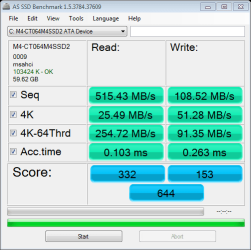
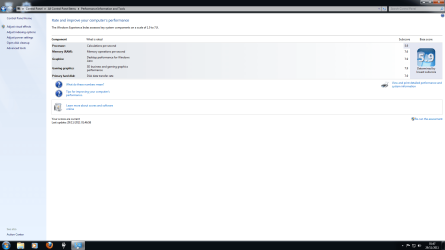
I don't know why the score is low for the CPU

Why times two?

Are you adjusting for DDR?
 

My Computer My Computer

At a glance

Windows 7 Pro-x64i7-2600 3.4GHz - 3.8GHz Turbo8Gb - 2x4GB, Muskin 991770 PC3-1333Integrated Intel HD 2000
Computer type
PC/Desktop
Computer Manufacturer/Model Number
Built 2/11/2011
OS
Windows 7 Pro-x64
CPU
i7-2600 3.4GHz - 3.8GHz Turbo
Motherboard
Intel DH67BL-B3
Memory
8Gb - 2x4GB, Muskin 991770 PC3-1333
Graphics Card(s)
Integrated Intel HD 2000
Sound Card
Integrated Intel 10.1 HD, RealTek ALC892
Monitor(s) Displays
Asus LCD VH222H, Haier HL24XSL2a
Screen Resolution
1920x1080, 1920x1080
Hard Drives
Crucial SSD C300-128Gb,
Western Digital WD5002AALX - 500Gb,
Western Digital WD7501AALS - 750Gb
PSU
Seasonic 650W 80+ Gold Modular
Case
Rosewill Defender
Cooling
Stock CPU, Four 120mm case fans, PCH fan added
Keyboard
Logitech EX100 Y-RBH94 Wireless
Mouse
Logitech EX100 M-RCE95 Wireless
Internet Speed
3.0/1.5 Mbs
Antivirus
Microsoft Security Essentials
Browser
Microsoft Internet Explorer 11
Other Info
Antec Veris Premier-Multimedia IR Station,
Cyber Accoustics-3602 Speakers,
AFT XM-5U Card Reader,
Hauppauge TV-HVR-2250,
Sony LX300 USB Turntable

Attachments

  • Regedit.png
    Regedit.png
    27.9 KB · Views: 26

My Computer My Computer

At a glance

Windows 7 Home 64 bitIntel Core I5 2500K8GBNVIDIA GeForce GTX 560 Ti
Computer Manufacturer/Model Number
Chillblast
OS
Windows 7 Home 64 bit
CPU
Intel Core I5 2500K
Motherboard
Asus P8Z68-V LE Motherboard
Memory
8GB
Graphics Card(s)
NVIDIA GeForce GTX 560 Ti
Monitor(s) Displays
32" Hannspree LCD TV
Screen Resolution
1920x1080
Hard Drives
1TB Samsung HDD
PSU
OCZ 80 plus 600W
Case
Cooler Master Elite 430 Case
Cooling
ThermoLab Trinity
That is the maximum setting it will run at with voltages etc. as they are now in bios.
 

My Computer My Computer

At a glance

Windows7 Pro 64bit SP-1; Windows XP Pro 32bitIntel Core i7-870 Lynnfield 2.93GHz LGA 1156 ...8GB@1400MHz Crucial Ballistix DDR3-1600 4x2GBASUS ENGTX460 DirectCU/2DI/1GD5 1GB 256-bit G...
Computer Manufacturer/Model Number
Hopalong/ Godzilla
OS
Windows7 Pro 64bit SP-1; Windows XP Pro 32bit
CPU
Intel Core i7-870 Lynnfield 2.93GHz LGA 1156 95W Quad-Core
Motherboard
ASUS P7P55D-E PRO
Memory
8GB@1400MHz Crucial Ballistix DDR3-1600 4x2GB
Graphics Card(s)
ASUS ENGTX460 DirectCU/2DI/1GD5 1GB 256-bit GDDR5
Sound Card
VIA Onboard
Monitor(s) Displays
Asus VS248H-P 24"; Samsung SyncMaster 941BW 19"ws
Screen Resolution
1920x1080; 1440x900
Hard Drives
Samsung 830 120GB SSD
Intel 320 120GB SSD
Western Digital Caviar Black WD7501AALS 750GB 7200 RPM SATA 3.0Gb/s
Western Digital Caviar Black WD6401AALS 640GB 7200 RPM SATA 3.0Gb/s
PSU
COOLER MASTER Silent Pro RS850-AMBAJ3-US 850W Modular
Case
COOLER MASTER HAF 932 RC-932-KKN5-GP Black
Cooling
Scythe "Mugen-2 Rev.B" (2 ScytheKaze-Jyuni PWM fans)
Keyboard
Logitech K-320
Mouse
Kensington
Antivirus
Avast Inernet Suite
Browser
IE 9 ; Chrome

My Computer My Computer

At a glance

Windows7 Pro 64bit SP-1; Windows XP Pro 32bitIntel Core i7-870 Lynnfield 2.93GHz LGA 1156 ...8GB@1400MHz Crucial Ballistix DDR3-1600 4x2GBASUS ENGTX460 DirectCU/2DI/1GD5 1GB 256-bit G...
Computer Manufacturer/Model Number
Hopalong/ Godzilla
OS
Windows7 Pro 64bit SP-1; Windows XP Pro 32bit
CPU
Intel Core i7-870 Lynnfield 2.93GHz LGA 1156 95W Quad-Core
Motherboard
ASUS P7P55D-E PRO
Memory
8GB@1400MHz Crucial Ballistix DDR3-1600 4x2GB
Graphics Card(s)
ASUS ENGTX460 DirectCU/2DI/1GD5 1GB 256-bit GDDR5
Sound Card
VIA Onboard
Monitor(s) Displays
Asus VS248H-P 24"; Samsung SyncMaster 941BW 19"ws
Screen Resolution
1920x1080; 1440x900
Hard Drives
Samsung 830 120GB SSD
Intel 320 120GB SSD
Western Digital Caviar Black WD7501AALS 750GB 7200 RPM SATA 3.0Gb/s
Western Digital Caviar Black WD6401AALS 640GB 7200 RPM SATA 3.0Gb/s
PSU
COOLER MASTER Silent Pro RS850-AMBAJ3-US 850W Modular
Case
COOLER MASTER HAF 932 RC-932-KKN5-GP Black
Cooling
Scythe "Mugen-2 Rev.B" (2 ScytheKaze-Jyuni PWM fans)
Keyboard
Logitech K-320
Mouse
Kensington
Antivirus
Avast Inernet Suite
Browser
IE 9 ; Chrome
Your in HKCU. You need to be in HKLM.

HKEY_LOCAL_MACHINE\SYSTEM\CurrentControlSet\services ...
 

My Computer My Computer

At a glance

Windows 7 Pro-x64i7-2600 3.4GHz - 3.8GHz Turbo8Gb - 2x4GB, Muskin 991770 PC3-1333Integrated Intel HD 2000
Computer type
PC/Desktop
Computer Manufacturer/Model Number
Built 2/11/2011
OS
Windows 7 Pro-x64
CPU
i7-2600 3.4GHz - 3.8GHz Turbo
Motherboard
Intel DH67BL-B3
Memory
8Gb - 2x4GB, Muskin 991770 PC3-1333
Graphics Card(s)
Integrated Intel HD 2000
Sound Card
Integrated Intel 10.1 HD, RealTek ALC892
Monitor(s) Displays
Asus LCD VH222H, Haier HL24XSL2a
Screen Resolution
1920x1080, 1920x1080
Hard Drives
Crucial SSD C300-128Gb,
Western Digital WD5002AALX - 500Gb,
Western Digital WD7501AALS - 750Gb
PSU
Seasonic 650W 80+ Gold Modular
Case
Rosewill Defender
Cooling
Stock CPU, Four 120mm case fans, PCH fan added
Keyboard
Logitech EX100 Y-RBH94 Wireless
Mouse
Logitech EX100 M-RCE95 Wireless
Internet Speed
3.0/1.5 Mbs
Antivirus
Microsoft Security Essentials
Browser
Microsoft Internet Explorer 11
Other Info
Antec Veris Premier-Multimedia IR Station,
Cyber Accoustics-3602 Speakers,
AFT XM-5U Card Reader,
Hauppauge TV-HVR-2250,
Sony LX300 USB Turntable

Well I put it in AHCI

Edit. I noticed it say system32. Does having a 64 bit OS and CPU have anything to do with it?
Should it be System 64 instead?

EDIT 2: I re-ran the assessment and have updated the WEI. Better than before by a mile as far as I am concerened. Thank you to all those who helped, much appreciated.
Should I start a Separate thread to resolve the issue just keep posting here?
 

Attachments

  • System32.png
    System32.png
    48.7 KB · Views: 7
  • as-ssd-bench M4-CT064M4SSD2 A 29.11.2011 01-33-20.png
    as-ssd-bench M4-CT064M4SSD2 A 29.11.2011 01-33-20.png
    13.2 KB · Views: 4
  • WEI.png
    WEI.png
    59.4 KB · Views: 24
Last edited:

My Computer My Computer

At a glance

Windows 7 Home 64 bitIntel Core I5 2500K8GBNVIDIA GeForce GTX 560 Ti
Computer Manufacturer/Model Number
Chillblast
OS
Windows 7 Home 64 bit
CPU
Intel Core I5 2500K
Motherboard
Asus P8Z68-V LE Motherboard
Memory
8GB
Graphics Card(s)
NVIDIA GeForce GTX 560 Ti
Monitor(s) Displays
32" Hannspree LCD TV
Screen Resolution
1920x1080
Hard Drives
1TB Samsung HDD
PSU
OCZ 80 plus 600W
Case
Cooler Master Elite 430 Case
Cooling
ThermoLab Trinity
Well I put it in AHCI but the CPU score has gone up a bit.

Edit. I noticed it say system32. Does having a 64 bit OS and CPU have anything to do with it?
Should it be System 64 instead?

Numbers are looking better but the CPU still has a issue
 

My Computer My Computer

At a glance

Windows 10 Home Premium 64bit sp1Intel I7-6700K @ 4.6 Ghz 1.344 volts everyday OC32GB G-Skill TridentZ 3200mhz 16-18-18-38 DDR4Sli Gigabyte Windforce GTX 980 G1
Computer type
PC/Desktop
Computer Manufacturer/Model Number
CoreI7-6700K MrFingerIII Special Builds
OS
Windows 10 Home Premium 64bit sp1
CPU
Intel I7-6700K @ 4.6 Ghz 1.344 volts everyday OC
Motherboard
Asrock Fatality K6 Z170 Socket 1151
Memory
32GB G-Skill TridentZ 3200mhz 16-18-18-38 DDR4
Graphics Card(s)
Sli Gigabyte Windforce GTX 980 G1
Sound Card
AC97 Creative Rage Tactic 3D Headphones Bluetooth
Monitor(s) Displays
27" Asus ROG Swift PG278Q G-Sync 48" Vizio Smart HD TV
Screen Resolution
2560x1440p 27"- 48" Currently Gaming at 2560x1440p Res 2K
Hard Drives
250GB Samsung Evo840SSD Seagate baracuda 500 GB WD Mybook 500Gb 1TB Seagate Barracuda
PSU
HX1050w Corsair Silver 80plus certified crosfire/sli
Case
Enthod Pro Full Tower
Cooling
Corsair H110i GT 280 mm High Performance WaterBlock
Keyboard
Logitech wireless keyboard
Mouse
Logitech wireless mouse
Internet Speed
Cox Cable 100+ mb
Antivirus
WebRoot Spysweeper with Antivirus
Browser
IE-10, Chrome, Opera
Other Info
My Other Rig is a AMD FX8320E @4.6Ghz 16GB Ballistic Sport Ram
Mobo Asrock Fatality 990FX 120GB OCZ SSD 1TB Seagate Barracuda Corsair H75 Cooling PSU Corsair CX750
GPU GTX Gigabyte 970G1
After you built the computer, on first start up you should have gone straight to bios. Can you remember exactly what you did and what you set? Did you set 'optimized defaults? Is turbo enabled and what is the multiplier for turbo mode? If you can take pictures showing the Vcore, turbo mode Intel speed step and all of the settings, please post them. It appears you have a wrong setting in bios, a bad CPU or a bad motherboard. Your CPU should get a 7.5-7.6 in WEI, and your raphics card should get 7.9.
 

My Computers My Computers

  • At a glance

    Windows 11 ProRyzen 9 5900X32GB G Skill DDR4-3600EVGA RTX 3080 FTW 3 Ultra
    Computer type
    PC/Desktop
    Computer Manufacturer/Model Number
    ALWAYS UNDER CONSTRUCTION
    OS
    Windows 11 Pro
    CPU
    Ryzen 9 5900X
    Motherboard
    Asus X570 Crosshair Viii Hero
    Memory
    32GB G Skill DDR4-3600
    Graphics Card(s)
    EVGA RTX 3080 FTW 3 Ultra
    Sound Card
    On Board/Sennheiser PC37X Headset
    Monitor(s) Displays
    3 X Asus 27"
    Screen Resolution
    2560x1440
    Hard Drives
    2 X 1 TB NVME drives
    PSU
    EVGA 850
    Case
    Phanteks Eclipse P400A
    Cooling
    EVGA 280 AIO
    Keyboard
    Logitech G510s/ Logitech G13
    Mouse
    Logitech G502
    Internet Speed
    24/1
    Antivirus
    ESET/MBAM Pro/SAS Pro
    Browser
    Chrome/ Firefox/ Edge
  • At a glance

    Windows 11 ProIntel Ultra 9 288V32 GB LPDDR5X 8533
    Computer type
    Laptop
    System Manufacturer/Model Number
    Dell 16 Plus
    OS
    Windows 11 Pro
    CPU
    Intel Ultra 9 288V
    Memory
    32 GB LPDDR5X 8533
    Monitor(s) Displays
    16" Mini-LED HDR600 Touch 90 Hz
    Screen Resolution
    2560X1600
    Hard Drives
    1 TB NVME
After you built the computer, on first start up you should have gone straight to bios. Can you remember exactly what you did and what you set? Did you set 'optimized defaults? Is turbo enabled and what is the multiplier for turbo mode? If you can take pictures showing the Vcore, turbo mode Intel speed step and all of the settings, please post them. It appears you have a wrong setting in bios, a bad CPU or a bad motherboard. Your CPU should get a 7.5-7.6 in WEI, and your raphics card should get 7.9.

I bought this PC from a friend. It was prebuilt I think. So I didn't set the settings but i'll go into the bios and look. But yes I think he said when he got it he flashed the bios and set it to optimized defaults because it kept turning itself off. Where can I find turbo boost?
 

My Computer My Computer

At a glance

Windows 7 Home 64 bitIntel Core I5 2500K8GBNVIDIA GeForce GTX 560 Ti
Computer Manufacturer/Model Number
Chillblast
OS
Windows 7 Home 64 bit
CPU
Intel Core I5 2500K
Motherboard
Asus P8Z68-V LE Motherboard
Memory
8GB
Graphics Card(s)
NVIDIA GeForce GTX 560 Ti
Monitor(s) Displays
32" Hannspree LCD TV
Screen Resolution
1920x1080
Hard Drives
1TB Samsung HDD
PSU
OCZ 80 plus 600W
Case
Cooler Master Elite 430 Case
Cooling
ThermoLab Trinity
After you built the computer, on first start up you should have gone straight to bios. Can you remember exactly what you did and what you set? Did you set 'optimized defaults? Is turbo enabled and what is the multiplier for turbo mode? If you can take pictures showing the Vcore, turbo mode Intel speed step and all of the settings, please post them. It appears you have a wrong setting in bios, a bad CPU or a bad motherboard. Your CPU should get a 7.5-7.6 in WEI, and your raphics card should get 7.9.

I bought this PC from a friend. It was prebuilt I think. So I didn't set the settings but i'll go into the bios and look. But yes I think he said when he got it he flashed the bios and set it to optimized defaults because it kept turning itself off. Where can I find turbo boost?

I'm not familar with Gigabyte bios settings. But you can usually find it in a section of bios usually called overclocking or advanced settings. It is the section where you overclock the CPU, but is also where the important settings are. My board, if I put a USB drive in; on any page I'm on I can push F12 and it will put a picture of that bios page on the USB. I would think yours has something similar.
 

My Computers My Computers

  • At a glance

    Windows 11 ProRyzen 9 5900X32GB G Skill DDR4-3600EVGA RTX 3080 FTW 3 Ultra
    Computer type
    PC/Desktop
    Computer Manufacturer/Model Number
    ALWAYS UNDER CONSTRUCTION
    OS
    Windows 11 Pro
    CPU
    Ryzen 9 5900X
    Motherboard
    Asus X570 Crosshair Viii Hero
    Memory
    32GB G Skill DDR4-3600
    Graphics Card(s)
    EVGA RTX 3080 FTW 3 Ultra
    Sound Card
    On Board/Sennheiser PC37X Headset
    Monitor(s) Displays
    3 X Asus 27"
    Screen Resolution
    2560x1440
    Hard Drives
    2 X 1 TB NVME drives
    PSU
    EVGA 850
    Case
    Phanteks Eclipse P400A
    Cooling
    EVGA 280 AIO
    Keyboard
    Logitech G510s/ Logitech G13
    Mouse
    Logitech G502
    Internet Speed
    24/1
    Antivirus
    ESET/MBAM Pro/SAS Pro
    Browser
    Chrome/ Firefox/ Edge
  • At a glance

    Windows 11 ProIntel Ultra 9 288V32 GB LPDDR5X 8533
    Computer type
    Laptop
    System Manufacturer/Model Number
    Dell 16 Plus
    OS
    Windows 11 Pro
    CPU
    Intel Ultra 9 288V
    Memory
    32 GB LPDDR5X 8533
    Monitor(s) Displays
    16" Mini-LED HDR600 Touch 90 Hz
    Screen Resolution
    2560X1600
    Hard Drives
    1 TB NVME
With Gigabyte, you find the various overclocking functions under MIT (Motherboard Intelligent Tweaker).
 

My Computer My Computer

At a glance

Windows 10 Pro x64 ; Xubuntu x64Intel i7 860 @ 2.80 GHz O/C'ed to 4.0GHz16GB Corsair Vengance DDR3 @ 661 MHz Dual Cha...EVGA NVidia GTX 560 1024MB
Computer type
PC/Desktop
Computer Manufacturer/Model Number
Golden Mk. I.4
OS
Windows 10 Pro x64 ; Xubuntu x64
CPU
Intel i7 860 @ 2.80 GHz O/C'ed to 4.0GHz
Motherboard
Gigabyte P55A-UD3R Rev.1. Award BIOS F13
Memory
16GB Corsair Vengance DDR3 @ 661 MHz Dual Channel (9-9-9-24)
Graphics Card(s)
EVGA NVidia GTX 560 1024MB
Sound Card
Realtek Integrated
Monitor(s) Displays
Dual Samsung SyncMaster 2494HS
Screen Resolution
1920*1080 and 1920*1080
Hard Drives
1*Samsung 840 EVO 120GB SSD;
1*OCZ Vertex 2 60GB SSD;
2*Samsung F3 SpinPoint 1TB in RAID0;
1*Samsung F1 SpinPoint 1TB;
2*Western Digital 1TB External USB 3.0
1*Western Digital 500GB External USB 3.0
1*Seagate 500GB External USB 2.0
PSU
Thermaltake ToughPower QFan 750W
Case
Thermaltake Element S VK60001W2Z
Cooling
Corsair H60 Water Cooling, 2*230mm and 2*80mm case fans
Keyboard
Logitech G110
Mouse
Logitech MX518
If he had to flash the Bios due to itself turning off it has to be a deeper issue

Something is not running properly or is on it's way out meaning one or maybe a few components are faulty or even bad cooling

have you checked all the hardware to make sure it is running at proper timmings and also the person didn't flash the wrong Bios to the board
 

My Computer My Computer

At a glance

Windows 10 Home Premium 64bit sp1Intel I7-6700K @ 4.6 Ghz 1.344 volts everyday OC32GB G-Skill TridentZ 3200mhz 16-18-18-38 DDR4Sli Gigabyte Windforce GTX 980 G1
Computer type
PC/Desktop
Computer Manufacturer/Model Number
CoreI7-6700K MrFingerIII Special Builds
OS
Windows 10 Home Premium 64bit sp1
CPU
Intel I7-6700K @ 4.6 Ghz 1.344 volts everyday OC
Motherboard
Asrock Fatality K6 Z170 Socket 1151
Memory
32GB G-Skill TridentZ 3200mhz 16-18-18-38 DDR4
Graphics Card(s)
Sli Gigabyte Windforce GTX 980 G1
Sound Card
AC97 Creative Rage Tactic 3D Headphones Bluetooth
Monitor(s) Displays
27" Asus ROG Swift PG278Q G-Sync 48" Vizio Smart HD TV
Screen Resolution
2560x1440p 27"- 48" Currently Gaming at 2560x1440p Res 2K
Hard Drives
250GB Samsung Evo840SSD Seagate baracuda 500 GB WD Mybook 500Gb 1TB Seagate Barracuda
PSU
HX1050w Corsair Silver 80plus certified crosfire/sli
Case
Enthod Pro Full Tower
Cooling
Corsair H110i GT 280 mm High Performance WaterBlock
Keyboard
Logitech wireless keyboard
Mouse
Logitech wireless mouse
Internet Speed
Cox Cable 100+ mb
Antivirus
WebRoot Spysweeper with Antivirus
Browser
IE-10, Chrome, Opera
Other Info
My Other Rig is a AMD FX8320E @4.6Ghz 16GB Ballistic Sport Ram
Mobo Asrock Fatality 990FX 120GB OCZ SSD 1TB Seagate Barracuda Corsair H75 Cooling PSU Corsair CX750
GPU GTX Gigabyte 970G1
After you built the computer, on first start up you should have gone straight to bios. Can you remember exactly what you did and what you set? Did you set 'optimized defaults? Is turbo enabled and what is the multiplier for turbo mode? If you can take pictures showing the Vcore, turbo mode Intel speed step and all of the settings, please post them. It appears you have a wrong setting in bios, a bad CPU or a bad motherboard. Your CPU should get a 7.5-7.6 in WEI, and your raphics card should get 7.9.

I bought this PC from a friend. It was prebuilt I think. So I didn't set the settings but i'll go into the bios and look. But yes I think he said when he got it he flashed the bios and set it to optimized defaults because it kept turning itself off. Where can I find turbo boost?

Your PCI-E slot also appears to be running at x1, not x16?

185858d1322523181-show-us-your-wei-3-mobo.png


Here's mine

2colk5e.jpg


A Guy
 

My Computer My Computer

At a glance

Windows 10 Home x64INTEL Core i5-750 Quad-Core 3.37GHzHyperX Fury Black Series 8GB (2 x 4GB) 1866MhzEVGA GeForce GTX 750 Superclocked 1GB 128-Bit...
Computer type
PC/Desktop
OS
Windows 10 Home x64
CPU
INTEL Core i5-750 Quad-Core 3.37GHz
Motherboard
ASUS P7P55D
Memory
HyperX Fury Black Series 8GB (2 x 4GB) 1866Mhz
Graphics Card(s)
EVGA GeForce GTX 750 Superclocked 1GB 128-Bit GDDR5
Monitor(s) Displays
LG 32MA68HY 32" IPS
Screen Resolution
1920 x 1080
Hard Drives
Samsung 840 Evo 120GB, SEAGATE 500GB Barracuda® 7200.12, SATA 3 Gb/s, 7200 RPM, 16MB cache
PSU
ANTEC TruePower New TP-550, 80 PLUS, 550W
Case
ANTEC Three Hundred Illusion
Cooling
COOLER MASTER Hyper 212 Plus, 4 x 120mm 1 x 140mm Noctua's
Internet Speed
85 + Mbps
Antivirus
Avast
Browser
Vivaldi
Nice catch A Guy. I missed that completely. First time I have ever missed anything.:roflmao:
But, how do you get a 2GB 6970 to run at X1?
 

My Computers My Computers

  • At a glance

    Windows 11 ProRyzen 9 5900X32GB G Skill DDR4-3600EVGA RTX 3080 FTW 3 Ultra
    Computer type
    PC/Desktop
    Computer Manufacturer/Model Number
    ALWAYS UNDER CONSTRUCTION
    OS
    Windows 11 Pro
    CPU
    Ryzen 9 5900X
    Motherboard
    Asus X570 Crosshair Viii Hero
    Memory
    32GB G Skill DDR4-3600
    Graphics Card(s)
    EVGA RTX 3080 FTW 3 Ultra
    Sound Card
    On Board/Sennheiser PC37X Headset
    Monitor(s) Displays
    3 X Asus 27"
    Screen Resolution
    2560x1440
    Hard Drives
    2 X 1 TB NVME drives
    PSU
    EVGA 850
    Case
    Phanteks Eclipse P400A
    Cooling
    EVGA 280 AIO
    Keyboard
    Logitech G510s/ Logitech G13
    Mouse
    Logitech G502
    Internet Speed
    24/1
    Antivirus
    ESET/MBAM Pro/SAS Pro
    Browser
    Chrome/ Firefox/ Edge
  • At a glance

    Windows 11 ProIntel Ultra 9 288V32 GB LPDDR5X 8533
    Computer type
    Laptop
    System Manufacturer/Model Number
    Dell 16 Plus
    OS
    Windows 11 Pro
    CPU
    Intel Ultra 9 288V
    Memory
    32 GB LPDDR5X 8533
    Monitor(s) Displays
    16" Mini-LED HDR600 Touch 90 Hz
    Screen Resolution
    2560X1600
    Hard Drives
    1 TB NVME
Nice catch A Guy. I missed that completely. First time I have ever missed anything.:roflmao:
But, how do you get a 2GB 6970 to run at X1?

Not sure you can, but you get a 7.8 if you do apparently :shock: Just looked at his WEI again, the GPU is not looking bad, but apparently it should get a 7.9?

A Guy
 

My Computer My Computer

At a glance

Windows 10 Home x64INTEL Core i5-750 Quad-Core 3.37GHzHyperX Fury Black Series 8GB (2 x 4GB) 1866MhzEVGA GeForce GTX 750 Superclocked 1GB 128-Bit...
Computer type
PC/Desktop
OS
Windows 10 Home x64
CPU
INTEL Core i5-750 Quad-Core 3.37GHz
Motherboard
ASUS P7P55D
Memory
HyperX Fury Black Series 8GB (2 x 4GB) 1866Mhz
Graphics Card(s)
EVGA GeForce GTX 750 Superclocked 1GB 128-Bit GDDR5
Monitor(s) Displays
LG 32MA68HY 32" IPS
Screen Resolution
1920 x 1080
Hard Drives
Samsung 840 Evo 120GB, SEAGATE 500GB Barracuda® 7200.12, SATA 3 Gb/s, 7200 RPM, 16MB cache
PSU
ANTEC TruePower New TP-550, 80 PLUS, 550W
Case
ANTEC Three Hundred Illusion
Cooling
COOLER MASTER Hyper 212 Plus, 4 x 120mm 1 x 140mm Noctua's
Internet Speed
85 + Mbps
Antivirus
Avast
Browser
Vivaldi
Nice catch A Guy. I missed that completely. First time I have ever missed anything.:roflmao:
But, how do you get a 2GB 6970 to run at X1?

Not sure you can, but you get a 7.8 if you do apparently :shock: Just looked at his WEI again, the GPU is not looking bad, but apparently it should get a 7.9?

A Guy

It should easily get a 7.9 but the really bad one is the CPU. It should get 7.5-7.6
 

My Computers My Computers

  • At a glance

    Windows 11 ProRyzen 9 5900X32GB G Skill DDR4-3600EVGA RTX 3080 FTW 3 Ultra
    Computer type
    PC/Desktop
    Computer Manufacturer/Model Number
    ALWAYS UNDER CONSTRUCTION
    OS
    Windows 11 Pro
    CPU
    Ryzen 9 5900X
    Motherboard
    Asus X570 Crosshair Viii Hero
    Memory
    32GB G Skill DDR4-3600
    Graphics Card(s)
    EVGA RTX 3080 FTW 3 Ultra
    Sound Card
    On Board/Sennheiser PC37X Headset
    Monitor(s) Displays
    3 X Asus 27"
    Screen Resolution
    2560x1440
    Hard Drives
    2 X 1 TB NVME drives
    PSU
    EVGA 850
    Case
    Phanteks Eclipse P400A
    Cooling
    EVGA 280 AIO
    Keyboard
    Logitech G510s/ Logitech G13
    Mouse
    Logitech G502
    Internet Speed
    24/1
    Antivirus
    ESET/MBAM Pro/SAS Pro
    Browser
    Chrome/ Firefox/ Edge
  • At a glance

    Windows 11 ProIntel Ultra 9 288V32 GB LPDDR5X 8533
    Computer type
    Laptop
    System Manufacturer/Model Number
    Dell 16 Plus
    OS
    Windows 11 Pro
    CPU
    Intel Ultra 9 288V
    Memory
    32 GB LPDDR5X 8533
    Monitor(s) Displays
    16" Mini-LED HDR600 Touch 90 Hz
    Screen Resolution
    2560X1600
    Hard Drives
    1 TB NVME
After you built the computer, on first start up you should have gone straight to bios. Can you remember exactly what you did and what you set? Did you set 'optimized defaults? Is turbo enabled and what is the multiplier for turbo mode? If you can take pictures showing the Vcore, turbo mode Intel speed step and all of the settings, please post them. It appears you have a wrong setting in bios, a bad CPU or a bad motherboard. Your CPU should get a 7.5-7.6 in WEI, and your raphics card should get 7.9.

I bought this PC from a friend. It was prebuilt I think. So I didn't set the settings but i'll go into the bios and look. But yes I think he said when he got it he flashed the bios and set it to optimized defaults because it kept turning itself off. Where can I find turbo boost?

Your PCI-E slot also appears to be running at x1, not x16?

185858d1322523181-show-us-your-wei-3-mobo.png


Here's mine

2colk5e.jpg


A Guy

Sorry for the late replies. I went to bed it was 2am when I was making changes to the computer. Yes it is set to PCI in the Bios should I change it to PCIE x16?
 

My Computer My Computer

At a glance

Windows 7 Home 64 bitIntel Core I5 2500K8GBNVIDIA GeForce GTX 560 Ti
Computer Manufacturer/Model Number
Chillblast
OS
Windows 7 Home 64 bit
CPU
Intel Core I5 2500K
Motherboard
Asus P8Z68-V LE Motherboard
Memory
8GB
Graphics Card(s)
NVIDIA GeForce GTX 560 Ti
Monitor(s) Displays
32" Hannspree LCD TV
Screen Resolution
1920x1080
Hard Drives
1TB Samsung HDD
PSU
OCZ 80 plus 600W
Case
Cooler Master Elite 430 Case
Cooling
ThermoLab Trinity
Nice catch A Guy. I missed that completely. First time I have ever missed anything.:roflmao:
But, how do you get a 2GB 6970 to run at X1?

Not sure you can, but you get a 7.8 if you do apparently :shock: Just looked at his WEI again, the GPU is not looking bad, but apparently it should get a 7.9?

A Guy

It should easily get a 7.9 but the really bad one is the CPU. It should get 7.5-7.6

The score has gone up to 6.3. It is set to PCI in the Bios should I set to PCIEx16?
 

Attachments

  • WEI.png
    WEI.png
    48.2 KB · Views: 34

My Computer My Computer

At a glance

Windows 7 Home 64 bitIntel Core I5 2500K8GBNVIDIA GeForce GTX 560 Ti
Computer Manufacturer/Model Number
Chillblast
OS
Windows 7 Home 64 bit
CPU
Intel Core I5 2500K
Motherboard
Asus P8Z68-V LE Motherboard
Memory
8GB
Graphics Card(s)
NVIDIA GeForce GTX 560 Ti
Monitor(s) Displays
32" Hannspree LCD TV
Screen Resolution
1920x1080
Hard Drives
1TB Samsung HDD
PSU
OCZ 80 plus 600W
Case
Cooler Master Elite 430 Case
Cooling
ThermoLab Trinity
Not sure you can, but you get a 7.8 if you do apparently :shock: Just looked at his WEI again, the GPU is not looking bad, but apparently it should get a 7.9?

A Guy

It should easily get a 7.9 but the really bad one is the CPU. It should get 7.5-7.6

The score has gone up to 6.3. It is set to PCI in the Bios should I set to PCIEx16?

Yes, if you are talking about the GPU. It should be PCIe X16. What other adjustments have you made? An increase from 4.2 to 6.3 is a significant increase, but should still be at least 7.5.

I just noticed that your GPU went up from 7.8 to 7.9 like it should be. Did you make the pcie change before running that wei?
 

My Computers My Computers

  • At a glance

    Windows 11 ProRyzen 9 5900X32GB G Skill DDR4-3600EVGA RTX 3080 FTW 3 Ultra
    Computer type
    PC/Desktop
    Computer Manufacturer/Model Number
    ALWAYS UNDER CONSTRUCTION
    OS
    Windows 11 Pro
    CPU
    Ryzen 9 5900X
    Motherboard
    Asus X570 Crosshair Viii Hero
    Memory
    32GB G Skill DDR4-3600
    Graphics Card(s)
    EVGA RTX 3080 FTW 3 Ultra
    Sound Card
    On Board/Sennheiser PC37X Headset
    Monitor(s) Displays
    3 X Asus 27"
    Screen Resolution
    2560x1440
    Hard Drives
    2 X 1 TB NVME drives
    PSU
    EVGA 850
    Case
    Phanteks Eclipse P400A
    Cooling
    EVGA 280 AIO
    Keyboard
    Logitech G510s/ Logitech G13
    Mouse
    Logitech G502
    Internet Speed
    24/1
    Antivirus
    ESET/MBAM Pro/SAS Pro
    Browser
    Chrome/ Firefox/ Edge
  • At a glance

    Windows 11 ProIntel Ultra 9 288V32 GB LPDDR5X 8533
    Computer type
    Laptop
    System Manufacturer/Model Number
    Dell 16 Plus
    OS
    Windows 11 Pro
    CPU
    Intel Ultra 9 288V
    Memory
    32 GB LPDDR5X 8533
    Monitor(s) Displays
    16" Mini-LED HDR600 Touch 90 Hz
    Screen Resolution
    2560X1600
    Hard Drives
    1 TB NVME
It should easily get a 7.9 but the really bad one is the CPU. It should get 7.5-7.6

The score has gone up to 6.3. It is set to PCI in the Bios should I set to PCIEx16?

Yes, if you are talking about the GPU. It should be PCIe X16. What other adjustments have you made? An increase fron 4.2 to 6.3 is a significant increase, but should still be at least 7.5.

I'll go into the bios now and make the change to the GPU and get info on the settings for you.
 

My Computer My Computer

At a glance

Windows 7 Home 64 bitIntel Core I5 2500K8GBNVIDIA GeForce GTX 560 Ti
Computer Manufacturer/Model Number
Chillblast
OS
Windows 7 Home 64 bit
CPU
Intel Core I5 2500K
Motherboard
Asus P8Z68-V LE Motherboard
Memory
8GB
Graphics Card(s)
NVIDIA GeForce GTX 560 Ti
Monitor(s) Displays
32" Hannspree LCD TV
Screen Resolution
1920x1080
Hard Drives
1TB Samsung HDD
PSU
OCZ 80 plus 600W
Case
Cooler Master Elite 430 Case
Cooling
ThermoLab Trinity
Back
Top