I don't know why the score is low for the CPU

The score has gone up to 6.3. It is set to PCI in the Bios should I set to PCIEx16?

Yes, if you are talking about the GPU. It should be PCIe X16. What other adjustments have you made? An increase fron 4.2 to 6.3 is a significant increase, but should still be at least 7.5.

I'll go into the bios now and make the change to the GPU and get info on the settings for you.

Since this is a second hand PC did anyone think that the original owner put the video card in the wrong PCI slot?

Say a PCI x1 slot instead of the PCIx16?
Some cards will plug into the wrong slot but won't function properly.

Just a thought. Don't know if applicable in this case.
 

My Computer My Computer

At a glance

Windows7 Pro 64bit SP-1; Windows XP Pro 32bitIntel Core i7-870 Lynnfield 2.93GHz LGA 1156 ...8GB@1400MHz Crucial Ballistix DDR3-1600 4x2GBASUS ENGTX460 DirectCU/2DI/1GD5 1GB 256-bit G...
Computer Manufacturer/Model Number
Hopalong/ Godzilla
OS
Windows7 Pro 64bit SP-1; Windows XP Pro 32bit
CPU
Intel Core i7-870 Lynnfield 2.93GHz LGA 1156 95W Quad-Core
Motherboard
ASUS P7P55D-E PRO
Memory
8GB@1400MHz Crucial Ballistix DDR3-1600 4x2GB
Graphics Card(s)
ASUS ENGTX460 DirectCU/2DI/1GD5 1GB 256-bit GDDR5
Sound Card
VIA Onboard
Monitor(s) Displays
Asus VS248H-P 24"; Samsung SyncMaster 941BW 19"ws
Screen Resolution
1920x1080; 1440x900
Hard Drives
Samsung 830 120GB SSD
Intel 320 120GB SSD
Western Digital Caviar Black WD7501AALS 750GB 7200 RPM SATA 3.0Gb/s
Western Digital Caviar Black WD6401AALS 640GB 7200 RPM SATA 3.0Gb/s
PSU
COOLER MASTER Silent Pro RS850-AMBAJ3-US 850W Modular
Case
COOLER MASTER HAF 932 RC-932-KKN5-GP Black
Cooling
Scythe "Mugen-2 Rev.B" (2 ScytheKaze-Jyuni PWM fans)
Keyboard
Logitech K-320
Mouse
Kensington
Antivirus
Avast Inernet Suite
Browser
IE 9 ; Chrome
KhajiitDovakiin, Just a thought. Turn off your computer, open the side of your case. Just to the left (usually) of the CPU, you should find a connection from the PSU. It should have 2 x 4 pin connectors. make sure both 4 pin connectors are connected and properly seated, not just 1 4 pin.
 

My Computers My Computers

  • At a glance

    Windows 11 ProRyzen 9 5900X32GB G Skill DDR4-3600EVGA RTX 3080 FTW 3 Ultra
    Computer type
    PC/Desktop
    Computer Manufacturer/Model Number
    ALWAYS UNDER CONSTRUCTION
    OS
    Windows 11 Pro
    CPU
    Ryzen 9 5900X
    Motherboard
    Asus X570 Crosshair Viii Hero
    Memory
    32GB G Skill DDR4-3600
    Graphics Card(s)
    EVGA RTX 3080 FTW 3 Ultra
    Sound Card
    On Board/Sennheiser PC37X Headset
    Monitor(s) Displays
    3 X Asus 27"
    Screen Resolution
    2560x1440
    Hard Drives
    2 X 1 TB NVME drives
    PSU
    EVGA 850
    Case
    Phanteks Eclipse P400A
    Cooling
    EVGA 280 AIO
    Keyboard
    Logitech G510s/ Logitech G13
    Mouse
    Logitech G502
    Internet Speed
    24/1
    Antivirus
    ESET/MBAM Pro/SAS Pro
    Browser
    Chrome/ Firefox/ Edge
  • At a glance

    Windows 11 ProIntel Ultra 9 288V32 GB LPDDR5X 8533
    Computer type
    Laptop
    System Manufacturer/Model Number
    Dell 16 Plus
    OS
    Windows 11 Pro
    CPU
    Intel Ultra 9 288V
    Memory
    32 GB LPDDR5X 8533
    Monitor(s) Displays
    16" Mini-LED HDR600 Touch 90 Hz
    Screen Resolution
    2560X1600
    Hard Drives
    1 TB NVME
Turno is set to auto

The Bios settings are:

MIT Menu
Bios version F3
BLCK 100.5 MHz
CPU Frequency 200.24 mhz
Memory frequency. 1334.80mhz
V.core 0.900 V
Vram voltage 1.524v

Advanced memory settings:
exteme memory profile Disabled
System memory multiplier auto 1333 1333
peformance enhance - turbo
Dram timing selectable
Profil DDR voltage 1.5V
Profile VTT voltage 1.05V
Channel interleaving auto
Rank interleavng auto

MIT curent settings
CPU cores turbo ratio
0 1 2 3
2 2 2 2

turbo frequency 200.2 for all cores
non turbo frequency 302.2 or 3302.2( I can't remeber which) for all cores. some times it went up to .5

DIMM(s)
Channel A and B readings are all the same TLC 9 TROD 9 TRAS 24 TRRD 5 TWTP 21 TRFC 108 TCMD 1
 

My Computer My Computer

At a glance

Windows 7 Home 64 bitIntel Core I5 2500K8GBNVIDIA GeForce GTX 560 Ti
Computer Manufacturer/Model Number
Chillblast
OS
Windows 7 Home 64 bit
CPU
Intel Core I5 2500K
Motherboard
Asus P8Z68-V LE Motherboard
Memory
8GB
Graphics Card(s)
NVIDIA GeForce GTX 560 Ti
Monitor(s) Displays
32" Hannspree LCD TV
Screen Resolution
1920x1080
Hard Drives
1TB Samsung HDD
PSU
OCZ 80 plus 600W
Case
Cooler Master Elite 430 Case
Cooling
ThermoLab Trinity
Turno is set to auto

The Bios settings are:

MIT Menu
Bios version F3
BLCK 100.5 MHz
CPU Frequency 200.24 mhz
Memory frequency. 1334.80mhz
V.core 0.900 V
Vram voltage 1.524v

Advanced memory settings:
exteme memory profile Disabled
System memory multiplier auto 1333 1333
peformance enhance - turbo
Dram timing selectable
Profil DDR voltage 1.5V
Profile VTT voltage 1.05V
Channel interleaving auto
Rank interleavng auto

MIT curent settings
CPU cores turbo ratio
0 1 2 3
2 2 2 2

turbo frequency 200.2 for all cores
non turbo frequency 302.2 or 3302.2( I can't remeber which) for all cores. some times it went up to .5

DIMM(s)
Channel A and B readings are all the same TLC 9 TROD 9 TRAS 24 TRRD 5 TWTP 21 TRFC 108 TCMD 1

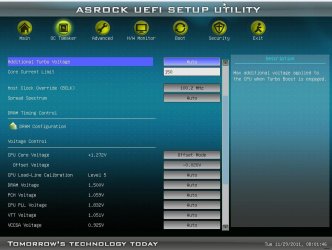
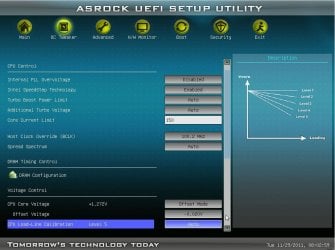
Hopefully, someone with knowledge of Gigabyte boards will help you. Gigabyte uses different terminology for most of their bios settings than most manufacturers do. On my board default Vcore is 1.228. I am currently overclocked to 4.2, but this is what settings I have in bios. Everything should be at default except the Vcore.

bios1.JPG

bios2.JPG
 

My Computers My Computers

  • At a glance

    Windows 11 ProRyzen 9 5900X32GB G Skill DDR4-3600EVGA RTX 3080 FTW 3 Ultra
    Computer type
    PC/Desktop
    Computer Manufacturer/Model Number
    ALWAYS UNDER CONSTRUCTION
    OS
    Windows 11 Pro
    CPU
    Ryzen 9 5900X
    Motherboard
    Asus X570 Crosshair Viii Hero
    Memory
    32GB G Skill DDR4-3600
    Graphics Card(s)
    EVGA RTX 3080 FTW 3 Ultra
    Sound Card
    On Board/Sennheiser PC37X Headset
    Monitor(s) Displays
    3 X Asus 27"
    Screen Resolution
    2560x1440
    Hard Drives
    2 X 1 TB NVME drives
    PSU
    EVGA 850
    Case
    Phanteks Eclipse P400A
    Cooling
    EVGA 280 AIO
    Keyboard
    Logitech G510s/ Logitech G13
    Mouse
    Logitech G502
    Internet Speed
    24/1
    Antivirus
    ESET/MBAM Pro/SAS Pro
    Browser
    Chrome/ Firefox/ Edge
  • At a glance

    Windows 11 ProIntel Ultra 9 288V32 GB LPDDR5X 8533
    Computer type
    Laptop
    System Manufacturer/Model Number
    Dell 16 Plus
    OS
    Windows 11 Pro
    CPU
    Intel Ultra 9 288V
    Memory
    32 GB LPDDR5X 8533
    Monitor(s) Displays
    16" Mini-LED HDR600 Touch 90 Hz
    Screen Resolution
    2560X1600
    Hard Drives
    1 TB NVME
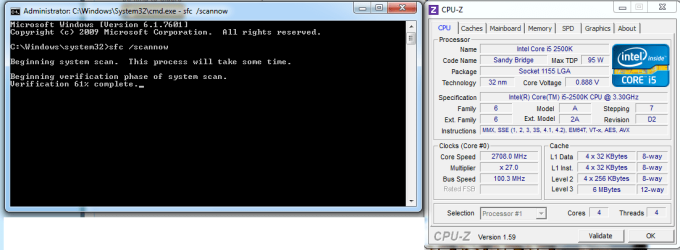
Try this just so we can see what is happening. Open cpuz to the CPU tab. Go to start, in the search box type cmd, on the entry for cmd, right click it and select 'run as administrator'. In the window that appears after giving permission, copy and paste this into the window. sfc /scannow and press enter. While the scan is running for a few minutes, take a screenshot of the cpuz opened to the CPU tab. Also, a screenshot of the scan window when the scan is complete. The scan will put enough stress on the CPU to put it into turbo mode. The cpuz screenshot will show what it is doing while in turbo mode..
 

My Computers My Computers

  • At a glance

    Windows 11 ProRyzen 9 5900X32GB G Skill DDR4-3600EVGA RTX 3080 FTW 3 Ultra
    Computer type
    PC/Desktop
    Computer Manufacturer/Model Number
    ALWAYS UNDER CONSTRUCTION
    OS
    Windows 11 Pro
    CPU
    Ryzen 9 5900X
    Motherboard
    Asus X570 Crosshair Viii Hero
    Memory
    32GB G Skill DDR4-3600
    Graphics Card(s)
    EVGA RTX 3080 FTW 3 Ultra
    Sound Card
    On Board/Sennheiser PC37X Headset
    Monitor(s) Displays
    3 X Asus 27"
    Screen Resolution
    2560x1440
    Hard Drives
    2 X 1 TB NVME drives
    PSU
    EVGA 850
    Case
    Phanteks Eclipse P400A
    Cooling
    EVGA 280 AIO
    Keyboard
    Logitech G510s/ Logitech G13
    Mouse
    Logitech G502
    Internet Speed
    24/1
    Antivirus
    ESET/MBAM Pro/SAS Pro
    Browser
    Chrome/ Firefox/ Edge
  • At a glance

    Windows 11 ProIntel Ultra 9 288V32 GB LPDDR5X 8533
    Computer type
    Laptop
    System Manufacturer/Model Number
    Dell 16 Plus
    OS
    Windows 11 Pro
    CPU
    Intel Ultra 9 288V
    Memory
    32 GB LPDDR5X 8533
    Monitor(s) Displays
    16" Mini-LED HDR600 Touch 90 Hz
    Screen Resolution
    2560X1600
    Hard Drives
    1 TB NVME
Try this just so we can see what is happening. Open cpuz to the CPU tab. Go to start, in the search box type cmd, on the entry for cmd, right click it and select 'run as administrator'. In the window that appears after giving permission, copy and paste this into the window. sfc /scannow and press enter. While the scan is running for a few minutes, take a screenshot of the cpuz opened to the CPU tab. Also, a screenshot of the scan window when the scan is complete. The scan will put enough stress on the CPU to put it into turbo mode. The cpuz screenshot will show what it is doing while in turbo mode..

I have done that and attatched the screens.
At first it was getting about 3000+ Mhz then dropped down to the numbers as the scan went on

I will try to get pictures of inside my PC. I have asked someone with a camera to come and they haven't got here yet.
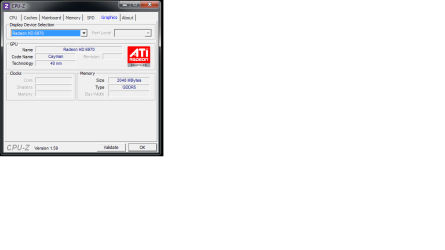
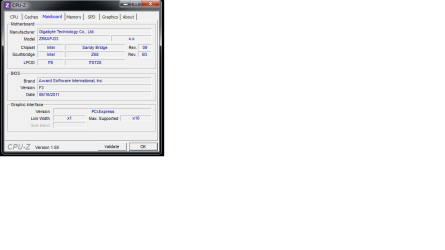
I have switched the GPU to PCIEx16 in the bios but it still says x1 in the CPU-Z
 

Attachments

  • before.png
    before.png
    28.2 KB · Views: 17
  • after.png
    after.png
    27 KB · Views: 20
  • GPU.png
    GPU.png
    12.3 KB · Views: 13
  • PCIE thingy.png
    PCIE thingy.png
    12.8 KB · Views: 13
Last edited:

My Computer My Computer

At a glance

Windows 7 Home 64 bitIntel Core I5 2500K8GBNVIDIA GeForce GTX 560 Ti
Computer Manufacturer/Model Number
Chillblast
OS
Windows 7 Home 64 bit
CPU
Intel Core I5 2500K
Motherboard
Asus P8Z68-V LE Motherboard
Memory
8GB
Graphics Card(s)
NVIDIA GeForce GTX 560 Ti
Monitor(s) Displays
32" Hannspree LCD TV
Screen Resolution
1920x1080
Hard Drives
1TB Samsung HDD
PSU
OCZ 80 plus 600W
Case
Cooler Master Elite 430 Case
Cooling
ThermoLab Trinity
The CPU has the built in graphics. I'm not sure how but it would need to be disabled or the video card enabled some how.

Here is the moboard page.> GIGABYTE - Motherboard - Socket 1155 - GA-Z68AP-D3 (rev. 1.0)

Select downloads tab and enter OS and then select manuals where it says> Download type: Driver < This is default setting so choose manual in the drop down menu.
The manual will tell you how to enable the graphics card and may be useful for other info.
 

My Computer My Computer

At a glance

Windows7 Pro 64bit SP-1; Windows XP Pro 32bitIntel Core i7-870 Lynnfield 2.93GHz LGA 1156 ...8GB@1400MHz Crucial Ballistix DDR3-1600 4x2GBASUS ENGTX460 DirectCU/2DI/1GD5 1GB 256-bit G...
Computer Manufacturer/Model Number
Hopalong/ Godzilla
OS
Windows7 Pro 64bit SP-1; Windows XP Pro 32bit
CPU
Intel Core i7-870 Lynnfield 2.93GHz LGA 1156 95W Quad-Core
Motherboard
ASUS P7P55D-E PRO
Memory
8GB@1400MHz Crucial Ballistix DDR3-1600 4x2GB
Graphics Card(s)
ASUS ENGTX460 DirectCU/2DI/1GD5 1GB 256-bit GDDR5
Sound Card
VIA Onboard
Monitor(s) Displays
Asus VS248H-P 24"; Samsung SyncMaster 941BW 19"ws
Screen Resolution
1920x1080; 1440x900
Hard Drives
Samsung 830 120GB SSD
Intel 320 120GB SSD
Western Digital Caviar Black WD7501AALS 750GB 7200 RPM SATA 3.0Gb/s
Western Digital Caviar Black WD6401AALS 640GB 7200 RPM SATA 3.0Gb/s
PSU
COOLER MASTER Silent Pro RS850-AMBAJ3-US 850W Modular
Case
COOLER MASTER HAF 932 RC-932-KKN5-GP Black
Cooling
Scythe "Mugen-2 Rev.B" (2 ScytheKaze-Jyuni PWM fans)
Keyboard
Logitech K-320
Mouse
Kensington
Antivirus
Avast Inernet Suite
Browser
IE 9 ; Chrome
Try this just so we can see what is happening. Open cpuz to the CPU tab. Go to start, in the search box type cmd, on the entry for cmd, right click it and select 'run as administrator'. In the window that appears after giving permission, copy and paste this into the window. sfc /scannow and press enter. While the scan is running for a few minutes, take a screenshot of the cpuz opened to the CPU tab. Also, a screenshot of the scan window when the scan is complete. The scan will put enough stress on the CPU to put it into turbo mode. The cpuz screenshot will show what it is doing while in turbo mode..

I have done that and attatched the screens.
At first it was getting about 3000+ Mhz then dropped down to the numbers as the scan went on

I will try to get pictures of inside my PC. I have asked someone with a camera to come and they haven't got here yet.
I have switched the GPU to PCIEx16 in the bios but it still says x1 in the CPU-Z

In the screenshots, your Vcore is way low. you are showing 0.88V and it should be around 1.228. I don't understand Gigabyte bios, but it appeared your Vcore was set to 0.9V in bios. Also, while the CPU should be in turbo mode it is showing a multiplier of X27 and it should be X37. The multiplier may be because the CPU is not getting enough voltage.
 

My Computers My Computers

  • At a glance

    Windows 11 ProRyzen 9 5900X32GB G Skill DDR4-3600EVGA RTX 3080 FTW 3 Ultra
    Computer type
    PC/Desktop
    Computer Manufacturer/Model Number
    ALWAYS UNDER CONSTRUCTION
    OS
    Windows 11 Pro
    CPU
    Ryzen 9 5900X
    Motherboard
    Asus X570 Crosshair Viii Hero
    Memory
    32GB G Skill DDR4-3600
    Graphics Card(s)
    EVGA RTX 3080 FTW 3 Ultra
    Sound Card
    On Board/Sennheiser PC37X Headset
    Monitor(s) Displays
    3 X Asus 27"
    Screen Resolution
    2560x1440
    Hard Drives
    2 X 1 TB NVME drives
    PSU
    EVGA 850
    Case
    Phanteks Eclipse P400A
    Cooling
    EVGA 280 AIO
    Keyboard
    Logitech G510s/ Logitech G13
    Mouse
    Logitech G502
    Internet Speed
    24/1
    Antivirus
    ESET/MBAM Pro/SAS Pro
    Browser
    Chrome/ Firefox/ Edge
  • At a glance

    Windows 11 ProIntel Ultra 9 288V32 GB LPDDR5X 8533
    Computer type
    Laptop
    System Manufacturer/Model Number
    Dell 16 Plus
    OS
    Windows 11 Pro
    CPU
    Intel Ultra 9 288V
    Memory
    32 GB LPDDR5X 8533
    Monitor(s) Displays
    16" Mini-LED HDR600 Touch 90 Hz
    Screen Resolution
    2560X1600
    Hard Drives
    1 TB NVME
The CPU has the built in graphics. I'm not sure how but it would need to be disabled or the video card enabled some how.

Here is the moboard page.> GIGABYTE - Motherboard - Socket 1155 - GA-Z68AP-D3 (rev. 1.0)

Select downloads tab and enter OS and then select manuals where it says> Download type: Driver < This is default setting so choose manual in the drop down menu.
The manual will tell you how to enable the graphics card and may be useful for other info.

In the manual It says:

Init Display First
Specifies the first initiation of the monitor display from the installed PCI graphics card, PCI Express graphics card, or the onboard graphics.
PCI Sets the PCI graphics card as the first display. (Default)
Onboard Sets the onboard graphics as the first display.
PCIE x16 Sets the PCI Express graphics card on the PCIEX16 slot as the first display.
PCIE x8 Sets the PCI Express graphics card on the PCIEX8 slot as the first display. Onboard VGA
Enables or disables the onboard graphics function.
Auto
Allows you to set up a dual-display configuration in Windows 7 operating system. (Default)
Enable If No Ext PEG
Activates the onboard graphics only when no PCI Express graphics card is installed.
Always Enable
Always activates the onboard graphics, whether or not a PCI Express graphics card is installed.
If you wish to set up a dual-display configuration, set this item to Always Enable. On-Chip Frame Buffer Size
Frame buffer size is the total amount of system memory allocated solely for the onboard graphics controller. MS-DOS, for example, will use only this memory for display. Options are: 32MB+2MB for GTT ~ 480MB+2MB for GTT. (Default: 64MB+2MB for GTT)

Sorry for the late reply. Household is busy
Should I disable onboard VGA?
 

My Computer My Computer

At a glance

Windows 7 Home 64 bitIntel Core I5 2500K8GBNVIDIA GeForce GTX 560 Ti
Computer Manufacturer/Model Number
Chillblast
OS
Windows 7 Home 64 bit
CPU
Intel Core I5 2500K
Motherboard
Asus P8Z68-V LE Motherboard
Memory
8GB
Graphics Card(s)
NVIDIA GeForce GTX 560 Ti
Monitor(s) Displays
32" Hannspree LCD TV
Screen Resolution
1920x1080
Hard Drives
1TB Samsung HDD
PSU
OCZ 80 plus 600W
Case
Cooler Master Elite 430 Case
Cooling
ThermoLab Trinity
Good point Hop. The integrated GPU can run along side a PCI-based card but it seems like an extra load if the GPU isn't in use. The option to enable/disable should be in the BIOS. Also, as mentioned before, Intel allows setting of Long and Short Duration Turbo limits (Set by Wattage and Time). There's also a TDC current and a TDP power override. Any of these being set low would limit Turbo. And on the other side of the coin, Any of these set too high could cause CPU throttling. In my BIOS, the settings are under Performance > Processor Overrides > Turbo Boost Technology.
 

My Computer My Computer

At a glance

Windows 7 Pro-x64i7-2600 3.4GHz - 3.8GHz Turbo8Gb - 2x4GB, Muskin 991770 PC3-1333Integrated Intel HD 2000
Computer type
PC/Desktop
Computer Manufacturer/Model Number
Built 2/11/2011
OS
Windows 7 Pro-x64
CPU
i7-2600 3.4GHz - 3.8GHz Turbo
Motherboard
Intel DH67BL-B3
Memory
8Gb - 2x4GB, Muskin 991770 PC3-1333
Graphics Card(s)
Integrated Intel HD 2000
Sound Card
Integrated Intel 10.1 HD, RealTek ALC892
Monitor(s) Displays
Asus LCD VH222H, Haier HL24XSL2a
Screen Resolution
1920x1080, 1920x1080
Hard Drives
Crucial SSD C300-128Gb,
Western Digital WD5002AALX - 500Gb,
Western Digital WD7501AALS - 750Gb
PSU
Seasonic 650W 80+ Gold Modular
Case
Rosewill Defender
Cooling
Stock CPU, Four 120mm case fans, PCH fan added
Keyboard
Logitech EX100 Y-RBH94 Wireless
Mouse
Logitech EX100 M-RCE95 Wireless
Internet Speed
3.0/1.5 Mbs
Antivirus
Microsoft Security Essentials
Browser
Microsoft Internet Explorer 11
Other Info
Antec Veris Premier-Multimedia IR Station,
Cyber Accoustics-3602 Speakers,
AFT XM-5U Card Reader,
Hauppauge TV-HVR-2250,
Sony LX300 USB Turntable
Try this just so we can see what is happening. Open cpuz to the CPU tab. Go to start, in the search box type cmd, on the entry for cmd, right click it and select 'run as administrator'. In the window that appears after giving permission, copy and paste this into the window. sfc /scannow and press enter. While the scan is running for a few minutes, take a screenshot of the cpuz opened to the CPU tab. Also, a screenshot of the scan window when the scan is complete. The scan will put enough stress on the CPU to put it into turbo mode. The cpuz screenshot will show what it is doing while in turbo mode..

I have done that and attatched the screens.
At first it was getting about 3000+ Mhz then dropped down to the numbers as the scan went on

I will try to get pictures of inside my PC. I have asked someone with a camera to come and they haven't got here yet.
I have switched the GPU to PCIEx16 in the bios but it still says x1 in the CPU-Z

In the screenshots, your Vcore is way low. you are showing 0.88V and it should be around 1.228. I don't understand Gigabyte bios, but it appeared your Vcore was set to 0.9V in bios. Also, while the CPU should be in turbo mode it is showing a multiplier of X27 and it should be X37. The multiplier may be because the CPU is not getting enough voltage.

Performance Enhance
Allows the system to operate at three different performance levels.
Standard Lets the system operate at its basic performance level.
Turbo Lets the system operate at its good performance level. (Default)
Extreme Lets the system operate at its best performance level.


Oddly enough I reran the assement and got those results but I haven't adjusted any settings besides from IDE to AHCI and turning it from PCI to PCIEx16

Performance Enhance
Allows the system to operate at three different performance levels.
Standard Lets the system operate at its basic performance level.
Turbo Lets the system operate at its good performance level. (Default)
Extreme Lets the system operate at its best performance level.
This is in the manual for the Motherboard. Should I leave it default?
 

Attachments

  • WEI.png
    WEI.png
    44 KB · Views: 40

My Computer My Computer

At a glance

Windows 7 Home 64 bitIntel Core I5 2500K8GBNVIDIA GeForce GTX 560 Ti
Computer Manufacturer/Model Number
Chillblast
OS
Windows 7 Home 64 bit
CPU
Intel Core I5 2500K
Motherboard
Asus P8Z68-V LE Motherboard
Memory
8GB
Graphics Card(s)
NVIDIA GeForce GTX 560 Ti
Monitor(s) Displays
32" Hannspree LCD TV
Screen Resolution
1920x1080
Hard Drives
1TB Samsung HDD
PSU
OCZ 80 plus 600W
Case
Cooler Master Elite 430 Case
Cooling
ThermoLab Trinity
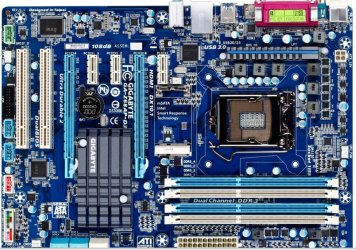
Make sure your monitor is connected to the 6970 card. disable on board graphics. Also make sure your graphics card is set in the pcie X16 slot. I asked you earlier about the 8 pin CPU power connecter. It appears your board only has a 4 pin CPU power connecter. You can see it in this picture just above where the CPU is installed. The graphics card should go in the 1st blue slot labeled pcieX16.

GIGA.JPG
 

My Computers My Computers

  • At a glance

    Windows 11 ProRyzen 9 5900X32GB G Skill DDR4-3600EVGA RTX 3080 FTW 3 Ultra
    Computer type
    PC/Desktop
    Computer Manufacturer/Model Number
    ALWAYS UNDER CONSTRUCTION
    OS
    Windows 11 Pro
    CPU
    Ryzen 9 5900X
    Motherboard
    Asus X570 Crosshair Viii Hero
    Memory
    32GB G Skill DDR4-3600
    Graphics Card(s)
    EVGA RTX 3080 FTW 3 Ultra
    Sound Card
    On Board/Sennheiser PC37X Headset
    Monitor(s) Displays
    3 X Asus 27"
    Screen Resolution
    2560x1440
    Hard Drives
    2 X 1 TB NVME drives
    PSU
    EVGA 850
    Case
    Phanteks Eclipse P400A
    Cooling
    EVGA 280 AIO
    Keyboard
    Logitech G510s/ Logitech G13
    Mouse
    Logitech G502
    Internet Speed
    24/1
    Antivirus
    ESET/MBAM Pro/SAS Pro
    Browser
    Chrome/ Firefox/ Edge
  • At a glance

    Windows 11 ProIntel Ultra 9 288V32 GB LPDDR5X 8533
    Computer type
    Laptop
    System Manufacturer/Model Number
    Dell 16 Plus
    OS
    Windows 11 Pro
    CPU
    Intel Ultra 9 288V
    Memory
    32 GB LPDDR5X 8533
    Monitor(s) Displays
    16" Mini-LED HDR600 Touch 90 Hz
    Screen Resolution
    2560X1600
    Hard Drives
    1 TB NVME
Make sure your monitor is connected to the 6970 card. disable on board graphics. Also make sure your graphics card is set in the pcie X16 slot. I asked you earlier about the 8 pin CPU power connecter. It appears your board only has a 4 pin CPU power connecter. You can see it in this picture just above where the CPU is installed. The graphics card should go in the 1st blue slot labeled pcieX16.

View attachment 186010

Ok. I am running 32" LCD TV how do I make sure my graphics card is connected to the TV?
This is my first PC so I havent done this before as you can probably tell. What do I do with the connectors?
 

My Computer My Computer

At a glance

Windows 7 Home 64 bitIntel Core I5 2500K8GBNVIDIA GeForce GTX 560 Ti
Computer Manufacturer/Model Number
Chillblast
OS
Windows 7 Home 64 bit
CPU
Intel Core I5 2500K
Motherboard
Asus P8Z68-V LE Motherboard
Memory
8GB
Graphics Card(s)
NVIDIA GeForce GTX 560 Ti
Monitor(s) Displays
32" Hannspree LCD TV
Screen Resolution
1920x1080
Hard Drives
1TB Samsung HDD
PSU
OCZ 80 plus 600W
Case
Cooler Master Elite 430 Case
Cooling
ThermoLab Trinity
Your motherboard has cable connections on the back for the monitor. The graphics card has connections also. You should be able to look at it and tell which is the graphics card connections. If not, look at where the graphics card is in the case and the ones you need will be where the rear of graphics card is attached to the back of the case. But, I am fairly sure that is where it is already connected, just make sure before you disable on board graphics.
 

My Computers My Computers

  • At a glance

    Windows 11 ProRyzen 9 5900X32GB G Skill DDR4-3600EVGA RTX 3080 FTW 3 Ultra
    Computer type
    PC/Desktop
    Computer Manufacturer/Model Number
    ALWAYS UNDER CONSTRUCTION
    OS
    Windows 11 Pro
    CPU
    Ryzen 9 5900X
    Motherboard
    Asus X570 Crosshair Viii Hero
    Memory
    32GB G Skill DDR4-3600
    Graphics Card(s)
    EVGA RTX 3080 FTW 3 Ultra
    Sound Card
    On Board/Sennheiser PC37X Headset
    Monitor(s) Displays
    3 X Asus 27"
    Screen Resolution
    2560x1440
    Hard Drives
    2 X 1 TB NVME drives
    PSU
    EVGA 850
    Case
    Phanteks Eclipse P400A
    Cooling
    EVGA 280 AIO
    Keyboard
    Logitech G510s/ Logitech G13
    Mouse
    Logitech G502
    Internet Speed
    24/1
    Antivirus
    ESET/MBAM Pro/SAS Pro
    Browser
    Chrome/ Firefox/ Edge
  • At a glance

    Windows 11 ProIntel Ultra 9 288V32 GB LPDDR5X 8533
    Computer type
    Laptop
    System Manufacturer/Model Number
    Dell 16 Plus
    OS
    Windows 11 Pro
    CPU
    Intel Ultra 9 288V
    Memory
    32 GB LPDDR5X 8533
    Monitor(s) Displays
    16" Mini-LED HDR600 Touch 90 Hz
    Screen Resolution
    2560X1600
    Hard Drives
    1 TB NVME
Your motherboard has cable connections on the back for the monitor. The graphics card has connections also. You should be able to look at it and tell which is the graphics card connections. If not, look at where the graphics card is in the case and the ones you need will be where the rear of graphics card is attached to the back of the case. But, I am fairly sure that is where it is already connected, just make sure before you disable on board graphics.

Thank you. I have found out what is wrong with the GPU. The GPU is set in the PCIEx4 slot. The watercooler is installed just above the PCIEx16 there is not enough room for it to even go there.
I also have seen that the CPU cooler(corsair H80) fan and the fan at the top of the case is not working and the button on the watercooler when I press it doesn't respond.

I rang the person who sold me the PC. He said he still has the warranty on it from the place he bought it from and he is going to help me send it back to where it came from so they can make the changes to the PC and get it sorted out.

Thank you to everyone who helped with everything. Once everything is sorted out I will come back and let you know how things have gone. Thanks again everyone.
 
Last edited:

My Computer My Computer

At a glance

Windows 7 Home 64 bitIntel Core I5 2500K8GBNVIDIA GeForce GTX 560 Ti
Computer Manufacturer/Model Number
Chillblast
OS
Windows 7 Home 64 bit
CPU
Intel Core I5 2500K
Motherboard
Asus P8Z68-V LE Motherboard
Memory
8GB
Graphics Card(s)
NVIDIA GeForce GTX 560 Ti
Monitor(s) Displays
32" Hannspree LCD TV
Screen Resolution
1920x1080
Hard Drives
1TB Samsung HDD
PSU
OCZ 80 plus 600W
Case
Cooler Master Elite 430 Case
Cooling
ThermoLab Trinity
Good luck with it. Let us know how things go.

Mike
 

My Computer My Computer

At a glance

Windows7 Pro 64bit SP-1; Windows XP Pro 32bitIntel Core i7-870 Lynnfield 2.93GHz LGA 1156 ...8GB@1400MHz Crucial Ballistix DDR3-1600 4x2GBASUS ENGTX460 DirectCU/2DI/1GD5 1GB 256-bit G...
Computer Manufacturer/Model Number
Hopalong/ Godzilla
OS
Windows7 Pro 64bit SP-1; Windows XP Pro 32bit
CPU
Intel Core i7-870 Lynnfield 2.93GHz LGA 1156 95W Quad-Core
Motherboard
ASUS P7P55D-E PRO
Memory
8GB@1400MHz Crucial Ballistix DDR3-1600 4x2GB
Graphics Card(s)
ASUS ENGTX460 DirectCU/2DI/1GD5 1GB 256-bit GDDR5
Sound Card
VIA Onboard
Monitor(s) Displays
Asus VS248H-P 24"; Samsung SyncMaster 941BW 19"ws
Screen Resolution
1920x1080; 1440x900
Hard Drives
Samsung 830 120GB SSD
Intel 320 120GB SSD
Western Digital Caviar Black WD7501AALS 750GB 7200 RPM SATA 3.0Gb/s
Western Digital Caviar Black WD6401AALS 640GB 7200 RPM SATA 3.0Gb/s
PSU
COOLER MASTER Silent Pro RS850-AMBAJ3-US 850W Modular
Case
COOLER MASTER HAF 932 RC-932-KKN5-GP Black
Cooling
Scythe "Mugen-2 Rev.B" (2 ScytheKaze-Jyuni PWM fans)
Keyboard
Logitech K-320
Mouse
Kensington
Antivirus
Avast Inernet Suite
Browser
IE 9 ; Chrome
Your motherboard has cable connections on the back for the monitor. The graphics card has connections also. You should be able to look at it and tell which is the graphics card connections. If not, look at where the graphics card is in the case and the ones you need will be where the rear of graphics card is attached to the back of the case. But, I am fairly sure that is where it is already connected, just make sure before you disable on board graphics.

Thank you. I have found out what is wrong with the GPU. The GPU is set in the PCIEx4 slot. The watercooler is installed just above the PCIEx16 there is not enough room for it to even go there.
I also have seen that the CPU cooler(corsair H80) fan and the fan at the top of the case is not working and the button on the watercooler when I press it doesn't respond.

I rang the person who sold me the PC. He said he still has the warranty on it from the place he bought it from and he is going to help me send it back to where it came from so they can make the changes to the PC and get it sorted out.

Thank you to everyone who helped with everything. Once everything is sorted out I will come back and let you know how things have gone. Mods please close the thread. Thanks again everyone.

Looks like you're almost home free with your Unit good job

There should be a area that has marked thread as solved after that the mods will take care of the rest

I do think it is a good idea to leave this post open though due to the fact this was a new kinda issue never before encountered which should be a good read for future issues like this one

I would like to take the time to Thank everyone who responded to the call of our Forum Brother +1 everybody who helped :cool:
 

My Computer My Computer

At a glance

Windows 10 Home Premium 64bit sp1Intel I7-6700K @ 4.6 Ghz 1.344 volts everyday OC32GB G-Skill TridentZ 3200mhz 16-18-18-38 DDR4Sli Gigabyte Windforce GTX 980 G1
Computer type
PC/Desktop
Computer Manufacturer/Model Number
CoreI7-6700K MrFingerIII Special Builds
OS
Windows 10 Home Premium 64bit sp1
CPU
Intel I7-6700K @ 4.6 Ghz 1.344 volts everyday OC
Motherboard
Asrock Fatality K6 Z170 Socket 1151
Memory
32GB G-Skill TridentZ 3200mhz 16-18-18-38 DDR4
Graphics Card(s)
Sli Gigabyte Windforce GTX 980 G1
Sound Card
AC97 Creative Rage Tactic 3D Headphones Bluetooth
Monitor(s) Displays
27" Asus ROG Swift PG278Q G-Sync 48" Vizio Smart HD TV
Screen Resolution
2560x1440p 27"- 48" Currently Gaming at 2560x1440p Res 2K
Hard Drives
250GB Samsung Evo840SSD Seagate baracuda 500 GB WD Mybook 500Gb 1TB Seagate Barracuda
PSU
HX1050w Corsair Silver 80plus certified crosfire/sli
Case
Enthod Pro Full Tower
Cooling
Corsair H110i GT 280 mm High Performance WaterBlock
Keyboard
Logitech wireless keyboard
Mouse
Logitech wireless mouse
Internet Speed
Cox Cable 100+ mb
Antivirus
WebRoot Spysweeper with Antivirus
Browser
IE-10, Chrome, Opera
Other Info
My Other Rig is a AMD FX8320E @4.6Ghz 16GB Ballistic Sport Ram
Mobo Asrock Fatality 990FX 120GB OCZ SSD 1TB Seagate Barracuda Corsair H75 Cooling PSU Corsair CX750
GPU GTX Gigabyte 970G1
Your motherboard has cable connections on the back for the monitor. The graphics card has connections also. You should be able to look at it and tell which is the graphics card connections. If not, look at where the graphics card is in the case and the ones you need will be where the rear of graphics card is attached to the back of the case. But, I am fairly sure that is where it is already connected, just make sure before you disable on board graphics.

Thank you. I have found out what is wrong with the GPU. The GPU is set in the PCIEx4 slot. The watercooler is installed just above the PCIEx16 there is not enough room for it to even go there.
I also have seen that the CPU cooler(corsair H80) fan and the fan at the top of the case is not working and the button on the watercooler when I press it doesn't respond.

I rang the person who sold me the PC. He said he still has the warranty on it from the place he bought it from and he is going to help me send it back to where it came from so they can make the changes to the PC and get it sorted out.

Thank you to everyone who helped with everything. Once everything is sorted out I will come back and let you know how things have gone. Mods please close the thread. Thanks again everyone.

Looks like you're almost home free with your Unit good job

There should be a area that has marked thread as solved after that the mods will take care of the rest

I do think it is a good idea to leave this post open though due to the fact this was a new kinda issue never before encountered which should be a good read for future issues like this one

I would like to take the time to Thank everyone who responded to the call of our Forum Brother +1 everybody who helped :cool:

I have edited my post. If this is a potential issue for other people then I wouldn't want them to go through it so I hope it stays open.
 

My Computer My Computer

At a glance

Windows 7 Home 64 bitIntel Core I5 2500K8GBNVIDIA GeForce GTX 560 Ti
Computer Manufacturer/Model Number
Chillblast
OS
Windows 7 Home 64 bit
CPU
Intel Core I5 2500K
Motherboard
Asus P8Z68-V LE Motherboard
Memory
8GB
Graphics Card(s)
NVIDIA GeForce GTX 560 Ti
Monitor(s) Displays
32" Hannspree LCD TV
Screen Resolution
1920x1080
Hard Drives
1TB Samsung HDD
PSU
OCZ 80 plus 600W
Case
Cooler Master Elite 430 Case
Cooling
ThermoLab Trinity
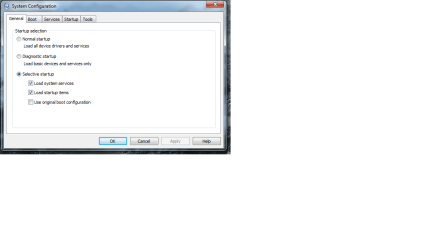
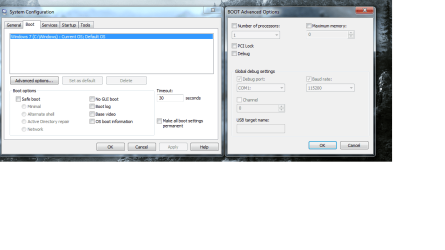
Ok. I talked to my brother and he suggested that I look into a program call msconfig. So I did and this is what I found. Is this causing problems if so what should I change?
 

Attachments

  • msconfig general.png
    msconfig general.png
    20.6 KB · Views: 20
  • msconfig boot.png
    msconfig boot.png
    50.7 KB · Views: 22

My Computer My Computer

At a glance

Windows 7 Home 64 bitIntel Core I5 2500K8GBNVIDIA GeForce GTX 560 Ti
Computer Manufacturer/Model Number
Chillblast
OS
Windows 7 Home 64 bit
CPU
Intel Core I5 2500K
Motherboard
Asus P8Z68-V LE Motherboard
Memory
8GB
Graphics Card(s)
NVIDIA GeForce GTX 560 Ti
Monitor(s) Displays
32" Hannspree LCD TV
Screen Resolution
1920x1080
Hard Drives
1TB Samsung HDD
PSU
OCZ 80 plus 600W
Case
Cooler Master Elite 430 Case
Cooling
ThermoLab Trinity
As best I can tell, what you are showing is correct. I don't believe that is what is causing you problems. I believe it is that you GPU is in an X4 port and that your bios is set wrong. As I recall the H80 has 2 fans and a radiator. You could put 1 fan on the outside of the case with the radiator and the other fan inside if that will give you room. Or you can relocate the radiator and fans to the top of the cae where the top fan is. But, if it is not working, you will have to replace that and figure out your bios settings. the best way may be to see how your bios is set up for ram, AHCI configuration, USB configuration and boot order and write it down if necessary. Then go to bios and set everyting to optimized defaults, then reconfigure those things listed above and see if that sets things right. But, watch your temps always.
 

My Computers My Computers

  • At a glance

    Windows 11 ProRyzen 9 5900X32GB G Skill DDR4-3600EVGA RTX 3080 FTW 3 Ultra
    Computer type
    PC/Desktop
    Computer Manufacturer/Model Number
    ALWAYS UNDER CONSTRUCTION
    OS
    Windows 11 Pro
    CPU
    Ryzen 9 5900X
    Motherboard
    Asus X570 Crosshair Viii Hero
    Memory
    32GB G Skill DDR4-3600
    Graphics Card(s)
    EVGA RTX 3080 FTW 3 Ultra
    Sound Card
    On Board/Sennheiser PC37X Headset
    Monitor(s) Displays
    3 X Asus 27"
    Screen Resolution
    2560x1440
    Hard Drives
    2 X 1 TB NVME drives
    PSU
    EVGA 850
    Case
    Phanteks Eclipse P400A
    Cooling
    EVGA 280 AIO
    Keyboard
    Logitech G510s/ Logitech G13
    Mouse
    Logitech G502
    Internet Speed
    24/1
    Antivirus
    ESET/MBAM Pro/SAS Pro
    Browser
    Chrome/ Firefox/ Edge
  • At a glance

    Windows 11 ProIntel Ultra 9 288V32 GB LPDDR5X 8533
    Computer type
    Laptop
    System Manufacturer/Model Number
    Dell 16 Plus
    OS
    Windows 11 Pro
    CPU
    Intel Ultra 9 288V
    Memory
    32 GB LPDDR5X 8533
    Monitor(s) Displays
    16" Mini-LED HDR600 Touch 90 Hz
    Screen Resolution
    2560X1600
    Hard Drives
    1 TB NVME
Back
Top